CH7: Identity and Access Management
Introduction
Access control is the mechanism that determines what authenticated users are allowed to do. It is the enforcement of security policy: defining who can access what resources, under what conditions, and with what restrictions. A strong authentication system that correctly verifies someone's identity is worthless if the access control system then grants them permissions to resources they should not touch. Conversely, an impeccably designed access control policy is useless if an attacker can bypass authentication.
This chapter addresses both sides: how organizations verify identity, how they manage accounts throughout their lifecycle, and how they enforce access decisions. You will learn that access control is not a single technology but a combination of identity proofing, account provisioning, authentication mechanisms, and authorization models. Each component must work correctly for the whole system to be secure.
Figure 7.1 separates identity proofing, authentication, and authorization by the question each process answers.
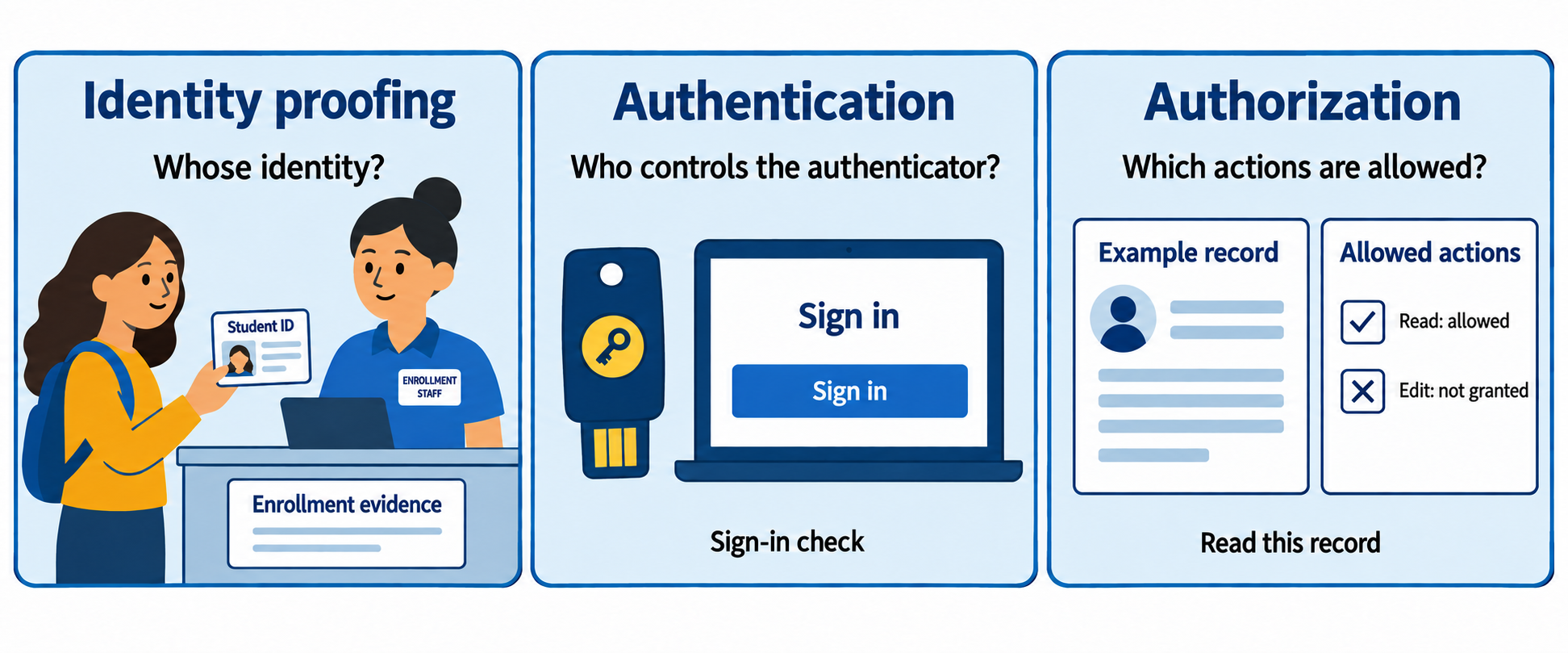
Figure 7.1: Identity proofing establishes a claimed identity during enrollment. Authentication verifies control of an authenticator. Authorization decides which actions a policy permits.
Text description for Figure 7.1
Identity proofing evaluates evidence about a claimed identity during enrollment. Authentication checks that a claimant controls an authenticator bound to an account, such as a security key. Authorization evaluates a requested action against policy, such as whether this account may read a record. Proofing does not occur at every sign-in, and a successful sign-in does not grant every permission. The three panels represent distinct decisions, not three screens required for every transaction.
Learning Objectives
After completing this chapter, you will be able to:
- Describe the lifecycle of user accounts, including provisioning, rights assignment, and secure deprovisioning.
- Distinguish between standard user, privileged, service, and emergency accounts and explain the risk management strategies appropriate for each.
- Explain the purpose of multi-factor authentication and evaluate the security and usability tradeoffs of different authentication factors.
- Compare role-based access control, rule-based access control, mandatory access control, and other authorization models in terms of complexity and security.
- Analyze federated identity and single sign-on systems and their role in enterprise environments.
- Explain the principles of password security and the alternatives to passwords under development.
7.1 Account Provisioning and Lifecycle Management
An account is a user's digital identity in a system. It includes a username, credentials (password, certificate, etc.), and permissions. The account's lifecycle spans from creation to deletion.
Provisioning and Rights Assignment
Provisioning is the process of creating an account and granting the user the permissions necessary to perform their job. A human resources system triggers provisioning: a new employee is hired, and a request flows to IT to create accounts in email, file servers, databases, applications, and other systems.
Provisioning should be:
- Role-based: The new employee's job title determines which accounts are created and which permissions are assigned. A software developer gets access to code repositories, development databases, and testing servers. An accountant gets access to financial systems. A human resources employee gets access to personnel records.
- Least-privilege: The user gets the minimum permissions required to perform their job. A junior developer does not get write access to the production database. A financial analyst does not get the ability to approve transactions exceeding a certain threshold.
- Documented: A record shows what accounts were created, what permissions were assigned, and who authorized the provisioning. This is essential for compliance and for later audits.
Identity Proofing and Verification
Before provisioning, the organization must verify the user's identity. Identity proofing is the process of confirming that a person is who they claim to be. Methods vary by organization:
- In-person verification: A human resources representative verifies the person's identity against government-issued documents and confirms their employment status.
- Background checks: For sensitive roles, the organization may conduct criminal background checks, employment history verification, and security clearances.
- Multi-step enrollment: The user registers for an account, receives an enrollment code via postal mail (proving they control the address on file), and enters the code to activate the account.
Without identity proofing, an attacker could create an account under a false identity.
Deprovisioning and Offboarding
When an employee leaves—whether by resignation, termination, or retirement—their accounts must be disabled or deleted. Deprovisioning is often more complex than provisioning because:
- Accounts are spread across multiple systems. A departing employee may have accounts in email, file servers, applications, code repositories, and specialized systems that IT did not explicitly create.
- Data ownership must be transferred. Who now owns the files the departing employee created? Who receives their email? These decisions must be made before the account is removed.
- Delays in deprovisioning create risk. A terminated employee who still has account access is a security liability. In one audit, investigators found that 15% of former employees still had active accounts six months after departure.
Best practice is an offboarding checklist: disable email within hours, revoke VPN access immediately, transfer file ownership, reset credentials for shared accounts, and audit systems 30 days later to ensure no orphaned accounts remain.
Privilege Creep
As employees move between roles or teams, they accumulate permissions from previous roles. Over time, an employee may have permissions that far exceed their current job requirements. Regular access reviews catch this "privilege creep." An employee who moved from engineering to sales should not retain production database access.
Figure 7.2 follows an account through onboarding, role changes, review, and departure.
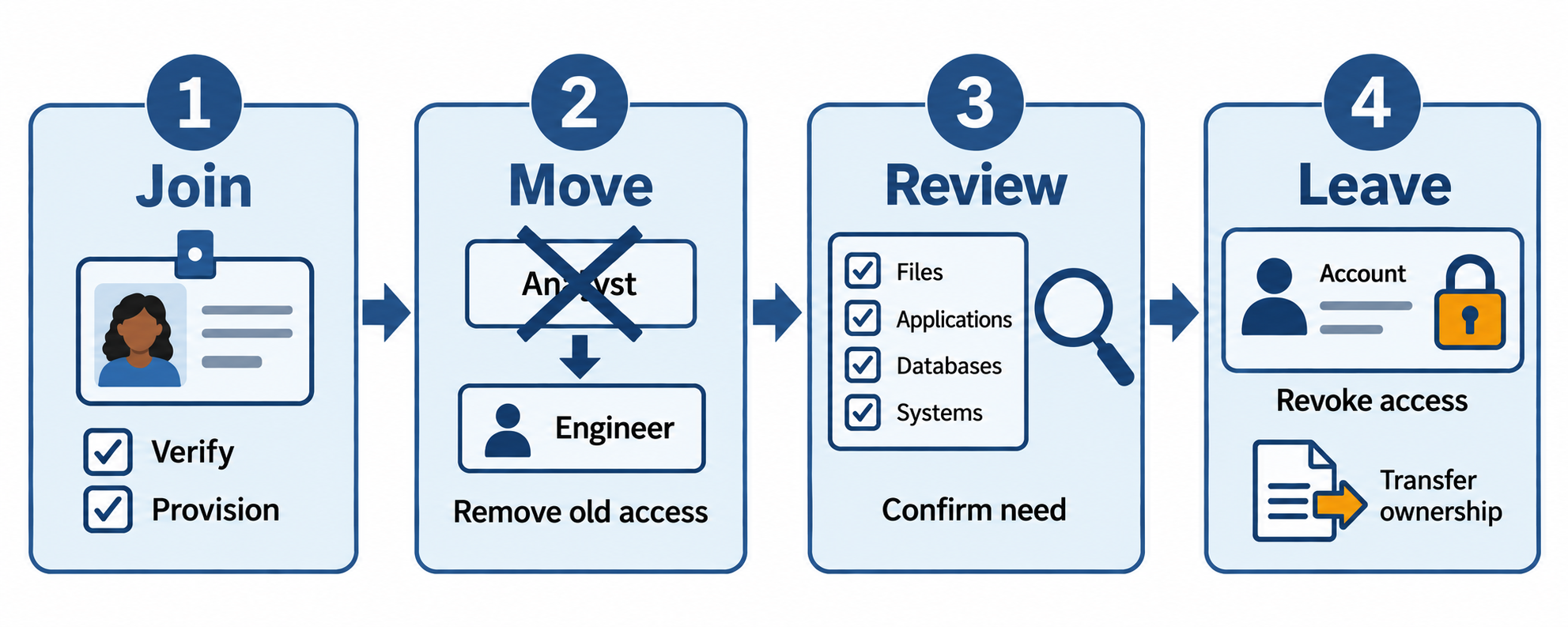
Figure 7.2: Account management follows the person and their work: grant needed access, remove obsolete permissions, and revoke access when the relationship ends.
Text description for Figure 7.2
Join: verify the person, create approved accounts, and grant only needed permissions. Move: compare the new role with existing permissions, add required access, and remove obsolete access. Review: confirm that the person, role, and permissions still match current needs. Leave: disable sign-in, revoke active sessions and credentials as supported, transfer necessary data ownership, and verify that all linked systems were covered. Keep records of approvals and changes. Reviews also recur between role changes and departure.
7.2 Account Types and Risk Management
Not all accounts are created equal. Different account types require different controls.
Standard User Accounts
A standard user account is a normal employee or contractor account with permissions sufficient to perform their job. Standard user accounts should operate with the principle of least privilege: no more permissions than necessary.
The risk is proportional to privilege: a standard user account with excessive permissions is a vulnerability. An attacker who compromises the account can access confidential data, modify systems, or escalate to administrative access.
Privileged Accounts
A privileged account (or administrative account) has permissions to modify system configuration, install software, create other accounts, or access all users' data. Examples include domain administrators, database administrators, and operating system root users.
Privileged accounts are high-value targets. An attacker who gains access to a domain administrator account can compromise an entire network. Therefore, privileged accounts require:
- Strong authentication: Multi-factor authentication (MFA) is mandatory. Passwords alone are insufficient.
- Auditing: All actions taken by privileged accounts should be logged and reviewed.
- Segregation: Privileged accounts should be used only for privileged operations. Administrators should have a separate standard account for email, browsing, and routine work. This limits the damage if an attacker compromises the standard account; they cannot immediately escalate to administrative privileges.
- Time-limited access: A privileged account should grant access for a defined period (e.g., for a specific maintenance window), not permanently.
Privileged Access Management (PAM) systems enforce these controls. A PAM solution provides a vault for storing privileged credentials, requires justification and approval before granting access, logs all sessions, and revokes access after a set duration.
Service and Third-Party Accounts
Service accounts are accounts used by automated processes or applications, not humans. A backup job runs as a service account to access files. A web server runs as a service account to serve web pages. A database replication process uses a service account to read from the primary database.
Service accounts typically have:
- Hardcoded credentials: The username and password (or API key) are stored in configuration files or environment variables. Unlike human passwords, service account credentials are not regularly changed.
- Static permissions: The service account has the same permissions every time it runs. It doesn't request access interactively.
This creates risk. If a service account's credentials are exposed, an attacker can impersonate the service indefinitely. Mitigations include:
- Credential rotation: Regularly change service account passwords (automated by a vault or configuration management system).
- Least privilege: Grant the service account only the permissions it needs. A backup service does not need to delete files, so the account should not have delete permissions.
- Monitoring: Alert when a service account logs in from an unexpected location or at an unusual time.
Third-party accounts are similar: contractors, vendors, or partner organizations are granted accounts. These should be provisioned, reviewed, and deprovisioned with the same rigor as internal accounts. A vendor with access to your systems is a vector for supply-chain attacks. Ensure vendor accounts are restricted to the specific resources they need.
Emergency Accounts
An emergency account (or break-glass account) is a privileged account used only in emergencies when normal access control systems are unavailable. If authentication servers are down, administrators need a way to log in and restore service.
Emergency accounts present a dilemma: they must exist for genuine emergencies, but if they are not carefully managed, they become a backdoor.
Controls for emergency accounts:
- Separate strong credentials: The emergency account has a strong password or certificate that is distinct from regular administrative accounts.
- Secure storage: The credentials are stored in a secure, offline location (a safe, encrypted USB drive, or similar). Only a few designated people know where they are stored.
- Audit trail: Every use of an emergency account is logged and reviewed. Any use should be justified and explained to management.
- Automatic expiration: An emergency account's credentials are reset after each use, ensuring that a single leaked credential is time-limited.
Figure 7.3 matches each account type with controls that address its purpose and exposure.
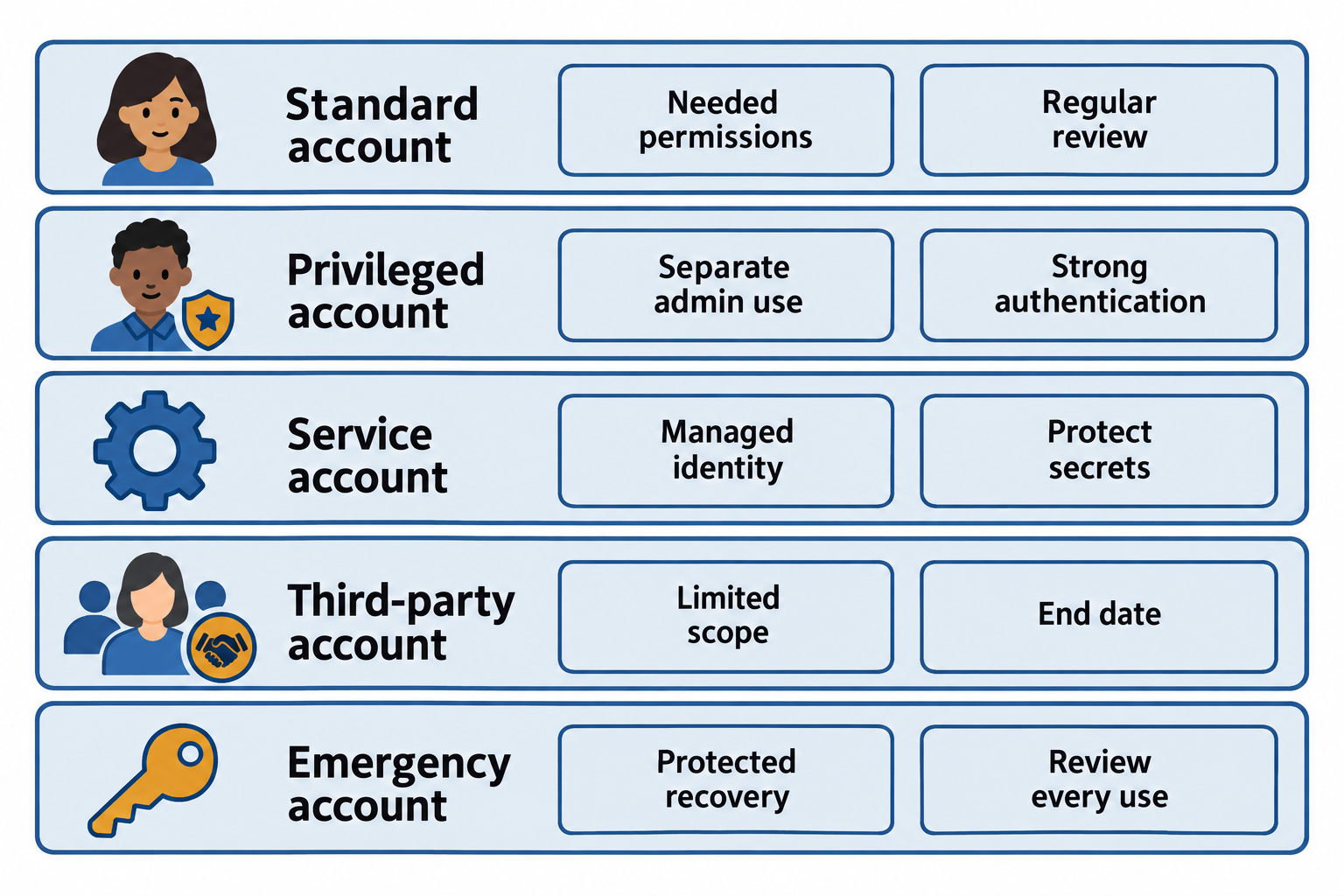
Figure 7.3: Account controls differ by use. Automated services need managed credentials; emergency access needs tested recovery procedures and review after use.
Text description for Figure 7.3
A standard account receives job-appropriate permissions. A privileged account is separate from routine browsing and uses strong authentication and monitored, limited elevation. A service account represents an automated workload; managed workload identities or protected, rotated credentials reduce secret exposure. A third-party account has an accountable sponsor, a defined scope, and an end date. An emergency account provides a tested recovery route when normal identity services fail; protect its credentials, alert on use, and review and reset or rotate credentials as appropriate after use. These examples complement local policy rather than promising that a single control removes all risk.
7.3 Multi-Factor Authentication
Authentication is the process of verifying a user's identity. The three authentication factors are:
- Something you know: A password, PIN, or security question answer. This is knowledge only the user should possess.
- Something you have: A physical device like a hardware security key, phone, or ID card. This assumes the user is the only one with the device.
- Something you are: A biometric like a fingerprint, face, or iris scan. This assumes the biometric is unique and cannot be easily spoofed.
Multi-factor authentication (MFA) or two-factor authentication (2FA) requires the user to provide evidence from at least two different factors. For example:
- Username + password + SMS code (something you know + something you have)
- Username + password + fingerprint (something you know + something you are)
Figure 7.4 groups authentication factors and illustrates how a local PIN can unlock a physical authenticator.
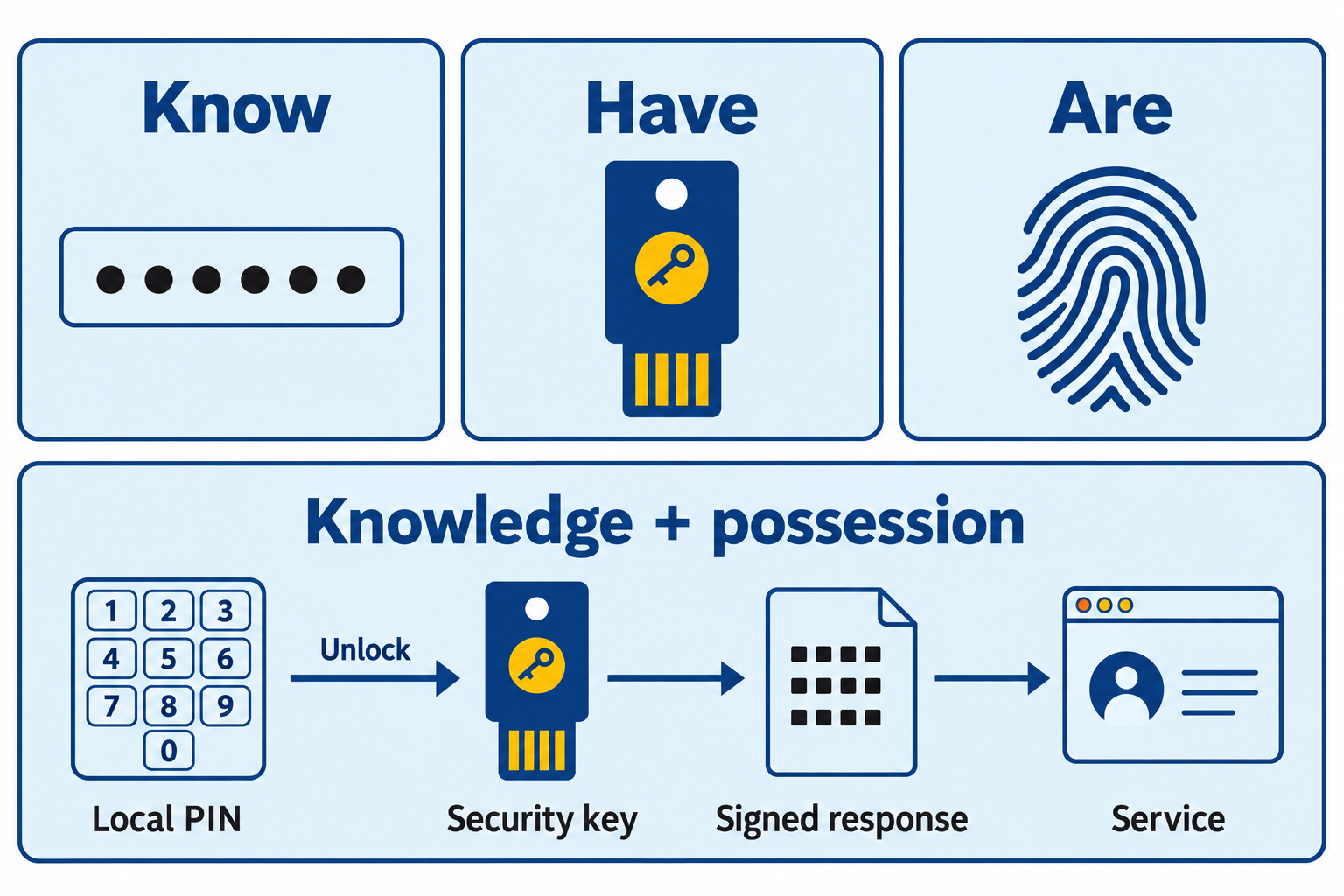
Figure 7.4: Multi-factor authentication uses distinct factor categories. A PIN or biometric can activate a device-held key; a username identifies an account and adds no authentication factor.
Text description for Figure 7.4
Knowledge is something remembered, such as a password or personal identification number (PIN). Possession is control of an authenticator such as a security key. Inherence is a biometric characteristic such as a fingerprint. The example uses a local PIN to unlock a physical security key, which then signs a challenge for the service. This combines knowledge and possession in a multi-factor authenticator. A biometric can serve as an activation factor with a physical authenticator; a biometric alone is not a standalone authenticator under NIST guidance. A username plus two passwords still supplies only the knowledge category. Specific authentication protocols determine resistance to phishing and other attacks.
Why MFA Matters
Single-factor authentication (password alone) is increasingly inadequate:
- Passwords are reused: Users employ the same password across multiple websites. When one website is breached, attackers use the same credentials on other sites (credential stuffing).
- Passwords are weak: Many users choose easily guessed passwords or fall victim to phishing, where an attacker's fake login page captures credentials.
- Passwords are stolen: Data breaches expose millions of password hashes. If the hash algorithm is weak (like MD5), attackers can crack many of them.
MFA adds a second verification step. Even if an attacker steals a password, they cannot log in without the second factor.
Authentication Factor Types
Hardware Security Keys
A hardware security key is a physical device (about the size of a thumb drive) that stores cryptographic keys. When the user logs in, they insert the key into a USB port, and the authentication system verifies they possess the physical key.
Advantages: Hardware keys are highly resistant to phishing. An attacker cannot steal the key remotely. The key requires physical possession.
Disadvantages: Users can lose or break the key. An organization must support key replacement. Hardware keys are more expensive than other MFA methods.
Software Tokens and Authenticator Apps
A software token is a cryptographic key stored on a user's device (usually their smartphone). An authenticator app (such as Google Authenticator, Microsoft Authenticator, or Duo Security) generates time-based one-time passwords (TOTPs) that change every 30 seconds.
When logging in, the user enters the password and the current code from the authenticator app.
Advantages: Software tokens are cheap (free app). Users always have their phone. Codes are generated locally (no need for network connectivity).
Disadvantages: If the phone is compromised, the token is compromised. Phishing is still possible if the attacker can trick the user into entering the code on a fake website. The user must manually synchronize the code with the server.
SMS and Email Codes
The authentication system sends a one-time code to the user's phone (via SMS) or email. The user enters the code to complete login.
Advantages: The user does not need a special app or device. SMS is nearly universal.
Disadvantages: SMS is insecure. An attacker can hijack a phone number through social engineering of the phone carrier. Email is also vulnerable if the email account is compromised. Codes sent over SMS or email are transmitted in cleartext.
Biometrics
Fingerprint, face, and iris recognition are increasingly common on mobile devices and laptops. Biometrics are fast and convenient: the user does not need to remember a password or carry a device.
Advantages: Biometrics cannot be forgotten or stolen (they are intrinsic to the person). They are fast. Users generally prefer biometric authentication to passwords.
Disadvantages: Biometrics are not secret. An attacker can capture a fingerprint from a glass or a face from a photograph. Biometric systems require secure matching algorithms to avoid false positives. Biometrics alone do not provide non-repudiation (you cannot prove you did not use your own fingerprint).
Putting It Together: MFA Implementation
An organization decides to require MFA for administrative accounts and VPN access. They issue each administrator a hardware security key for the most sensitive operations (privileged account creation, firewall rule changes) and allow software tokens (Google Authenticator) for routine administrative tasks.
When an administrator logs in to the VPN, the authentication system prompts for password and TOTP. The administrator enters the password and pulls up Google Authenticator on their phone, which displays the current code. The system verifies both and grants access. The session timeout is 8 hours; if the user remains inactive, they must authenticate again.
For an attacker to gain access, they would need to:
- Steal the administrator's password (difficult if strong and unique).
- Compromise the administrator's phone or somehow access the authenticator app (much more difficult).
- Steal the hardware key (physically, not remotely).
MFA raises the bar significantly.
7.4 Access Control Models
An access control model defines how permissions are assigned and enforced. Different models are appropriate for different environments.
Role-Based Access Control
Role-Based Access Control (RBAC) assigns users to roles, and roles are assigned permissions. For example:
- Users assigned to the "Software Developer" role get read and write access to code repositories, testing databases, and development servers.
- Users assigned to the "QA Tester" role get read access to code repositories and full access to testing databases, but not production systems.
- Users assigned to the "DevOps Engineer" role get administrative access to all systems.
RBAC is scalable: you can manage many users by assigning them to roles rather than configuring permissions for each user individually. It is also business-aligned: roles correspond to job functions, making it easy to understand who should have what access.
The challenge is defining roles. If you define too many fine-grained roles, administration becomes complex. If you define too few broad roles, you lose granularity and violate least privilege.
Analyst Perspective
When auditing RBAC, examine whether users are assigned to roles appropriate for their actual job, not roles that grant excessive permissions. It is easy for a system administrator to assign a user to the "Full Admin" role for temporary convenience and forget to remove it later.
Rule-Based Access Control
Rule-Based Access Control (also called Attribute-Based Access Control or ABAC) makes access decisions based on attributes of the user, the resource, and the context.
For example:
- Allow access to payroll files if (user department = "Finance") AND (current hour >= 9 AND current hour <= 5) AND (user location = "company office").
- Allow access to customer data if (user clearance level >= 3) AND (user signed data handling agreement within past year).
RBAC is simpler: assign to a role, get permissions. ABAC is more flexible: permissions can be context-dependent. But ABAC systems are more complex to configure and troubleshoot.
Figure 7.5 compares role-based access control (RBAC) with attribute-based access control (ABAC).
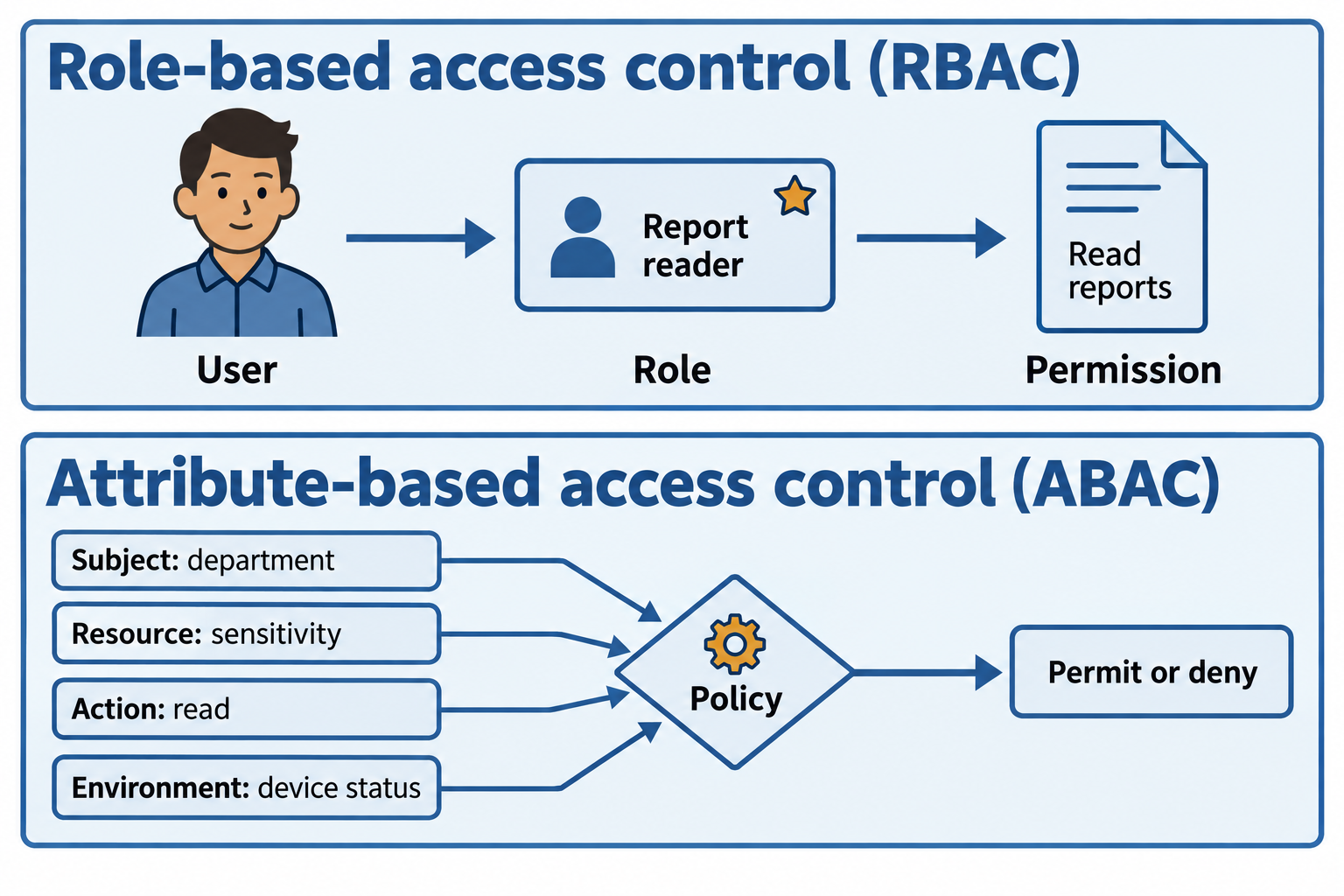
Figure 7.5: RBAC links users to roles and permissions. ABAC evaluates attributes of the requester, resource, requested action, and environment against policy.
Text description for Figure 7.5
Role-based access control assigns users to roles that carry permissions. The upper example gives an analyst the Report reader role and a permission to read reports. Attribute-based access control evaluates a policy using information about the subject requesting access, the resource, the requested action, and environmental conditions. The lower example checks department, record sensitivity, a read operation, and device status. Rules can appear in many access-control systems; rule-based control and ABAC are not universally interchangeable terms. Organizations can combine role assignments with attribute checks.
Mandatory Access Control
Mandatory Access Control (MAC) enforces a security policy that users cannot override. The organization (via its security administrator) dictates what permissions apply; the user cannot grant or revoke access to resources they own.
MAC is common in military and high-security environments where strict data classification is enforced. Every file is labeled with a classification level (Top Secret, Secret, Confidential, Unclassified). Every user is granted a clearance level. Access is allowed only if the user's clearance is at or above the file's classification.
MAC ensures that a careless user cannot accidentally share a classified document with an unauthorized person, even if they own the document.
Discretionary Access Control
Discretionary Access Control (DAC) allows users to control access to resources they own. If you create a document, you can share it with colleagues, grant them read access, or restrict access to just yourself.
DAC is flexible and intuitive: users manage their own files. The downside is that users may grant access improperly. A user might email a document to the wrong person or fail to revoke access when a contractor leaves.
Figure 7.6 compares who controls permission changes under mandatory access control (MAC) and discretionary access control (DAC).
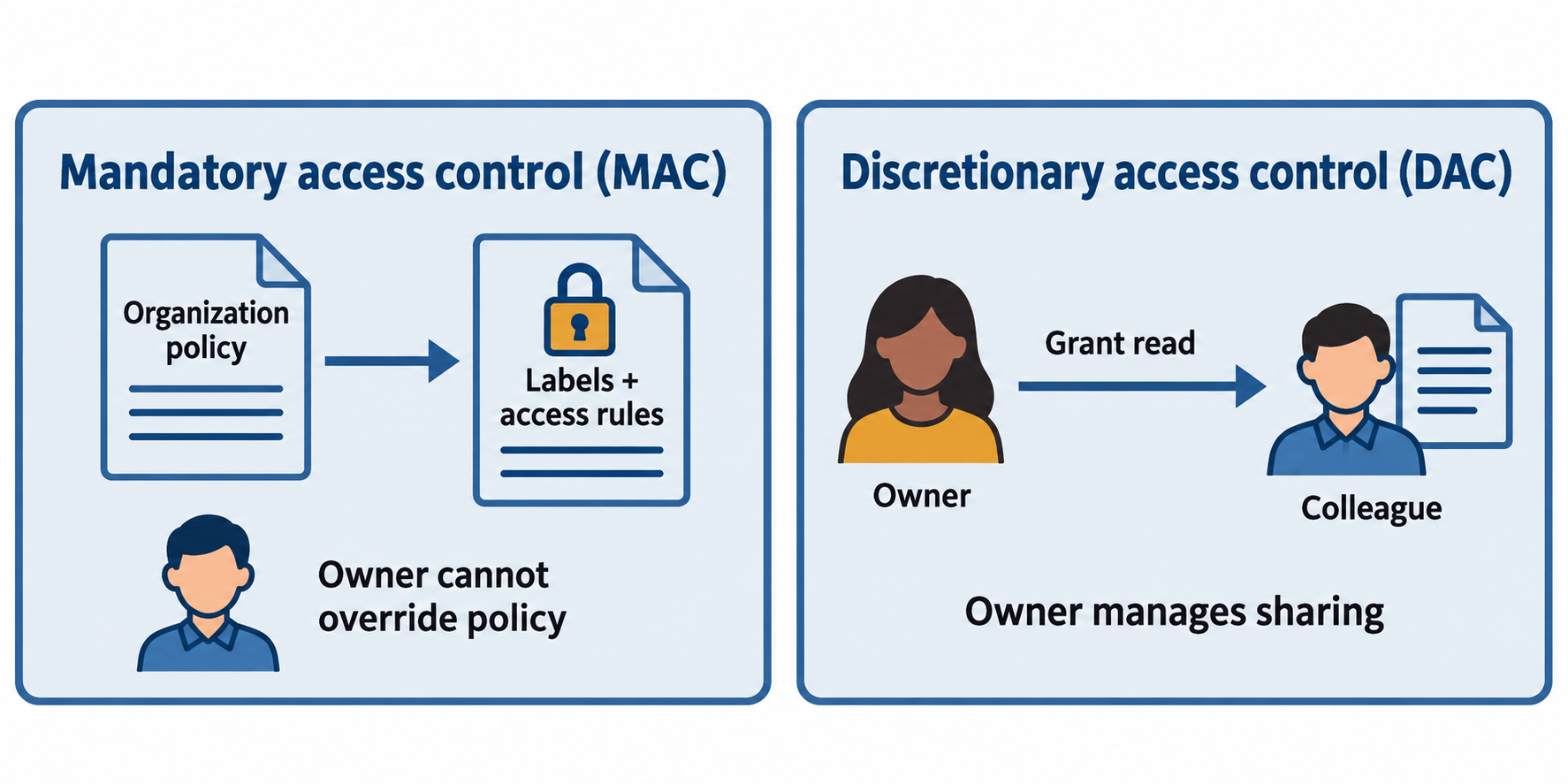
Figure 7.6: MAC enforces centrally defined policy that an ordinary resource owner cannot override. DAC lets an owner delegate access within the system’s governing limits.
Text description for Figure 7.6
In mandatory access control, an organization establishes rules such as classification labels, clearances, and need-to-know constraints. An ordinary owner cannot override those rules simply by sharing a file. In discretionary access control, the owner can grant another account a permission, such as read access, subject to system and organizational limits. Clearance level alone is not a complete model for every mandatory policy. The comparison concerns authority over permissions, not a guarantee that either model prevents every disclosure.
Time-Based and Just-in-Time Access
Time-based access control grants access for a defined period. A contractor is given access to a project repository for three months. When three months pass, access automatically expires.
Just-in-Time (JIT) access grants access on-demand for a specific task, not permanently. A developer requests access to the production database to debug an issue. An access management system checks that the request is valid (the developer has done this before, they are requesting access during business hours, they provided a justification), approves it, grants access for two hours, and automatically revokes it.
JIT access limits the window of time an attacker can use a compromised account. It also provides an audit trail: every use of JIT access is logged and reviewed.
Figure 7.7 shows how just-in-time (JIT) access limits the duration and scope of an elevated permission.
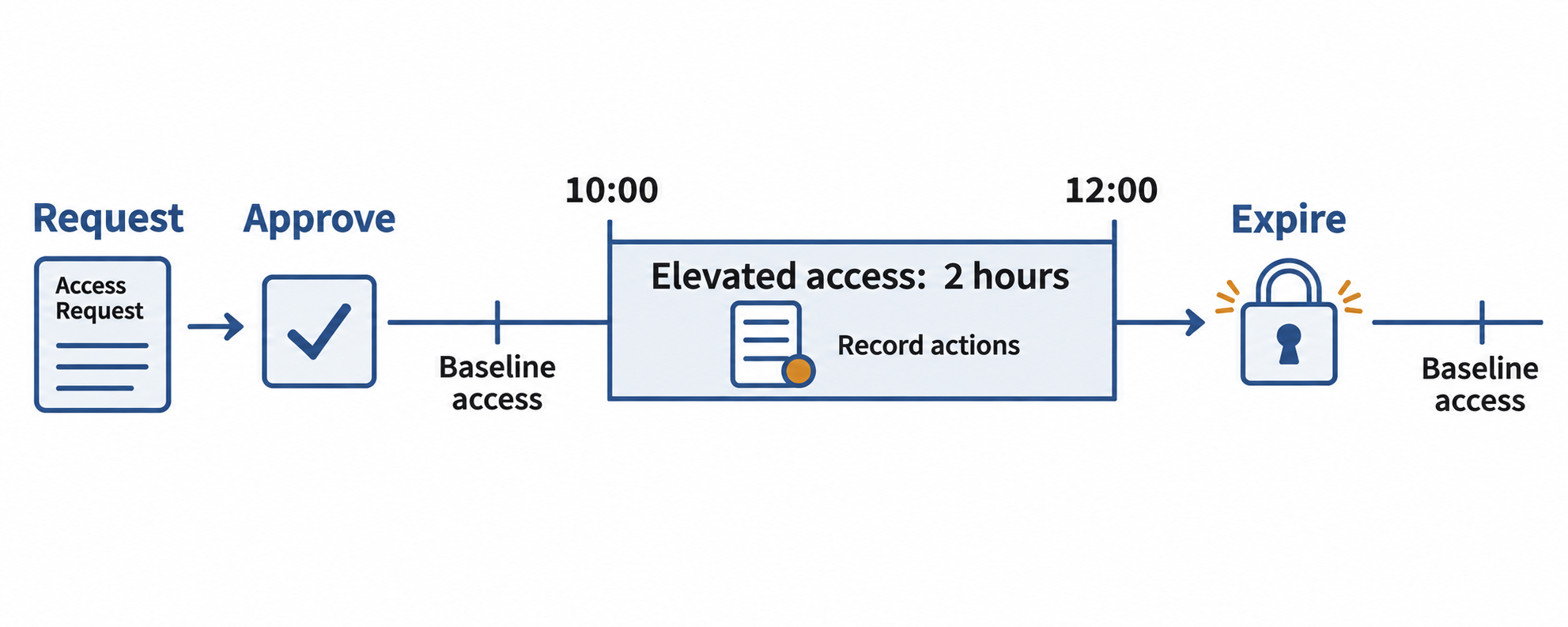
Figure 7.7: A JIT workflow checks a request, activates a scoped permission for a defined interval, logs its use, and removes that elevation at expiration.
Text description for Figure 7.7
The user begins with baseline permissions. A request names the task and needed resource. An approval or automated policy check authorizes a specific elevation. In this example, elevated access begins at 10:00 and expires at 12:00. The system records actions during that two-hour window and removes the elevated permission at expiration. The user may retain ordinary baseline permissions. JIT does not automatically make every action safe and still depends on correct enforcement, session handling, and monitoring.
Access Control Decision Matrix
| Model | Granularity | Complexity | Scalability | Flexibility |
|---|---|---|---|---|
| RBAC | Medium | Low | High | Medium |
| ABAC | High | High | Medium | High |
| MAC | Medium | Medium | Medium | Low |
| DAC | High | Low | Medium | High |
| JIT | Very High | Medium | Medium | High |
7.5 Federation and Single Sign-On
Organizations often need to grant access to users from partner organizations or contractors who use a different identity provider (a different organization's user database).
Federated Identity
Federated identity allows a user managed by one organization to access resources at another organization without creating a duplicate account. For example:
- A consultant works for Company A but needs access to services at Company B. Instead of creating a new account at Company B, the consultant uses their Company A identity.
- A university researcher collaborates with researchers at other universities. They access shared research systems using their university identity.
SAML and LDAP
Security Assertion Markup Language (SAML) is a federation protocol. When a user from Company A tries to access a service at Company B:
- The service at Company B redirects the user to Company A's identity provider.
- The user authenticates to Company A's identity provider.
- Company A's identity provider issues a SAML assertion (an XML document cryptographically signed by Company A) stating "This is Alice Smith, and she is a member of the Engineering group."
- The user is redirected back to Company B's service with the SAML assertion.
- Company B's service verifies the assertion (by checking the signature) and trusts that Company A correctly authenticated the user.
- If Company A's assertion indicates the user has the required role or group membership, Company B grants access.
LDAP (Lightweight Directory Access Protocol) is a protocol for querying user directories. A system can integrate with an LDAP directory to authenticate users and retrieve their group memberships.
OAuth and OpenID Connect
OAuth is a protocol for authorization and API access. A third-party application needs access to your data on a service (e.g., a photo app wants access to your Google Photos). Instead of giving the app your Google password:
- You are redirected to Google.
- You log in to Google.
- Google asks "Do you want to allow this photo app to access your photos?" You say yes.
- Google issues the photo app a token that allows access to your photos (but not your email, passwords, or other data).
OpenID Connect is a layer on top of OAuth that adds authentication. It allows you to use your Google account, Facebook account, or other identity provider to log in to third-party websites.
Figure 7.8 distinguishes an OAuth access token from an OpenID Connect identity token.
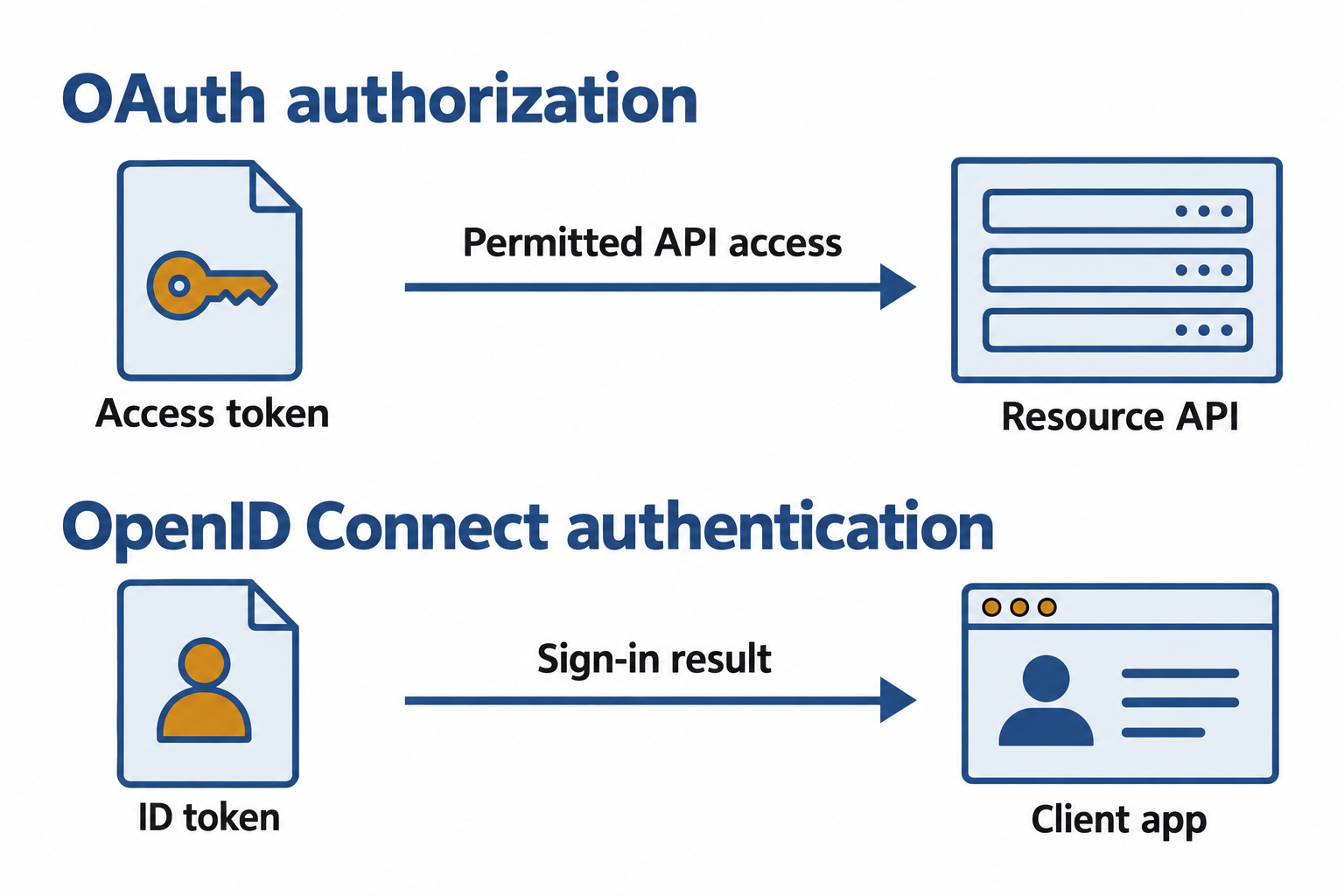
Figure 7.8: An access token authorizes an application to call a resource API. An OpenID Connect ID token conveys authentication information to the client application.
Text description for Figure 7.8
OAuth is an authorization framework. A client presents an access token to a resource server, often through an application programming interface (API). That server validates the token and its permitted scope. OpenID Connect adds an authentication layer and an ID token intended for the client application. The client validates the ID token, including its issuer, audience, signature, and time limits, to establish the sign-in result. An ID token is not the bearer credential for arbitrary API calls. The lanes simplify token purpose and recipients; they omit redirects, code exchanges, and validation details.
Single Sign-On
Single Sign-On (SSO) means logging in once and gaining access to multiple systems. You log in to your company's identity provider, receive a token or assertion, and use that same token to access email, file storage, applications, and other systems without re-authenticating.
SSO is convenient: users don't need to remember multiple passwords. It is also more secure: the organization can enforce strong password policies and MFA at a single point (the identity provider) rather than requiring every application to implement security independently.
Figure 7.9 shows a common federated single sign-on design with a shared identity-provider session and separately targeted assertions.
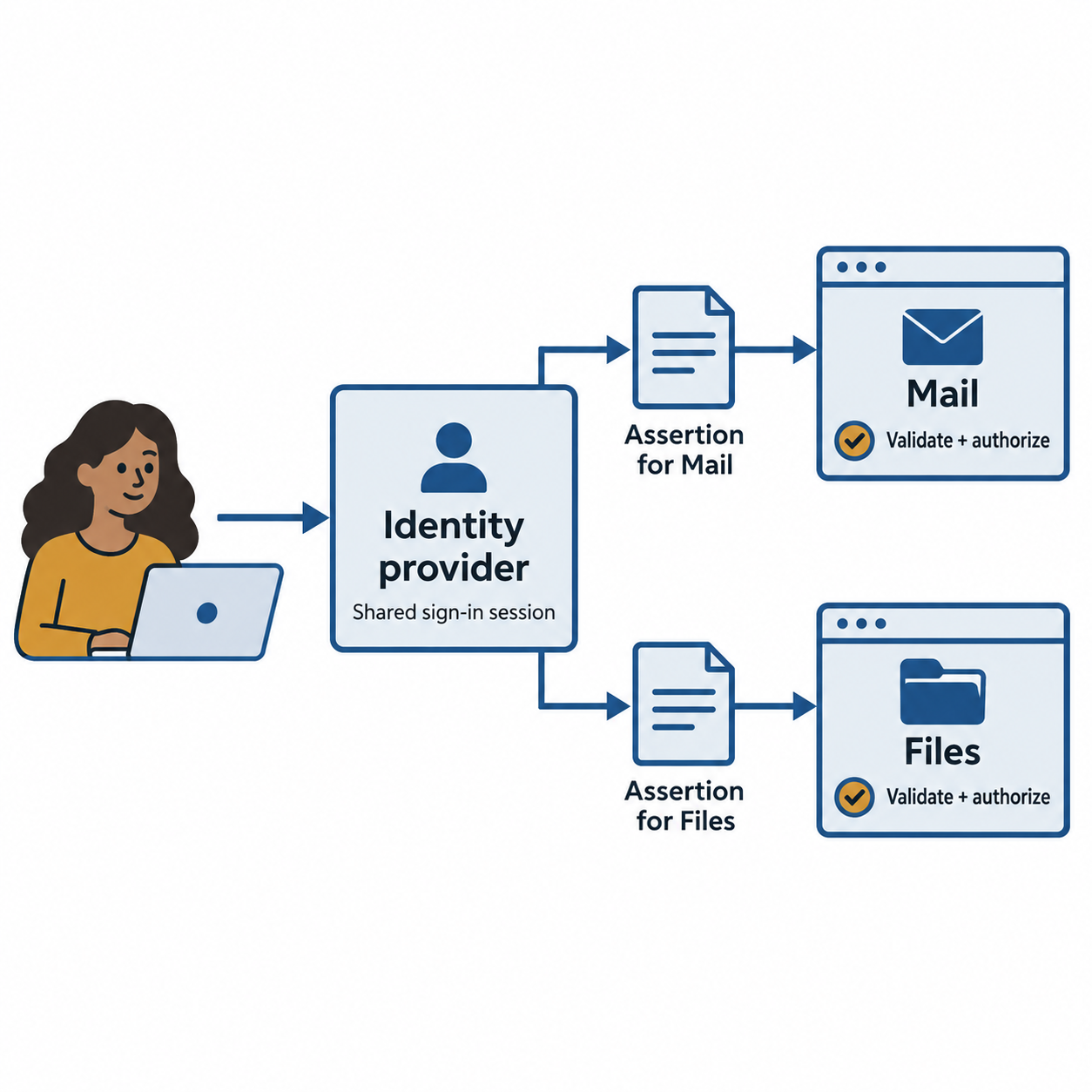
Figure 7.9: A shared sign-in session can support access to several applications. Each application validates an assertion or token intended for it and applies its own authorization rules.
Text description for Figure 7.9
An identity provider authenticates a user and maintains a sign-in session. When the user opens Mail, it issues an assertion or token intended for Mail. When the user opens Files, it can use the existing identity-provider session to issue another assertion or token intended for Files, subject to policy. Each application checks the issuer, signature, intended audience, expiration, and other protocol requirements before creating its local session and applying authorization. Reauthentication or additional factors may still be required. This conceptual diagram omits browser redirects. It does not depict one universal bearer token accepted by every application.
7.6 Password Security and Alternatives
Passwords are still the dominant form of authentication, despite their shortcomings.
Password Length Over Complexity
A common password policy requires short passwords (8 characters) with a mix of uppercase, lowercase, numbers, and special characters. This encourages users to choose passwords like "Fall2025!" which are easy to remember but not very secure.
Modern guidance from NIST and security practitioners recommends length over complexity:
- Longer passwords are more secure. A 15-character password is harder to crack than an 8-character password with mixed character types, even if the 15-character password uses only lowercase letters.
- Users can remember longer passwords if they are passphrases: "correct-horse-battery-staple" is 28 characters and easy to remember.
- Don't enforce special characters. Users add them predictably (append an exclamation mark), reducing effective entropy.
A reasonable modern password policy:
- Minimum 12 characters.
- No maximum (or a very high maximum).
- No character type requirements.
- Check against a list of compromised passwords (don't allow "password," "12345678," or passwords found in known breaches).
- Require MFA instead of relying solely on password strength.
Figure 7.10 groups complementary password controls without treating length alone as a guarantee of strength.
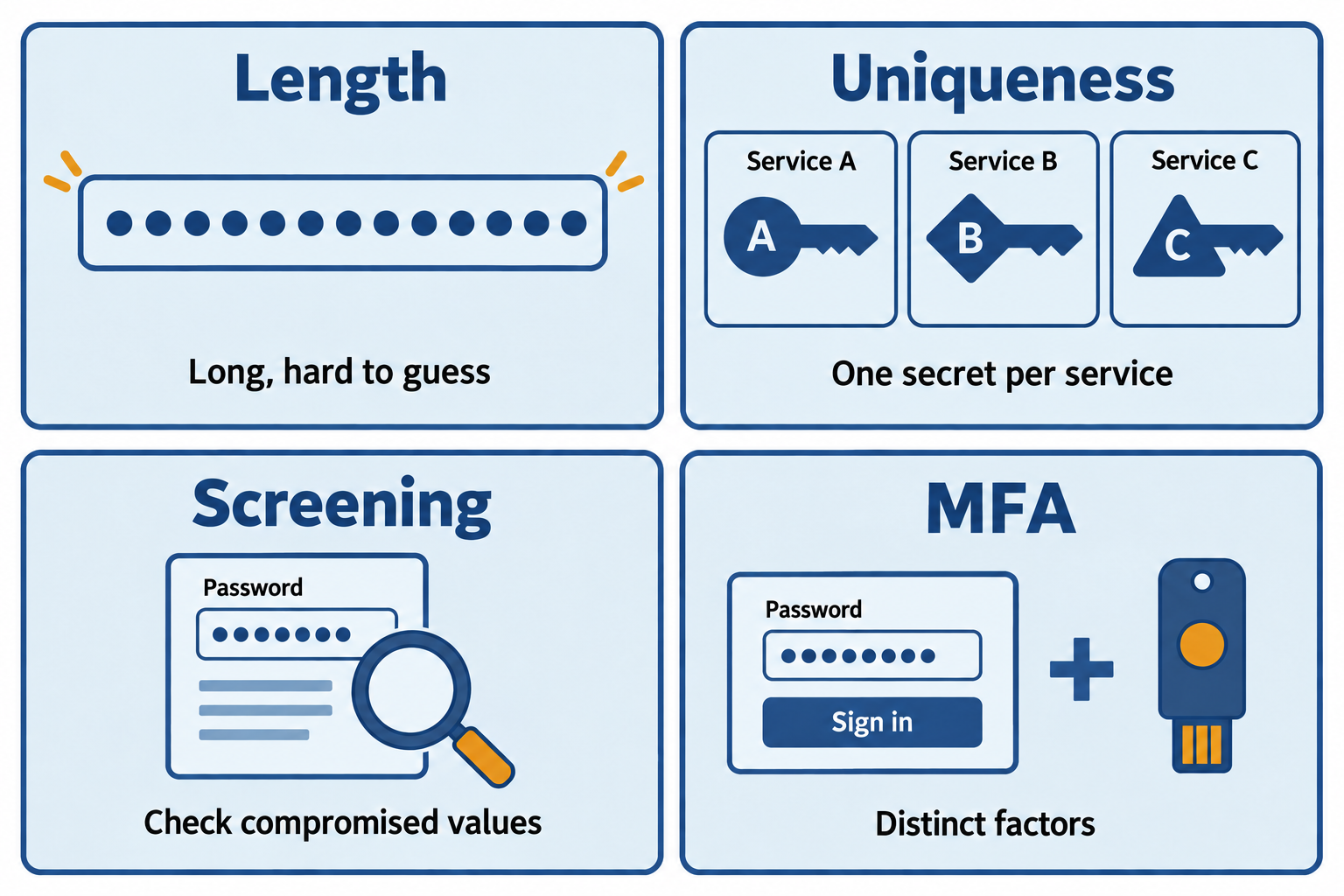
Figure 7.10: Use long, unique passwords, support password managers, screen for compromised values, and combine passwords with additional authentication where appropriate.
Text description for Figure 7.10
Length increases the space of possible passwords when choices are sufficiently unpredictable. A long but commonly guessed phrase can still be weak. Unique passwords prevent one exposed value from being reused across accounts. Password managers help generate and store those values. Services should block common or compromised choices and avoid predictable character-composition rules. The National Institute of Standards and Technology (NIST) publication SP 800-63B-4 requires at least 15 characters for a password used as the sole authentication factor, permits a minimum of 8 when used only within multi-factor authentication, and recommends allowing at least 64 characters. It does not recommend routine forced password changes without evidence of compromise. These are verifier requirements with defined scope; organizations must apply appropriate policy to their systems.
Credential Stuffing
Credential stuffing occurs when an attacker takes usernames and passwords from a breach of one service and tries them on other services, exploiting password reuse.
If you use the same password on 10 websites and one website is breached, an attacker has that password and your username. They try the credentials on your email, bank, social media, and other sites.
Mitigations:
- Use a unique password for every important service (a password manager helps).
- Monitor for credential stuffing attacks: services should alert you if your credentials appear in a breach.
- Implement MFA so that even stolen credentials cannot be used without the second factor.
Figure 7.11 traces how an exposed username-password pair can be replayed against another service.
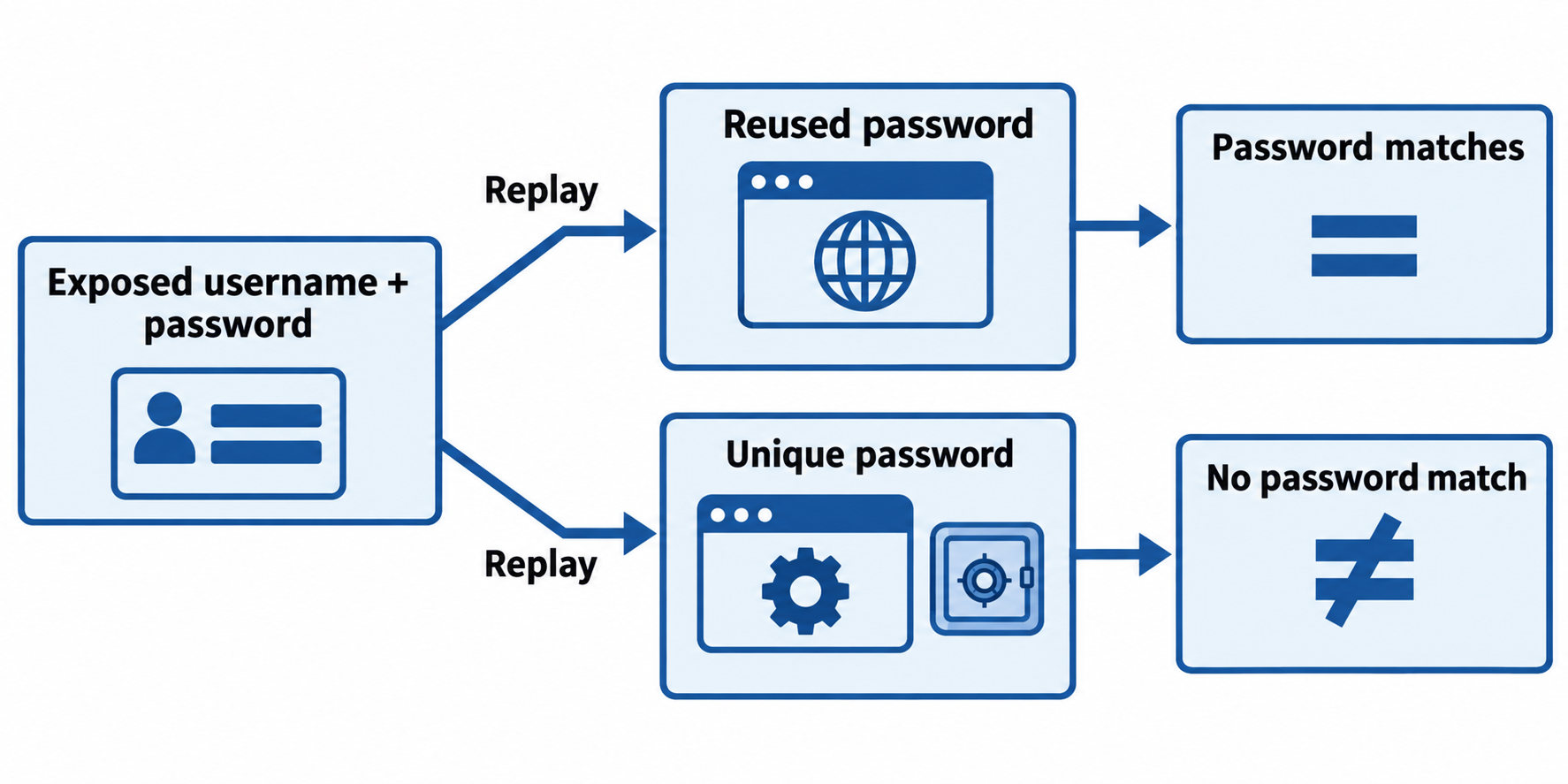
Figure 7.11: Credential stuffing exploits password reuse. Unique passwords prevent the same exposed pair from matching another account; additional controls address guessing, phishing, and account recovery risks.
Text description for Figure 7.11
A breached service exposes a username and password. An attacker tries that pair at other services. If another account uses the same pair, the password check may succeed, though additional authentication or risk controls can still stop sign-in. If the second service uses a different password, replaying the old pair fails its password check. A password manager helps maintain unique values. Multi-factor authentication and service-side protections add defenses, but none of these controls justifies ignoring account recovery or active sessions. The illustration shows password-check outcomes rather than guaranteed account compromise.
Passkeys and Passwordless Authentication
Passkeys are a new approach to replacing passwords. A passkey is a cryptographic key pair stored on your device. When you log in to a website or app:
- The website detects that you are using a passkey-capable device.
- You verify your identity using biometrics (fingerprint, face) or a PIN on your device.
- Your device signs a cryptographic challenge and sends the signature to the website.
- The website verifies the signature using your public key (which it has on file) and grants access.
Figure 7.12 follows a passkey sign-in from the website’s challenge to verification with its stored public key.
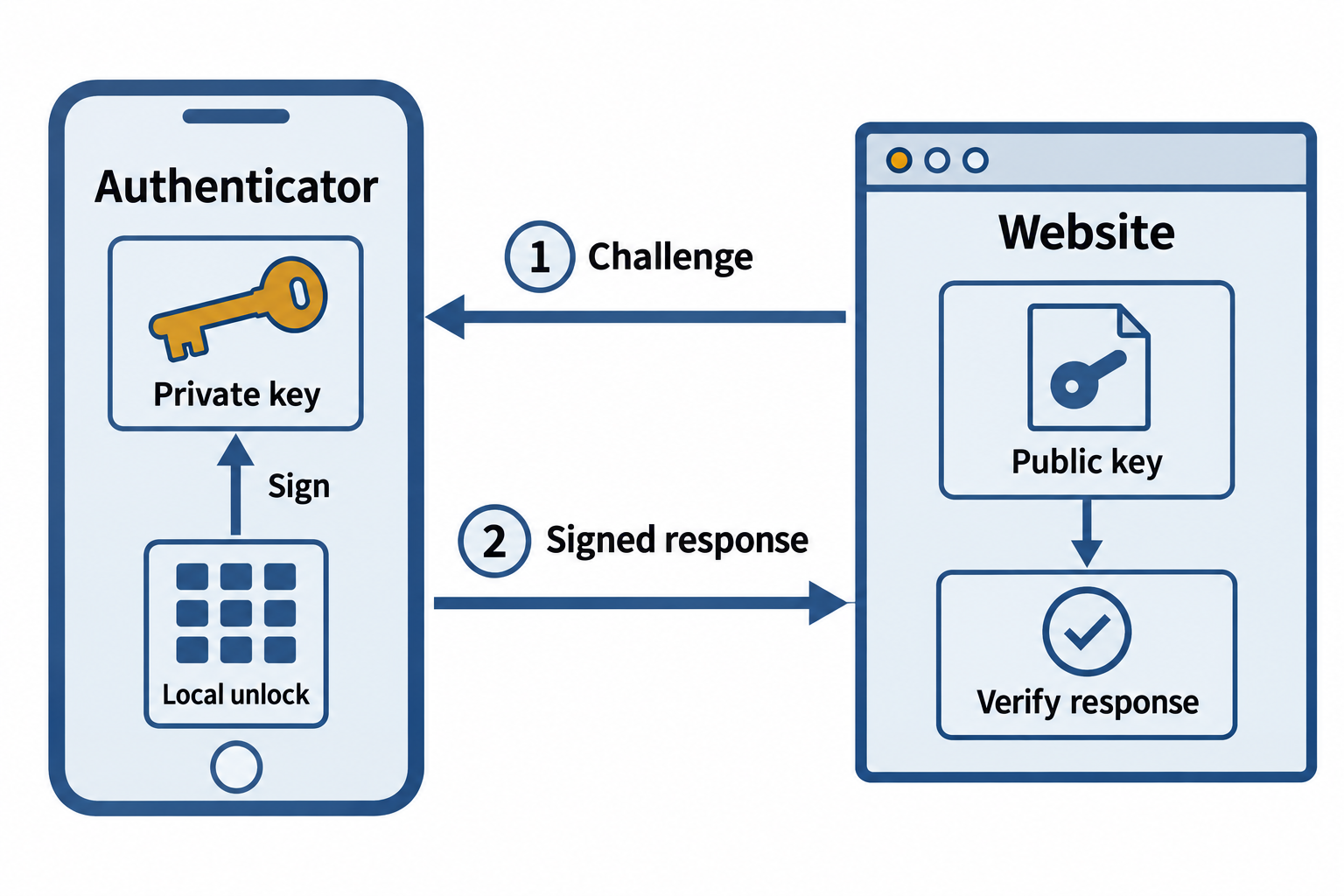
Figure 7.12: The authenticator signs a fresh challenge after local user verification. The website verifies the response with a public key; it does not receive the private key or local PIN or biometric.
Text description for Figure 7.12
The website sends a fresh challenge. The user unlocks the authenticator with a local PIN or biometric as required. The authenticator uses the passkey’s private key to create a signed response bound to the relying party, meaning the website or application accepting the sign-in. The website verifies the response using the registered public key and checks the protocol conditions before granting a session. The private key and local PIN or biometric are not sent to the website. Passkeys can be device-bound or synchronized through a passkey provider; the device picture represents the authenticator used for this sign-in and does not imply every passkey exists on only one device.
Passkeys are:
- More secure than passwords: There is no password to forget, reuse, or steal. Phishing becomes difficult because the website and your device cryptographically verify each other.
- More convenient than passwords: You use biometrics or a PIN (which you do not need to remember in full detail).
- Standardized: FIDO2 and WebAuthn are open standards. Multiple vendors support passkeys.
Adoption is increasing, but passkey-only systems are still rare. Most services offer passkeys as an option alongside passwords.
Access Review and Privilege Auditing
Even with strong authentication and well-designed access control, permissions drift over time. Users accumulate permissions as they change roles. Accounts are deprovisioned incompletely.
Organizations should conduct access reviews quarterly or annually:
- Management reviews all accounts in their department.
- For each account, they confirm: Is this person still in this role? Do they still need these permissions? Is the access appropriate?
- Accounts with inappropriate access are flagged. The user is either corrected (permissions adjusted) or disabled.
Access reviews are labor-intensive but essential for maintaining the principle of least privilege.
Least Privilege in Practice
Least privilege sounds simple: give users the minimum access they need. In practice, it conflicts with convenience and operational efficiency. A system administrator might grant broad permissions to "make it simpler." An access control system might fail to revoke a permission when a user changes roles, leaving them with excessive access. Regular audits and automated enforcement (removing excess permissions after a set duration) are necessary.
Chapter Summary
- Account provisioning is role-based and follows the principle of least privilege. Deprovisioning of departing employees must be thorough and timely.
- Standard user accounts have job-appropriate permissions. Privileged accounts require strong authentication, auditing, and segregation. Service and third-party accounts need credential rotation and least privilege. Emergency accounts must be carefully guarded and logged.
- Multi-factor authentication requires evidence from at least two factors (something you know, have, or are). Hardware keys are most secure but least convenient. Software tokens and biometrics are increasingly common.
- RBAC assigns users to roles and roles to permissions—scalable and business-aligned. ABAC makes decisions based on user, resource, and context attributes—more flexible but complex. MAC enforces organization-wide policy that users cannot override. DAC allows users to control access to their own resources.
- JIT access grants time-limited access on-demand, reducing the window an attacker can exploit compromised credentials.
- Federated identity allows users from one organization to access resources at another using SAML, LDAP, OAuth, or OpenID Connect. SSO simplifies user authentication across multiple systems.
- Passwords should be long (12+ characters) and unique, not complex. Passkeys use cryptographic key pairs and are emerging as a passwordless alternative.
- Access reviews ensure that permissions remain appropriate as users and roles change.