CH6: Vulnerability Discovery and Analysis
Introduction
Enumeration maps the terrain. Vulnerability scanning finds the cracks. Every running service, every misconfigured permission, every outdated library represents a potential entry point. Your job in this phase is to systematically identify weaknesses, validate them, and prioritize them for exploitation.
Vulnerability discovery is both an art and a science. The science is straightforward: run scanners, collect data, parse results. The art lies in knowing which scanner to use for which target, interpreting false positives and false negatives, and understanding the difference between a vulnerability that exists and a vulnerability that is exploitable. An open port is not a vulnerability until you understand what service runs on it and what weakness that service has.
This chapter covers network scanning, application scanning, container scanning, and secrets scanning. You'll learn to interpret scanner output, validate findings, and build evidence of exploitability.
Section 6.1 introduces the five application security tools this chapter relies on, by name and before any of them appears in a worked example. Two dynamic scanners test a running application from the outside, two static analyzers read source code without running it, and one checks the third-party libraries an application depends on. Burp Suite and OWASP ZAP get a closer look at their components, because a web assessment runs through those two interfaces.
Learning Objectives
After completing this chapter, you will be able to:
-
Identify the purpose and basic use of the chapter's application security toolkit, from the Burp Suite and OWASP ZAP proxies through the Checkmarx and Semgrep code analyzers to OWASP Dependency-Check.
-
Perform network vulnerability scans using TCP/UDP, SYN, and application-layer probes to identify exposed services and misconfigurations.
-
Execute application vulnerability scans using DAST (Dynamic Application Security Testing), SAST (Static Application Security Testing), and SCA (Software Composition Analysis) to find web and API flaws.
-
Scan container images and filesystems for known vulnerabilities and secrets using specialized tools.
-
Validate scan results by distinguishing true positives from false positives and confirming exploitability.
-
Analyze vulnerability data using severity scoring (CVSS, EPSS) and threat intelligence to prioritize targets.
6.1 The Application Security Testing Toolkit
Chapters 4 and 5 built up the reconnaissance and enumeration toolkits one profile at a time. This chapter adds the tools that test applications for flaws, and it introduces them the same way: by name, before they appear in a worked example, so that when Burp Suite shows up in the dynamic scanning workflow you already know what you are looking at.
Five tools carry the application security work in this chapter. Two are dynamic scanners that test a running application from the outside: Burp Suite and OWASP ZAP. Two are static analyzers that read source code without running it: Checkmarx and Semgrep. One checks the third-party libraries an application pulls in: OWASP Dependency-Check. The network scanners, container scanners, and secrets scanners appear in the sections that use them, and TruffleHog, Trivy, and Grype were introduced in Chapter 5.
Each profile answers the same four questions used in the previous chapters: what the tool does, how you run it, where it came from, and its practical use on an engagement. Burp Suite and OWASP ZAP also get a breakdown of their major components, because you will spend more hours inside those two interfaces than any other tool in web application testing.
Scanning an application is active testing
Every tool in this section either sends traffic to a target or reads source code you were given access to. Dynamic scanners submit real attack payloads to a live application and can corrupt data, trigger alerts, or take a fragile service down. None of it is authorized by default. The statement of work and rules of engagement from Chapter 2 must name the target application, define its scope, and state whether active scanning is permitted against production or only against a staging copy.
Dynamic Application Security Testing
Burp Suite
What it does. Burp Suite is an integrated platform for testing web application security. At its center is an intercepting proxy that sits between your browser and the target, so you can read, pause, and rewrite every Hypertext Transfer Protocol (HTTP) request and response before it reaches either side. Around that proxy sit tools for crawling, scanning, and hand-crafting attacks.
How you run it. Graphical interface, written in Java, cross-platform. It ships in three editions. Community is free, included on Kali Linux, and covers manual testing, but it disables the automated scanner and throttles the Intruder attack tool. Professional is the paid per-user edition that unlocks the scanner and full-speed Intruder. Enterprise runs automated scans on a schedule inside a continuous integration and continuous delivery (CI/CD) pipeline. Launch the Community edition on Kali with burpsuite.
Where it came from. Written by Dafydd Stuttard and sold by his company PortSwigger, first released in 2003. Stuttard co-wrote The Web Application Hacker's Handbook, and Burp is the tool that book teaches. It is the standard tool of the web application testing trade.
Practical use: Burp is where a web assessment lives. You route your browser through it, walk the application by hand, and every request you generate is captured for inspection and replay.
The parts of Burp you will use most:
- Proxy. Intercepts live traffic and records a full HTTP history you can search after the fact. This is the starting point for everything else.
- Target and site map. Builds a tree of every URL you have touched and lets you define scope so the other tools ignore out-of-scope hosts.
- Repeater. Takes a single request and lets you edit and resend it as many times as you want, watching how the response changes. This is the manual workhorse for confirming an injection or probing a parameter by hand.
- Intruder. Automates a customized attack by inserting payloads into marked positions in a request. Its four attack types, sniper, battering ram, pitchfork, and cluster bomb, control how payloads map to positions, which is how you run password spraying, parameter fuzzing, or account enumeration. Community edition throttles this tool.
- Scanner. Crawls the application and sends payloads to find injection, cross-site scripting (XSS), and misconfiguration automatically. Professional and Enterprise only.
- Decoder, Comparer, and Sequencer. Decoder converts encodings by hand. Comparer diffs two responses. Sequencer measures the randomness of session tokens to judge whether they can be predicted.
- Extensions and the BApp Store. A catalog of add-ons that extend Burp, many of them free, installed from the Extensions tab.
- Collaborator. A PortSwigger-hosted service that catches out-of-band interactions, meaning a callback the target makes to an external server, which is how blind vulnerabilities that produce no visible response get detected. Professional only.
Follow the original exchange and the replay path in Figure 6.1.
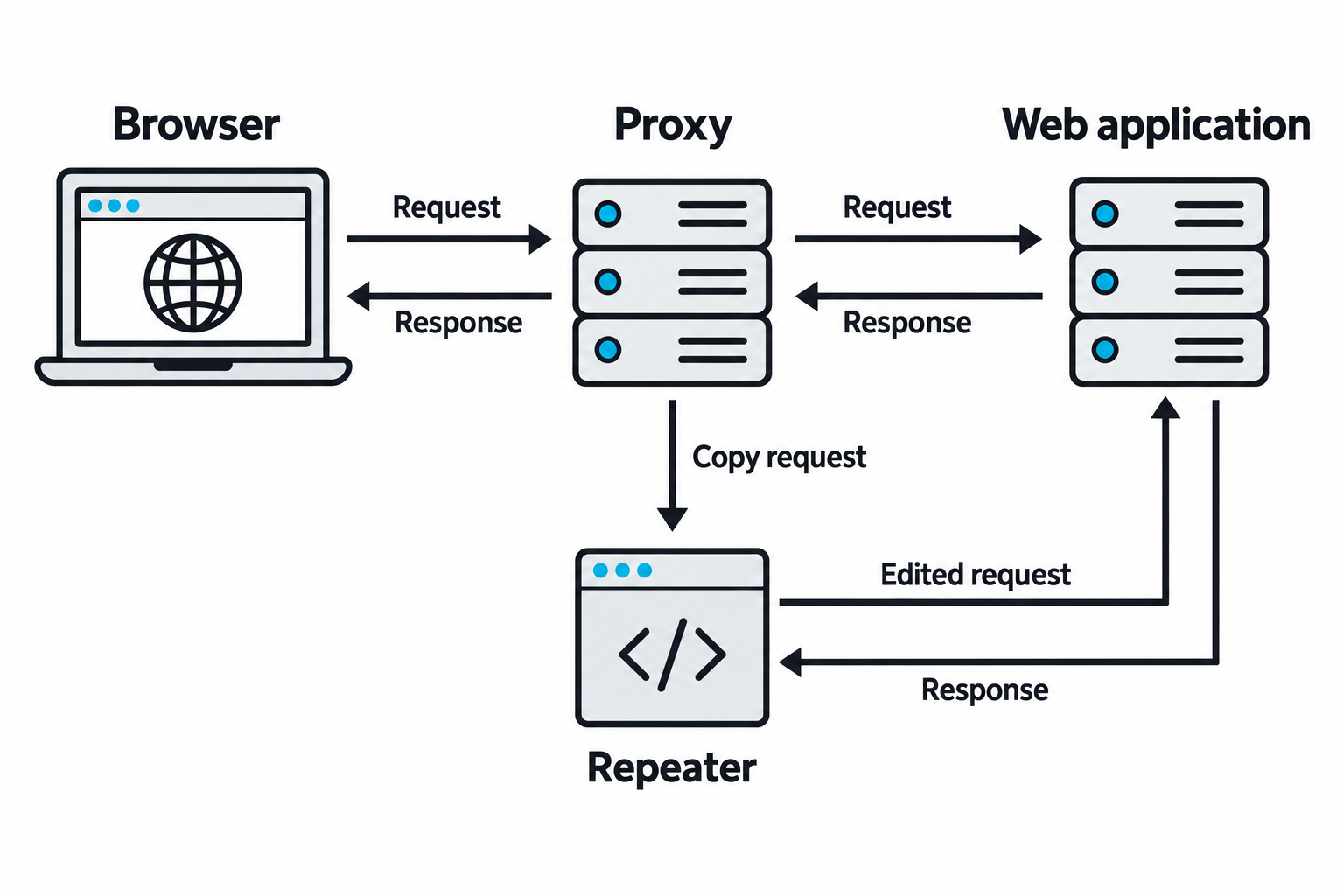
Figure 6.1: An intercepting proxy records the browser exchange, while Repeater sends an edited copy for comparison.
Text description for Figure 6.1
Read the upper exchange from browser through proxy to web application, then follow the responses back. The lower path copies a captured Hypertext Transfer Protocol (HTTP) request into Burp Repeater, where the tester changes and resends it. The application returns that response to Repeater. Replaying a request creates another interaction with the application and may change its state. This is a conceptual workflow, not a product screenshot.
OWASP ZAP
What it does. ZAP, the Zed Attack Proxy, is a free and open-source dynamic scanner that does the same core job as Burp. It proxies traffic between your browser and a web application, then spiders and attacks the application to find flaws.
How you run it. Graphical interface, written in Java, cross-platform, preinstalled on Kali. It also runs headless as a daemon driven by a Representational State Transfer (REST) application programming interface (API), ships as a Docker image, and includes an Automation Framework, which is what makes it a common choice for scanning inside a CI/CD pipeline. The desktop application opens with two front doors: Automated Scan, which spiders and attacks a URL in one step, and Manual Explore, which launches a browser proxied through ZAP for hands-on work.
Where it came from. Started by Simon Bennetts in 2010 as a fork of the older Paros Proxy, and grown for over a decade as an OWASP flagship project. In 2023 the project moved to the Software Security Project (SSP) with sponsorship from Checkmarx. Many testers still call it OWASP ZAP out of habit.
Practical use: ZAP is the tool of choice when budget rules out a Burp Professional license, or when a scan has to run unattended in a build pipeline. It is free with no throttled features, which is why it anchors a large amount of automated application security testing.
The parts of ZAP worth knowing:
- Traditional Spider and AJAX Spider. The traditional spider follows links in the returned HTML. The AJAX Spider drives a real browser to reach content that only appears after JavaScript runs, which the traditional spider cannot see. Modern single-page applications need the AJAX Spider.
- Passive and Active Scan. Passive scanning inspects traffic as it passes through and never sends an attack, so it is safe to leave running. Active scanning submits payloads and carries the same risk as any live attack.
- Heads Up Display (HUD). An overlay injected into the proxied browser that surfaces alerts and controls on top of the page, so you can test without switching back to the ZAP window.
- Fuzzer. Substitutes payloads into a chosen part of a request, the equivalent of Burp Intruder, with no throttling.
- Automation Framework and API. Drives ZAP from a YAML plan or the REST API for repeatable, scripted scans in CI/CD.
- Marketplace add-ons. Extend ZAP with community and official add-ons, managed from inside the application.
Compare the sources of traffic in Figure 6.2.
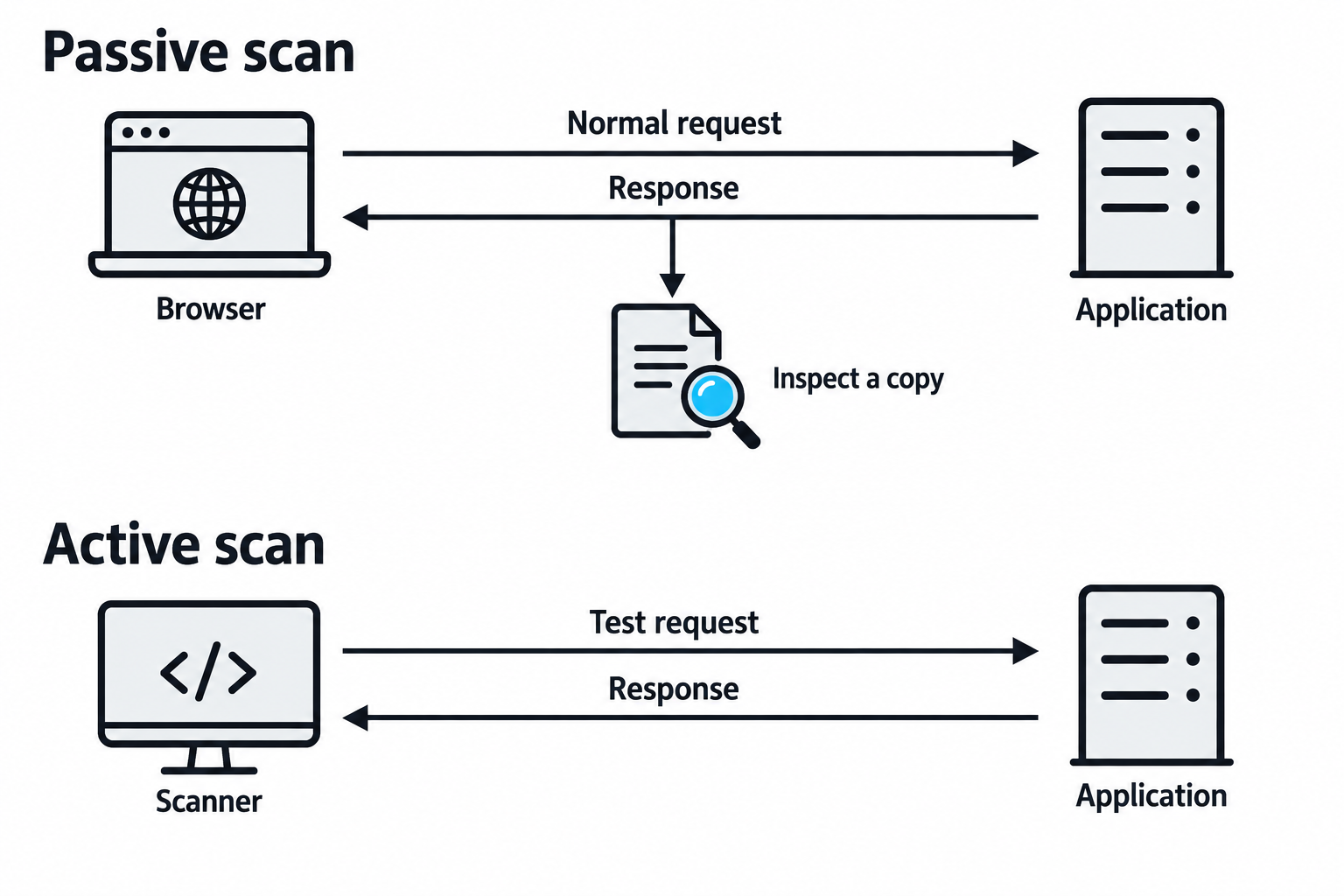
Figure 6.2: Passive analysis inspects existing messages; active scanning sends additional test requests.
Text description for Figure 6.2
In the upper lane, a browser exchanges normal messages with the application and passive analysis inspects a copy. In the lower lane, an active scanner creates test traffic. ZAP's passive scanner does not modify the messages it inspects. Browsing and crawling still generate application traffic, and their effects depend on the requested actions. Active scanning requires authorization appropriate to the target.
Static Application Security Testing
Checkmarx
What it does. Checkmarx is a commercial static analysis platform. It reads an application's source code without running it and traces how untrusted input flows through the program to find injection, unsafe data handling, and weak cryptography.
How you run it. A commercial product, not free and not on Kali. It is delivered as the cloud platform Checkmarx One and the on-premises engine CxSAST, with plugins for integrated development environments (IDEs) and CI/CD systems so scans run as code is written and built. One distinguishing trait: it analyzes source directly and does not require the project to compile first, which lets it scan partial or in-progress codebases.
Where it came from. Built by Checkmarx, a company founded in 2006. Its engine models code as a graph and queries that graph with a purpose-built query language, CxQL, which teams use to write custom rules for their own frameworks.
Practical use: On an engagement you will most often meet Checkmarx as the scanner a mature development shop already runs, and reading its findings is a routine task. Static analysis catches classes of flaw a dynamic scanner cannot see, such as a dangerous function that is reachable only through a code path you never triggered from the outside.
Semgrep
What it does. Semgrep is a fast, open-source static analysis tool. You write rules that look like the code you want to find, and Semgrep matches them across a codebase with awareness of the language's syntax rather than treating the source as plain text.
How you run it. Command line, cross-platform, run against a directory of source. The open-source engine is free and driven by rulesets, for example semgrep --config=p/security-audit /path/to/code, or --config=auto to let it pick rules by language. A commercial cloud platform adds cross-file dataflow, dependency scanning, and secret detection. It is not preinstalled on Kali; install it with pip install semgrep or run the official Docker image.
Where it came from. Built by the company r2c, now Semgrep, Inc., and derived from an earlier pattern-matching tool developed at Facebook. Its community rule registry holds thousands of published rules.
Practical use: Semgrep's appeal is that a rule reads like the vulnerable code itself, so writing a check for a project-specific bad pattern takes minutes rather than an afternoon. It runs fast enough to fire on every commit, which is where many teams put it.
Software Composition Analysis
OWASP Dependency-Check
What it does. Dependency-Check is a software composition analysis tool. It inventories the third-party libraries an application pulls in and reports which ones carry publicly known vulnerabilities.
How you run it. Command line, plus plugins for build systems such as Maven, Gradle, and Jenkins. It is written in Java. A basic run is dependency-check --project "MyApp" --scan /path/to/project. It identifies each dependency, maps it to a Common Platform Enumeration (CPE) identifier, and looks that identifier up against the National Vulnerability Database (NVD).
Where it came from. An OWASP project created by Jeremy Long. Because it relies on the NVD data feed, current versions need a free NVD API key to update at a usable speed; without one the first run is slow and heavily rate-limited. Confirm the current key requirement in the tool's documentation before a class or an engagement, since NVD access rules have changed more than once.
Practical use: A single outdated library with a known flaw is one of the most common ways a well-written application still gets breached. Dependency-Check surfaces those libraries by name and Common Vulnerabilities and Exposures (CVE) identifier. Its CPE matching produces some false positives, so treat every finding as a lead to confirm against the actual version in use.
Toolkit at a Glance
| Tool | Job | Type | Cost |
|---|---|---|---|
| Burp Suite | Web app proxy and scanner | DAST | Community free; Pro and Enterprise paid |
| OWASP ZAP | Web app proxy and scanner | DAST | Free and open source |
| Checkmarx | Source code analysis | SAST | Commercial |
| Semgrep | Pattern-based code analysis | SAST | Open-source core; paid cloud |
| OWASP Dependency-Check | Dependency vulnerability check | SCA | Free and open source |
Compare the inputs examined by each testing method in Figure 6.3.
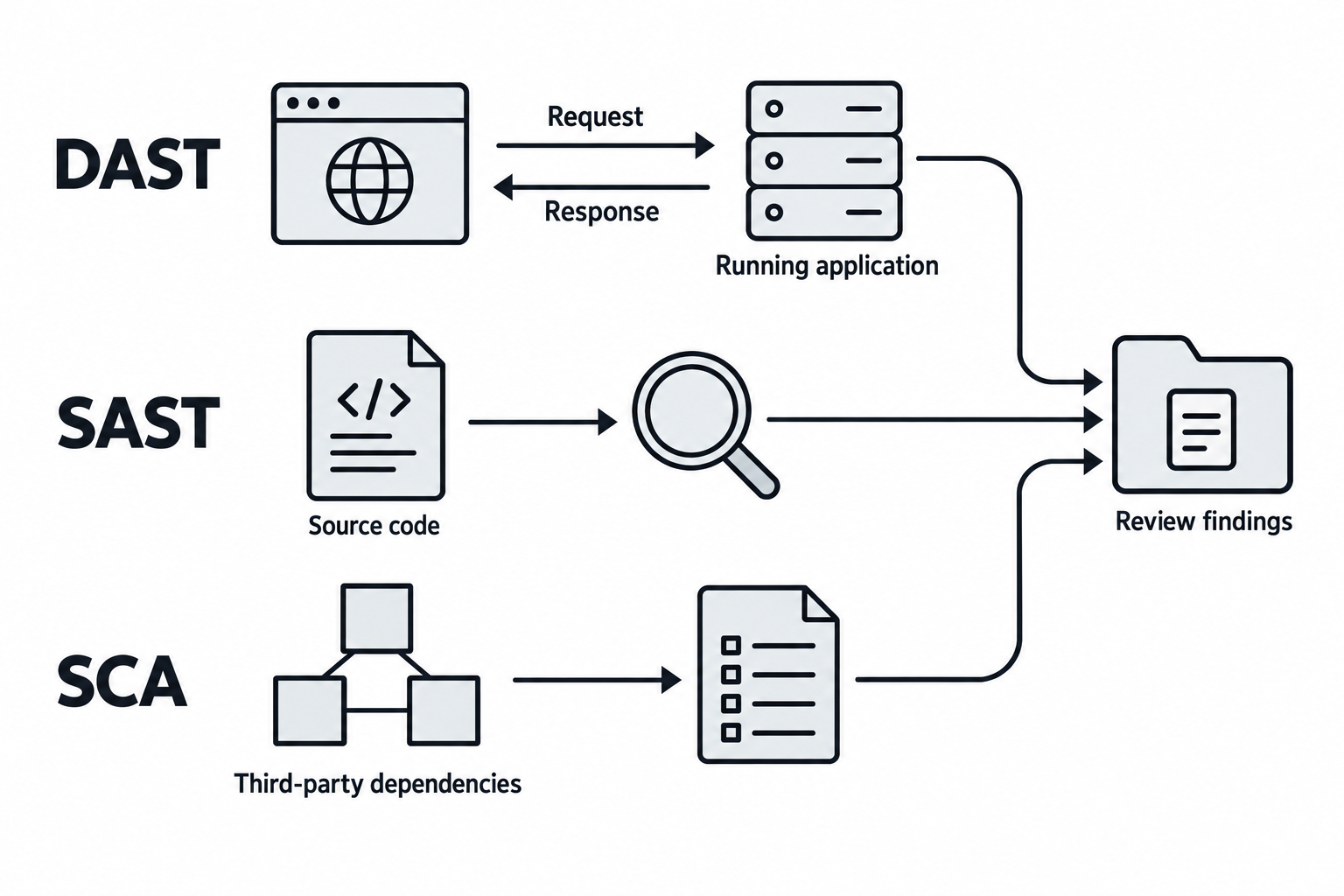
Figure 6.3: Dynamic, static, and composition analysis examine different parts of the same application.
Text description for Figure 6.3
Dynamic Application Security Testing (DAST) evaluates behavior exposed by a running application. Static Application Security Testing (SAST) analyzes source code without executing the application. Software Composition Analysis (SCA) identifies third-party components and their known vulnerabilities. Their different inputs yield complementary evidence. Findings still require validation, and combining the methods does not guarantee complete coverage.
6.2 Network Vulnerability Scanning
TCP and UDP Port Scanning
Network scanning begins with determining which ports are open. Nmap is the industry standard, supporting multiple scan types:
TCP SYN scan (-sS): The default for privileged users. Sends a SYN packet and listens for SYN-ACK response without completing the three-way handshake:
nmap -sS -p- example.com
A SYN scan is fast (doesn't complete connections) and relatively stealthy (less likely to log as a complete connection). Open ports respond with SYN-ACK; closed ports respond with RST.
TCP Connect scan (-sT): Uses the full three-way handshake. Necessary when you lack raw socket privileges (unprivileged users), but slower and more likely to be logged:
nmap -sT -p- example.com
UDP scan (-sU): Sends UDP packets to ports and listens for ICMP unreachable errors (indicating closed) or service responses (indicating open). UDP scanning is slow because ICMP rate limiting delays responses:
nmap -sU -p 53,123,161,162,500 example.com
Common UDP services: DNS (53), SNMP (161), NTP (123), DHCP (67/68), IPsec (500).
FIN, NULL, and XMAS scans (-sF, -sN, -sX): Exploit an obscure TCP RFC behavior: closed ports should respond with RST to packets with no flags set, while open ports should ignore them. These scans are stealthier but unreliable on modern systems:
nmap -sF example.com
Most modern firewalls block these, making them useful for detecting basic filtering but not reliable for comprehensive scanning.
Service version detection (-sV): Sends service-specific probes to extract version information:
nmap -sV -p 22,80,443,3306,5432,8080 example.com
Output includes OS detection, service names, and version strings. This data feeds vulnerability lookups.
Vulnerability-Focused Network Scanning
Once you've mapped ports, you scan for known vulnerabilities on those services. Nessus, OpenVAS, and Qualys are commercial or open-source network vulnerability scanners that combine multiple techniques:
- Port-based signatures: Known vulnerable versions on specific ports
- Service queries: Asking the service directly about its configuration
- Credential-based assessment: Scanning authenticated (deeper, more reliable)
- Configuration review: Checking for weak defaults (SMB signing disabled, SNMP community strings, etc.)
A typical Nessus scan:
# Start Nessus server
sudo systemctl start nessusd

# Create a scan via the UI: example.com, default policies
# Run scan
Output includes:
- Vulnerability name
- CVSS score and vector
- Affected service and port
- Remediation steps
- False positive likelihood
Nmap NSE scripts are lightweight alternatives for specific checks:
# Enumerate SMB shares and check for null sessions
nmap -p 445 --script smb-enum-shares,smb-os-discovery example.com

# Check SSL/TLS cipher strength
nmap -p 443 --script ssl-enum-ciphers,ssl-cert example.com

# Check for default credentials on multiple services
nmap -p 22,23,80,110,143 --script default-accounts example.com
Trace the evidence-building sequence in Figure 6.4.
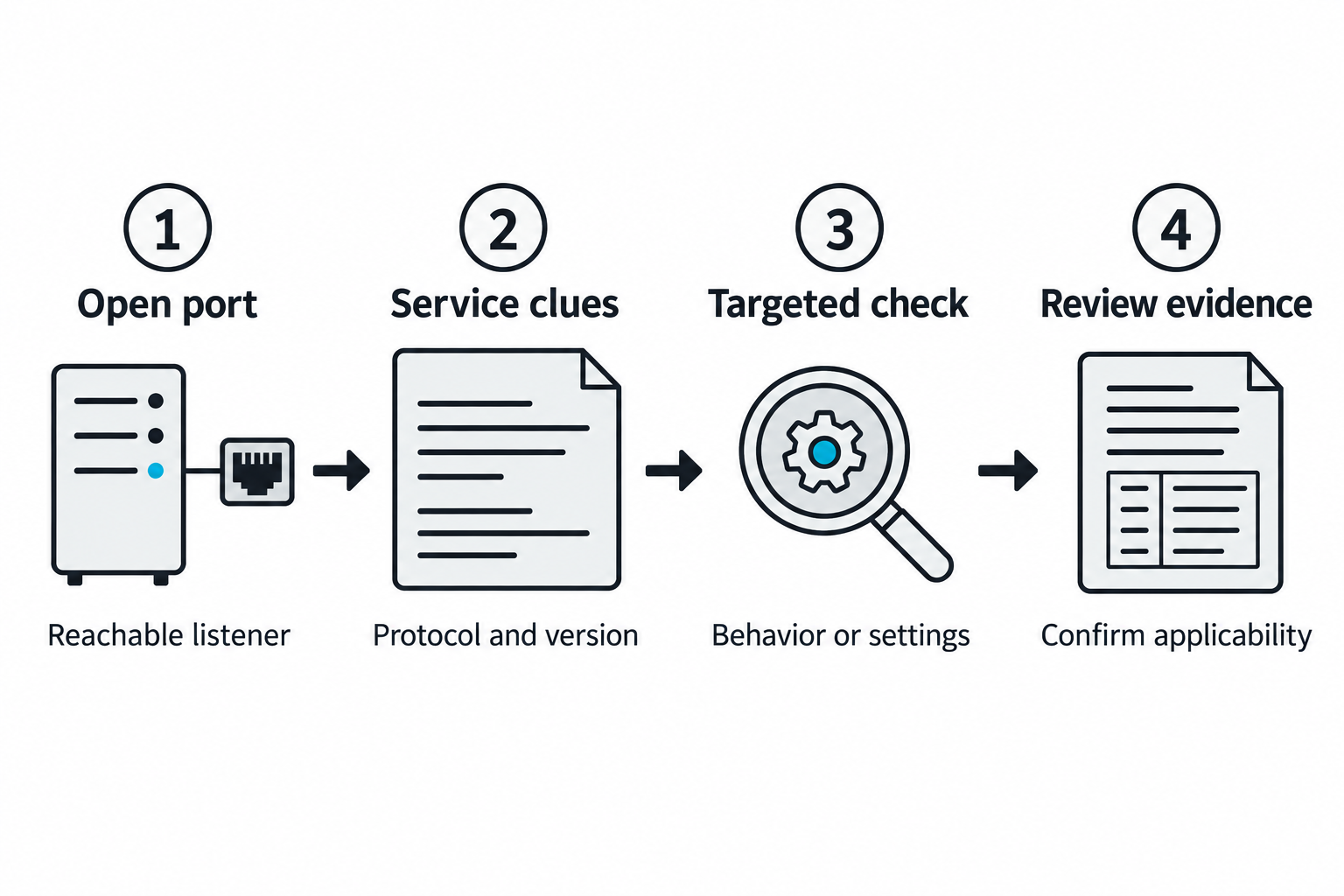
Figure 6.4: Port discovery guides service checks that produce evidence for validation.
Text description for Figure 6.4
A port observation establishes a reachable listener under the tested conditions. Service probes collect protocol and version clues, which guide checks of behavior and configuration. Review compares those results with the actual software, patch status, and environment. A familiar port number or an old-looking banner alone does not confirm that a published vulnerability applies.
Putting It Together: Comprehensive Network Scan
You're assessing a corporate network. Here's the workflow:
Phase 1: Broad port discovery
nmap -sS -p- -oG ports.txt example.com
# Identifies 43 open ports across the range
Phase 2: Service identification
nmap -sV -p 22,25,53,80,110,143,389,443,445,3306,3389,5432,5985,5986,8080,8443 \
  -oX services.xml example.com
Result: - 22: OpenSSH 7.4 (EOL, vulnerable to CVE-2018-15473) - 80: Apache 2.4.6 - 443: Apache 2.4.6 with outdated SSL/TLS - 445: Samba 4.10.4 (vulnerable to multiple CVEs) - 3306: MySQL 5.7.28 (vulnerable to escalation)
Phase 3: Vulnerability scanning with NSE
nmap -p 22,80,443,445,3306 --script vuln example.com
Discovers:
- SSH: Weak host key algorithms
- Apache: Information disclosure via Server header
- SMB: Signing not required (MITM risk)
- MySQL: Allows anonymous login with password or no authentication
Phase 4: Authenticated scan (if credentials obtained)
nmap -p 445,3306 --script smb-enum-*,mysql-enum -u domain\\user -p pass example.com
Reveals additional data: user lists, group memberships, database names.
6.3 Application Vulnerability Scanning
DAST (Dynamic Application Security Testing)
DAST scans a running application by interacting with it like a user would. It crawls pages, identifies input fields, and submits test payloads to discover injection flaws, XSS, CSRF, and misconfiguration.
Burp Suite is the dominant DAST tool:
# Start Burp in headless mode with a specific project
burp_suite -Dburp.options.config=/path/to/config.json
Or via the GUI:
- Navigate to Target > Add to Scope
- Spider the application (automated crawling)
- Run Active Scan (sends payloads)
- Review findings
OWASP ZAP is a free alternative:
zaproxy -cmd -configfile /path/to/config.xml
Example DAST payloads:
- SQL injection:
' OR 1=1 --,'; DROP TABLE users; -- - XSS:
<script>alert('xss')</script>,"><script>alert('xss')</script> - LDAP injection:
*)(uid=*,*)(|(uid=* - Path traversal:
../../../etc/passwd,..\\..\\windows\\win.ini
DAST strength: It finds real, exploitable flaws in the running application. DAST weakness: It only scans what it can access; authentication is required for protected areas.
SAST (Static Application Security Testing)
SAST analyzes source code without running it. It identifies insecure patterns: hardcoded secrets, unsafe deserialization, buffer overflows, and weak cryptography.
SonarQube and Checkmarx are commercial SAST tools. Open-source alternatives include Semgrep:
# Scan Python code for security patterns
semgrep --config=p/security-audit /path/to/code

# Scan for specific pattern (SQL injection)
semgrep --pattern='query = "SELECT * FROM users WHERE id = " + $USER_INPUT' /path/to/code
SAST is code-review at scale. It finds:
- Hardcoded passwords and API keys
- Unsafe use of cryptographic functions
- Missing input validation
- Dangerous library functions (strcpy, eval, pickle.loads)
Drawback: High false positive rate. Not all flagged code is exploitable.
Follow the source-code path in Figure 6.5.
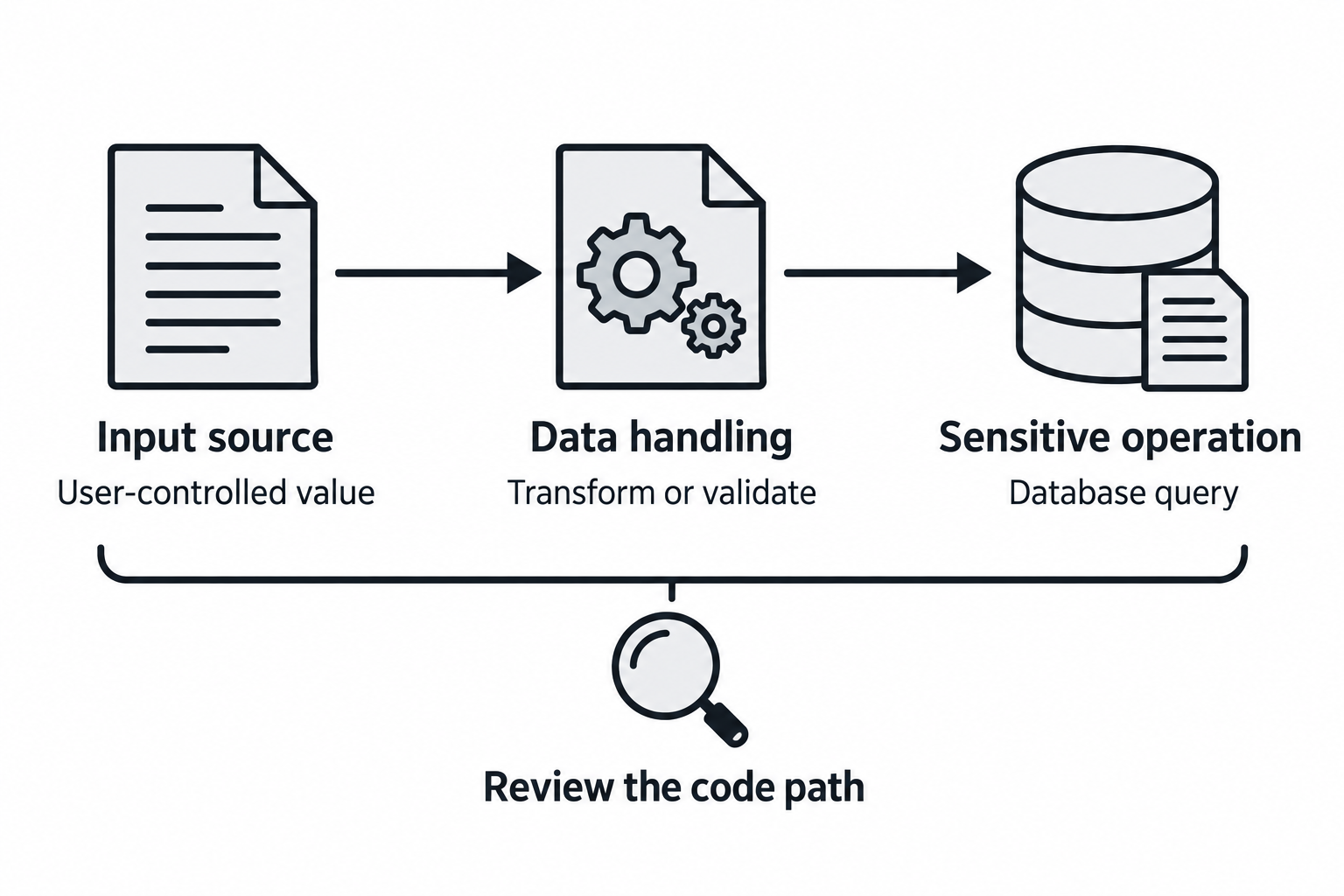
Figure 6.5: Static analysis follows how input can reach a security-sensitive operation.
Text description for Figure 6.5
The input source introduces a value controlled by a user. Intermediate code may transform or validate it before a security-sensitive operation, sometimes called a sink, uses it. Static analyzers can flag patterns or track data along such paths, depending on their engine and rules. The analyst checks whether the path is reachable and whether the handling actually prevents unsafe use. The drawing is a conceptual example, not a finding from a real codebase.
SCA (Software Composition Analysis)
SCA scans dependencies and third-party libraries for known vulnerabilities. A single outdated library can compromise the entire application.
Common third-party library risks include:
- Direct dependency vulnerability: An application uses an outdated web framework with a publicly known remote-code-execution flaw. The application team must upgrade, apply a vendor patch, or remove the affected feature.
- Transitive dependency vulnerability: A project depends on a logging library that depends on a vulnerable parsing component. The vulnerable package may not appear in the application's source code, but it is still included in the build.
- Malicious package or typosquatting: A developer installs a package with a name similar to the intended library. The substitute package may steal credentials, modify build artifacts, or add a backdoor.
- Abandoned or unmaintained library: A library may have no active maintainer, security response process, or compatible patch path. Even without a known CVE, it creates long-term operational and supply-chain risk.
- Unsafe update: Updating a dependency without reviewing its changelog, integrity metadata, or compatibility can introduce malicious code, break security controls, or silently change how authentication and input validation work.
Grype scans container images and filesystems:
grype myapp:latest
Output:
Name            Version  Vulnerability   Fix
lodash          4.17.11  CVE-2019-10744  Update to 4.17.12
requests        2.22.0   CVE-2023-32681  Update to 2.28.0
PIL             7.0.0    CVE-2021-25289  Update to 8.4.0
Trivy scans images, filesystems, and Git repositories:
trivy image myapp:latest
trivy fs /path/to/project
trivy repo https://github.com/target/project
OWASP Dependency-Check:
dependency-check --project "MyApp" --scan /path/to/project
SCA is essential: Vulnerable dependencies account for a significant portion of production breaches.
Trace the inventory and matching process in Figure 6.6.
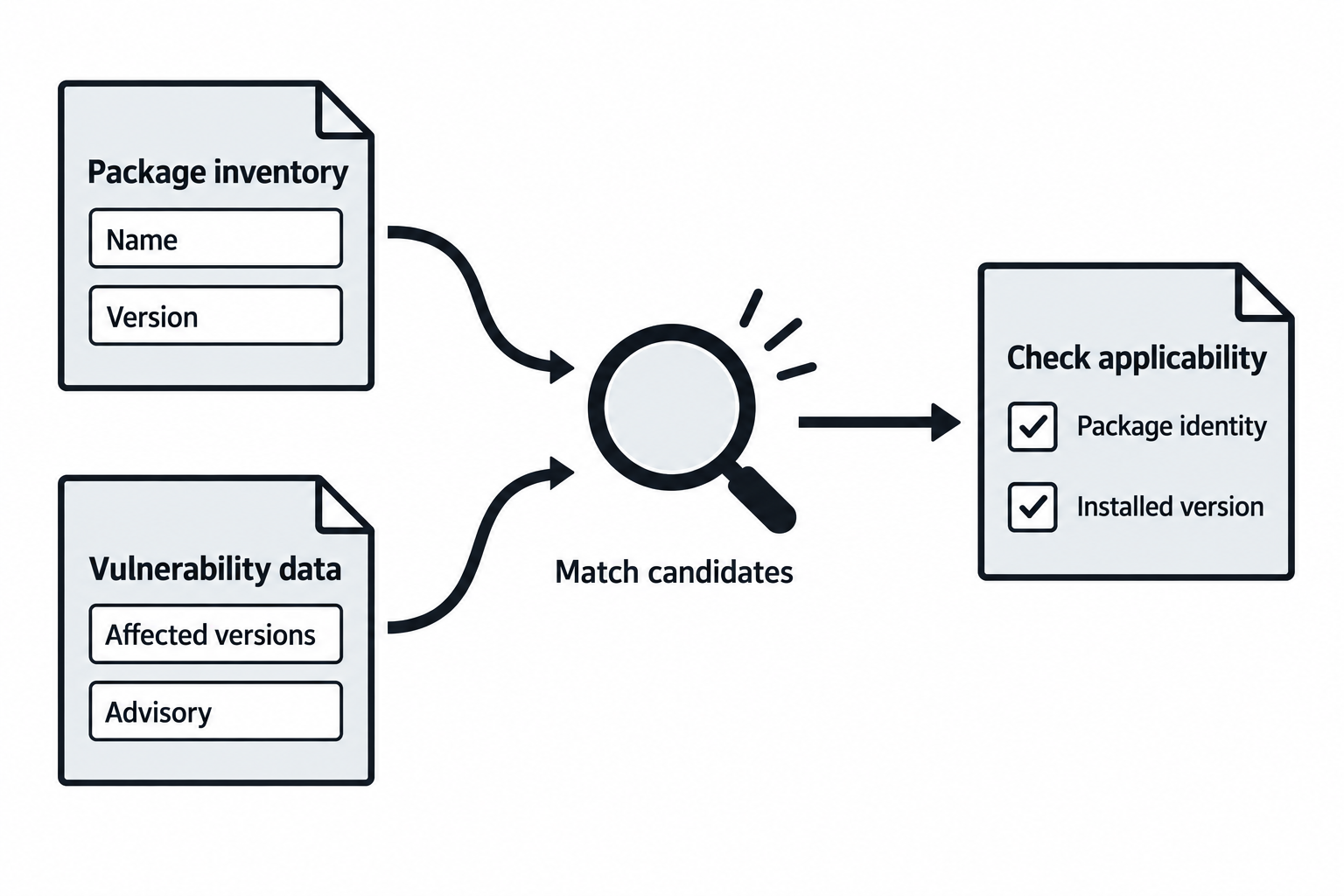
Figure 6.6: Dependency findings begin with an inventory and a match to vulnerability records.
Text description for Figure 6.6
Software Composition Analysis compares an inventory of installed components with vulnerability records. Matching can depend on package ecosystem and product identifiers. Confirm the component identity, installed version, affected range, and vendor guidance before accepting a match. Dependency presence alone does not establish an exploitable path in the application, and a clean report cannot rule out unknown flaws.
Putting It Together: Application Vulnerability Scan
You're assessing a web application at http://example.com/app/. Here's the process:
Phase 1: Crawling and mapping
# Use Burp or ZAP to spider the application
# Burp: Crawler found 187 URLs
Phase 2: DAST scanning
# Burp runs active scan on all discovered URLs
# Findings:
# - SQL Injection in /app/search (Parameter: keyword)
# - Reflected XSS in /app/profile (Parameter: bio)
# - Insecure deserialization in /app/api/export
Phase 3: SAST on source code
# Source code is obtained (private repo or acquired during assessment)
semgrep --config=p/security-audit /path/to/source

# Findings:
# - Hardcoded database password in config.py
# - Use of pickle.loads on user input
# - Missing CSRF tokens on state-changing endpoints
Phase 4: SCA on dependencies
grype /path/to/project

# Findings:
# - flask 1.1.2 (CVE-2018-1000656)
# - jinja2 2.11.1 (CVE-2020-28493)
Consolidated risk assessment: The combination of DAST + SAST + SCA creates a comprehensive picture. The SQL injection is a critical finding; the hardcoded password is a critical finding; the vulnerable dependencies are high-risk.
6.4 Container and Secrets Scanning
A Refresher on Containers, Docker, and Kubernetes
Before you scan a container image, it helps to remember what one is. A container packages an application together with everything it needs to run:
- Its code, runtime, system libraries, and configuration
- An isolated process on a host that shares the host operating system's kernel
- A lightweight alternative to a virtual machine, which carries a complete guest operating system and takes much longer to start
Docker is the tool most teams use to build and run containers:
- A developer writes a Dockerfile, a text recipe that starts from a base image such as
ubuntu:22.04orpython:3.12, then adds packages, application code, and settings. - Running
docker buildturns that recipe into an image, a read-only template stored as a stack of layers. - Running
docker runstarts a live container from that image. - Images are shared through a registry, most commonly Docker Hub, where public base images are pulled from and finished images are pushed to.
Kubernetes solves the next problem by acting as the orchestration layer for production workloads:
- It schedules containers across many servers.
- It restarts containers that crash and scales them under load.
- It routes traffic and pulls images from a registry.
- It runs containers as pods across a cluster according to a configuration you declare.
Organizations adopt containers because they provide several practical benefits:
- The same image runs on a developer's laptop, in testing, and in production, removing a large class of "it worked on my machine" failures.
- Teams can build software as many small, independently deployable services rather than one large program.
- Each service can be scaled on its own.
That model creates the exact risk this section addresses:
- An image stacks your code on top of a base image you did not write, which includes an operating system and libraries maintained by other people.
- A vulnerability anywhere in that stack ships inside your image and can propagate to every application built from the same base image.
- An image can run unchanged for months, allowing a base image that was current at build time to accumulate known vulnerabilities as new ones are disclosed.
- Scanning reads the image layers, inventories the operating system packages and application libraries, and reports their known vulnerabilities before the image reaches a registry or running cluster.
Compare packaged software with runtime execution in Figure 6.7.
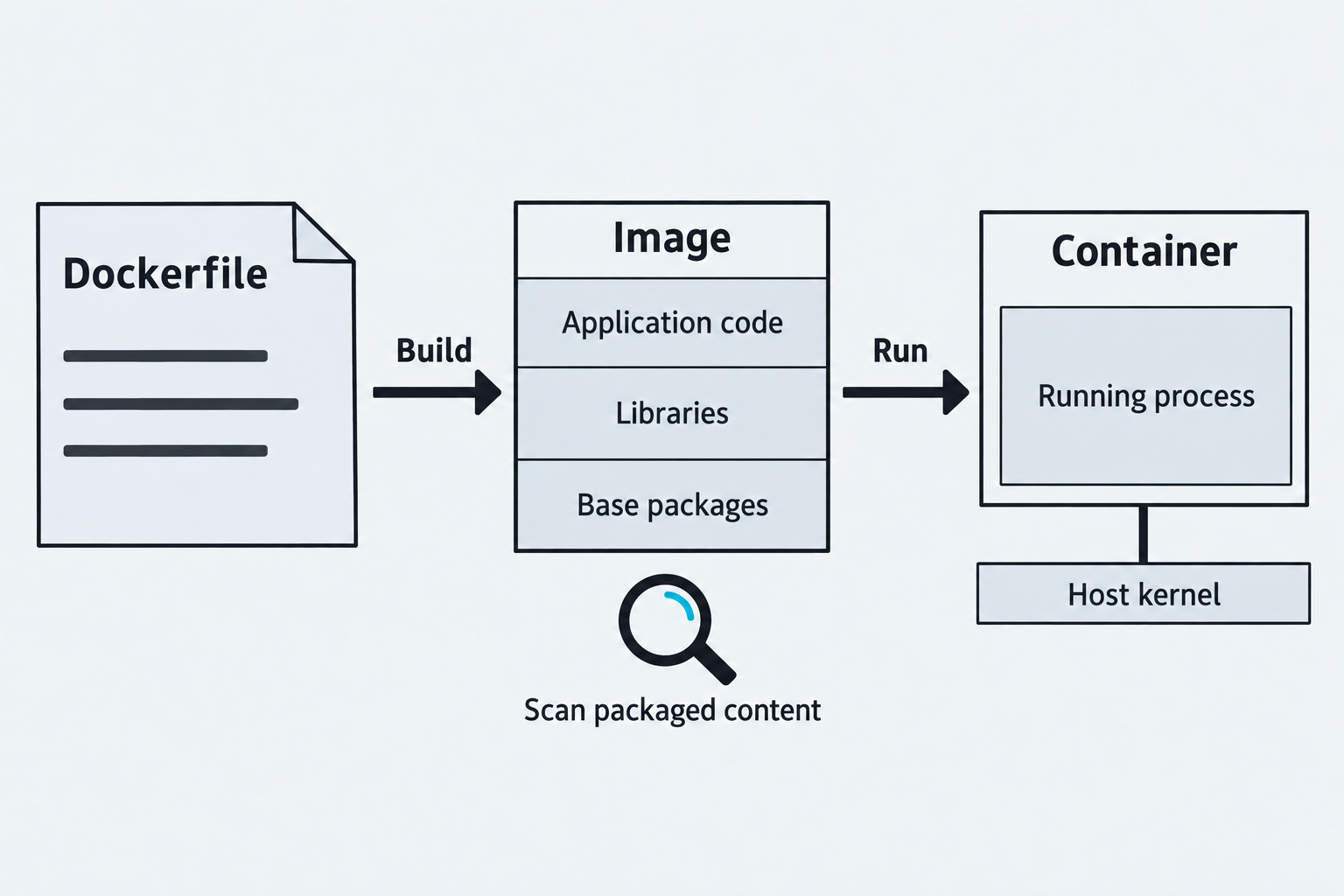
Figure 6.7: An image packages software; a running container uses that image and the host kernel.
Text description for Figure 6.7
A Dockerfile supplies build instructions. The image stores packaged filesystem content in layers, illustrated here as a simplified stack of application code, libraries, and base packages. Starting a container adds runtime state and runs isolated processes using a host kernel. Image scanning inspects packaged components. It does not fully assess the host, runtime permissions, cluster configuration, or the application's behavior.
Container Image Vulnerability Scanning
Container images package application code, libraries, and OS packages. A single vulnerable base image propagates to all derived images.
Trivy and Grype scan image layers for vulnerable packages:
# Build image
docker build -t myapp:latest .

# Scan with Trivy
trivy image myapp:latest

# Scan with Grype
grype myapp:latest
Output identifies CVEs in the base OS, web server, and application libraries.
Scanning efficiency matters in CI/CD pipelines. Scanning happens on every build; slow scans block deployment.
Admission controllers (Kubernetes enforcement) can block image deployment if it exceeds a vulnerability threshold:
apiVersion: admissionregistration.k8s.io/v1
kind: ValidatingWebhookConfiguration
metadata:
  name: image-scan-validator
webhooks:
  - name: scanner.example.com
    clientConfig:
      service:
        name: image-scanner
        namespace: default
        path: "/validate"
rules:
  - operations: ["CREATE"]
    apiGroups: [""]
    apiVersions: ["v1"]
    resources: ["pods"]
Follow the policy decision in Figure 6.8.
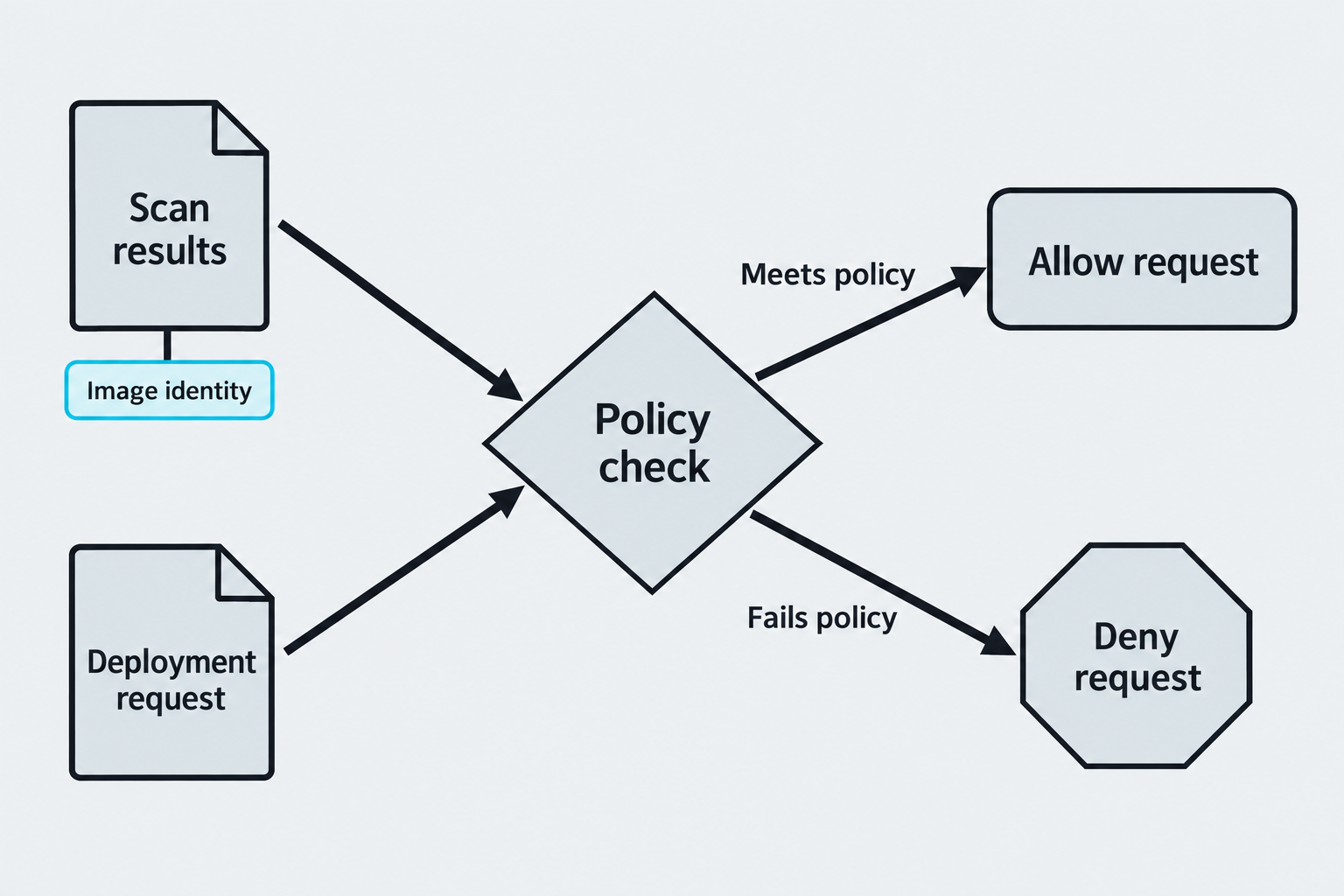
Figure 6.8: A configured admission policy can use scan results when deciding whether to allow a deployment request.
Text description for Figure 6.8
Admission control evaluates a request to the Kubernetes application programming interface before the requested object is persisted. In this conceptual integration, a configured policy uses scan evidence associated with the requested image identity. Meeting that policy allows the request; failing it denies the request. Implementing this design requires a policy service or other configured integration. Admission control does not automatically provide vulnerability scanning, and permission to deploy is not a guarantee of safety.
Secrets Scanning in Code and Artifacts
Hardcoded secrets in source code are critical findings. TruffleHog scans Git history for secrets:
# Scan entire repository history
trufflehog git https://github.com/target/repo

# Scan with entropy detection (flags high-entropy strings)
trufflehog git https://github.com/target/repo --json --entropy True

# Scan filesystem
trufflehog filesystem /path/to/project
Patterns detected:
- AWS access keys (
AKIA*) - Private SSH keys (
-----BEGIN RSA PRIVATE KEY-----) - Slack tokens (
xoxp-,xoxb-) - GitHub personal access tokens
- Database connection strings
- API keys in environment variables
Gitguardian is a commercial secrets scanning service:
# Pre-commit hook preventing secret commit
#!/bin/bash
gitguardian scan --staged --with-history
if [ $? -ne 0 ]; then
    echo "Secrets detected. Commit blocked."
    exit 1
fi
Trivy also detects secrets:
trivy fs /path/to/project --scanners secret
Trace the retained copies in Figure 6.9.
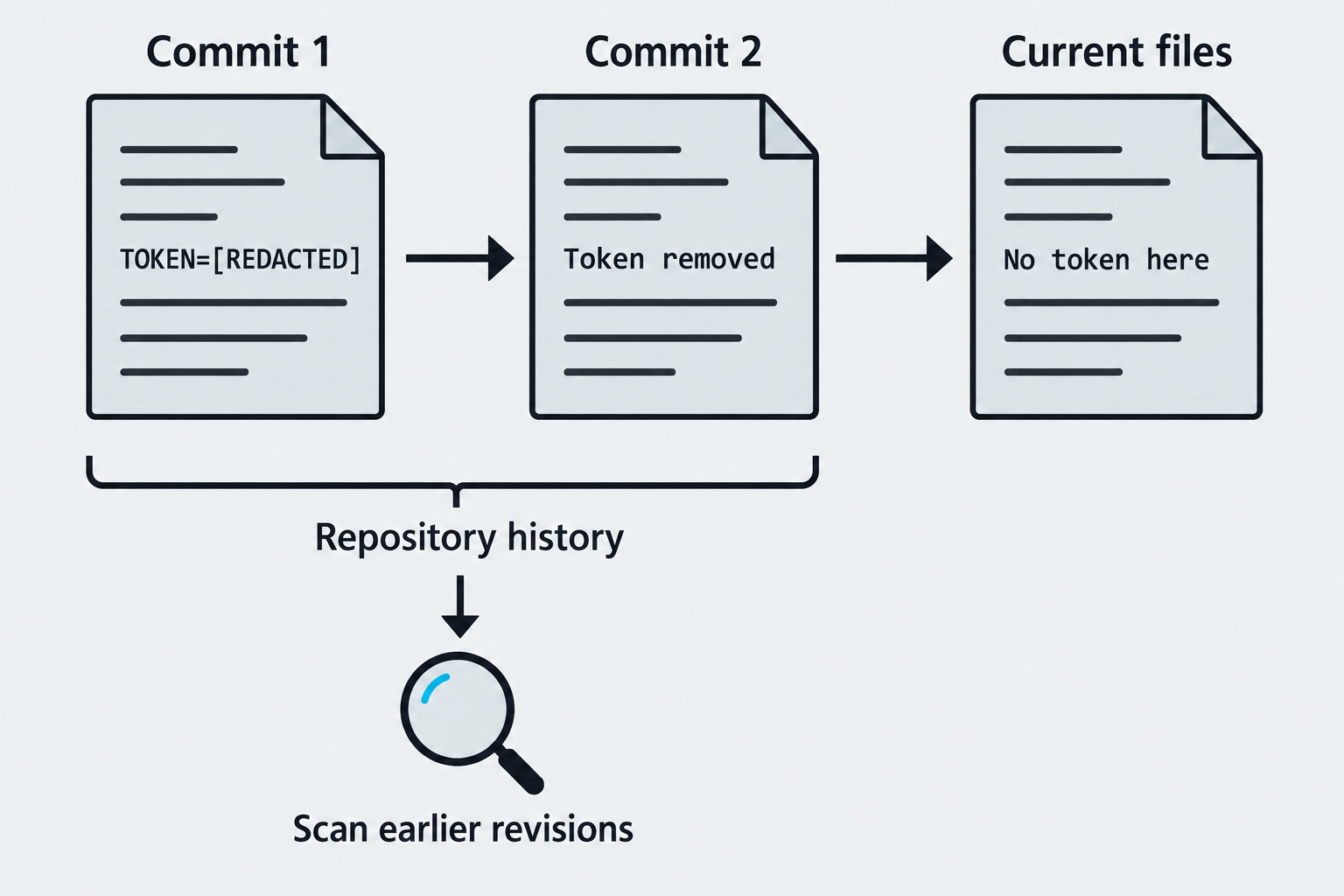
Figure 6.9: Earlier revisions can retain a secret after it disappears from the current files.
Text description for Figure 6.9
Read the snapshots from left to right. The first commit contains a redacted token. A later commit removes it, and the current file no longer contains the token. Repository history can retain the earlier content, so scanning only the current files misses that copy. A secret detector reports candidate exposures; the figure makes no claim about whether a credential remains valid. A confirmed exposure requires credential revocation or rotation as appropriate.
Authenticated versus Unauthenticated Scanning
Vulnerability scanning conducted with credentials (authenticated scan) is significantly more thorough than unauthenticated scanning. An authenticated scan can:
- Query running processes and services with full details
- List installed software packages and patch levels
- Examine configuration files (permissions, defaults, hardening)
- Check account lockout policies, password history, and complexity requirements
- Retrieve system information (BIOS version, firmware, driver versions)
- Test for weak configurations that only privileged operations reveal
Unauthenticated scans are limited to:
- Network-exposed ports and services
- Banner grabbing (identifying service versions from visible information)
- Default credentials and public vulnerabilities
- Information disclosure from error messages or misconfigured services
In practice, many assessments begin unauthenticated (to simulate external attack) and transition to authenticated scans (to assess internal risk or after gaining initial access).
Compare the available evidence in Figure 6.10.
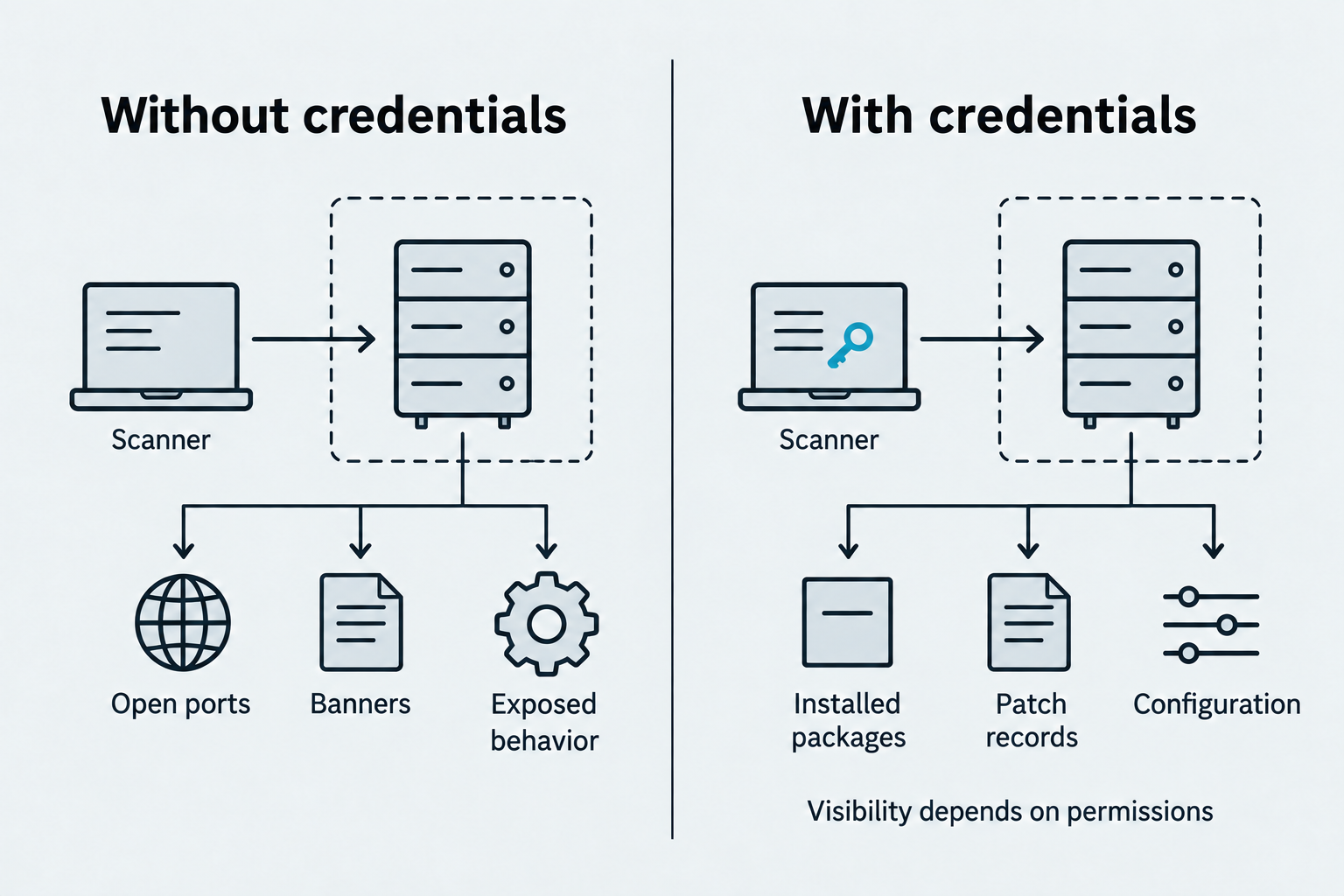
Figure 6.10: Credentials can reveal internal evidence that a network-only scan cannot inspect.
Text description for Figure 6.10
Without credentials, the scanner primarily observes services and behavior exposed over the network. With an authorized account, supported checks can read additional package, patch, and configuration evidence. The extra visibility depends on privileges, successful authentication, platform support, and scan settings. Record credential failures and untested checks; possession of credentials alone does not establish scan completeness.
Putting It Together: Container and Secrets Scan
Your organization maintains a Docker image for a microservice. Here's the assessment:
Phase 1: Base image scan
trivy image ubuntu:18.04
# High-severity CVEs found (18.04 is EOL, outdated packages)
Phase 2: Dockerfile analysis
FROM ubuntu:18.04
RUN apt-get update && apt-get install -y apache2 php mysql-client
COPY --chown=root:root . /var/www/html
ENV DB_PASSWORD=super_secret_123
Issues:
- Base image is EOL and vulnerable
- DB password hardcoded in ENV (scanners will flag this)
Phase 3: Secrets scan
trufflehog filesystem /path/to/microservice

# Findings:
# - AWS key in config.py
# - Slack webhook in .env.example
# - Database credentials in docker-compose.yml
Phase 4: Application library scan
grype myapp:latest

# Findings:
# - requests 2.22.0 (CVE-2023-32681)
# - cryptography 3.1.1 (multiple CVEs)
Remediation: Update base image, move secrets to environment/vault, update dependencies.
6.5 Validating Scan Results
True Positives, False Positives, and Exploitability
A true positive (TP) is a vulnerability that exists and is exploitable. A false positive (FP) is a finding that doesn't exist (scanner misidentified something) or exists but is not exploitable (defense-in-depth mitigates it).
Example:
A scanner flags a SQL injection vulnerability in a search field:
Parameter: keyword
Payload: ' OR 1=1 --
Response: 500 Internal Server Error
Finding: SQL Injection - High
To validate:
- Reproduce manually: Enter
' OR 1=1 --in the search field - If results change (returns all records), it's a TP
-
If error occurs (but consistent across inputs), it's an FP (error-based, not injection)
-
Check context: Is the input actually queried in SQL?
- If search is cached (Redis) and not SQL, injection may not work
-
If database is read-only, injection risk is lower
-
Test for true data extraction: Attempt to extract data:
If data is returned, confirmed TP.' UNION SELECT username, password FROM users --
Compare the validation outcomes in Figure 6.13.
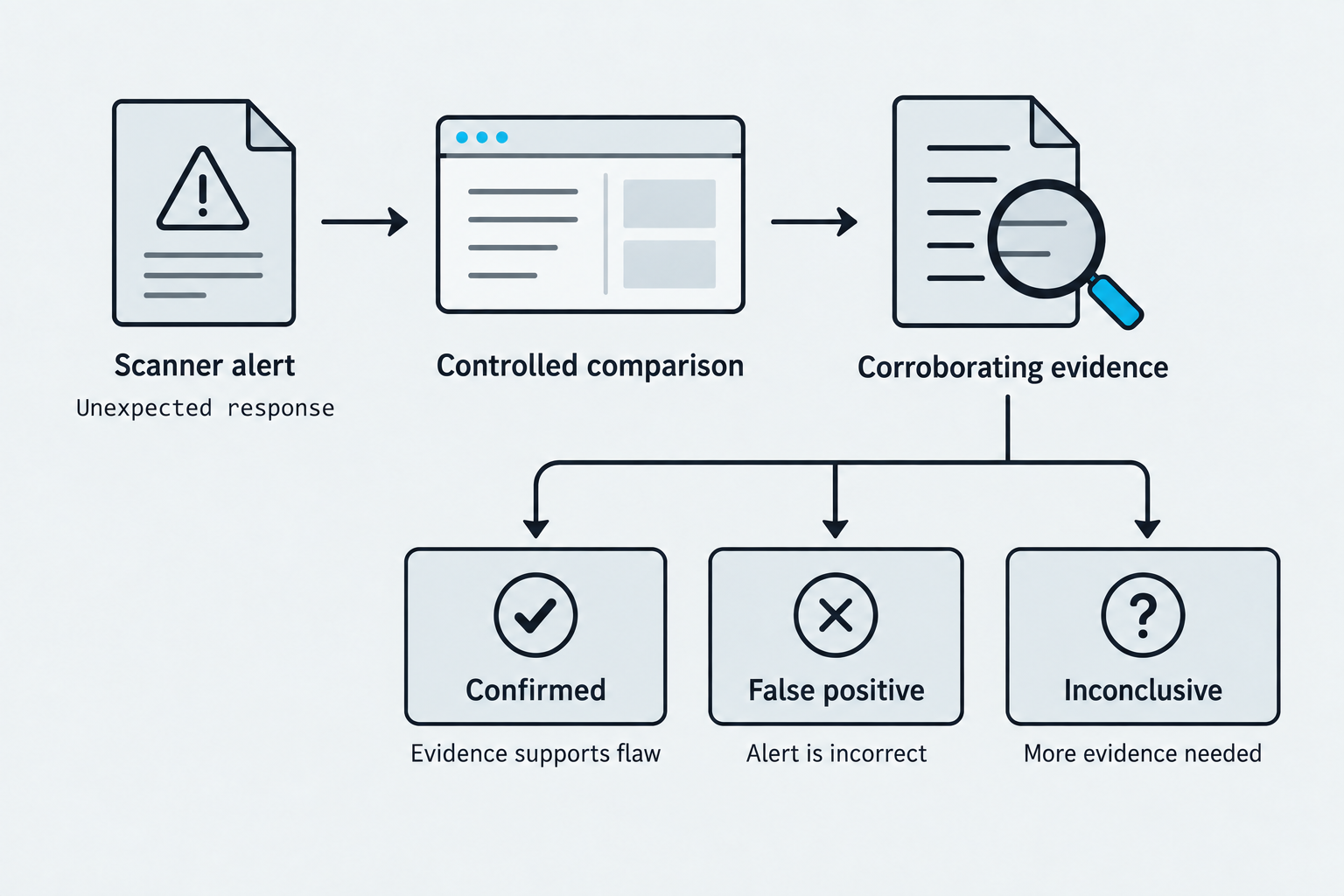
Figure 6.13: Validation compares controlled behavior with corroborating evidence and preserves uncertainty when the evidence is incomplete.
Text description for Figure 6.13
A scanner alert starts an investigation. Compare a baseline with an authorized, controlled test and inspect supporting evidence such as the code path or relevant configuration. Confirmed means the evidence supports the reported weakness. False positive means the alert incorrectly identifies a weakness. Inconclusive means the evidence cannot settle the question. Document exploitability, mitigations, and impact separately. A server error alone does not confirm injection, and a compensating control does not automatically erase an underlying flaw.
Severity Scoring
CVSS (Common Vulnerability Scoring System) is the standard for communicating severity. CVSS v3.1 includes:
- Base Score: Intrinsic properties of the vulnerability (0-10)
- Temporal Score: Factors that change over time (exploit availability, patch availability)
- Environmental Score: Context-specific factors (asset value, compensating controls)
CVSS vector example:
CVSS:3.1/AV:N/AU:N/PR:N/UI:N/S:U/C:H/I:H/A:H
Meaning:
- AV:N: Attack Vector = Network (can be exploited remotely)
- AU:N: Authentication = None (no credentials required)
- PR:N: Privilege Required = None (no prior access required)
- UI:N: User Interaction = None (no user action needed)
- S:U: Scope = Unchanged (impacts only the vulnerable component)
- C:H/I:H/A:H: Confidentiality/Integrity/Availability = High
This vector scores 9.8 (Critical).
EPSS (Exploit Prediction Scoring System) estimates the likelihood of exploit in the next 30 days:
CVE-2023-12345: EPSS = 0.92 (92% chance of exploit activity)
CVE-2023-67890: EPSS = 0.02 (2% chance of exploit activity)
Using scores to prioritize: Focus on high CVSS + high EPSS (critical and actively exploited). A vulnerability with CVSS 9.8 but EPSS 0.1 (low exploit likelihood) might be deprioritized if more pressing findings exist.
Distinguish the inputs to remediation priority in Figure 6.14.
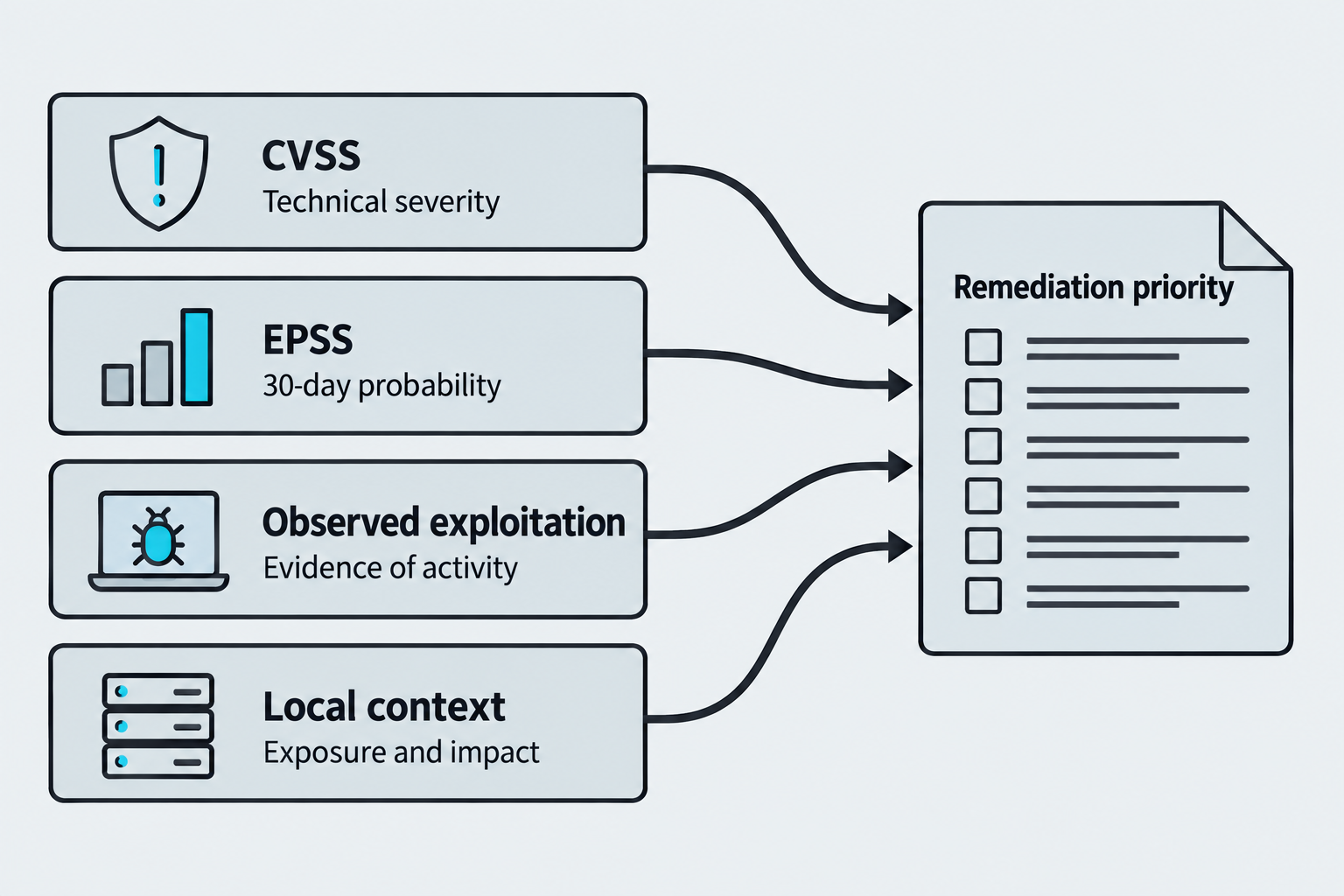
Figure 6.14: Severity, exploitation probability, observed activity, and local context inform remediation priority.
Text description for Figure 6.14
The Common Vulnerability Scoring System (CVSS) describes technical severity. The Exploit Prediction Scoring System (EPSS) estimates the probability of exploitation activity in the next 30 days for a published Common Vulnerabilities and Exposures (CVE) record. Observed exploitation is separate evidence of activity. Local context includes exposure, affected assets, business impact, and compensating controls. EPSS is not a general score for every custom finding or exposed secret. The diagram shows inputs to judgment, not a formula.
Putting It Together: Validation and Prioritization
You've completed vulnerability scans across three assets:
| Asset | Finding | CVSS | EPSS | Status |
|---|---|---|---|---|
| Web App | SQL Injection (search field) | 9.1 | 0.89 | Confirmed TP |
| Web App | Hardcoded AWS key | 9.8 | 0.45 | Confirmed TP (key has permissions) |
| Web App | Outdated jQuery (XSS sink) | 6.1 | 0.12 | TP (requires user interaction) |
| Database | No authentication required | 9.9 | 0.78 | Confirmed TP (accessed without password) |
| Database | Weak TLS cipher (RC4) | 7.5 | 0.05 | TP (encryption negotiation allows weak cipher) |
| Server | SSH weak MAC | 5.9 | 0.01 | TP (connection downgrade possible) |
Prioritization:
- Critical & Exploited: Hardcoded AWS key, No authentication on database (fix immediately)
- Critical & Not Yet Exploited: SQL injection (fix within 24-48 hours)
- High & Exploited: Outdated jQuery (patch on next release cycle)
- Medium: Weak ciphers, weak MAC (patch in maintenance window)
Chapter Summary
-
Network scanning uses SYN scans for efficiency, UDP scans for comprehensive port coverage, and service version detection to identify vulnerable services.
-
Vulnerability scanners (Nessus, OpenVAS) combine port-based signatures, service queries, and configuration review. NSE scripts provide lightweight, targeted scanning.
-
DAST interacts with running applications, finding injection flaws, XSS, and misconfigurations. SAST analyzes source code for insecure patterns. SCA identifies vulnerable dependencies.
-
Container scanning must be integrated into CI/CD pipelines to prevent vulnerable images from reaching production. Secrets scanning detects hardcoded credentials in code and artifacts.
-
Validation distinguishes true positives from false positives through manual reproduction, context analysis, and data extraction attempts.
-
Severity scoring (CVSS, EPSS) prioritizes findings. Focus on high CVSS + high EPSS first.