CH7: Vulnerability Assessment Tools
Introduction
Chapter 6 established the methodologies and planning required for a mature vulnerability scanning program. This chapter introduces the tools that execute those methodologies. No tool is universally best; each tool addresses specific problems and has particular strengths. A network scanning tool like Nmap excels at port enumeration but cannot assess web application security. A web application scanner like Burp Suite cannot scan network infrastructure. A vulnerability scanner like Nessus identifies missing patches but cannot assess cloud configuration. Effective security programs combine multiple tools to cover the entire attack surface.
This chapter surveys the most widely-used tools organized by function: network scanning and mapping tools, multipurpose frameworks, web application scanners, vulnerability scanners, cloud infrastructure assessment tools, and breach simulation tools. Rather than providing exhaustive feature lists, the chapter focuses on what each tool is designed to do, what problems it solves, and when to use it.
By the end of this chapter, students will understand which tools address which problems, how to select tools appropriate for specific assessment objectives, and how to integrate tool output into remediation workflows.
Learning Objectives
Upon completing this chapter, students will be able to:
- Select appropriate network scanning and reconnaissance tools for mapping infrastructure and identifying running services.
- Explain how multipurpose frameworks (Nmap, Metasploit, Maltego, Recon-ng) integrate multiple assessment techniques.
- Evaluate web application scanners for finding common vulnerabilities (SQL injection, XSS, authentication bypass).
- Use vulnerability scanners to identify missing patches and configuration vulnerabilities across networks.
- Apply cloud-specific assessment tools to identify infrastructure misconfigurations and compliance violations.
7.1 Network Scanning and Mapping Tools
Network scanning tools discover what hosts are alive on the network and what services they are running.
Nmap: The Foundational Port Scanner
Nmap (Network Mapper) is the de facto standard for port scanning and network mapping. It serves multiple functions: host discovery, port scanning, service version detection, and OS fingerprinting. Nmap runs on Windows, macOS, and Linux, and its output can be formatted as text, XML, or parseable greppable format.
Basic syntax (Linux/macOS):
nmap [target]
nmap -p 22,80,443 192.168.1.0/24  # Scan specific ports on a subnet
nmap -sV 192.168.1.100              # Service version detection
nmap -O 192.168.1.100               # OS fingerprinting
nmap -sS 192.168.1.100              # Stealth SYN scan
nmap -oX results.xml 192.168.1.100  # Output to XML
Key Nmap features:
- Port scanning methods: SYN scan (-sS, default) sends SYN packets and watches for responses without completing three-way handshakes. UDP scan (-sU) probes UDP services. Connect scan (-sT) completes full TCP handshakes.
- Service version detection (-sV) attempts to identify service versions by connecting and analyzing banners. Known vulnerable versions can be immediately flagged.
- OS fingerprinting (-O) analyzes TCP/IP implementation characteristics to infer the operating system. Accuracy depends on system configuration and firewall rules.
- Timing templates (-T[0-5]) control scan speed. T0 (paranoid) is slowest and stealthiest. T5 (insane) is fastest. Default is T3 (normal).
- Scripting engine (NSE): Nmap includes thousands of scripts that automate tasks beyond port scanning. NSE scripts can check for specific vulnerabilities, extract information from services, and perform brute-force attacks.
Nmap example: Scanning a subnet for web servers and checking HTTP methods:
nmap -p 80,443 -sV --script http-methods 192.168.1.0/24 -oX web_servers.xml
This scans ports 80 and 443 on a /24 subnet, detects web server versions, runs an NSE script to enumerate allowed HTTP methods, and outputs results to XML. The results reveal which servers are vulnerable to certain HTTP methods that should be disabled.
Analyst Perspective
Nmap is ubiquitous in security work. You will use it in assessments, incident response, network troubleshooting, and threat hunting. Investing time to master Nmap (flags, scan types, NSE scripting) is a career asset. It is also one of the few security tools that is identical across Windows, macOS, and Linux, making skills portable.
Angry IP Scanner
Angry IP Scanner is a graphical tool for network host discovery and port scanning. Unlike Nmap (command-line), Angry IP Scanner presents results in a spreadsheet-like interface, making it accessible to analysts less comfortable with command-line tools.
Key features:
- Host discovery: Ping sweep to identify all alive hosts on a network range
- Port scanning: Scans specified ports (e.g., common ports like 22, 80, 443, 3389) to determine which hosts are running services
- DNS reverse lookup: Resolves IP addresses to hostnames where DNS records exist
- Graphical display: Results are displayed in a sortable table, making it easy to identify patterns (all systems on a subnet running Windows, all systems missing specific ports)
- Multi-threaded scanning: Scans multiple hosts in parallel, completing faster than sequential scanning
Angry IP Scanner is particularly useful for quick network inventory. Run it on a subnet, and within minutes you have a list of all active hosts and running services.
Masscan: High-Speed Port Scanning
Masscan is designed for speed. Where Nmap may take hours to scan a large IP range, Masscan can scan the same range in minutes by using asynchronous scanning and custom packet crafting.
Use case: Scanning large IP ranges or the entire internet to identify systems with specific services exposed. Masscan can scan all IPv4 addresses on port 443 (looking for HTTPS servers) or port 22 (looking for SSH) and generate a list of all responding systems.
Limitation: Masscan is fast but less feature-rich than Nmap. It excels at identifying open ports but provides less service version information or OS fingerprinting.
Figure 7.1 compares the kinds of network observations these tools can collect.
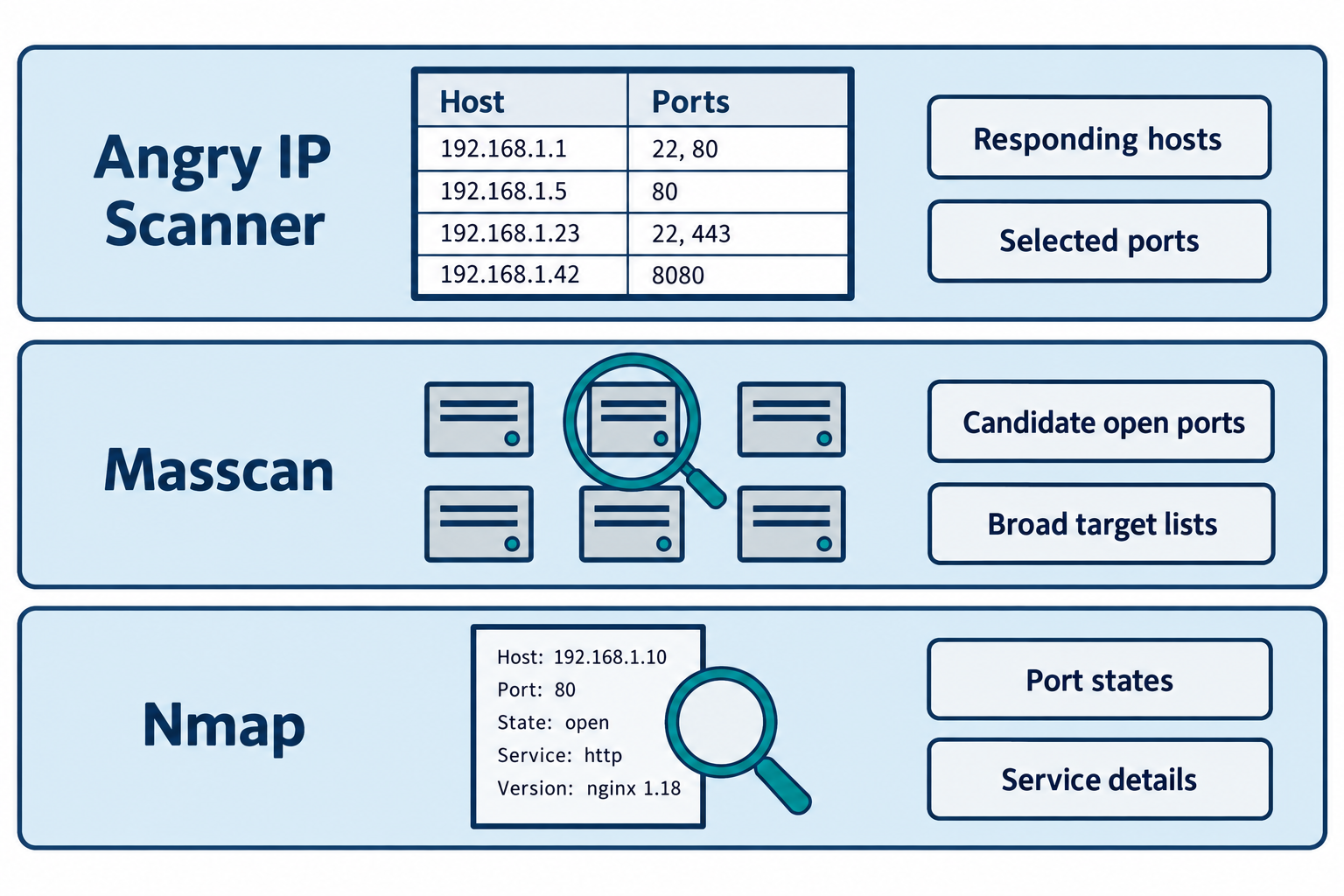
Figure 7.1: Network scanners emphasize different outputs. The fictional observations illustrate common uses, with results depending on selected probes, target responses, and scan conditions.
Text description for Figure 7.1
Three horizontal rows compare common uses. Angry IP Scanner emphasizes a sortable inventory of responding hosts and selected ports. Masscan emphasizes candidate open ports across an authorized address range. Nmap can examine selected hosts more closely to identify port states, service versions, and operating-system clues. The rows show representative outputs, not exact interfaces or exclusive capabilities. Missing responses do not establish that a host is absent. Service identification and version observations need validation before an analyst concludes that a vulnerability exists. The fictional inventory lists 192.168.1.1 with ports 22 and 80, 192.168.1.5 with port 80, 192.168.1.23 with ports 22 and 443, and 192.168.1.42 with port 8080. The separate Nmap-style record shows 192.168.1.10, port 80, state open, service http, and observed version nginx 1.18. These examples do not represent a scan of a real network or establish that a displayed version is vulnerable.
7.2 Multipurpose Frameworks
Some tools integrate multiple techniques into a single framework.
Nmap + NSE (Network Scripting Engine)
Nmap's NSE extends its capabilities. Rather than just identifying services, NSE scripts perform targeted actions:
- Vulnerability detection: Check for known vulnerabilities in identified services (e.g., Heartbleed in OpenSSL)
- Information gathering: Extract information from services (DNS zone transfers, NTP server lists)
- Brute-force attacks: Attempt default or weak credentials
- Fingerprinting: Identify software and services more precisely
NSE scripts are written in Lua and are stored in /usr/share/nmap/scripts/ (Linux). Running scripts with identified vulnerabilities:
nmap -p 443 --script ssl-enum-ciphers 192.168.1.100  # Check SSL cipher strength
nmap -p 22 --script ssh-auth-methods 192.168.1.100    # Check SSH authentication methods
Figure 7.2 shows how the Nmap Scripting Engine (NSE) adds targeted checks to a service assessment.
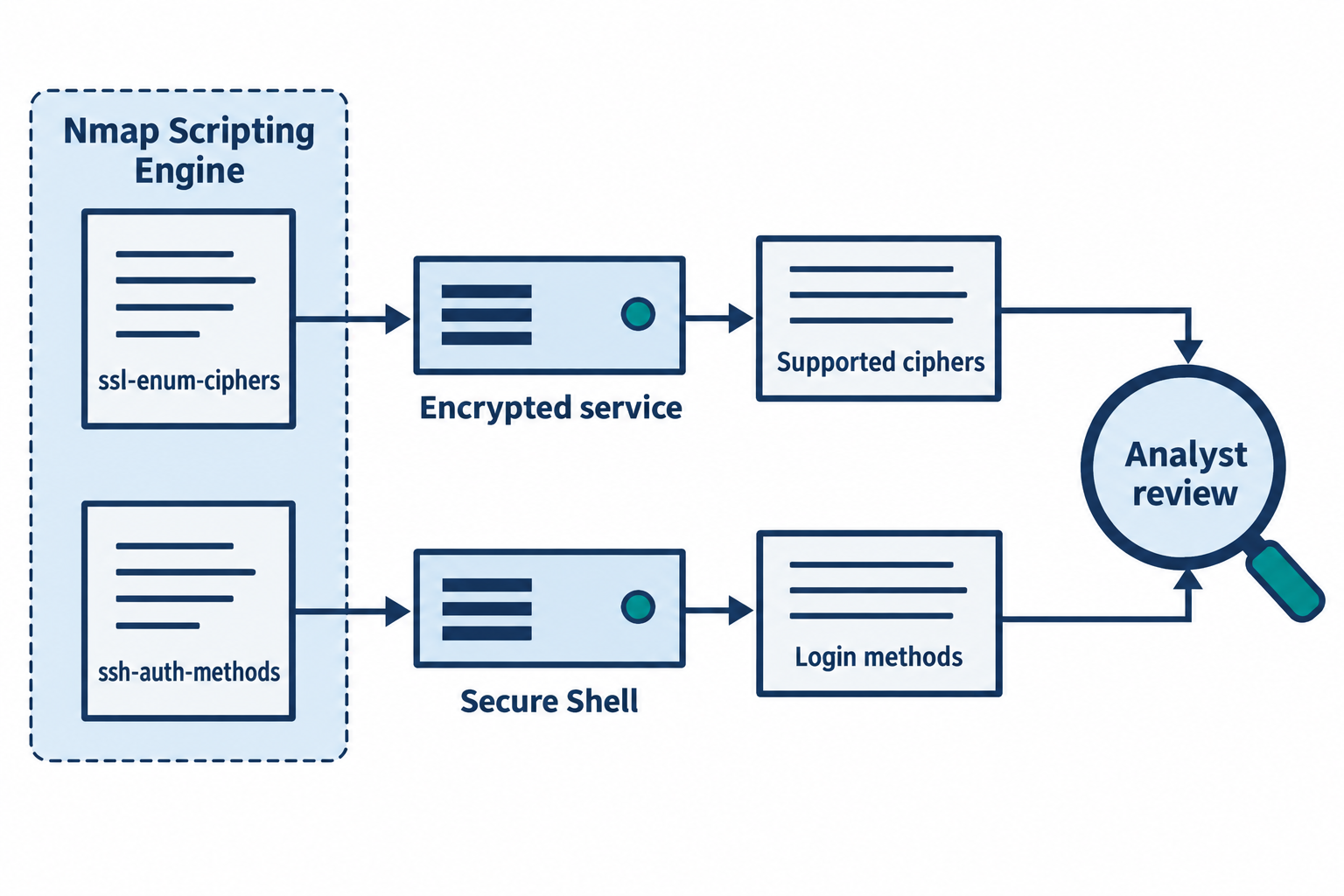
Figure 7.2: NSE scripts collect specific observations that an analyst interprets against the system's intended configuration.
Text description for Figure 7.2
The Nmap Scripting Engine, abbreviated NSE, runs scripts for selected assessment tasks. In the upper lane, ssl-enum-ciphers queries an encrypted service and records supported cipher suites. A cipher suite specifies algorithms used by an encrypted connection. In the lower lane, ssh-auth-methods queries a Secure Shell service and records the authentication methods offered for the supplied user context. Both results go to analyst review. A supported protocol feature or authentication method is an observation. Whether it creates a vulnerability depends on policy, configuration, and context. Script selection and testing scope require review because script behavior varies.
Metasploit Framework
Metasploit is a comprehensive penetration testing framework that integrates exploitation, payload generation, and post-exploitation features. While primarily used in offensive security (ethical hacking), it is relevant to vulnerability assessment because it is used to verify that identified vulnerabilities are actually exploitable.
Key components:
- Exploits: Modules that target specific vulnerabilities. An exploit for CVE-2017-5638 (Apache Struts) attempts to remotely execute code on a vulnerable server.
- Payloads: Code that executes after a successful exploit. Payloads can spawn shells, download files, or establish reverse connections for command execution.
- Modules: Hundreds of modules for reconnaissance, scanning, exploitation, and post-exploitation.
- msfconsole: The interactive command-line interface where an attacker chains modules together.
In a vulnerability assessment context, Metasploit verifies that a vulnerability found by a scanner is actually exploitable. For example:
- Vulnerability scanner (Nessus) identifies Apache Struts 2.3.15 vulnerable to CVE-2017-5638
- Metasploit exploit attempts to execute a benign payload (not malicious, just confirming code execution)
- If payload succeeds, vulnerability is confirmed exploitable. If it fails, it may be a false positive or the vulnerability is not present.
Figure 7.3 separates a scanner finding from the evidence produced by an authorized validation test.
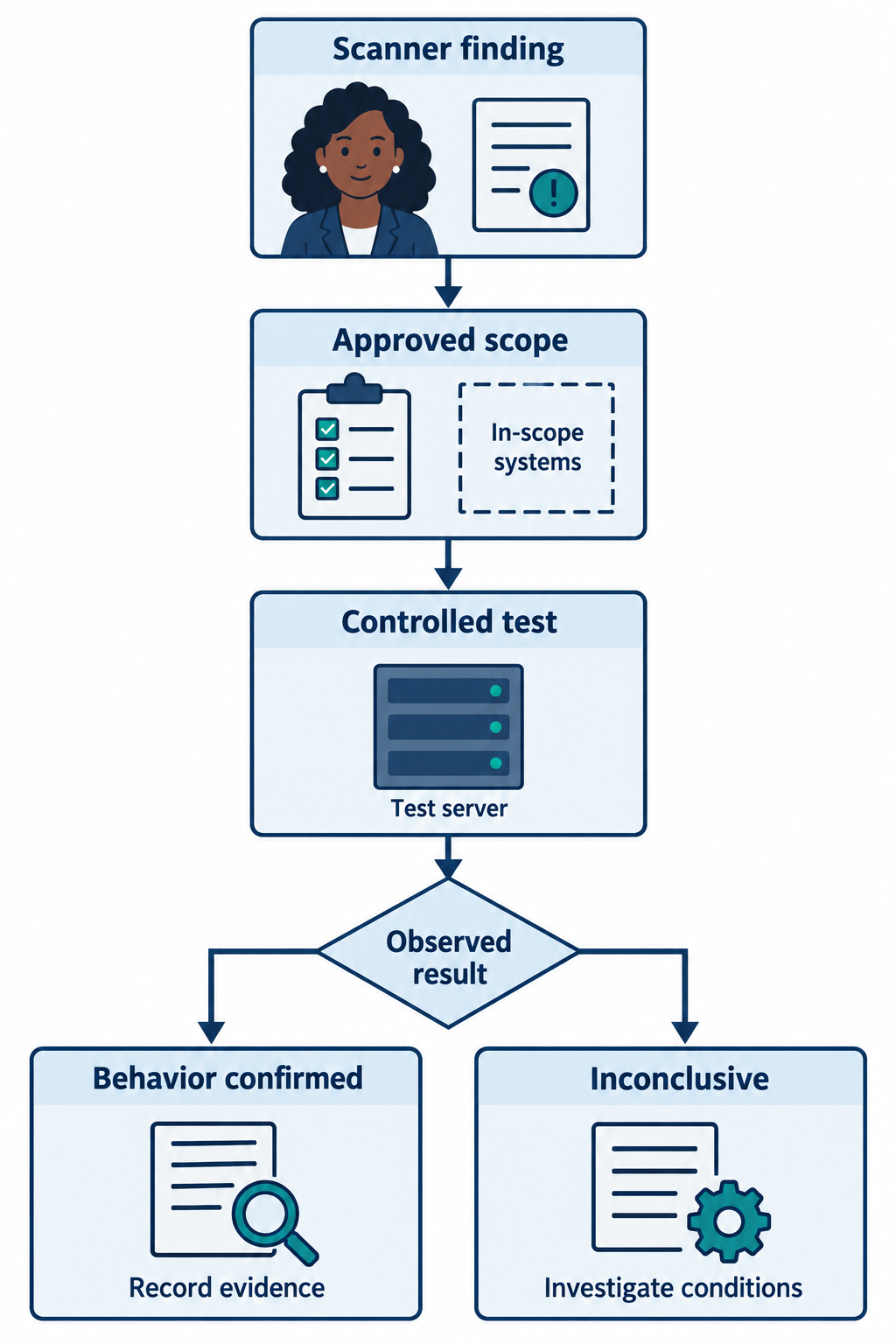
Figure 7.3: Controlled validation can confirm exploitability under tested conditions. An unsuccessful test leaves several possible explanations.
Text description for Figure 7.3
An analyst starts with a suspected vulnerability reported by a scanner. Before testing, the assessment team confirms authorization, target scope, and a recovery plan. A controlled validation test, such as an appropriate Metasploit module in an approved environment, records the observed behavior. Demonstrated behavior can confirm exploitability under those conditions. An unsuccessful attempt is inconclusive: targeting, prerequisites, defenses, connectivity, or the absence of the flaw can explain failure. The team preserves evidence, checks the environment, and investigates unresolved results. This conceptual workflow contains no exploit commands or payload instructions.
Maltego: Open-Source Intelligence (OSINT) Framework
Maltego is an OSINT tool designed for gathering intelligence on targets. While not a vulnerability scanner, it integrates data from multiple sources to build relationship graphs and identify information relevant to security assessment.
Uses in vulnerability assessment:
- Domain enumeration: Discover subdomains of a target domain (www.target.com, mail.target.com, staging.target.com)
- DNS analysis: Identify mail servers, name servers, and other infrastructure
- Whois data: Extract registrant information, registrar details, and hosting providers
- IP address research: Identify IP ranges associated with an organization, all domains hosted on the same IP
- Social media and personnel: Identify key individuals (CTO, security team) and their public information
Maltego is valuable for external assessments where you need to map the organization's internet-facing infrastructure before scanning begins.
Recon-ng: Reconnaissance Automation
Recon-ng is a web reconnaissance framework that automates reconnaissance steps. It integrates with APIs and data sources to gather information without direct scanning.
Features:
- Domain enumeration: Identify subdomains and hosts
- DNS resolution: Resolve domains to IP addresses
- WHOIS and registrar data: Extract ownership and administrative information
- Port and vulnerability data: Query databases of known vulnerabilities associated with identified IP ranges
- Reporting: Generate HTML reports summarizing reconnaissance findings
Recon-ng is useful when direct scanning is not possible (assessment of an external organization) or should be limited (reconnaissance without alerting the target).
Figure 7.4 connects reconnaissance records to a relationship graph and a scoped assessment list.
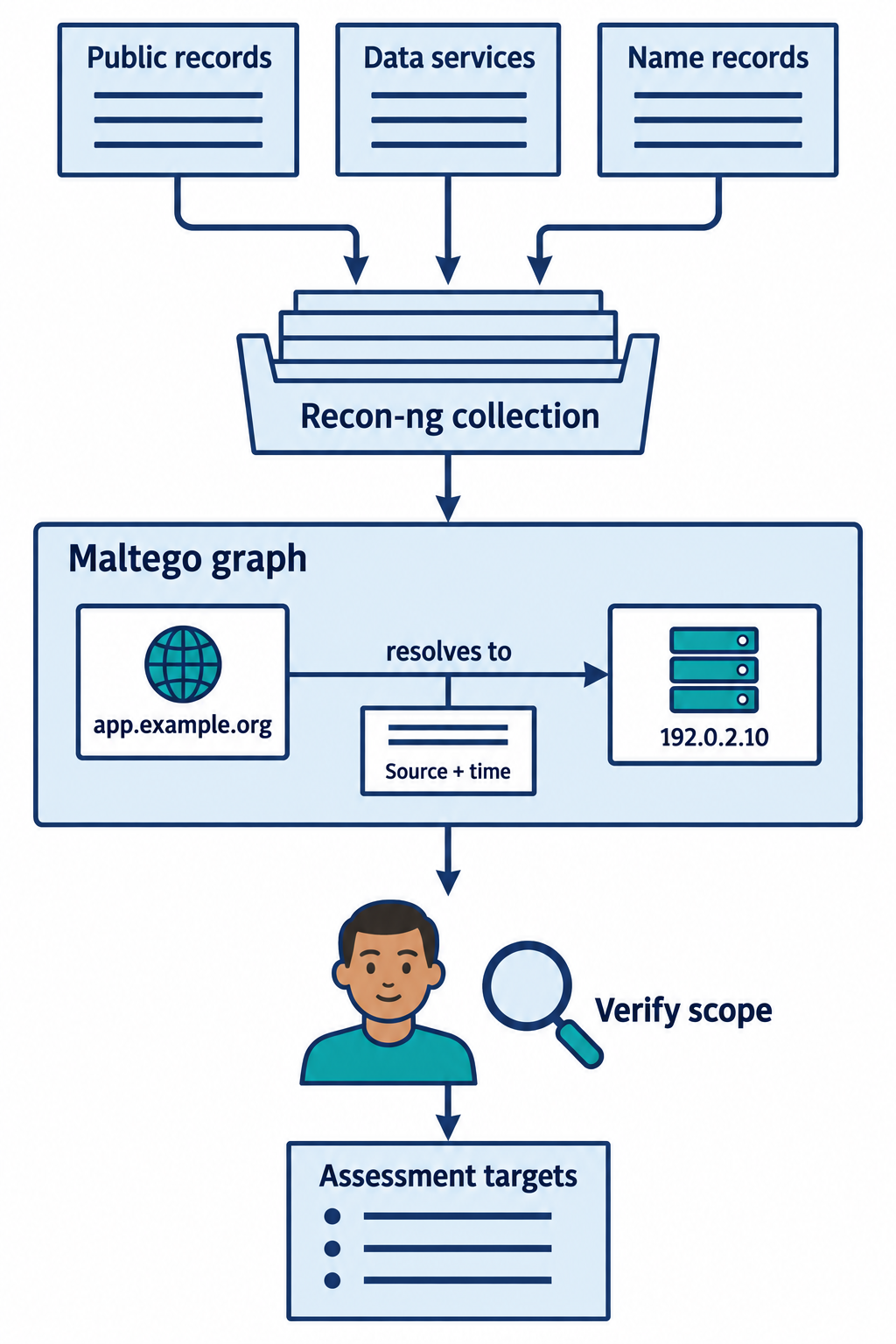
Figure 7.4: Reconnaissance tools organize observations from multiple sources. Each relationship needs source context and verification before it defines assessment scope.
Text description for Figure 7.4
Public records and authorized data sources provide candidate hostnames and infrastructure relationships. Recon-ng modules can collect and organize such records. A Maltego-style graph represents entities and the relationships between them. The fictional example shows app.example.org resolving to the documentation address 192.0.2.10. A source and observation time accompany the relationship. Resolution does not establish ownership, and shared infrastructure can connect unrelated organizations. An analyst verifies relevance and permission before adding a candidate to the scan scope. Module and transform behavior varies, so the illustration does not imply that every reconnaissance action is passive. The collection-to-graph arrow represents an analyst workflow for organizing related records, not a claim that the two products connect automatically.
Analyst Perspective
Reconnaissance tools (Maltego, Recon-ng) are particularly useful for external vulnerability assessments where you are assessing a customer's external posture without having internal network access. You can map all internet-facing systems before active scanning begins, reducing noise and focusing scanning on key assets.
7.3 Web Application Scanners
Web applications are the attack surface for many breaches. Unlike network scanners, which probe ports and services, web application scanners test application logic and look for common web vulnerabilities.
Burp Suite
Burp Suite is the industry standard for web application testing. It combines a proxy, scanner, and manual testing tools. The proxy intercepts HTTP/HTTPS traffic between the browser and web server, allowing manipulation and analysis of requests and responses.
Key features:
- Proxy: Intercepts all HTTP/HTTPS traffic, allowing manual inspection and manipulation
- Scanner: Actively scans the application for common vulnerabilities (SQL injection, XSS, authentication bypass, broken access control)
- Intruder: Automates customized attacks by inserting payloads into requests (parameter injection, brute-force)
- Repeater: Captures and replays requests, useful for testing authentication and session handling
- Decoder: Encodes/decodes data (base64, URL encoding, etc.) for analysis
- Collaborator: External service that detects out-of-band data interactions (HTTP callbacks, DNS lookups) useful for confirming certain vulnerabilities
Typical workflow:
- Configure browser to use Burp proxy on localhost:8080
- Browse the application normally; Burp intercepts and logs all traffic
- Use Burp Scanner to automatically test for vulnerabilities
- Manually test authentication, authorization, and business logic using Repeater and Intruder
- Export findings and prioritize for remediation
Figure 7.5 traces a browser request and its response through a testing proxy.
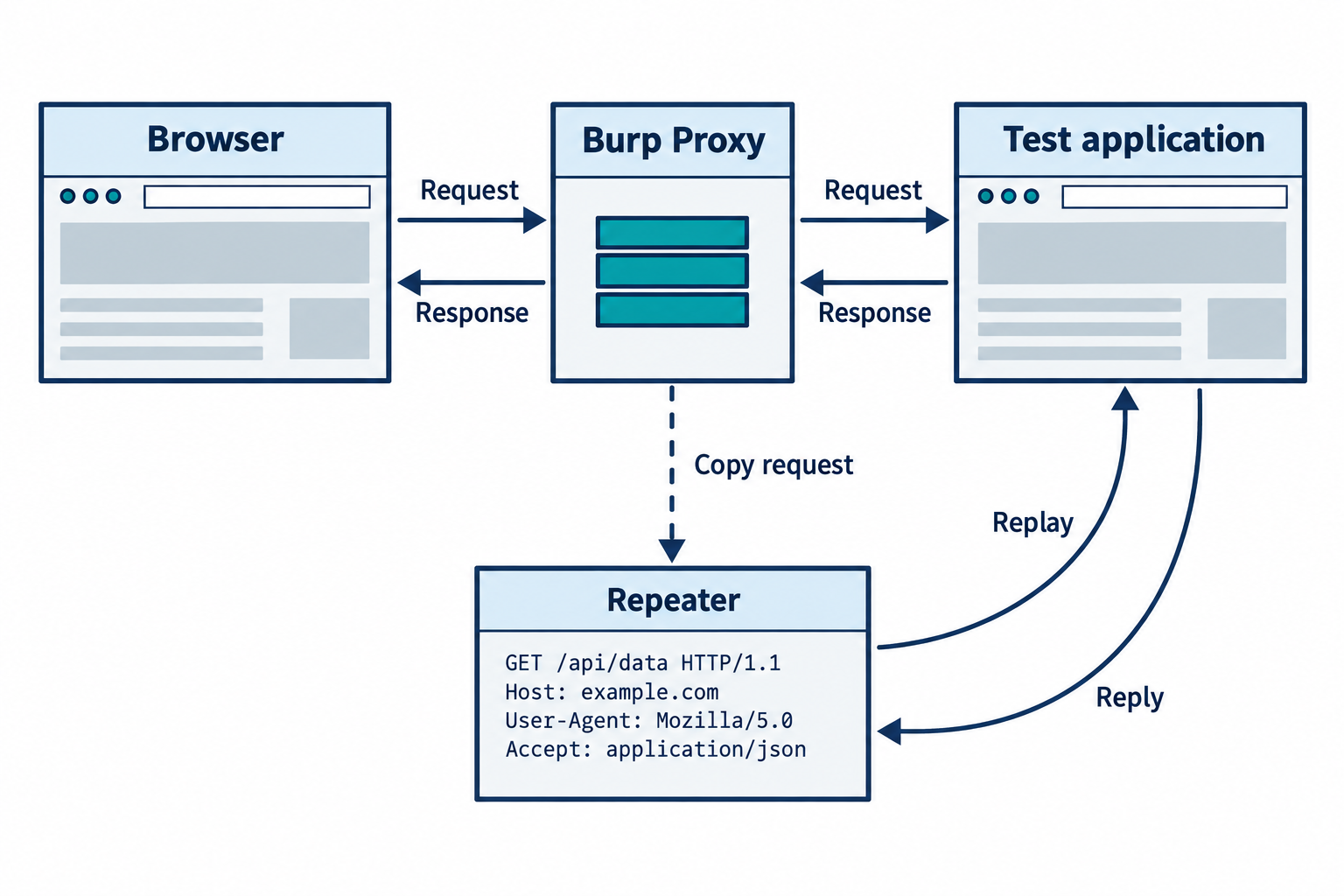
Figure 7.5: A configured testing proxy lets the analyst inspect selected web traffic. Manual replay tools support controlled changes to individual requests.
Text description for Figure 7.5
Across the main row, a browser sends a request through Burp Proxy to an authorized test application. A separate row of arrows returns the application response through the proxy to the browser. Hypertext Transfer Protocol, or HTTP, carries web requests and responses. HTTPS adds Transport Layer Security encryption, so interception requires appropriate browser trust and proxy configuration. A dashed copy arrow from the proxy leads to Repeater below. Repeater lets an analyst edit and resend a chosen request to the application and compare the returned response. The diagram shows configured traffic only, not every application's network traffic. The fictional Repeater card shows GET /api/data HTTP/1.1, Host: example.com, User-Agent: Mozilla/5.0, and Accept: application/json. These are representative request lines rather than an exact product screenshot.
Burp is powerful but requires expertise. Beginners often trigger hundreds of false positives or miss subtle vulnerabilities. Professional penetration testers spend weeks learning Burp's capabilities.
OWASP ZAP (Zed Attack Proxy)
ZAP is an open-source alternative to Burp Suite. It provides similar functionality (proxy, scanner, manual testing) at no cost. ZAP is particularly valuable for organizations with limited budgets or open-source requirements.
Key differences from Burp:
- Open source: Freely available and can be modified or integrated into custom tools
- Less feature-rich: ZAP covers common test cases well but lacks some advanced features of commercial Burp
- Community-driven: Active community contributes scripts and plugins
- Suitable for: Organizations transitioning from manual testing to automated scanning, or those integrating scanning into CI/CD pipelines
ZAP can be run in headless mode (no GUI) and integrated into automated testing pipelines:
zaproxy.sh -cmd -quickurl http://target.com -quickout report.html
Nikto
Nikto is a lightweight web server scanner that identifies:
- Outdated server software (Apache 2.2, IIS 7.0 with known vulnerabilities)
- Dangerous files or directories (default installations, backup files, administrative panels)
- Server misconfigurations (directory listing enabled, weak HTTP methods allowed)
- Known server vulnerabilities (buffer overflows, information disclosure)
Nikto is command-line based and simple to use:
nikto -h target.com -p 80 -o report.html
Nikto is fast and generates useful output for web server assessment, but it is less sophisticated than Burp or ZAP for application logic testing.
Figure 7.6 maps common web assessment tools to server checks, application interaction, and analyst review.
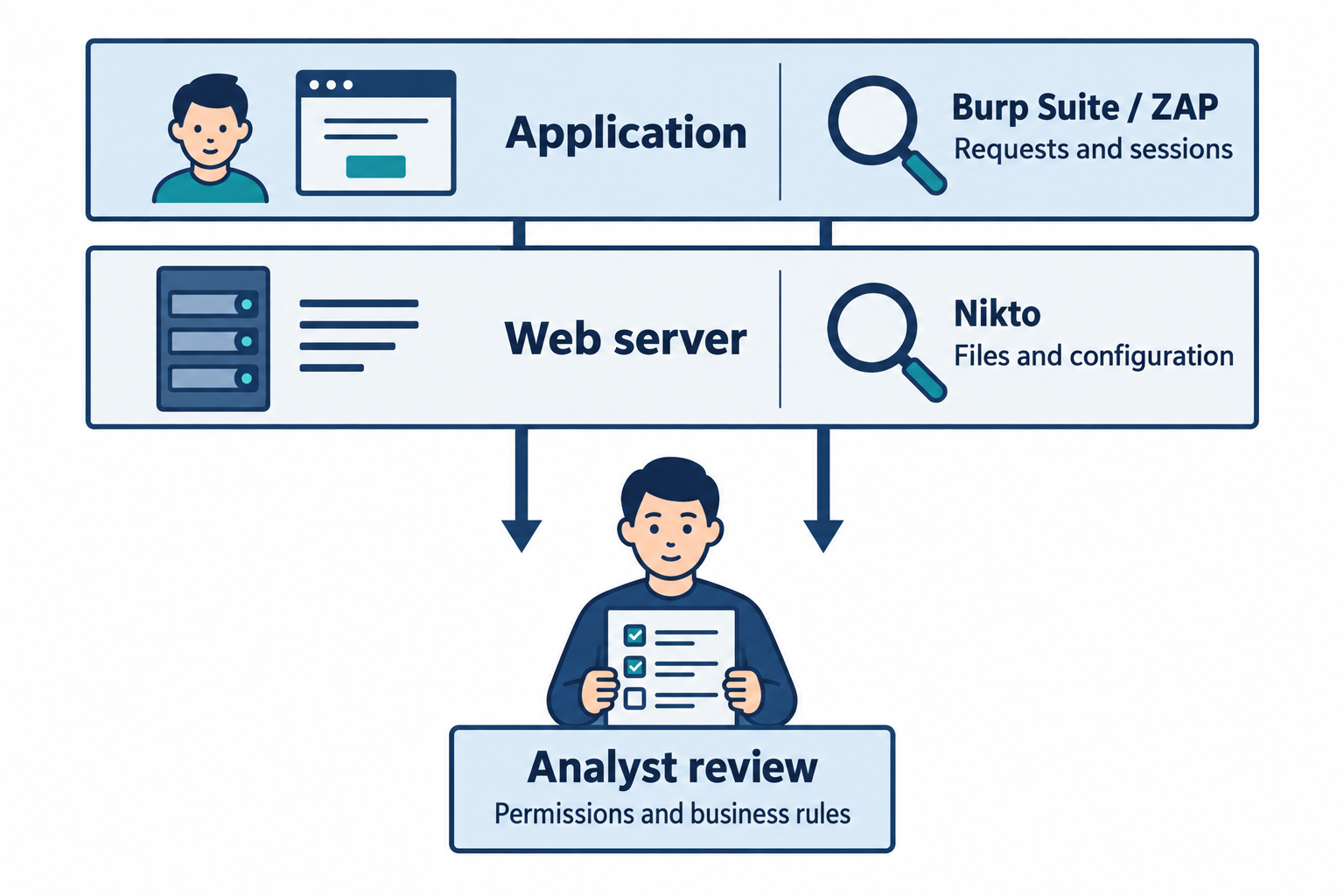
Figure 7.6: Web assessment combines server observations with application testing. Access-control and business-rule checks require context about expected behavior.
Text description for Figure 7.6
A cutaway-style flat schematic separates two parts of a web system without suggesting exclusive tool boundaries. The web server layer exposes software, files, and configuration that Nikto can examine. The application layer processes requests, sessions, and inputs that Burp Suite and ZAP can inspect and test. Analyst review compares observed behavior with expected permissions and business rules. Automated scanning can miss logic errors and unvisited functionality. Burp's automated Scanner belongs to paid editions, while Community Edition provides manual testing tools. Tool configuration, authentication, and application coverage determine what a test can observe.
7.4 Vulnerability Scanners: Network and System Assessment
While web scanners target applications, vulnerability scanners target infrastructure: servers, workstations, network devices, and cloud infrastructure.
Nessus
Nessus is the most widely-deployed vulnerability scanner. It performs network scanning, service identification, patch assessment, and configuration checking across networks.
Nessus capabilities:
- Credentialed scanning: If provided credentials, Nessus can log into systems and inspect patches, services, configuration files, and registry keys (Windows)
- Uncredentialed scanning: Without credentials, Nessus probes services and identifies vulnerabilities based on version banners
- Compliance checking: Nessus templates check systems against baselines (PCI DSS, CIS Benchmarks, HIPAA)
- Cloud assessment: Plugins assess AWS, Azure, and Google Cloud configurations
- Extensive vulnerability database: Nessus maintains a large database of CVEs and checks for each one
Typical workflow:
- Define scan target (IP range, specific hosts)
- Select scan template (Intrusive, Basic Network Scan, Credentialed Patch Audit, Compliance)
- Provide credentials for credentialed scanning (optional but recommended for deeper assessment)
- Run scan
- Review findings, prioritize by severity (Critical, High, Medium, Low)
- Export to ticketing system for remediation
Nessus is expensive (licensing is based on number of systems scanned), but its accuracy and coverage make it the industry standard. Many compliance frameworks specifically reference Nessus as an approved scanning tool.
Analyst Perspective
Nessus generates hundreds or thousands of findings in a typical large network scan. The key skill is triaging findings: identifying which are actually exploitable vulnerabilities requiring immediate patching vs. which are false positives or low-risk items. High-impact findings (Remote Code Execution vulnerabilities in internet-facing systems) take priority. Low-priority findings (information disclosure, missing non-critical patches) are remediated on a regular schedule.
OpenVAS (Open Vulnerability Assessment System)
OpenVAS is an open-source vulnerability scanner comparable to Nessus. It performs similar scans (credentialed and uncredentialed) and maintains a database of CVEs and checks.
Advantages:
- Free and open-source
- Can be self-hosted without licensing costs
- Integrates with other open-source tools
Limitations:
- Smaller vulnerability database than Nessus
- Less sophisticated reporting than commercial tools
- Smaller community and fewer integrations
OpenVAS is valuable for organizations with limited budgets or those integrating scanning into custom security tools.
Figure 7.7 compares remote service checks with the local evidence available through successful authenticated scanning.
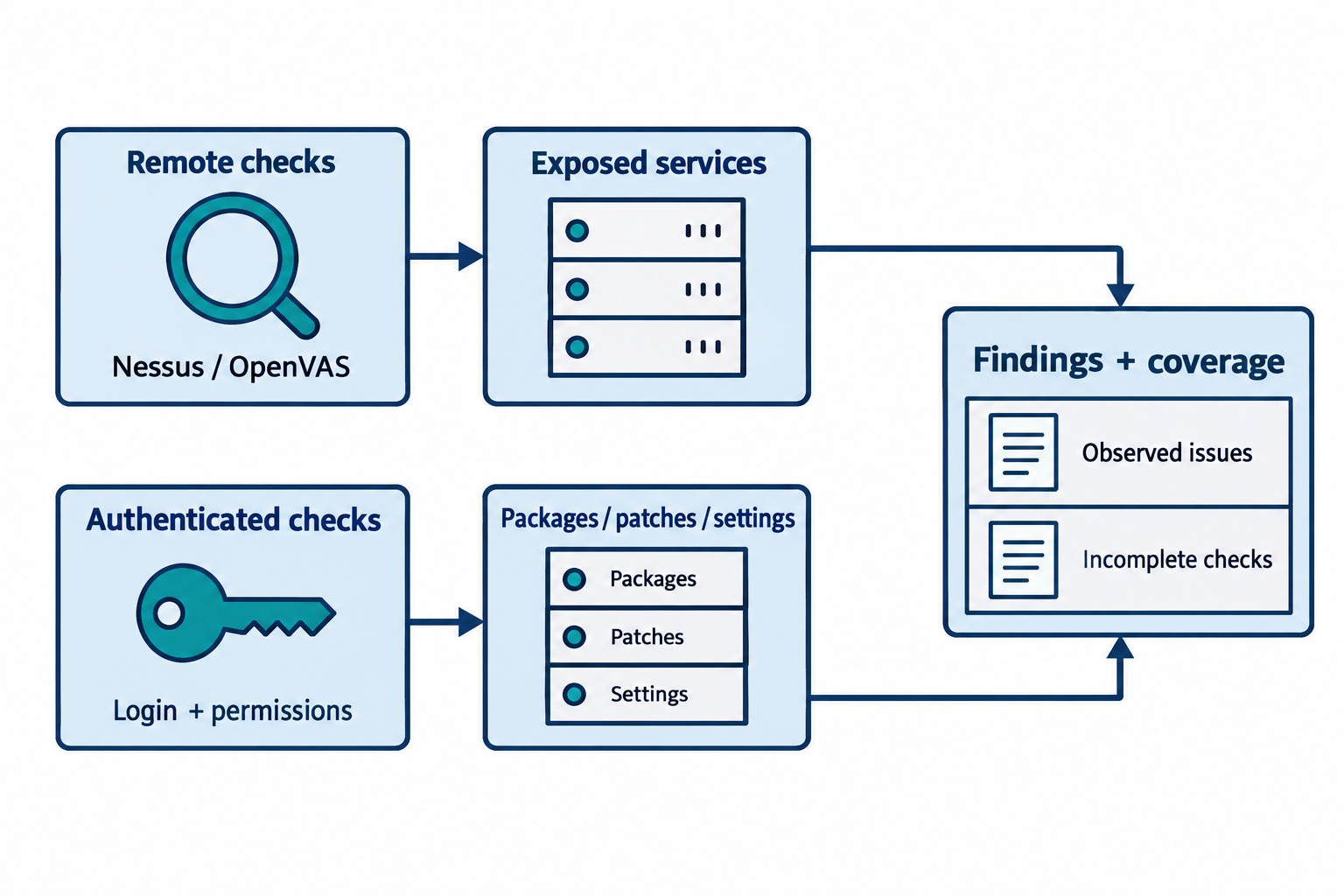
Figure 7.7: Credentialed checks add host information when login and permissions succeed. A scan report should also identify checks that could not run.
Text description for Figure 7.7
Two evidence paths lead to a vulnerability scan report. Remote checks interact with reachable services and can collect responses, banners, and supported features. Authenticated checks first require successful login and sufficient permissions, then inspect local evidence such as installed packages, patches, and settings. Nessus and OpenVAS-based deployments can support these assessment approaches. The report combines findings with coverage information, including failed logins, unreachable targets, and checks that could not complete. Credentials alone do not guarantee a successful local assessment. A missing finding must be interpreted alongside scan coverage.
Video: Nessus and OpenVAS
Nuclei
Nuclei is a modern vulnerability scanner built for speed and customization. It uses YAML-based templates to define vulnerability checks, making it accessible to security engineers who want to write custom checks.
Key features:
- Template-based: Vulnerability checks are defined in YAML, making them readable and modifiable
- Fast: Designed for parallel execution across large target sets
- Customizable: Teams can write organization-specific checks (check for internal asset management application, custom authentication bypass)
- Open-source: Templates and tools are community-driven
Nuclei is particularly useful when standard scanners miss organization-specific vulnerabilities or when you want to verify custom security controls.
Figure 7.8 shows how a Nuclei template turns a targeted request and matching rule into a reported observation.
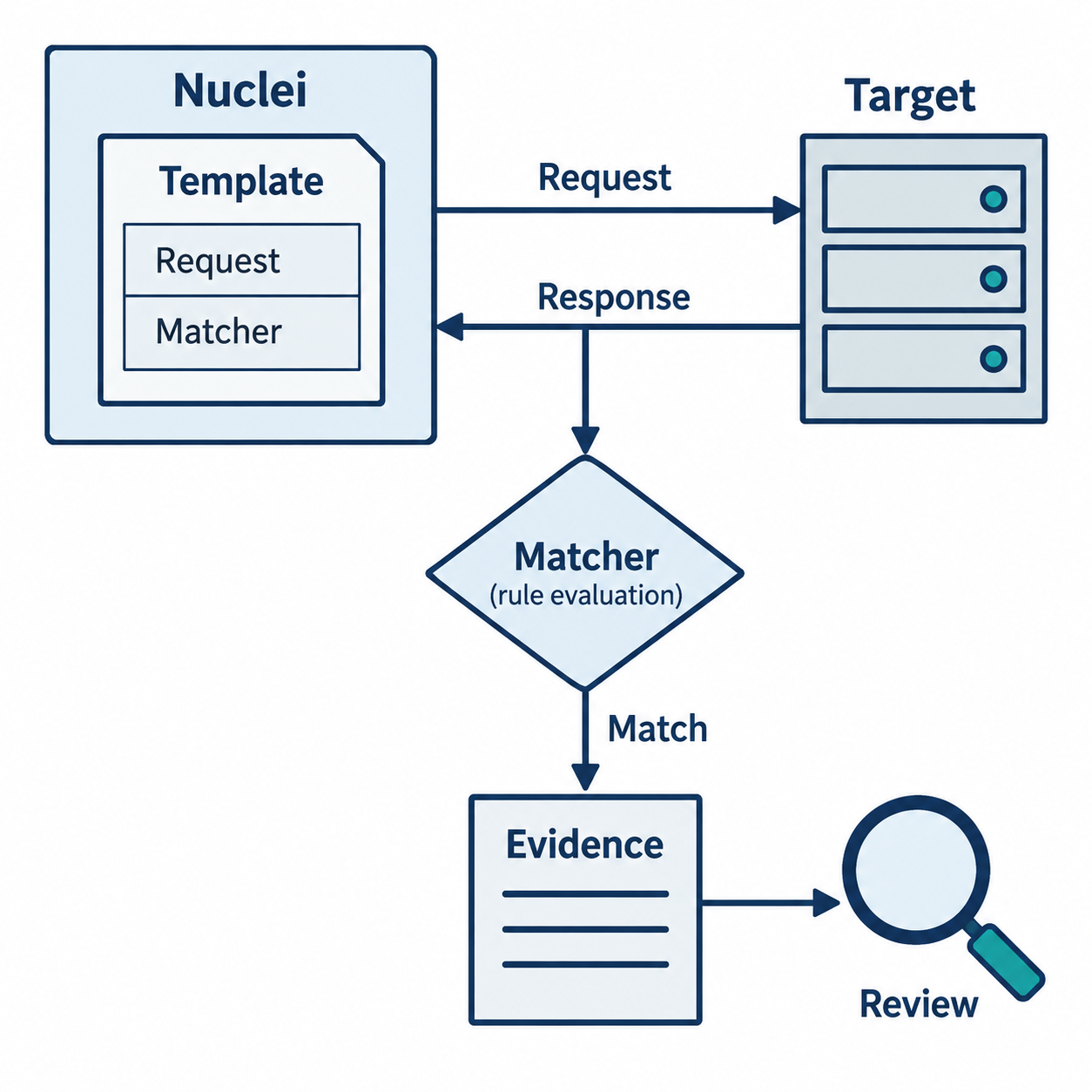
Figure 7.8: A template defines a test and its matching logic. The analyst evaluates what a match establishes in the target's context.
Text description for Figure 7.8
A Nuclei template uses YAML, a human-readable structured text format, to define a test. In this simplified request-based example, the template specifies a request and a matcher. A matcher is a rule that evaluates a response, such as looking for a status value or a text pattern. Nuclei sends the request to an authorized target, receives the response, applies the matcher, and records evidence when the rule matches. The analyst then checks whether the evidence supports the claimed issue. Nuclei supports multiple protocols and more complex workflows, so this figure shows one conceptual path rather than a complete template or product interface.
7.5 Cloud Infrastructure Assessment
Cloud environments (AWS, Azure, Google Cloud) require different assessment approaches than on-premises infrastructure.
ScoutSuite
ScoutSuite is an open-source multi-cloud auditing tool. It connects to AWS, Azure, Google Cloud, and Alibaba Cloud APIs, enumerates all resources, and checks configurations against best practices.
Capabilities:
- Inventory enumeration: Identifies all cloud resources (VMs, databases, storage buckets, IAM roles)
- Configuration assessment: Checks for common misconfigurations (public S3 buckets, overly-permissive IAM policies)
- Compliance checking: Evaluates configurations against security baselines
- HTML reporting: Generates interactive reports showing risk areas
Example usage (AWS):
scout suite-scan --provider aws --profile default # Scan AWS account using default profile
ScoutSuite requires API credentials with read-only access and can scan large cloud environments quickly.
Prowler
Prowler is another open-source cloud assessment tool, particularly strong for AWS. It runs hundreds of checks based on AWS best practices, CIS AWS Foundations Benchmark, and compliance frameworks (PCI DSS, HIPAA, GDPR).
Checks include:
- IAM: Unused access keys, overly-permissive policies, MFA configuration
- Networking: Overly-open security groups, insecure network ACLs
- Storage: Public S3 buckets, unencrypted EBS volumes, unencrypted RDS databases
- Logging: CloudTrail and VPC Flow Logs disabled or misconfigured
- Encryption: Unenencrypted data in transit or at rest
Prowler output is detailed and maps to specific compliance requirements, making remediation straightforward.
Figure 7.9 shows how cloud assessment tools use permitted configuration data and record gaps in collection.
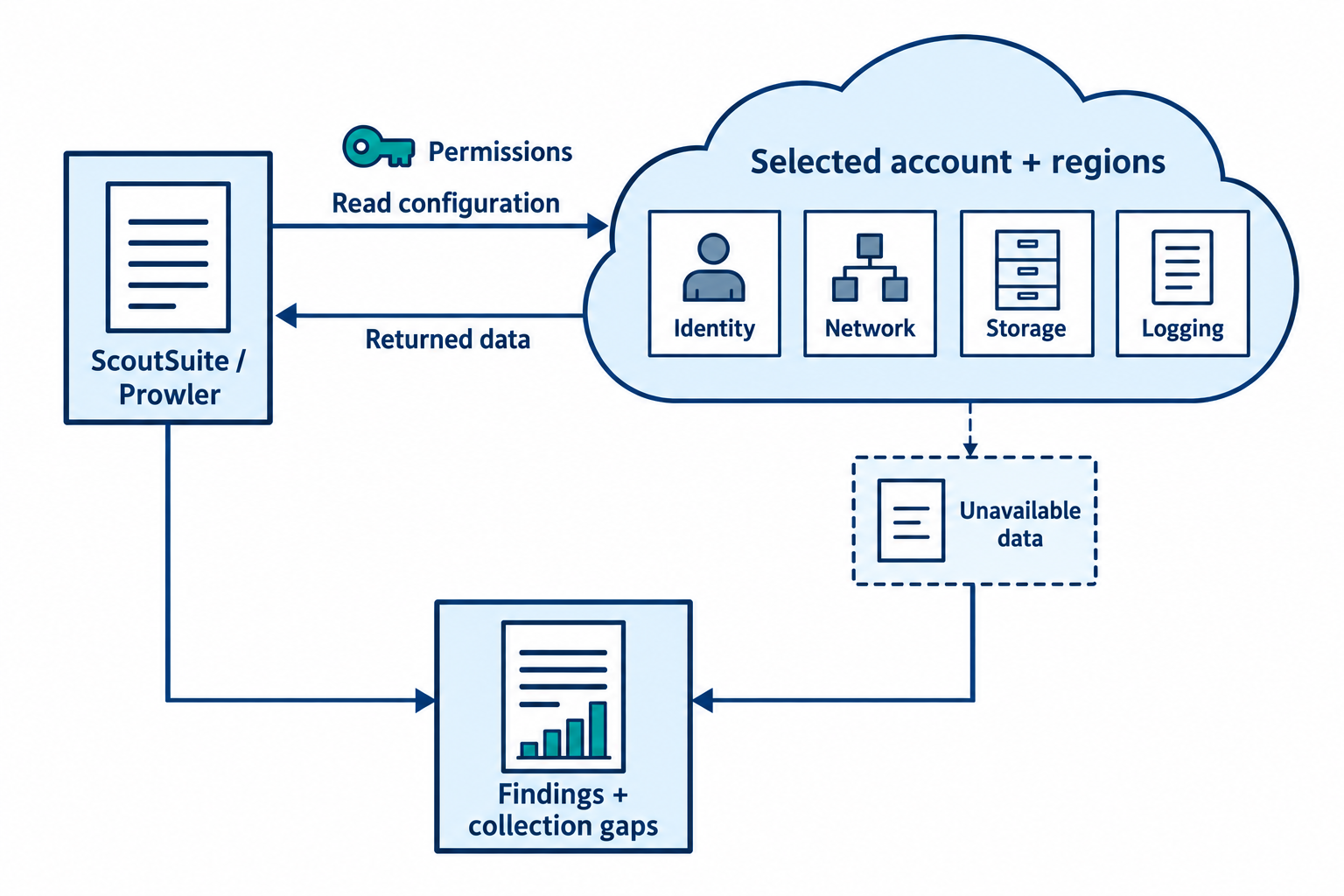
Figure 7.9: Cloud audits depend on the selected account, regions, services, and permissions. Reports should distinguish reviewed resources from unavailable evidence.
Text description for Figure 7.9
ScoutSuite and Prowler can obtain cloud configuration through provider application programming interfaces, or APIs. These interfaces return structured information about resources when the assessment identity has permission. Within the selected account and region scope, tools inspect accessible settings for identities, networking, storage, and logging. They evaluate the collected data against configured checks. Resources outside the selected scope or blocked by permissions remain collection gaps. The report should preserve these gaps alongside findings, so the reader can judge what the audit covered. The diagram does not imply that every cloud resource or every provider feature is automatically supported.
Video: ScoutSuite and Prowler
Trivy: Container and Image Vulnerability Scanning
Trivy is a vulnerability scanner for container images and file systems. As organizations adopt containerization, scanning container images becomes essential.
Capabilities:
- Image scanning: Identifies vulnerable packages in Docker images before deployment
- File system scanning: Checks files and configuration for vulnerabilities
- SBOM generation: Produces Software Bill of Materials (list of all components and their versions)
- Integration: Integrates into CI/CD pipelines to block vulnerable images from production
Example:
trivy image nginx:latest  # Scan nginx Docker image for vulnerabilities
trivy image -format json -o report.json nginx:latest  # JSON output for automation
Checkov: Infrastructure-as-Code Scanning
Checkov scans infrastructure-as-code (Terraform, CloudFormation, Dockerfile, Kubernetes manifests) for misconfigurations before deployment.
Examples of checks:
- Ensure S3 buckets are not publicly readable
- Ensure encryption is enabled on RDS databases
- Ensure security groups deny access by default
- Ensure container images run as non-root users
Checkov integrates into development pipelines to catch misconfigurations before infrastructure is deployed.
checkov -d . --framework terraform # Scan all Terraform files in current directory
Figure 7.10 places configuration and package checks at different points in a deployment workflow.
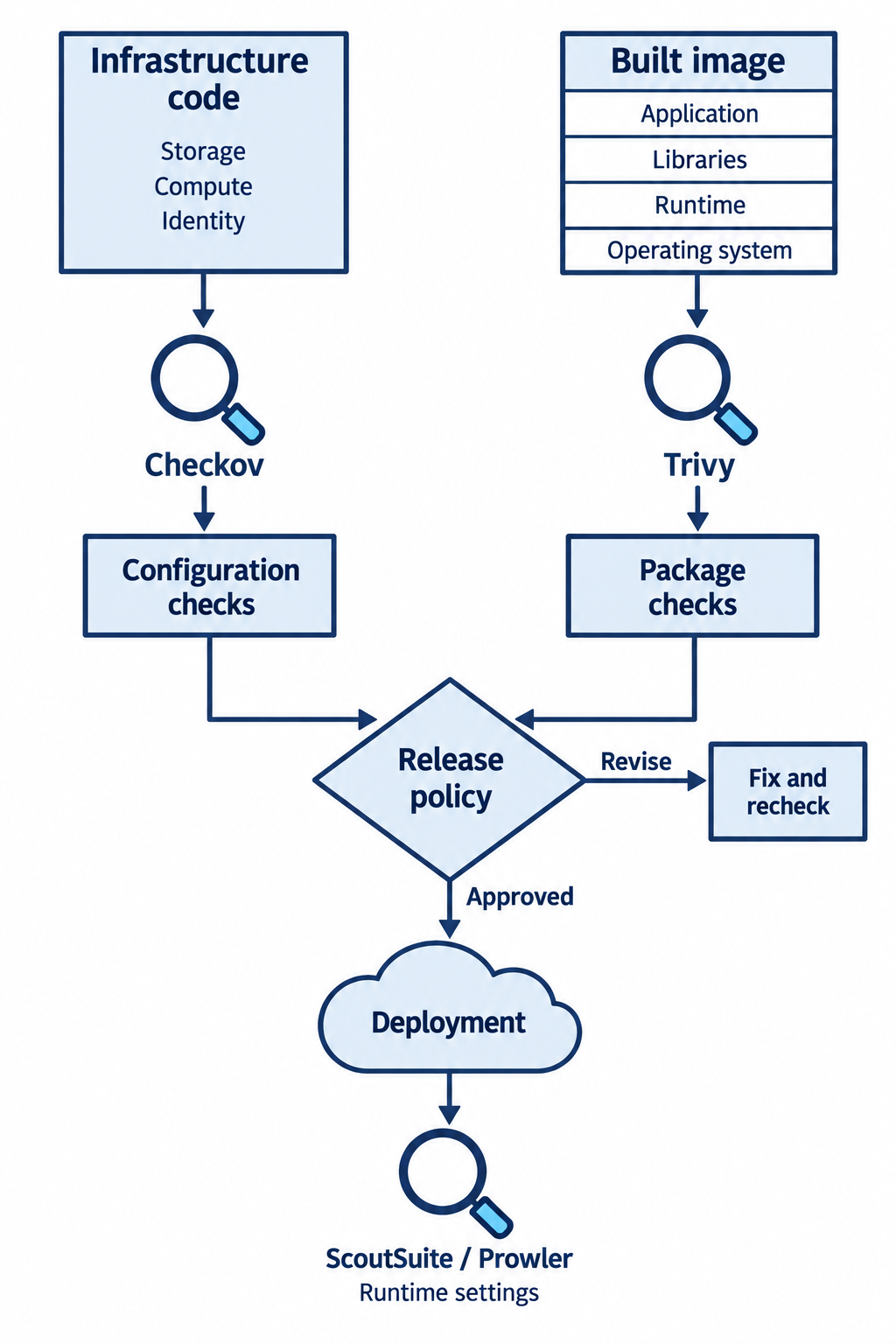
Figure 7.10: Checkov can assess infrastructure definitions before deployment, while Trivy can inspect built-image packages. Runtime cloud reviews add evidence about deployed settings.
Text description for Figure 7.10
A development pipeline contains complementary assessment points. Infrastructure as code, abbreviated IaC, describes resources in configuration files. Checkov can evaluate those definitions for misconfigurations. A separate built container image contains operating-system packages and application dependencies that Trivy can compare with vulnerability information. Both results inform the team's configured release policy. A scanner result blocks deployment only when the pipeline enforces that decision. After deployment, ScoutSuite or Prowler can assess accessible runtime cloud configuration. These examples emphasize common uses and do not define exclusive capabilities or guarantee complete coverage. The infrastructure definition groups storage, compute, and identity resources. The built-image stack labels application, libraries, runtime, and operating system. The operating-system layer represents packaged user-space files and dependencies. The release-policy branches lead either to deployment when approved or to fixing and rechecking when revisions are needed.
7.6 Breach Simulation and Validation Tools
These tools simulate attacker techniques to validate that detection and prevention controls are working.
Atomic Red Team
Atomic Red Team provides a library of small, testable "atomic" attack simulations mapped to the MITRE ATT&CK framework. Each test simulates a specific attacker technique without causing damage.
Examples:
- Create a new user account with admin privileges (tests if account creation is monitored)
- Copy lsass.exe for credential dumping (tests if process dumping is detected)
- Modify registry for persistence (tests if registry changes are monitored)
- Launch mimikatz credential harvester (tests if EDR detects credential dumping)
Organizations use Atomic Red Team to validate that detection systems (EDR, SIEM) properly alert on attacker behaviors. Each test is reversible (can be undone).
Caldera: Automated Adversary Emulation
Caldera is a more sophisticated framework that simulates multi-step attack sequences based on MITRE ATT&CK. Rather than isolated tests, Caldera chains techniques together to simulate realistic attack campaigns.
Example campaign:
- Initial access (phishing simulation, vulnerable web app exploitation)
- Establish persistence (create user account, install persistence mechanism)
- Escalate privileges (UAC bypass, sudo exploitation)
- Harvest credentials (LSASS dumping, cached credential theft)
- Lateral movement (Pass-the-Hash, WMI execution on remote systems)
- Exfiltrate data (copy files to external destination, upload to cloud storage)
Caldera integrates with detection systems to measure how many steps an attacker can execute before being detected. Organizations use this to measure and improve their security posture.
Figure 7.11 compares an individual detection test with a sequence of emulated behaviors.
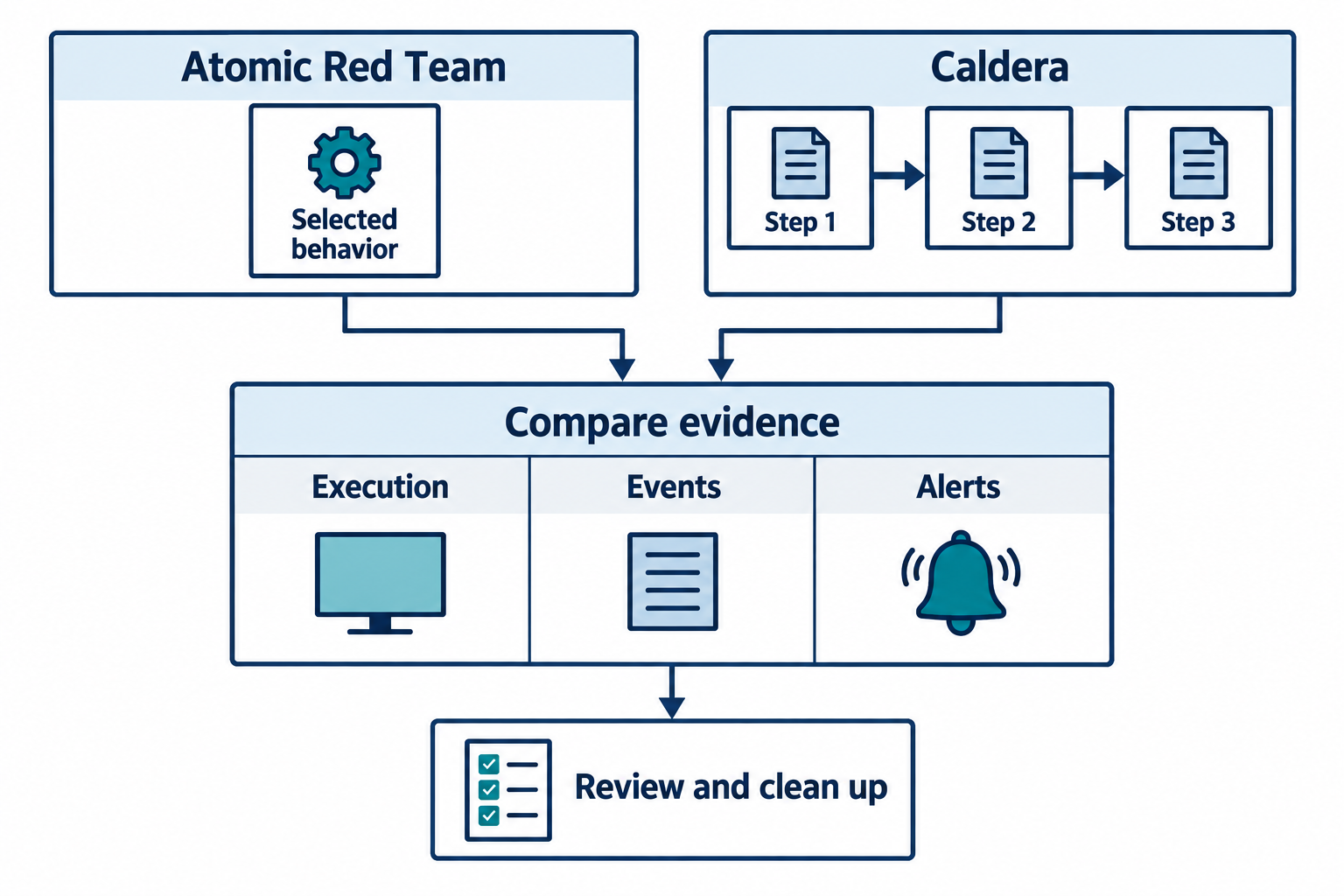
Figure 7.11: Test execution records and security telemetry help the team assess whether expected controls responded. Cleanup and verification belong in the test plan.
Text description for Figure 7.11
Atomic Red Team provides small tests mapped to MITRE ATT&CK, a knowledge base of adversary tactics and techniques. An individual test can evaluate a selected behavior. Caldera can coordinate an emulation sequence containing multiple behaviors, commonly through deployed agents. The team compares execution records with collected security events and expected alerts or prevention actions. An absent alert can reflect missing telemetry, detection logic, test conditions, or a test that did not execute as intended. Both approaches require approved scope, preparation, and verification of cleanup. Some tests change system state, and reversibility depends on the test and environment.
7.7 Integration and Tool Selection
No single tool addresses all assessment needs. A comprehensive program combines multiple tools.
Reference Matrix: Tool Selection by Objective
| Objective | Tool | Why |
|---|---|---|
| Network mapping and open port discovery | Nmap | Most widely-used, comprehensive, free |
| Quick network host inventory | Angry IP Scanner | Graphical, fast for subnet-level discovery |
| Large-scale external port scanning | Masscan | Designed for speed across large IP ranges |
| External infrastructure mapping | Maltego, Recon-ng | Aggregates public data sources for reconnaissance |
| Web application testing | Burp Suite (commercial), ZAP (free) | Designed for application logic, authentication, authorization testing |
| Web server vulnerability scanning | Nikto | Fast, focused on server configuration and known issues |
| Network vulnerability scanning | Nessus (commercial), OpenVAS (free) | Comprehensive, widely-supported, integrates with compliance frameworks |
| Custom vulnerability checks | Nuclei | Template-based, customizable for organization-specific needs |
| AWS/Azure/GCP configuration audit | ScoutSuite, Prowler | Cloud-specific, checks against best practices and compliance baselines |
| Container image vulnerability scanning | Trivy | Integrates into CI/CD, prevents vulnerable images from production |
| Infrastructure-as-code misconfiguration | Checkov | Catches issues before infrastructure is deployed |
| Breach simulation and detection validation | Atomic Red Team, Caldera | Tests whether detection systems actually alert on attacker behaviors |
Figure 7.12 shows how observations from different tools can contribute to one actionable assessment record.
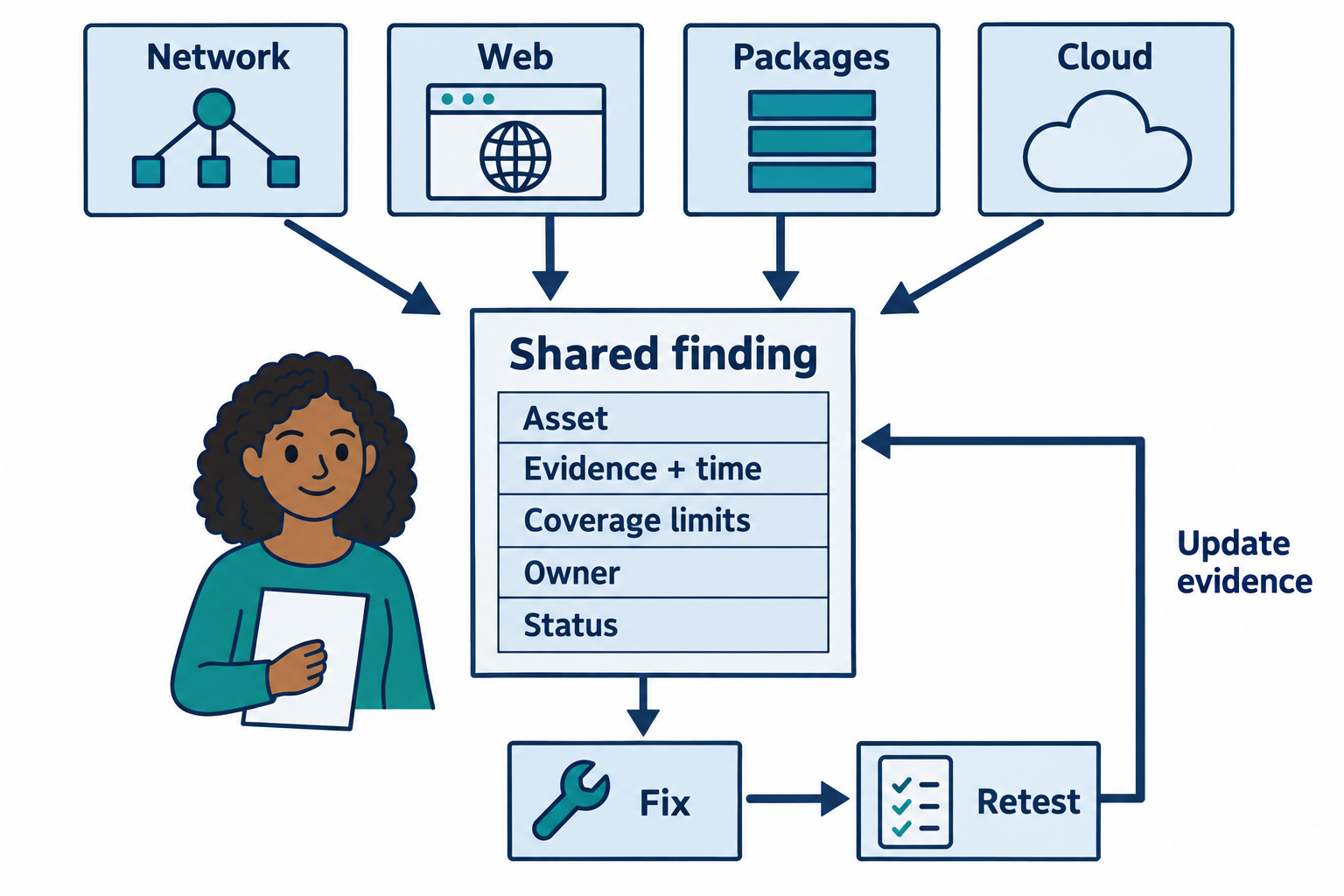
Figure 7.12: An integrated finding retains evidence and coverage details, connects them to an owner, and records the result of retesting.
Text description for Figure 7.12
Four labeled inputs represent network observations, web tests, package checks, and cloud configuration checks. An analyst correlates records by asset and context rather than counting every tool report as a separate issue. A shared finding records the asset, supporting evidence with its source and observation time, coverage limits, responsible owner, and status. The owner applies an appropriate fix, then the assessment team retests the relevant condition. Retest evidence updates the finding. The workflow preserves unresolved coverage gaps and does not imply that a clean report proves an entire system secure.
Analyst Perspective
When planning an assessment, start with your objectives. If you need to map internal network infrastructure, use Nmap and configure it for service version detection. If you need to assess cloud configuration, use Prowler or ScoutSuite. If you need to validate that detection systems are working, use Atomic Red Team. Tool selection drives methodology and findings.
Putting It Together: Log4Shell (2021) Detection and Remediation
In December 2021, a critical vulnerability in Apache Log4j (Log4Shell, CVE-2021-44228) allowed remote code execution in systems using vulnerable Log4j versions. Organizations worldwide scrambled to identify and patch affected systems.
Scanning approach:
-
Vulnerability scanner (Nessus): Run credentialed scans across all Java applications to identify installed Log4j versions. Nessus plugins check Java classpath and library listings for vulnerable versions.
-
Web application scanner (Burp): Test web applications for the vulnerability by sending payloads that trigger logging of malicious input. Vulnerable applications echo back log4j expression language that allows code execution.
-
Container scanning (Trivy): Scan all Docker images in the registry to identify images containing vulnerable Log4j versions. Block deployment of vulnerable images.
-
Infrastructure-as-code scanning (Checkov): Review all application deployment configurations to ensure Log4j is not included or is pinned to a patched version.
-
Breach simulation (Atomic Red Team): After patching, simulate Log4Shell exploitation to confirm that unpatched systems are no longer vulnerable.
Organizations that rapidly applied this workflow identified vulnerable systems, patched them, and validated remediation much faster than those using manual assessment or single tools.
Chapter Summary
-
Nmap is the foundational tool for network mapping and port scanning. Its scripting engine (NSE) extends capabilities into vulnerability detection and exploitation.
-
Web application scanners (Burp Suite, ZAP, Nikto) test application security through HTTP/HTTPS interaction. Different tools suit different needs: Burp for in-depth testing, ZAP for open-source automation, Nikto for quick server assessment.
-
Vulnerability scanners (Nessus, OpenVAS) identify missing patches and configuration vulnerabilities across networks. Nessus is the industry standard; OpenVAS is the free alternative.
-
Cloud-specific tools (ScoutSuite, Prowler, Trivy, Checkov) address cloud assessment needs. As organizations migrate to cloud infrastructure, cloud-specific assessment becomes essential.
-
Reconnaissance and OSINT tools (Maltego, Recon-ng) gather intelligence without active probing. Valuable for external assessments where direct scanning may not be possible.
-
Breach simulation tools (Atomic Red Team, Caldera) validate that detection systems are functioning. Testing your controls is as important as implementing them.
-
Tool selection is methodology-driven. Define your assessment objectives, then select tools that address those objectives. Most comprehensive assessments use multiple tools.
-
Integration and automation matter. Modern security programs integrate tool output into remediation workflows, track remediation progress, and retest after remediation to confirm fixes.