CH10: Data Protection and Privacy
Introduction
Data is both the most valuable asset organizations protect and their greatest liability if compromised. Unlike physical assets that wear out or become obsolete, data compounds in value the longer it exists: historical customer records become targets for identity theft, intellectual property theft can threaten market position, and medical records remain sensitive for decades after collection. This chapter examines how organizations protect data throughout its lifecycle and how regulations like the General Data Protection Regulation (GDPR) and California Consumer Privacy Act (CCPA) have transformed data protection from a technical problem into a foundational business and legal obligation.
The chapter is structured around three interconnected concepts. First, it examines the states of data (at rest, in transit, in use) and the distinct security challenges each presents. Second, it introduces data protection techniques that address confidentiality, integrity, and availability across those states. Third, it maps the regulatory landscape that organizations navigate when handling sensitive data, and the roles and responsibilities required to manage data as a strategic asset.
By the end of this chapter, students will understand not only the technical mechanisms that protect data, but also the governance frameworks and legal obligations that define how data should be handled in a compliant, ethical organization.
Learning Objectives
Upon completing this chapter, students will be able to:
- Classify data by sensitivity level (public, internal, confidential, critical/restricted) and determine appropriate handling and protection controls.
- Explain the security challenges and required controls for data in different states (at rest, in transit, in use).
- Differentiate between data protection techniques including encryption, tokenization, masking, anonymization, and pseudonymization, and apply each to appropriate scenarios.
- Describe the data loss prevention (DLP) technologies and policies that protect data across endpoints, networks, and cloud environments.
- Explain data retention and disposal procedures, including secure destruction methods and cryptographic erasure.
- Identify the key roles in data governance (data controller, processor, steward) and explain their responsibilities under privacy regulations (GDPR, CCPA, HIPAA).
- Apply data protection concepts to a scenario involving regulated data, identifying appropriate controls and compliance requirements.
10.1 Data Classification and Sensitivity Levels
Data classification is the process of labeling information according to its sensitivity and the impact of unauthorized disclosure. Organizations cannot protect all data equally; resources are finite. Classification provides a decision framework that ties protection measures to actual risk.
Most organizations use four classification levels, though terminology varies. This chapter uses the framework common in compliance and security operations:
Public Data
Public data can be disclosed without harming the organization, individual privacy, or competitive position. This includes marketing materials, published annual reports, job postings, and general company information available on websites. Public data requires minimal protection controls beyond ensuring availability and basic integrity (preventing accidental modification).
Internal Data
Internal data is intended for organizational use but not sensitive. It includes internal memos, non-confidential project plans, organizational charts, and routine communications. Internal data should not be disclosed externally without authorization, but unauthorized exposure would cause limited harm. Internal data typically receives moderate protection controls: access restrictions and basic encryption, but not the highest-cost techniques.
Confidential Data
Confidential data requires protection because unauthorized disclosure would cause significant harm to the organization or individuals. Confidential data includes business strategies, financial records, customer contact information, employee personally identifiable information (PII), and trade secrets. Confidential data demands strong controls: encryption at rest, encrypted transit, access control lists, and regular access audits.
Critical/Restricted Data
Critical or restricted data is the highest classification, reserved for data whose exposure would cause severe financial, legal, or reputational harm. This includes payment card data (covered by PCI DSS), protected health information (covered by HIPAA), and classified government data. Critical data receives the strongest controls: encryption, multi-factor authentication for access, network isolation, and comprehensive logging of all access.
Figure 10.1 connects the chapter’s sensitivity levels to handling decisions.
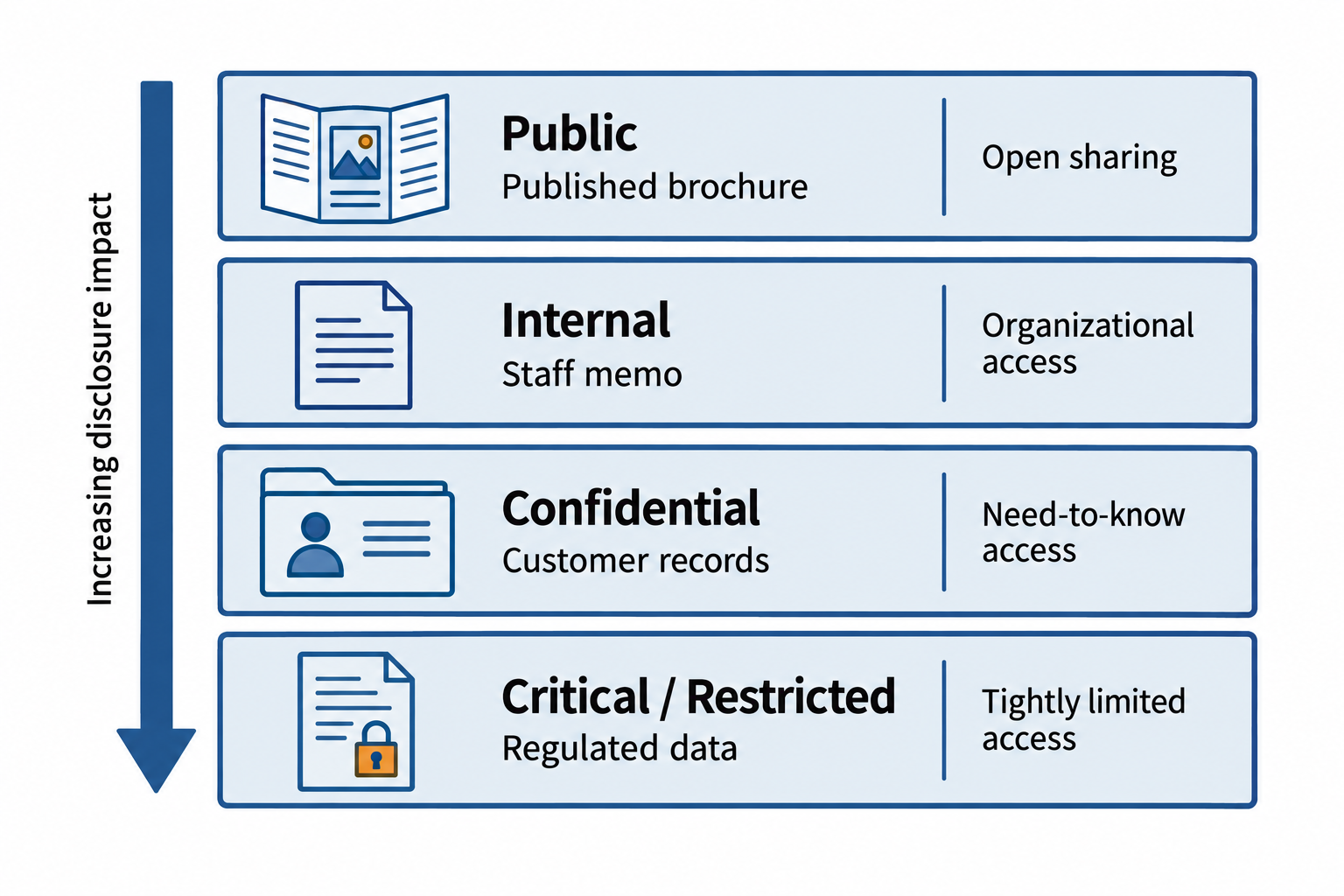
Figure 10.1: The chapter uses four sensitivity levels. Organizational policy determines each label and the corresponding handling controls.
Text description for Figure 10.1
Public: a published brochure can be shared openly while its integrity remains protected. Internal: a staff memo stays within authorized organizational channels. Confidential: customer records require limited access and protected storage and transmission. Critical or restricted: regulated data (data subject to legal or regulatory handling requirements) receives tightly limited access and monitoring. The vertical ordering indicates increasing disclosure impact. Each organization defines its classifications in policy.
Analyst Perspective
When you join an organization, one of your early tasks will be to understand the data classification policy and which classification level applies to the data you work with. In a financial services company, account numbers are confidential at minimum. In a healthcare organization, patient records are critical. Misclassifying data is a common security mistake: treating confidential data as internal, or critical data as confidential. The classification policy is your guide to what protection level is appropriate, and applying it correctly is not optional.
10.2 Data States and Protection Requirements
Data exists in three states, and each state presents distinct security challenges and requires different protection mechanisms.
Data at Rest
Data at rest is stored data: files on hard drives, data in databases, backups on tape, archived records in cold storage. The primary threat to data at rest is unauthorized access by someone with physical possession of the storage device or authenticated access to a system.
The primary protection mechanism for data at rest is encryption. Encrypting the storage device (full disk encryption on laptops, encrypted database columns) ensures that even if someone obtains the hardware or gains database access without proper authentication, the data remains unreadable without the encryption key.
Additional controls for data at rest include access controls (restricting who can access storage systems), physical security (locking data centers and secure rooms), and backup security (ensuring backups are encrypted and stored securely).
Data in Transit
Data in transit is data being transmitted across networks: web traffic, email messages, file transfers, API calls, database synchronization across cloud regions. The threat to data in transit is interception by an attacker on the network path between sender and recipient (a "man-in-the-middle" attack).
The primary protection mechanism for data in transit is encryption in transit, implemented through protocols like TLS (Transport Layer Security). When a user accesses a website over HTTPS, TLS encrypts the connection so that an attacker on the network cannot read the transmitted data. When an organization sends data to a cloud provider or a partner, encrypted file transfer protocols like SFTP ensure that the data is protected throughout the journey.
Additional controls include VPN (Virtual Private Network) for encrypting entire network connections, TLS 1.2 or higher (older TLS versions have known vulnerabilities), and mutual authentication (ensuring both endpoints are who they claim to be).
Data in Use
Data in use is actively being processed: data in memory while an application is running, data on a screen being viewed by a user, data being analyzed or transformed. Data in use is the most difficult to protect because the system processing the data must have access to it in unencrypted form.
Protection mechanisms for data in use include application-level controls (ensuring that only authorized users can access the application), memory protection (using techniques like Address Space Layout Randomization to prevent memory-based attacks), and secure enclaves (trusted execution environments that process sensitive data in isolation). The most sensitive operations may use specialized hardware, such as Hardware Security Modules (HSMs) for cryptographic operations.
A practical example illustrates the three states: A hospital's patient database contains medical records. The database at rest is encrypted with strong keys stored in an HSM. When a clinician queries the database over the hospital network, the data in transit is protected by TLS. When the data appears on the clinician's screen, the workstation uses role-based access controls and session timeouts to ensure that only authorized personnel can view it. If the clinician steps away, the screen locks. All three states require protection.
Figure 10.2 follows a patient record through its three data states.
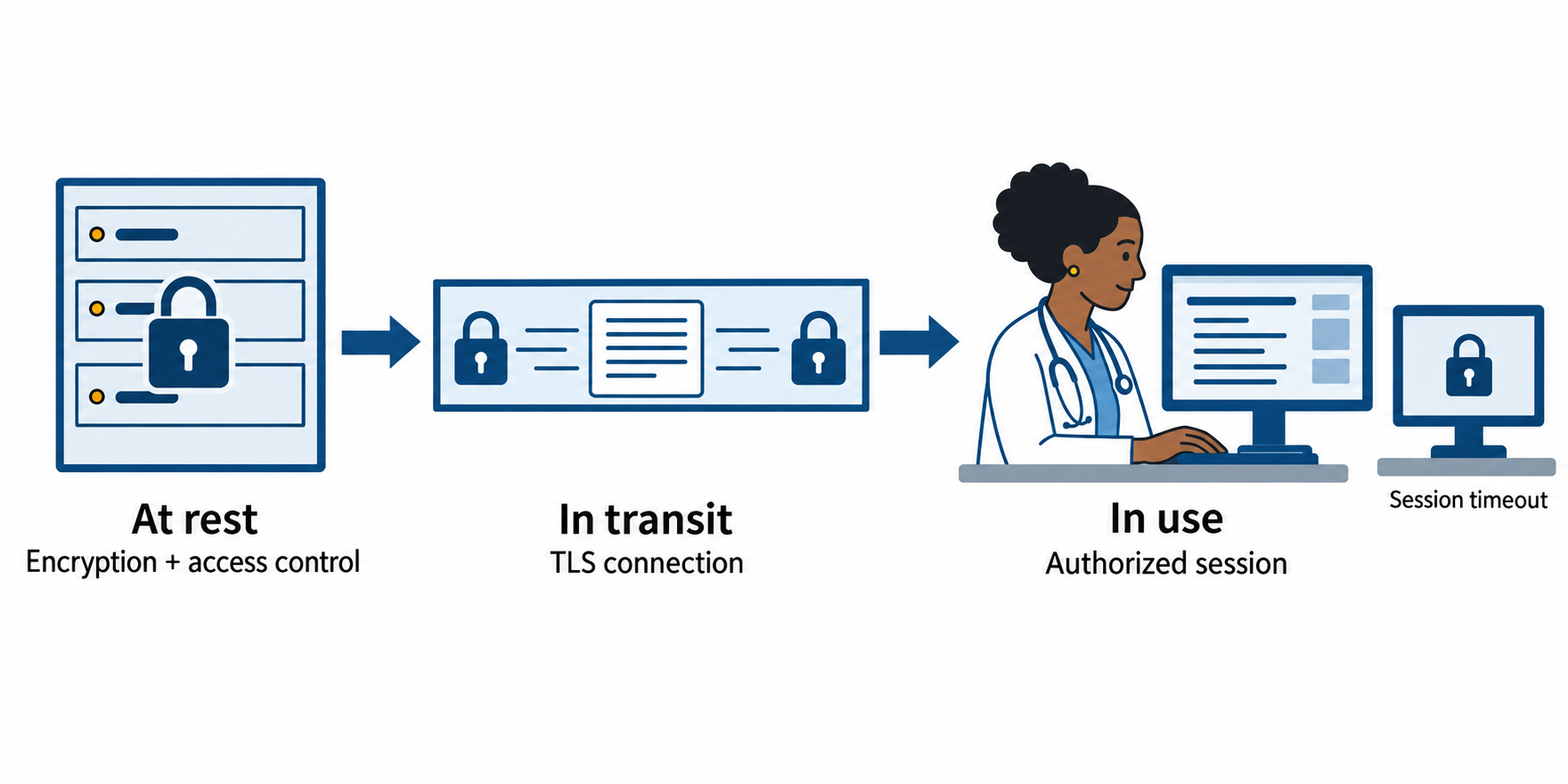
Figure 10.2: The same patient record needs controls while stored, transmitted, and displayed to an authorized clinician.
Text description for Figure 10.2
At rest, access controls and encryption protect stored records. In transit, Transport Layer Security (TLS) protects the connection between systems. In use, the application controls access to the displayed record and locks an idle session. Storage encryption alone does not protect a record that an authorized application has already decrypted.
| State | Definition | Primary Threat | Primary Control |
|---|---|---|---|
| At Rest | Stored on disk, database, tape, or archive | Unauthorized physical access or system access | Encryption, access controls, physical security |
| In Transit | Transmitted across networks or cloud | Man-in-the-middle interception | TLS encryption, VPN, mutual authentication |
| In Use | Actively processed in memory or displayed | Process compromise, memory attacks, unauthorized viewing | Application access controls, memory protection, secure enclaves |
10.3 Data Protection Techniques
Organizations deploy multiple techniques to protect data, each with different tradeoffs in terms of functionality, performance, and security. Understanding when to apply each technique is essential.
Encryption
Encryption transforms plaintext data into unreadable ciphertext using a cryptographic algorithm and a key. Without the key, the data remains unreadable. Encryption is the most comprehensive data protection technique and applies to all three data states.
Symmetric encryption (using the same key for encryption and decryption) is fast and suitable for protecting large volumes of data. AES (Advanced Encryption Standard) is the industry standard for symmetric encryption.
Asymmetric encryption (using a public key to encrypt and a private key to decrypt) enables scenarios where the sender and receiver have never shared a secret key. Asymmetric encryption is slower and better suited for small amounts of data, such as encrypting database credentials or encrypting a symmetric key itself (key encryption key pattern).
Encryption is explored in depth in Chapter 6 (Cryptographic Concepts). For this chapter, the key point is that encryption is the foundational technique for protecting confidentiality across all three data states.
Tokenization
Tokenization replaces sensitive data with a random token that has no mathematical relationship to the original value. A customer's credit card number "4111111111111111" might be replaced with the token "7f8a9d2e1c5b4a3g". The actual card number is stored in a secure vault, and applications use the token for processing. If an attacker steals the token, it has no value; the original card number remains protected.
Tokenization is particularly useful in scenarios where applications need to reference sensitive data (for auditing or matching customer records) without needing the actual value. Unlike encryption, where you decrypt to recover the original data, tokenization creates a one-way reference. It is commonly used for payment card data, healthcare identifiers, and financial account numbers.
Masking
Masking obscures sensitive data by replacing characters with placeholder values. A Social Security number might be displayed as "*--1234", showing only the last four digits. Masking is used to display partial sensitive data to authorized users who need to see some identifying information but not the complete value. Masking does not protect the underlying data from theft; it is primarily a user interface control that reduces exposure during normal use.
Masking is commonly applied to personal identification numbers, financial account numbers, and medical record identifiers in reports and user interfaces.
Figure 10.3 compares what three protection techniques change.
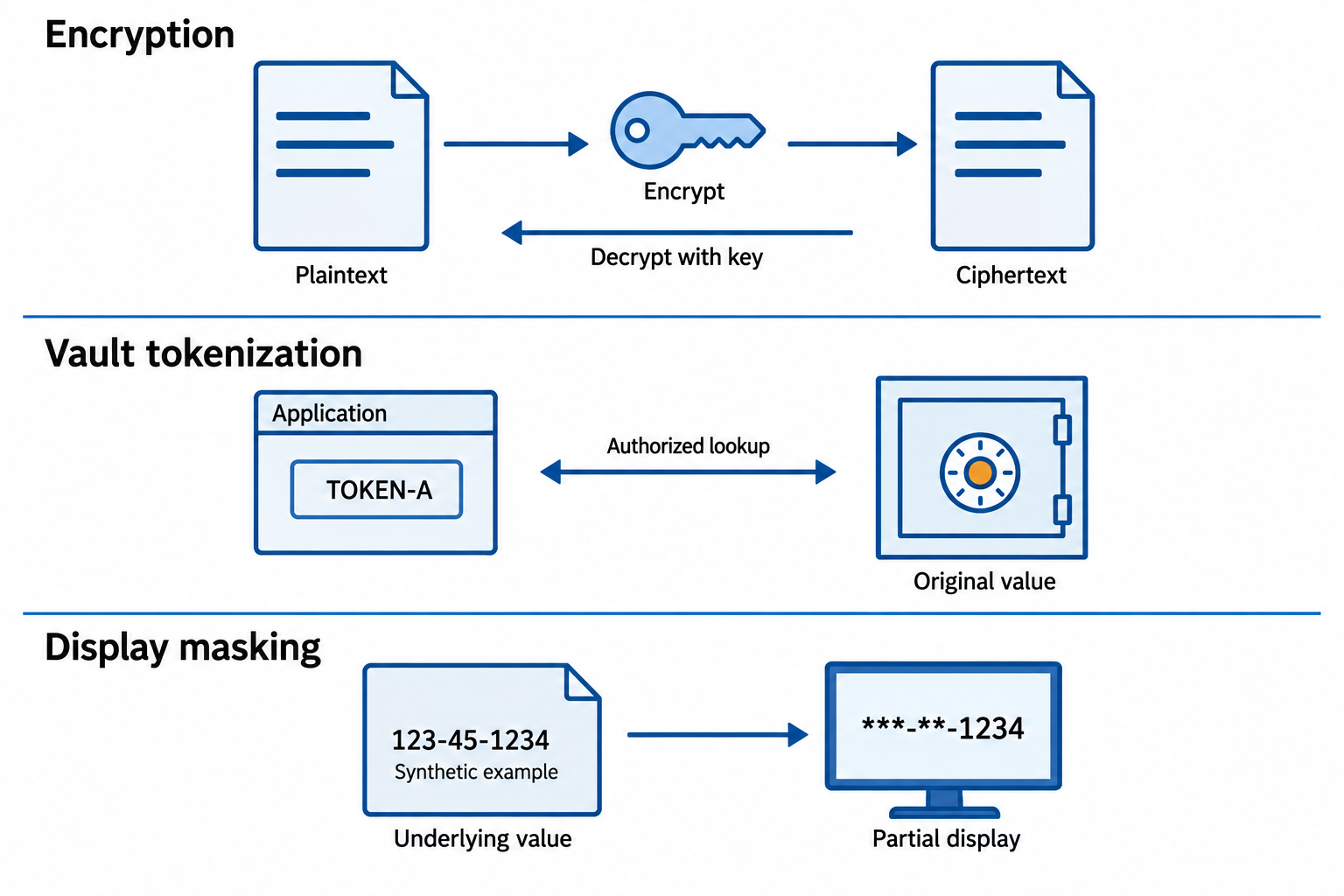
Figure 10.3: Encryption changes the representation, vault tokenization substitutes a reference, and display masking limits what a user sees.
Text description for Figure 10.3
Encryption transforms plaintext into ciphertext and uses a key to decrypt it. In vault-based tokenization, an application uses a substitute identifier and an authorized service can map it to the stored value. A token can still be sensitive when it authorizes actions. Display masking hides selected characters while the underlying value remains in storage. These mechanisms protect different exposures. The synthetic masking example displays 123-45-1234 as ***-**-1234, retaining only the final four digits.
Anonymization
Anonymization removes or transforms identifying information so that data cannot be linked back to individuals. True anonymization is irreversible: if the original data cannot be recovered, and individuals cannot be re-identified from the anonymized data, then the data is no longer considered personal data under regulations like GDPR.
Anonymization techniques include removing direct identifiers (names, social security numbers), generalizing location data (storing "Boston, MA" instead of specific street addresses), removing quasi-identifiers that could enable re-identification, and aggregating data to group level (reporting statistics about age ranges rather than individual ages).
The challenge with anonymization is that modern data analysis techniques can sometimes re-identify individuals from supposedly anonymous data. GDPR and similar regulations are cautious about anonymization claims, placing the burden on organizations to prove that re-identification is not reasonably possible.
Pseudonymization
Pseudonymization replaces identifying information with a pseudonym (artificial identifier) that can be reversed only with a mapping key. A patient's medical record might be identified as "PATIENT-78934" instead of the patient's name, with a separate key stored securely that maps patient names to pseudonyms. Pseudonymized data is still considered personal data under GDPR (because it can be reversed), but it provides practical protection for data processing. An attacker stealing the pseudonymized data without the mapping key cannot identify individuals.
Pseudonymization is widely used in research, clinical trials, and healthcare analytics because it enables data sharing and analysis while reducing re-identification risk.
Figure 10.4 shows how the remaining link to identity changes the protection claim.
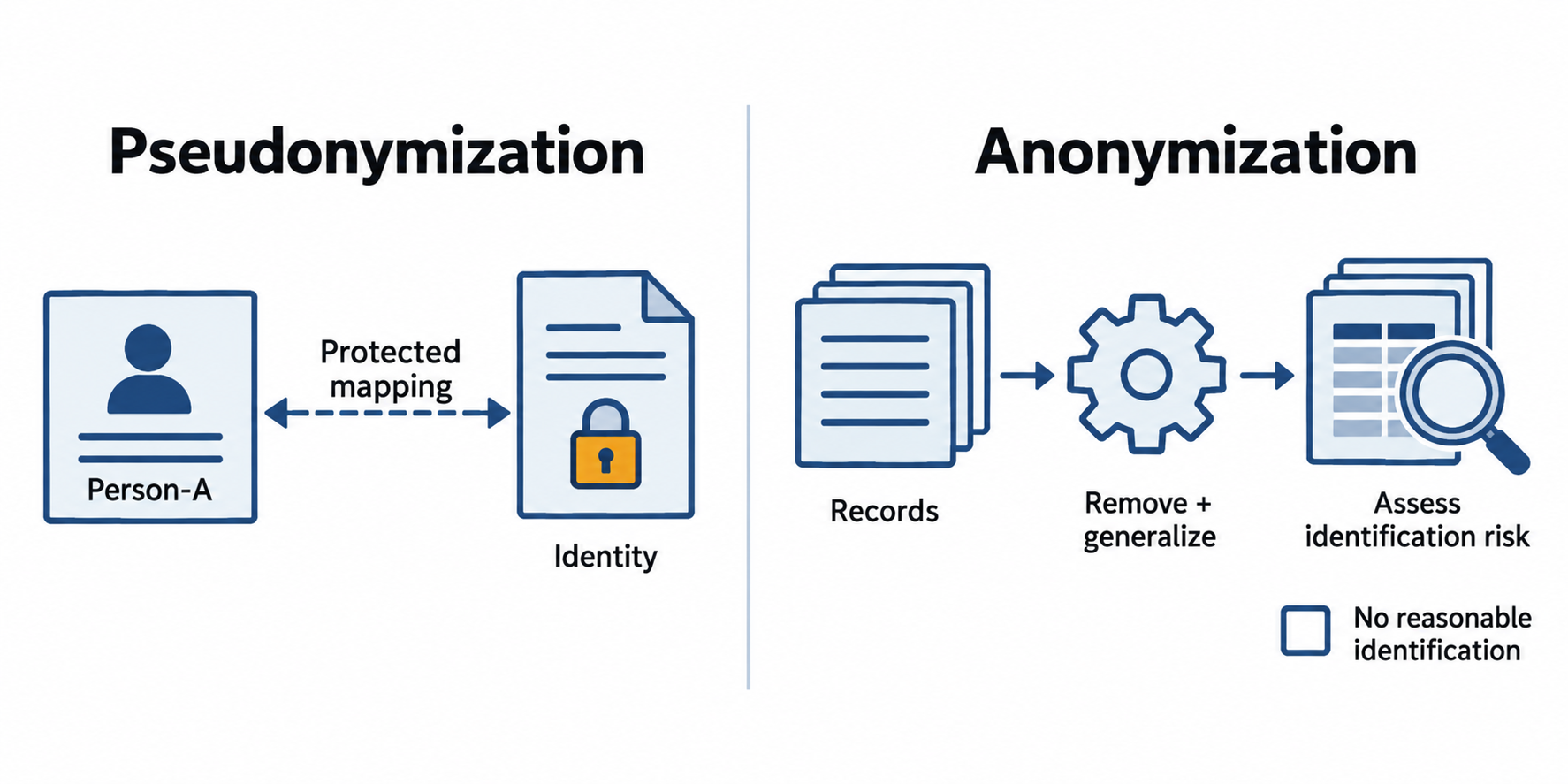
Figure 10.4: Pseudonymization separates identifiers from records. Anonymization requires that people are no longer reasonably identifiable.
Text description for Figure 10.4
A pseudonymous record can link back to a person through separately protected additional information. It remains personal data. Anonymization requires assessing whether identification remains reasonably possible using other available information. Removing a name or grouping values alone does not establish anonymity.
| Technique | Purpose | Reversible | Use Case |
|---|---|---|---|
| Encryption | Make data unreadable without key | Yes (with key) | Protect data in all states; still processable |
| Tokenization | Replace sensitive data with random token | No (practical) | Payment cards, medical IDs; no computational value |
| Masking | Hide sensitive data in displays | Yes (access underlying data) | User interfaces; see partial values only |
| Anonymization | Remove all links to individuals | No | Research, analytics; risk of re-identification |
| Pseudonymization | Replace identifiers with pseudonyms | Yes (with mapping key) | Data sharing; maintain data utility |
Warning
Organizations often confuse anonymization and pseudonymization. Pseudonymization is reversible and still considered personal data under regulations like GDPR. Anonymization is not reversible, but demonstrating true anonymization is extremely difficult. When in doubt, treat data as pseudonymized rather than anonymized, and apply corresponding protections.
10.4 Data Loss Prevention
Data Loss Prevention (DLP) is a set of technologies and policies designed to prevent sensitive data from leaving the organization through unauthorized channels. DLP monitors for sensitive data patterns (such as credit card numbers or healthcare identifiers) and either blocks transmission or alerts a security team.
Endpoint DLP
Endpoint DLP monitors devices (laptops, desktops, mobile phones) for attempts to transmit or store sensitive data outside the organization's control. Endpoint DLP agents can:
- Block USB device transfers if the destination device is not approved
- Intercept copy-paste operations that attempt to move sensitive data outside approved applications
- Prevent printing of sensitive documents
- Block upload of sensitive files to personal cloud storage services
- Alert when a user saves sensitive data to external media
Endpoint DLP provides granular control but requires agent installation on all devices.
Network DLP
Network DLP inspects traffic on the organization's network for sensitive data patterns. Network DLP can:
- Block email messages containing credit card numbers or healthcare identifiers
- Intercept file transfers (FTP, SFTP) containing sensitive data
- Alert on unusual data volumes being transferred to external IP addresses
- Inspect encrypted traffic (with appropriate key access) to detect sensitive data within TLS streams
Network DLP operates at the network perimeter or on internal network segments and does not require agent installation on individual devices, but it may miss traffic on encrypted VPNs or personal mobile networks.
Cloud DLP
Cloud DLP provides data loss prevention for cloud services like Microsoft 365, Google Workspace, and Salesforce. Cloud DLP policies can:
- Prevent sharing of sensitive data with external recipients
- Block uploads of sensitive files to unapproved cloud storage services
- Alert on bulk data exports from cloud applications
- Enforce document classification and watermarking
Cloud DLP is critical as organizations increasingly adopt cloud services and store data in platforms outside their network boundary.
Data Classification as the Foundation for DLP Policies
DLP needs a reliable way to determine which data requires protection and which handling rules apply. An operational data classification strategy connects the sensitivity levels from Section 10.1 to identifiable data and enforceable handling requirements. For example, the organization must define what qualifies as Critical/Restricted, identify the files that meet that definition, and specify where authorized users may store or send them. A written classification policy has limited value if employees and systems do not apply it to the data they handle.
A sensitivity label is a machine-readable designation attached to an item, such as a document or email, that identifies its classification. Users can apply labels, or automated processes can assign them using configured criteria. DLP can use these labels as rule conditions. It can also inspect content for sensitive information, such as payment card numbers, even when an item has no label. Microsoft's DLP policy reference describes both label-based and content-based detection.
Without usable labels or configured content-detection criteria, DLP lacks the information needed to distinguish sensitive files from ordinary files reliably. A rule that checks only for a Confidential label will miss an unlabeled confidential document. Content inspection can help close that gap, but a detector for payment card numbers will not necessarily recognize a confidential acquisition plan. Classification therefore includes defining sensitive business content and configuring how the system recognizes it.
To make classification operational, data owners define categories and approve handling requirements. Employees receive guidance on applying labels, while administrators configure automated detection, label application, and DLP rules for supported locations. The organization must also classify existing files, review incorrect labels, and verify that labels remain usable when files move through approved workflows. Administrators should test both prohibited and permitted actions before enabling blocking, then review policy matches and exceptions as business needs change.
A DLP rule combines three elements: data identification (which label or content type matches), activity context (who is acting, what action they attempt, and where the data is going), and response (what the system does when the conditions match). The following examples illustrate organizational policies. Actual enforcement depends on the product, supported file types, and coverage of the application or transfer channel.
| Classified data | Conditions that trigger the rule | What the rule blocks | What the policy allows |
|---|---|---|---|
| Internal: staff planning memo | A file labeled Internal is attached to an email addressed outside the organization. | Sending the attachment to an external recipient. The user receives a notice explaining the restriction. | Sharing through approved internal channels with authorized employees. |
| Confidential: employee payroll spreadsheet | A file labeled Confidential with a Payroll category is uploaded to a personal cloud-storage service or copied to unapproved removable storage. | The upload or copy, with an alert to the security team. | Authorized payroll staff storing and sharing the file within the approved payroll workspace. |
| Critical/Restricted: regulated patient records | A file labeled Critical/Restricted with a Health Records category is shared through a public link or sent to a recipient outside the approved care-partner list. | Public-link creation or the unapproved transfer, with an incident record for review. | Authorized staff transferring records to an approved care partner through the designated secure channel when the business purpose and applicable requirements permit it. |
| Critical/Restricted: payment card data | Content inspection detects payment card data in a file being sent through ordinary email, even if the file lacks a label. | Sending the file through that channel, with a notice directing the user to the approved payment workflow. | Authorized processing through the designated payment system, subject to its access and handling controls. |
For example, a payroll employee may legitimately open a Confidential spreadsheet in the payroll workspace. If that employee attempts to upload the same spreadsheet to personal cloud storage, the destination changes and the blocking rule applies. Classification identifies the protected data, and the activity context determines whether that particular use violates policy. An allowed DLP outcome still requires the user's normal access permissions and any applicable business approval.
DLP Challenges
Effective DLP deployment faces practical challenges: High false positive rates (flagging legitimate business operations as suspicious) can overwhelm security teams. Complex data formats require sophisticated pattern matching to detect. Encryption defeats keyword-based DLP, requiring different approaches. Users often perceive DLP as an obstacle rather than protection, leading to workarounds.
Successful DLP requires tuning policies to specific organizational needs, not applying vendor defaults across all data types and departments.
Figure 10.5 locates DLP checks along three routes that data can take.
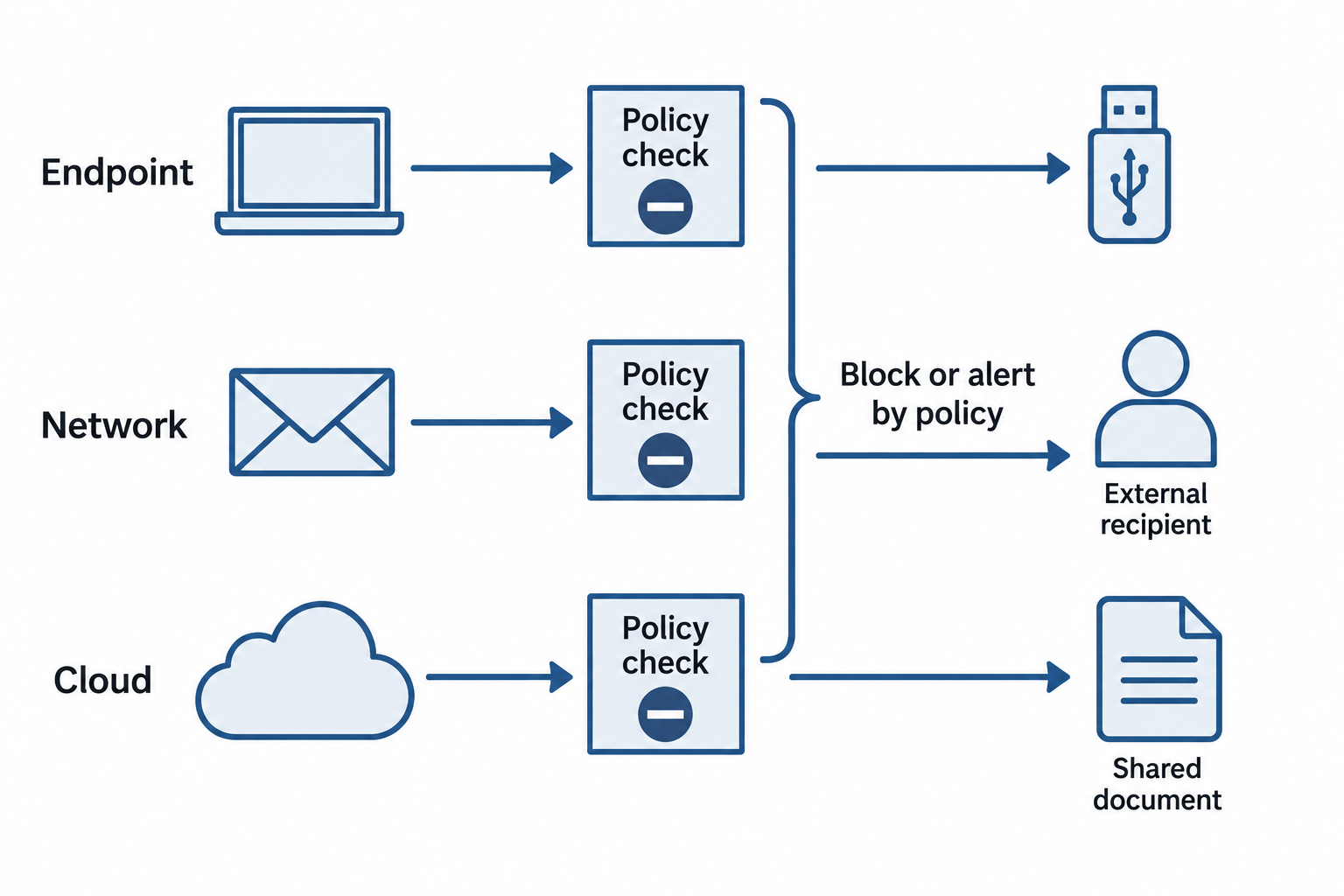
Figure 10.5: Data loss prevention (DLP) applies policy checks at endpoints, network inspection points, and cloud services.
Text description for Figure 10.5
Endpoint controls can check a file copy to removable storage. Network controls inspect traffic they can access; encrypted content requires an authorized inspection arrangement. Cloud controls can evaluate sharing permissions and exports. Each control may block or alert according to policy. Coverage and tuning determine what the system can actually detect.
10.5 Data Retention and Secure Destruction
Organizations collect data for specific purposes (processing a transaction, providing healthcare, fulfilling a contract). Once that purpose is fulfilled, the data becomes a liability: it requires protection but provides no business value, and it increases the risk of breach or compliance violation.
Data Retention Policies
A data retention policy specifies how long data is kept and when it should be destroyed. Retention periods depend on regulatory requirements, business needs, and litigation holds.
Legal and regulatory retention requirements include:
- HIPAA: Medical records must be retained for at least six years in most cases
- GDPR: Personal data must be deleted or anonymized once it is no longer needed for the original purpose
- PCI DSS: Payment card data must not be retained longer than necessary (typically, immediately after transaction authorization)
- SOX (Sarbanes-Oxley): Financial records must be retained for seven years for publicly traded companies
Business retention requirements might keep financial data for seven to ten years for audit purposes, or customer contact data for the duration of the customer relationship plus several years.
Litigation holds supersede normal retention policies. When litigation is anticipated or underway, organizations place a "hold" on affected data, preventing deletion until the legal matter is resolved.
Figure 10.6 shows the decisions that precede disposal.
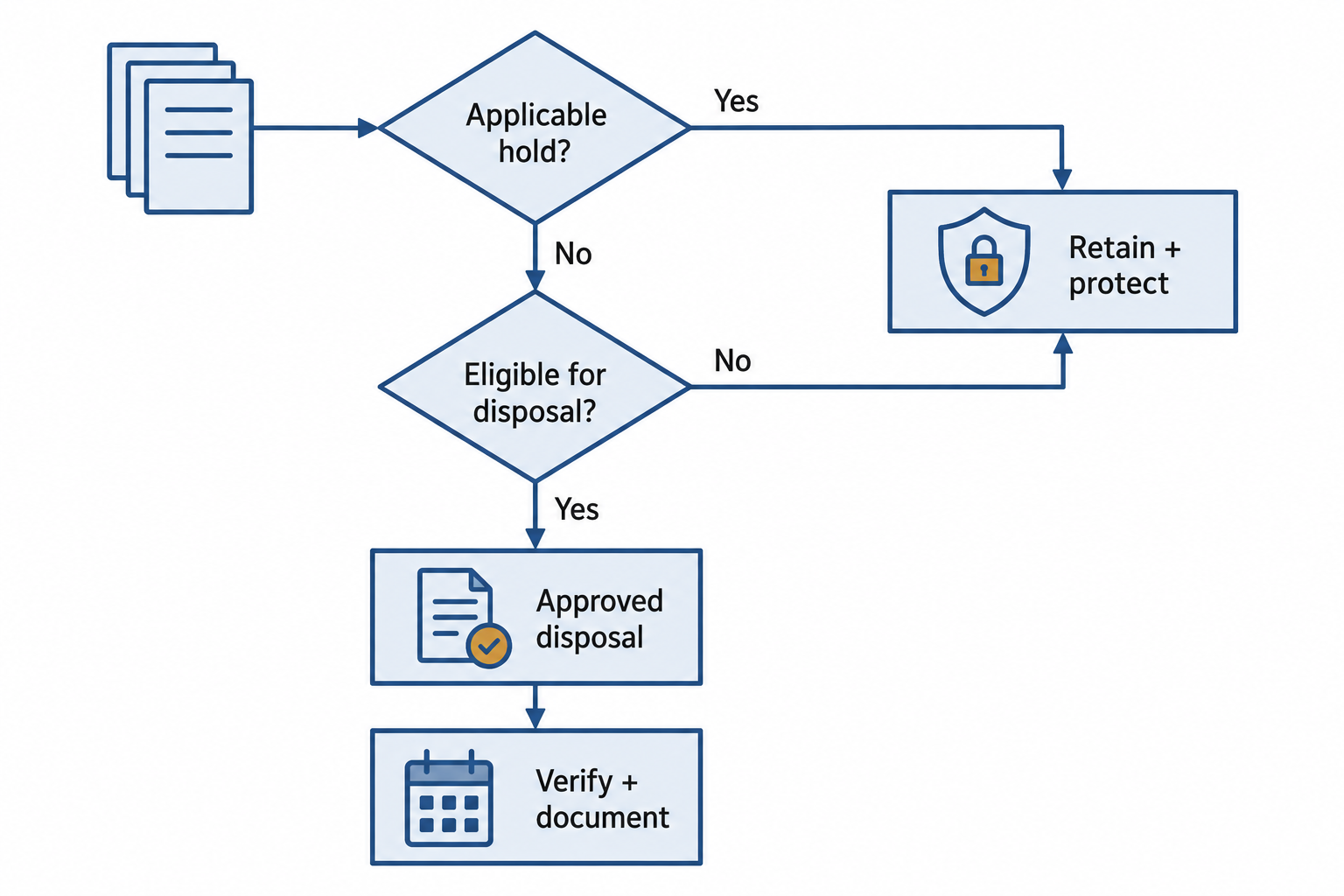
Figure 10.6: A retention decision considers the approved schedule and any applicable hold before authorizing disposal.
Text description for Figure 10.6
First check whether an applicable legal hold requires preserving the record. A hold routes the record to protected retention. If no hold applies, review the authorized retention period and continuing requirements. Records still needed remain protected. Records eligible for disposal move to an approved sanitization process with verification and documentation. The figure does not prescribe a universal retention period.
Secure Destruction Methods
Once the retention period expires and no holds apply, data must be destroyed in a way that cannot be recovered. The method depends on the storage media.
Hard drives and solid-state drives (SSDs):
- Degaussing applies a strong magnetic field that randomizes the magnetic domains on the drive. Degaussing is effective for traditional hard drives (which store data magnetically) but not for SSDs (which use flash memory). After degaussing, the drive is unusable.
- Shredding physically destroys the drive into small pieces. Shredding is effective for both hard drives and SSDs and is often combined with incineration. Shredding is irreversible but creates e-waste.
- Physical destruction via incineration: High-temperature burning destroys storage media completely but creates environmental concerns.
Magnetic tape and optical media:
- Degaussing is effective for magnetic tape
- Incineration is the most secure method but creates environmental hazards
- Some organizations use specialized tape shredders that mechanically destroy the media
Figure 10.7 explains why the storage medium affects sanitization choices.
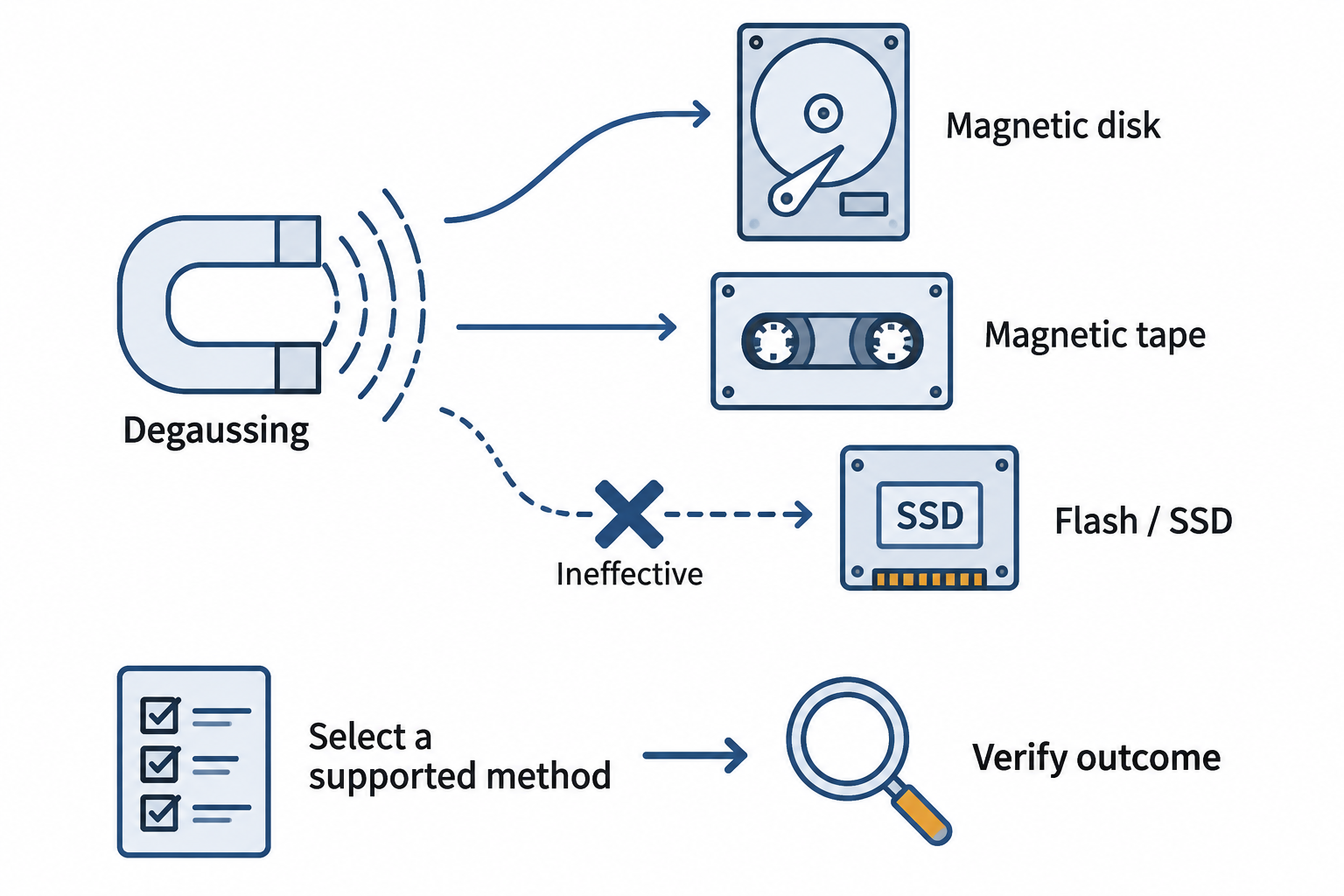
Figure 10.7: The storage technology determines which sanitization methods can work. Degaussing affects magnetic media and does not sanitize flash memory.
Text description for Figure 10.7
Degaussing applies a suitable magnetic field to magnetic storage such as hard drives and tape. Flash memory stores data electronically, so degaussing is ineffective for solid-state drives. Organizations select a supported sanitization or destruction method for the particular device, sensitivity, and disposition, then verify the outcome. Physical destruction must meet appropriate specifications.
Cryptographic erasure:
Cryptographic erasure (or crypto-shredding) destroys encryption keys instead of the physical media. If all data on a device is encrypted with a strong key, destroying the key makes the data computationally unrecoverable. This approach allows secure data destruction without physical destruction of the hardware. It is increasingly used in cloud environments where physical access to storage is not possible.
The organization must verify that: - All data on the device is encrypted with a strong encryption algorithm - Encryption keys are stored separately from the data - Keys are securely destroyed in a way that prevents recovery (hardware security module key deletion, secure key retirement procedures)
Figure 10.8 shows the key material that must be addressed for cryptographic erasure.
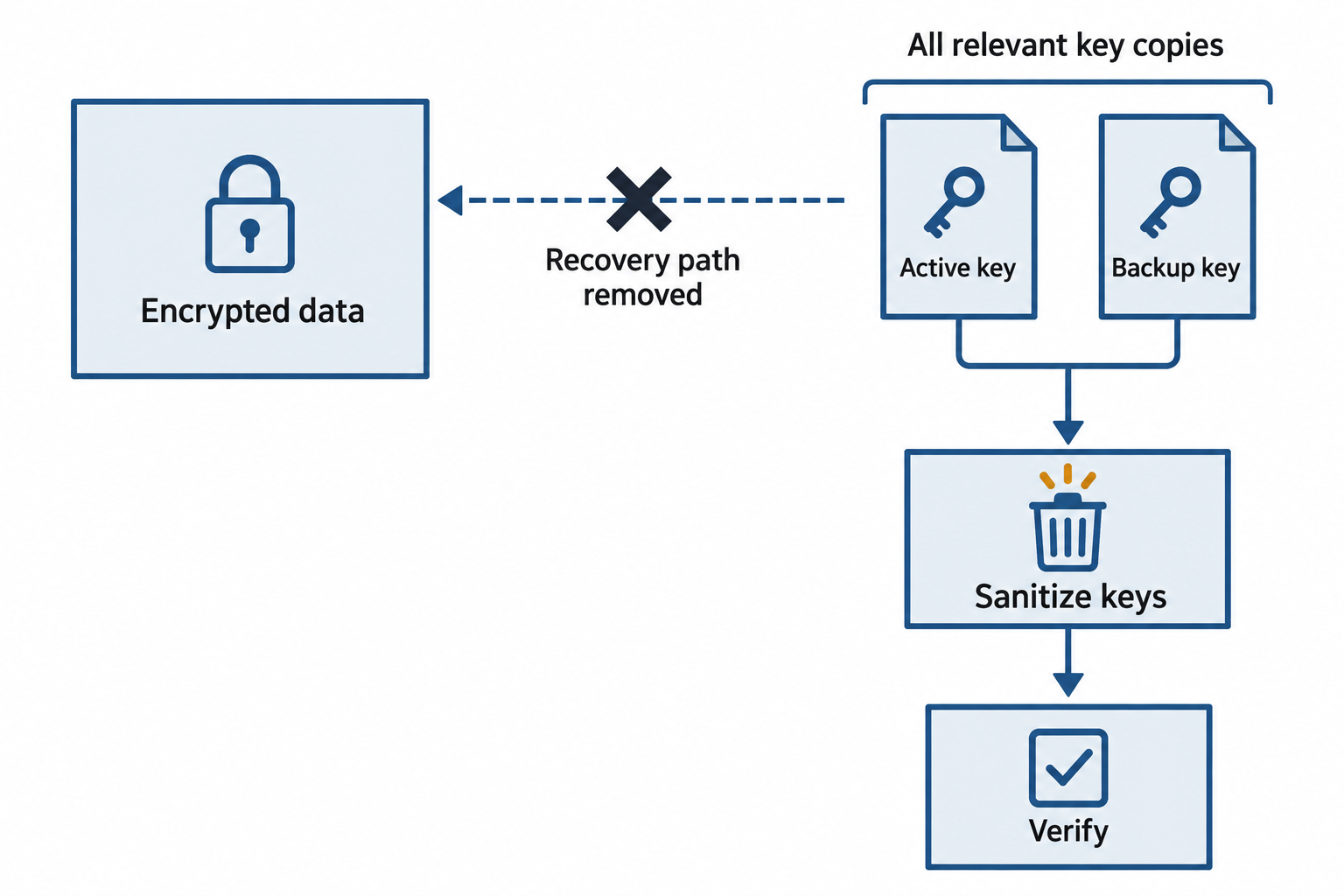
Figure 10.8: Cryptographic erasure depends on securely eliminating the keys needed to recover encrypted data, including recoverable key copies.
Text description for Figure 10.8
Before relying on cryptographic erasure, establish that the targeted data was properly encrypted and identify all relevant keys and copies. Sanitize the key material so it cannot be recovered, then verify and document the result. Plaintext copies and data outside the key’s coverage need separate treatment.
Analyst Perspective
Data destruction is often the overlooked final step in the data lifecycle. Organizations excel at protecting data in use and transit, but when retention periods expire, destroyed data sometimes sits for months or years. As a security professional, you will often be asked to verify that data destruction is actually happening. This might involve auditing a contract with a data destruction vendor, reviewing logs showing key deletion, or physically witnessing a shredding event. Incomplete or delayed data destruction is a compliance violation and an ongoing liability.
10.6 Privacy Regulations and Frameworks
Privacy regulations fundamentally shape how organizations handle data. Three frameworks are most prominent in security operations: GDPR (Europe), CCPA/CPRA (California and spreading nationally), and HIPAA (healthcare). Each defines data subjects' rights, organizations' obligations, and breach notification requirements.
GDPR (General Data Protection Regulation)
GDPR applies to any organization processing the personal data of EU residents, regardless of where the organization is located. GDPR establishes several foundational principles:
Data subject rights include the right to be informed about data collection, the right to access personal data, the right to rectification (correction of inaccurate data), the right to erasure ("right to be forgotten"), the right to restrict processing, the right to data portability (receiving data in a portable format), the right to object to processing, and rights related to automated decision-making.
Lawful basis for processing requires that organizations justify why they are processing data. Consent is only one lawful basis; others include contractual necessity (processing data needed to fulfill a contract), legal obligation (processing data required by law), vital interests (processing data to protect someone's health), public task (processing data to perform a public function), and legitimate interests (processing data for an organization's reasonable business interests, balanced against individuals' privacy interests).
Data Protection Impact Assessments (DPIAs) are required for processing activities that involve high risk to data subjects' rights. A DPIA documents the processing activity, identifies risks, and describes mitigating controls.
Data controller vs. processor: A data controller is the organization that determines the purposes and means of data processing (e.g., a healthcare provider collecting patient data). A data processor is an organization that processes data on behalf of the controller (e.g., a cloud storage provider hosting the patient data). GDPR places primary obligations on the controller but requires processors to implement technical and organizational controls.
Breach notification: Organizations must notify affected individuals and authorities of breaches "without undue delay and in any case not later than 72 hours" after becoming aware of the breach (unless the breach does not pose a risk to individuals' rights and freedoms).
CCPA and CPRA (California Consumer Privacy Act and California Privacy Rights Act)
CCPA (effective 2020) applies to for-profit organizations that collect personal data from California residents and meet certain thresholds (over $25 million in revenue, or collecting data on more than 100,000 residents). CPRA (effective 2023) expanded CCPA with additional consumer rights and created a California Privacy Protection Agency to enforce the law.
Consumer rights under CCPA/CPRA include the right to know what personal information is collected, the right to delete personal information, the right to opt-out of the sale or sharing of personal information, the right to correct inaccurate information, and the right to limit use of sensitive personal information.
Businesses must provide privacy notices, honor opt-out requests, implement technical and organizational controls, and report breaches.
Unlike GDPR, CCPA/CPRA do not require a specific lawful basis for processing; organizations need consent only for the sale or sharing of personal information (not for normal business operations).
HIPAA (Health Insurance Portability and Accountability Act)
HIPAA applies to covered entities (healthcare providers, health plans, healthcare clearinghouses) and business associates that handle protected health information (PHI). HIPAA establishes:
Privacy Rule: Regulates use and disclosure of PHI. Patients have rights to access, amend, and receive accounting of disclosures. Covered entities can use and disclose PHI for treatment, payment, and healthcare operations without explicit consent, but other uses require authorization.
Security Rule: Requires administrative, physical, and technical safeguards for PHI. The Rule specifies implementation standards for access controls, encryption, audit controls, and incident response.
Breach Notification Rule: Requires notification of breaches affecting more than 500 individuals to media outlets, and notification of all affected individuals.
Privacy Governance Roles
Effective privacy compliance requires clear roles and responsibilities:
Data Controller (GDPR term, no direct equivalent in US law): The organization that determines why and how personal data is processed. Responsible for implementing privacy-by-design, conducting DPIAs, managing consent, and responding to subject access requests.
Data Processor (GDPR term, "business associate" under HIPAA): An organization that processes personal data on behalf of the controller. Responsible for implementing technical controls, assisting the controller with subject requests, and reporting breaches.
Data Steward: Within an organization, the steward is responsible for a specific category of data (e.g., customer data, employee data, financial data). The steward understands the business purpose of the data, ensures it is classified appropriately, and works with IT security to implement protections.
Data Protection Officer (DPO): Required under GDPR for public authorities and organizations whose core business involves large-scale processing of sensitive personal data. The DPO advises on privacy compliance, conducts DPIAs, serves as a point of contact for data subjects and authorities, and monitors compliance.
Chief Privacy Officer (CPO): In larger organizations, the CPO oversees privacy strategy, regulatory compliance, and organizational privacy governance. The CPO often oversees data governance, privacy impact assessments, and breach response.
Figure 10.9 separates key privacy responsibilities.
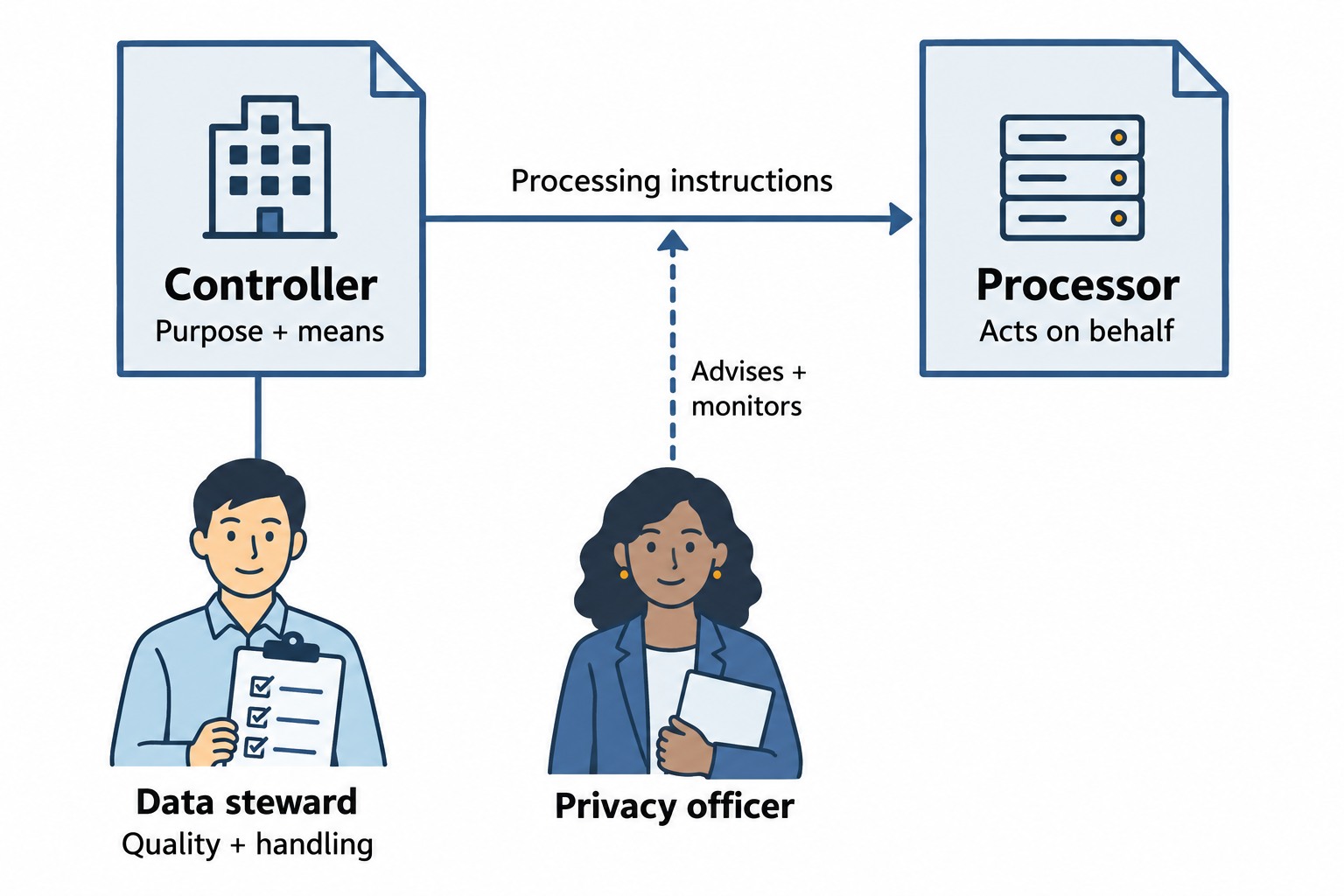
Figure 10.9: Privacy governance assigns decisions, operational handling, and independent advice to clearly defined roles.
Text description for Figure 10.9
A controller determines the purpose and means of processing. A processor handles data on the controller’s behalf. A data steward maintains operational definitions, quality, and handling. A data protection officer advises and monitors compliance where that role applies. These labels do not make the European processor role identical to a HIPAA business associate.
10.7 Data Governance and Stewardship
Data governance is the organizational framework that ensures data is managed as a strategic asset, not a byproduct of business operations. Governance addresses who owns data, what standards apply, and how decisions are made about data use.
Data Governance Framework
A governance framework typically includes:
Data inventory: Documenting what data the organization collects, where it is stored, who has access, and how long it is retained.
Data ownership: Assigning clear ownership and responsibility for each dataset. This is particularly critical for critical data; someone must be accountable for ensuring it is protected.
Data standards: Establishing consistent definitions, formats, and quality standards across the organization. This prevents duplicate or conflicting records.
Data access policies: Defining who can access what data, under what conditions, and for what purposes. Role-based access control (RBAC) is the typical mechanism.
Privacy and compliance policies: Documenting retention periods, destruction procedures, breach response, and compliance with applicable regulations.
Putting It Together: Data Protection in a SaaS Application
Sophia is a security engineer at a software-as-a-service (SaaS) company that provides project management tools to enterprises. The company collects customer data including user names, email addresses, project descriptions, and file uploads. Recently, Sophia was asked to conduct a data protection assessment for a customer in the financial services industry.
Data classification: Sophia identifies three categories of data in the system. User authentication credentials are classified as critical/restricted. Project descriptions and file contents might include financial data or confidential business information, so they are classified as confidential. User account metadata (name, company affiliation) is classified as internal.
Data states and controls: Sophia reviews protection across all three states. At rest, customer data is encrypted with AES-256 in the database, and backups are encrypted separately. In transit, all data to and from customers uses TLS 1.2 or higher. In use, the application implements role-based access control so that users can only see projects they have been granted access to, and application logs track all data access.
Data loss prevention: Sophia configures DLP rules to detect financial data patterns (credit card numbers, account identifiers) and prevent them from being uploaded to the project collaboration features. She also enables endpoint DLP on company devices to prevent employees from exporting customer data to personal cloud storage.
Data retention and destruction: Sophia implements a policy that customer data is retained for 30 days after account termination (to allow recovery in case the customer's deletion request was accidental), then deleted. Deletion uses cryptographic erasure: the database records are encrypted with per-customer keys, and deletion involves securely destroying the decryption key.
Regulatory compliance: Because the customer handles sensitive financial data, Sophia ensures that the SaaS platform's data protection practices comply with industry standards. She documents the security controls in a Data Protection Impact Assessment and provides it to the customer as evidence of compliance.
Figure 10.10 maps Sophia’s controls around the customer workspace.
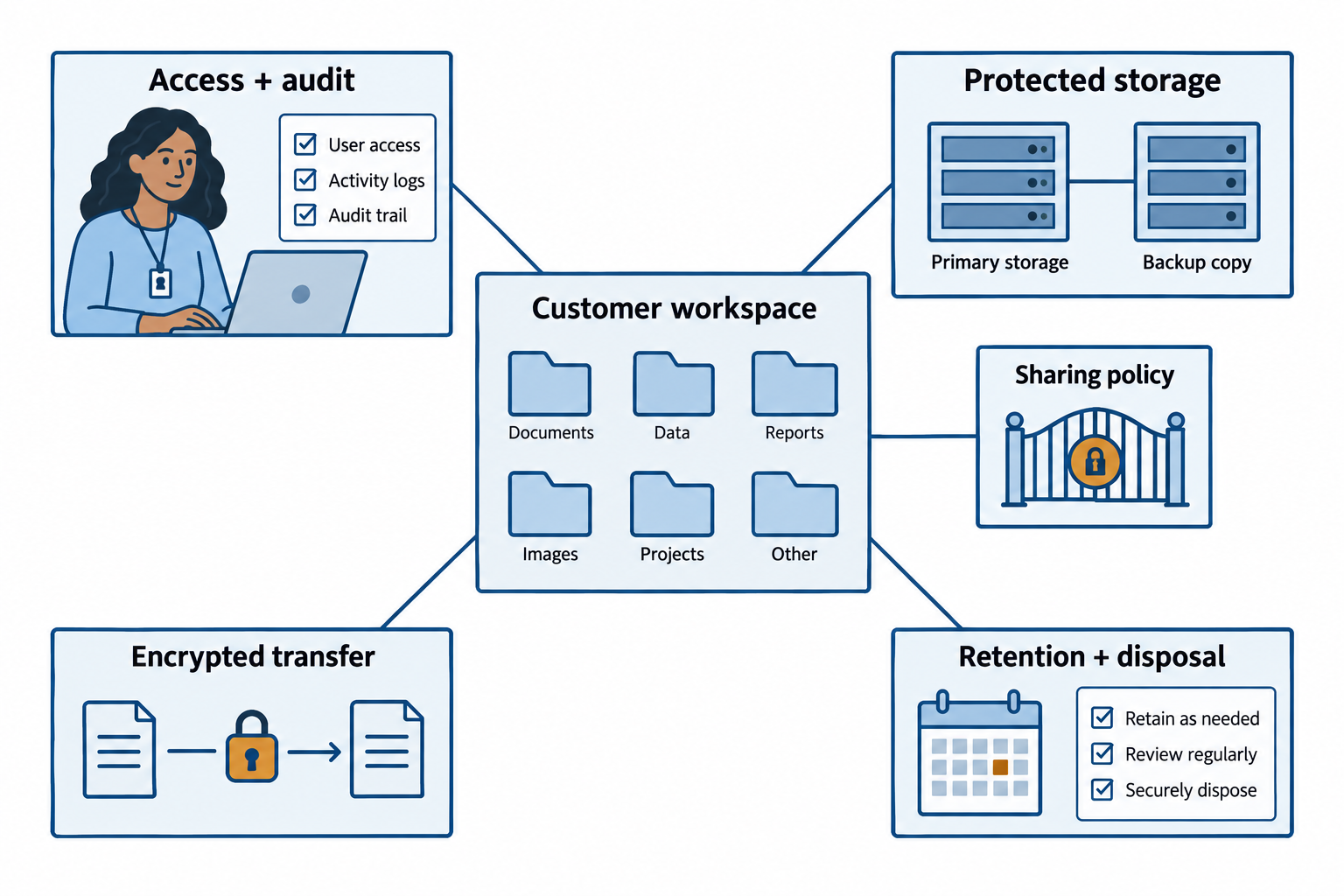
Figure 10.10: Sophia’s software-as-a-service assessment connects access, storage, transfer, and retention controls around the customer workspace.
Open Figure 10.10 at full size
Text description for Figure 10.10
The scenario’s customer workspace limits access by project and records activity. Its storage and backups need protection, and network transfers use encrypted connections. Sharing and export controls address data leaving approved workflows. Retention and disposal decisions must follow applicable requirements and cover relevant data and key copies. A documented assessment supports review but does not by itself certify compliance.
10.8 Data Protection Concepts in Practice
The data protection landscape continues to evolve as organizations adopt cloud services, process more personal data, and face increasingly sophisticated attacks. Several trends affect how data protection is implemented:
Encryption by default: More organizations are moving toward encrypting all data by default rather than selectively encrypting only the most sensitive data. This reduces the need to classify every piece of data and simplifies compliance with regulations that expect organizations to use "state-of-the-art" protection.
Zero Trust and data: Zero Trust principles apply to data as well as access. Instead of assuming data inside the network boundary is safe, Zero Trust approaches assume all data could be compromised and implement controls (encryption, access logging, anomaly detection) accordingly.
Cloud-specific challenges: In cloud environments, organizations do not have physical control over storage media or keys. Data protection in cloud relies heavily on encryption (ensuring the cloud provider cannot access data without keys) and access controls (ensuring only authorized users can retrieve decrypted data).
Privacy-preserving analytics: Organizations increasingly need to analyze sensitive data without fully decrypting it. Techniques like differential privacy, homomorphic encryption, and secure multi-party computation allow statistical analysis or aggregate reporting on sensitive data while protecting individual privacy.
Chapter Summary
- Data classification assigns sensitivity levels (public, internal, confidential, critical) to guide appropriate protection controls. Higher classifications receive stronger protections.
- Data states (at rest, in transit, in use) each present distinct security challenges. At rest requires encryption and access controls. In transit requires encrypted channels and mutual authentication. In use requires application-level controls and hardware protections.
- Data protection techniques include encryption (making data unreadable without keys), tokenization (replacing sensitive data with tokens), masking (obscuring sensitive data in displays), anonymization (removing all links to individuals), and pseudonymization (replacing identifiers with reversible pseudonyms).
- Data loss prevention (DLP) technologies monitor endpoints, networks, and cloud services to prevent sensitive data from leaving the organization without authorization.
- Secure destruction ensures data cannot be recovered after the retention period expires. Methods include degaussing (for magnetic media), shredding (for all media), incineration (permanent but with environmental impact), and cryptographic erasure (destroying keys instead of physical media).
- Privacy regulations including GDPR, CCPA/CPRA, and HIPAA establish legal requirements for data handling, data subject rights, and breach notification. Compliance requires technical controls, governance structures, and organizational awareness.
- Data governance assigns roles (controller, processor, steward, data protection officer) to ensure data is managed as a strategic asset and that organizational policies are consistently applied.