CH6: Vulnerability Scanning Methods
Introduction
Chapter 5 taught analysts to recognize indicators of compromise (evidence that an attacker is already operating inside a system or network). This chapter shifts from detection to prevention and assessment. A vulnerability is a weakness in a system, application, network, or configuration that an attacker can exploit to gain unauthorized access, modify data, or disrupt operations. Unlike indicators, which signal that a compromise may have occurred, vulnerabilities represent the conditions that permit compromise in the first place.
A vulnerability scanner is an automated tool that systematically probes systems and networks to identify known vulnerabilities, misconfigurations, and security gaps. Scanning is foundational to a mature security program. Organizations that do not know what vulnerabilities exist in their infrastructure cannot prioritize remediation or defend against known threats.
This chapter introduces vulnerability scanning as a structured process, not a point-and-click tool run in isolation. A responsible scanning program requires planning: determining what to scan and when, understanding the operational impact of active scanning, classifying systems by sensitivity, aligning scanning to regulatory requirements, and interpreting results with context. The chapter covers scanning planning, different scan types (internal vs. external, agent-based vs. agentless, active vs. passive), and the use of scanning to enforce security baselines like PCI DSS, CIS Benchmarks, and ISO 27000 families.
By the end of this chapter, students will understand when and how to execute vulnerability scans, what data scans generate, and how to use scanning data to improve security posture.
Learning Objectives
Upon completing this chapter, students will be able to:
- Develop a vulnerability scanning program that includes asset inventory, scheduling considerations, and operational planning.
- Explain the differences between internal and external scans, agent-based and agentless approaches, and active and passive scanning methodologies.
- Describe how discovery scans (network mapping, service fingerprinting) support vulnerability assessment.
- Evaluate security baselines and compliance frameworks (PCI DSS, CIS Benchmarks, ISO 27000) that guide what to scan and what to prioritize.
- Develop a scanning strategy that balances discovery, compliance, and operational risk.
6.1 Foundations of Vulnerability Scanning
A vulnerability scanner generates inventory data and identifies specific weaknesses. The output is a report listing systems, services, configurations, and patches missing from scanned systems.
Vulnerability Taxonomy
Vulnerability scanning relies on a shared vocabulary. Two core standards organize much of the information in scanner findings: Common Vulnerabilities and Exposures (CVE) identifies a known vulnerability, while the Common Vulnerability Scoring System (CVSS) describes its technical severity. They answer different questions: CVE answers which vulnerability is this?; CVSS helps answer how severe is it?
CVE: A Unique Identifier for Known Vulnerabilities
A CVE is a standardized, unique identifier assigned to a publicly known cybersecurity vulnerability. Its format is CVE-year-number, such as CVE-2021-44228, the identifier for the Log4Shell vulnerability. The identifier does not describe the vulnerability's severity or provide a patch by itself. Instead, it gives vendors, researchers, scanners, and defenders a precise, common reference for the same issue.
When a scanner detects software or a configuration affected by a known issue, it can report the CVE ID. Analysts can then use that ID to correlate the finding with vendor advisories, patches, exploit reports, threat intelligence, ticketing records, and other scan results. Without a shared identifier, a vendor advisory, a scanner finding, and a remediation ticket could use different names for the same flaw, making tracking and verification unnecessarily difficult.
The National Vulnerability Database (NVD) is NIST's searchable repository of vulnerability information. Search an NVD record by its CVE ID to review the vulnerability description, affected products, references, published dates, and available scoring information. For example, the NVD record for CVE-2021-44228 provides the details used to identify and track Log4Shell. The NVD builds on CVE data; a CVE ID remains the durable reference used to connect vulnerability information across tools and organizations.
CVSS: A Standardized Severity Score
The Common Vulnerability Scoring System (CVSS) is a standardized framework that expresses the technical severity of a vulnerability on a 0.0 to 10.0 scale. CVSS considers characteristics such as how an attacker reaches the vulnerable system, whether authentication or user interaction is required, and the potential effect on confidentiality, integrity, and availability. Higher scores generally indicate more severe technical impact, allowing teams to sort large numbers of findings into an initial triage order.
CVSS is useful for prioritization, but it is not a complete measure of organizational risk. A high CVSS finding on an isolated test system may require less urgent action than a lower-scoring issue on an internet-facing system that processes sensitive data. Analysts must combine CVSS with asset criticality, exposure, exploit activity, compensating controls, and business impact. Chapter 8, Vulnerability Prioritization and Mitigation, examines CVSS and these additional prioritization factors in detail.
Video: CVE and CVSS
Asset Inventory: Knowing What to Scan
Before scanning, you must know what exists. An asset inventory is a comprehensive list of every device, system, and application the organization owns or operates.
Physical assets include servers, workstations, network equipment (firewalls, routers, switches), printers, IoT devices, and storage systems. In modern organizations, this also includes cloud infrastructure: virtual machines, databases, storage buckets, and serverless functions.
An asset inventory must track:
- Device type, manufacturer, model
- Operating system and version
- Location (physical office, data center, cloud region)
- Ownership (department, cost center, responsible person)
- Data classification (public, internal, confidential, restricted)
- Network segment (DMZ, internal, guest network)
- Criticality (business-critical, standard, low-risk)
The challenge is maintaining accuracy. In large organizations with thousands of devices, equipment changes hands, systems are provisioned and decommissioned, and inventory data becomes stale. A mature asset management practice includes automated discovery tools that scan networks periodically to identify new devices and flag devices that are no longer in the inventory.
Scanning begins with asset inventory. A scan that discovers systems not in the inventory is a valuable finding (it reveals that infrastructure exists outside normal change control and governance processes).
Figure 6.1 connects discovered assets to the inventory details needed for scan planning.
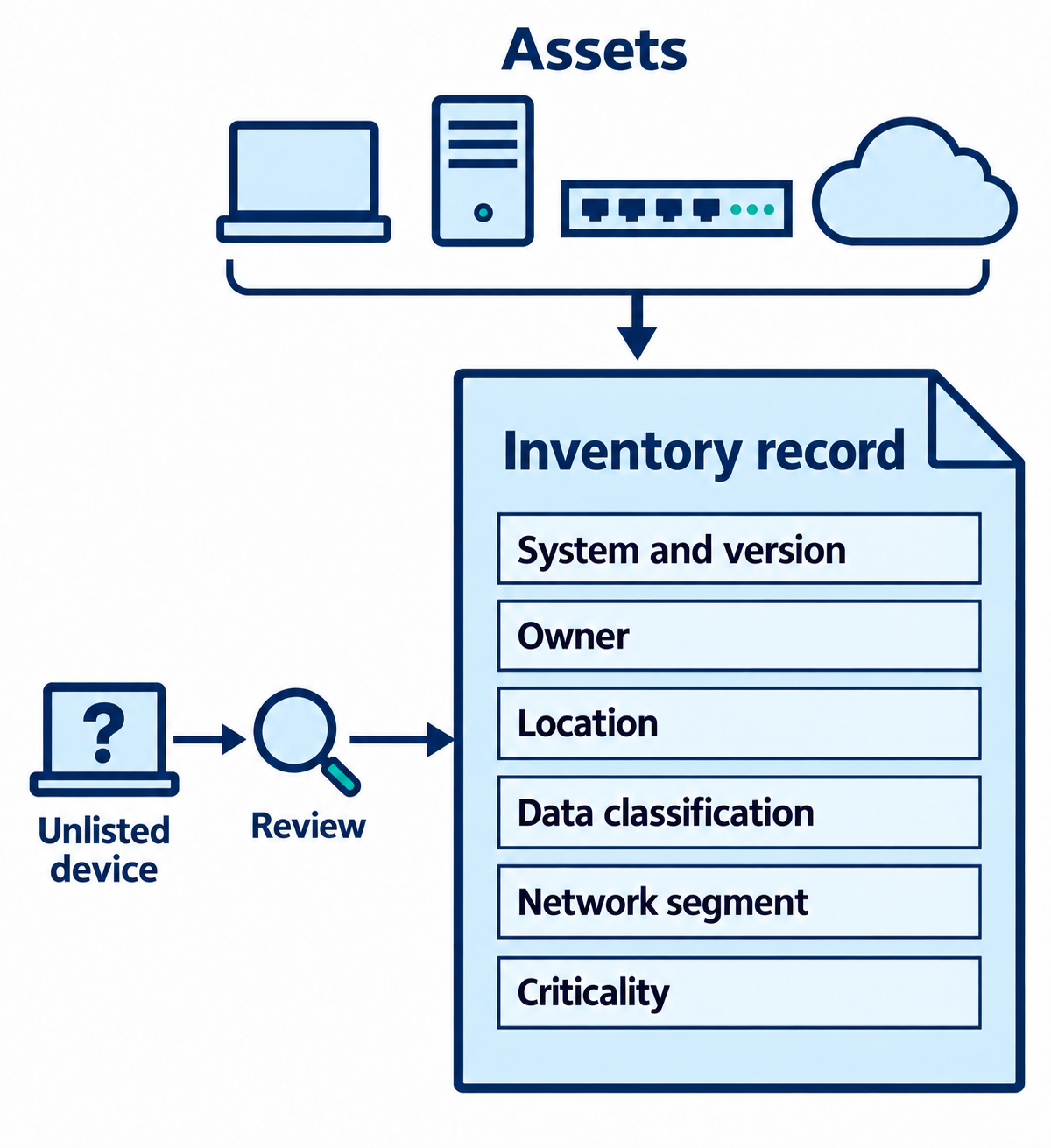
Figure 6.1: An asset inventory connects system identity with ownership, location, data sensitivity, network placement, and business importance.
Text description for Figure 6.1
The asset group includes a workstation, server, network device, and cloud resource. Their records capture system and version, owner, location, data classification, network segment, and criticality. Criticality describes how strongly the organization depends on an asset. A separate unlisted device leads to review before its information joins the inventory. Discovery observations help maintain inventory accuracy, while ownership and business context require additional records.
Planning Considerations: When and What to Scan
Vulnerability scanning is not passive. Active scanning sends probes and requests to every port and service, consuming bandwidth and potentially impacting system performance.
Scheduling is the first consideration. Scanning during business hours disrupts legitimate users and creates false positives (users report "the network is slow," not realizing a scan is consuming bandwidth). Scans are typically scheduled for:
- Off-hours: 2:00 AM to 5:00 AM on weekdays when user activity is minimal
- Maintenance windows: Designated times when systems are taken offline or reduced availability is expected
- Weekend scans: If the organization operates Monday-Friday, weekend scans minimize user impact
Operational impact must be assessed. Some systems cannot tolerate scanning:
- Production systems handling live transactions may become unresponsive if scanned during peak usage
- Medical devices, industrial control systems, and real-time systems can be destabilized by scanning probes
- Embedded devices with limited resources (printers, IP cameras) may crash or reboot if scanned aggressively
For these systems, scanning is either avoided entirely, scheduled during maintenance, or replaced with agent-based scans that consume fewer resources.
Sensitivity levels vary across the organization. Critical systems (financial transaction servers, healthcare record databases) require more careful planning than non-critical systems (development environments, test servers).
System Segmentation and Scanning Scope
Network segmentation divides the network into zones. Each zone is scanned according to its risk profile:
- DMZ (Demilitarized Zone): Systems publicly accessible from the internet (web servers, email gateways) can be aggressively scanned because external attackers are already probing them.
- Internal network: Systems accessible only to employees can be scanned but with more caution to avoid disruption.
- Industrial control networks (ICN): Manufacturing and critical infrastructure networks may forbid scanning entirely due to stability concerns.
- Cloud networks: Cloud provider APIs allow programmatic scanning without consuming network bandwidth.
Scanning scope must be explicitly defined. Scanning everything simultaneously creates operational chaos. A more structured approach scans segments systematically: DMZ this month, internal servers next month, workstations the following month.
Figure 6.2 shows how network zones inform the targets, exclusions, methods, and timing recorded in a scan plan.
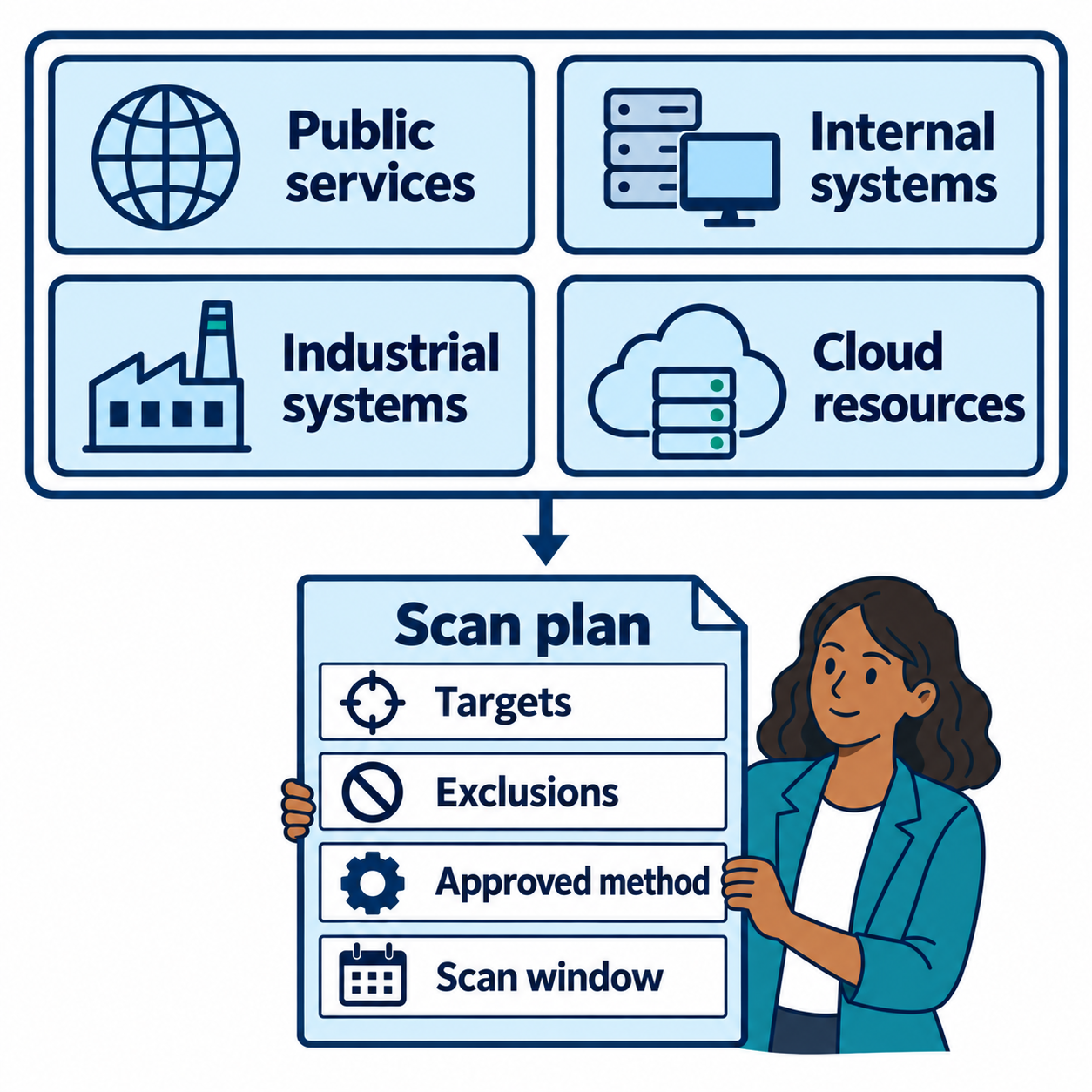
Figure 6.2: A scan plan defines which systems are included and how their operational needs shape the assessment.
Text description for Figure 6.2
The diagram groups assets into public services, internal systems, industrial systems, and cloud resources. Each zone contributes to a scan plan that names targets, exclusions, an approved method, and a scan window. A scan window is the scheduled period for assessment activity. Each environment needs its own operational review. Public exposure alone does not establish that an aggressive scan is safe.
Regulatory Requirements Driving Scanning
Compliance frameworks mandate vulnerability scanning:
- PCI DSS (Payment Card Industry Data Security Standard): Organizations handling payment cards must conduct vulnerability scans at least quarterly and after any significant system changes. Scans must identify "critical" and "high-risk" vulnerabilities.
- HIPAA (Health Insurance Portability and Accountability Act): Healthcare organizations must periodically assess security vulnerabilities in systems that handle protected health information.
- SOC 2 Type II: Service organizations handling customer data must demonstrate ongoing vulnerability assessment and remediation.
- NIST Cybersecurity Framework (CSF): The U.S. government framework recommends regular assessment activities including vulnerability scanning.
These requirements drive scanning frequency and scope. A PCI DSS-compliant payment processing system must be scanned at minimum quarterly; a non-compliance asset can be scanned annually. Understanding your regulatory landscape is essential for planning.
6.2 Scan Types and Methodologies
Different scan types answer different questions and reveal different data.
Internal vs. External Scans
External scans originate from outside the network and probe systems accessible from the internet. The scanner may be on the public internet or on a customer-accessible network segment (DMZ). External scans answer: "What would an attacker on the internet discover about our organization?"
External scanning typically targets:
- Public web servers and web applications
- Email gateways and remote access portals (VPN, RDP, Citrix)
- DNS servers
- Authentication systems publicly exposed
External scans are limited because firewalls block most ports. A firewall configured correctly exposes only ports necessary for business (80, 443, 25, 53) while blocking everything else. This limits what an external scanner can discover.
Internal scans originate from inside the network and probe all systems regardless of firewall rules. The scanner has the vantage point of an insider or an attacker who has gained internal access. Internal scans typically reveal much more because:
- All ports are accessible
- All systems, including non-production systems, are scanned
- Internal protocols (SMB, Kerberos, SNMP) are visible
- Legacy systems with known vulnerabilities are discovered
A mature scanning program includes both external and internal scans. External scans simulate an attacker probing from the internet; internal scans simulate an attacker who has gained internal access and is seeking lateral movement paths.
Figure 6.3 compares scan locations and shows how filtering affects the paths available to each scanner.
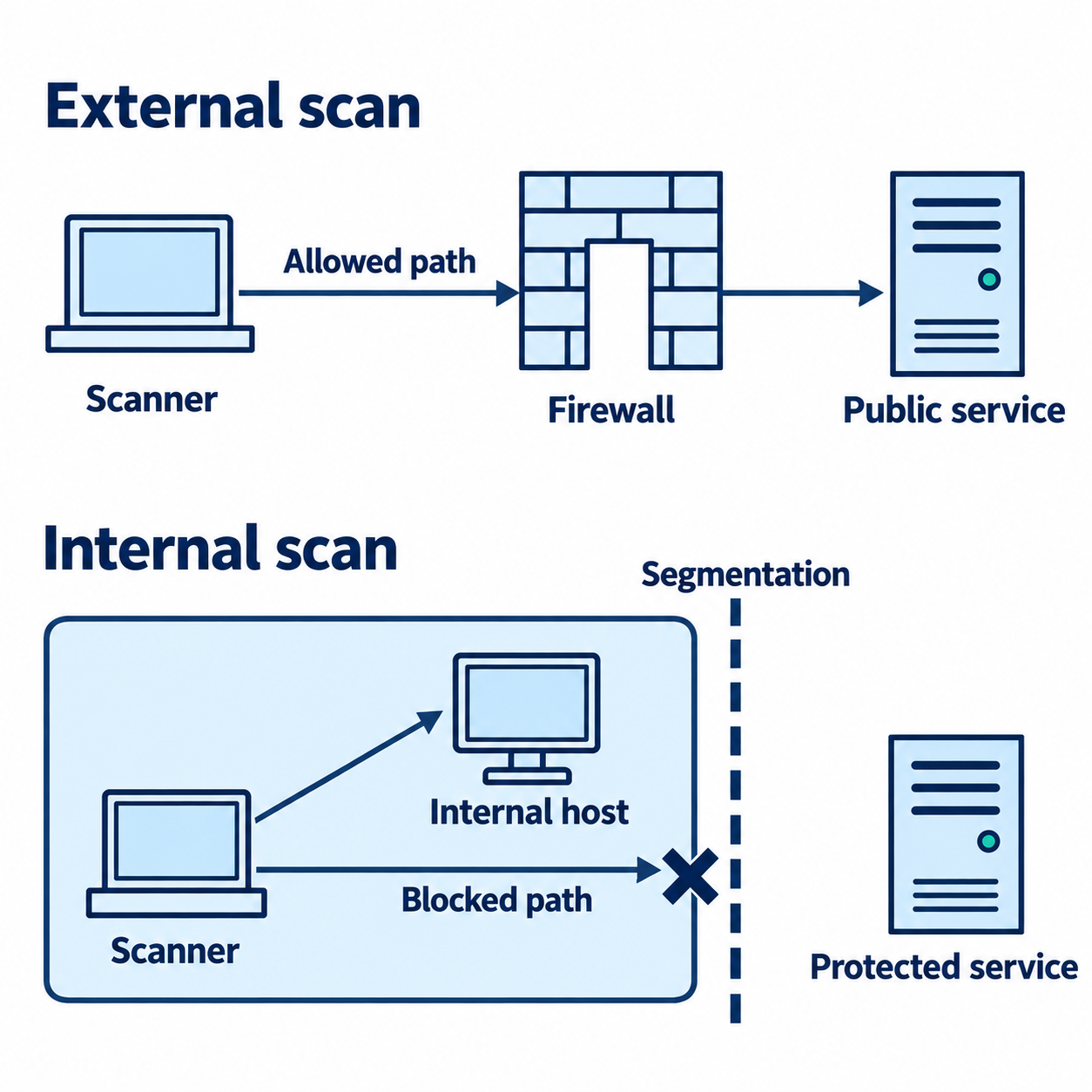
Figure 6.3: External and internal scans examine reachable services from different network locations. Firewall and segmentation rules affect both views.
Text description for Figure 6.3
Read the two scenes from top to bottom. In the external scene, a scanner outside the organization follows an allowed path through a firewall to a public service. In the internal scene, the scanner and one host share a segment. A separate route toward another segment ends at a stop mark on the segmentation boundary. No arrow continues through that blocked path. The drawing illustrates selected routes. Actual visibility also depends on routing, configuration, and target responses.
Agent-Based vs. Agentless Scanning
Agentless scanning sends network probes from a centralized scanner to target systems. The scanner sends packets, analyzes responses, and identifies services and vulnerabilities. Advantages include:
- No installation required; the target system is unaware a scan is occurring
- Can scan diverse systems (routers, printers, embedded devices) that cannot run agent software
- Centralized control; the administrator manages one scanner
Disadvantages include:
- Network firewalls may block probes, preventing detection of systems behind firewalls
- Scans are less detailed; the scanner infers vulnerability based on service versions and configuration
- Scans consume network bandwidth and can impact performance
Agent-based scanning installs small software agents on target systems. Agents report inventory data and vulnerability information directly to the scanner. Advantages include:
- More detailed information; agents inspect actual system configuration, installed packages, running processes
- Agents bypass firewall rules; network segmentation doesn't prevent reporting
- Lighter network footprint; agents don't generate scanning probes that consume bandwidth
- Detailed OS-specific information (Windows registry, Linux package managers, running services)
Disadvantages include:
- Requires deployment to every system; new systems must have agents installed before they are scanned
- Ongoing maintenance; agents must be updated and managed
- Cannot scan external systems (internet-facing servers scanned from outside)
A comprehensive scanning program uses both. Agentless scans discover all externally-visible systems. Agent-based scans provide detailed inventory of internal systems.
Figure 6.4 compares remote collection with local agent checks and their reporting connection.
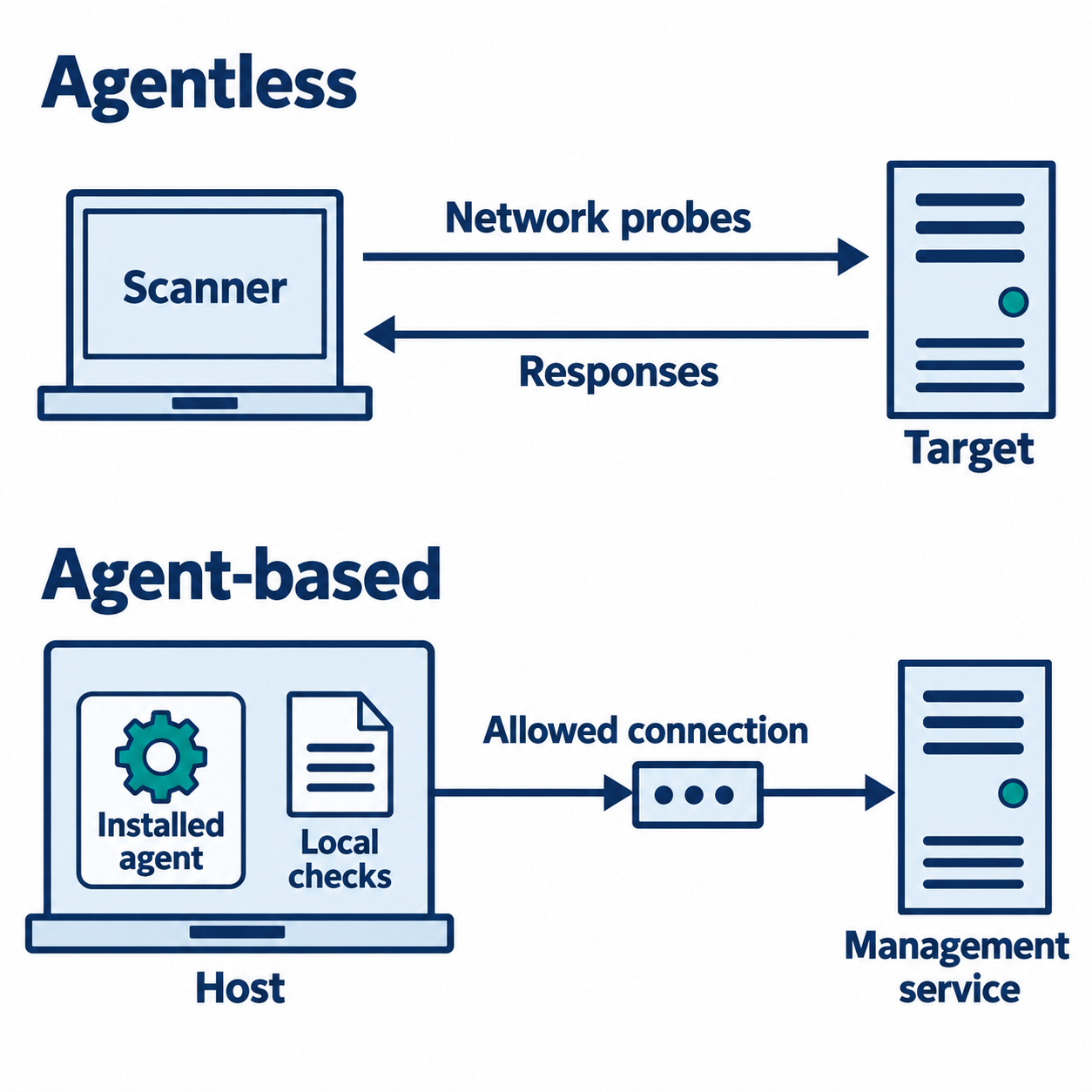
Figure 6.4: Agentless scanning collects information through network access. An installed agent checks its host locally and reports over an allowed connection.
Text description for Figure 6.4
The upper scene shows a central scanner sending network probes toward a target and receiving responses in the opposite direction. The lower scene places an installed software agent inside the host, where it performs local checks. A separate permitted connection carries results from the host to a management service. Agent communication remains subject to network controls. Collection depth depends on the selected checks and available access.
Video: agent-based versus agentless scanning
Active vs. Passive Scanning
Active scanning sends network traffic to the target and analyzes responses. Port scans, service enumeration, vulnerability probes, and exploit attempts (without executing) are active techniques. Active scans reveal the most information but carry operational risk because probes may destabilize systems.
Passive scanning observes traffic without sending probes. Packet capture and network traffic analysis can infer running services and system types without directly probing. Passive scanning reveals less information but has zero operational risk because the network is not disrupted.
A scanning strategy often combines both. Passive reconnaissance (packet capture, traffic analysis) identifies systems that merit active probing. Then, active scans target specific systems with minimal operational risk.
Figure 6.5 distinguishes traffic generated for assessment from copies of existing communication.
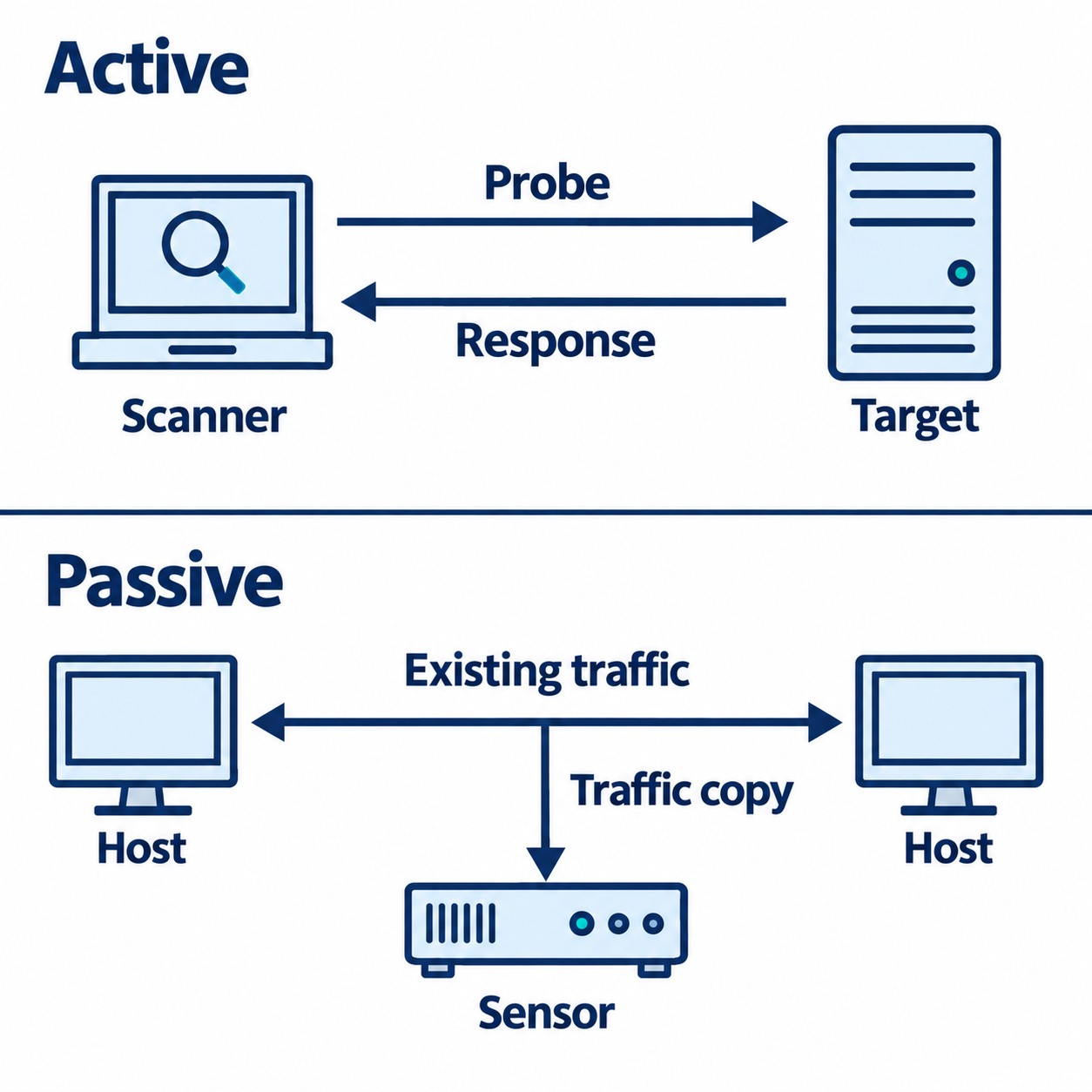
Figure 6.5: Active assessment sends probes to a target. Passive observation examines existing traffic visible at the sensor's collection point.
Text description for Figure 6.5
In the active scene, a scanner sends a probe to a target and the target returns a response. In the passive scene, two systems already communicate. A branch copies their traffic to an observing sensor. The branch arrow points only toward the sensor. The sensor's view depends on what reaches that collection point, including any limits imposed by visibility and encryption.
Discovery Scans: Network Mapping and Service Fingerprinting
Discovery scans establish a network map and inventory of running services.
Network mapping identifies all IP addresses in use across the network. Tools send ICMP echo requests (ping) or ARP requests to every IP in a subnet range and record which addresses respond. The result is a map of what's connected:
- Hosts that respond are alive
- Hosts that don't respond are either offline or blocking ICMP
- The process reveals unexpected devices and rogue systems
Service fingerprinting identifies what services are running on each host. The scanner attempts to connect to common ports (80, 443, 22, 3389, 445) and analyzes the response banner. For example:
- Connecting to port 22 and receiving "SSH-2.0-OpenSSH_7.4" reveals OpenSSH version 7.4 is running
- Connecting to port 80 and receiving an HTTP response with "Server: Apache/2.4.6" reveals Apache web server version 2.4.6
Service fingerprinting is often OS-specific. A system responding on port 3389 with an RDP banner is likely Windows. A system responding on ports 22, 111, and 2049 (NFS) is likely Linux. Fingerprinting provides initial vulnerability context: a known vulnerability in OpenSSH 7.4 can be checked against the fingerprinted version.
Discovery scans are less intrusive than vulnerability scanning (no exploit attempts) but highly valuable for understanding network topology and asset inventory.
Figure 6.6 follows discovery evidence from a host response to a candidate software identification.
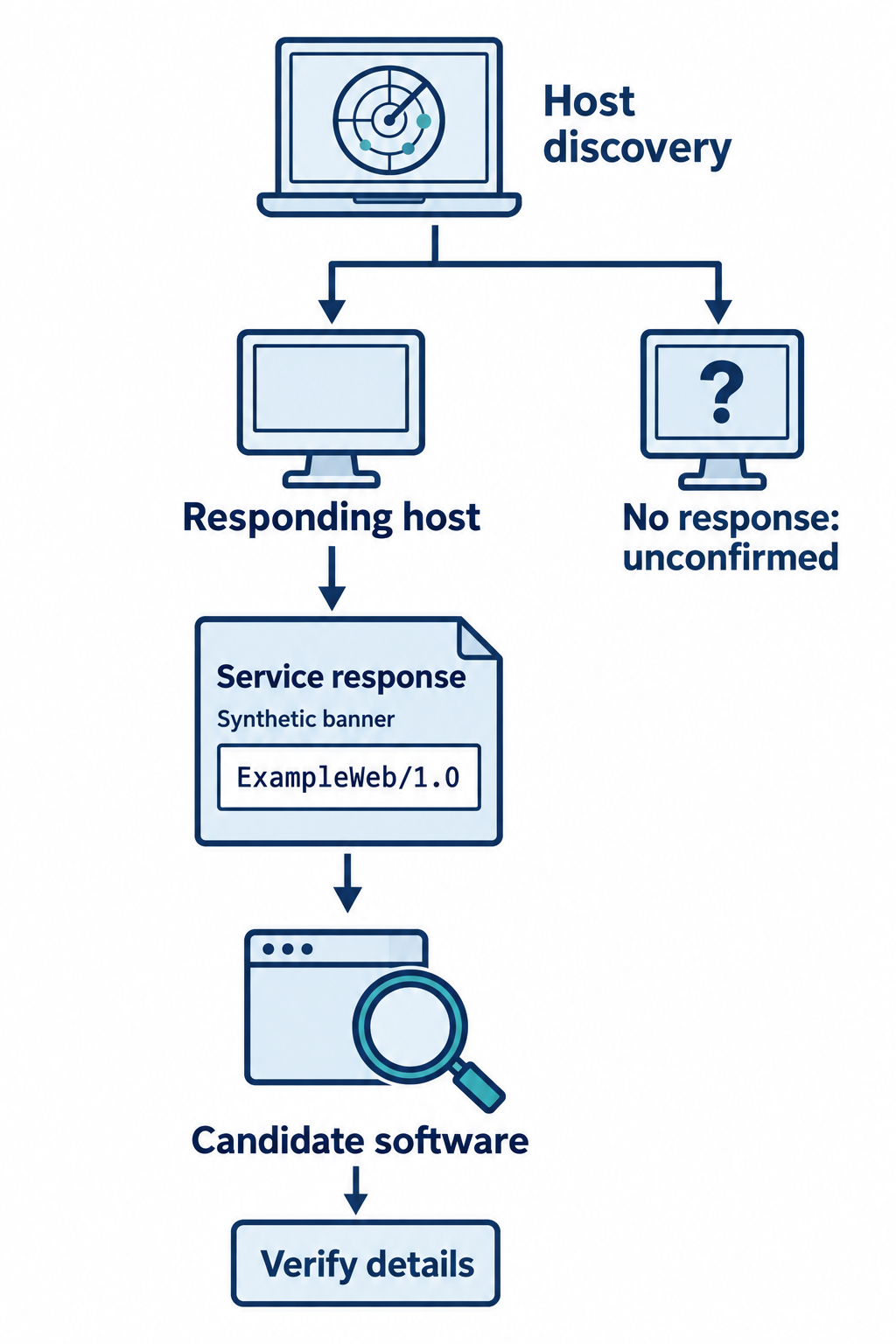
Figure 6.6: Discovery identifies responding systems and service clues. Nonresponse leaves a host unconfirmed, and software identification requires verification.
Text description for Figure 6.6
Host discovery produces two illustrated outcomes. A responding host leads to service inspection. A short banner identifies the fictional classroom product ExampleWeb version 1.0, which becomes a candidate software identity for follow-up. A host that does not respond stays unconfirmed. A banner is reported information that may need corroboration with installed-software records. Neither the banner nor a missing response establishes a confirmed vulnerability.
Video: discovery and service fingerprinting
Analyst Perspective
In incident response, discovery scans are often the first step to establish what systems exist on a segment. A network segment you thought contained only workstations may harbor unauthorized servers or rogue devices. Discovery reveals the true attack surface.
Scan Types Comparison Matrix
The following matrix summarizes the characteristics, advantages, and limitations of different scanning methodologies:
| Scan Type | Scope | Intrusiveness | Operational Risk | Information Depth | Best Use Case |
|---|---|---|---|---|---|
| External agentless | Internet-facing systems | High (active probes) | Low (outside network) | Service versions, open ports | Initial reconnaissance, compliance baseline |
| Internal agentless | All internal systems | High (active probes) | Medium (can disrupt) | All services, vulnerabilities | Comprehensive vulnerability assessment |
| Agent-based | Systems with agents | Low (agents query locally) | Minimal | Deep OS config, installed packages | Ongoing inventory and compliance monitoring |
| Active vulnerability | Specific systems | Very high (exploit testing) | Medium-High | Specific vulnerabilities | Targeted assessment, proof-of-concept |
| Passive discovery | Network segment | None (observational only) | None | Running services, traffic patterns | Network baseline, threat hunting |
| Baseline compliance | Targeted systems | Medium | Low-Medium | Config against standard | PCI DSS, CIS, HIPAA compliance verification |
Security Baseline Scanning: Compliance-Driven Assessment
Rather than searching for known vulnerabilities, baseline scans verify that systems comply with security standards.
PCI DSS scanning verifies that payment processing systems meet the Payment Card Industry Data Security Standard. Checks include:
- Are firewalls properly configured (default deny)?
- Are default passwords changed?
- Are systems regularly patched?
- Are strong encryption protocols in use?
CIS Benchmarks are consensus-based hardening guidelines published by the Center for Internet Security. CIS provides benchmarks for major operating systems (Windows Server 2019, Ubuntu 20.04, etc.), network equipment (Cisco routers), and cloud platforms (AWS, Azure). A CIS benchmark defines "Level 1" (basic hardening applicable to all systems) and "Level 2" (hardening for high-security environments) recommendations.
Scanning against CIS involves evaluating system configuration against the benchmark. For example, the Windows Server 2019 CIS Benchmark recommends:
- Account lockout threshold set to 5 failed attempts
- Minimum password length set to 14 characters
- Windows Firewall enabled for all profiles
A CIS compliance scan checks these settings and reports non-compliance.
Figure 6.7 illustrates the comparison process using a fictional classroom configuration baseline.
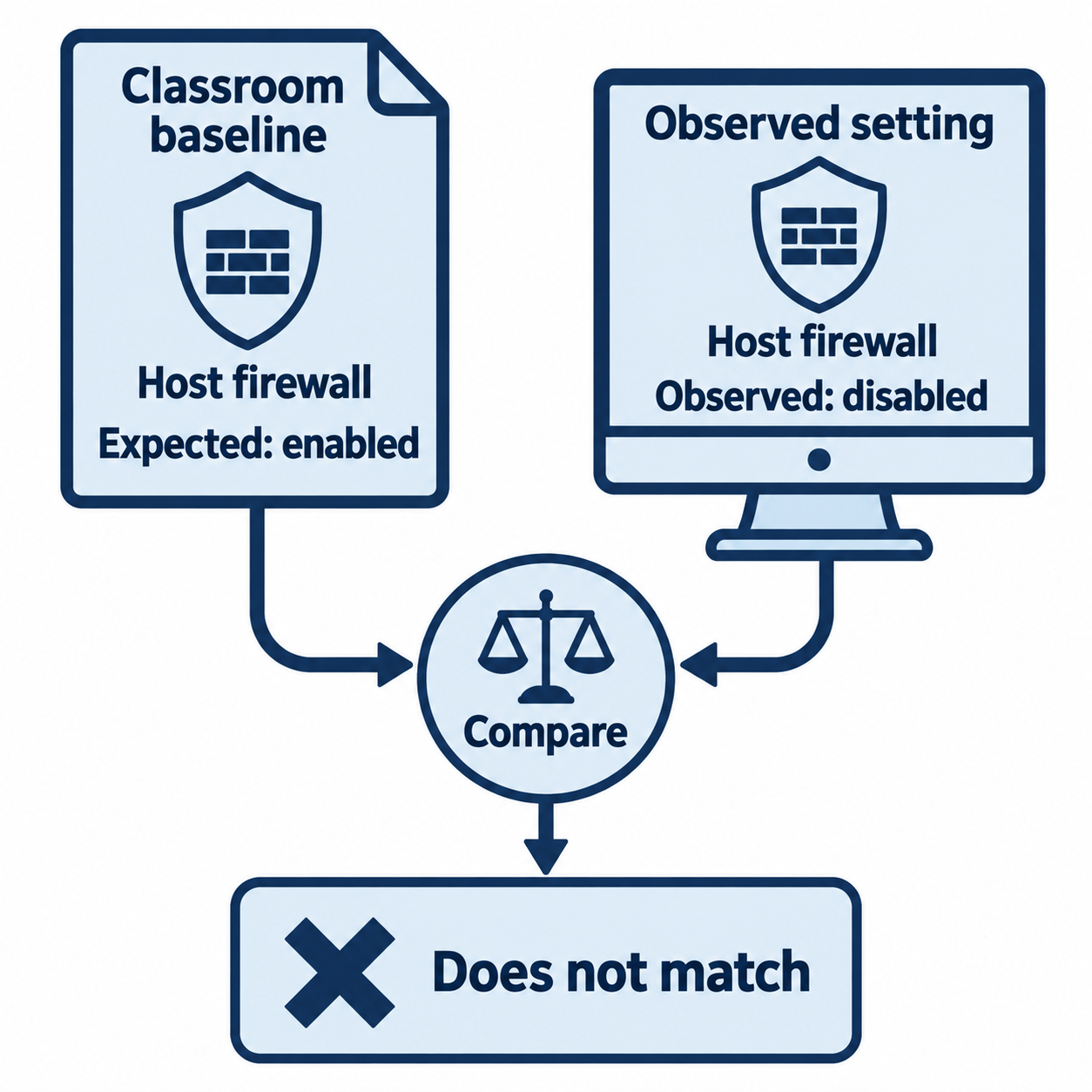
Figure 6.7: A classroom baseline comparison finds that the observed host firewall setting differs from the expected setting.
Text description for Figure 6.7
Two inputs describe the same setting. The fictional classroom baseline expects the host firewall to be enabled, while the observed host setting is disabled. The comparison reports that the setting does not match. This example demonstrates a configuration check and does not quote a particular version or profile of a Center for Internet Security benchmark.
ISO 27000 series defines information security management systems. ISO 27001 is the certification standard; ISO 27002 provides control guidance. Rather than prescriptive technical controls (like CIS), ISO 27001 focuses on organizational controls: access control policies, change management processes, incident response procedures. Compliance scanning is less technical (no automated tool checks policies) and more governance-focused.
Video: baseline scanning and regulations
6.3 Planning a Vulnerability Scanning Program
A mature organization implements vulnerability scanning as a continuous process with governance, not as an occasional cleanup activity.
Scanning Frequency and Triggers
Most organizations adopt a baseline scanning schedule:
- Critical systems: Scanned monthly or quarterly
- Standard systems: Scanned quarterly
- Low-risk systems: Scanned annually
Trigger-based scanning supplements baseline scans:
- After a system is deployed (initial scan to establish baseline)
- After a major system update or patch (verify the update didn't break something)
- After a security incident (verify lateral movement didn't spread to other systems)
- When regulatory changes occur (new compliance requirement)
Organizations required to meet PCI DSS must scan at least quarterly and after any significant system change. This drives more frequent scanning than organizations without this requirement.
Figure 6.8 shows how scheduled assessments and relevant events both feed scan planning.
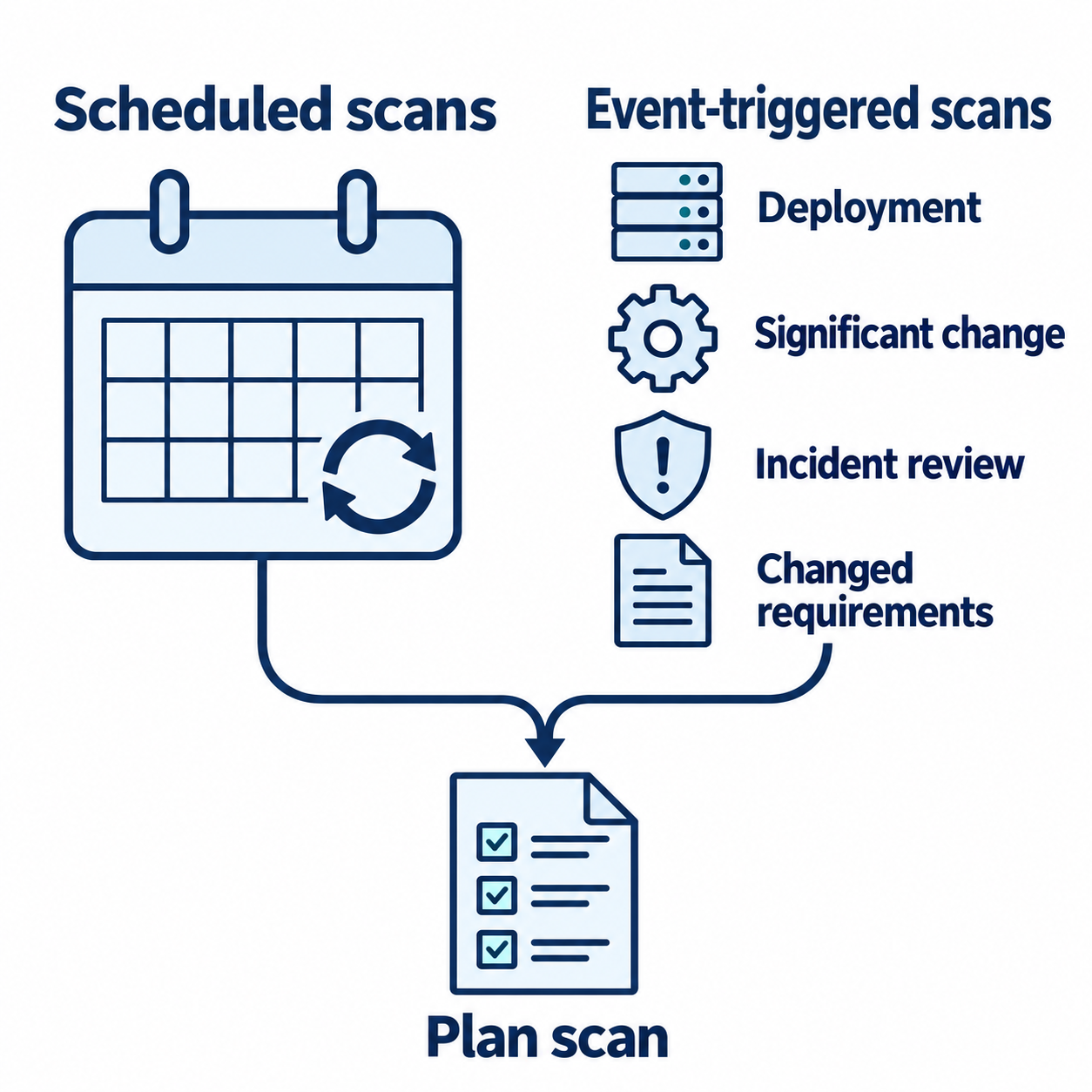
Figure 6.8: A scanning program combines recurring assessments with reviews triggered by deployments, changes, incidents, or changed requirements.
Text description for Figure 6.8
A calendar represents recurring scans. A separate event group includes deployment, significant change, incident review, and changed requirements. Both sources lead to scan planning so the organization can determine appropriate scope, timing, and checks. The diagram specifies no universal interval. Frequency depends on the system's risk, operational context, and applicable requirements.
Scan Configuration: Scope and Intensity
A scan can be configured to be light, moderate, or aggressive.
Light scans perform basic service enumeration without exploiting vulnerabilities. They consume minimal resources and are safe to run during business hours. They answer: "What services are running?"
Moderate scans probe for known vulnerabilities without exploiting them. They may send payloads designed to trigger error messages that reveal vulnerability (SQL injection syntax, XSS vectors) without actually modifying data. They consume moderate resources and should be run during off-hours.
Aggressive scans probe deeply and may attempt exploits in a controlled way (without executing malicious payloads). They can significantly impact system performance and are only appropriate for non-production systems or critical vulnerabilities requiring verification.
Figure 6.9 identifies configuration choices that shape the work a scan imposes on its targets.
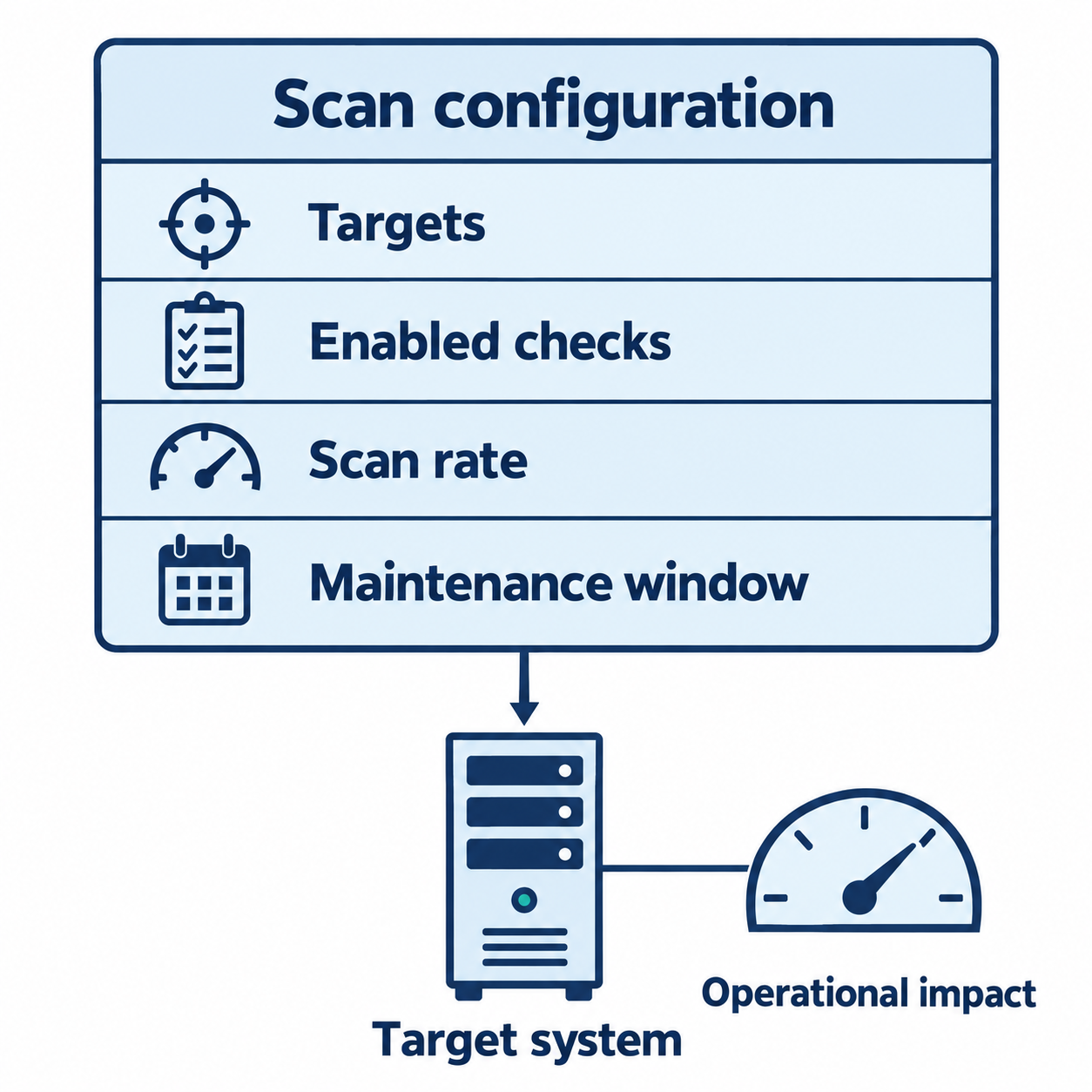
Figure 6.9: Selected targets, enabled checks, scan rate, and timing influence assessment coverage and operational impact.
Text description for Figure 6.9
The configuration sheet names targets, enabled checks, scan rate, and the maintenance window. Scan rate describes how quickly the scanner sends work to targets. These choices affect what the scan examines and the load imposed on the target system. The drawing uses no fixed thresholds or universal safe setting. Operators must account for the target's capacity and operational constraints.
Scan Reporting and Remediation Workflows
Scanning generates large volumes of data. A typical scan of a medium-sized network may identify thousands of findings. Not all findings are equally important. Remediation requires prioritization.
Findings are typically prioritized by:
- Severity: Critical vulnerabilities (exploitable without authentication, leading to complete system compromise) take priority over Low vulnerabilities
- Exploitability: Easily-exploited vulnerabilities take priority over those requiring specific conditions
- Business impact: Vulnerabilities in systems handling sensitive data or critical operations take priority
- Compliance relevance: Vulnerabilities that cause compliance failures take priority
- Patch availability: Vulnerabilities with available patches are often remediated before vulnerabilities without patches
A typical remediation workflow assigns findings to system owners, tracks remediation progress, and retests after remediation to verify the vulnerability was fixed.
Figure 6.10 follows a finding through treatment and verification, including the return path when retesting leaves it unresolved.
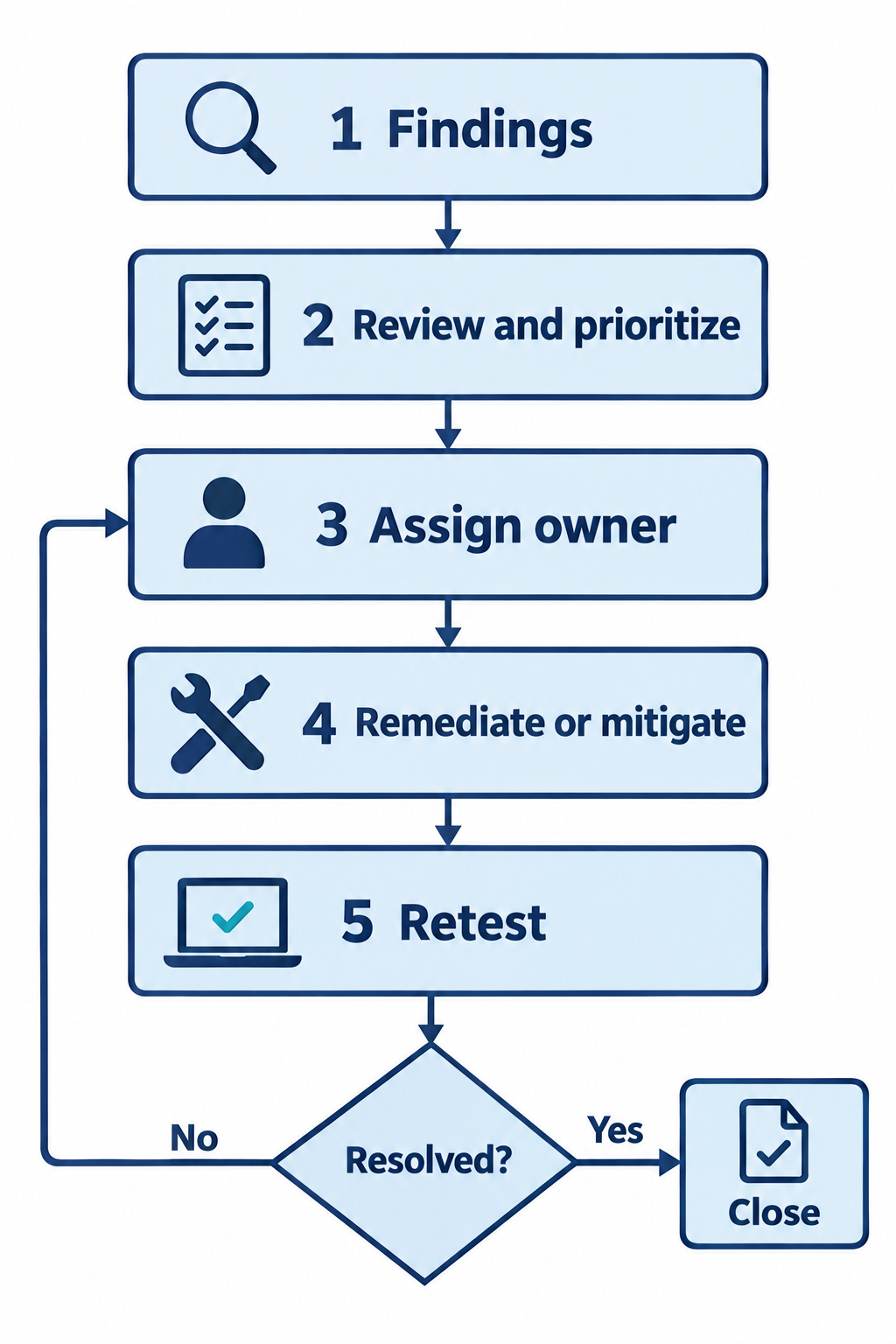
Figure 6.10: A remediation workflow assigns responsibility and uses retesting to determine whether a finding can close.
Text description for Figure 6.10
Read the numbered path: findings, review and prioritize, assign owner, remediate or mitigate, and retest. The retest feeds a decision asking whether the finding is resolved. The yes branch ends at close. The no branch returns to the assigned owner for further action. Mitigation reduces exposure and may leave a residual issue, so treatment alone does not automatically close the finding.
Putting It Together: Equifax (2017) and the Scanning Failure
The Equifax breach (2017) exposed personal data of 147 million people and triggered a national security incident. The root cause was a vulnerability in the Apache Struts web framework (CVE-2017-5638) that allowed remote code execution. What makes this breach relevant to vulnerability scanning is that the vulnerability was publicly disclosed on March 6, 2017, but Equifax was not patched until July 2017 (a four-month delay).
During that four-month window, vulnerability scanners that tested for CVE-2017-5638 would have identified the vulnerability in Equifax's systems. The attacker exploited it on July 13, 2017, exactly four months after disclosure. Equifax's lack of vulnerability scanning, or failure to act on scanning results, allowed a known, patched vulnerability to be exploited.
The incident demonstrates:
-
Known vulnerabilities are routine: CVE-2017-5638 was widely publicized. Attackers knew about it and searched for it. Defensive scanning would have found it.
-
Scanning is useless without action: Even if Equifax had scanned and found the vulnerability, not patching it provided no benefit. The organization's failure involved both absent scanning and absent remediation.
-
Criticality drives timeline: Equifax processes financial data. The Struts vulnerability in a public-facing application should have triggered immediate patching, not a four-month delay.
Organizations today that scan regularly and remediate vulnerabilities quickly reduce their exposure to exactly this scenario.
6.4 Compliance Frameworks and Scanning Requirements
Different industries face different compliance mandates that dictate scanning frequency, scope, and rigor.
PCI DSS Scanning Requirements
PCI DSS is a contractual requirement for organizations that handle payment cards. The standard requires:
- Quarterly vulnerability scans
- Scans must be performed by an approved scanning vendor (ASV) or qualified personnel
- Scans must identify "critical" and "high-risk" vulnerabilities
- All vulnerabilities must be remediated or documented with a risk acceptance
- Scans must be repeated after major system changes
PCI DSS defines vulnerability severity by CVSS score:
- Critical: CVSS 9.0-10.0
- High: CVSS 7.0-8.9
- Medium: CVSS 4.0-6.9
- Low: CVSS 0.1-3.9
CIS Benchmarks: Prescriptive Hardening
CIS Benchmarks provide specific configuration recommendations. A CIS scan checks actual system configuration against the benchmark and reports compliance status. For example, CIS Windows Server 2019 includes Level 1 recommendations such as:
- Account Policies: Password History = 24, Max Password Age = 60, Min Password Age = 1, Min Password Length = 14
- Lockout Policies: Account lockout threshold = 5 invalid logons, lockout duration = 15 minutes
- User Rights Assignment: Specific permissions granted to specific user groups
Systems compliant with CIS Level 1 have passed basic hardening. Level 2 recommendations are more strict and may require more operational planning.
HIPAA and Healthcare Scanning
HIPAA (Health Insurance Portability and Accountability Act) requires covered entities and business associates to protect patient health information. The Security Rule (45 CFR 164.304) requires:
- Regular vulnerability assessments
- Timely remediation of identified vulnerabilities
- Risk mitigation strategies for vulnerabilities that cannot be immediately remedied
HIPAA does not specify scanning frequency (unlike PCI DSS), but implied best practice is at least annual assessment, more frequent for systems handling high-risk data.
Figure 6.11 brings together evidence from scanning, configuration checks, and documented risk review.
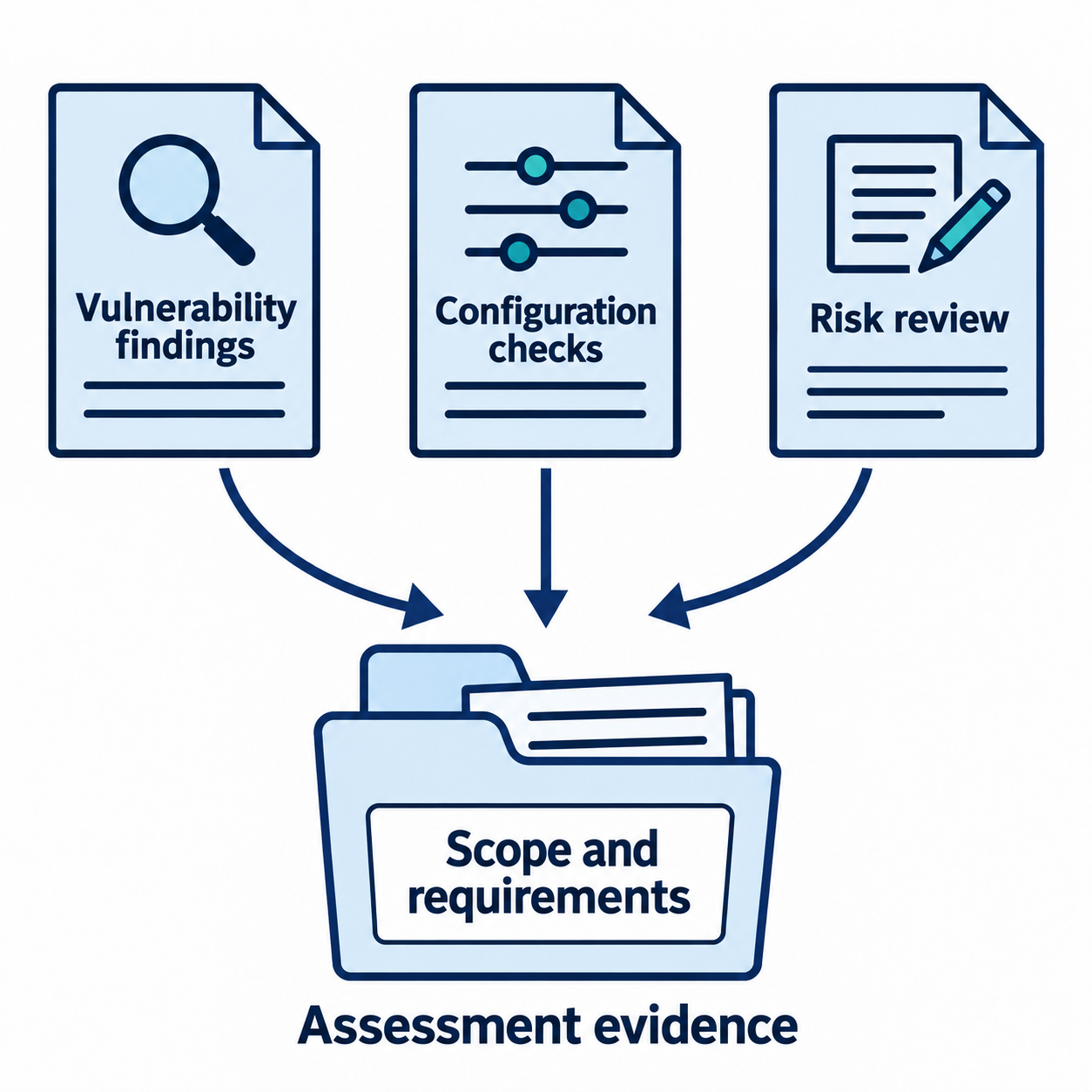
Figure 6.11: Assessment combines several kinds of evidence and evaluates them against the applicable scope and requirements.
Text description for Figure 6.11
Three source records contribute to an assessment: vulnerability findings, configuration checks, and documented risk review. Their arrows converge on an assessment evidence record associated with scope and requirements. Each source answers a different question. A vulnerability scan identifies potential technical weaknesses, configuration checks compare observed settings with an expected baseline, and risk review considers context and treatment decisions. A complete compliance determination requires the applicable assessment process and evidence.
Chapter Summary
-
Asset inventory is the foundation of vulnerability scanning. You cannot scan what you don't know exists. Automated discovery tools help maintain accurate inventory in dynamic environments.
-
Planning is essential for responsible scanning. Consider scheduling (off-hours to minimize disruption), operational impact (production systems may become unresponsive), and system criticality. Not everything can be aggressively scanned.
-
Internal and external scans are complementary. External scans simulate attacker reconnaissance from the internet; internal scans simulate an attacker who has gained internal access. Both are necessary.
-
Agent-based and agentless scanning have trade-offs. Agentless scanning discovers internet-facing systems; agent-based scanning provides deeper information about internal systems. Use both.
-
Active scanning (sending probes) provides more data than passive scanning (analyzing existing traffic) but carries operational risk. Balance discovery needs with system stability.
-
Discovery scans map network topology and enumerate running services. These are prerequisites for understanding the attack surface.
-
Compliance frameworks (PCI DSS, CIS Benchmarks, ISO 27001) drive scanning requirements. Understanding your regulatory landscape determines scanning frequency and priority.
-
Remediation is more important than scanning. A scanned vulnerability that is not fixed provides no security benefit. Implement workflows that prioritize high-impact findings and track remediation to completion.
The next chapter introduces the tools that execute these scanning methodologies. Each tool has strengths, limitations, and appropriate use cases depending on your environment and objectives.