CH9: Containment Strategies
Introduction
In Chapter 8, we invested the time to understand the full scope of the breach. We identified compromised hosts, traced lateral movement, mapped the attacker's Command and Control (C2) infrastructure, and constructed a unified timeline of the intrusion. The Analysis phase gave us the X-ray. Now it is time to operate.
Containment is the phase where the Incident Response team shifts from observer to actor. Containment is the deliberate, coordinated act of cutting off the attacker's access, stopping the spread of damage, and stabilizing the environment so that eradication and recovery can proceed safely.
However, containment is not as simple as "pull the plug." Isolating a server preserves evidence but disrupts business operations. Disabling an account stops an attacker but may alert them, causing them to accelerate destruction or activate dormant backdoors. Powering off a ransomware-infected machine halts encryption but destroys volatile memory that may hold decryption keys.
This chapter treats containment as what it truly is: a series of strategic decisions, not reflexive reactions.
Learning Objectives
By the end of this chapter, you will be able to:
- Differentiate between short-term and long-term containment strategies and identify when each is appropriate.
- Evaluate containment tradeoffs, including the tension between evidence preservation, business continuity, and adversary awareness.
- Apply network-based containment techniques—DNS sinkholing, null-routing, firewall ACL modifications, and VLAN quarantine—to isolate compromised systems.
- Execute identity and access containment actions, including account disablement, credential resets, session and token revocation, and privileged access review.
- Analyze the unique containment challenges posed by ransomware incidents, including the power-off vs. isolate decision and its impact on encryption keys and forensic evidence.
9.1 The Logic of Containment
Before executing any containment action, the team must understand what containment is and, equally important, what it is not.
Containment is not eradication. The goal is to stop the bleeding—to prevent the attacker from expanding their foothold, exfiltrating additional data, or detonating destructive payloads. Containment does not remove the attacker from the environment. After successful containment:
- Their malware may still reside on disk.
- Their backdoor accounts may still exist.
- Their persistence mechanisms (scheduled tasks, Registry run keys, WMI subscriptions) remain in place.
Those are problems for Chapter 10 (Eradication). Containment is the tourniquet, not the surgery.
The "Contain, Don't Cure" Principle
The instinct during a live incident is to fix everything immediately—wipe the infected machine, patch the vulnerability, reset every password. This instinct is dangerous. Premature remediation destroys evidence, introduces chaos, and often fails to address the full scope because the team has not yet finished mapping the attacker's reach.
Containment operates under disciplined restraint: stop the spread, preserve the evidence, and hold the line until the team is ready for a coordinated eradication.
Short-Term vs. Long-Term Containment
Containment is not a single action but a phased approach. The distinction between short-term and long-term containment reflects the difference between emergency stabilization and sustained operational control.
Short-Term Containment is the immediate response. It prioritizes speed over elegance—preventing the situation from getting worse right now.
- Disconnecting a compromised host from the network (pulling the Ethernet cable or disabling the switch port).
- Blocking a known C2 IP address at the perimeter firewall.
- Disabling a compromised user account in Active Directory.
These actions are fast but blunt, and they are not sustainable for extended periods.
Long-Term Containment is a measured posture designed to sustain operations while maintaining control over the threat. It involves architectural changes that allow the business to continue functioning while the attacker's access is neutralized or monitored.
- Moving compromised hosts to a quarantine VLAN for continued analysis without risking lateral spread.
- Implementing network segmentation to isolate affected business units while others continue to operate.
- Deploying enhanced monitoring on contained systems to detect breakout attempts.
Long-term containment often runs in parallel with continued analysis.
Warning
Containment Reveals New Scope
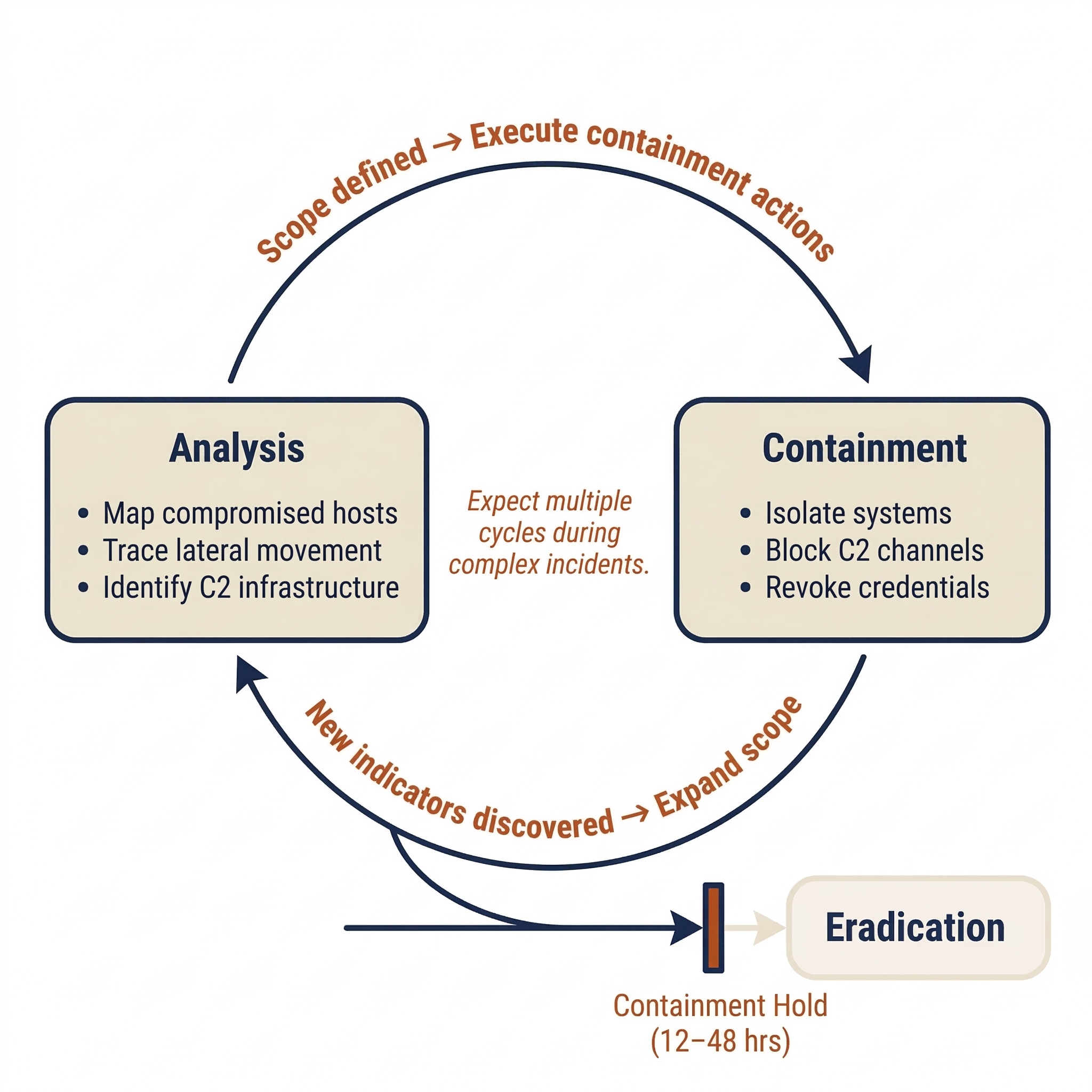
Containment is not a one-way door. When you isolate a system and the attacker loses access to it, they may attempt to "break out" through alternate footholds the team has not yet discovered. This means containment actions can trigger new detection alerts, which loop the team back to the Analysis phase (Chapter 8). The IR lifecycle is iterative, not linear—expect to cycle between Analysis and Containment multiple times during a complex incident.
9.2 Containment Tradeoffs and the Approval Framework
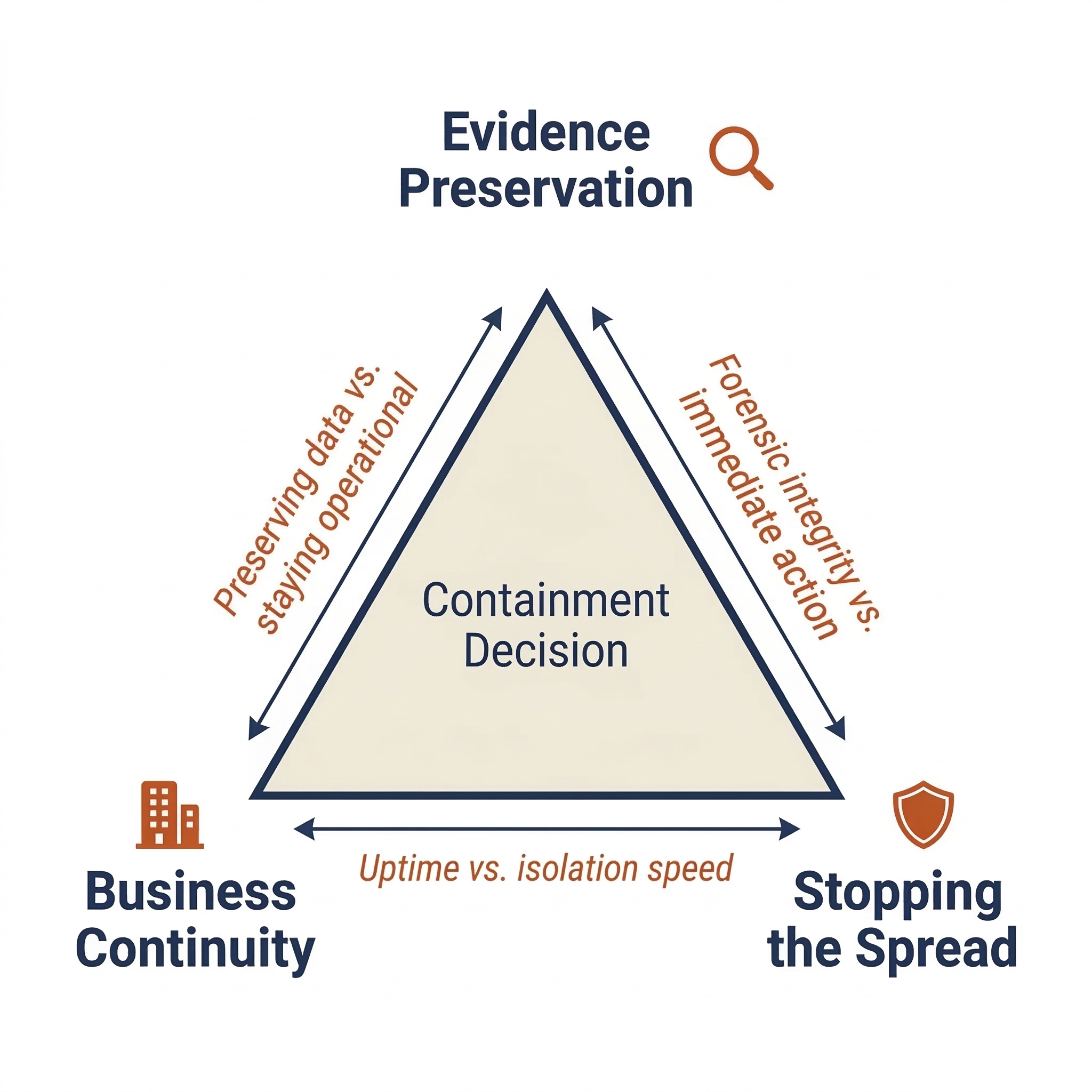
Every containment action exists at the intersection of three competing priorities:
- Evidence Preservation: Forensic investigators need systems intact. Powering off a server destroys volatile memory. If the incident may lead to litigation, evidence integrity is paramount.
- Business Continuity: The organization needs to operate. Isolating the email server stops the attacker but also stops every employee from communicating.
- Stopping the Spread: Every minute the attacker retains access, they can escalate privileges, exfiltrate data, or deploy ransomware.
These priorities frequently conflict. A forensic investigator wants a compromised Domain Controller running to capture memory. The CISO wants it isolated immediately. The CFO wants the whole thing resolved before Monday. There is no universal "right answer"—only the best decision given the specific circumstances.
The Approval Question
Containment actions that affect production systems require authorization. If a SOC analyst unilaterally disconnects the ERP server at 2:00 PM on the last day of the fiscal quarter, the business impact could rival the breach itself.
Chapter 5 introduced the RACI model for incident response. During containment, these assignments become critical. The SOC analyst executes the action (Responsible). The Incident Commander approves it and accepts the associated risk (Accountable). Business owners and Legal Counsel are Consulted. Executive leadership and the CMT are Informed.
Chapter 6 established that the IR Policy grants the CSIRT authority to act. This authority prevents hesitation, but it is not a blank check—high-impact containment actions (isolating a Domain Controller, disabling the CEO's account) should still flow through the Incident Commander for approval.
Decision Documentation
Every containment action must be logged in the case management system (Chapter 5). The log entry should capture:
- What action was taken (e.g., "Disabled switch port Gi0/24 on core-sw-01, isolating host WS-FIN-042").
- Who authorized it (e.g., "Approved by IC Martinez, verbal approval at 14:32 UTC").
- Why it was necessary (e.g., "Host confirmed as actively beaconing to C2 infrastructure").
- What risks were accepted (e.g., "Finance quarterly reporting offline until replacement provisioned").
This documentation creates accountability and feeds the post-incident review (Chapter 11).
Containment Decision Matrix
The following matrices provide a reference for evaluating common containment actions against their tradeoffs. These are not exhaustive, but they frame the cost-benefit analysis that should precede every containment decision.
Short-Term Containment Actions
| Containment Action | Evidence Impact | Business Impact | Adversary Awareness Risk |
|---|---|---|---|
| Network cable disconnect | Preserves disk; loses active network connections | High — immediate outage for host | High — attacker sees host go offline |
| Switch port disable | Preserves disk; loses active connections | High — same as above, centrally managed | High |
| EDR network isolation | Preserves disk and RAM; host stays online for remote forensics | Moderate — host loses network but remains powered | Moderate — attacker's C2 fails silently |
| Firewall ACL block (C2 IPs) | Minimal — traffic is blocked, not deleted | Low — only malicious traffic affected | Low — attacker sees failed callbacks |
| Account disable | Minimal | Moderate — legitimate user loses access | High — attacker's next login attempt fails |
| Power off host | Destructive — volatile memory lost | High — immediate outage | High — host disappears from network |
Long-Term Containment Actions
| Containment Action | Evidence Impact | Business Impact | Adversary Awareness Risk |
|---|---|---|---|
| DNS sinkhole | Positive — captures beacon attempts as evidence | Low — only malicious domain resolution affected | Low — attacker's C2 resolves but reaches a dead end |
| VLAN quarantine | Preserves all data; enables continued monitoring | Moderate — host is functional but isolated | Low — attacker may not notice immediately |
| Null-routing (C2 IPs) | Minimal — traffic is dropped silently | Low — only malicious traffic affected | Low — attacker sees timeouts, not resets |
| Forced password reset (enterprise-wide) | Minimal | High — all users disrupted simultaneously | High — signals active response to attacker |
| Network segmentation | Preserves all data | Moderate — cross-segment communication restricted | Low — internal routing changes are not visible to attacker |
Activity
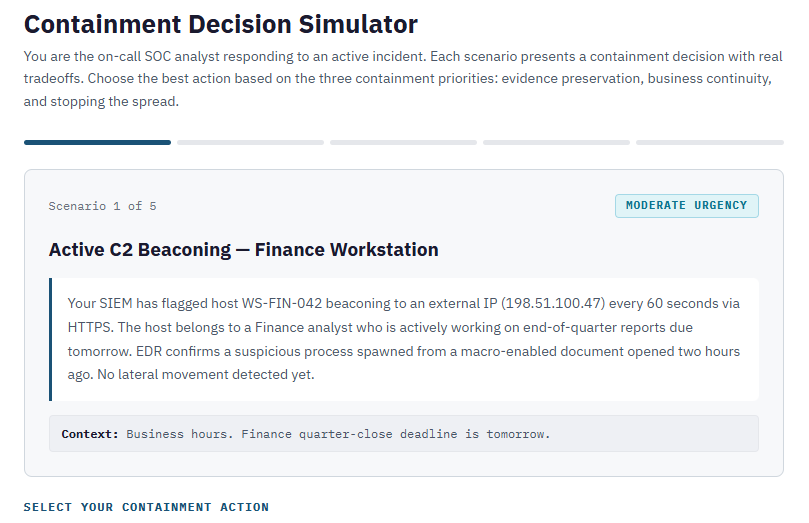
<a href="../activities/ch9_containment_decision.html" target="_blank"">Can you make the right containment decisions during a stressful incident? Try out 5 different scenarios with this activity.
9.3 Network-Based Containment
Network-based containment targets the attacker's ability to communicate—both with their external C2 infrastructure and with other systems inside the network. The principle is straightforward: if the attacker cannot talk to their tools, they cannot issue commands, exfiltrate data, or spread.
Immediate Isolation
The most direct form of network containment is severing the compromised host's connection. Switch port disablement is preferred for wired hosts—fast, centrally managed, and requires no physical access. For remote or VPN-connected endpoints where switch port control is not applicable, a host-based firewall lockdown (deny all inbound/outbound except management traffic) can be pushed remotely via Group Policy or endpoint management tools.
The key limitation is bluntness. If the host was running a production service, that service is now down—which is why the approval framework from Section 9.2 exists.
VLAN Quarantine
When the team needs to maintain access to a compromised host for continued forensic analysis, a VLAN quarantine provides a middle ground. The host is moved from its production VLAN to a dedicated quarantine VLAN with no routing to the corporate network, but with access to designated forensic workstations and monitoring tools.
This requires advance preparation (Chapter 6). The quarantine VLAN, routing rules, and authorized forensic subnets should be pre-configured before an incident occurs.
DNS Sinkholing
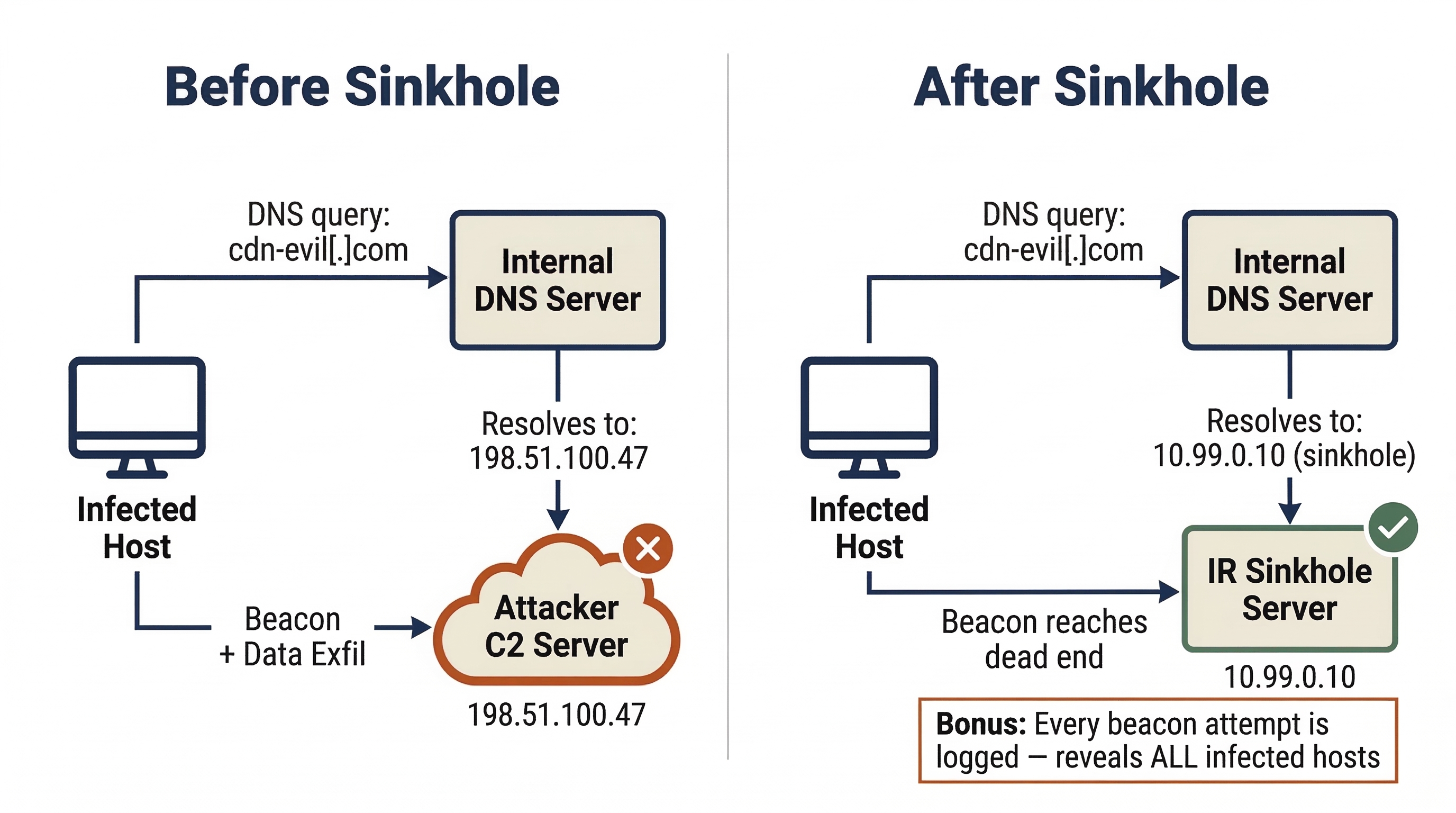
Many C2 implants rely on domain names rather than hardcoded IPs to reach their operators. DNS sinkholing exploits this dependency by configuring the organization's internal DNS server to override resolution for the known malicious domain. Instead of returning the attacker's real IP address, the DNS server returns the address of an internal sinkhole server controlled by the IR team (e.g., 10.0.0.200).
The malware continues to beacon, but its traffic reaches a dead end. This has two benefits: the attacker loses command and control, and the sinkhole captures every beacon attempt, helping identify all infected hosts in the environment. Any system querying the sinkhole is compromised.
Analyst Perspective
When you configure a DNS sinkhole, the SIEM becomes your best friend. Create a detection rule that alerts on any DNS resolution pointing to the sinkhole IP. Within minutes of activating the sinkhole, you may see hosts you did not know were compromised suddenly appearing in the logs. Each beacon attempt is a new lead. This is one of the rare containment techniques that simultaneously acts as a detection mechanism—it stops the bleeding and reveals the full wound.
Null-Routing
Null-routing (also called blackholing) operates at the routing layer. The network team adds a static route that sends all traffic destined for a known malicious IP address to a "null" interface—a dead end where packets are silently dropped. Unlike firewall ACL changes, which operate on specific ports and protocols, null-routing drops all traffic to the target IP regardless of port, making it harder for the attacker to evade by changing communication ports.
Firewall ACL Modifications
The perimeter firewall is the most common enforcement point for network containment. The IR team provides the firewall administrator with C2 IP addresses and domains identified during Analysis, and explicit deny rules are added to the Access Control List (ACL).
Warning
Coordinate Before You Block
A common mistake during containment is implementing firewall rules piecemeal—blocking a C2 IP on one firewall while forgetting about the VPN concentrator, the cloud security group, or the branch office router. The attacker only needs one open path. Before executing network containment, the IR team should compile a complete list of all egress points and assign an owner for each. The containment action should be executed simultaneously (or as close to simultaneously as feasible) across all points. A partial block is worse than no block because it creates a false sense of security.
Activity
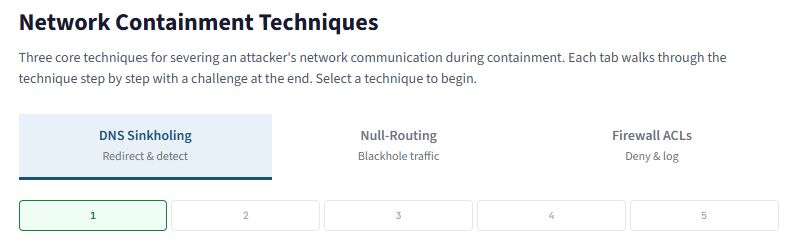
<a href="../activities/ch9_network_containment.html" target="_blank"">Walk through the steps and important considerations as it relates to DNS sinkholing, null-routing, and updating firewall ACLs for network containment.
9.4 Endpoint Containment
While network-based containment controls the paths an attacker can use, endpoint containment targets the hosts where the attacker has established a presence. Modern endpoint containment relies heavily on Endpoint Detection and Response (EDR) platforms.
EDR-Based Network Isolation
Most enterprise EDR solutions (CrowdStrike Falcon, Microsoft Defender for Endpoint, SentinelOne, Carbon Black) include a network isolation feature. When activated, the EDR agent blocks all inbound and outbound traffic except communication with the EDR management console.
This makes EDR isolation the preferred containment method in most modern IR engagements because it achieves three objectives simultaneously:
- Stops the attacker — C2 and lateral movement paths are severed.
- Preserves evidence — the machine stays powered on, retaining volatile memory and running processes.
- Maintains investigative access — the analyst can still remotely query the host, pulling process lists, collecting artifacts, or running forensic scripts through the EDR console.
Disabling Persistence (Selectively)
During containment, the team may identify specific persistence mechanisms—a scheduled task that re-launches malware, a malicious Windows service, or a rogue startup entry. The containment-appropriate action is to disable rather than delete. Disable the scheduled task so it no longer fires, but leave the task definition intact for forensic documentation. Stop the malicious service but do not uninstall it. This prevents reactivation while preserving evidence for the eradication phase and any potential legal proceedings.
9.5 Identity and Access Containment
In modern enterprise environments—especially those with heavy cloud and SaaS adoption—the attacker's most valuable asset is often not a piece of malware on a server, but a stolen credential. Compromised accounts provide the attacker with legitimate access that blends seamlessly with normal user activity, making detection difficult and network-based containment insufficient.
Identity containment addresses this by targeting the accounts and sessions the attacker is using, not just the machines and networks they are traversing.
Account Disablement and Credential Resets
The most direct identity containment action is disabling the compromised account. In Active Directory, this means setting the account to "Disabled." In cloud identity providers (Entra ID, Okta, Google Workspace), this means suspending the account or revoking its sign-in capability.
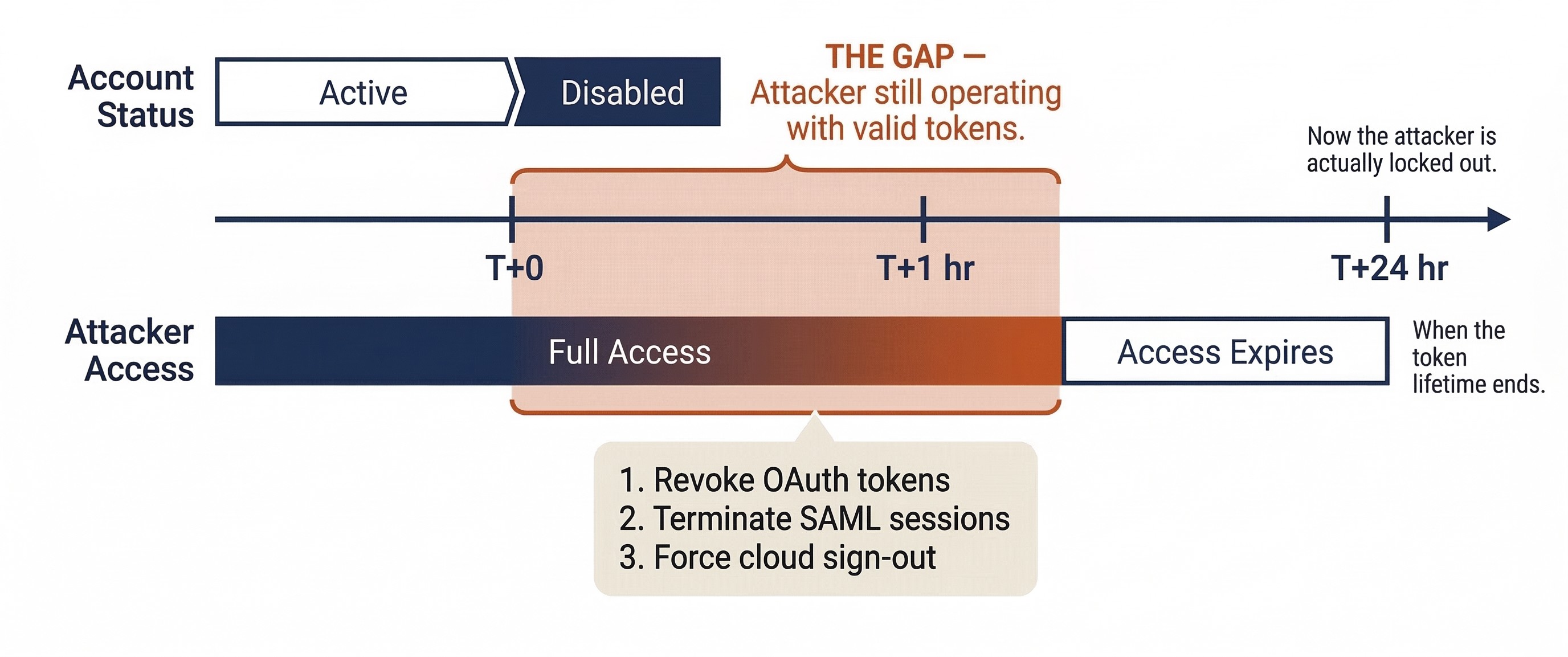
However, disabling an account does not kill active sessions on many platforms. If the attacker is logged into a cloud application with an OAuth token, that token may remain valid for hours or days even after the underlying account is disabled. This is one of the most commonly misunderstood aspects of identity containment.
Credential resets must accompany account disablement. The aggressiveness of the reset depends on the account type:
- Standard users: Forced password change.
- Privileged accounts (Domain Admins, service accounts, root): New passwords, rotated Kerberos keys (resetting the password twice), and verification that no cached credentials remain on compromised hosts.
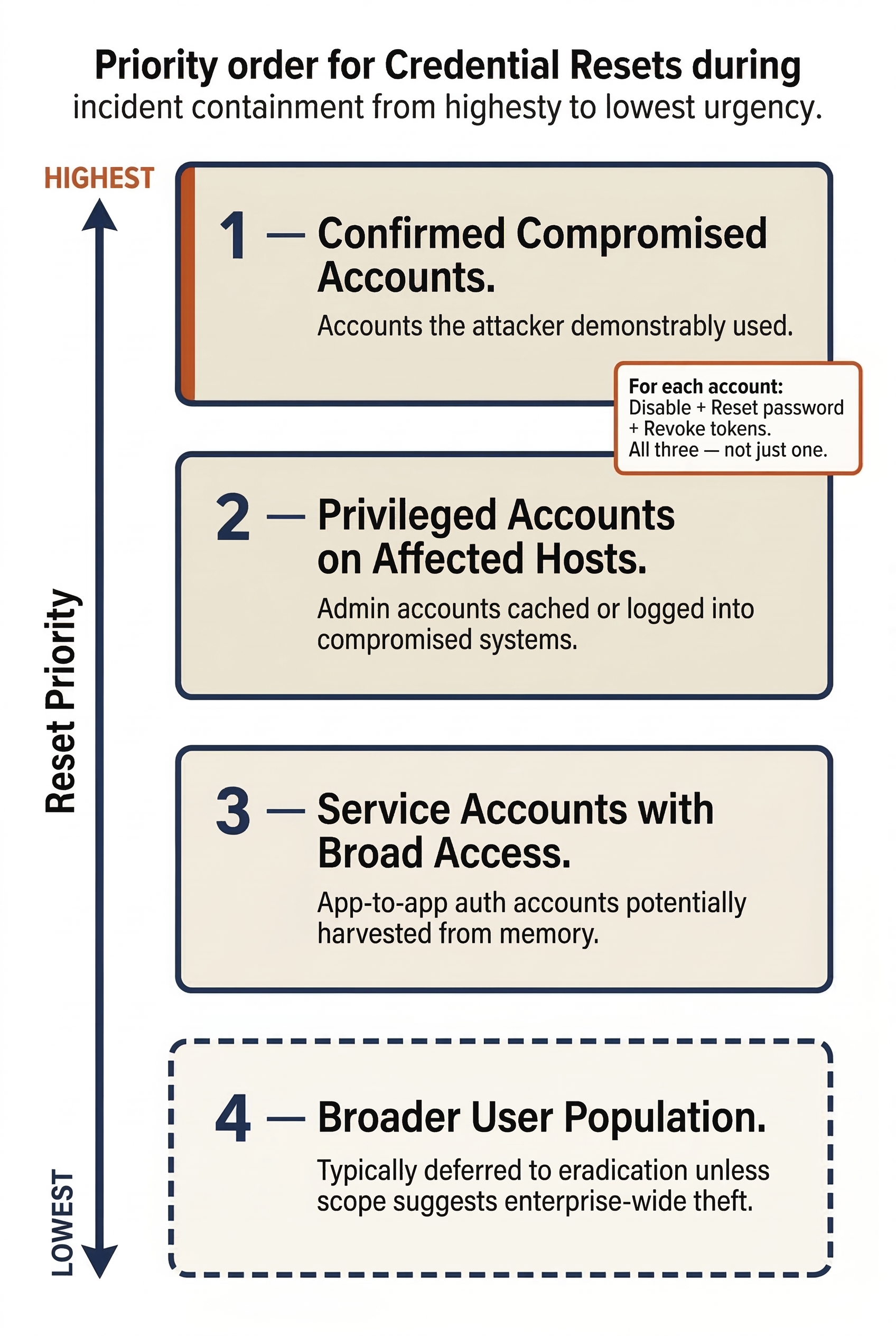
The priority order for credential resets during containment:
- Confirmed compromised accounts — accounts the attacker demonstrably used.
- Privileged accounts on compromised systems — any admin account that was cached or logged into an affected host.
- Service accounts with broad access — accounts used for application-to-application authentication that may have been harvested from memory.
- Broader user population — typically deferred to eradication unless the scope suggests enterprise-wide credential theft.
Warning
Disabling ≠ Disconnecting
On many cloud platforms (Microsoft 365, Google Workspace, Salesforce), disabling a user account does not immediately terminate their active sessions or invalidate their OAuth/SAML tokens. The attacker may continue operating with a valid token for the duration of its lifetime—sometimes 60 minutes, sometimes 24 hours. Containment requires both account disablement and explicit session/token revocation. In Microsoft Entra ID, this means using "Revoke Sessions" in addition to disabling the account. In Google Workspace, it means resetting the user's sign-in cookies. Skipping this step is a containment gap that sophisticated attackers will exploit.
Session and Token Revocation
Revoking active sessions and tokens is the identity equivalent of pulling the network cable. It forces the attacker to re-authenticate—and if the account is already disabled or the password changed, they cannot. Key revocation actions include:
- OAuth token revocation: Invalidating all tokens issued to the compromised account, including those granted to third-party applications.
- SAML session termination: Ending active federated sessions across all integrated applications.
- Cloud session sign-out: Forcing sign-out across all devices and browsers via the identity provider's admin console.
- Kerberos key rotation: In Active Directory, resetting the account password twice to invalidate issued tickets.
If Kerberos ticket-granting tickets may have been forged (Golden Ticket attacks), a KRBTGT account reset must be on the containment team's radar, though this high-impact action is typically deferred to eradication.
Privileged Access Review
During containment, the team must audit whether the attacker created, elevated, or modified accounts to maintain access. Common indicators include:
- New accounts added to Domain Admins or equivalent cloud administrator roles.
- Service accounts with newly granted permissions.
- Changes to Conditional Access policies or MFA configurations.
- New OAuth application consents (a technique used in cloud account takeover to maintain access even after password changes).
This review identifies attacker-created access that must be revoked and uncovers additional scope that feeds back into Analysis.
Conditional Access Tightening
If the organization uses Conditional Access policies, containment may include emergency changes:
- Enforcing device compliance requirements (blocking sign-ins from unmanaged devices).
- Restricting sign-ins to known corporate IP ranges or geographic regions.
- Requiring step-up MFA for all privileged actions.
- Blocking legacy authentication protocols that bypass MFA.
These changes must be carefully scoped to avoid locking out the IR team itself—nothing derails containment faster than the responding analysts losing their own access.
9.6 The Ransomware Containment Decision
Ransomware presents a unique containment challenge because the threat is both immediate and irreversible. Unlike data exfiltration (where the damage is the copy, and the original data remains intact), ransomware actively destroys the usability of data by encrypting it in place. Every second the ransomware runs, more files are lost. This urgency compresses the decision timeline from hours to minutes.
The Three Options
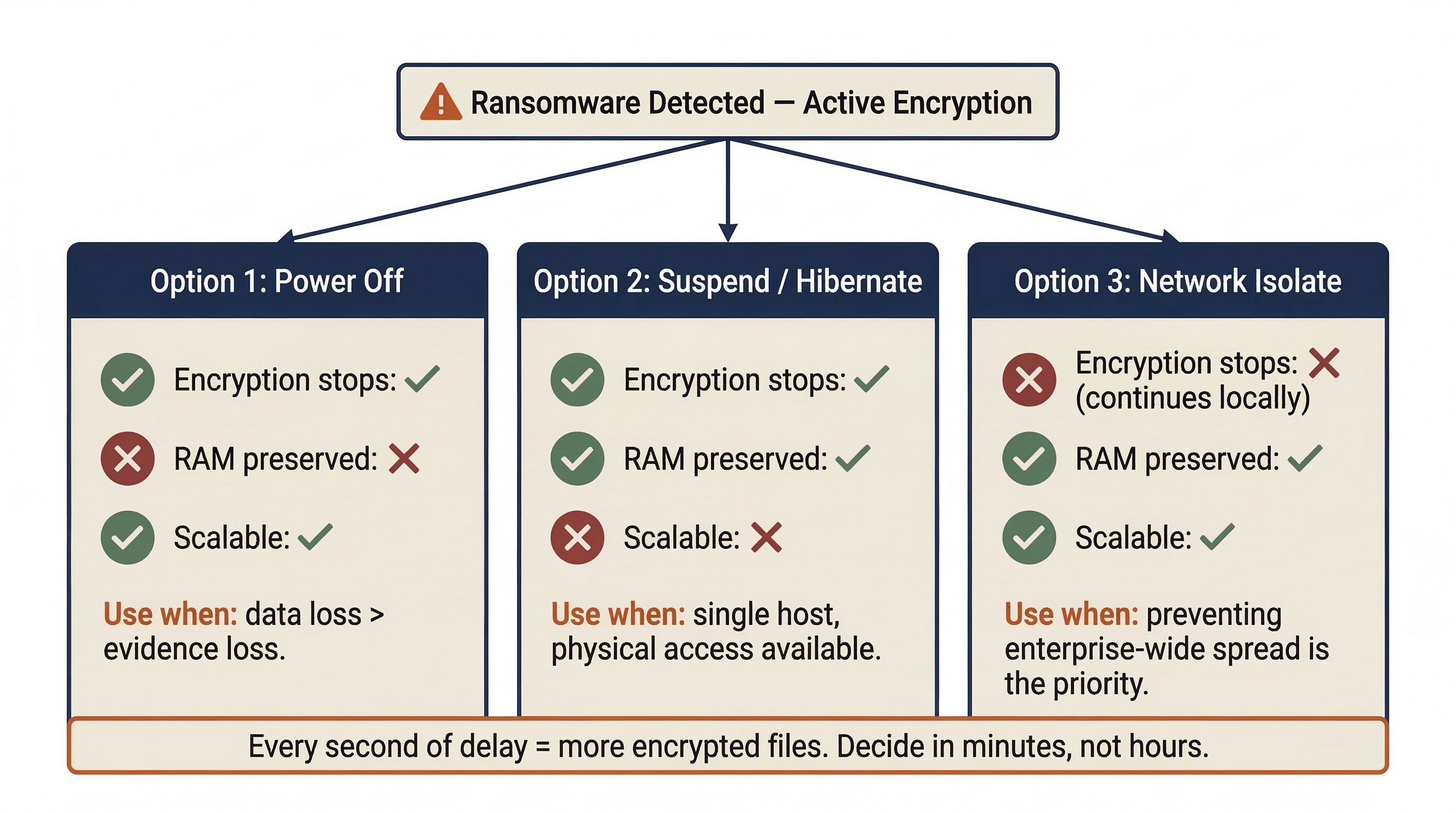
When ransomware is detected on a host, the responder faces three primary containment choices. Each carries distinct consequences.
Option 1: Power Off the Host
Pulling the power stops encryption immediately, but destroys all volatile memory (RAM). If the encryption keys were stored only in the malware's running process memory (common for many ransomware families), those keys are now gone.
When to use: When the host is actively encrypting critical data and no other isolation method is available. If the data being encrypted is more valuable than the potential forensic evidence in RAM, power off.
Option 2: Suspend or Hibernate the Host
Suspending the machine halts all processes while preserving RAM contents in a hibernation file on disk—theoretically the best of both worlds.
When to use: When the responder has physical access and the host supports hibernation. In practice, this is difficult to scale beyond a single workstation.
Option 3: Network Isolate the Host
Severing the host's network connection stops lateral spread but allows the ransomware to continue encrypting local files until it finishes.
When to use: When preventing enterprise-wide encryption is the priority. This is often the correct choice for the first detected host, because the primary threat is not one encrypted workstation—it is the entire network.
The EDR Factor
If the EDR agent on the compromised host is still functional, EDR network isolation is typically the fastest and most scalable containment action. However, sophisticated ransomware operators increasingly target EDR agents—disabling processes, exploiting kernel-level vulnerabilities, or unloading drivers before detonating the payload. If the EDR agent is compromised, the team falls back to network infrastructure controls (switch port disablement) or physical intervention.
Ransomware is also one of the most common triggers for activating the Crisis Management Team (CMT) described in Chapter 4. When the IR team confirms active ransomware with evidence of lateral movement or data exfiltration (double extortion), the Incident Commander should immediately escalate.
Activity
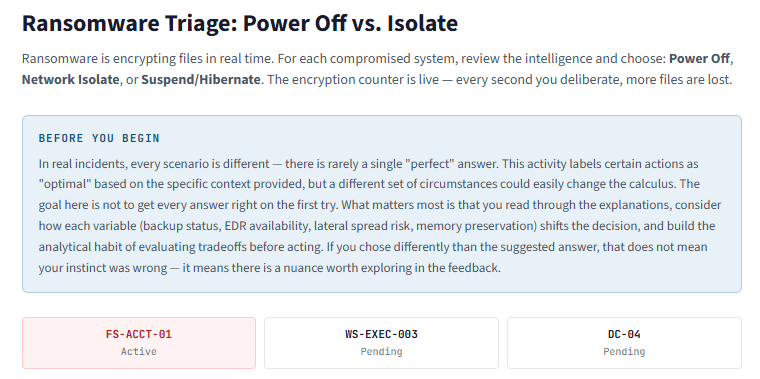
<a href="../activities/ch9_ransomware_triage.html" target="_blank"">Do you power off, network isolate, or suspend/hibernate? Walk through a scenario where you have to make the right decisions during ongoing ransomware incidents.
Putting It Together: A Coordinated Containment Operation
To illustrate how these concepts work in practice, consider the following scenario.
The Situation: Meridian Financial Services, a mid-size financial services firm with 2,000 employees, has been under investigation by the CSIRT for the past six hours. The Analysis phase (Chapter 8) has produced the following findings:
- Patient Zero: A phishing email delivered a malicious macro document to a Finance department employee (WS-FIN-042) three days ago.
- Lateral Movement: The attacker used stolen credentials from the initial host to move laterally to the HR file server (FS-HR-01) and a Domain Controller (DC-02).
- Privilege Escalation: The attacker dumped credentials from DC-02's memory using a Mimikatz variant, obtaining the password hash for a Domain Admin service account (
svc-backup). - C2 Infrastructure: All three compromised hosts are beaconing to an external C2 server at
198.51.100.47, resolving the domaincdn-analytics-update[.]com. - Data Staging: The team has identified a compressed archive (
data_export.7z) staged on FS-HR-01 containing employee PII. No evidence of successful exfiltration yet, but the archive was created two hours ago.
The Incident Commander calls a containment planning meeting. Here is how the operation unfolds.
Step 1: Establish Priorities
The Incident Commander, working with Legal Counsel and the CISO, determines the priority order:
- Prevent data exfiltration. The staged archive has not left the network yet. Stopping it is the top priority.
- Sever C2 communication. Cut the attacker's ability to issue commands.
- Contain lateral movement. Prevent the attacker from reaching additional systems.
- Preserve evidence. Maintain forensic integrity where possible.
Step 2: Coordinate the Actions
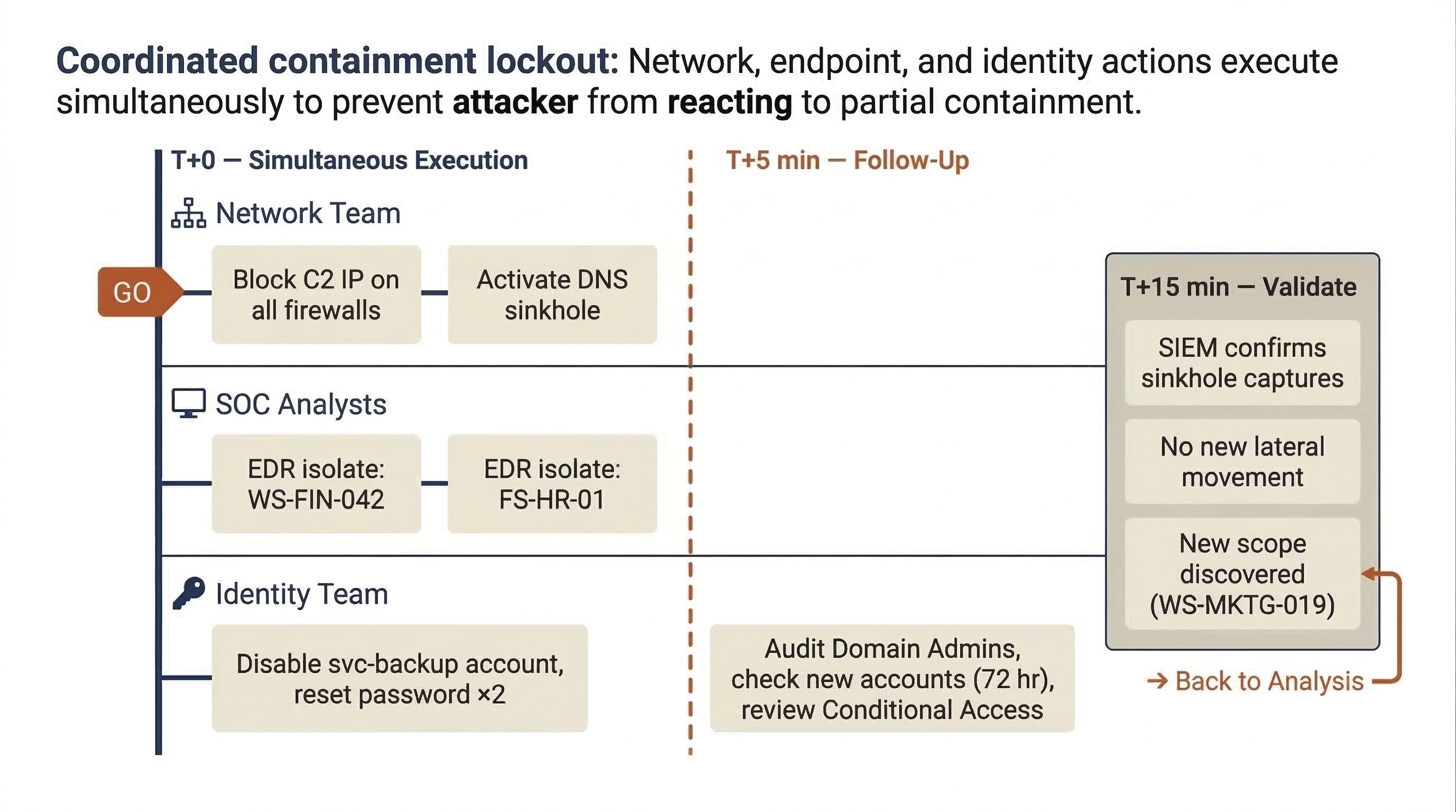
The team assigns specific tasks for simultaneous execution (a "coordinated lockout") so the attacker does not have time to react to partial containment:
- Network Team (T+0): Block all traffic to/from
198.51.100.47on all perimeter firewalls, the VPN concentrator, and cloud security groups. Configure a DNS sinkhole forcdn-analytics-update[.]compointing to10.99.0.10(internal sinkhole server). - SOC Analyst 1 (T+0): Activate EDR network isolation on WS-FIN-042 and FS-HR-01.
- SOC Analyst 2 (T+0): Disable the
svc-backupDomain Admin account; reset its password twice (Kerberos key rotation). Disable the compromised Finance user account and revoke all cloud sessions. - Identity Team (T+5 min): Audit all Domain Admin group memberships, check for newly created accounts in the last 72 hours, and review Conditional Access policy changes.
Step 3: Handle the Domain Controller
DC-02 is the hardest decision. Isolating it would affect authentication for a significant portion of the enterprise. The Incident Commander approves a measured approach:
- The firewall rules blocking the C2 IP sever the attacker's command channel to DC-02 (no full isolation needed).
- Enhanced monitoring is deployed—real-time process monitoring and authentication log forwarding at maximum verbosity.
- The Identity Team begins emergency credential rotation for all privileged accounts cached on DC-02.
- A plan is developed to demote and rebuild DC-02 during eradication, with DC-01 and DC-03 absorbing its FSMO roles.
Step 4: Document and Validate
Every action, approval, and timestamp is logged in the case management ticket. Within 15 minutes, the team validates:
- The SIEM confirms that beacon attempts from WS-FIN-042 and FS-HR-01 are now resolving to the sinkhole IP (
10.99.0.10). Containment is working. - The DNS sinkhole is logging beacon attempts from a fourth host the team had not previously identified (WS-MKTG-019). New scope—the Incident Commander assigns an analyst to begin analysis on this host immediately.
- No new lateral movement is detected from DC-02 following the firewall block. Enhanced monitoring is in place.
Analyst Perspective
The sinkhole discovery of WS-MKTG-019 is a textbook example of why containment and analysis are iterative. The "containment is complete" moment rarely exists in a single clean step. Every containment action is also a detection action—when you close one door, you learn who was trying to walk through it. Stay alert for new leads in the hours immediately following containment execution. Your SIEM dashboards should be running real-time queries against the sinkhole IP and any newly blocked C2 indicators.
9.7 Containment Validation and Transition to Eradication
Executing containment actions is only half the job. The team must verify that containment is effective and monitor for signs that the attacker has found a way around it.
Validating Containment Effectiveness
After containment actions are executed, the team must verify they are working:
- C2 Communication: Confirm that no traffic is reaching the attacker's C2 infrastructure. The SIEM should show blocked or sinkholed connections, not successful ones.
- Lateral Movement: Monitor for new authentication events or network connections originating from contained hosts.
- New Indicators: Watch for backup C2 domains or IPs that activate when primary channels are severed.
- Sinkhole Activity: Review sinkhole logs for unexpected hosts—each represents a potentially compromised system outside the original scope.
The Containment Hold
Before transitioning to eradication, experienced IR teams impose a deliberate containment hold—a monitoring window of 12 to 48 hours where the team watches for attacker breakout or re-compromise. During this window:
- All contained systems remain isolated.
- Enhanced monitoring runs at full verbosity on critical systems.
- The team actively hunts for alternate access paths—additional backdoors, secondary C2 channels, and unidentified compromised accounts.
The containment hold exists because moving to eradication prematurely—before all attacker access has been identified—risks re-compromise through undiscovered footholds.
Formal Handoff to Eradication
When the Incident Commander is satisfied that containment is effective and scope is fully defined, the team transitions to Eradication. The handoff package should include:
- A complete list of contained systems and the method used for each (EDR isolation, VLAN quarantine, powered off, etc.).
- A complete list of contained accounts and the actions taken (disabled, password reset, tokens revoked).
- The current C2 blocklist (IPs, domains, and sinkhole entries).
- Known persistence mechanisms identified during Analysis and Containment that must be removed.
- An updated incident timeline incorporating all containment actions and their results.
- Any new scope discovered during containment (like WS-MKTG-019 in our scenario) and its analysis status.
Chapter Summary
Containment is the turning point of the incident response lifecycle—the moment the team stops gathering intelligence and starts actively fighting the adversary.
-
Containment is not eradication. The goal is to stop the spread and stabilize the environment. Eradication (Chapter 10) follows once containment is validated.
-
Short-term containment prioritizes speed (immediate isolation, firewall blocks). Long-term containment sustains operations while restricting the attacker (VLAN quarantine, sinkholing, segmentation).
-
Every containment action has tradeoffs between evidence preservation, business continuity, and adversary awareness. The Incident Commander approves actions based on the RACI model, and every decision is documented.
-
Network containment (DNS sinkholing, null-routing, firewall ACLs, VLAN quarantine) targets the attacker's communication paths. DNS sinkholing is particularly valuable because it simultaneously contains and detects.
-
Endpoint containment leverages EDR isolation to sever attacker access while preserving evidence and maintaining remote investigative capability.
-
Identity containment is critical in cloud-heavy environments. Disabling accounts alone is insufficient—active sessions and tokens must be explicitly revoked, and privileged access must be audited for attacker-created accounts.
-
Ransomware containment compresses decision timelines to minutes. The power-off vs. isolate decision depends on whether data preservation or evidence preservation takes priority.
-
Containment is iterative. Actions frequently reveal new scope, feeding back into the Analysis phase.
In the next chapter, we will take the stabilized environment produced by containment and begin the Eradication process—systematically removing every trace of the attacker's presence and closing the vulnerabilities that allowed the breach.