CH13: App Artifacts and Third-Party Evidence
Introduction
For most of mobile forensics history, the core evidence set was well-defined: call logs, SMS messages, contacts, and photos. Those artifacts are still relevant, but they no longer tell the full story. The average smartphone user has over 80 installed applications, and users increasingly conduct their most meaningful communication, financial transactions, navigation, and daily activities through third-party apps rather than the phone's native functions. A suspect who sends zero traditional text messages may have thousands of WhatsApp conversations. A subject who makes no phone calls may coordinate entirely through Discord or Telegram. A person who claims to have been home all evening may have Uber receipts, Instagram geotags, and Apple Health step counts that tell a very different story.
This chapter moves up one layer from the operating system-level forensics covered in Chapters 9 through 11. Where those chapters mapped the file system and identified where databases reside, this chapter focuses on what those databases reveal and, more critically, how artifacts from multiple applications can be correlated to reconstruct timelines, establish behavioral patterns, and build investigative narratives that no single data source could support alone.
The key principle of this chapter is this: no single artifact tells the whole story, but artifacts from multiple apps, correlated together, can dismantle alibis, establish intent, prove relationships, and reveal patterns that are invisible when examined in isolation.
Learning Objectives
By the end of this chapter, you will be able to:
- Identify the major categories of mobile application artifacts and explain the evidentiary value of each in criminal investigations.
- Explain how third-party app data extends forensic analysis beyond traditional call logs, SMS, and contacts.
- Apply a structured correlation methodology to reconstruct timelines and behavioral patterns from multiple app sources.
- Evaluate which app artifacts are most relevant for specific investigation types (narcotics, fraud, stalking, burglary, missing persons).
- Recognize the forensic limitations of app-level evidence, including encryption, ephemeral messaging, and cloud-only storage.
13.1 Why App Artifacts Matter
Traditional mobile forensics centered on the native operating system: the SMS database, the call log, the contact list, and the photo library. These artifacts remain valuable, but they represent a shrinking fraction of the evidence on a modern device. The shift is driven by user behavior. People communicate through WhatsApp instead of SMS, pay through Venmo instead of writing checks, navigate through Google Maps instead of asking for directions, and document their lives on Instagram instead of in photo albums.
For the forensic examiner, this shift means that a thorough investigation must extend well beyond the native OS artifacts covered in Chapters 9 and 11. It requires understanding dozens of third-party applications, knowing what each one stores, and recognizing how data from different apps can be combined to answer investigative questions.
The Artifact Category Framework
Rather than memorizing individual apps, which appear, disappear, and change with every software update, examiners benefit from thinking in categories. Each category represents a type of human behavior, and each type of behavior generates specific kinds of forensic evidence:
- Communication: Who the subject talks to, what they say, and when.
- Financial: Where money flows, between whom, and in what amounts.
- Location: Where the subject goes, how they get there, and how long they stay.
- Health and Fitness: Physical activity, sleep patterns, physiological data.
- Entertainment: What the subject watches, listens to, plays, and searches for.
- Productivity: What the subject writes, plans, schedules, and stores.
- Smart Home / IoT: When the subject is home, when they leave, and who else has access.
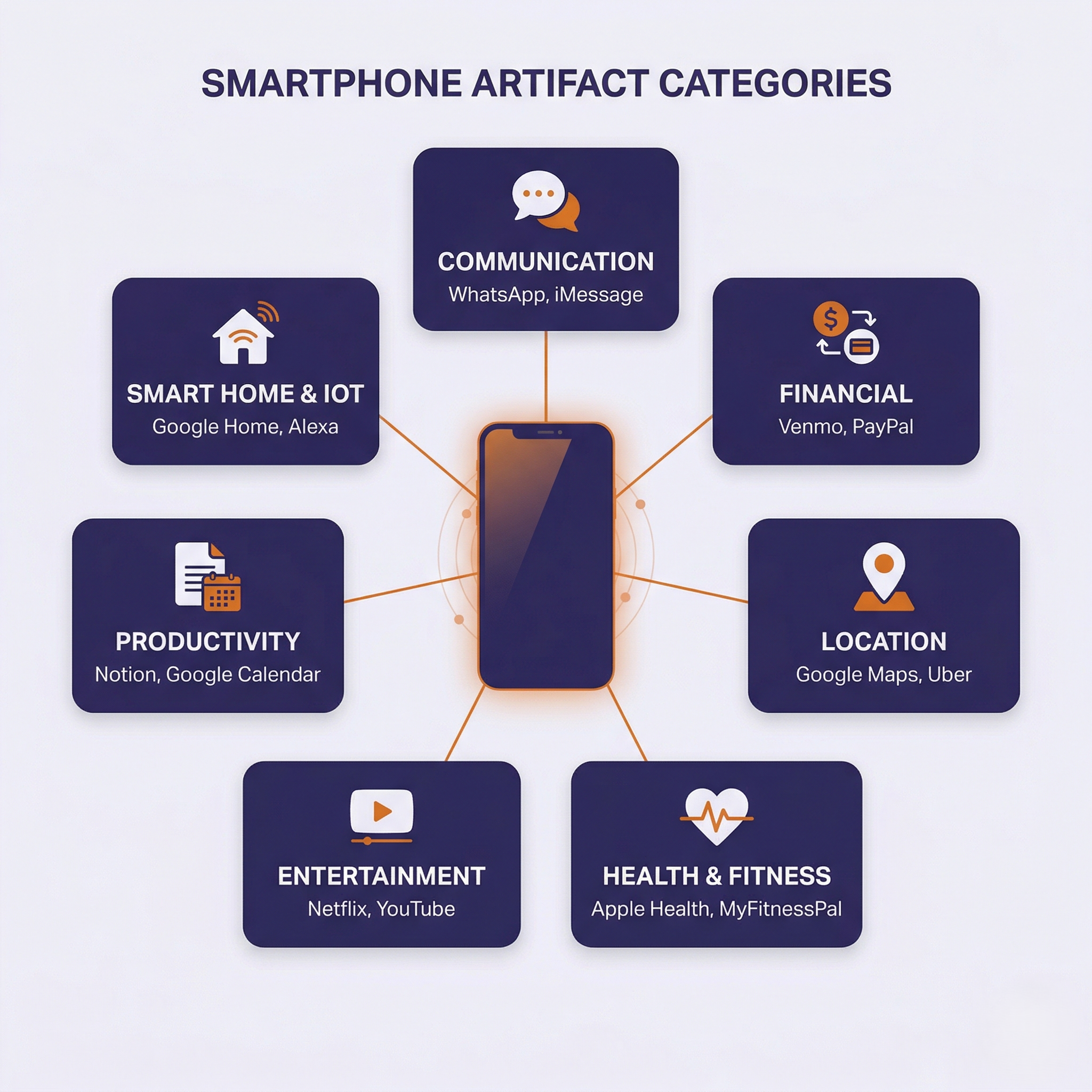
This framework allows examiners to approach any investigation by asking: "Which categories of behavior are relevant to this case?" and then identifying which installed apps fall into those categories, rather than starting with a list of app names and hoping one is relevant.
How Commercial Tools Handle App Artifacts
Tools like Cellebrite Physical Analyzer and Magnet AXIOM include built-in parsers for hundreds of popular applications. When an extraction is loaded into these tools, the software automatically identifies known app databases, parses them into readable formats, and categorizes the results (Chat, Social Media, Financial, Location, etc.).
This automated parsing is valuable for efficiency, but it has limitations. App developers update their database schemas with every release. A WhatsApp update that changes a table name or adds encryption to a previously plaintext field can break an automated parser until the forensic tool vendor releases an update. This is why the manual SQLite skills from Chapter 8 remain essential. When automated parsing fails, the examiner must be able to open the raw database and query it directly.
13.2 Communication and Messaging Apps
Communication apps are the most commonly examined artifact category in criminal investigations. The forensic value extends beyond message content to include contact networks, group memberships, call logs, media sharing patterns, and timestamps that establish when communication occurred.
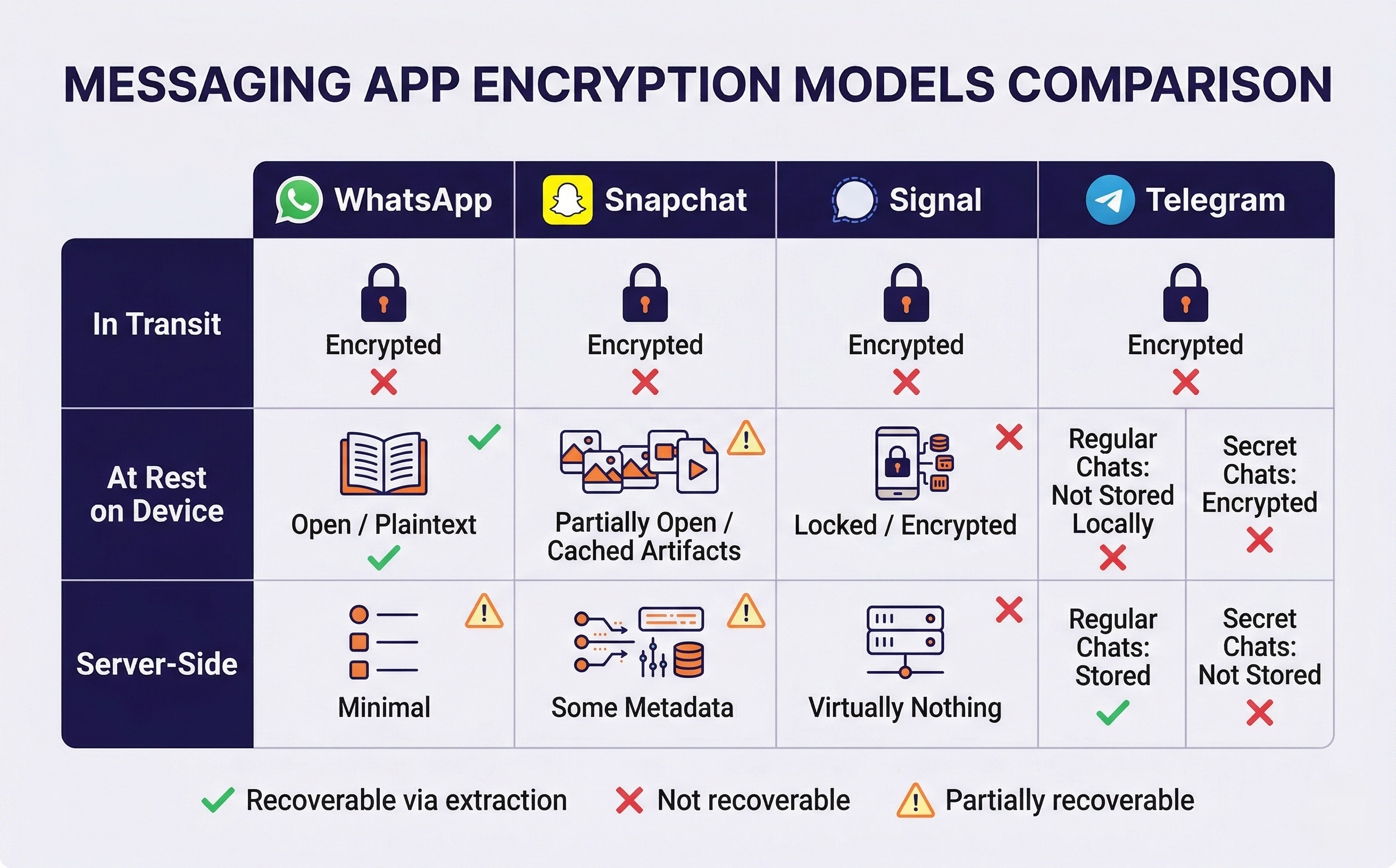
WhatsApp stores messages in msgstore.db (Android) or ChatStorage.sqlite (iOS). Despite using end-to-end encryption for messages in transit, the local database on an unlocked device stores messages in plaintext once they have been delivered. Key artifacts include:
- Message content with timestamps
- Group chat memberships and participant lists
- Voice and video call logs with duration
- Shared media files (photos, videos, documents, voice messages)
- Contact lists that may differ from the device's native address book
WhatsApp's "Delete for Everyone" feature removes the message from the visible chat but does not always fully purge the record from the database. Remnants may persist in database free pages (Chapter 8) or in the msgstore.db WAL (Write-Ahead Log) file.
Snapchat
Snapchat is designed around ephemerality, meaning content is intended to disappear after viewing. In practice, significant forensic artifacts persist:
- Chat logs: includes text messages that were displayed as "disappeared"
- Cached media: thumbnails and full images that were supposedly deleted
- Memories: user-saved snaps stored on the device
- Snap Map location history: records of where the user was when they sent or received content
The gap between Snapchat's marketing ("it disappears") and the forensic reality ("artifacts persist in cache and database") is one of the most important concepts for students to understand. Users behave more freely on Snapchat because they believe the evidence is temporary, which often makes Snapchat evidence more candid and more incriminating than evidence from platforms the user perceives as permanent.
Signal and Telegram
These apps occupy opposite ends of the forensic accessibility spectrum.
Signal:
- Encrypts its local database at rest using a key not accessible through standard logical extraction
- Recovering messages typically requires a file system extraction combined with tool-specific decryption
- Signal retains virtually no user data server-side, so legal requests to Signal produce minimal results
Telegram:
- Regular chats are stored on Telegram's cloud servers, synchronized across devices, and obtainable through legal requests
- Secret Chats are device-to-device only, end-to-end encrypted, and not stored on Telegram's servers
- The distinction between regular and Secret Chats matters for both device forensics and legal process decisions
Instagram, TikTok, and Discord
These platforms generate artifacts that extend beyond direct messaging:
- Instagram: DM conversations, search history, story view records with timestamps, location tags, saved posts, accounts viewed
- TikTok: watch history, search history, comments, liked videos, draft videos (content the user decided not to post), direct messages
- Discord: server memberships, chat logs across multiple servers and channels, file shares, voice channel participation timestamps. Particularly relevant in investigations involving online communities, gaming-related offenses, and extremist group coordination
Warning
Encryption varies dramatically between messaging apps, and students must understand where encryption applies to know what is recoverable. WhatsApp encrypts messages in transit but stores them in plaintext on the device. Signal encrypts messages both in transit and at rest on the device. Telegram encrypts regular chats in transit and stores them server-side (accessible via legal process), while Secret Chats are encrypted end-to-end and stored only on the devices involved. Confusing these models leads to incorrect assumptions about what an extraction can and cannot recover.
13.3 Financial and Transaction Apps
Financial artifacts are among the most powerful evidence in fraud, narcotics, and trafficking investigations. They establish relationships, prove transactions, and trace money flows with a precision that communication evidence alone cannot match.
Peer-to-Peer Payment Apps
Venmo is a forensic goldmine because of its default public transaction feed. Unless the user has changed their privacy settings, every payment they send, including the note field, is visible to other Venmo users. In narcotics cases, suspects frequently use emoji codes or slang in Venmo payment notes ("🌲," "gas," "party supplies") that correlate directly with messaging app conversations. Key Venmo artifacts:
- Public transaction feed with note fields
- Complete friend network
- Payment history with timestamps
- Linked bank accounts and funding sources
Other peer-to-peer platforms:
- Cash App: transaction history, Bitcoin purchase and transfer activity, direct deposit info, Cash App tag (username that may differ from real name)
- Zelle: transfer history with recipient associations, typically linked to the user's bank account
- PayPal: purchase history, payment receipts, shipping addresses
Banking and Cryptocurrency Apps
Banking apps store artifacts that trace financial activity with precision:
- Transaction history with timestamps
- Login records (some apps log GPS coordinates of each login session)
- Beneficiary lists and saved account numbers
- Recent transfers and bill payments
Cryptocurrency wallets present unique forensic opportunities:
- Wallet addresses and transaction history
- Exchange account connections
- Recovery phrases: users sometimes store these insecurely in screenshots, Notes app entries, or plaintext files. A recovery phrase found in a screenshot gives investigators access to the wallet's complete transaction history on the blockchain.
Analyst Perspective
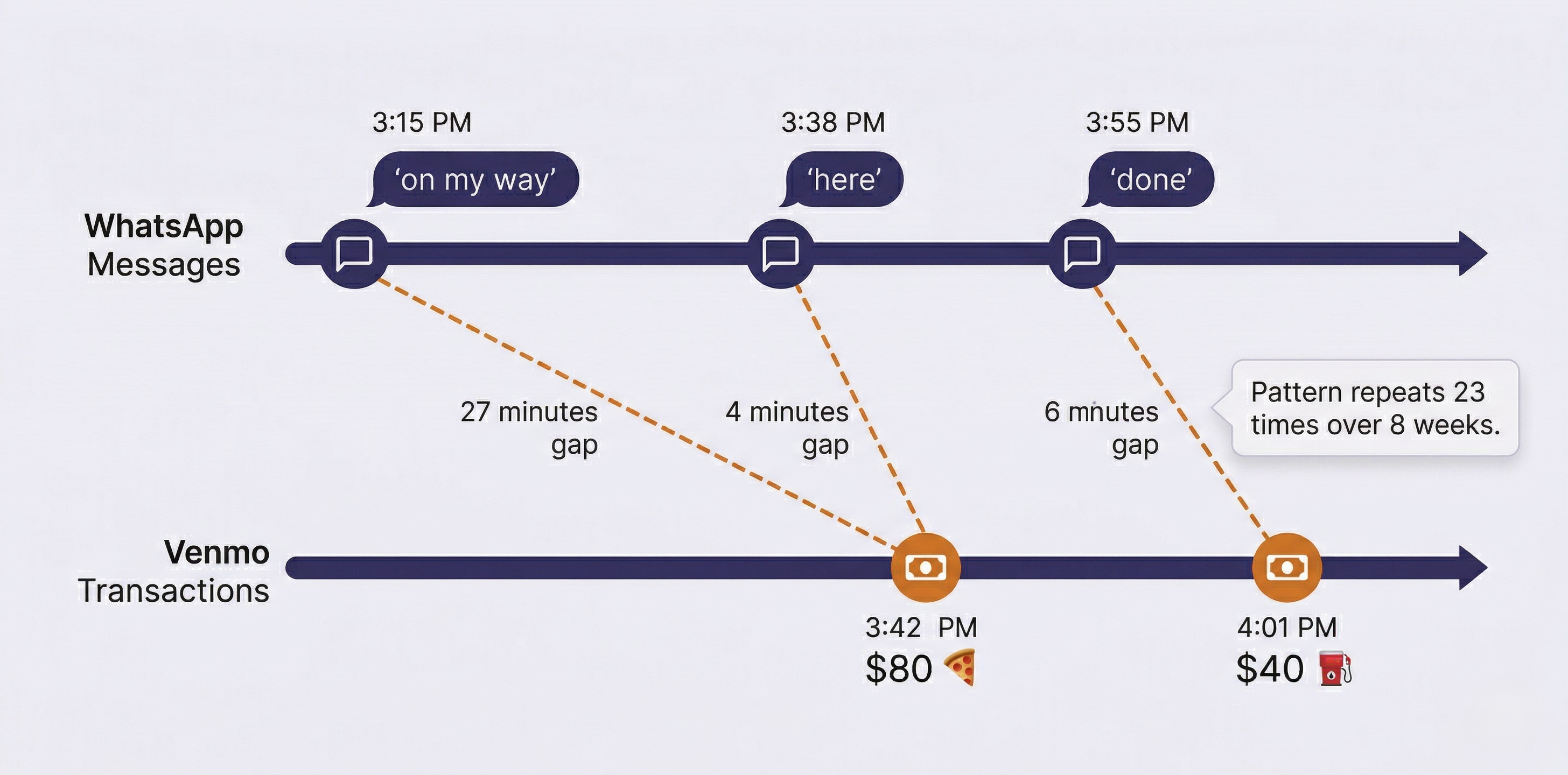
In narcotics investigations, cross-referencing Venmo transaction timestamps with messaging activity frequently reveals the coordination pattern. A WhatsApp message at 3:15 PM saying "on my way" followed by a Venmo payment at 3:42 PM with a pizza emoji, repeated dozens of times over weeks, establishes a distribution pattern that neither data source could prove alone. The messaging provides context; the financial record provides the transaction; and the timestamps tie them together.
13.4 Location-Based Apps
Location evidence from apps is often more granular than traditional cell tower data. A cell tower places a device within a sector that may cover hundreds of meters to several kilometers. An Uber pickup places the user at a specific street address at a specific minute.
Navigation and Transportation
Google Maps Timeline is one of the most comprehensive location records available on any device. If the user has Location History enabled, Google Maps maintains:
- Every place visited with arrival and departure times
- Travel routes between locations
- Mode of transportation (walking, driving, transit)
- Saved and searched locations
- Data stored both on-device and in the user's Google account
Uber and Lyft store complete ride history that is difficult for a suspect to dispute because it represents a third-party commercial transaction record:
- Pickup and dropoff addresses (specific street-level precision)
- Exact request and completion timestamps
- Driver information and route taken
- Payment method used
Waze stores route history, frequent destinations, and timestamps. Transit apps store route searches and station check-in times.
Dating Apps
Tinder, Bumble, Hinge, and Grindr all use location-based matching, which means the app calculates and stores proximity data. Key artifacts include:
- Profile activity timestamps
- Match history and swipe patterns
- Message content within the app
- Location proximity calculations
In stalking or harassment cases, dating app location data can establish that the suspect was within proximity of the victim at specific times.
The Location Corroboration Principle
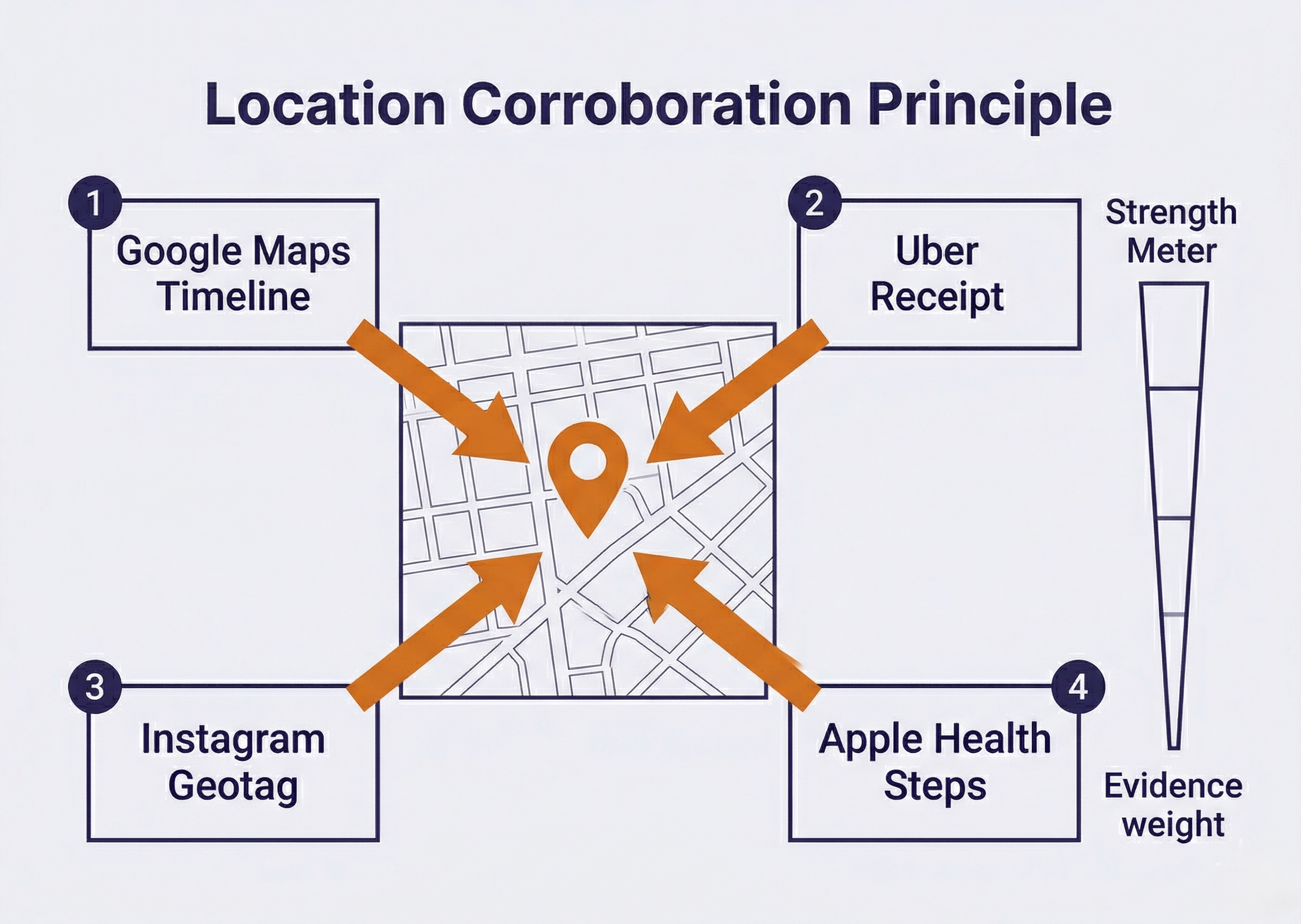
A single location source can be challenged. Cell tower data has a wide margin of error. GPS coordinates can be questioned (was the phone on the person, or left in a car?). But when Google Maps Timeline, an Uber receipt, a geotagged Instagram post, and Apple Health step count data all place the suspect at the same location within the same timeframe, the cumulative weight becomes difficult to dispute. This is the location corroboration principle: individual sources have weaknesses, but convergence across independent sources creates strong evidence.
13.5 Health and Fitness Apps
Health and fitness apps function as "accidental witnesses." They record physical activity that the user never intended to serve as forensic evidence. This makes them particularly powerful for contradicting alibis, because suspects rarely think to manipulate health data before or after an incident.
Apple Health and Google Fit were covered in detail in Chapters 11 and 9 respectively from a database perspective. This section focuses on their investigative application.
What Health Data Reveals
Each data type serves a distinct forensic purpose:
- Step counts and distance place the user in motion during specific time windows. A suspect claiming to have been asleep all night is contradicted by 3,400 steps recorded between 1:00 and 4:00 AM.
- Heart rate data from an Apple Watch or fitness band provides physiological context. A resting heart rate of 55 BPM that spikes to 145 BPM at 2:17 AM indicates significant physical exertion or stress, inconsistent with sleep.
- Elevation changes document stair climbing or altitude changes, narrowing down the type of physical activity.
- GPS workout routes from apps like Strava or Fitbit trace the exact path the user traveled during a recorded workout, with timestamps at every point along the route.
- Sleep tracking records when the user fell asleep and woke up (or more precisely, when the device's sensors detected the transition). A sleep tracker showing "awake" from 2:00 to 3:30 AM on the night of a crime directly contradicts a sleep alibi.
Sensitive Data Considerations
Health apps may contain deeply personal information that requires careful handling:
- Period tracking apps (Flo, Clue)
- Mental health apps (therapy session notes, mood logs)
- Medication reminder apps
- Telemedicine appointment history
This data can be relevant in specific investigation types, but its forensic use requires sensitivity to privacy implications and careful consideration of whether the data is within the scope of the warrant. Examiners should consult with their supervising attorney before including health data of this nature in reports.
13.6 Entertainment, Productivity, and Smart Home Apps
These three categories provide context, corroboration, and behavioral patterns that supplement the primary evidence from communication, financial, and location sources.
Entertainment Apps
Streaming services (Netflix, Hulu, YouTube, Spotify) maintain detailed usage histories with timestamps. This data serves multiple forensic purposes:
- Device activity timestamps: a Netflix session from 7:00 to 9:30 PM confirms the device was in use during that window
- Account sharing: two people sharing a Netflix "household" or Spotify Family plan suggests cohabitation or close association
- Search history: may be relevant to establishing intent or state of mind (see caveat below)
Regarding search and viewing history as evidence of intent: courts have admitted evidence such as internet search history and media consumption as circumstantial evidence of premeditation or state of mind. A suspect's YouTube search history showing queries about disposing of evidence, or a pattern of consuming content related to the specifics of a crime, can be presented as corroborating evidence. This type of evidence does not prove guilt on its own. It is circumstantial and must be presented alongside other evidence. An examiner should report what was found factually without drawing conclusions about the suspect's thoughts or motivations. The interpretation of what search history or viewing patterns mean is ultimately a question for the trier of fact (judge or jury), not the forensic examiner.
Gaming apps store artifacts that investigators often overlook:
- In-game chat logs (communication conducted through a platform the suspect believed was not monitored)
- Session timestamps establishing device usage
- Friend lists and clan/guild memberships
- In-app purchase history
Productivity Apps
- Notes apps (Apple Notes, Google Keep, Evernote) are frequently underestimated. Suspects occasionally store passwords, addresses, to-do lists, financial calculations, or plans in notes they believe are private.
- Calendar apps contain past and future events, recurring meeting patterns, invitations sent and received, and deleted events (often recoverable from database free pages).
- Cloud storage apps (Google Drive, Dropbox, iCloud Drive) provide shared file records, access logs, recently deleted items, and synchronization timestamps.
Smart Home and IoT Apps
Security cameras (Ring, Nest, Arlo):
- Motion detection logs and video access timestamps
- User accounts with shared access lists
- Arm/disarm history
Smart locks:
- Lock/unlock events with timestamps
- Which access code or user performed the action
- Shared access history
Voice assistants (Google Home, Amazon Alexa):
- Voice command history
- Routine execution logs
- Device control logs
Thermostat and lighting apps:
- Home/away mode transitions with timestamps
- Scheduling patterns and manual overrides
IoT evidence is notable because it often comes from both sides of an investigation. The victim's Ring doorbell may show no one approaching the front door, while the suspect's smart lock app shows them leaving their own home at the time of the offense. Collecting IoT artifacts from all relevant devices, not just the suspect's phone, can produce a more complete picture.
Analyst Perspective
In a burglary investigation, the victim's Ring doorbell showed no motion at the front door during the break-in window. This initially seemed unhelpful. But the suspect's own Nest thermostat app showed a mode switch to "Away" at 1:45 AM, fifteen minutes before the burglary occurred. The suspect's smart lock app confirmed the front door was unlocked at 1:43 AM. Neither IoT artifact alone was conclusive, but together they placed the suspect leaving his own home at the right time. Always consider IoT artifacts from every party involved, not just the primary suspect.
13.7 The Correlation Methodology
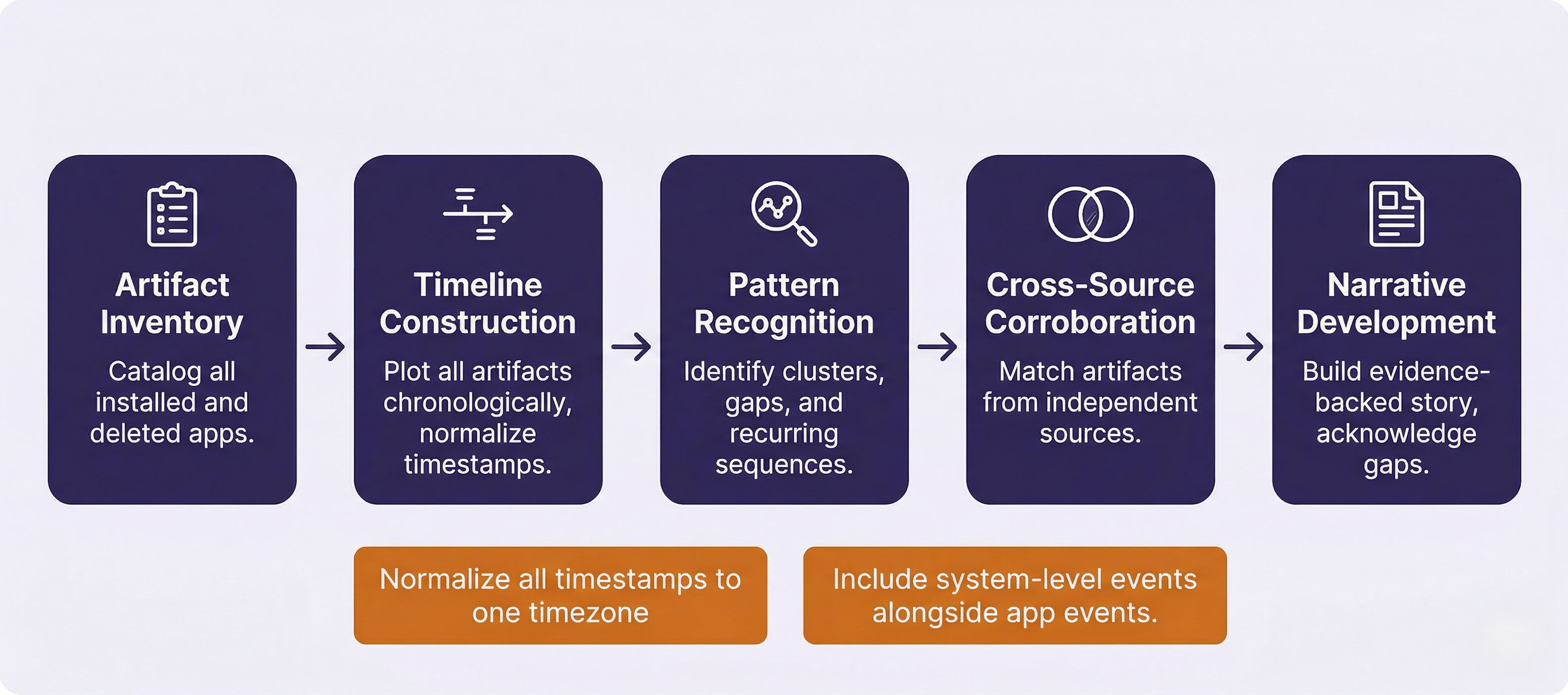
Individual app artifacts are data points. The correlation methodology transforms those data points into an investigative narrative. This is a structured, five-step process that can be applied to any case regardless of the crime type or the specific apps involved.
Step 1: Artifact Inventory
Before analysis begins, catalog every app installed on the device, including recently deleted apps. On Android, packages.xml (Chapter 9) lists every app that has ever been installed, including the installation source. On iOS, app bundle records serve the same purpose. For each relevant app, identify what data categories are available and note which apps were successfully parsed by the commercial tool and which require manual database analysis.
Step 2: Timeline Construction
Plot all artifacts on a unified timeline. Commercial tools like Magnet AXIOM and Cellebrite Physical Analyzer include built-in timeline views that merge artifacts from multiple sources into a single chronological display. For manual analysis, a spreadsheet works well: one row per event, with columns for timestamp, source app, event type, and content.
Two critical requirements for effective timelines. First, normalize all timestamps to a single timezone. App databases may store timestamps in UTC, local time, Unix epoch, or Apple Cocoa epoch (Chapter 7). Mixing timezone formats on a timeline produces false sequences that can mislead the investigation. Second, include system-level events alongside app-level events. Calls, texts, Wi-Fi connections, and device lock/unlock events (KnowledgeC on iOS) provide the scaffolding that app events are layered onto.
Step 3: Pattern Recognition
With artifacts plotted on a timeline, look for three types of patterns:
- Clusters: Multiple apps showing activity within the same short timeframe. A burst of messaging followed immediately by a financial transaction followed by a ride-share booking suggests coordinated activity.
- Gaps: Periods of unusual inactivity on a device that is normally active. A suspect who uses their phone every few minutes suddenly has a two-hour gap during the window of a crime. The absence of data is itself evidence.
- Sequences: Recurring ordered patterns. A message exchange, then an Uber ride, then a Venmo payment, then a Snapchat photo, repeating weekly, suggests a pattern of behavior (which may be a distribution pattern, a meeting pattern, or a routine).
Step 4: Cross-Source Corroboration
Cross-reference artifacts from independent sources to strengthen each data point:
- Match location data from Google Maps, Uber, and Instagram geotags. Do they converge?
- Match financial transactions to communication patterns. Does a Venmo payment follow a WhatsApp conversation?
- Match physical activity (Health data) to claimed behavior. Does step count data contradict an alibi?
- Identify contradictions between the subject's statements and the artifact record.
Step 5: Narrative Development
Build a cohesive, evidence-backed narrative from the correlated artifacts. This narrative should identify which artifacts corroborate each other, which stand alone and require additional support, and which contradict the subject's account. Gaps in the evidence must be acknowledged explicitly. The narrative should reflect what the evidence shows, not what the examiner believes happened.
Correlation Methodology Quick-Reference
| Step | Action | Tools | Output |
|---|---|---|---|
| 1. Inventory | Catalog all installed/deleted apps; identify data categories | packages.xml, app bundle records, tool app list | App inventory with data availability |
| 2. Timeline | Plot all artifacts chronologically; normalize timestamps | AXIOM Timeline, Cellebrite, spreadsheet | Unified event timeline |
| 3. Patterns | Identify clusters, gaps, and recurring sequences | Visual analysis of timeline | Pattern map with flagged anomalies |
| 4. Corroboration | Cross-reference across independent sources | Side-by-side comparison | Corroborated evidence points |
| 5. Narrative | Build evidence-backed story; acknowledge gaps | Report writing (Ch. 3) | Investigative narrative |
Putting It Together: The Armed Robbery Timeline
Detectives investigate an armed robbery at a convenience store at 10:15 PM on a Tuesday. A suspect is arrested the following day and claims he was at a friend's apartment all evening watching movies. His iPhone 14 is seized pursuant to a search warrant, and the lab performs a file system extraction. The examiner applies the five-step correlation methodology.
Step 1: Inventory. The app list reveals Uber, Instagram, Cash App, Netflix, Apple Health, Google Maps, Snapchat, and WhatsApp among 73 installed apps.
Step 2: Timeline construction. The examiner extracts data from each relevant app and plots events chronologically, normalizing all timestamps to Eastern Time.
Step 3/4: Pattern recognition and corroboration. The unified timeline reveals:
- 9:12 PM: Netflix session ends (last activity on the account the suspect claims he was watching all evening). KnowledgeC confirms the Netflix app moved to background at this time.
- 9:14 PM : WhatsApp message to contact "J": "leaving now, 15 min."
- 9:18 PM: Uber ride requested. Pickup at the friend's apartment address. Dropoff at an intersection two blocks from the convenience store.
- 9:31 PM: Uber ride completes. Apple Health begins recording steps.
- 9:32 to 10:10 PM: Apple Health records 1,850 steps. Google Maps Timeline shows movement in the vicinity of the convenience store.
- 10:15 PM: Robbery occurs (per store surveillance timestamp).
- 10:22 PM: Snapchat message to contact "J": single image, no text. (Image recovered from cache shows cash and merchandise.)
- 10:25 PM: Uber ride requested. Pickup near the convenience store. Dropoff at the friend's apartment.
- 10:41 PM: Cash App: $200 sent to contact "J" with note "🙏."
- 10:43 PM: Netflix session resumes at the friend's apartment. KnowledgeC confirms Netflix app returned to foreground.
- 10:45 PM: Instagram story posted from the friend's apartment: selfie on the couch with movie playing in background. Caption: "chill night 😴."
Step 5: Narrative. The artifact timeline directly contradicts the suspect's alibi. Netflix confirms he stopped watching at 9:12 PM, not "all evening." Uber places him two blocks from the robbery scene at 9:31 PM. Apple Health confirms physical movement during the robbery window. Snapchat and Cash App suggest coordination with an accomplice. The Instagram story posted at 10:45 PM, after the suspect returned to the apartment, appears to be a deliberate attempt to create a false digital alibi.
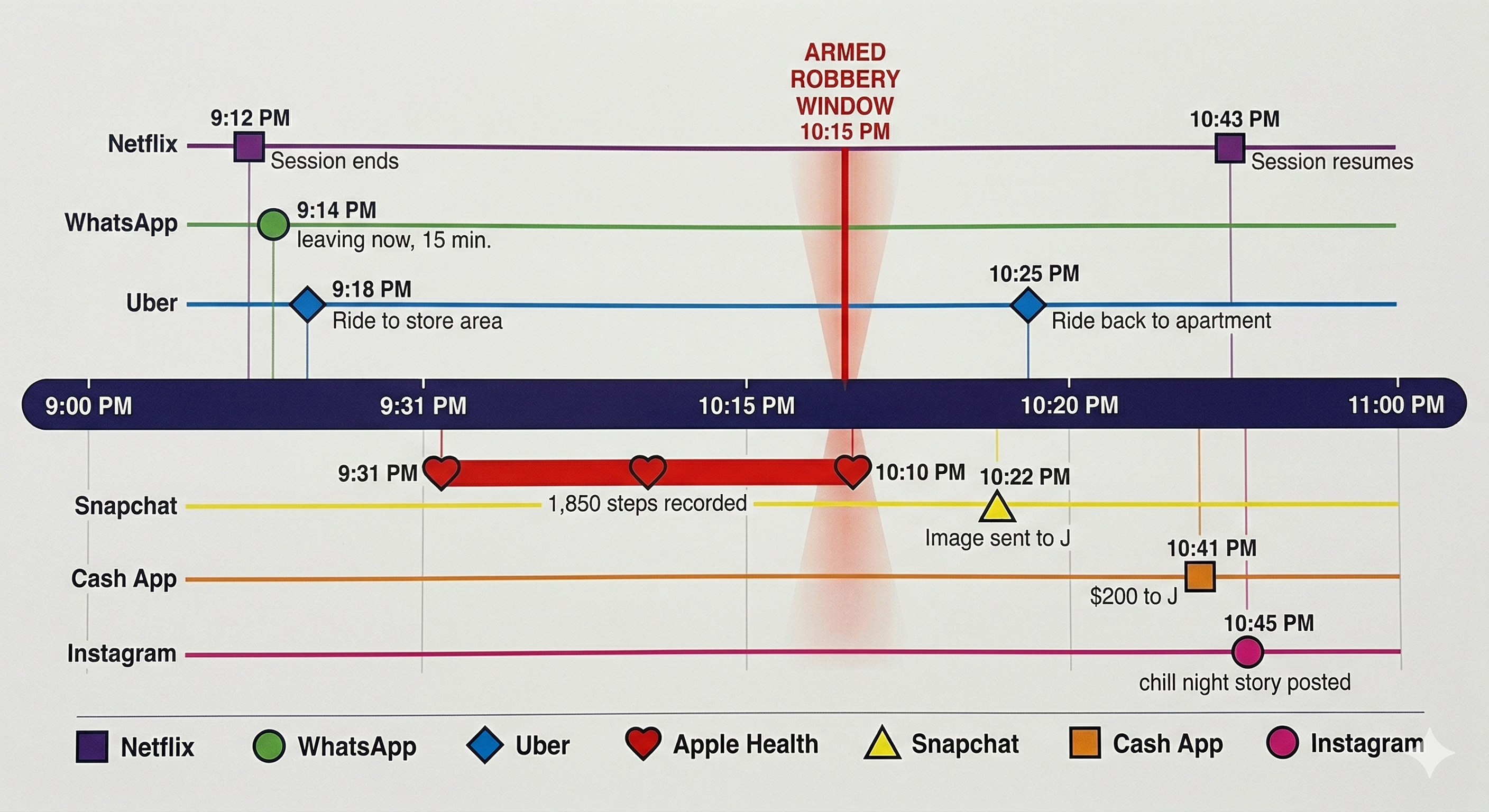
No single artifact proves the robbery. The Uber ride alone could be innocent. The Cash App payment alone could be unrelated. But when correlated across seven apps on a unified timeline, the pattern of departure, presence, communication, payment, and return is a comprehensive narrative that supports the prosecution's theory and demolishes the alibi.
13.8 Limitations and Challenges
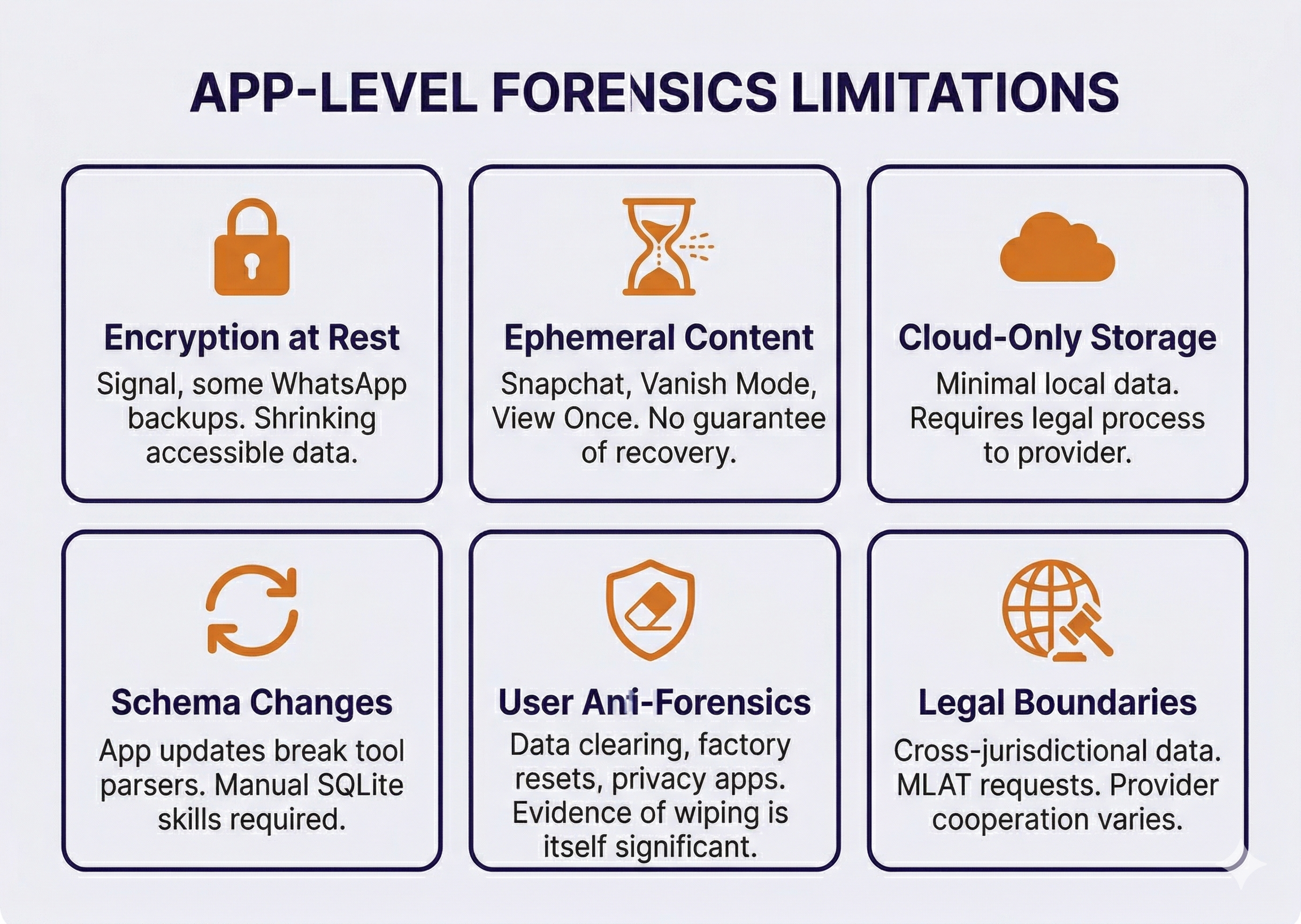
App-level forensics is powerful, but it has boundaries that students and practicing examiners must understand and communicate honestly in their reports.
Encryption at Rest
Signal encrypts its local database with a key that logical extractions cannot access. Some WhatsApp backup configurations encrypt the backup file itself. As more apps adopt at-rest encryption, the proportion of app data accessible through standard extraction methods will shrink. File system extractions recover more than logical extractions, but even file system methods cannot decrypt every app's local storage.
Ephemeral and Disappearing Content
Snapchat, Instagram Vanish Mode, Signal disappearing messages, and WhatsApp's "View Once" media are designed to not persist. While forensic artifacts from these features sometimes survive in cache or database free pages, there is no guarantee. An examiner cannot report "the suspect sent no Snapchat messages during this period" with confidence, only that no messages were recovered. The absence of evidence is not evidence of absence.
Cloud-Only Storage
Some apps store minimal data locally, keeping everything on remote servers. Recovering this data requires a legal request to the service provider rather than device forensics. Response times vary from days to months, and some providers (particularly those outside the United States) may require Mutual Legal Assistance Treaty (MLAT) requests that take significantly longer.
App Updates and Schema Changes
App developers update their database schemas regularly. A forensic tool that successfully parsed Instagram DMs last month may fail after Instagram releases a new version that restructures the database. This is why tool updates must be applied regularly and why manual SQLite analysis skills (Chapter 8) remain essential as a fallback.
User Anti-Forensics
Suspects who are aware of digital forensics may take countermeasures: clearing app data, using apps' built-in "Clear Chat" features, factory resetting the device, using privacy-focused apps, or employing dedicated anti-forensic tools. These actions are not always effective (database free pages and WAL files may retain deleted content), but they do reduce the volume of recoverable evidence. Notably, evidence of anti-forensic behavior, such as a factory reset performed hours after a crime, is itself forensically significant and should be documented.
Legal Boundaries
App data may span jurisdictions. A message sent from Ohio through a server in Ireland to a recipient in California involves multiple legal frameworks. Data stored on foreign servers may require international legal process. Some companies respond promptly to domestic law enforcement requests; others are slow, uncooperative, or legally unable to comply. Examiners should work closely with prosecutors to ensure legal process is initiated early for cloud-stored evidence, as the device extraction alone may not capture everything.
Chapter 13 Summary
- The category framework organizes app artifacts by behavior type: communication, financial, location, health/fitness, entertainment, productivity, and smart home/IoT. Thinking in categories allows examiners to approach any investigation systematically rather than memorizing individual apps.
- Communication apps remain the most commonly examined category. WhatsApp stores messages in plaintext on the device despite E2E encryption in transit. Snapchat artifacts persist despite the "disappearing" design. Signal encrypts at rest and requires file system extraction. The encryption model of each app determines what is recoverable.
- Financial apps establish relationships, prove transactions, and trace money flows. Venmo's public transaction feed (with note fields) is among the most forensically valuable artifacts in narcotics investigations. Cross-referencing financial timestamps with messaging activity reveals coordination patterns.
- Location apps provide more granular data than cell tower records. Google Maps Timeline, Uber/Lyft ride history, and dating app proximity data can place a subject at a specific address at a specific time. The location corroboration principle: convergence across multiple independent sources creates strong evidence.
- Health and fitness data are "accidental witnesses" that contradict alibis because users do not think to manipulate them. Step counts, heart rate, sleep tracking, and GPS workout routes provide physiological and physical evidence of activity during critical timeframes.
- Entertainment, productivity, and IoT artifacts provide behavioral context, corroborate timelines, and establish presence or absence. Smart home data from both suspect and victim devices can contribute to the same timeline.
- The five-step correlation methodology transforms isolated data points into investigative narratives: Inventory, Timeline, Pattern Recognition, Cross-Source Corroboration, Narrative Development. Normalizing timestamps and including system-level events alongside app events are critical for accurate timelines.
- Limitations include encryption at rest (Signal), ephemeral content (Snapchat), cloud-only storage (requires legal process), app updates breaking tool parsers, user anti-forensics, and cross-jurisdictional legal complexities. These limitations must be acknowledged transparently in reports.
Next Steps: Chapter 14 covers the most invasive acquisition methods in mobile forensics: advanced physical techniques including JTAG, ISP, and chip-off. These methods are increasingly reserved for damaged devices, legacy hardware, and IoT/drone forensics as modern smartphones have made traditional physical extraction impractical through hardware-backed encryption.