CH11: Secure Network Design
Introduction
The network is simultaneously the organization's greatest operational asset and its most complex attack surface. Applications depend on the network to communicate with users and other systems. Users depend on the network to access the tools they need to work. Yet every network connection is a potential entry point for attackers to breach systems, eavesdrop on communications, or disrupt services.
Secure network design addresses this tension by building protection into the network architecture itself, rather than treating the network as a trusted highway and defending only the endpoints. This chapter examines the protocols and technologies that form the network foundation, the security properties of each, and how organizations design networks that protect confidentiality and integrity of communications while maintaining the availability that business operations require.
The chapter progresses from protocols (what travels over the network) to technologies (how the network is protected), to architectural patterns (how networks are segmented and managed). Students will learn to distinguish between secure and insecure protocols, understand what cryptography protects in network traffic, and evaluate network access control and segmentation strategies.
By the end of this chapter, students will be able to assess network security controls, recommend protocols and technologies appropriate to specific security requirements, and understand the tradeoffs between security and operational complexity.
Learning Objectives
Upon completing this chapter, students will be able to:
- Differentiate between secure and insecure network protocols, identify which protocols are appropriate for different use cases, and explain the risks of continuing to use deprecated protocols.
- Explain how virtual private networks (VPNs) establish encrypted tunnels over untrusted networks, describe site-to-site and remote access VPN architectures, and identify configuration weaknesses like split tunneling.
- Describe wireless security technologies including WPA2, WPA3, enterprise vs. personal authentication, EAP types, and attacks such as rogue access points and evil twin networks.
- Explain network access control (NAC) concepts including 802.1X authentication, agent-based vs. agentless approaches, and how NAC enforces device compliance policies.
- Evaluate secure network protocols for specific scenarios, including DNS security, DNSSEC, and LDAP/LDAPS selection.
- Describe network segmentation and micro-segmentation strategies that reduce attack blast radius and limit lateral movement.
- Apply secure network design principles to a scenario involving a multi-site organization, identifying appropriate protocols, access controls, and segmentation strategies.
11.1 Network Protocols: Secure vs. Insecure
Network protocols define how data is formatted and transmitted. Each protocol operates at specific layers of the OSI model and serves specific functions. Security-aware network design begins by choosing protocols that provide confidentiality, integrity, or authentication.
Insecure Protocols (Legacy, Deprecated)
Several protocols are considered insecure because they transmit credentials or sensitive data in plaintext (unencrypted form). These protocols should not be used in modern networks except in isolated, non-sensitive environments.
Telnet (port 23) is an insecure remote access protocol that transmits all commands and output, including login credentials, in plaintext. An attacker on the network can read every keystroke. Telnet has been deprecated for two decades in favor of SSH.
FTP (File Transfer Protocol) (port 21) transmits filenames, file contents, and credentials in plaintext. FTP has been deprecated in favor of SFTP (SSH File Transfer Protocol) and other encrypted file transfer methods.
SNMP v1 and v2c (Simple Network Management Protocol) use community strings (essentially passwords) transmitted in plaintext to authenticate management queries. These versions are insecure and should not be exposed to untrusted networks. SNMP v3 adds authentication and encryption.
HTTP (HyperText Transfer Protocol) (port 80) transmits web content and session cookies in plaintext. HTTP should not be used for any transaction involving credentials or sensitive data. Modern web applications use HTTPS exclusively.
LDAP (Lightweight Directory Access Protocol) (port 389) transmits directory queries, user credentials, and directory data in plaintext. LDAP is commonly used within organizations for authentication, but must not be exposed directly to untrusted networks.
Secure Protocols
HTTPS (HTTP over TLS) (port 443) wraps HTTP in a TLS encryption layer. All content (requests and responses) is encrypted, authenticated, and integrity-protected. HTTPS is the standard for all web applications and should be enforced site-wide using HTTP Strict Transport Security (HSTS), which forces browsers to use HTTPS even if a user attempts to access HTTP versions.
SSH (Secure Shell) (port 22) is the secure replacement for Telnet and other insecure remote access protocols. SSH provides encrypted command execution, remote login, and secure tunneling capabilities. SSH authentication typically uses key-based authentication (a public/private key pair) rather than passwords, further strengthening security.
SFTP (SSH File Transfer Protocol) and SCP (Secure Copy Protocol) are secure file transfer methods layered on top of SSH. Both encrypt all communication. SFTP is the standard for file transfer in modern environments.
LDAPS (LDAP over TLS) (port 636) encrypts LDAP directory queries and authentication attempts. LDAPS should be the standard for any organization using LDAP for authentication.
DNSSEC (DNS Security Extensions) adds authentication to DNS queries, allowing clients to verify that DNS responses have not been tampered with. DNSSEC is discussed in detail in Section 11.4.
SNMPv3
SNMPv3 (port 161) adds encryption and authentication to SNMP queries. SNMPv3 allows management traffic to be encrypted and authenticated so that only authorized administrators can query network devices.
Analyst Perspective
When you audit a network for security, one of the first tasks is to identify which protocols are in active use. You will often find legacy protocols like Telnet, FTP, or SNMP v1/v2c still in use because they are embedded in old network devices or applications that have never been updated. Your job is to highlight the risk and work with operational teams to plan migrations to secure equivalents. Sometimes the migration is straightforward; sometimes it requires coordination with vendors or significant infrastructure changes. But using insecure protocols in 2026 is not a security tradeoff; it is a compliance and liability issue.
Protocol Selection Guidelines
| Protocol | Port | Secure? | Use Case | Alternative |
|---|---|---|---|---|
| Telnet | 23 | No | Remote access (legacy) | SSH |
| SSH | 22 | Yes | Remote access, tunneling | - |
| HTTP | 80 | No | Web (legacy) | HTTPS |
| HTTPS | 443 | Yes | Web, APIs | - |
| FTP | 21 | No | File transfer (legacy) | SFTP, SCP |
| SFTP | 22 | Yes | File transfer | - |
| LDAP | 389 | No | Directory queries (legacy) | LDAPS |
| LDAPS | 636 | Yes | Directory queries | - |
| SNMPv1/v2c | 161 | No | Network management (legacy) | SNMPv3 |
| SNMPv3 | 161 | Yes | Network management | - |
Figure 11.1 pairs common network tasks with protected protocol options.
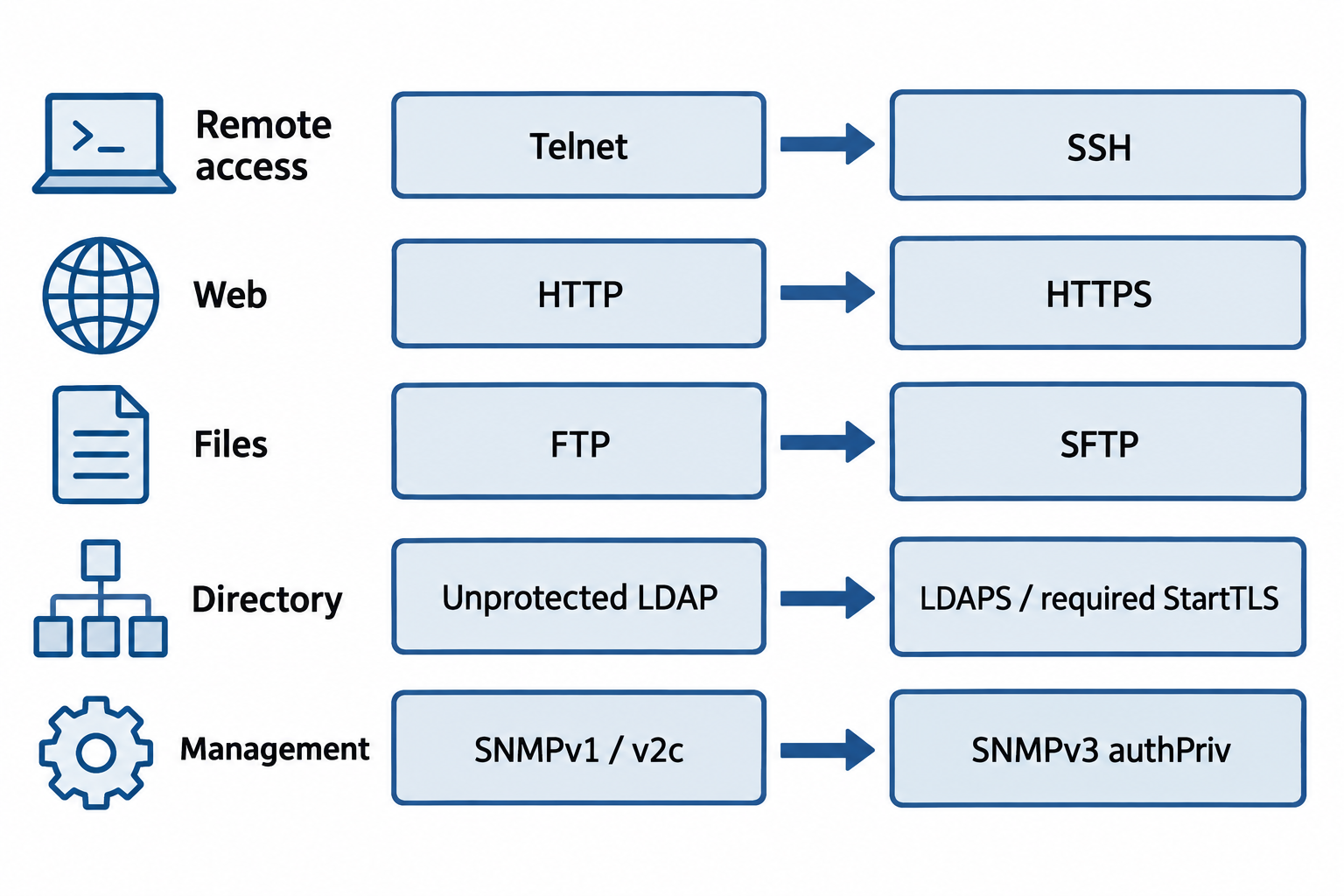
Figure 11.1: Protocol choices need an appropriate secure mode and correct configuration. LDAP can use either implicit TLS or StartTLS, and SNMPv3 needs authPriv for authentication plus privacy.
Text description for Figure 11.1
Remote administration moves from Telnet to Secure Shell (SSH). Web traffic uses HTTPS, which protects HTTP with Transport Layer Security (TLS). File transfers can use SSH File Transfer Protocol (SFTP). Directory traffic can use LDAP over TLS (LDAPS) or require a successful StartTLS upgrade before sensitive operations. Simple Network Management Protocol version 3 (SNMPv3) provides authentication and encryption when configured for authPriv. Protocol names alone do not establish secure deployment.
11.2 Virtual Private Networks (VPNs)
A Virtual Private Network (VPN) creates an encrypted tunnel over an untrusted network (typically the public internet). Data traveling through the tunnel is encrypted, authenticated, and protected from eavesdropping or tampering. VPNs enable two primary architectures: site-to-site VPNs connect entire office networks, and remote access VPNs connect individual users to an organization's network.
VPN Protocols and Technologies
IPSec (Internet Protocol Security) operates at the network layer (Layer 3) and can encrypt all traffic between two networks. IPSec supports two modes:
Tunnel mode encrypts entire IP packets, including the original source and destination addresses. The encrypted packet is wrapped in a new IP header with the VPN gateway addresses. Tunnel mode is used for site-to-site VPNs where an entire network tunnel is established between two locations.
Transport mode encrypts only the payload (the data inside the IP packet), leaving the original IP header visible. Transport mode is used for end-to-end encryption between specific applications.
Figure 11.2 compares the encrypted portions of the two ESP modes.
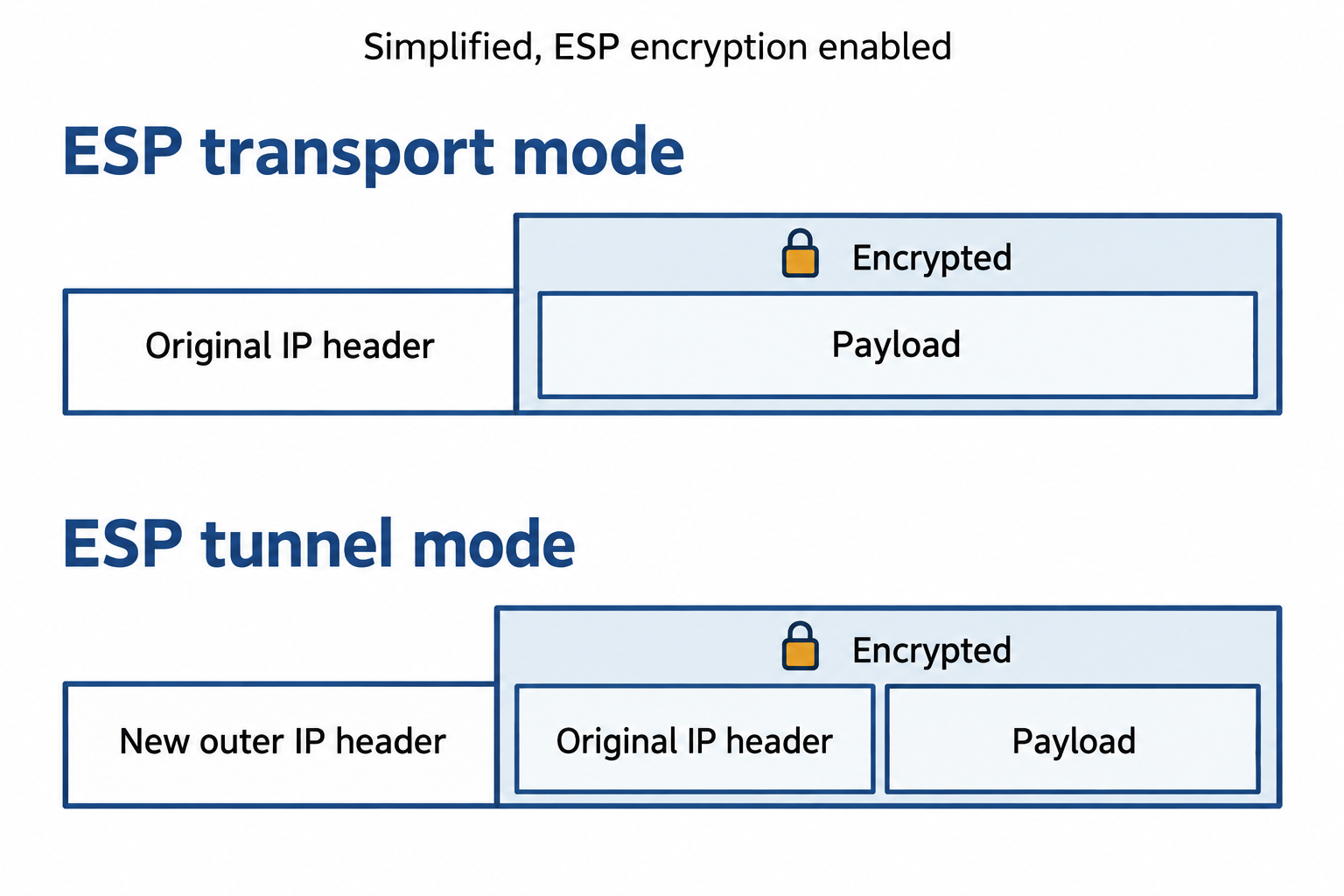
Figure 11.2: With encryption enabled, IPsec Encapsulating Security Payload (ESP) protects the transport payload in transport mode and the original IP packet in tunnel mode.
Text description for Figure 11.2
In transport mode, the original IP header remains visible while ESP protects the upper-layer payload. In tunnel mode, a new outer IP header supports routing between tunnel endpoints and the original IP header travels inside the encrypted portion with its payload. The drawing omits ESP overhead fields to emphasize the scope of encryption.
IPSec uses two protocols for different functions: Encapsulating Security Payload (ESP) encrypts and authenticates the payload, while Authentication Header (AH) authenticates the packet but does not encrypt. Modern deployments use ESP, which provides both encryption and authentication.
TLS/SSL VPNs (such as OpenVPN or Cisco AnyConnect) operate at the transport layer and establish encrypted tunnels using the same protocol that secures web traffic (TLS). TLS VPNs are easier to deploy than IPSec (fewer configuration options, easier to traverse firewalls and proxies) but may be slightly less efficient for high-bandwidth scenarios.
Site-to-Site VPNs
A site-to-site VPN connects entire office networks. The VPN gateway at one office encrypts all traffic destined for the other office and transmits it through the tunnel. This allows users at either location to access resources on the other network transparently, as if the networks were directly connected.
Site-to-site VPNs are used to:
- Connect branch offices to a central headquarters
- Establish redundant connections between data centers
- Connect to cloud environments where critical infrastructure is hosted
- Connect to partner organizations' networks for secure inter-organizational communication
Site-to-site VPNs typically use static IP addresses and are always active (or fail over to backup tunnels if the primary tunnel fails).
Remote Access VPNs
A remote access VPN allows individual users (traveling, working from home) to connect securely to the organization's network. The user runs a VPN client on their device that establishes a tunnel to the VPN gateway. Once connected, the user's traffic appears to originate from the VPN gateway, and they can access network resources as if they were physically present in the office.
Remote access VPNs are used for:
- Enabling work-from-home for employees
- Allowing traveling employees to access corporate resources securely
- Connecting contractors and partners who need temporary access
- Protecting traffic on untrusted public networks (public WiFi, hotel networks)
Remote access VPNs typically use dynamic IP addresses (assigned by the VPN gateway) and are activated on-demand by users.
Figure 11.3 shows where each VPN architecture starts and ends its tunnel.
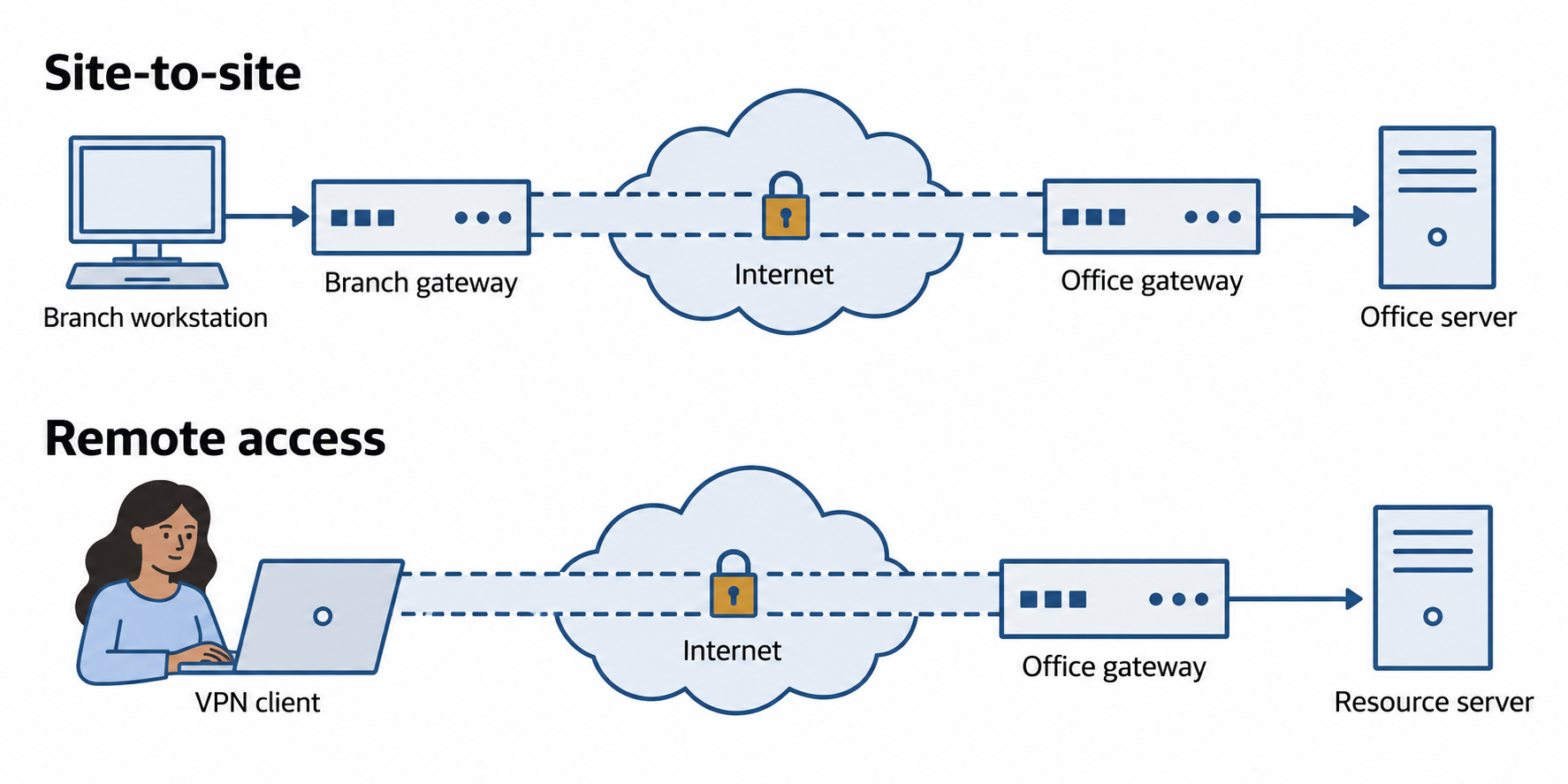
Figure 11.3: A virtual private network (VPN) tunnel protects traffic between its endpoints. Site-to-site and remote access designs place those endpoints differently.
Text description for Figure 11.3
A site-to-site VPN places a tunnel between gateways serving different networks. A remote access VPN places one endpoint on the worker’s device and the other at the organization’s gateway. Traffic beyond either endpoint needs its own appropriate protection and access policy. A tunnel does not automatically authorize every internal resource.
Split Tunneling and Security Concerns
Split tunneling occurs when a remote access VPN is configured to allow some traffic to traverse the VPN tunnel (encrypted, monitored by the organization) while other traffic goes directly to the user's local gateway (unencrypted, not monitored).
Split tunneling is convenient for users: They can access both corporate resources (through the VPN) and public internet sites (direct connection) without routing all traffic through the corporate gateway. However, split tunneling creates security risks:
- Malware on the user's device can use the direct internet connection to communicate with attackers, exfiltrating data or receiving commands while the user believes they are protected by the VPN
- A compromised device can route corporate traffic through the unencrypted direct connection despite the VPN connection being active
- Policy enforcement by DLP or threat detection systems is bypassed
Most organizations disable split tunneling and require all user traffic to traverse the VPN while connected. This is called full tunneling or non-split tunneling.
Figure 11.4 traces how full and split tunneling route traffic.
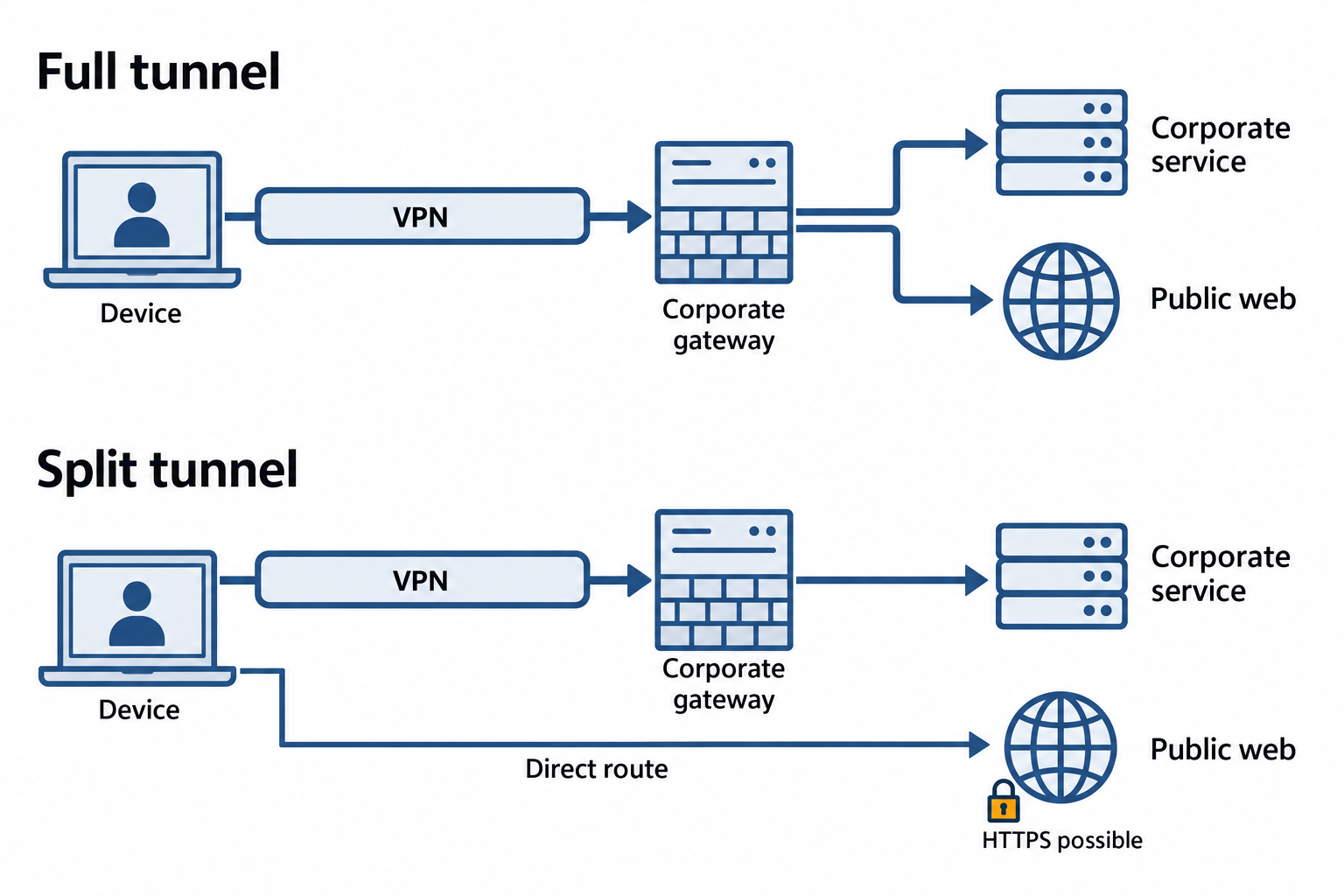
Figure 11.4: In this full-tunnel design, internet-bound traffic passes through the organization’s VPN gateway. Split tunneling also provides a direct route according to policy.
Text description for Figure 11.4
In the full-tunnel example, the device sends both corporate and public-web traffic through the VPN gateway. In the split-tunnel example, corporate traffic uses the VPN while public-web traffic takes a direct route. Direct traffic can still use HTTPS. The routing policy determines where organizational inspection can occur. Transport encryption remains a separate protection.
11.3 Wireless Security
Wireless networks present unique security challenges. Unlike wired networks where attackers must gain physical access to network cables, wireless networks are accessible from anywhere within radio range. Wireless security therefore requires strong encryption, robust authentication, and protection against rogue access points.
Wireless Standards: WPA2 and WPA3
Wi-Fi Protected Access (WPA) is the security standard for wireless networks. WPA defines how devices authenticate to access points and how traffic is encrypted.
WPA2 (standardized in 2004 and still widely deployed) uses CCMP (Counter Mode CBC-MAC Protocol) for encryption, which leverages AES. WPA2 provides strong encryption but has been found vulnerable in specific attack scenarios (KRACK attacks) and does not protect against brute-force attacks on weak passwords.
WPA3 (standardized in 2018 and increasingly deployed on new devices) addresses WPA2's weaknesses:
- Simultaneous Authentication of Equals (SAE) replaces the older WPA2 Pre-Shared Key (PSK) mechanism, making brute-force attacks much harder
- Protection against KRACK attacks by preventing key recovery attacks
- 192-bit encryption for enterprise deployments (vs. 128-bit in WPA2)
- Individualized Data Encryption (OWE) for open networks, encrypting traffic even when no password is set
- Protection on weak passwords through SAE's design (even a weak password provides stronger protection than it would in WPA2)
WPA3 is the current best practice. Organizations with older devices should plan upgrades to WPA3-capable hardware.
Enterprise vs. Personal Mode
WPA2/WPA3 Personal (Pre-Shared Key) uses a shared password known to all users on the network. The password is entered during initial device setup, and all devices derive the same encryption key from it. Personal mode is suitable for home networks and small offices but does not provide per-user accountability or isolation.
WPA2/WPA3 Enterprise uses 802.1X authentication (described in detail in Section 11.5) where each user (or device) authenticates individually to a RADIUS server. The authentication server assigns unique encryption keys per user and can enforce per-user policies. Enterprise mode is the standard for organizations and provides better security and auditability.
Figure 11.5 compares shared-password and individual wireless authentication.
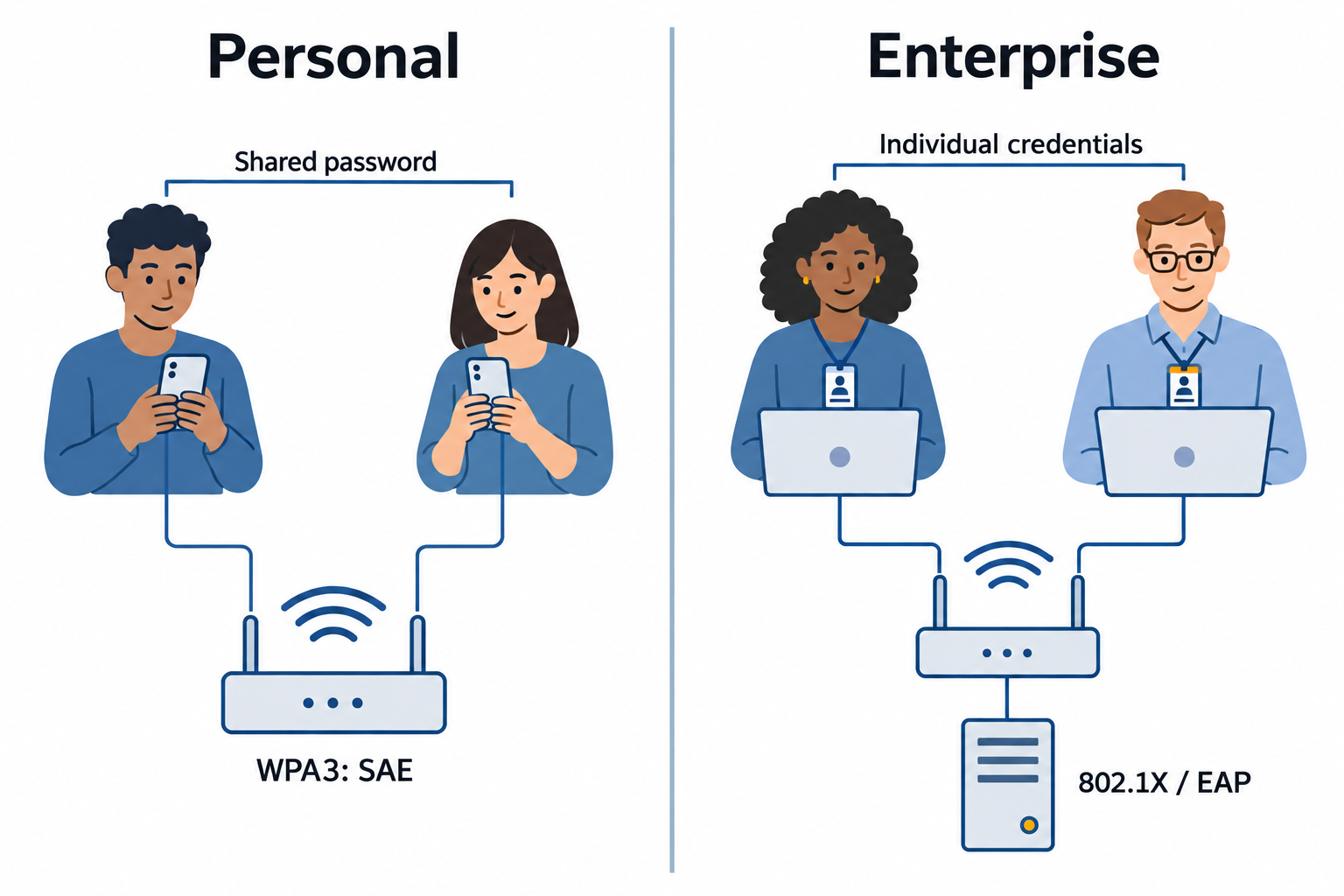
Figure 11.5: Personal wireless networks commonly share a password. Enterprise networks authenticate individual users or devices through an authentication service.
Text description for Figure 11.5
Wi-Fi Protected Access (WPA) Personal deployments commonly use a shared password. WPA3-Personal uses Simultaneous Authentication of Equals (SAE) during authentication. Enterprise deployments use 802.1X and an Extensible Authentication Protocol (EAP) method to authenticate each user or device. Shared passwords do not mean every client uses one identical traffic-encryption key. Enterprise policy still depends on correct certificate and credential configuration.
Rogue Access Points and Evil Twin Attacks
A rogue access point is an unauthorized wireless access point deployed on a network (often by an attacker or a careless insider). An attacker connects a low-cost access point to the network, advertising an SSID (network name) similar to the organization's legitimate network. Unsuspecting users connect to the rogue access point instead of the legitimate one, and the attacker captures their credentials or performs a man-in-the-middle attack.
An evil twin is a more sophisticated rogue access point that uses the exact same SSID as the legitimate network. Users cannot distinguish the evil twin from the legitimate access point and connect to whichever has the stronger signal. The attacker then:
- Performs a man-in-the-middle attack, intercepting traffic between the user and the internet
- Displays a fake login portal to capture credentials
- Injects malware into user traffic
Defenses against rogue access points and evil twins:
- Maintain a registry of legitimate access points (MAC addresses and SSIDs)
- Deploy wireless intrusion detection systems that monitor for rogue access points
- Use certificate-based authentication (802.1X with EAP-TLS) so that users verify the network's identity, not just connect to an SSID
- Educate users to verify network names and expect connection prompts only when first joining
Figure 11.6 shows why an SSID alone cannot authenticate a network.
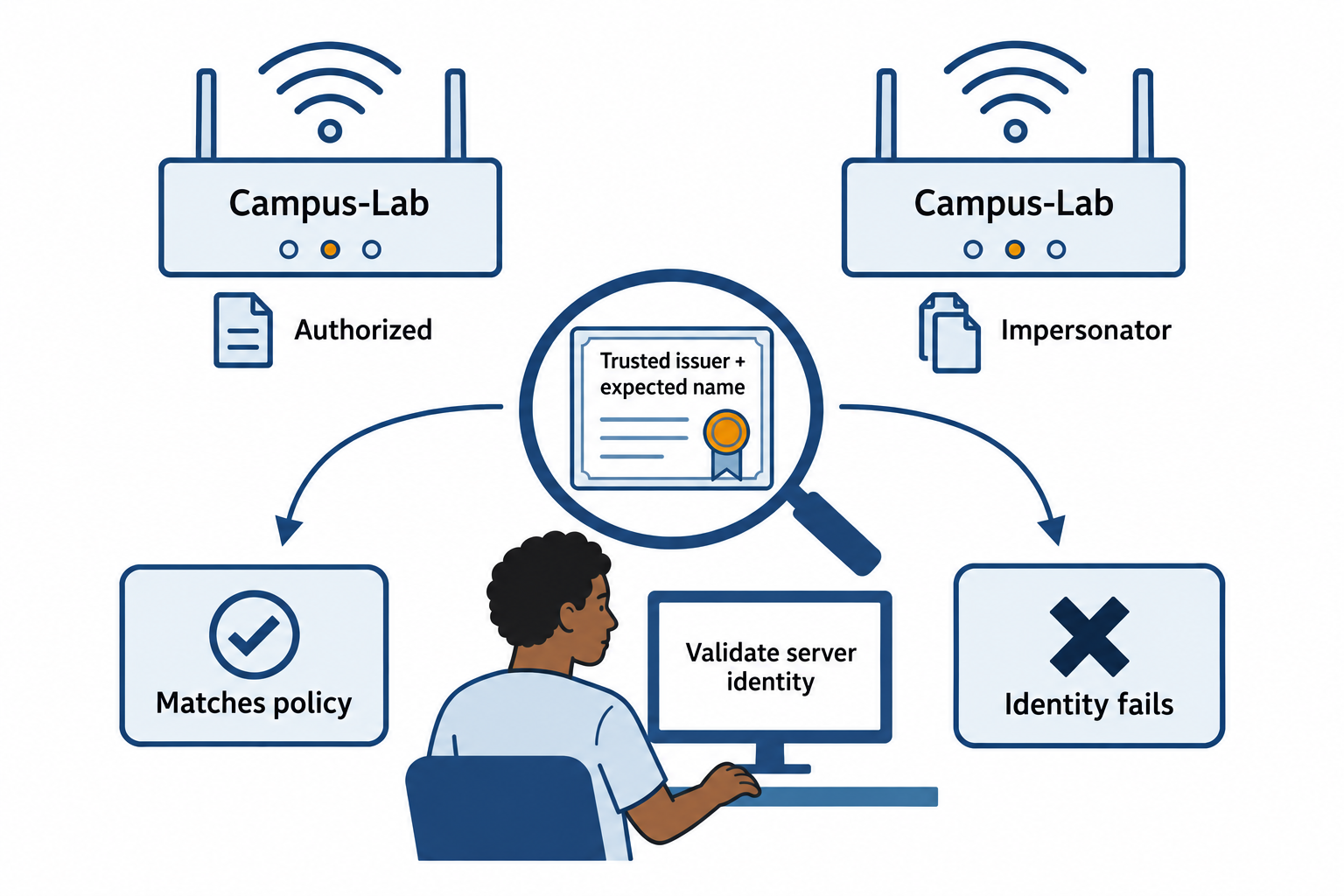
Figure 11.6: An evil twin can advertise the same network name. Correct certificate validation helps a managed enterprise client distinguish the expected authentication service.
Text description for Figure 11.6
A service set identifier (SSID) is the displayed network name. An attacker can copy it. In a managed certificate-based enterprise deployment, the client validates the expected authentication server name and trusted certificate authority. An unexpected certificate or identity fails that check. Matching names or strong signal alone do not establish trust.
EAP (Extensible Authentication Protocol) Types
EAP is an authentication framework used in 802.1X enterprise wireless networks. EAP supports multiple authentication methods, each with different security properties:
EAP-TLS (TLS = Transport Layer Security) is the most secure EAP method. Both the client and the RADIUS server authenticate using X.509 certificates. This requires each user device to have a certificate, which increases deployment complexity but prevents attacks where a rogue access point impersonates a legitimate RADIUS server. EAP-TLS is the standard for highly secure wireless networks.
EAP-TTLS (Tunneled TLS) uses a certificate on the server side but allows the client to use simpler authentication (username/password, another EAP method) inside the encrypted tunnel. EAP-TTLS is more deployable than EAP-TLS but less secure because the client does not verify the server's identity.
PEAP (Protected EAP) also creates an encrypted tunnel on the server side but is simpler to deploy than EAP-TTLS. PEAP is widely supported but less secure than EAP-TLS.
EAP-PWD (Password) uses a password instead of certificates for mutual authentication. EAP-PWD is convenient but susceptible to brute-force attacks.
Security-conscious organizations prioritize EAP-TLS for the highest security, though the certificate management overhead is significant.
11.4 Network Access Control (NAC)
Network Access Control (NAC) enforces compliance policies before or during network access. A NAC system can prevent non-compliant devices from accessing the network, or restrict them to a limited network segment.
802.1X Authentication
802.1X is a standard that controls access to a network port (physical or logical). Before authentication, the port is blocked; only after successful authentication is the port opened.
Port Access Entity (PAE) architecture involves three components:
Supplicant: The device requesting access (a laptop, smartphone, or IoT device)
Authenticator: The network switch or wireless access point that controls the port
Authentication server: A RADIUS server that verifies credentials and communicates policy to the authenticator
The flow is: Supplicant connects to the authenticator and requests access. The authenticator blocks the port and forwards the supplicant's credentials to the authentication server. The authentication server verifies credentials and responds with an Access-Accept (grant access) or Access-Reject (deny access). The authenticator then opens or closes the port based on the server's response.
Figure 11.7 assigns each participant a distinct role in 802.1X access.
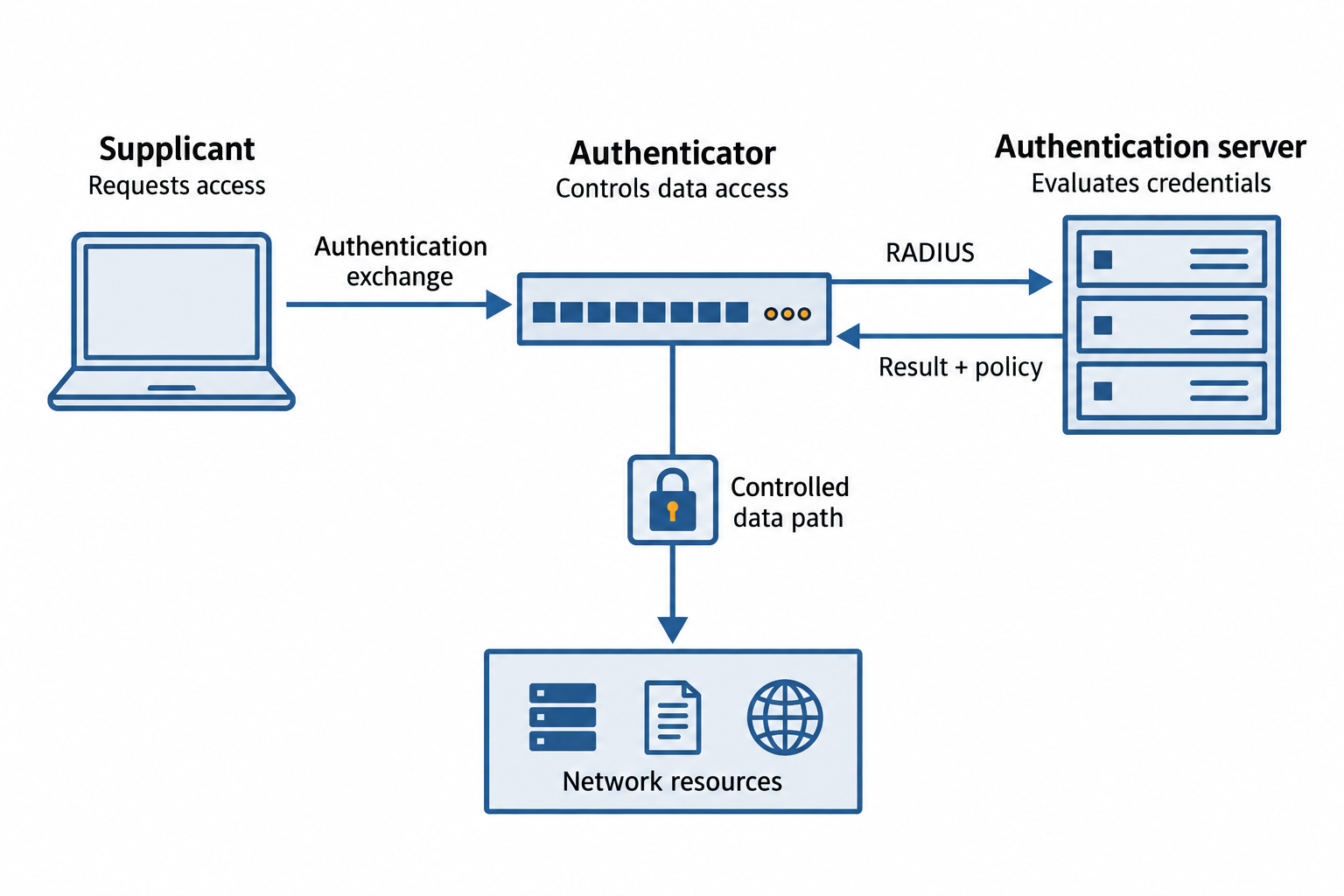
Figure 11.7: 802.1X separates the device requesting access, the switch or access point enforcing access, and the server evaluating authentication.
Text description for Figure 11.7
The supplicant requests access. The authenticator, usually a switch or access point, relays authentication exchanges to the authentication server, commonly using RADIUS (Remote Authentication Dial-In User Service). The server returns a result and policy. The authenticator enforces authorized data access. Authentication traffic can flow before ordinary data access is granted; device health checks require additional network access control functions.
802.1X can be applied to:
- Wired networks: Switches control access to physical ports, blocking non-authenticated devices
- Wireless networks: Access points control which devices can associate with the SSID
Agent-Based vs. Agentless NAC
Agent-based NAC requires software installed on each device. The agent verifies the device's compliance status (antivirus status, patch level, firewall configuration, encryption status) and reports to the NAC server. If the device is non-compliant, it is restricted to a quarantine network.
Agent-based NAC provides detailed device visibility but requires agent deployment on all devices (including BYOD, contractors' devices, and guest devices).
Agentless NAC does not require agent installation. Instead, the NAC server queries device information available without an agent, such as:
- Device MAC address and hostname
- DHCP client information
- Active directory group membership
- Results of network scanning tools
- Device behavior observed on the network
Agentless NAC is easier to deploy and works on devices where agent installation is not possible, but it provides less detailed visibility into the device's internal state.
NAC Deployment Scenarios
Pre-admission NAC blocks non-compliant devices entirely. A device must prove compliance before it is allowed on the network. Pre-admission is strict but can block legitimate devices that are slightly out of compliance.
Post-admission NAC allows devices on the network but restricts access to sensitive resources based on compliance status. A partially non-compliant device might be allowed on the network but isolated to a guest segment.
Figure 11.8 connects device evidence to an enforceable access decision.
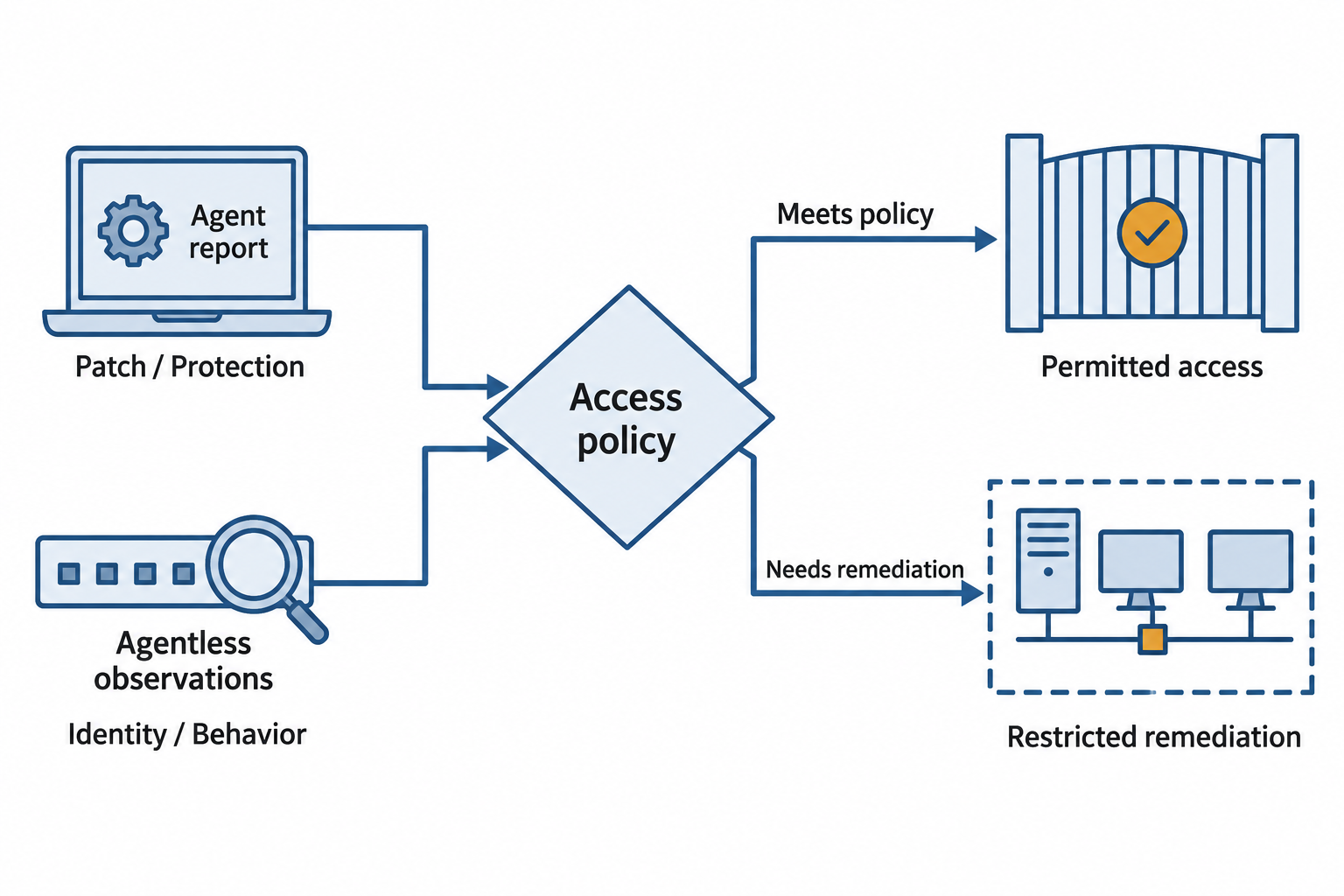
Figure 11.8: Network access control (NAC) combines identity, device evidence, and policy to determine available access.
Text description for Figure 11.8
An installed agent can report internal device state such as patch and protection status. Agentless observations infer information from network-visible behavior and device information. The policy decision considers identity and available evidence, then directs enforcement. A restricted remediation segment can provide approved repair services. Authentication success alone does not prove that a device meets health requirements.
11.5 DNS Security
Domain Name System (DNS) translates domain names (google.com) into IP addresses (8.8.8.8). DNS is fundamental to internet operation but is also a critical attack surface because it lacks built-in security.
DNS Attacks
DNS spoofing (or DNS cache poisoning) occurs when an attacker injects false DNS responses into the DNS system. A user asks for the IP address of their bank's website, but a spoofed response redirects them to an attacker's website. The user, seeing the correct domain name in their browser address bar, enters their credentials on the fake website.
DNS amplification attacks use DNS servers as unwitting participants in DDoS attacks. An attacker sends a DNS query to a public DNS server with a spoofed source address (the victim's IP). The server responds with a large DNS answer, amplifying the attacker's traffic and flooding the victim.
DNSSEC
DNSSEC (DNS Security Extensions) adds cryptographic signatures to DNS responses. Each DNS response is signed by the authoritative nameserver, and resolvers verify the signature before trusting the response. DNSSEC prevents DNS spoofing attacks but does not prevent denial-of-service attacks.
DNSSEC deployment requires:
- The authoritative nameserver for a domain signs all DNS records with the domain's private key
- The domain's parent zone publishes a DS (Delegation Signer) record that contains the public key
- Resolvers verify signatures by following the chain of trust up to the root zone
DNSSEC adoption is slower than ideal because it adds complexity and because insecurely configured DNSSEC can actually worsen security. However, DNSSEC is increasingly important for critical infrastructure and financial institutions.
Figure 11.9 locates the records used to validate a DNSSEC chain.
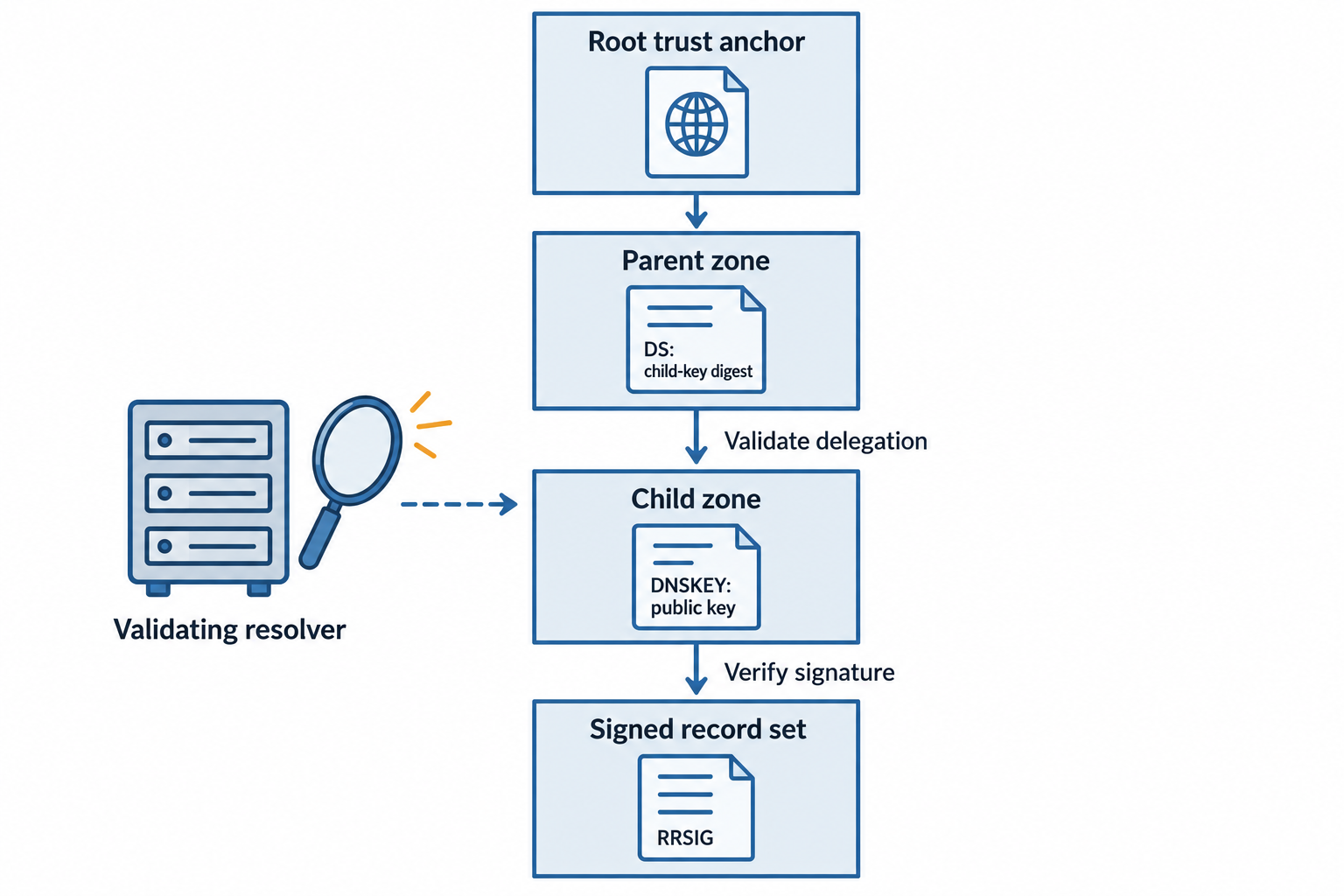
Figure 11.9: DNS Security Extensions (DNSSEC) use signed records and a chain of trust. A parent’s Delegation Signer (DS) record contains a digest of a child key, while the child publishes its public key in DNSKEY.
Text description for Figure 11.9
A validating resolver starts with a configured trust anchor and checks signed delegations. The parent’s DS record identifies and contains a digest of the child DNSKEY. The child’s DNSKEY supports verification of signatures over record sets. DNSSEC validates origin and integrity when a trusted chain exists; it does not encrypt DNS traffic or certify that a domain is benign. An RRSIG record carries the signature used to verify the associated record set.
DNS over HTTPS (DoH) and DNS over TLS (DoT)
DNS over HTTPS (DoH) and DNS over TLS (DoT) encrypt DNS queries and responses in transit, preventing eavesdropping and man-in-the-middle attacks. These protocols protect the privacy of DNS queries (hiding what websites a user visits from network operators).
DoH and DoT are increasingly deployed, particularly in browsers and mobile operating systems, but they also complicate enterprise security monitoring because organizations' monitoring tools cannot see which websites users are accessing.
DNS Filtering
DNS filtering (or DNS sinkholing) blocks access to malicious domains by filtering DNS queries. When a user attempts to access a known malicious domain, the DNS filter returns a null response (or a response pointing to a monitoring server) instead of the domain's legitimate IP address. DNS filtering is a simple, network-level defense against malware and phishing sites.
Figure 11.10 compares the properties supplied by three DNS controls.
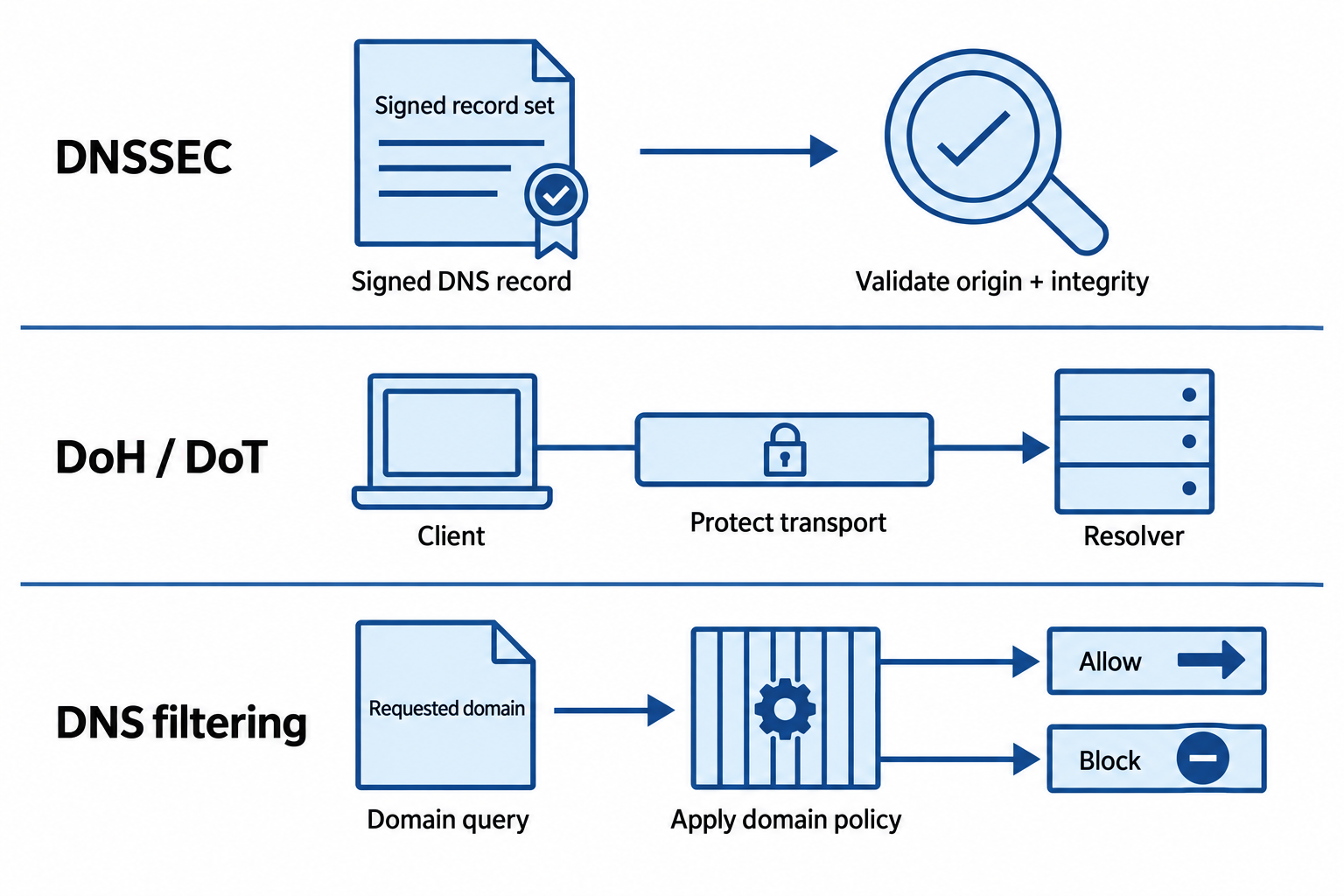
Figure 11.10: DNSSEC validates signed DNS data, encrypted DNS protects a transport connection, and DNS filtering applies a domain policy.
Open Figure 11.10 at full size
Text description for Figure 11.10
DNSSEC checks signed data and its trust chain. DNS over HTTPS (DoH) and DNS over TLS (DoT) protect the connection to the selected resolver, which still sees the query. DNS filtering applies organizational policy to requested domains. These controls can complement each other, and each has a distinct visibility and trust boundary.
11.6 Network Segmentation and Micro-segmentation
Network segmentation divides the network into separate security zones, and micro-segmentation extends this to fine-grained access controls between hosts.
Traditional Network Segmentation
Network segmentation using VLANs (Virtual Local Area Networks) and firewalls creates trust boundaries. Common segments include:
DMZ (Demilitarized Zone): A network segment that contains public-facing systems (web servers, DNS servers, email gateways). The DMZ is accessible from the internet but restricted from accessing internal systems.
Internal network: Corporate systems, file servers, and user workstations. The internal network is protected from the DMZ and the internet.
Guest network: A segment for visitors and contractors with limited access to corporate resources.
OT/ICS network: Operational technology and industrial control systems, isolated from corporate IT networks.
Segmentation is enforced using firewalls that control traffic between segments. A user in the guest network cannot access the internal network because the firewall blocks traffic between segments.
Figure 11.11 places enforcement between distinct network zones.
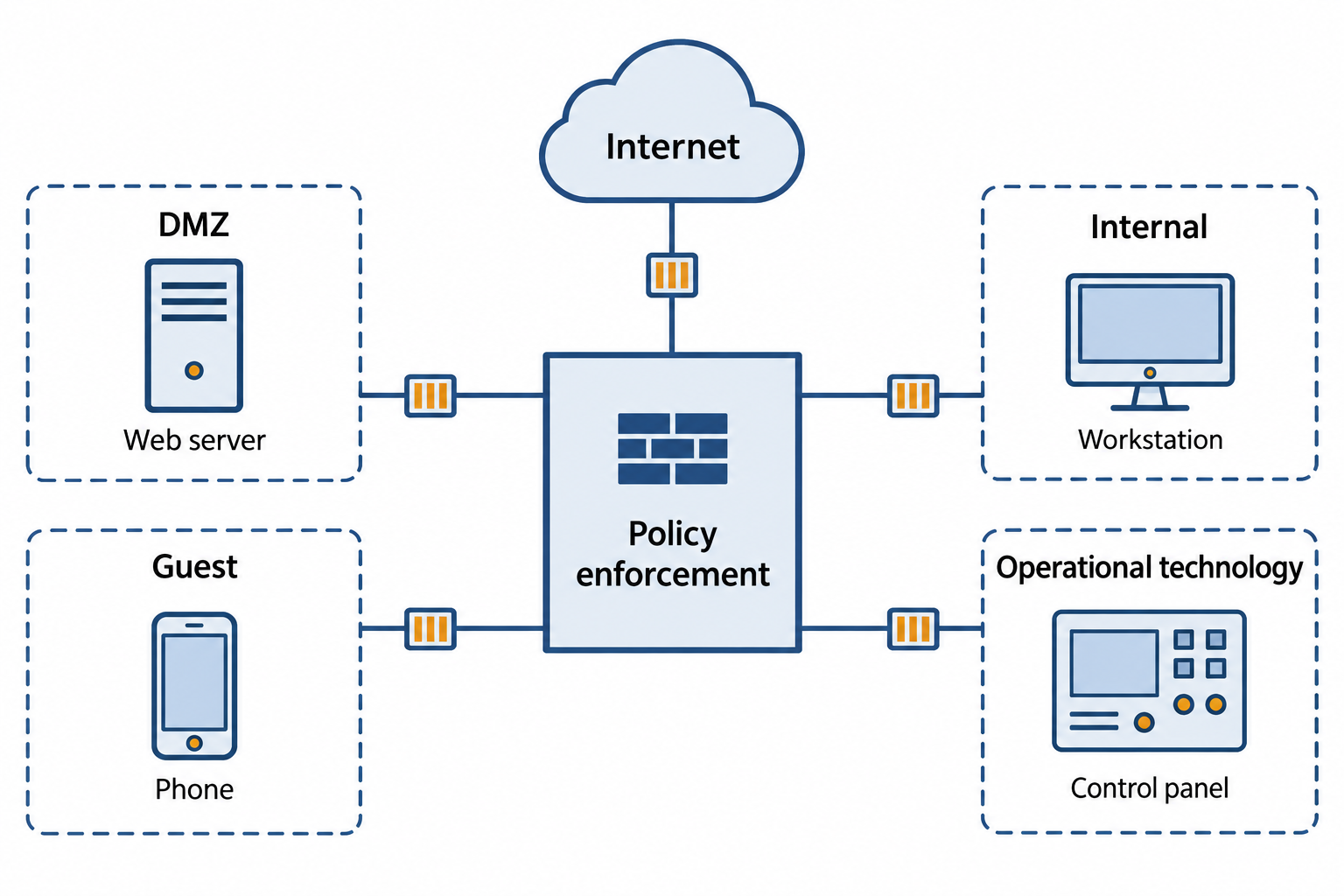
Figure 11.11: Separate network zones limit access when enforcement points control the traffic between them.
Open Figure 11.11 at full size
Text description for Figure 11.11
A demilitarized zone (DMZ) contains public-facing services. Internal systems, guest devices, and operational technology occupy separate segments. A virtual local area network (VLAN) separates network traffic, while firewall or equivalent policy enforcement governs routed communication. Each connection needs an explicit policy; membership in an internal zone alone does not establish trust.
Micro-segmentation
Micro-segmentation (also called application segmentation) extends the segmentation concept to individual hosts or even application-level granularity. Instead of allowing all devices in a segment to communicate freely, micro-segmentation enforces policies that specify exactly which hosts can communicate with which other hosts.
Micro-segmentation is implemented using:
- Host-based firewalls on each host (Windows Firewall, iptables)
- Software-defined networking (SDN) that dynamically applies network policies
- Zero Trust network access controllers that evaluate each connection request against explicit policies
Micro-segmentation reduces the blast radius of a breach. If one host is compromised, the attacker's lateral movement is restricted by policies that prevent that host from communicating with most other hosts.
Figure 11.12 shows policy boundaries between workloads within one segment.
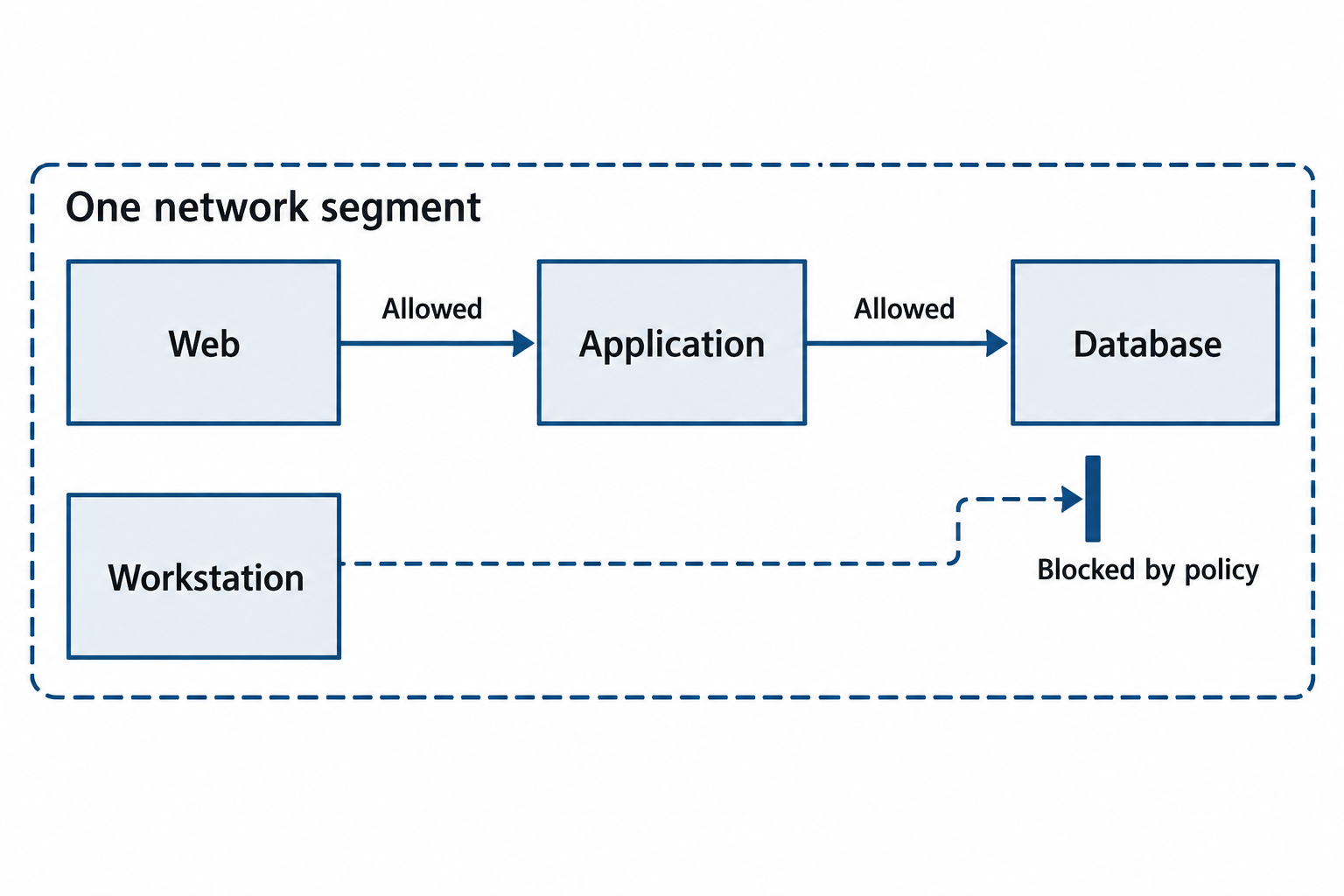
Figure 11.12: Micro-segmentation applies communication policy to individual workloads, including those within one broader network segment.
Open Figure 11.12 at full size
Text description for Figure 11.12
The example permits the web service to contact the application and permits the application to contact the database for its assigned purpose. A workstation lacks a direct authorized database path. Enforcement can reside on hosts or in network controls. Restricting routes limits opportunities for lateral movement but does not remove a compromise from an already affected workload.
11.7 Putting It Together: Securing a Multi-Site Organization
Atlas Resources is a consulting firm with headquarters in Boston and branch offices in Dallas, San Francisco, and London. The company handles confidential client data, and leadership is concerned about both data protection and insider threats. The IT security team is asked to design a network architecture that balances security, performance, and operational usability.
VPN Architecture: Atlas establishes site-to-site IPSec VPNs between headquarters and each branch office. All traffic between sites (file synchronization, email, database replication) traverses the encrypted VPN tunnels. For remote workers, Atlas deploys a TLS-based remote access VPN with full tunneling (no split tunneling) to prevent data exfiltration over public networks.
Wireless Security: All office networks deploy WPA3 Enterprise with 802.1X authentication. Users authenticate with their corporate credentials, and each receives a unique encryption key. The wireless intrusion detection system continuously monitors for rogue access points.
Access Control: The headquarters network is segmented using VLANs: a DMZ for email and web services, an internal segment for file servers and workstations, and a sensitive segment for financial data accessed only by finance staff. Firewalls between segments enforce policies. Wireless access points are 802.1X authenticators, allowing only compliant devices to join the network.
Compliance: Branch offices use the same security architecture. The San Francisco office must comply with California privacy law, so additional audit logging is enabled for all data access in that segment.
Putting it Together: Responding to a DNS Hijacking Attempt
Keisha, a network security analyst, notices unusual DNS traffic patterns. Multiple users are reporting that when they access their bank's website, they land on an unfamiliar login page. Investigation reveals that the organization's primary DNS server has been compromised, and responses for banking websites are being spoofed.
Keisha responds:
- Immediately isolates the compromised DNS server from the network
- Temporarily redirects DNS requests to a secondary, uncompromised DNS server
- Verifies that the secondary server is clean before routing traffic to it
- Implements DNSSEC for critical domains (banking, email, internal services) to cryptographically verify responses
- Deploys DNS filtering to block known malicious domains
- Works with IT operations to investigate how the primary DNS server was compromised (malware, credential theft, unpatched vulnerability)
Chapter Summary
- Insecure protocols (Telnet, FTP, HTTP, LDAP, SNMP v1/v2c) transmit data and credentials in plaintext and should not be used in production networks. Secure equivalents (SSH, SFTP, HTTPS, LDAPS, SNMPv3) provide encryption, authentication, and integrity protection.
- Virtual Private Networks (VPNs) create encrypted tunnels over untrusted networks. Site-to-site VPNs connect office networks; remote access VPNs allow individual users to connect securely. Split tunneling creates security risks by allowing unencrypted traffic while the VPN is active.
- Wireless security depends on encryption standards (WPA3 is superior to WPA2) and authentication methods. Enterprise mode with 802.1X and certificate-based EAP-TLS provides the strongest security. Rogue access points and evil twins are defeated by certificate verification and wireless intrusion detection.
- Network Access Control (NAC) uses 802.1X to enforce device compliance before or during network access. Agent-based NAC provides detailed device visibility; agentless NAC is easier to deploy but provides less visibility.
- DNS security prevents spoofing and eavesdropping through DNSSEC (cryptographic verification), DNS over HTTPS/TLS (encryption), and DNS filtering (blocking malicious domains).
- Network segmentation creates trust boundaries using VLANs and firewalls. Micro-segmentation extends fine-grained access control to individual hosts, reducing lateral movement in case of compromise.