CH14: Incident Response, Digital Forensics, and Business Continuity
Introduction
When security controls fail and a breach occurs, organizations must respond quickly and methodically. An incident is a security event that has confirmed impact or poses credible threat. Incidents range from minor (a single compromised account with no data access) to catastrophic (widespread ransomware infection disrupting business operations). This chapter covers the incident response process as defined by NIST standards, digital forensics fundamentals including evidence collection and chain of custody, and the business continuity measures that enable organizations to survive and recover from major incidents.
Learning Objectives
After completing this chapter, you will be able to:
- Explain the four-phase incident response model from NIST SP 800-61 Revision 2, including preparation, detection and analysis, containment, eradication, recovery, and post-incident activities.
- Define roles and communication plans for incident response teams, including escalation procedures and stakeholder notifications.
- Explain digital forensics fundamentals including evidence acquisition, chain of custody documentation, cryptographic integrity verification, and order of volatility.
- Apply the order of volatility to evidence collection decisions, prioritizing most-volatile data first.
- Evaluate resilience strategies including RPO/RTO metrics, backup strategies, site types, and failover mechanisms.
14.1 Incident Response Process: NIST SP 800-61
The National Institute of Standards and Technology (NIST) published the Computer Security Incident Handling Guide as Special Publication (SP) 800-61 Revision 2. Its four-phase incident response model provides the structure for the discussion below. NIST superseded that guide with Revision 3 in April 2025, integrating incident response with the NIST Cybersecurity Framework (CSF) 2.0.
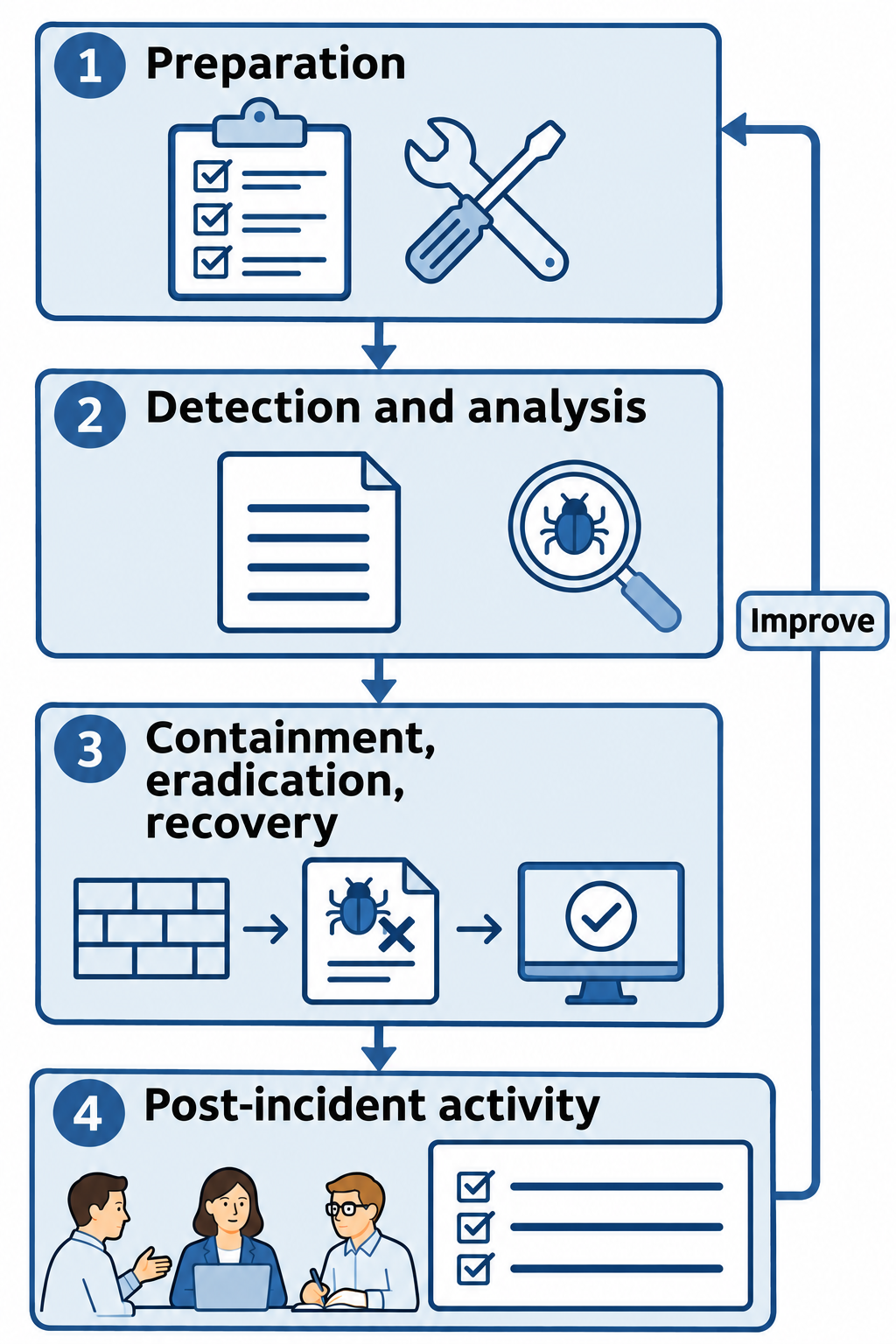
Figure 14.1: The chapter's four-phase incident response model comes from NIST SP 800-61 Revision 2, the historical guide superseded by Revision 3 in April 2025.
Text description for Figure 14.1
The National Institute of Standards and Technology (NIST) published this four-phase model in Special Publication (SP) 800-61 Revision 2. Teams can revisit earlier activities as evidence changes. Post-incident findings improve later preparation. Revision 3 now integrates incident response with the NIST Cybersecurity Framework 2.0; the figure identifies the historical model used in this chapter.
Phase 1: Preparation
Preparation is the foundation for effective incident response. Organizations that invest in preparation before incidents occur respond faster, more effectively, and with less business disruption. Organizations without preparation often discover they lack essential tools, trained personnel, or documented procedures during the crisis of an actual incident.
Preparation activities include:
Detection and monitoring capabilities: Deploy intrusion detection systems (IDS) that monitor network traffic for suspicious patterns, endpoint detection and response (EDR) agents that monitor individual systems for malware and suspicious behavior, and Security Information and Event Management (SIEM) tools that aggregate and correlate logs from thousands of sources. Organizations should establish baseline network and system behavior so that deviations trigger alerts.
Personnel training and awareness: Ensure all staff understand how to report suspicious activity (phishing emails, unfamiliar system behavior, unusual access requests) and their role in incident response. Non-technical staff are often the first line of detection. A user noticing a colleague's account sending unusual emails might prevent lateral movement.
Incident response team formation: Define who is responsible for each function. This includes detection (monitoring personnel), investigation (forensic investigators and security analysts), containment (network and systems engineers), eradication (systems administrators), recovery (IT operations), and communication (public relations, legal, executive leadership).
Policies and procedures: Document incident classification criteria (what constitutes an incident), escalation procedures (how to report incidents and to whom), and communication protocols (who notifies whom and when). Define roles such as "Incident Commander" (overall authority), "Technical Lead" (directs technical response), and "Communications Lead" (manages external communications).
Forensic readiness: Configure systems to preserve evidence. This includes enabling comprehensive logging on critical systems, setting appropriate log retention periods, configuring write-once backup media to ensure logs cannot be modified, and documenting the location and ownership of logs. Without forensic readiness, investigations lack evidence needed to determine root cause or prosecute attackers.
Tools and resources: Acquire and test incident response tools before they are needed. Tools include storage acquisition software such as FTK Imager, memory acquisition tools, memory analysis software such as Volatility, log analysis tools, malware analysis platforms, and communication systems that function even if primary systems fail. Volatility analyzes captured memory images. A separate acquisition tool captures memory from the running system.
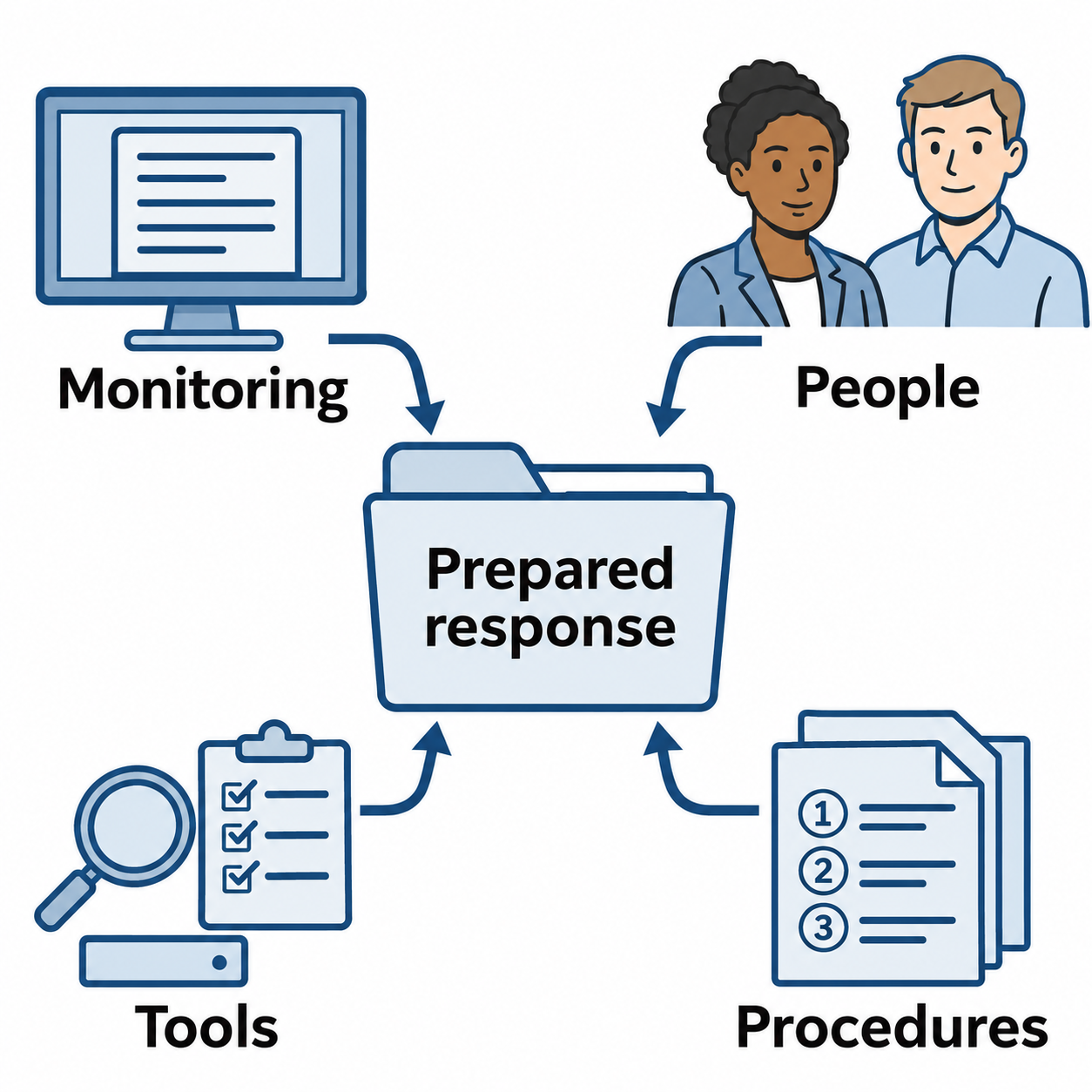
Figure 14.2: Preparation connects monitoring, trained people, tested tools, and documented procedures before an incident occurs.
Text description for Figure 14.2
Monitoring provides evidence and alerts. Trained people understand their roles. Tested tools support analysis, containment, and evidence collection. Written procedures define decisions and communications. These preparations work together, and exercises reveal gaps before an actual incident.
Phase 2: Detection and Analysis
Detection is the process of identifying that a security event has occurred. Detection can come from automated tools (IDS/EDR alerts), user reports (a user noticing unusual account activity), or external parties (law enforcement notifying an organization of suspicious activity).
Detection sources include:
- Intrusion detection systems: Network-based IDS inspect traffic and alert on known attack signatures or suspicious protocols.
- Endpoint agents: EDR and antivirus agents monitor individual systems for malware, suspicious process behavior, and unauthorized system changes.
- User reports: Users noticing unusual emails, login failures, or system behavior.
- Third-party notifications: Partner organizations, law enforcement, or security researchers reporting suspicious activity originating from your network.
- Log monitoring and correlation: SIEM tools alert when logs contain suspicious patterns (impossible travel, multiple failed logins, unusual database access).
Analysis determines what actually happened and whether it constitutes a security incident. A false positive occurs when an alert incorrectly identifies the condition it was designed to detect. An alert that correctly detects a penetration-testing tool during an authorized assessment may be a benign positive: the activity occurred, but the organization expected and authorized it. Analysts check the user, system, timing, and assessment scope before classifying the alert. The same tool running without authorization may indicate an incident. Microsoft's alert-classification guidance distinguishes these outcomes.
Analysis requires answering:
- What happened? What is the nature of the event? Malware infection? Unauthorized access? Data exfiltration?
- When did it happen? Determine the timeline of attack. When was the system first compromised? When was data accessed?
- Who or what was affected? Which systems, users, or data are involved?
- How did it happen? What is the attack vector (phishing, vulnerability exploitation, credential abuse)?
- Why does it matter? What is the business impact? How many customers are affected? What data is exposed?
The output of the analysis phase is a determination of whether an incident exists and, if so, its severity and scope.
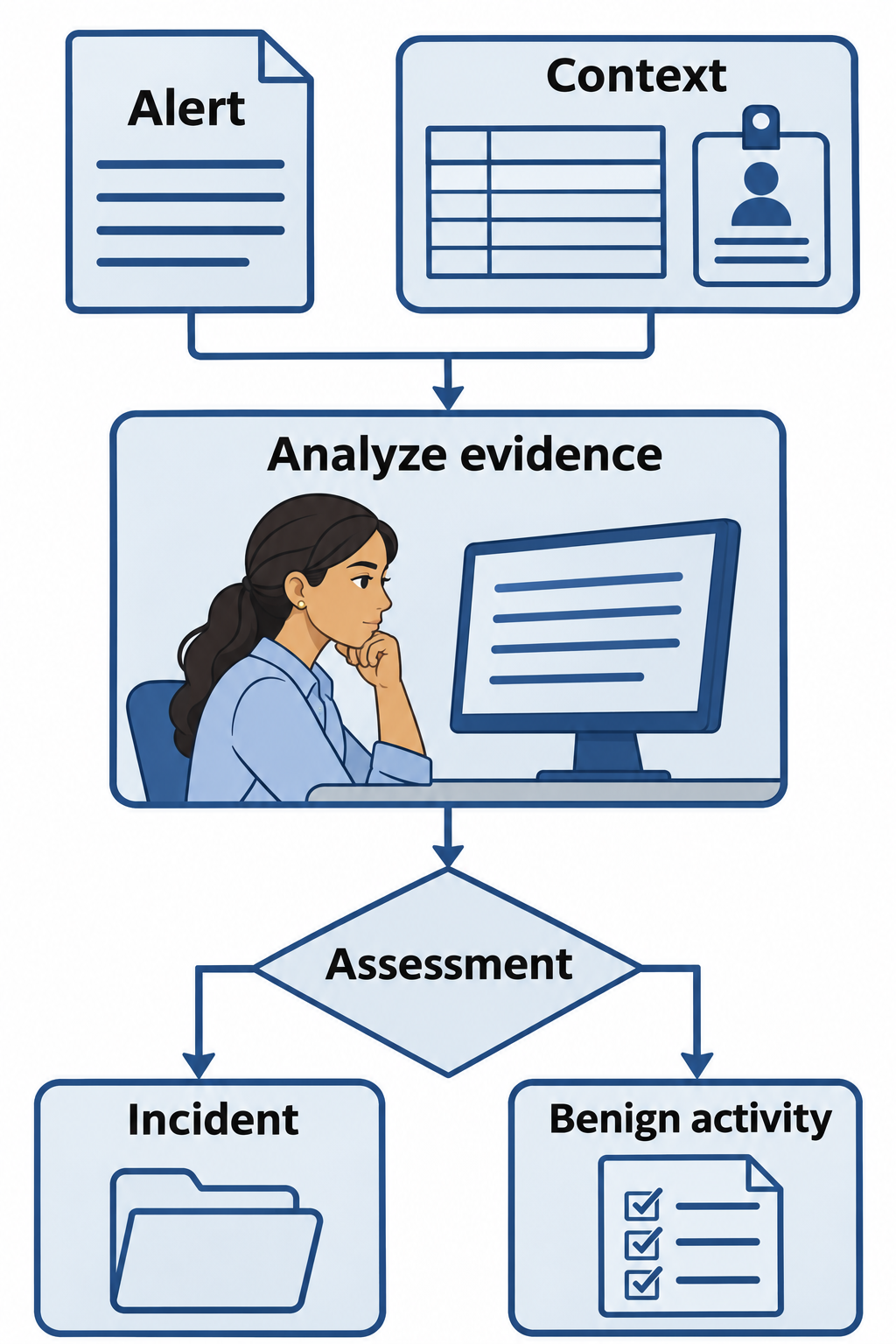
Figure 14.3: Detection provides a lead. Analysis checks the evidence, context, scope, and impact before classifying the event.
Text description for Figure 14.3
An alert can come from monitoring, a user report, or an external notification. An analyst examines related activity, timing, affected assets, authorization, and business impact. The resulting assessment can confirm an incident or explain benign activity. When evidence is incomplete, investigation continues and the assessment can change.
Phase 3: Containment, Eradication, and Recovery
Containment stops the attacker from causing further damage. Containment strategies vary by situation and phase of attack:
Short-term containment isolates the compromised system from the network immediately. An infected workstation is disconnected from the network, preventing lateral movement to other systems. This is the most aggressive containment and should be used for high-risk incidents but may not be appropriate for all situations (the isolation itself causes business disruption).
Long-term containment maintains restrictions while the team prepares a lasting recovery. Measures can include temporary network segmentation, restricted accounts, and alternate systems that support essential operations. Monitoring helps the team detect further attacker activity. Keeping a compromised system accessible solely to observe an attacker is a separate, high-risk decision that requires explicit authorization and controls against additional harm.
Eradication removes the attacker's presence from the environment completely. This includes:
- Malware removal: Preserve needed evidence, then use endpoint remediation tools or rebuild affected systems from trusted sources. Forensic tools support evidence collection and analysis.
- Vulnerability remediation: Close the vulnerability that enabled compromise (patching, configuration changes, access control modifications).
- Credential reset: Change passwords and revoke tokens for compromised credentials. Attackers often maintain persistence using stolen credentials, so comprehensive credential changes are essential.
- Backdoor removal: Remove any remote access mechanisms the attacker installed (webshells, scheduled tasks, rogue user accounts).
Eradication must be thorough. If even one copy of malware or one backdoor account remains, the attacker can easily regain access.
Recovery restores systems to normal operations. This includes:
- System restoration: Restore systems from clean backups created before the compromise. A system backup taken after compromise occurred may contain malware.
- Patching: Apply security patches to prevent re-compromise via the same vulnerability.
- Gradual restoration: Bring systems back online gradually, monitoring for signs of re-compromise or residual malware.
- Validation: Verify that restored systems function correctly and that no attacker access points remain.
Recovery timing depends on the nature of the incident. A single compromised account might recover in hours. A widespread ransomware infection might take weeks to fully recover.
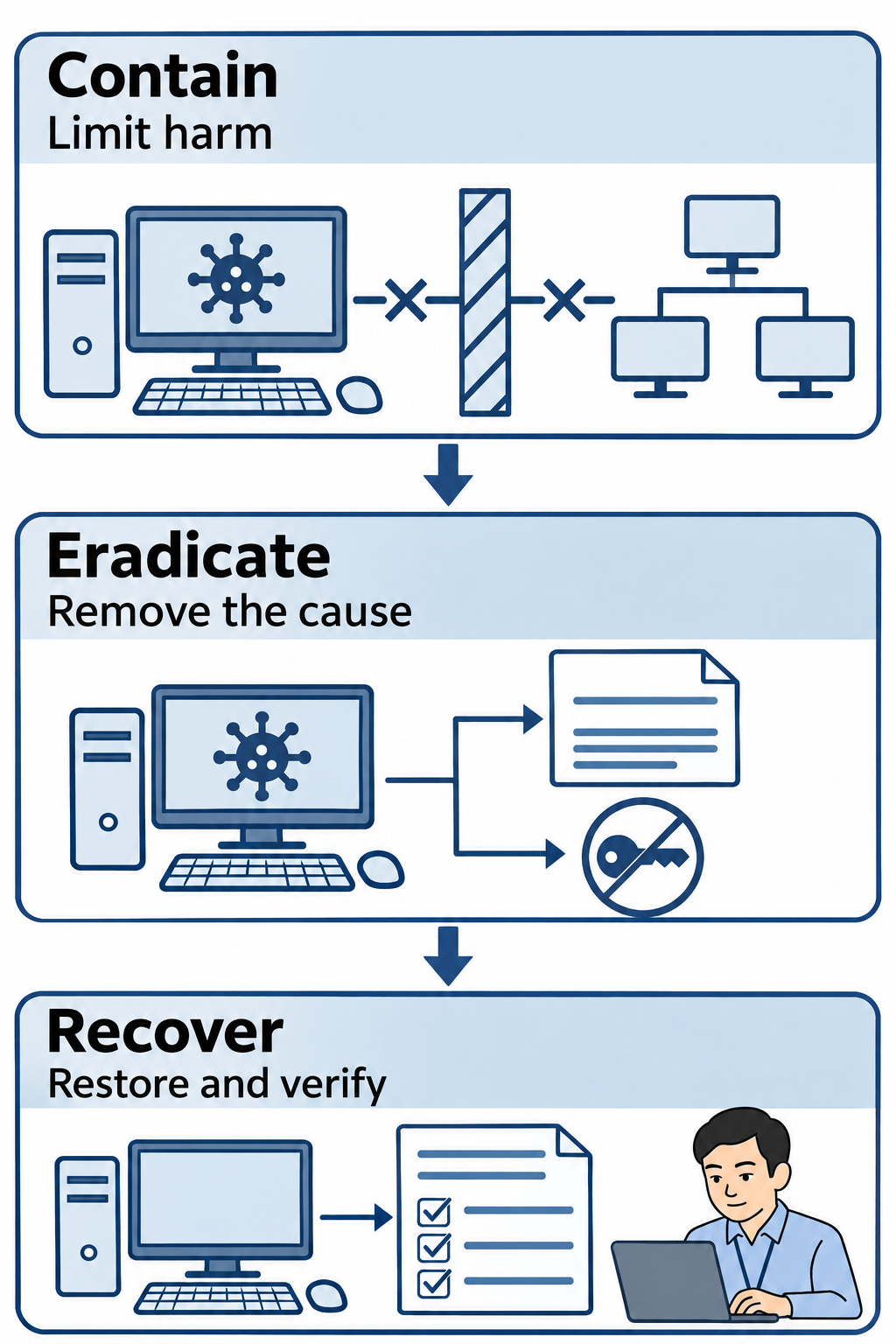
Figure 14.4: Containment limits harm, eradication addresses the compromise, and recovery restores validated service.
Text description for Figure 14.4
Containment restricts the attacker's ability to cause further harm. Eradication removes malicious access and addresses the enabling cause, which may require rebuilding systems and changing credentials. Recovery restores clean systems, checks functionality, and monitors for recurring activity. Teams may repeat these activities as they discover additional affected assets.
Phase 4: Post-Incident Activity
Post-incident activity occurs after an incident is contained and systems are restored. Activities include:
Root cause analysis: Determine the underlying cause of the incident. Was it a known vulnerability? Weak password policies? User error? Understanding root cause prevents recurrence.
Documentation and lessons learned: Document the incident timeline, impact, response actions, and lessons learned. What went well? What should be improved? This documentation becomes institutional knowledge.
Process improvement: Implement changes based on lessons learned. If the incident was caused by an unpatched vulnerability, improve patch management. If social engineering enabled initial access, improve security awareness training.
Report to stakeholders: Provide incident reports to leadership, the board of directors, customers affected by the incident, and regulatory bodies (if required). Reports should include incident summary, business impact, root cause, remediation actions, and recommendations for future prevention.
Evidence preservation for legal action: Continue preserving evidence collected throughout the response for potential legal proceedings. Collection and documentation begin as soon as appropriate during the incident. Work with law enforcement and legal counsel to ensure evidence is handled correctly.
CompTIA 7-Phase Approach
CompTIA Security+ Exam: Phase Names and Numbering
If you are preparing for CompTIA Security+, recognize the seven-phase presentation of this process. The SY0-701 exam objectives, section 4.8, list the following activities in the same order used above:
| NIST SP 800-61 Revision 2: Four Phases | Security+: Seven Phases |
|---|---|
| 1. Preparation | 1. Preparation |
| 2. Detection and Analysis | 2. Detection; 3. Analysis |
| 3. Containment, Eradication, and Recovery | 4. Containment; 5. Eradication; 6. Recovery |
| 4. Post-Incident Activity | 7. Lessons Learned |
The core activities and their sequence remain the same. The difference is how the activities are named, grouped, and numbered. Security+ separates detection from analysis, gives containment, eradication, and recovery their own phase numbers, and labels the final phase Lessons Learned, corresponding to Post-Incident Activity here.
If an exam or practice question refers to a phase number, check which presentation it uses. For example, phase 3 means Analysis in the seven-phase presentation, while NIST's four-phase model groups Containment, Eradication, and Recovery under phase 3. Learn both the names and the sequence so that different numbering does not cause confusion.
14.2 Incident Response Roles and Responsibilities
An effective incident response team includes distinct roles from multiple organizational functions. Roles should be defined before an incident occurs, with named individuals for each role.
Incident Commander: The overall authority for the incident response. The Incident Commander makes final decisions on containment actions, establishes communication protocols, and is accountable for the response. The Incident Commander is typically a senior security manager or the Chief Information Security Officer.
Technical Lead: Directs the technical investigation and response. The Technical Lead works with forensic investigators, systems engineers, and network engineers to determine what happened and execute containment/eradication actions.
Forensic Investigator: Collects, preserves, and analyzes digital evidence. The investigator documents chain of custody, creates forensic images, and conducts detailed analysis to determine root cause and scope of compromise.
Containment Engineer: Executes containment actions such as isolating systems from the network, disabling accounts, and blocking network traffic. The containment engineer works under direction of the Technical Lead and Incident Commander.
Eradication Specialist: Removes malware, patches vulnerabilities, and restores systems. May include system administrators, patch management specialists, and malware analysts.
Communications Lead: Manages internal and external communications. Internal communications keep leadership and staff informed. External communications notify customers affected by data loss, regulatory bodies, law enforcement, and the media. The Communications Lead works closely with legal counsel and public relations.
Legal Counsel: Advises on legal implications of the incident, regulatory notification requirements, evidence preservation for potential prosecution, and liability issues.
Executive Sponsor: C-level executive (CISO, CTO, or CEO) who ensures incident response receives necessary resources and stakeholder attention.
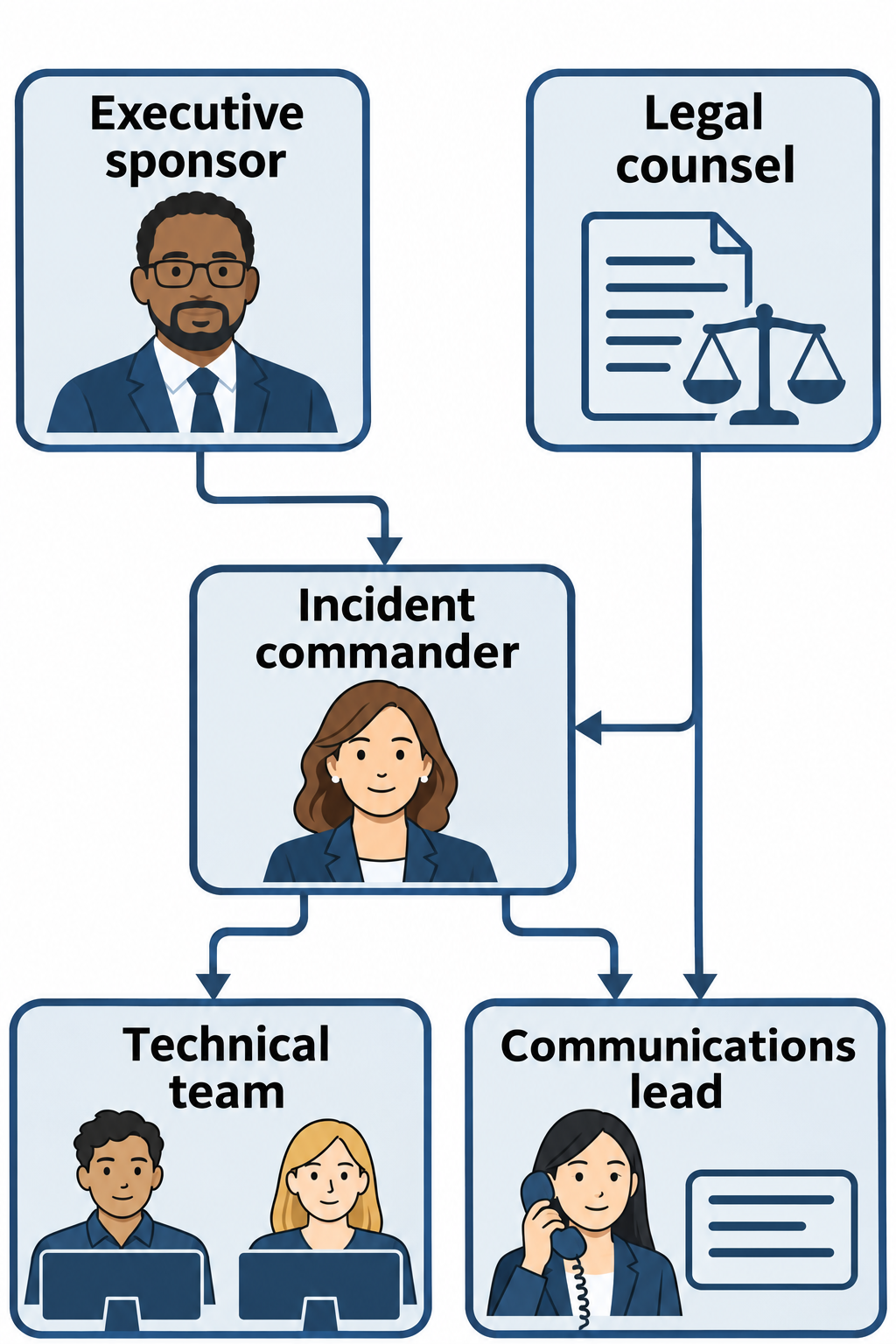
Figure 14.5: Response authority, technical work, communications, legal advice, and executive support serve distinct functions.
Text description for Figure 14.5
The incident commander directs the response and resolves decisions. The technical team includes investigation, containment, eradication, and recovery personnel. The communications lead coordinates messages with legal counsel. An executive sponsor provides resources and organizational support. The diagram groups technical roles to show responsibilities; each organization defines its actual reporting structure.
Communication Plans and Escalation
Incident response communication plans define:
Escalation criteria: What constitutes an incident requiring escalation? Is it any security event, or only confirmed compromises affecting critical systems or customer data?
Notification procedures: Who must be notified when an incident occurs? The security team must be notified immediately. Executive leadership should be notified for high-severity incidents. Customers and regulatory bodies must be notified if required by law.
Timing of notifications: Notification might occur immediately upon detection, or after initial analysis confirms the incident is real (avoiding false alarms that unnecessarily alarm leadership).
Information sharing protocols: What information is shared with whom? Technical details appropriate for the security team might not be appropriate for board of directors. Focus board communications on business impact and remediation timeline, not technical details.
External communications: Notifications to regulatory bodies, law enforcement, customers, and media follow legal requirements and organizational policy. Requirements depend on the law, affected data, and recipient:
- Under the General Data Protection Regulation (GDPR), a data controller generally must notify the relevant supervisory authority of a personal data breach without undue delay and, where feasible, within 72 hours of becoming aware of it. Notification is unnecessary when the breach is unlikely to create a risk to individuals' rights and freedoms. The European Data Protection Board explains that an initial notification can be supplemented as the investigation continues.
- Under the Health Insurance Portability and Accountability Act (HIPAA), a covered entity must notify affected individuals of a reportable breach of unsecured protected health information (PHI) without unreasonable delay and generally no later than 60 calendar days after discovery. The U.S. Department of Health and Human Services explains the separate requirements for individual, government, and media notices.
Legal counsel determines which requirements apply, including state laws and any permitted exceptions. An ongoing forensic investigation does not automatically extend notification deadlines.
Out-of-band communication: If primary communication systems fail (email, phones), incident response teams need alternative communication methods. This might include a conference bridge, satellite phone, or text messaging.
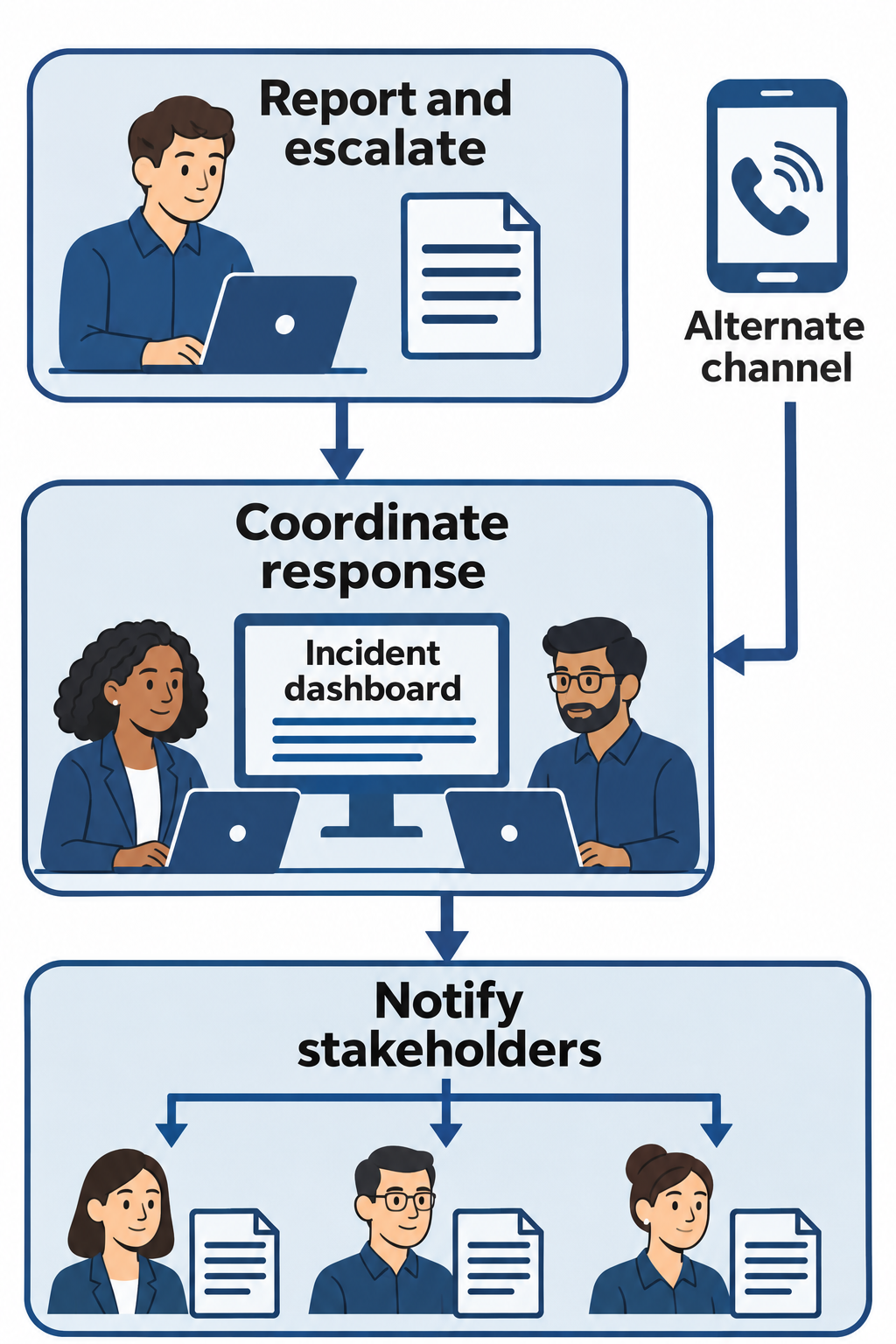
Figure 14.6: A communication plan defines escalation, coordination, stakeholder messages, and an alternate channel when primary systems fail.
Text description for Figure 14.6
Staff report suspicious activity through defined channels. The response team applies escalation criteria, coordinates the response, and sends audience-appropriate updates. Legal counsel helps determine applicable notification duties and timing. An out-of-band channel is an alternate communication path that remains usable when the primary channel is unavailable or untrusted.
14.3 Digital Forensics Fundamentals
Digital forensics is the process of collecting, analyzing, and presenting digital evidence. Digital forensics serves multiple purposes: post-incident root cause analysis to understand how compromise occurred, legal prosecution of attackers, regulatory investigations, and general understanding of breach scope.
Evidence Acquisition
Evidence acquisition captures data for examination while documenting its source and collection method. A physical forensic image copies the addressable storage sectors that the acquisition tool can read, including allocated and unallocated space. It may preserve deleted-file remnants that still exist. Overwritten data and data erased internally by a solid-state drive may be unavailable. A logical acquisition collects selected files or other accessible data instead of all addressable sectors. Tools such as FTK Imager support storage acquisition.
Hash verification checks acquired data against a recorded reference. A cryptographic hash is a fixed-length value calculated from data. Tools can calculate an acquisition hash as they read the source, then verify the acquired data using the same algorithm, such as SHA-256. Matching values provide strong evidence that the compared bytes match. The comparison must cover the same data: a compressed evidence container can have a different file hash from the storage data it contains. Document unreadable sectors and changes during live acquisition. The Scientific Working Group on Digital Evidence's acquisition guidance explains these verification procedures.
Forensic image capture must be done carefully to avoid contaminating evidence. The acquisition process should:
- Use a tested hardware or software write blocker when acquiring offline storage. For live acquisitions, minimize and document changes made by collection tools.
- Document the acquisition process and tool used
- Create multiple copies of the forensic image for preservation
- Store copies in secure locations with restricted access
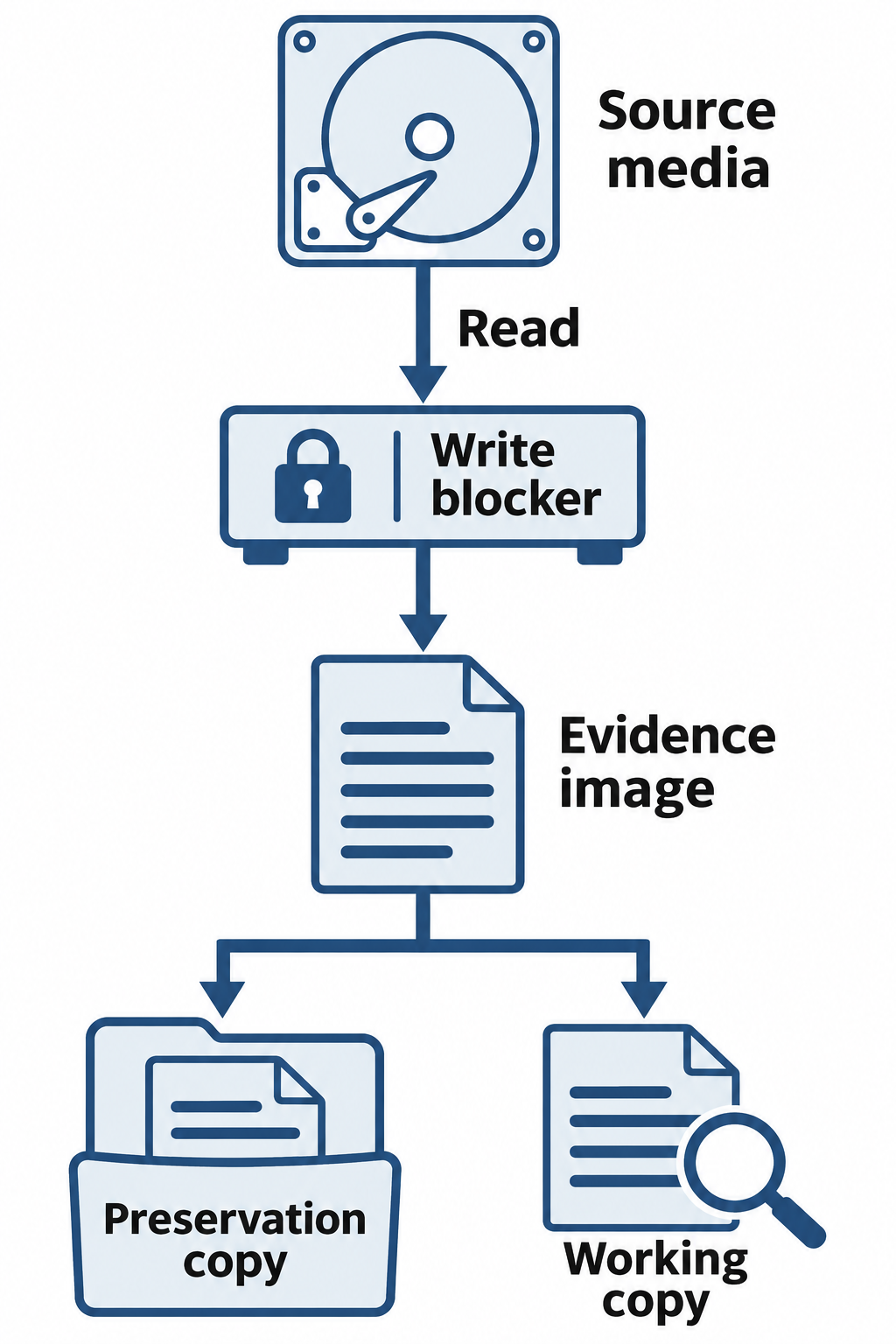
Figure 14.7: A write-blocked storage acquisition produces an evidence image while limiting writes to the source.
Text description for Figure 14.7
A write blocker is a device or control that prevents acquisition software from writing to supported source media. The examiner reads the source, records acquisition details, and verifies the acquired data. A protected preservation copy and a separate working copy support later analysis. This illustrates a storage-media acquisition; live systems, cloud services, unreadable sectors, and device behavior can require different procedures.
Chain of Custody
Chain of custody records the collection, possession, transfers, access, and storage of evidence. It helps establish the evidence's identity and handling history. Hash verification and access controls provide additional support for integrity. Gaps in the record require investigation and can weaken confidence in the evidence. Courts determine admissibility under the applicable rules and circumstances.
Chain of custody records include:
- Who collected the evidence: Name, title, and signature of the person collecting evidence
- When it was collected: Date and time of collection
- How it was stored and secured: Storage location, physical security measures, environmental controls
- Who accessed the evidence and when: Every person accessing the evidence is documented with name, time, purpose, and duration
- Collection and examination actions: Tools used, copies created, and any unavoidable changes, including changes caused by live collection. Examine verified working copies when feasible and preserve the original evidence.
Illustrative chain of custody record (each transfer should also identify the releasing and receiving parties and their acknowledgments):
Evidence ID: ACME-2024-0315-001
Item: Dell laptop, serial number ABC123XYZ
Collected: 2024-03-15 09:30 UTC by John Smith, Senior Forensic Investigator
Storage: Secured locker, Room 451, Locked cabinet A1
Access Log:
  03-15 09:30 - 10:00: John Smith - Initial collection and documentation
  03-15 14:00 - 15:30: Jane Doe - Forensic imaging (write-blocked)
  03-16 10:00 - 12:00: John Smith - Analysis of forensic image
  03-16 13:00 - 14:30: Legal counsel - Evidence review
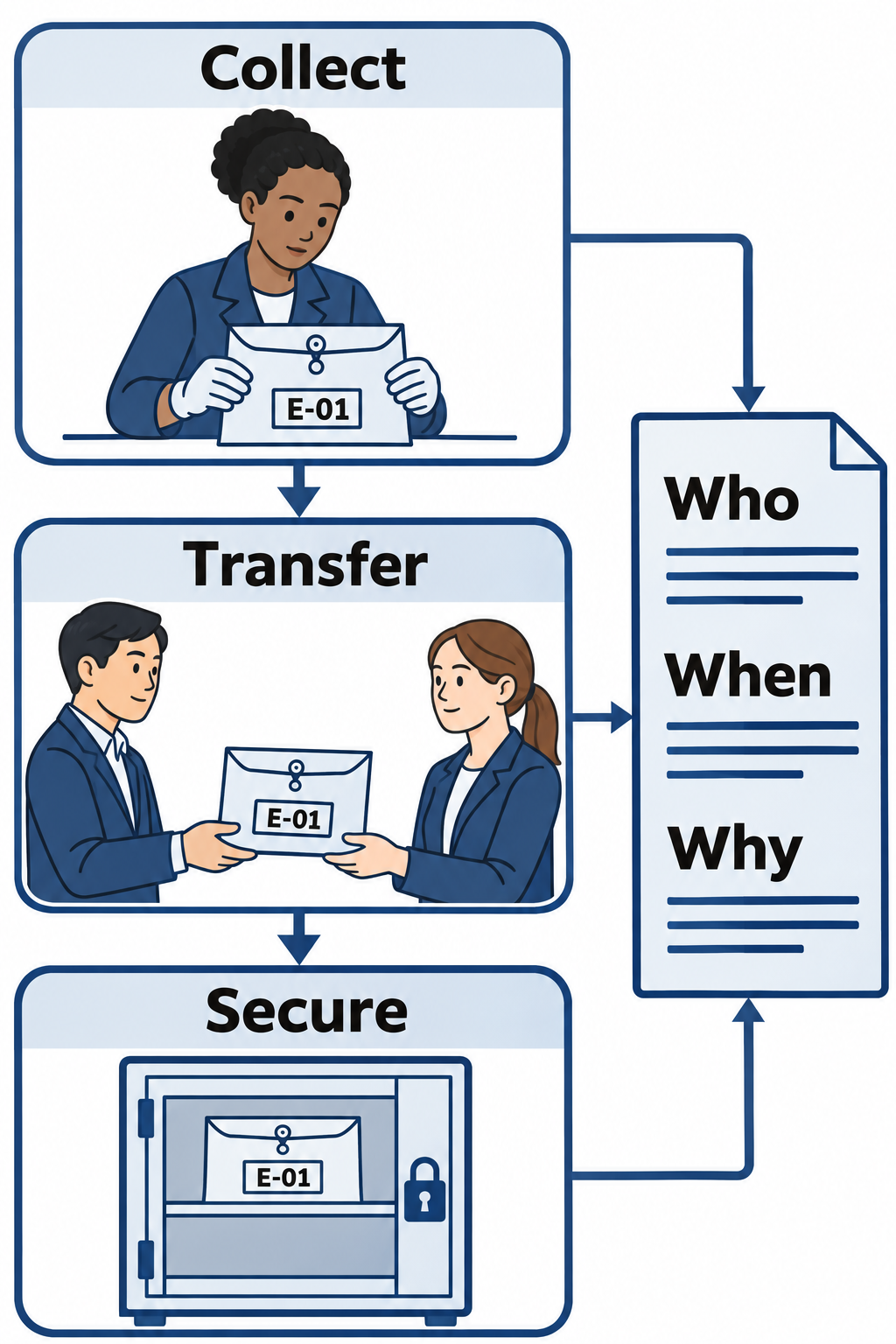
Figure 14.8: Chain of custody records evidence handling and transfers so an examiner can account for the item's history.
Text description for Figure 14.8
The collector assigns an evidence identifier and records the item, time, method, and initial custody. Each transfer or access records who handled the evidence, when, why, and how it was secured. Custody records support an account of the evidence's history. Integrity checks provide a separate check on data changes; neither a diagram nor a single record guarantees admissibility.
Integrity Verification
Forensic investigators use cryptographic hashing to check whether evidence content changed between verification points. Before analysis begins, investigators record the hash of the forensic image. The following output is illustrative and shortened for readability. Actual SHA-256 output contains 64 hexadecimal characters followed by the filename:
$ sha256sum /mnt/evidence/laptop-abc123.img
a1b2c3d4e5f6...  /mnt/evidence/laptop-abc123.img
After completing analysis, they calculate the hash again:
$ sha256sum /mnt/evidence/laptop-abc123.img
a1b2c3d4e5f6...  /mnt/evidence/laptop-abc123.img
Matching complete hashes provide strong evidence that the image content is unchanged between the two checks. They do not establish how the evidence was handled before the first hash or whether the acquisition captured everything relevant. A mismatch requires investigation: confirm the filename, algorithm, and data scope, then check for modification or damage. Document the result and consult legal counsel about any evidentiary consequences.
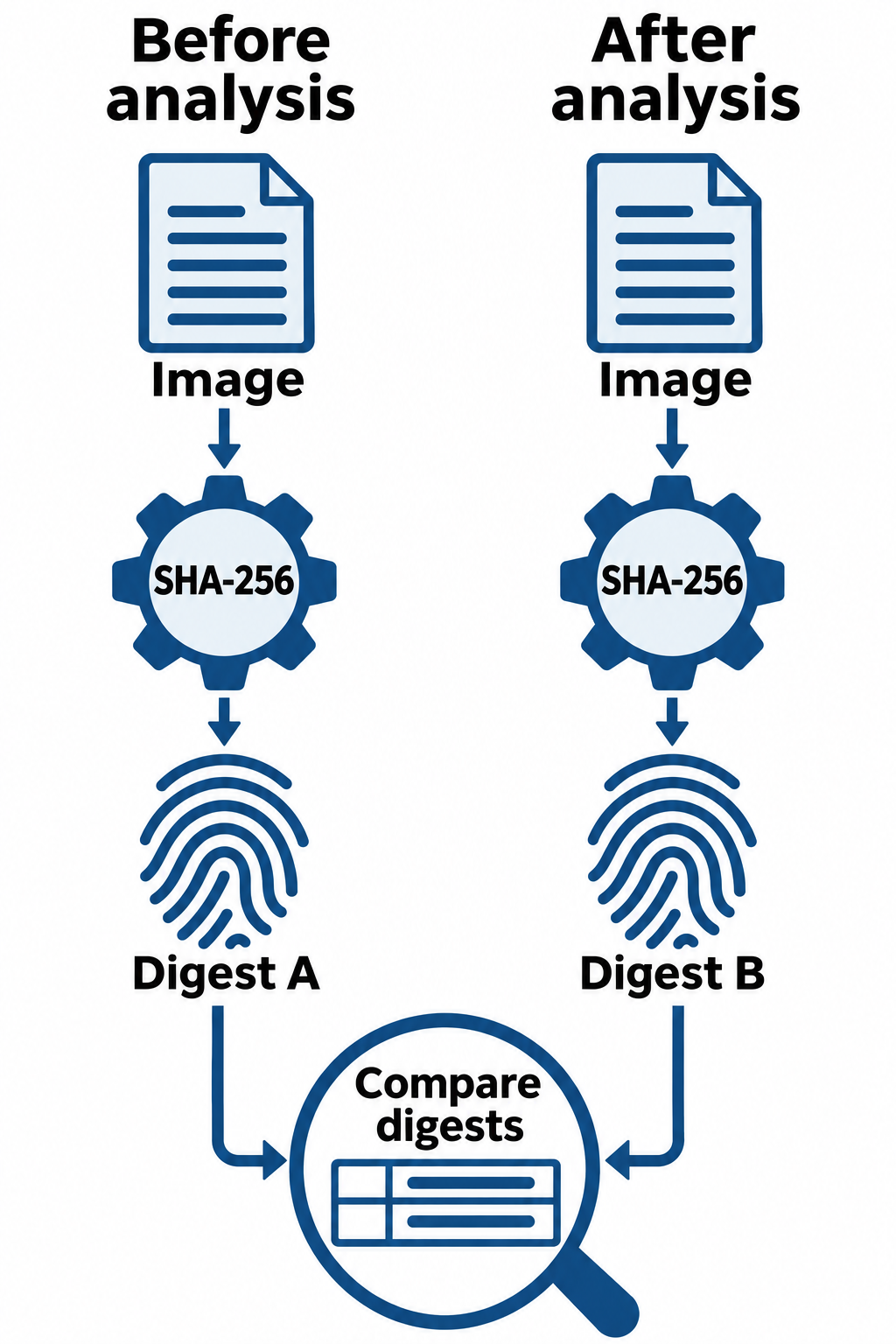
Figure 14.9: Comparing cryptographic hashes checks whether the same evidence-image content changed between two measurements.
Text description for Figure 14.9
A cryptographic hash function converts input bytes into a fixed-length digest. Secure Hash Algorithm 256-bit (SHA-256) is one example. The examiner hashes the same image content before and after analysis and compares the results. Matching digests support unchanged content within that scope. A mismatch requires investigation. Hashes alone do not establish the source's history or completeness.
Order of Volatility
Some data is more volatile (more easily lost or overwritten) than others. The order of volatility guides forensic investigators in the sequence of evidence collection. Volatile data should be collected before it is lost.
Typical order from most to least volatile:
-
Processor registers and caches: Change extremely quickly and disappear when power is lost. Acquiring them may be impractical during routine incident response.
-
Random-access memory (RAM) and live system state: RAM changes continuously and generally becomes unavailable after power loss. It can contain running processes, network information, decrypted data, and in-memory disk caches waiting to be written to storage.
-
Temporary file systems and files: Their persistence depends on where they are stored. Memory-backed temporary files disappear at shutdown, while disk-backed temporary files may survive but can be deleted or overwritten frequently.
-
Persistent storage, including disk-backed swap and page files: Operating systems can move memory pages to storage to manage RAM use. These files can survive shutdown, although configuration or later activity may clear or overwrite them. Other drive contents also remain subject to deletion, overwriting, and device behavior.
-
Offline backups and archived media: Often less exposed to ongoing changes, but retention limits, media failure, and access constraints still affect availability.
The order is a planning guide, as illustrated in RFC 3227. Adapt it to safety, ongoing damage, collection feasibility, and evidence likely to disappear, including remote logs with short retention periods. For example:
Illustrative live response plan:
1. Record system time, time zone, and collection actions.
2. Capture RAM promptly with a compatible memory acquisition tool.
3. Record running processes and network connections with trusted tools.
4. Preserve relevant logs and other data at risk of loss.
5. Select live or offline storage acquisition based on the system's condition.
6. Analyze the captured memory later with a tool such as Volatility.
The trade-off is that collecting volatile data (like RAM) requires leaving the system powered on and running forensic tools, which may alter the system state. Forensic investigators must balance volatility prioritization with evidence integrity.
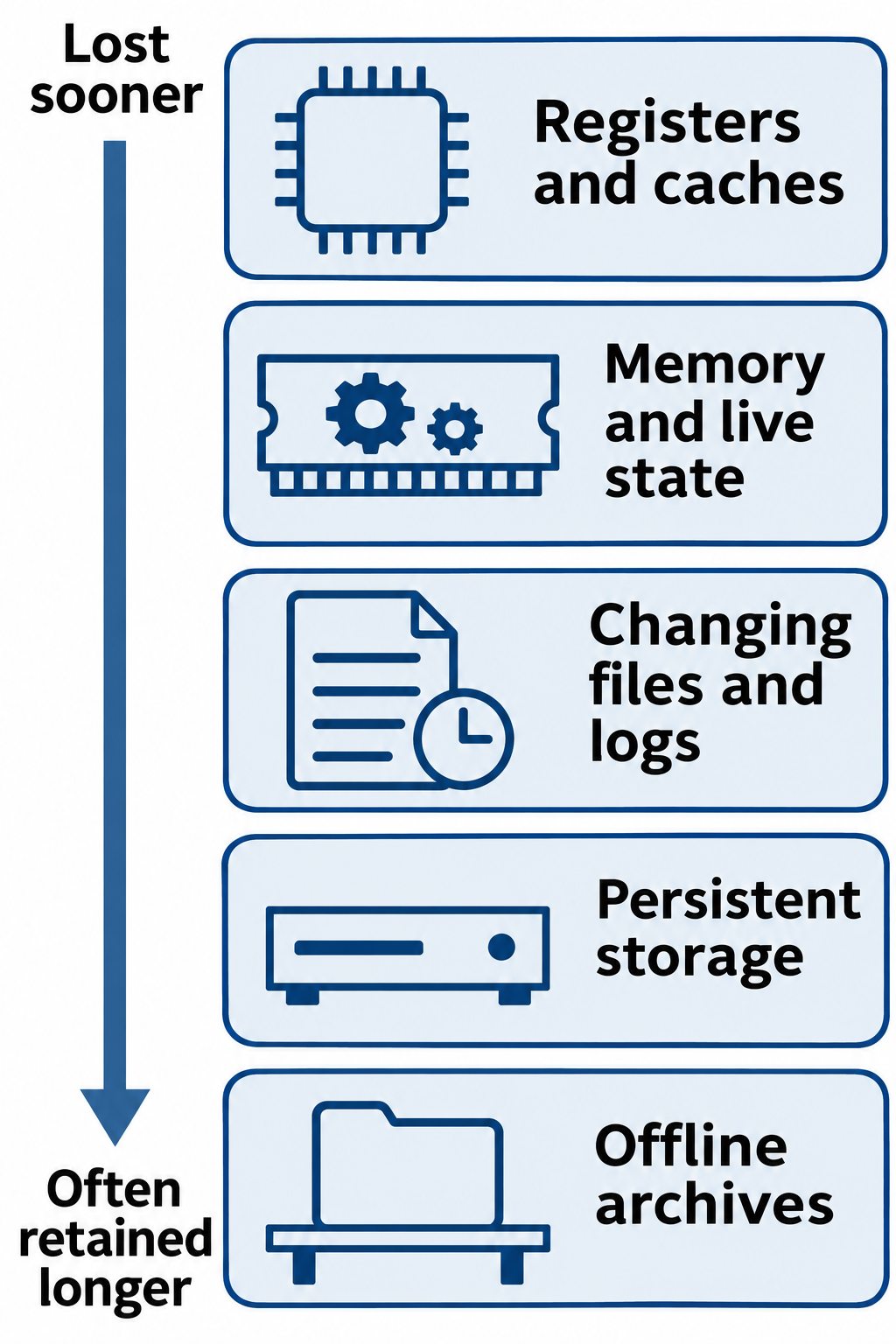
Figure 14.10: Collection priorities consider how quickly evidence can disappear, alongside safety, feasibility, and the incident's conditions.
Text description for Figure 14.10
Registers and processor caches can change extremely quickly. Random-access memory (RAM) and live process or connection state can also disappear when power is lost. Files, logs, and persistent storage have different overwrite and retention risks, while offline archives often change less frequently. This is a representative ordering, not a mandatory sequence. Acquisition feasibility, remote log expiration, encryption, active destruction, and operational safety can change priorities.
Live Response vs. Forensic Imaging
Live response collects evidence while the system is running. Investigators use memory acquisition tools and commands such as netstat, lsof, and ps to gather memory, process, and network information. They can also collect files, logs, and storage images from a running system. Live response has advantages:
- Captures volatile data (running processes, network connections, decrypted information)
- Allows investigation of actively running malware
- Can reduce downtime, although collection tools may affect performance or stability
But live response has limitations:
- A collection limited to memory and live status omits other storage evidence
- Running forensic tools may alter system state
- Data changes during collection, so the results may represent different moments
Storage imaging captures storage data for later examination and can occur on a live system or on storage taken offline. A physical image aims to capture all readable, addressable sectors. It has advantages:
- Can preserve allocated data, unallocated space, and remaining deleted-file fragments
- Detailed analysis possible without time pressure
- Offline acquisition with tested write blocking reduces changes to source storage
- Can be analyzed using many different tools
But storage imaging has limitations:
- A storage image alone does not capture current RAM or all live system state
- Offline acquisition can require downtime and lose access to unlocked encrypted data
- Live storage imaging must account for data changing during acquisition
- Large or damaged devices can take substantial time to acquire
Investigators often combine live response and storage imaging. Decide whether to shut down only after considering volatile evidence, encryption, operational impact, and ongoing damage. NIST SP 800-86 discusses these collection decisions and their limitations.
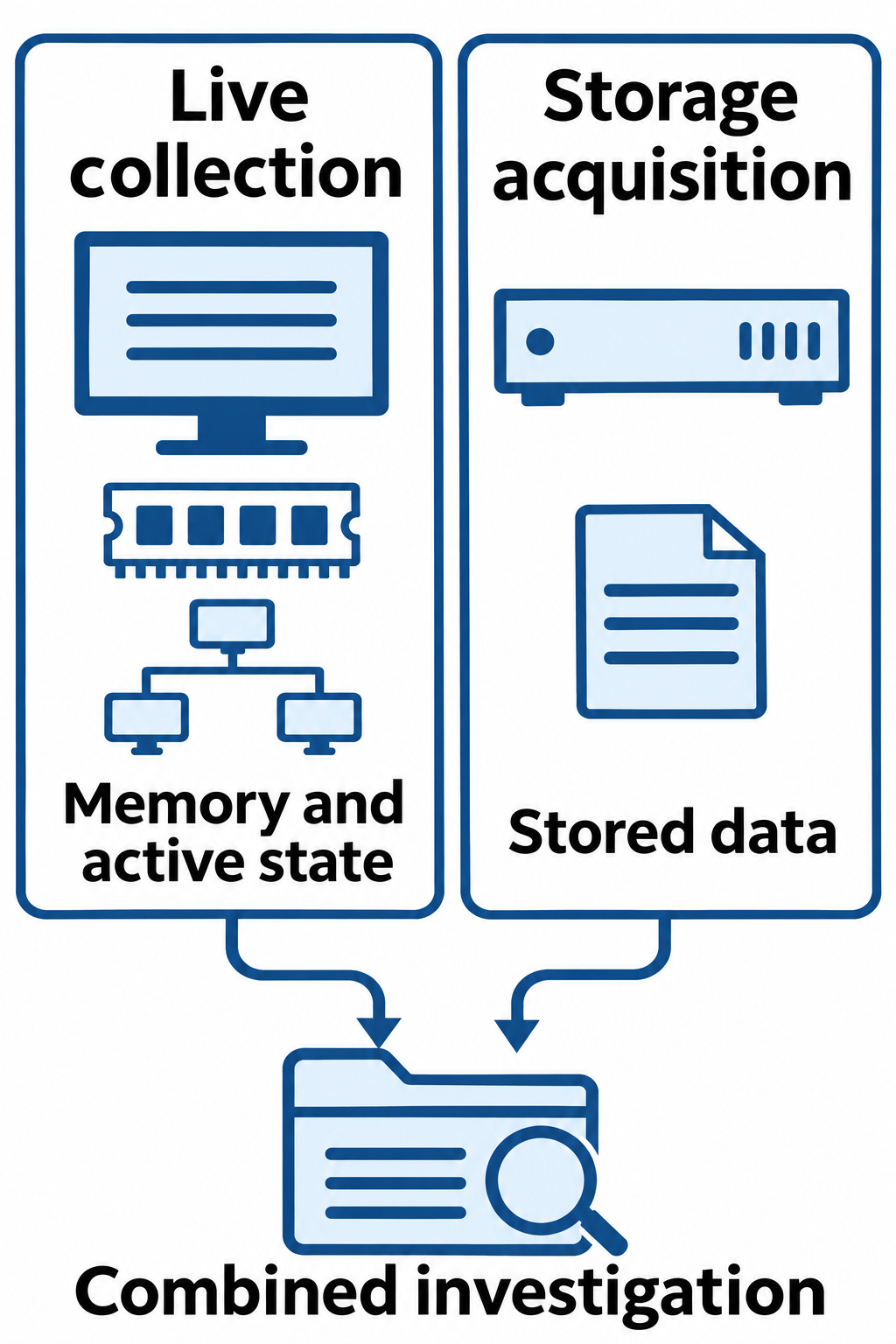
Figure 14.11: Live collection and storage acquisition provide complementary views of a system.
Text description for Figure 14.11
Live collection can capture memory, processes, connections, and other active state, while also changing the running system. Storage acquisition captures an identified scope of persistent data for examination. Storage can sometimes be acquired while a system is running, although changing data complicates consistency and verification. The examiner selects and documents suitable methods for the system and investigation.
14.4 Business Continuity and Disaster Recovery
Business continuity is the capacity to maintain critical business functions despite disruptions. A manufacturing plant might maintain operations using manual backup processes if computerized systems fail. A financial institution might transfer transactions to a backup data center if the primary data center becomes unavailable.
Disaster recovery is the process of restoring systems and data after a disaster. Disaster recovery focuses on IT systems specifically: which systems should be recovered first, in what order, and with what timing.
Key Metrics: RPO and RTO
Recovery Point Objective (RPO) is the maximum acceptable data loss, measured in time. If RPO is 1 hour, the organization can accept losing up to 1 hour of data. If a database fails at 3:00 PM and the organization restores from a backup created at 2:00 PM, the organization has lost 1 hour of transactions (2:00-3:00 PM). If RPO is 1 hour, this is acceptable. If RPO is 15 minutes, this restoration would violate the RPO.
Recovery Time Objective (RTO) is the target time limit for restoring an interrupted service to its required operating level. If an outage begins at 1:00 PM and the RTO is 2 hours, the recovery deadline is 3:00 PM. Restoring service at 2:30 PM takes 90 minutes and meets the RTO. Restoring it at 3:30 PM takes 2.5 hours and misses the RTO by 30 minutes.
RPO and RTO drive business continuity planning. A system with 4-hour RTO and 2-hour RPO requires:
- Usable recovery points no more than 2 hours old at the time of disruption, supported by frequent backups or other recovery mechanisms
- Faster recovery procedures (procedures tested and optimized to recover within 4 hours)
- Possibly redundant systems or cloud-based recovery to achieve recovery speed
A system with 24-hour RTO and 24-hour RPO may use:
- Daily backups that complete successfully and provide a usable recovery point within the 24-hour RPO
- Less optimized recovery (can take up to 24 hours to recover)
- May use less-expensive recovery methods
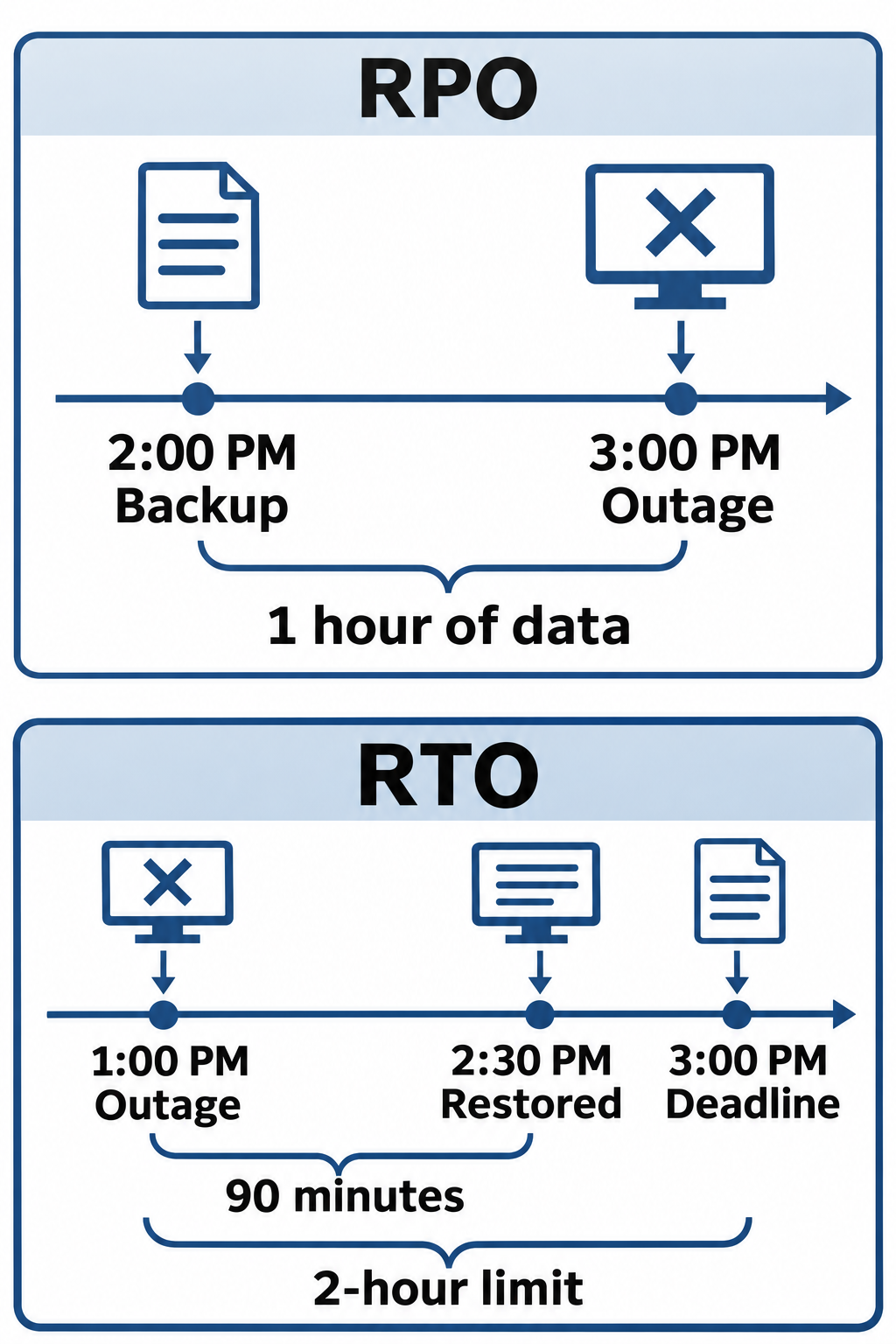
Figure 14.12: Recovery Point Objective (RPO) limits acceptable data loss in time. Recovery Time Objective (RTO) limits acceptable service-restoration time.
Text description for Figure 14.12
In the first example, a 2:00 PM recovery point precedes a 3:00 PM outage by one hour. In the separate recovery-time example, an outage at 1:00 PM and restoration at 2:30 PM produce 90 minutes of downtime. That meets a two-hour RTO, whose deadline is 3:00 PM. Recovery objectives are targets; the actual usable recovery point and verified service restoration determine whether they were met. Timeline spacing is schematic.
Backup Strategies
Full backup creates a complete copy of all data. A full backup might contain 500 GB of data. Advantages:
- Restoration is fast (only need to restore one backup file)
- Simple procedure (single backup contains all data)
Disadvantages:
- Slow to perform (takes hours for large datasets)
- Requires large storage capacity
Incremental backup copies only data that changed since the last backup. After a full backup on Monday, incremental backups on Tuesday through Friday contain only changes made that day. Advantages:
- Fast to perform (only changed data is copied)
- Requires minimal storage (only changes are backed up)
- Multiple incremental backups can be maintained efficiently
Disadvantages:
- Restoration is complex (must restore the full backup, then replay each incremental backup in sequence)
- Loss of any incremental backup breaks the restoration chain
Differential backup copies data that changed since the last full backup. After a full backup on Monday, differential backups on Tuesday through Friday each contain all changes made since Monday. Advantages:
- Faster to perform than full backup (only changes since last full)
- Restoration is simpler than incremental (restore full, then restore one differential)
Disadvantages:
- Slower than incremental (more data to backup as the week progresses)
- Requires more storage than incremental
Choice of backup strategy depends on RPO/RTO requirements and storage capacity. A system with RPO of 1 hour might use hourly incremental backups. A system with 24-hour RPO might use daily full backups.
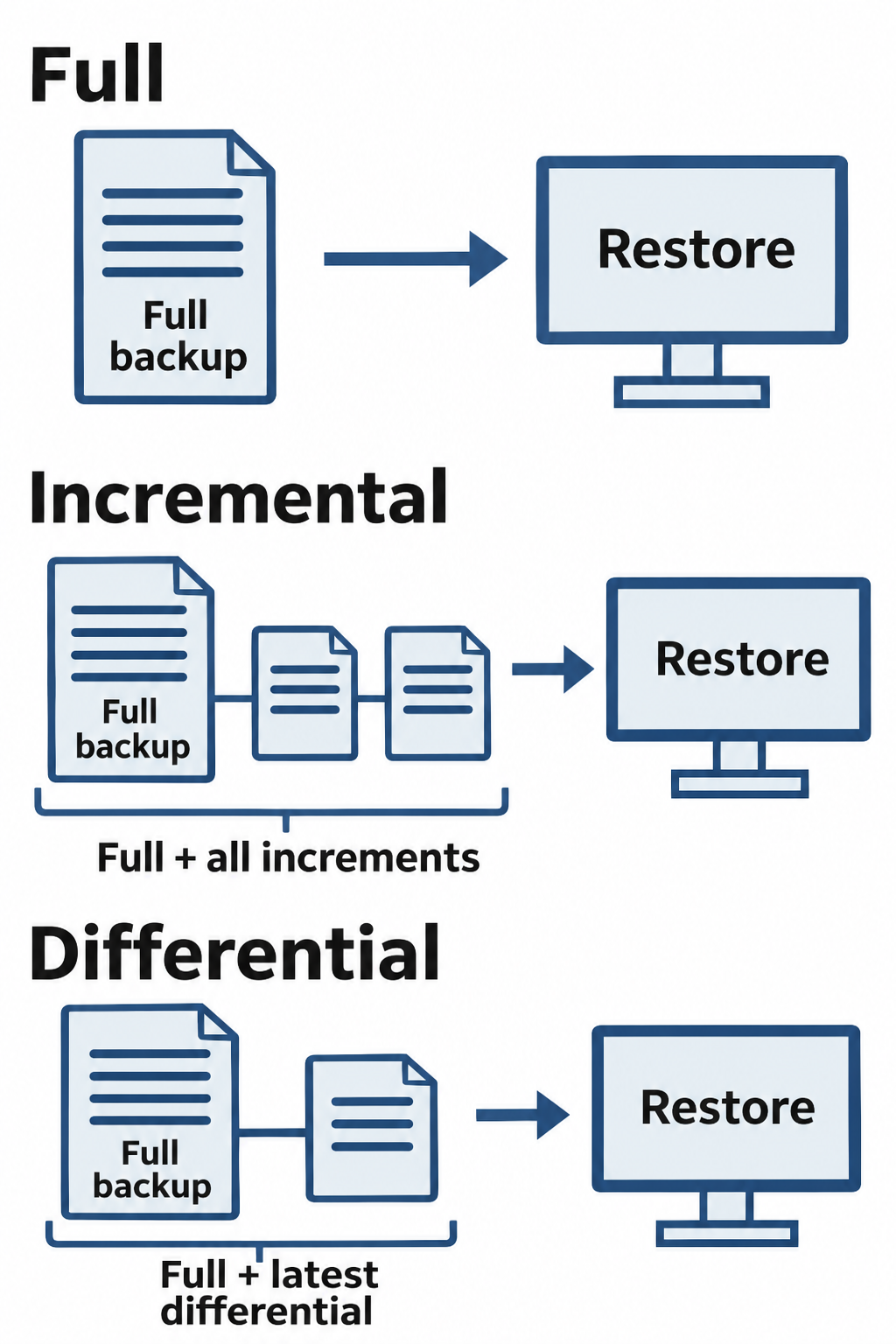
Figure 14.13: Full, incremental, and differential backup strategies require different sets of backup data for restoration.
Text description for Figure 14.13
A full backup captures the selected dataset. In a conventional incremental chain, each incremental captures changes since the previous backup, so restoration needs the full backup and each required incremental in order. A differential captures changes since the last full backup, so restoration needs that full backup and the selected differential. Backup products can implement synthetic or other variants; this figure shows the chapter's conventional model.
Site Types and Recovery Capabilities
Organizations often maintain backup sites to enable rapid recovery after a disaster at the primary site.
Hot site: An equipped and configured alternate data center prepared to take over quickly. Data synchronization and service validation still affect readiness. A hot site typically has:
- Compatible systems and enough capacity to support required services
- Current data (synchronized in real-time or near real-time)
- Trained personnel ready to manage the site
- Network connectivity configured and tested
Advantages:
- Usually the shortest recovery time of the three site types
- Minimal data loss if real-time replication is used
Disadvantages:
- Most expensive (maintaining a duplicate data center is costly)
- Ongoing operational costs
Warm site: A partially equipped alternate data center that requires additional configuration and data restoration before use. A warm site may have:
- Systems and infrastructure similar (but not identical) to primary
- Access to backups or replicated data that must be loaded or brought current
- Basic network connectivity
- Staff available but not full-time dedicated
Advantages:
- Moderate cost (less than hot site)
- Faster activation than a cold site, with actual timing established through testing
Disadvantages:
- Requires activation and configuration during disaster
- May have data loss
Cold site: Empty backup facility with no operational systems or data, ready to be provisioned for recovery. A cold site has:
- Physical facility (building, power, HVAC)
- Network connectivity available
- No servers, storage, or software pre-configured
Advantages:
- Lowest cost (only facility costs, no equipment or operational costs)
- Minimal ongoing operational burden
Disadvantages:
- Usually the longest recovery time, potentially days or weeks for complex systems
- Data recovery depends on available backups and their recovery points
- Requires arrangements to obtain equipment, install systems, and restore data
Site type describes readiness. It does not guarantee a particular RPO or RTO. NIST SP 800-34 Revision 1 explains the different preparation and restoration needs.
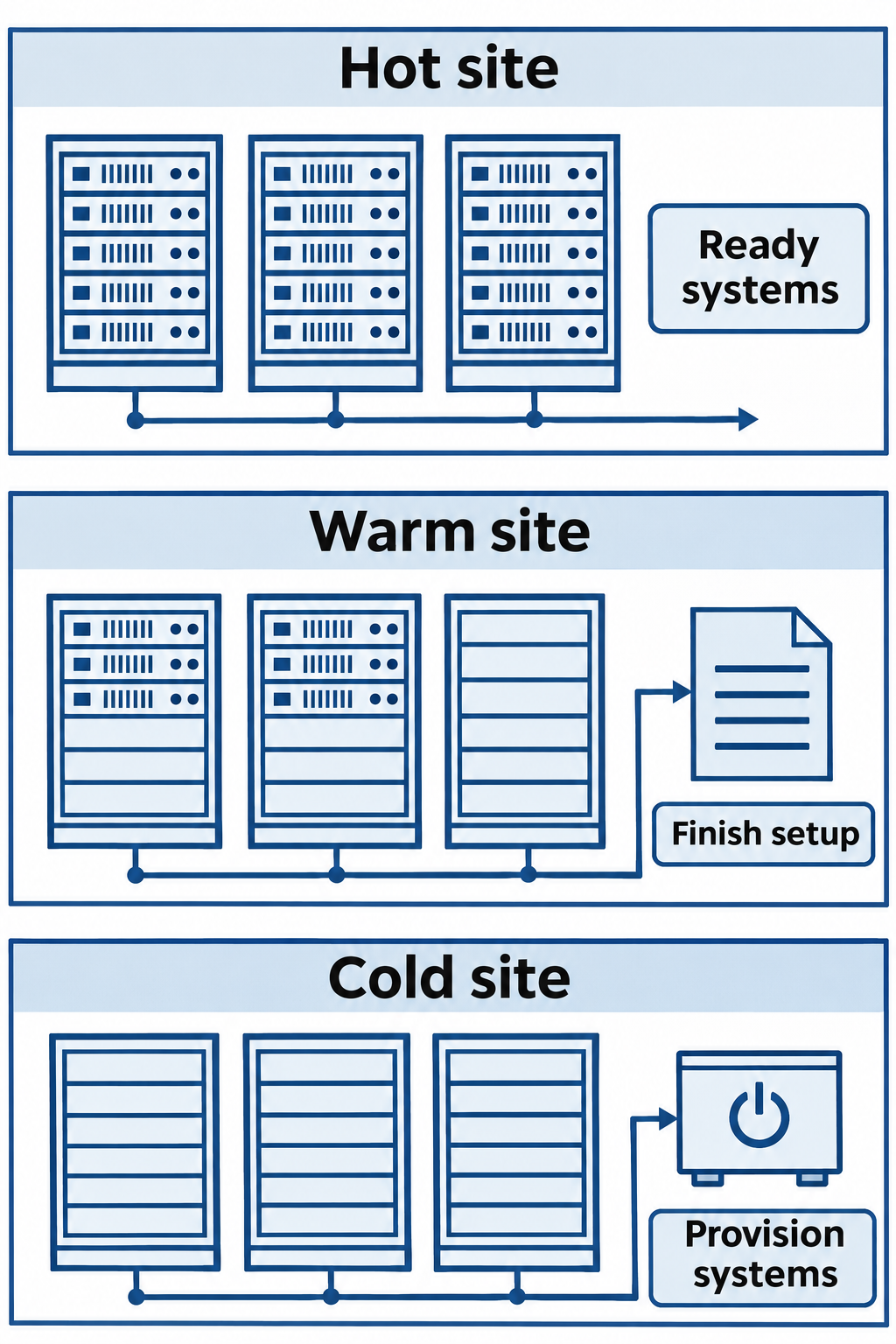
Figure 14.14: Hot, warm, and cold sites differ in how much infrastructure preparation remains before recovery can proceed.
Text description for Figure 14.14
A hot site has substantial operational capability ready for activation. A warm site has some equipment or configuration in place and requires more setup. A cold site provides a facility or basic supporting infrastructure while systems still need provisioning. Actual recovery time and data loss depend on tested procedures, dependencies, and available recovery data, so site labels do not guarantee specific targets.
14.5 Redundancy, Failover, and Replication
Redundancy duplicates critical components to reduce single points of failure. Shared dependencies, such as power, network paths, or an identity service, can still interrupt multiple components at once. Examples include:
- Multiple ISPs: Connectivity is not dependent on a single provider. If ISP A fails, traffic routes through ISP B.
- Database replication: Multiple database servers contain synchronized copies of data. If the primary server fails, a secondary server assumes operations.
- Network routing: Multiple routers with redundant network paths ensure traffic can be rerouted if a primary path fails.
Failover and Automatic Recovery
Failover switches service from a failed or unavailable component to a standby component. It can occur automatically or require an administrator. An illustrative automatic failover sequence is:
Primary database server fails (network unreachable)
Failover detector recognizes failure (three missed heartbeats)
Virtual IP address (which clients connect to) is reassigned to secondary database
Clients automatically connect to secondary database
Application continues operating without manual intervention
Failover can be:
- Automatic: Failover occurs without human intervention
- Manual: Administrator must explicitly fail over to backup
- Assisted: System alerts administrator and requires confirmation before failing over
Automatic failover can reduce recovery time. Both automatic and manual procedures need checks that the standby is suitable and that the old primary cannot continue accepting conflicting writes. Manual approval allows additional review but adds delay. Test the complete procedure, including client reconnection and data consistency.
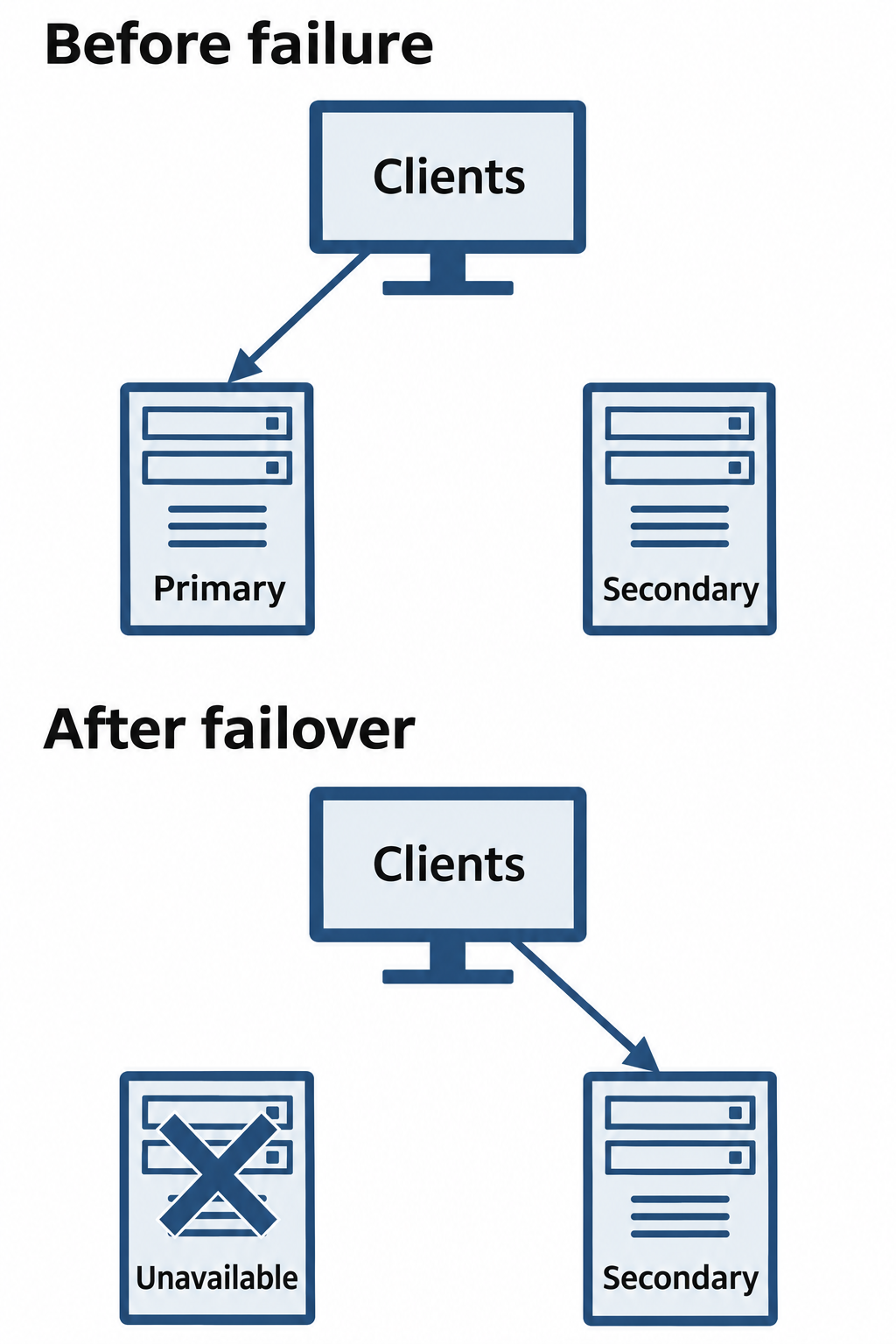
Figure 14.15: Failover changes the service path from a failed primary component to a suitable secondary component.
Text description for Figure 14.15
Clients initially use the active primary component. When the primary fails, a controlled failover changes the service path to a secondary component that can serve the workload. Failover may be automatic, assisted, or manual. Health checks, data readiness, routing, and application behavior affect whether service resumes successfully; redundant hardware alone does not guarantee recovery.
Database Replication
Database replication copies changes from a primary database to one or more replicas. A replica can support availability, but deletions, corruption, or malicious changes may also propagate to it. Organizations still need protected backups and a tested restoration process. Replication can be:
Synchronous replication: The primary waits for the required replicas to acknowledge a transaction before confirming it to the application. The database and configuration determine what acknowledgment means. For example, PostgreSQL's durable synchronous configuration waits for transaction log records to reach storage on the required standby servers. This protects acknowledged transactions when failing over to an appropriate surviving replica, while adding network and storage delay. It cannot protect against every replica being lost or an unwanted change being replicated.
Asynchronous replication: The primary can confirm a transaction before a replica receives it. This avoids waiting for replica acknowledgment, but a promoted replica may lack recently confirmed transactions. If the original primary cannot be recovered, those transactions may be lost.
Trade-offs in replication:
| Replication Type | What the Primary Waits For | Failover Consideration |
|---|---|---|
| Synchronous | Required replica acknowledgments, according to durability settings | Select a replica containing the acknowledged transactions |
| Asynchronous | No replica acknowledgment before confirming a transaction | Recent transactions may be missing from the promoted replica |
Recovery speed also depends on failure detection, replica readiness, promotion, and application reconnection. Replication mode alone does not guarantee a recovery time.
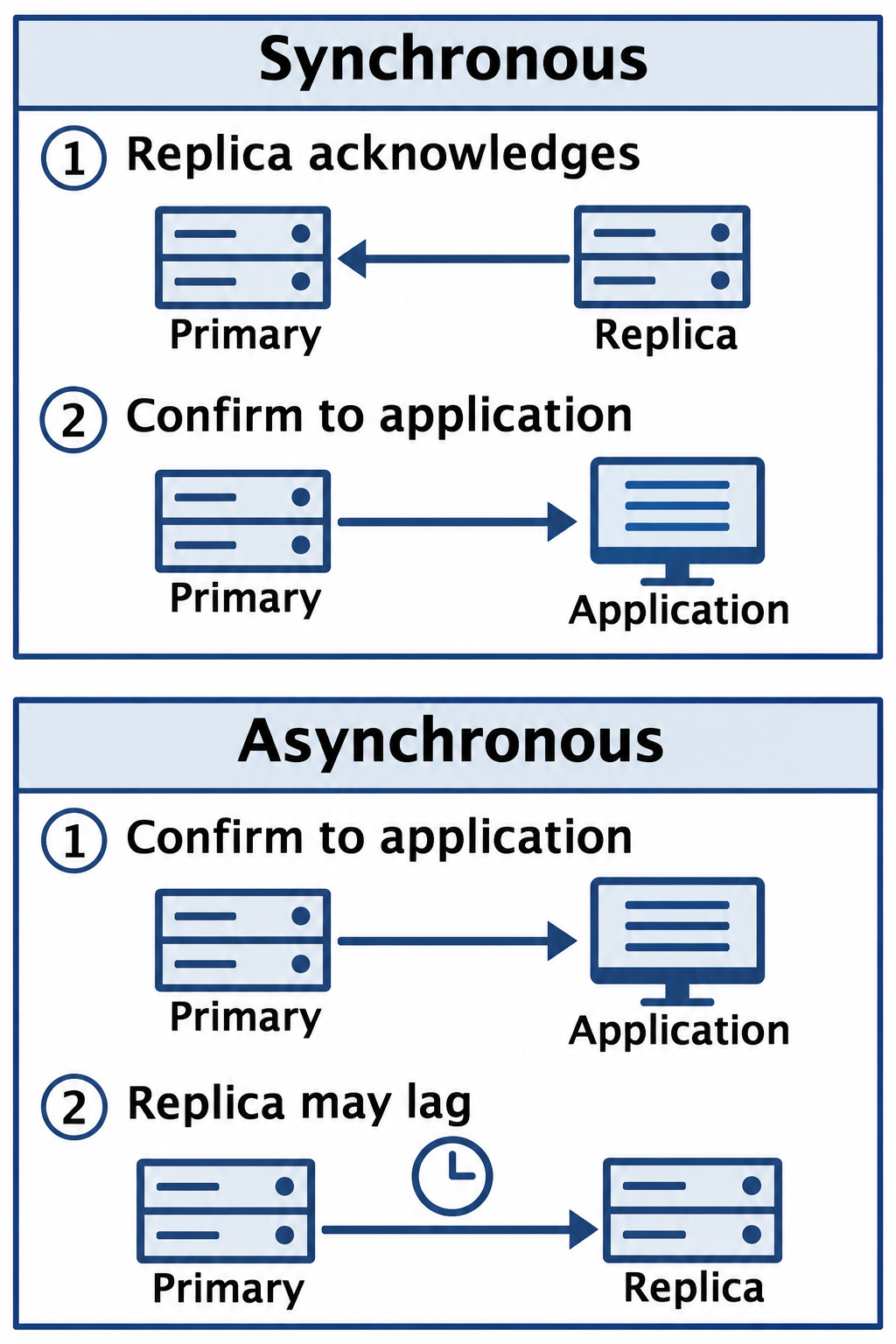
Figure 14.16: Synchronous and asynchronous replication differ in when the system confirms a write relative to replica progress.
Text description for Figure 14.16
In the synchronous example, the primary waits for the configured replica acknowledgment before confirming the write to the application. In the asynchronous example, it can confirm without waiting, so a replica can lag and lack recent writes if it must take over. The meaning of acknowledgment and durability depends on the product and configuration.
14.6 Putting It Together: Manufacturing Incident Response Scenario
In this fictional scenario, ransomware compromises a manufacturing organization's Supervisory Control and Data Acquisition (SCADA) server, which supports monitoring and control of production equipment. Production stops at 10:15 AM. The team uses the four-phase model from NIST SP 800-61 Revision 2. Times and costs below are illustrative.
Industrial Response and Safety
Operational technology (OT) monitors or controls physical equipment. Responders coordinate isolation, account changes, evidence collection, and shutdown with operations and safety personnel. Abruptly disabling control access can create physical hazards. Tools and endpoint agents require compatibility testing. NIST SP 800-82 Revision 3 addresses these safety and availability requirements.
Preparation (foundation work completed before incident)
The organization maintains:
- Tested EDR agents on compatible SCADA servers and workstations, supplemented by network monitoring for other devices
- Network segmentation isolating SCADA from corporate networks with monitored firewalls
- SIEM collecting logs from SCADA systems, firewalls, and corporate network
- Forensic tools and trained forensic investigators on staff
- Documented incident response plan with defined roles (Incident Commander, Technical Lead, etc.)
- Backup SCADA configuration and system images stored offline and encrypted
- Documented RPO of 4 hours (acceptable data loss) and RTO of 4 hours (restoration deadline)
Detection and Analysis (0-15 minutes after disruption)
- 10:15 AM: EDR agent detects file encryption activity on primary SCADA system (thousands of files being encrypted rapidly)
- 10:16 AM: Alert is sent to security operations center and Incident Commander is notified
- 10:17 AM: SIEM confirms suspicious lateral movement from recently compromised workstation to SCADA network
- 10:20 AM: Initial analysis confirms ransomware on the production server and compromise of the originating corporate workstation. The team checks other systems and the integrity of protected backups.
- 10:25 AM: Incident Commander declares incident, activates incident response team, establishes communication protocols
Containment (15-40 minutes after disruption)
- 10:30 AM: Operations and security personnel isolate affected systems and block unnecessary corporate-to-SCADA traffic while maintaining required safety functions.
- 10:32 AM: The team disables compromised accounts and revokes affected sessions while preserving authorized operator and emergency access.
- 10:35 AM: EDR agents scan all corporate systems for signs of ransomware or lateral movement
- 10:45 AM: With operations approval, the investigator captures volatile evidence from the affected server using tested tools.
- 10:55 AM: Monitoring shows no further spread beyond the identified workstation and SCADA server. Containment checks continue.
Eradication (45-195 minutes after disruption)
- 11:00 AM: After volatile collection, operations personnel approve shutdown of the affected server. The investigator documents its state and secures it for examination.
- 11:15 AM: The investigator begins a write-blocked storage acquisition for later analysis.
- 11:20 AM: Administrators begin restoring a replacement server from a validated clean backup with an 8:00 AM recovery point that morning. The 2-hour-15-minute data gap is within the 4-hour RPO.
- 12:00 PM: Administrators restore the SCADA configuration, apply tested security updates, and reset compromised credentials. They also rebuild the affected corporate workstation.
- 1:00 PM: The team updates detection rules and corrects known access-control weaknesses. These measures reduce the risk of reinfection but cannot guarantee prevention.
- 1:30 PM: The replacement server starts in an isolated validation environment with monitoring settings approved for the control workload.
Recovery (225-270 minutes after disruption)
- 2:00 PM: Restored SCADA system undergoes validation testing (correct production parameters loaded, controlled startup)
- 2:15 PM: The team begins a limited production restart under close monitoring. The 4-hour RTO deadline arrives, but the required production service level has not yet been restored.
- 2:45 PM: Operations personnel confirm restoration of the required production service level, with enhanced monitoring.
- 3:00 PM: The team records 4 hours 30 minutes from disruption to verified recovery. The response missed the 4-hour RTO by 30 minutes, even though it met the RPO.
Post-Incident Activity (following days and weeks)
- Day 2: Forensic analysis of imaging conducted offline. Investigator determines initial compromise was via phishing email with malicious attachment.
- Day 3-4: Root cause analysis: User clicked on malicious email attachment, executable bypassed email filtering due to misconfiguration, EDR agent did not block initial execution due to whitelisting overly permissive policies.
- Day 5: Lessons learned documented: Email filtering configuration needs review, EDR whitelisting policies need tightening, security awareness training needs emphasis on phishing risks.
- Day 7: The report to leadership records 4.5 hours to verified production recovery, a 2-hour-15-minute gap between the recovery point and disruption, and an illustrative estimated loss of $150,000. It explains that the RPO was met and the RTO was missed by 30 minutes. Follow-up actions address email filtering, endpoint policies, phishing awareness, and delays in restoration and validation.
The elapsed times below start at the 10:15 AM disruption. Activities can overlap, and monitoring continues between the listed milestones.
| Phase | Timeline | Key Actions |
|---|---|---|
| Preparation | Before incident | Backup systems, EDR deployment, IR team defined |
| Detection | 0-2 min | EDR detection, alert escalation |
| Analysis | 2-15 min | Incident confirmation, scope determination |
| Containment | 15-40 min | Coordinated isolation, compromised-account restrictions |
| Eradication | 45-195 min | Evidence preservation, system rebuild, security corrections |
| Recovery | 225-270 min | Production validation and restart, RTO missed by 30 minutes |
| Post-Incident | Days 2-7 | Forensic analysis, root cause, lessons learned |
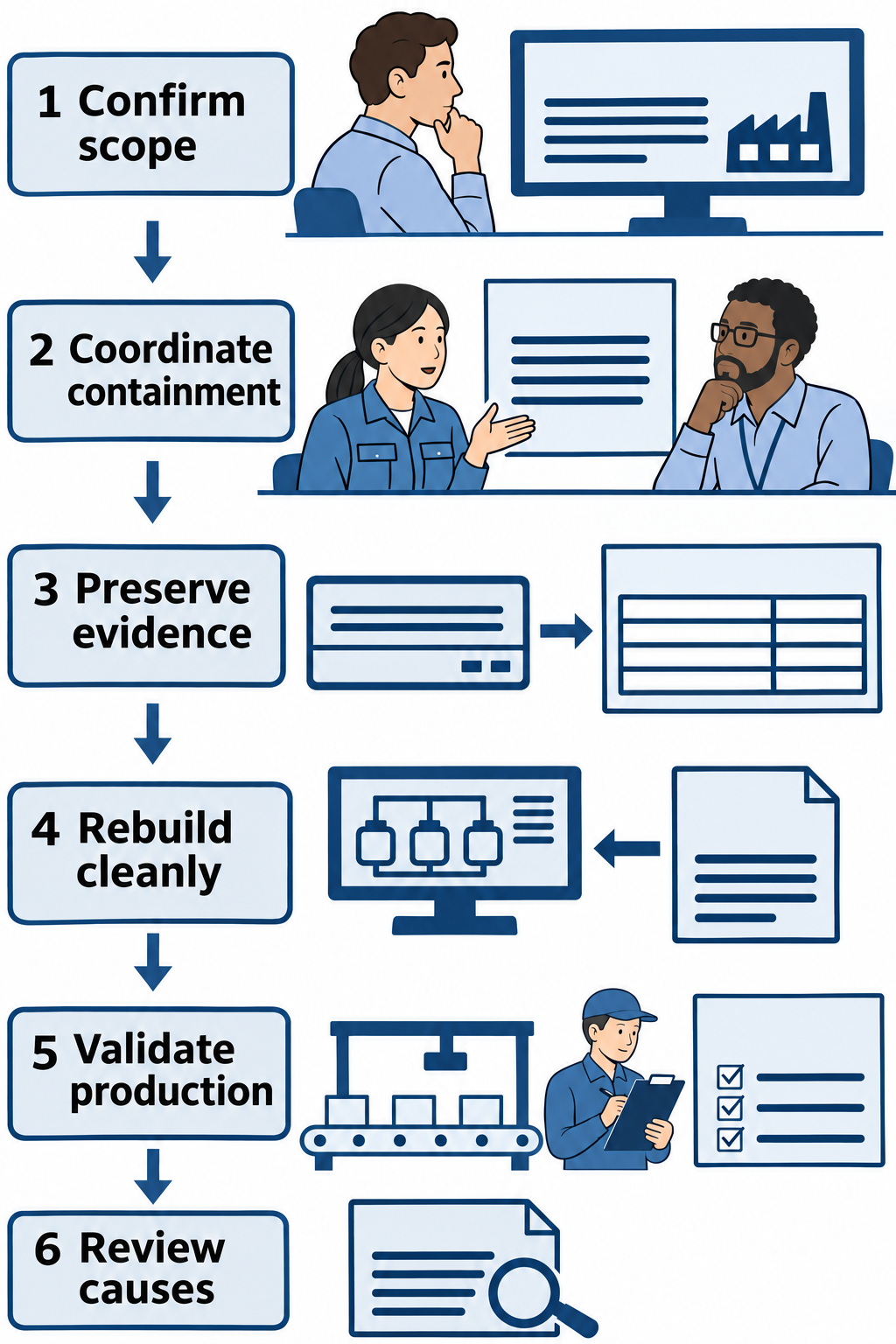
Figure 14.17: The manufacturing response coordinates containment, evidence preservation, restoration, and production validation.
Text description for Figure 14.17
The team investigates the affected production environment and coordinates containment with operations and safety personnel. It preserves feasible evidence, restores from validated recovery sources, and checks production behavior before resuming service. Later analysis informs improvements. Supervisory Control and Data Acquisition (SCADA) systems monitor and control industrial processes. Their safety and availability requirements shape response decisions.
Chapter Summary
- Incident response in this chapter uses the historical NIST SP 800-61 Revision 2 four-phase model: Preparation, Detection/Analysis, Containment/Eradication/Recovery, and Post-Incident Activity. Revision 3 superseded that guide in April 2025 and integrates incident response with CSF 2.0.
- Preparation is foundational. Organizations that invest in detection tools, personnel training, and documented procedures respond faster and more effectively.
- Detection and analysis uses context to distinguish incidents, correctly detected authorized activity, and false positives.
- Containment limits further harm through isolation, access restrictions, and monitored temporary arrangements that account for operational needs.
- Eradication removes malware, closes vulnerabilities, and resets compromised credentials to prevent re-compromise.
- Recovery restores systems from clean backups and validates that attackers cannot regain access.
- Post-incident activity includes root cause analysis, documentation, process improvements, and stakeholder reporting.
- Incident response teams require personnel from multiple functions with defined roles, escalation procedures, and communication plans.
- Digital forensics uses documented acquisition and examination methods. Hash comparisons support integrity checks within the data scope being compared.
- Chain of custody documents evidence handling and transfers to support its identity and history. Admissibility depends on the applicable legal rules and circumstances.
- Order of volatility helps prioritize evidence likely to disappear, while safety, feasibility, and retention risks affect the collection plan.
- Live response captures evidence from a running system, including volatile data, while introducing changes that investigators must document.
- Storage imaging can occur live or offline. It preserves an identified scope of storage data for examination and complements memory collection.
- Business continuity metrics RPO (acceptable data loss) and RTO (acceptable recovery time) drive disaster recovery planning.
- Backup strategies (full, incremental, differential) balance recovery speed against backup time and storage requirements.
- Site types (hot, warm, cold) provide recovery capabilities with varying costs and recovery times.
- Redundancy reduces single points of failure when shared dependencies are addressed. Failover transfers service to a suitable standby automatically or with human involvement.
- Replication maintains additional database copies with product-specific acknowledgment and durability guarantees. Protected backups remain necessary because unwanted changes can propagate to replicas.