CH11: Wireless Attacks and Physical Security
Introduction
Physical proximity is the unifying constraint between wireless attacks and physical security compromises. You cannot jam a wireless network from across the country. You cannot clone a badge remotely. You cannot pick a lock through the internet. But if you are within radio range or inside the facility, the attack surface expands dramatically.
This chapter treats wireless and physical attacks as proximity-based threat vectors that, when combined, create a coherent attack narrative. A pen tester discovers wireless networks through passive reconnaissance. They position a rogue access point in a nearby parking lot. While users connect to the fake network, the tester physically enters the facility through tailgating, clones an employee badge, and plants a USB drop. Wireless compromise and physical access converge on a single objective: internal network access and persistence.
Unlike network attacks that work remotely and web application attacks that exploit logic flaws, wireless and physical attacks require boots on the ground. But for organizations that underestimate their proximity attack surface, these techniques yield extraordinary results.
Learning Objectives
Upon completing this chapter, students will be able to:
- Conduct wireless reconnaissance including passive wardriving, active site surveys, and signal analysis.
- Execute wireless attacks including evil twin deployment, deauthentication, WPS PIN cracking, and Pixie Dust exploitation.
- Identify and exploit physical security controls including tailgating, badge cloning, and lock picking.
- Combine wireless and physical findings to plan multi-stage attack scenarios.
- Establish wireless persistence post-compromise and plan long-term access.
- Understand scope, authorization, and escalation procedures for physical and wireless testing.
11.1 Wireless Reconnaissance
Wireless reconnaissance begins long before attack execution. The goal is to understand the target's wireless footprint: which networks exist, their signal coverage, security posture, and client behavior.
Passive Wireless Reconnaissance
Wardriving is the foundational reconnaissance technique. A pen tester drives a vehicle equipped with wireless scanning capability (a laptop with a wireless adapter in monitor mode or a dedicated tool like the Yagi antenna plus WiFi adapter). As the vehicle moves, the scanner logs every wireless network, its signal strength (RSSI), the channel it uses, and security configuration.
Tools like Kismet and inSSIDer perform passive discovery:
kismet -c wlan0 -o logtype:kismetdb -o log:wardriving-survey
Kismet logs GPS coordinates with each network, creating a heatmap of wireless coverage. This reveals:
- Network SSIDs and whether they broadcast or are hidden.
- Signal strength by location, identifying the best position for attacking or establishing a rogue AP.
- Channel utilization and interference patterns.
- Client devices and their probe request patterns (showing which networks devices have previously connected to).
Signal analysis interprets the radio signals:
- RSSI (Received Signal Strength Indication) measured in dBm indicates signal strength. Higher RSSI (closer to 0 dBm) means stronger signal; lower RSSI (more negative) means weaker signal. This determines attack positioning.
- Channel and bandwidth analysis reveals whether networks operate on overlapping channels (2.4 GHz channels 1-11 overlap significantly) or non-overlapping channels (5 GHz has more channel options).
- Beacon frames broadcast network information, including the SSID (unless hidden), security settings, and data rates.
- Probe requests are sent by client devices searching for networks they have previously connected to. Analyzing probe requests reveals which SSIDs nearby devices trust.
Figure 11.1 separates the building boundary from radio coverage. A passive observer receives transmissions, while a site survey samples conditions at planned locations.
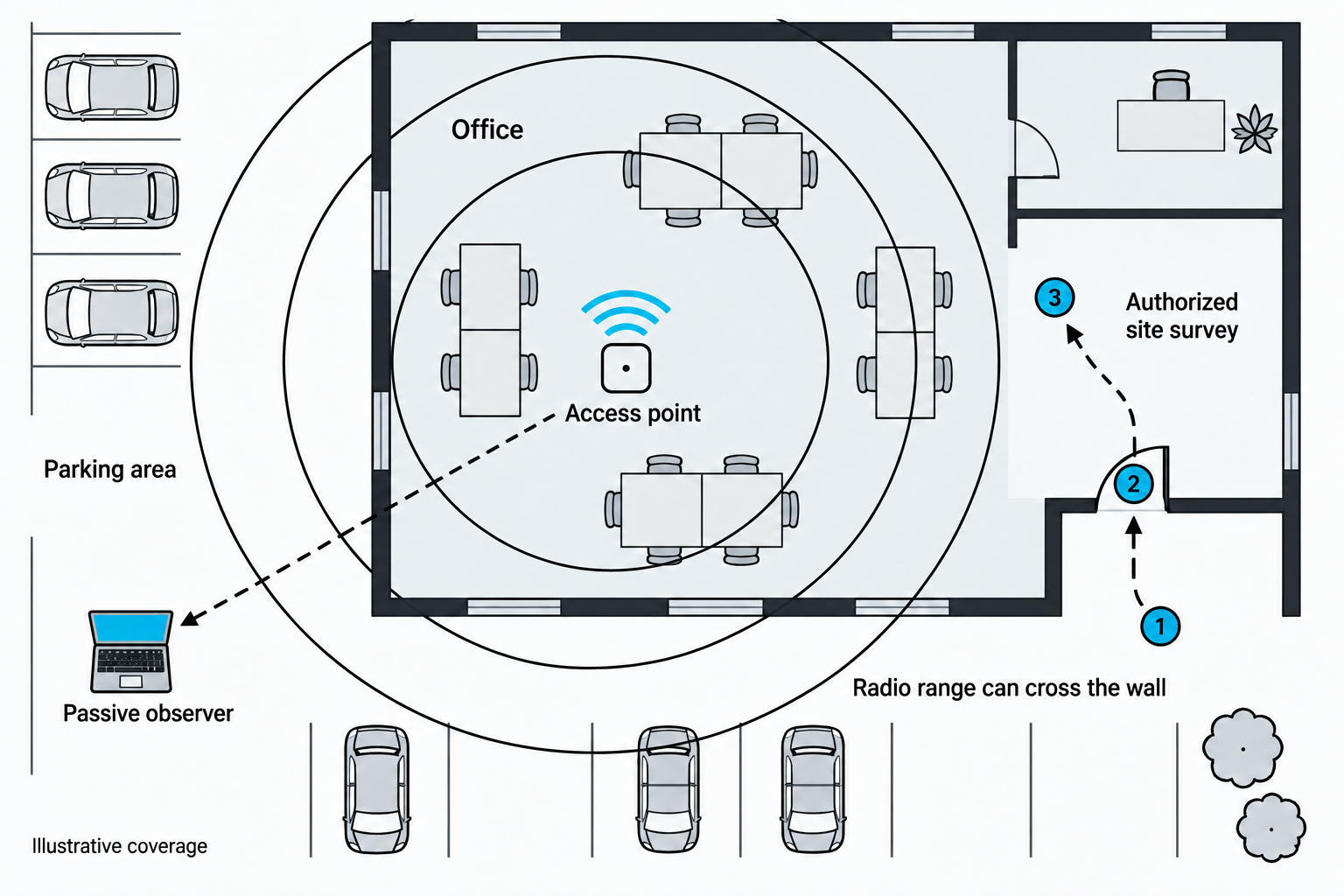
Figure 11.1: Illustrative radio coverage can extend beyond a facility wall; the circles represent a concept rather than measured signal strength.
Open Figure 11.1 at full size (opens in a new tab)
Text description for Figure 11.1
The office contains an access point, a device that connects wireless clients to a network. Coverage arcs cross the exterior wall. A one-way dashed arrow leads from the access point to a laptop in the parking area, representing reception without transmission by the observer. A separate route visits three survey locations. Real coverage depends on construction, antenna placement, interference, and other conditions. Detectable signal outside a building alone does not establish a security failure.
Active Wireless Reconnaissance
Site surveys are planned, on-site assessments conducted with the target's knowledge and authorization. A site survey involves:
- Coverage mapping: Walking the facility while monitoring signal strength, identifying dead zones and areas of weak coverage.
- Interference assessment: Identifying sources of RF interference (microwaves, Bluetooth devices, cordless phones) that degrade wireless performance.
- Roaming behavior: Testing how devices handoff between access points and whether roaming is uninterrupted.
- Client enumeration: Observing what devices connect to wireless networks and their MAC addresses.
Hidden SSID discovery occurs when networks do not broadcast their name. However, hidden SSIDs are easily discovered because:
- Existing clients associate with the hidden SSID, and their MAC address is visible in association frames.
- Probe responses reveal the SSID to any device that probes for it.
- A Reverse Beacon Table compiled from passive monitoring reveals SSIDs even when not broadcast.
Figure 11.2 shows how network discovery exchanges can reveal information about nearby wireless networks.
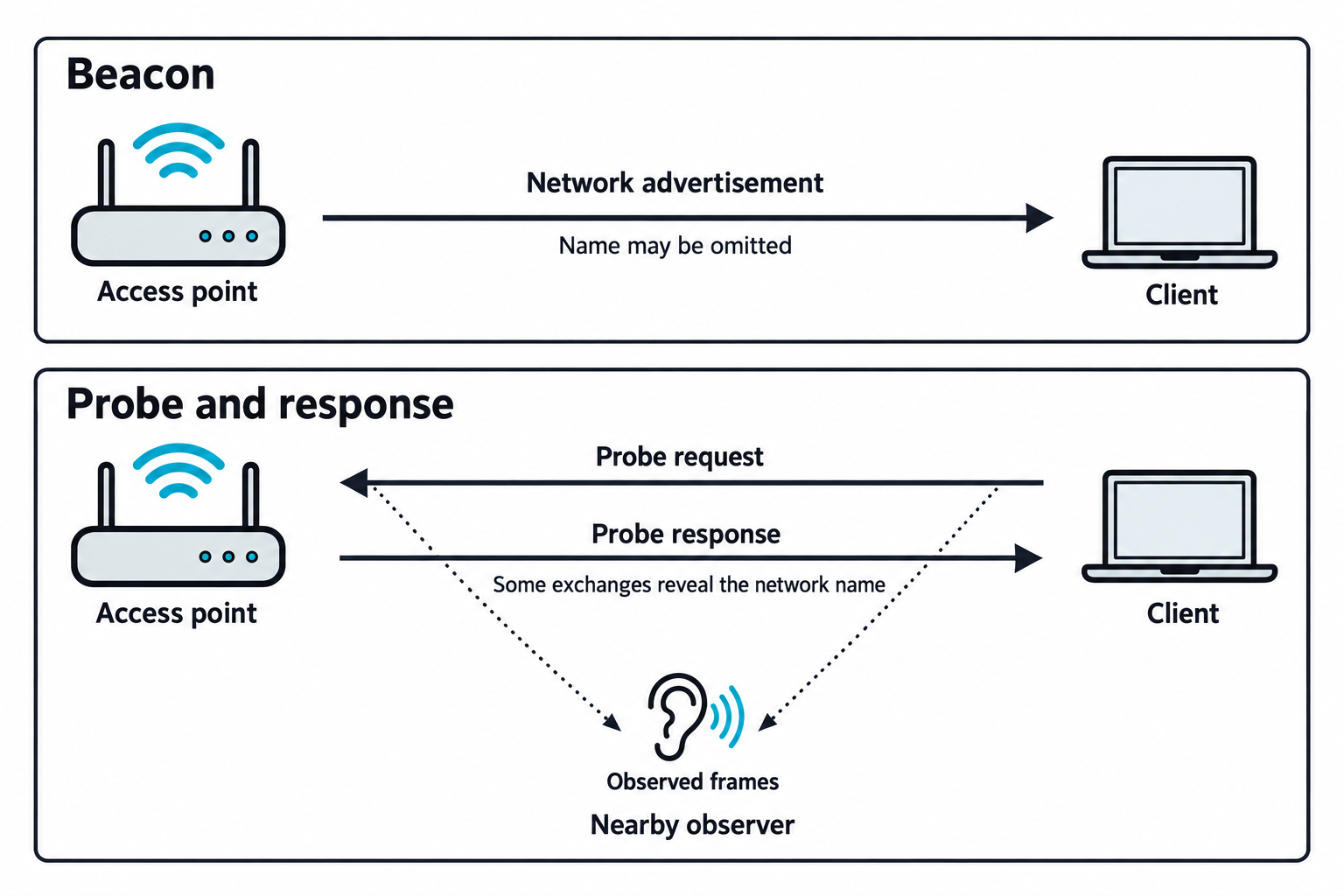
Figure 11.2: Beacon advertisements and probe exchanges expose different pieces of wireless discovery information.
Open Figure 11.2 at full size (opens in a new tab)
Text description for Figure 11.2
Read the top lane from the access point to the client: a beacon advertises network information, and a hidden network can omit its name. In the lower lane, the client sends a probe request toward the access point, which sends a response back. An observer within reception range can capture these frames. The service set identifier (SSID) is the network name. Some directed discovery or association exchanges expose it. Modern clients can use wildcard probes and randomized addresses, so a captured probe does not necessarily reveal a complete saved-network history.
Wireless Protocol Analysis
Understanding the wireless protocol reveals what security is in place:
- WEP (Wired Equivalent Privacy) is cryptographically broken and should never be encountered in modern networks.
- WPA (Wi-Fi Protected Access) uses TKIP encryption and preshared keys.
- WPA2 uses AES encryption and is the standard for enterprise and personal networks. WPA2 supports both preshared key (PSK) and enterprise (802.1X with RADIUS) authentication.
- WPA3 uses the Simultaneous Authentication of Equals (SAE) handshake, protecting against brute-force attacks on the password.
A pen tester's reconnaissance must identify which protocol is in use because the attack methodology differs.
11.2 Wireless Attack Vectors
Evil Twin and Rogue Access Point
An evil twin is a rogue access point (AP) that impersonates a legitimate network. The attacker broadcasts the same SSID as the target network, often from a more advantageous location with stronger signal.
Setting up an evil twin:
airmon-ng start wlan0
airbase-ng -e "Target-Network" -a aa:bb:cc:dd:ee:ff wlan0mon
# Configure DHCP server on tap0 interface
dnsmasq -d -C /dev/null -i tap0 --dhcp-range=192.168.1.10,192.168.1.100,12h
Devices connecting to the evil twin do so because they recognize the SSID or because the rogue AP has stronger signal. Traffic to and from connected devices flows through the attacker's machine, enabling:
- Packet sniffing: Capturing unencrypted traffic.
- Man-in-the-middle (MITM): Intercepting encrypted connections and downgrading them to plaintext via SSL stripping.
- Credential harvesting: Displaying a fake login page when users attempt to access the internet.
- Malware injection: Modifying downloaded files to include malware.
Figure 11.3 follows a synthetic open guest-network example. The service set identifier (SSID), or advertised network name, is Campus-Guest on both access points.
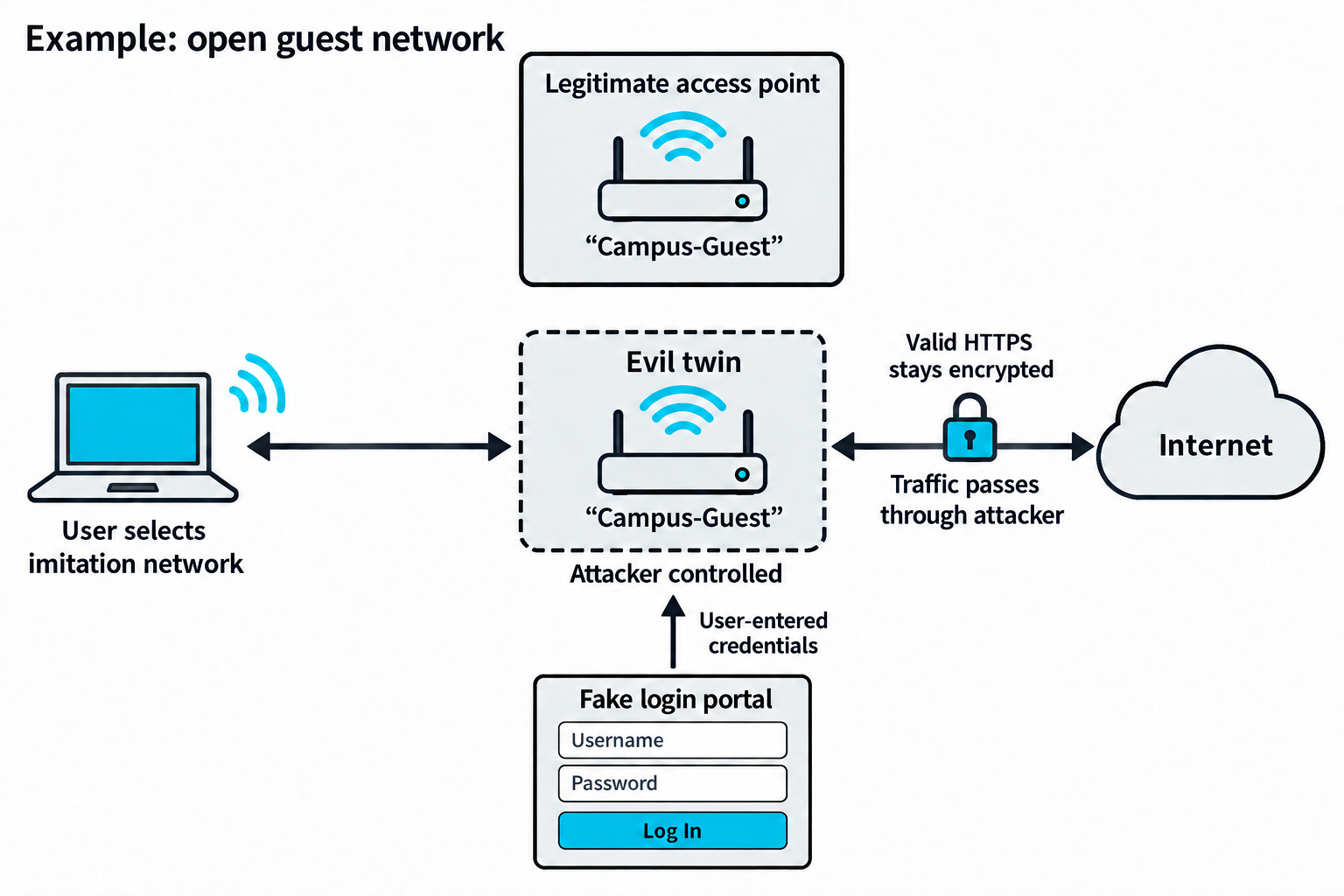
Figure 11.3: An evil twin copies a network identity and places the attacker on the traffic path when a client accepts the imitation network.
Open Figure 11.3 at full size (opens in a new tab)
Connection and interception limits: client settings, the security mode, and authentication checks determine whether the imitation is accepted. A rogue access point does not automatically defeat HTTPS.
Text description for Figure 11.3
The legitimate and rogue access points both advertise Campus-Guest, a fictional network name. In this example, the user selects the rogue open network. Traffic then passes through the attacker-controlled access point toward the internet. A separate fake login portal can receive credentials that the user voluntarily enters into it. Hypertext Transfer Protocol Secure (HTTPS) protects web traffic using Transport Layer Security (TLS). Correct certificate validation and an uncompromised encrypted connection prevent the rogue access point from automatically reading or altering its contents. Matching a network name or offering a stronger signal does not by itself satisfy a protected network's authentication requirements. See MITRE ATT&CK: Evil Twin.
Deauthentication Attacks
Deauthentication frames are management frames that break the association between a device and an AP. An attacker sends spoofed deauth frames to:
- Disconnect a client from a legitimate AP.
- Capture the client's reassociation to the AP (or to the attacker's rogue AP).
- Force a WPA/WPA2 handshake capture.
The deauth attack is devastating because there is no defense, the frames are part of the wireless protocol:
aireplay-ng --deauth 100 -a aa:bb:cc:dd:ee:ff wlan0mon
This sends 100 deauth frames to the target AP (specified by -a), disconnecting all clients. As clients reconnect, the attacker captures the WPA handshake.
Figure 11.4 compares spoofed disassociation and deauthentication frames, management messages that can end different parts of a wireless connection.
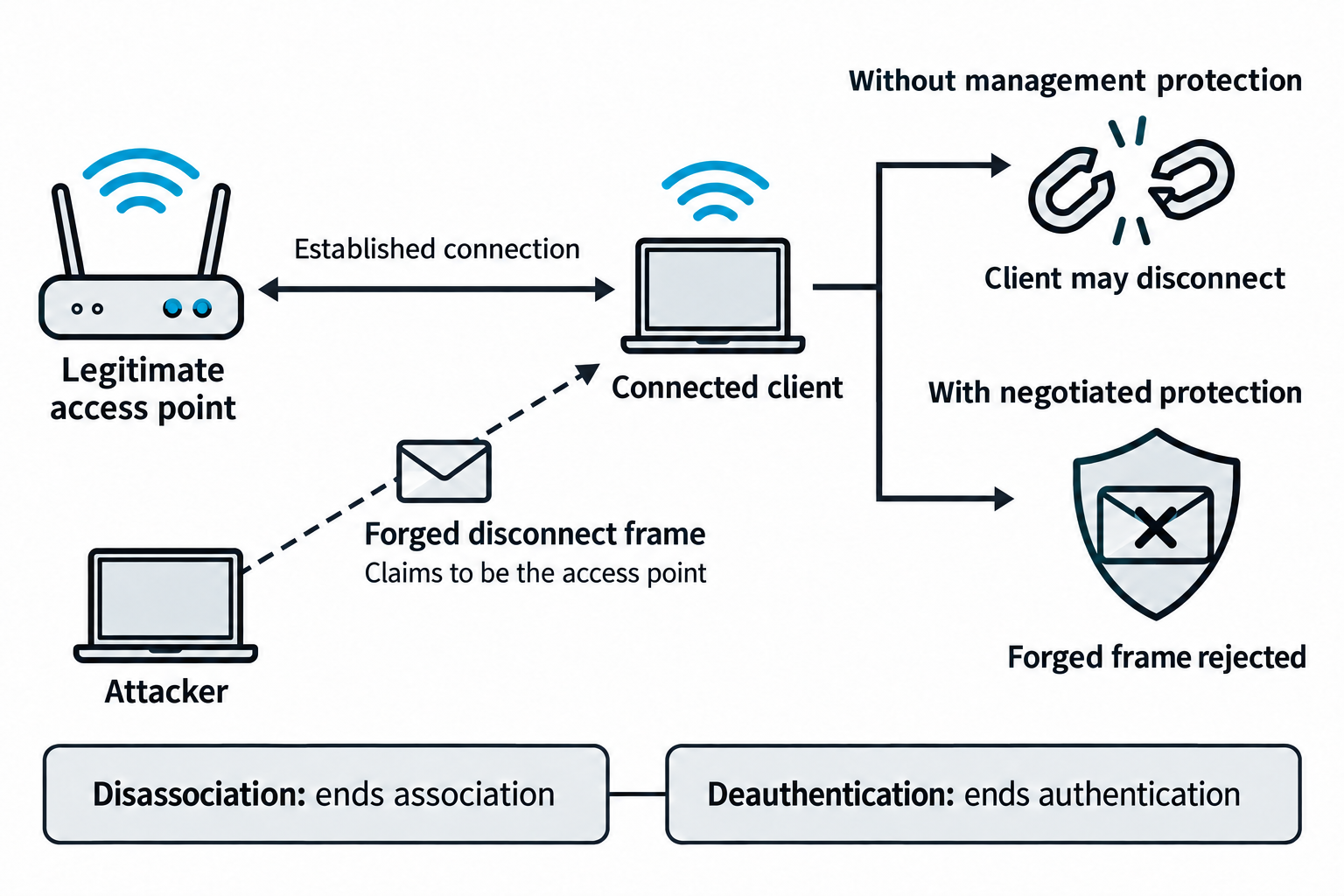
Figure 11.4: Forged disconnect messages can disrupt an unprotected connection; negotiated management-frame protection changes the result.
Open Figure 11.4 at full size (opens in a new tab)
Text description for Figure 11.4
The client first has an established connection to the legitimate access point. The attacker transmits a management frame that claims the access point sent it. Disassociation ends the association, the client's link with that access point. Deauthentication ends the authentication relationship and also ends any association. Without effective management protection, the client may accept the forgery and disconnect. Protected Management Frames (PMF), defined by IEEE 802.11w, authenticate selected management traffic after protection has been negotiated and established. The protected path rejects this forged frame. PMF does not prevent radio jamming or every possible denial-of-service condition. A disconnect also does not guarantee that a client will join an evil twin. See Cisco: 802.11w protected management frames.
Signal Jamming and Denial of Service
Jamming intentionally transmits RF noise on the same frequency as the target network, causing service disruption. While effective, jamming is illegal in most countries without explicit authorization.
Legitimate interference (microwaves operate on 2.4 GHz, Bluetooth devices, cordless phones) has the same effect as intentional jamming: degraded wireless service.
Protocol Fuzzing and Malformed Frames
802.11 protocol fuzzing injects malformed or unexpected frames to find vulnerabilities in client and AP firmware:
- Management frame fuzzing: Sending beacons with invalid settings, probe responses with malformed TLVs (Type-Length-Value fields).
- Data frame anomalies: Invalid QoS settings, fragmentation flags, encryption states.
- Driver crashes: Triggering kernel panics or driver crashes that allow code execution.
Tools like Scapy allow custom frame creation:
from scapy.all import RadioTap, Dot11, Dot11Beacon, SSID
frame = RadioTap() / Dot11(addr1="ff:ff:ff:ff:ff:ff") / \
  Dot11Beacon() / SSID(ssid=b"Malformed-SSID-\xff\xff")
Figure 11.5 distinguishes interference in the radio channel from malformed data reaching the software that interprets wireless frames.
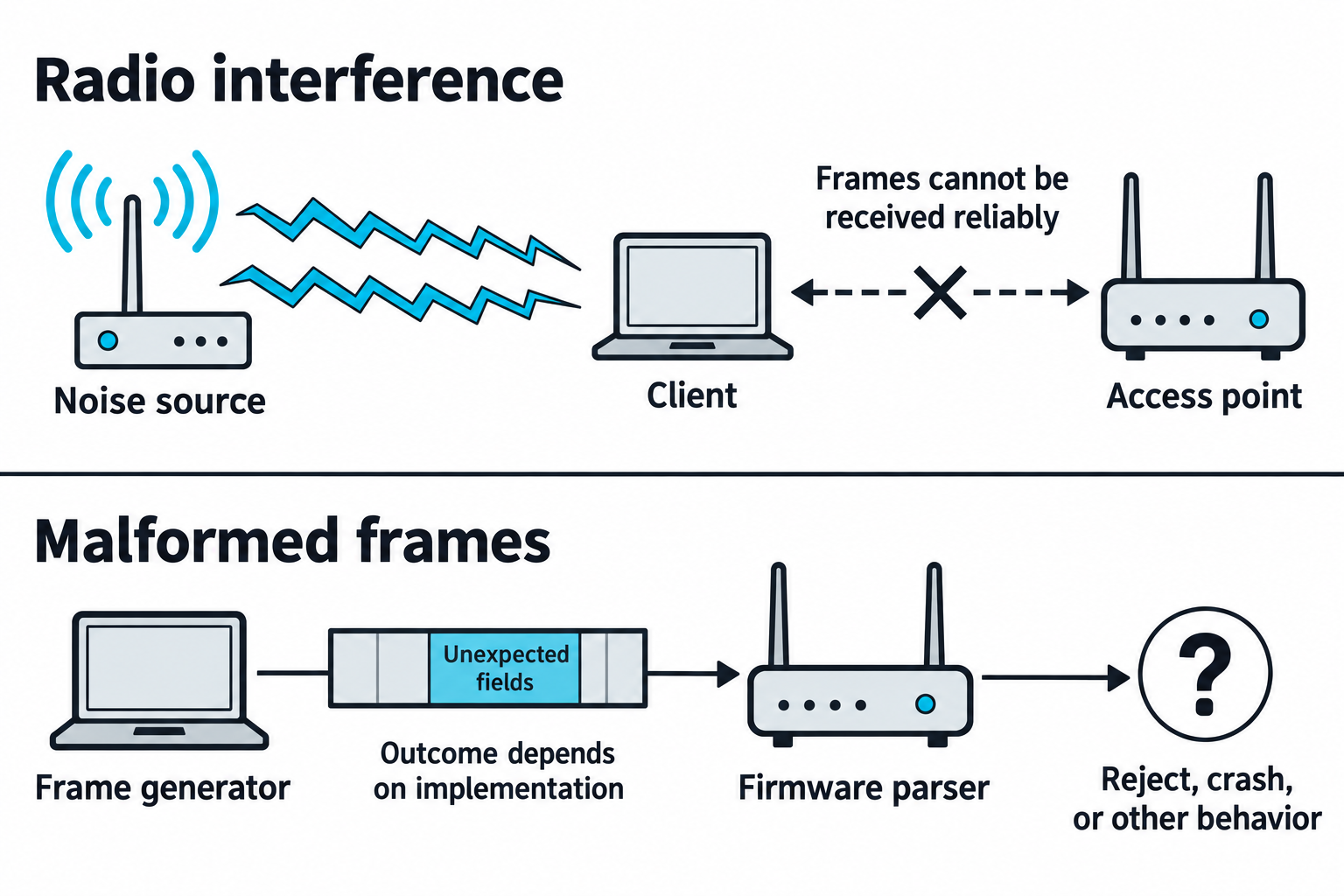
Figure 11.5: Radio interference and protocol fuzzing affect different parts of wireless communication.
Open Figure 11.5 at full size (opens in a new tab)
Text description for Figure 11.5
The upper lane shows radio-frequency interference preventing reliable reception. Its origin could be deliberate or accidental. The lower lane shows a frame generator sending unexpected field values to a firmware parser, the software component that interprets a frame. Depending on the implementation, the parser may reject the input, crash, or exhibit another behavior. A crash alone does not demonstrate code execution. These mechanisms differ from a client accepting a forged but otherwise understandable disconnect message.
Captive Portal Bypass
Captive portals require users to authenticate (often via email or social login) before internet access. Bypassing them allows network access without authentication:
- Portal detection: Legitimate devices detect captive portals by accessing known domains (apple.com, google.com). If a redirect occurs, a captive portal is present.
- HTTP header spoofing: Modifying the User-Agent header to appear as a device that bypasses the portal (Apple TV, printer).
- MAC address spoofing: Using the MAC address of a previously authenticated device.
- DHCP-based redirection: Intercepting DHCP responses and modifying DNS settings.
WPS (Wi-Fi Protected Setup) Attacks
WPS allows quick network configuration via an 8-digit PIN. The PIN is divided into two groups: the first 4 digits narrow the search space. An attacker can brute-force the PIN efficiently:
- PIN range: 10,000 possible PINs (0000-9999).
- Dual-step testing: First 4 digits (10,000 possibilities), then the 5th digit (10 possibilities), then the last 3 digits (1,000 possibilities). This reduces the effective search space to ~11,000 attempts.
- Online attacks: Tools like Reaver and Bully attempt PINs against the AP directly, with the AP indicating whether each PIN or PIN segment is correct.
Pixie Dust attack exploits weak random number generation in WPS implementations. Instead of brute-forcing the PIN, the attacker:
- Captures EAPOL frames during the WPS handshake.
- Analyzes the nonce (random value) to recover the PIN components.
- Reconstructs the PIN in seconds, bypassing the need for thousands of attempts.
The Pixie Dust attack is so effective that it renders WPS completely broken on vulnerable APs. Tools like Reaver include Pixie Dust support:
reaver -i wlan0mon -b aa:bb:cc:dd:ee:ff --pixie-dust
Figure 11.6 separates the design weakness in Wi-Fi Protected Setup (WPS) personal identification number (PIN) validation from the implementation weakness used by Pixie Dust.
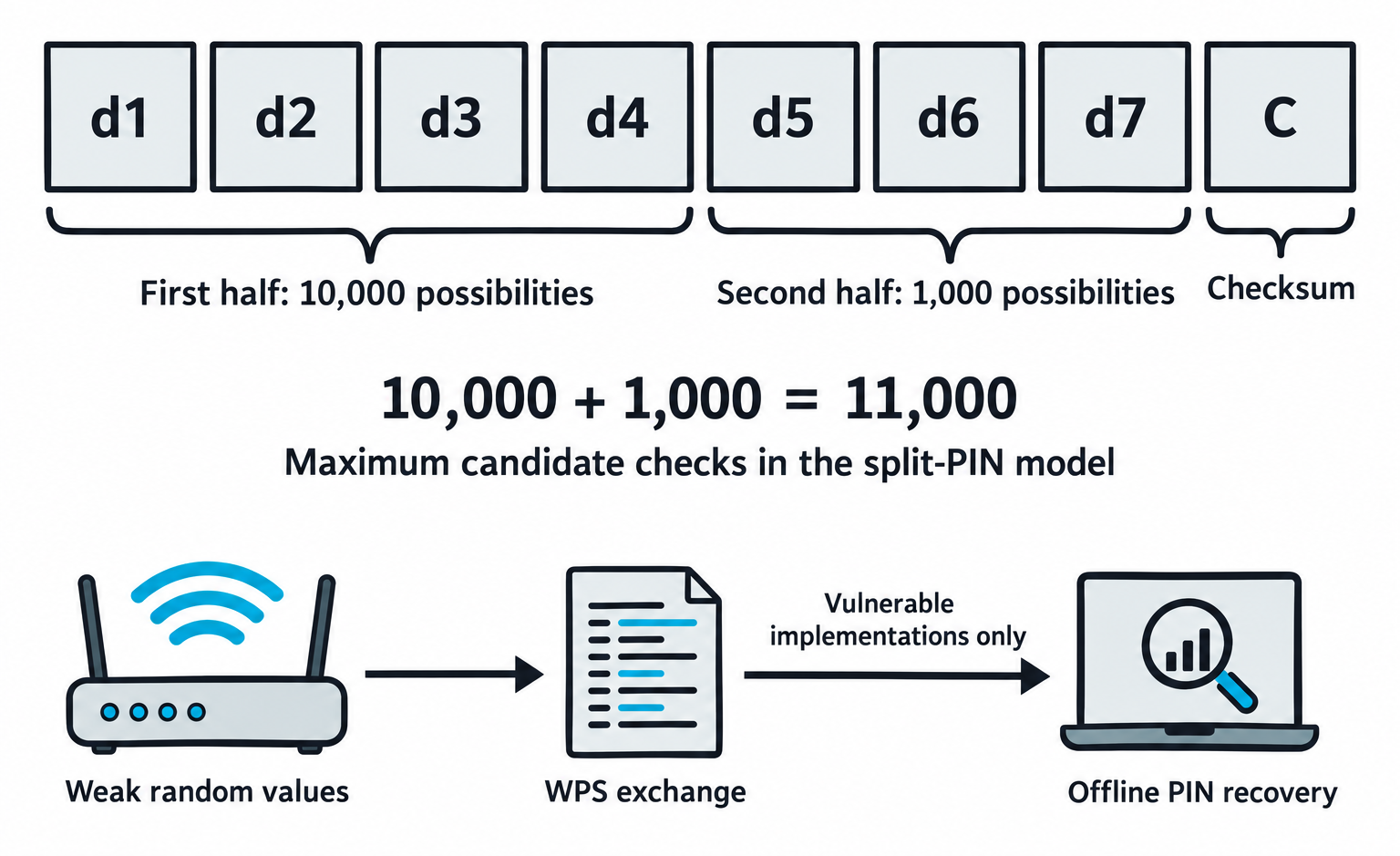
Figure 11.6: The split-PIN design reduces candidate checks, while Pixie Dust depends on weak random values in vulnerable implementations.
Open Figure 11.6 at full size (opens in a new tab)
Technical clarification: the second search stage tests three unknown digits. The final digit is a checksum; there is no separate fifth-digit search stage in the 11,000-check calculation.
Text description for Figure 11.6
The first four digits have 10,000 possibilities. The next three unknown digits have 1,000 possibilities. The eighth digit is a checksum computed from the other digits. Feedback that identifies a correct first half lets an attacker test the halves separately, giving a maximum of 10,000 plus 1,000 candidate checks in this model. Lockouts, rate limits, and implementation behavior affect practical testing. The lower path represents Pixie Dust: weak random values in a vulnerable WPS exchange can support offline PIN recovery. The figure does not promise a recovery time or imply that every WPS implementation has this flaw. See CERT/CC: WPS PIN brute-force vulnerability.
11.3 Wireless Encryption and Authentication Attacks
WEP Cracking
WEP (Wired Equivalent Privacy) uses a 40-bit or 104-bit key with a 24-bit initialization vector (IV), a value combined with the key for each packet. The IV has a limited range of possible values, so IVs can repeat. When two packets use the same key and IV, applying exclusive OR (XOR) to their encrypted contents exposes a relationship between the original messages.
XOR combines data one bit (a binary 0 or 1) at a time. Matching bits produce 0, and different bits produce 1. For example, 1 XOR 1 = 0, while 1 XOR 0 = 1. Applying the same bit sequence twice with XOR cancels its effect.
WEP uses XOR to combine the original data, called plaintext, with a keystream, a sequence of bits generated from the key and IV. Reusing that keystream lets an attacker XOR the two encrypted messages so the shared keystream cancels out. The result is the two plaintexts XORed together. If the attacker knows or correctly guesses part of one message, they can recover the corresponding part of the other. This step alone does not reveal the secret key or automatically decrypt both messages.
WEP cracking with Aircrack-ng:
This example assumes that wlan0mon already operates in monitor mode, which allows the wireless adapter to capture nearby wireless frames. The network address, name, packet counts, and recovered key below are fictional. The simulated output excerpts show selected fields and lines for readability.
1. Capture WEP traffic:
airodump-ng -c 6 --bssid aa:bb:cc:dd:ee:ff -w wep-capture wlan0mon
Simulated capture output (selected columns):
BSSID              Beacons  #Data  CH  ENC  ESSID
AA:BB:CC:DD:EE:FF      6120  85000   6  WEP  Example-WEP
BSSID identifies the access point, and ESSID shows its advertised network name. CH confirms channel 6, while ENC identifies WEP encryption. Beacons counts network announcement frames. For WEP, #Data reports the number of unique IVs captured, here 85,000. This count does not guarantee successful key recovery.
The -w wep-capture option sets the output filename prefix. For the first capture using that prefix, the packet file is wep-capture-01.cap. Stop the capture with Ctrl+C before running the next command in the same terminal.
2. Attempt key recovery from the saved capture:
aircrack-ng -b aa:bb:cc:dd:ee:ff wep-capture-01.cap
Simulated key-recovery output (result excerpt):
KEY FOUND! [ 6A:2F:91:C4:08:BE:73:D5:10:A6:4C:82:E9 ]
Decrypted correctly: 100%
KEY FOUND! identifies the recovered WEP key in hexadecimal, a number format that uses digits 0 through 9 and letters A through F. The 13 pairs represent a 104-bit secret key. Decrypted correctly: 100% reports successful decryption of the captured packets the tool checked to validate that key. Aircrack-ng uses statistical weaknesses across many captured packets for key recovery. The amount and type of traffic needed vary.
Modern networks use WPA/WPA2, so WEP is rarely encountered. However, legacy networks sometimes still use it.
Figure 11.7 isolates one weakness in Wired Equivalent Privacy (WEP): encrypting different messages with the same keystream.
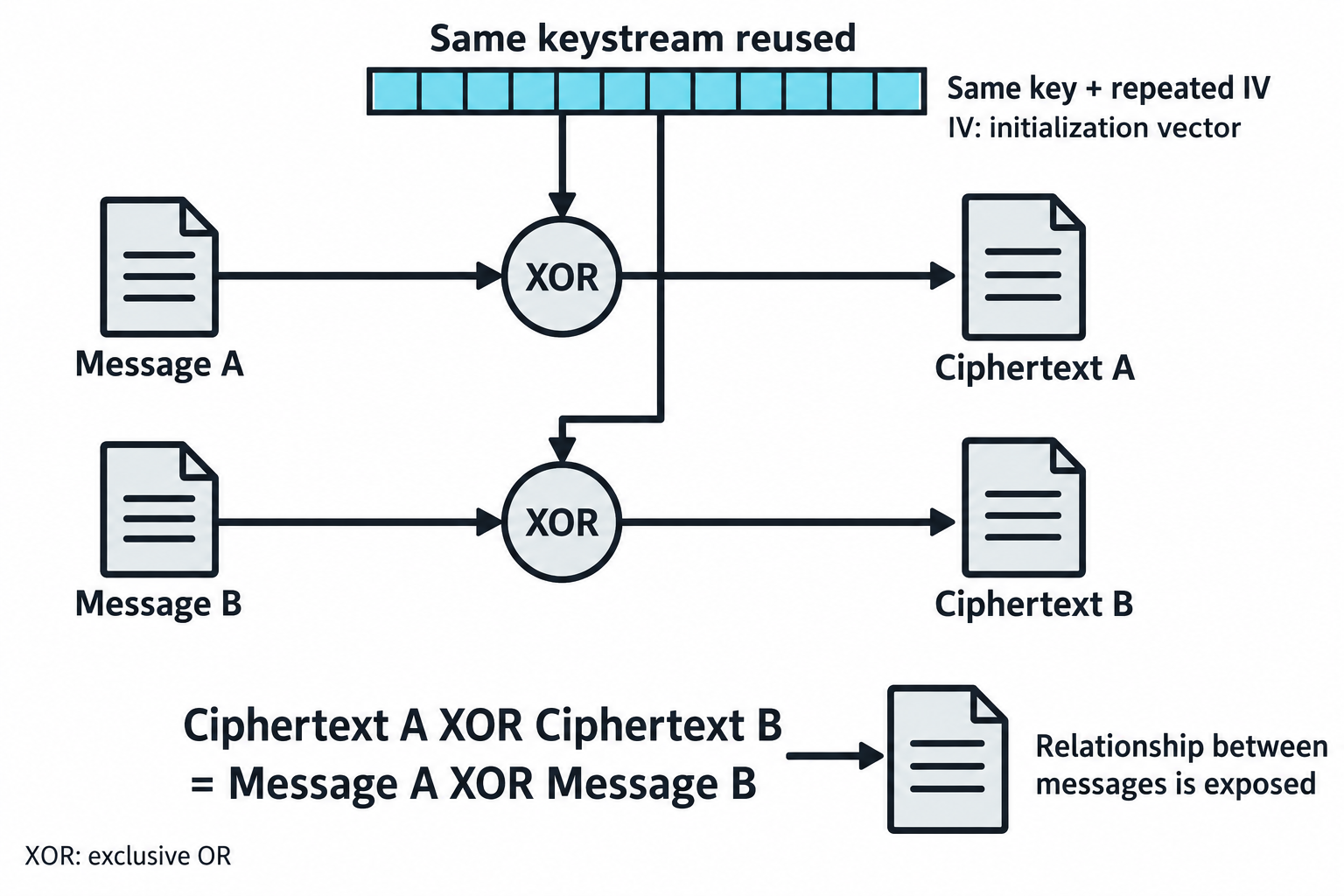
Figure 11.7: Reusing a keystream exposes a mathematical relationship between messages.
Open Figure 11.7 at full size (opens in a new tab)
Text description for Figure 11.7
A keystream is the sequence of bits combined with a message during stream encryption. WEP derives it from a secret key and an initialization vector (IV). If the same key and IV produce the same keystream for two messages, exclusive OR (XOR), a bitwise operation, cancels that shared stream when the ciphertexts are combined. The result is Message A XOR Message B. This reveals a relationship between messages rather than automatically revealing both plaintexts. Known or predictable content can provide additional leverage. Actual WEP key-recovery methods also exploit weaknesses in key scheduling and statistical patterns.
WPA/WPA2 Handshake Attacks
WPA2 Pre-Shared Key (PSK) protection relies on the passphrase. An attacker captures the WPA handshake (4-way EAPOL exchange) and performs offline dictionary attacks.
Handshake capture:
airodump-ng -c 6 -b aa:bb:cc:dd:ee:ff -w handshake-capture wlan0mon
# Wait for natural handshake or force one with deauth
aireplay-ng --deauth 10 -a aa:bb:cc:dd:ee:ff wlan0mon
Offline dictionary attacks:
hashcat -m 22000 handshake.hc22000 /usr/share/wordlists/rockyou.txt
# Or with rule-based mutation
hashcat -m 22000 handshake.hc22000 wordlist.txt -r /usr/share/hashcat/rules/d3ad0ne.rule
The success of these attacks depends on password complexity. Weak passphrases are cracked in minutes; strong ones resist offline attacks indefinitely.
Rainbow tables are pre-computed hashes for common SSIDs and passwords. Tools like Asleap and online services offer pre-computed WPA hashes, allowing instant lookup if the password is in the table.
Mask attacks narrow the search space to likely passwords:
hashcat -m 22000 handshake.hc22000 -a 3 '?l?l?l?l?d?d?d?d'
# Searches: 4 lowercase letters + 4 digits (common password pattern)
Figure 11.8 shows why a captured WPA2-Personal exchange can support password guessing without submitting each guess to the access point.
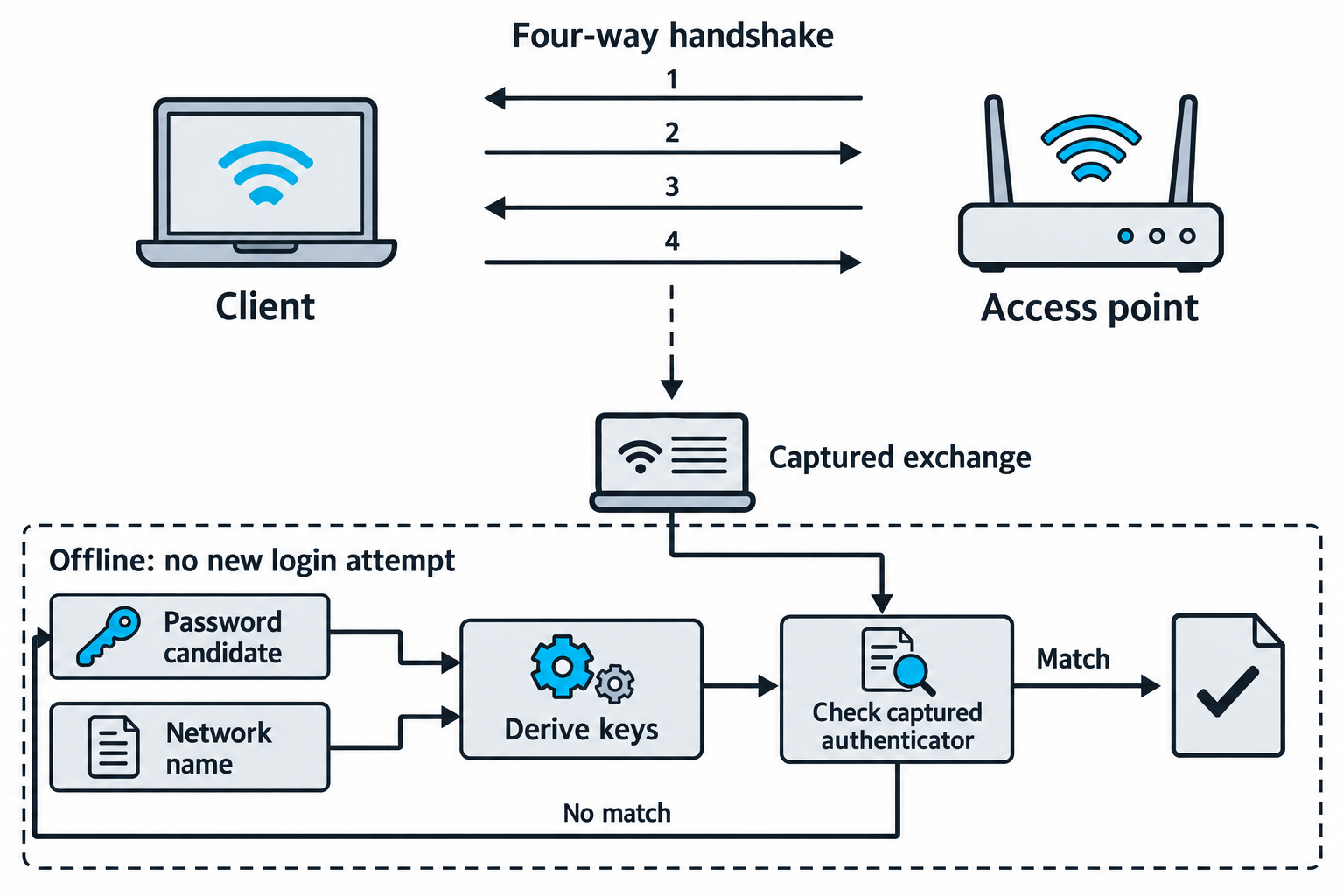
Figure 11.8: A suitable WPA2-Personal capture supplies verification material for offline password candidates.
Open Figure 11.8 at full size (opens in a new tab)
Text description for Figure 11.8
Wi-Fi Protected Access 2 (WPA2) Personal derives key material from a pre-shared secret. The upper exchange contains four messages alternating between access point and client, beginning at the access point. The password itself is not sent as readable text. A suitable capture supplies values and an authenticator, a cryptographic value used to check integrity. In the lower flow, the network name and a password candidate feed key derivation. The derived material and captured values let the tool test the authenticator. A mismatch leads to another password candidate while the network name stays constant. A matching candidate can validate the guess. Capture quality, password choice, and available computation determine feasibility. See Aircrack-ng: WPA/WPA2 capture and offline checking.
WPA2 Enterprise Attacks
WPA2 Enterprise uses 802.1X authentication with a RADIUS server. Instead of a preshared key, users authenticate with username and password (or certificate).
An attacker sets up a rogue RADIUS server that the legitimate AP never contacts. Instead, clients connect to the attacker's network and authenticate to the rogue server:
hostapd -dd wpa2-enterprise-config.conf
# Attacker's hostapd acts as legitimate AP
# Clients attempt 802.1X authentication to attacker's rogue RADIUS server
The rogue RADIUS server:
- Accepts connections from any user with any password (or with hardcoded credentials).
- Either downgrades the authentication method (EAP-MD5 is weaker than EAP-TLS) or logs credentials.
- Establishes the wireless session, giving the attacker network access.
Victims believe they connected to the legitimate network and authenticated with their real credentials, but the credentials went to the attacker.
Figure 11.9 focuses on server identity checks during certificate-based or tunneled enterprise authentication.
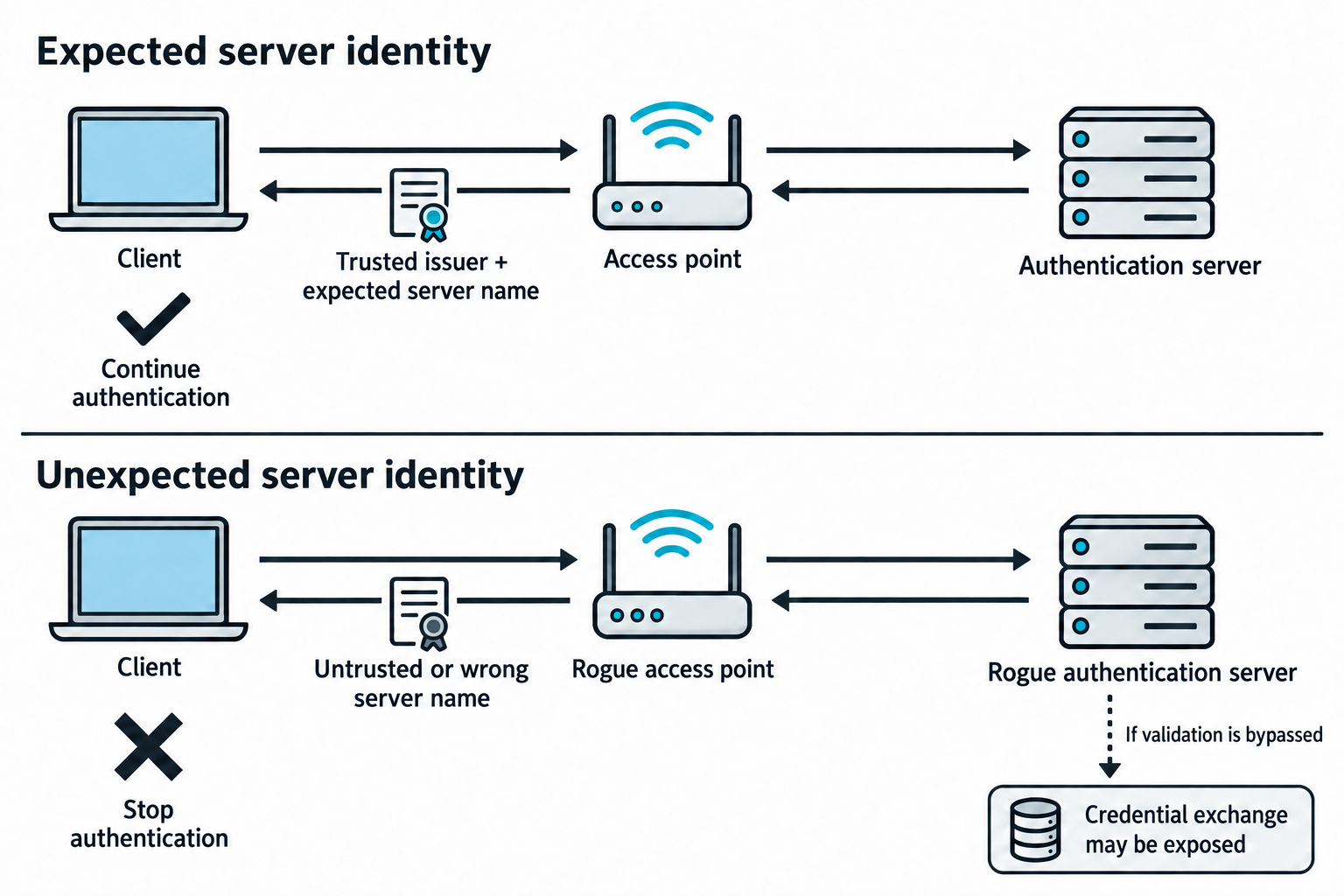
Figure 11.9: Checking the authentication server's certificate helps prevent a client from trusting a rogue enterprise network.
Open Figure 11.9 at full size (opens in a new tab)
Text description for Figure 11.9
In the upper path, the access point carries authentication messages between the client and the expected authentication server. The client checks the server certificate's trust chain and expected server name before continuing. In the lower path, a rogue access point carries messages to a rogue server. A correctly configured client stops when server identity validation fails. If the client bypasses that validation, the rogue service may collect credential material, depending on the authentication method. This might be challenge-response material rather than a plaintext password. Connecting to the rogue network does not itself grant the attacker access to the legitimate internal network. See Microsoft: EAP authentication and server validation.
WPA3 Attacks
WPA3 uses Simultaneous Authentication of Equals (SAE) instead of the pre-shared key (PSK) handshake. SAE is more resistant to brute-force attacks because failed authentication attempts are slowed, and the handshake is more complex.
However, WPA3 implementations have vulnerabilities:
- Dragonblood attack: Exploits implementation flaws in SAE to recover the password.
- Side-channel attacks: Timing analysis on password handling reveals information about the password.
Current WPA3 implementations are relatively secure, but older implementations may be vulnerable.
Figure 11.10 compares passive-capture password guessing in WPA2-Personal with correctly implemented WPA3-Personal Simultaneous Authentication of Equals (SAE).
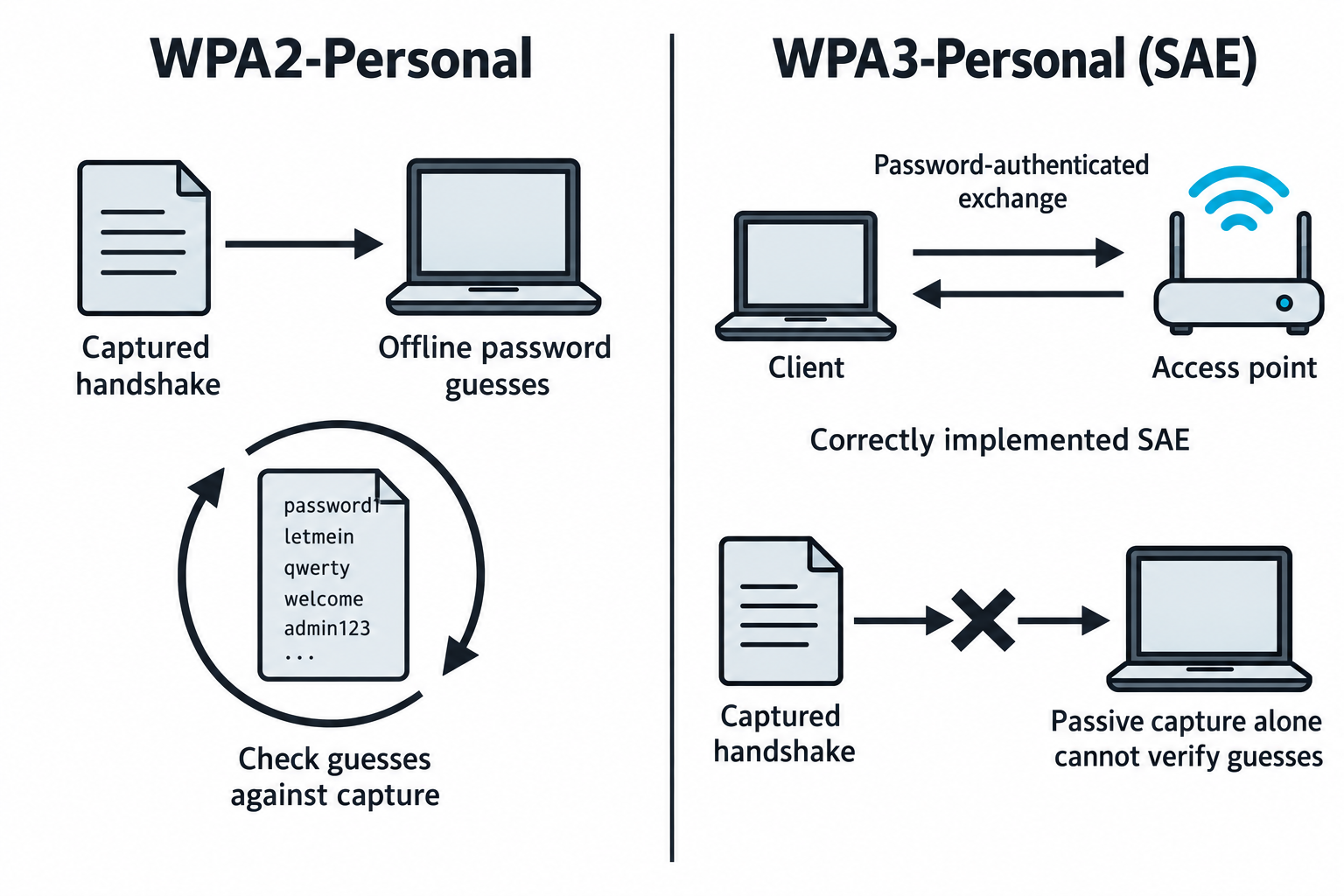
Figure 11.10: SAE resists verifying password guesses from a passive capture alone.
Open Figure 11.10 at full size (opens in a new tab)
Text description for Figure 11.10
The left side shows repeated password candidates checked against a WPA2-Personal capture. The listed words are illustrative weak candidates, not recovered credentials. The right side shows a password-authenticated exchange between a client and access point using SAE. A passive observer cannot use that capture alone to verify guesses in the same way. WPA3-Personal still uses a subsequent four-way handshake to establish traffic keys. Active guessing, transition-mode choices, and implementation flaws require separate analysis, so this protection does not establish immunity to every attack. See Wi-Fi Alliance: WPA3 security considerations.
11.4 Physical Security Attacks
Physical access to a facility opens attack vectors that bypass digital controls entirely.
Tailgating and Piggybacking
Tailgating (piggybacking) means following an authorized person through a secured door without presenting credentials. The attacker appears as a colleague, holds the door, and enters the facility.
Variations include:
- Holding the door: Following closely behind a legitimate employee.
- Pretext: Claiming to be a contractor, delivery person, or new employee.
- Escape route reconnaissance: Identifying doors that open from the inside without card readers.
Tailgating requires minimal technical skill but maximum social engineering. It works because security is not a priority for most employees, and they do not want to appear rude.
Figure 11.11 shows how a successful badge check can admit an additional person whose identity was never checked.
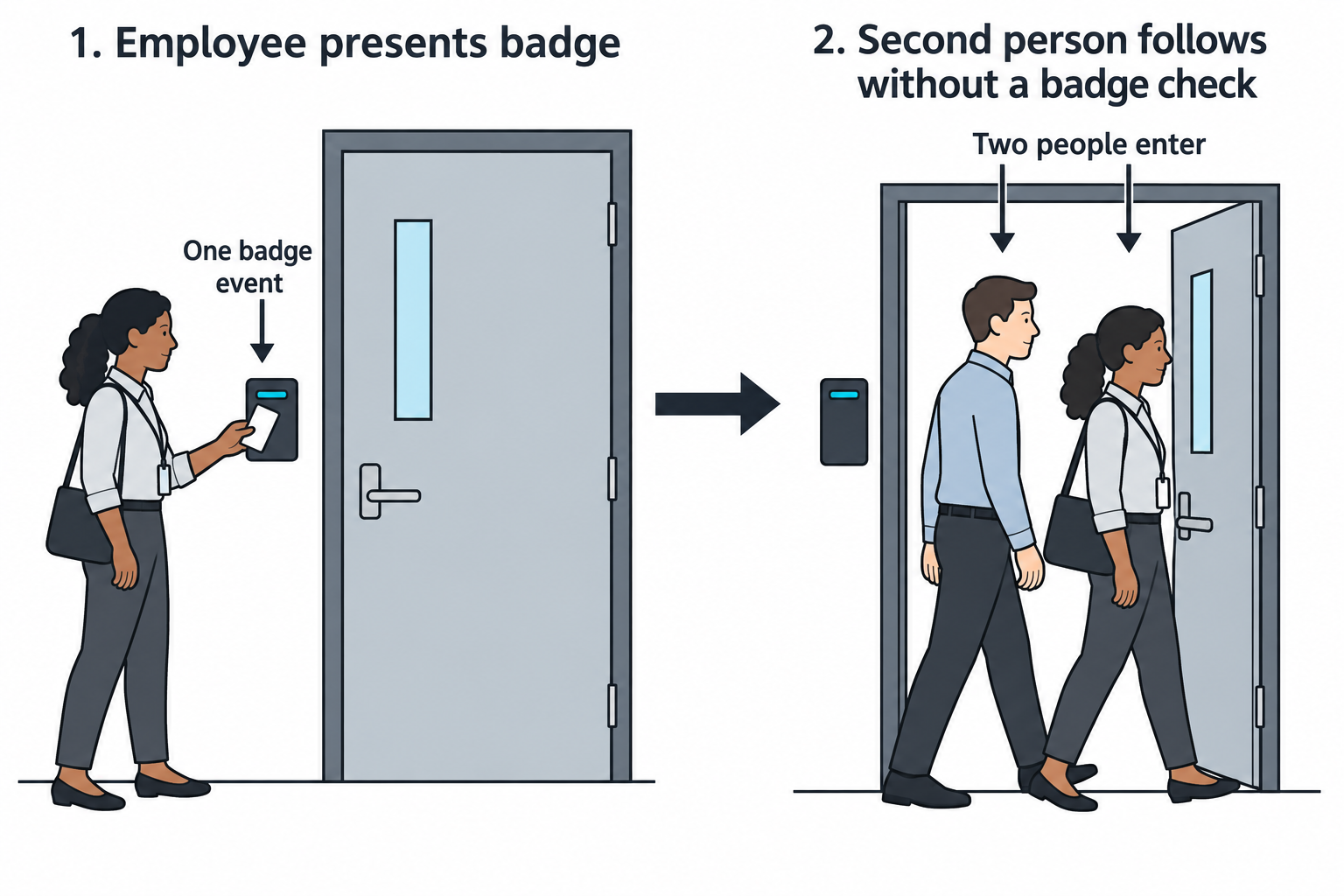
Figure 11.11: Tailgating creates a mismatch between the recorded badge event and the people who enter.
Open Figure 11.11 at full size (opens in a new tab)
Text description for Figure 11.11
In the first scene, an employee presents a badge to the door reader. In the second scene, the employee proceeds through the opening while a second person follows without a separate check. The reader records one badge event even though two people pass through. The figure illustrates why an access log alone may not establish the number or identity of everyone who entered.
Badge Cloning
RFID and proximity cards operate on specific frequencies (usually 125 kHz for older cards, 13.56 MHz for newer ones). An attacker reads the card's unique identifier (UID) and clones it to a blank card.
An attacker walks into the facility with a cloned badge. If the badge reader only checks the UID (and not a certificate or additional authentication factor), the clone is indistinguishable from the original.
Modern cards use cryptographic authentication that makes cloning harder, but many facilities still use weaker systems.
Figure 11.12 compares checking a static badge identifier with checking a response calculated using a secret key.
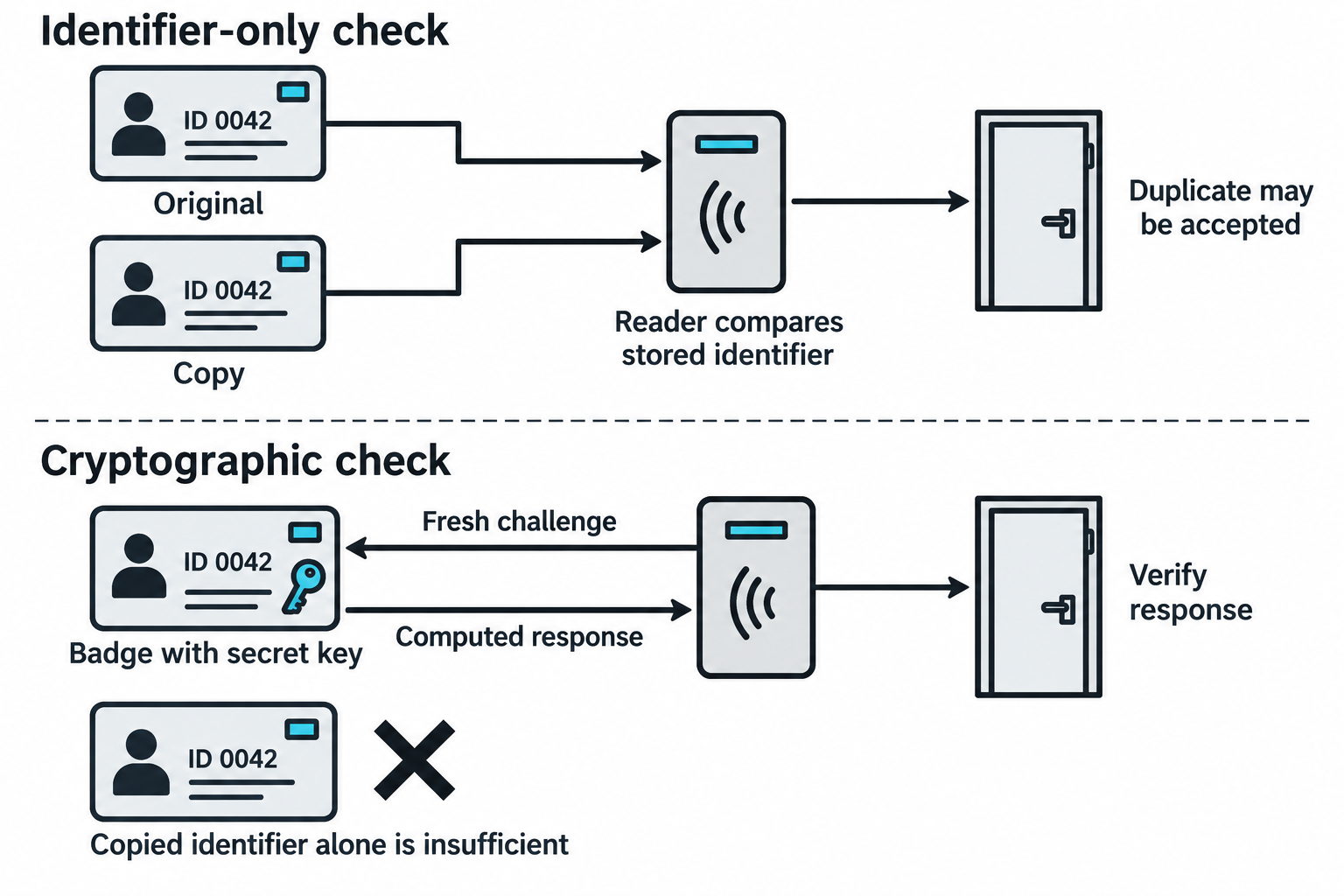
Figure 11.12: The information a reader verifies determines whether copying an identifier can reproduce access.
Open Figure 11.12 at full size (opens in a new tab)
Text description for Figure 11.12
In the upper lane, the original and copy both display the fictional identifier ID 0042. A simplified reader that checks only that identifier may accept either one. In the lower lane, the reader sends a fresh challenge to the badge. A badge with the required secret calculates a response, and the access-control system verifies it. Merely copying a visible or transmitted identifier does not supply that secret. The diagram is a conceptual comparison, not a claim that every badge, radio frequency, or reader uses one universal protocol.
Lock Picking
Specific authorization required
Physical penetration testing, including lock picking, requires explicit written authorization in the Rules of Engagement (RoE), the document that defines the assessment's permitted activities and limits. The RoE must identify the approved locations, specific doors or locks, allowed techniques, testing times, and stop conditions. General permission to conduct a penetration test does not authorize physical entry or lock manipulation. If an activity or target is unclear or omitted, obtain written clarification before proceeding.
Pin tumbler locks (the most common type) can be picked by manipulating the lock pins to align with the shear line. An attacker with lock picks applies tension and lifts pins individually until the lock opens.
Lock picking requires practice but is a learnable skill. Some locks are particularly weak:
- Master key systems: Many master keys share commonalities that make them predictable.
- Simple designs: Cheap locks have minimal security, opening in seconds.
- Worn locks: Locks worn by frequent use have reduced precision, making picking easier.
More sophisticated attacks bypass locks entirely:
- Shimming: Sliding a thin piece of metal (shim) into the lock to move the bolt.
- Lock bumping: Using a specially cut "bump key" and striking it to align pins.
- Bypass via hinges: Removing hinge pins from doors that open inward.
Figure 11.13 shows the mechanical relationship between lock pins and the shear line, the boundary between the fixed housing and the rotating plug.
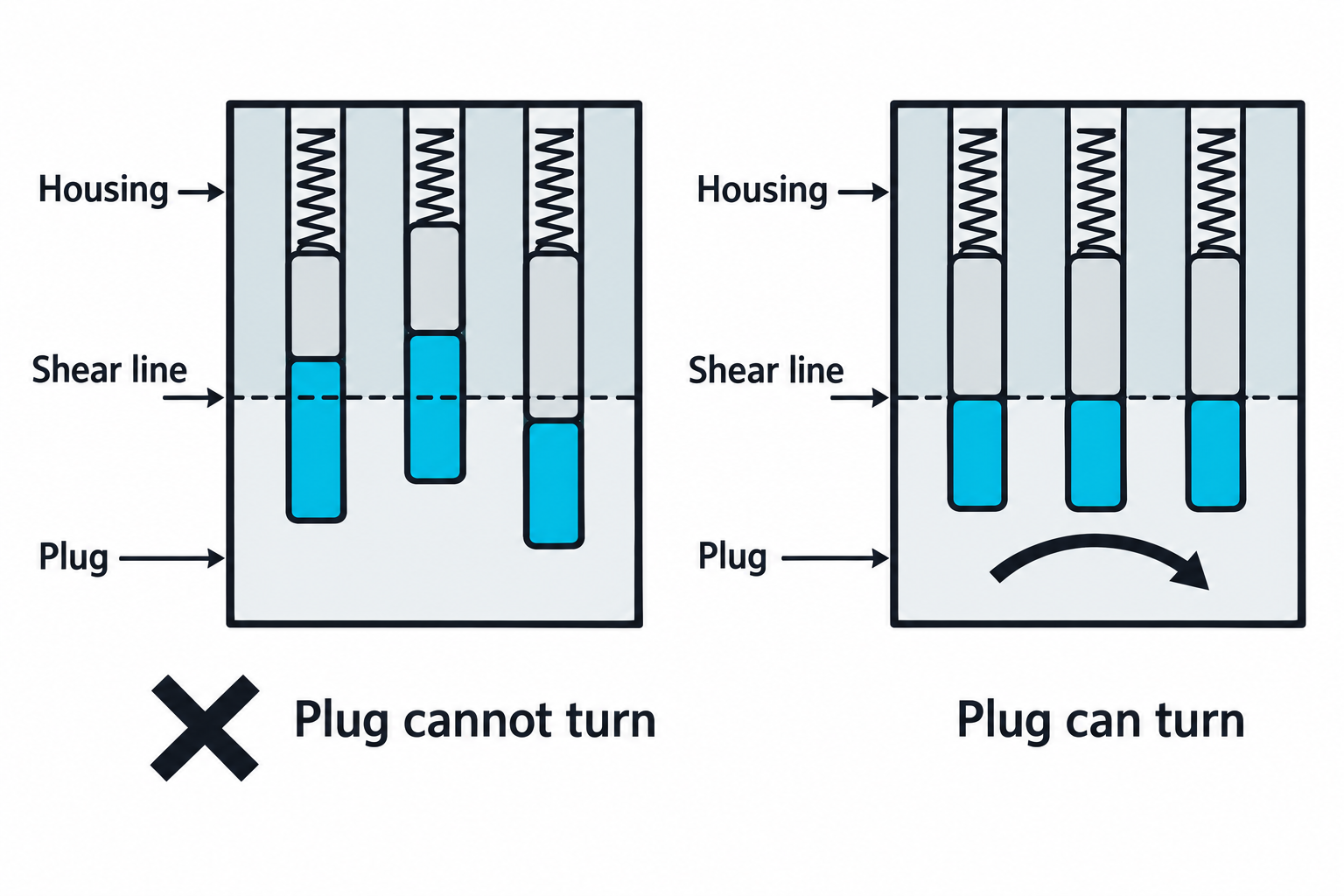
Figure 11.13: Pins that cross the shear line block rotation; aligned pin joints allow the plug to turn in this simplified mechanism.
Open Figure 11.13 at full size (opens in a new tab)
Text description for Figure 11.13
Both schematic views contain three pin stacks held down by springs. The housing remains fixed while the plug would rotate. On the left, solid parts of pins cross the dashed shear line, preventing that rotation. On the right, the joint between the two pieces of each pin stack aligns with the shear line. The plug can then turn. The drawing explains the basic alignment condition and omits many details of real locks.
USB Drop Attacks and Payload Delivery
An attacker leaves USB drives in parking lots, lobbies, or common areas. An employee finds the USB drive and plugs it into a company computer, executing the attacker's payload.
Effective USB payloads:
- Autorun capability: Windows systems automatically execute
autorun.inf, which can launch executables. - Badusb / Rubber ducky: A programmable USB device that emulates a keyboard, typing commands at high speed.
- Staged payloads: The USB executes a simple script that downloads and executes more sophisticated malware.
An attacker tracks deployed USBs by embedding a beacon that calls home, confirming execution.
Figure 11.14 follows a USB device found in a parking lot and separates two ways it could lead to code execution. Universal Serial Bus (USB) devices can present different device types to a computer.
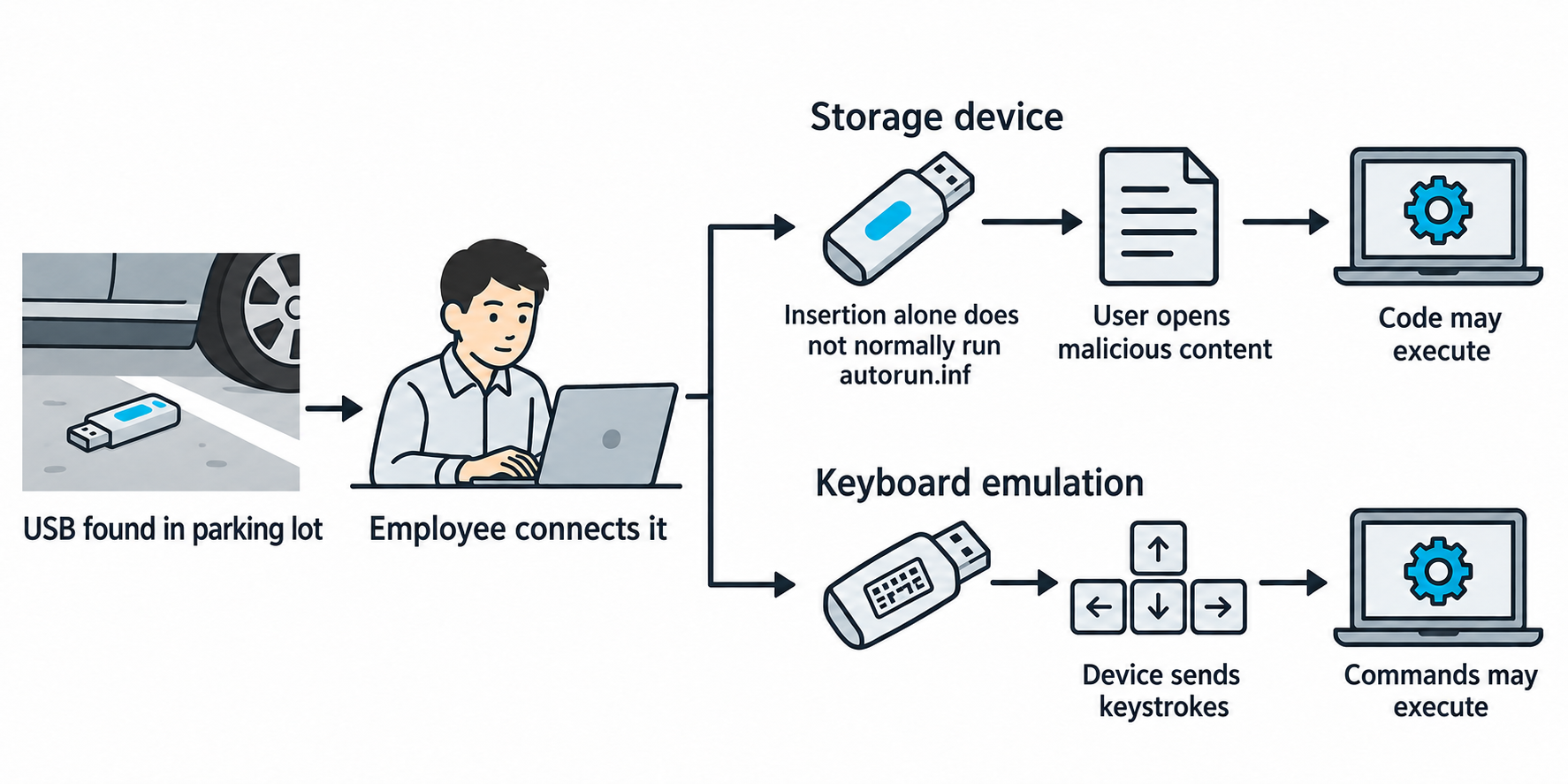
Figure 11.14: A parking-lot USB drop can deliver malicious files or emulate a keyboard, with different requirements for execution.
Open Figure 11.14 at full size (opens in a new tab)
Technical clarification: modern Windows does not normally execute autorun.inf from an ordinary USB flash drive merely because it is inserted. File execution, a vulnerability, or a different device behavior such as keyboard emulation supplies a separate mechanism.
Text description for Figure 11.14
The left scene shows a USB device on parking-lot pavement beside a car. An employee connects it to a computer. In the upper branch, the device presents storage containing malicious content. The illustrated path requires the user to open that content and an execution mechanism to succeed. In the lower branch, the device presents itself as a keyboard and sends keystrokes. Whether those inputs execute commands depends on the computer's state, permissions, and controls. The exterior shape of the device does not reliably identify the functions it presents. See Microsoft: AutoRun changes for USB media.
Dumpster Diving
Dumpster diving recovers discarded materials containing sensitive information:
- Documents: Unshredded papers containing credentials, architecture diagrams, or policy information.
- Hardware: Discarded computers with drives that were not properly destroyed.
- Credentials: Sticky notes with passwords, badge numbers, or PIN codes.
Many organizations inadequately destroy sensitive materials, making dumpster diving a surprisingly effective recon technique.
Figure 11.15 follows information that can remain in discarded documents and retired storage devices.
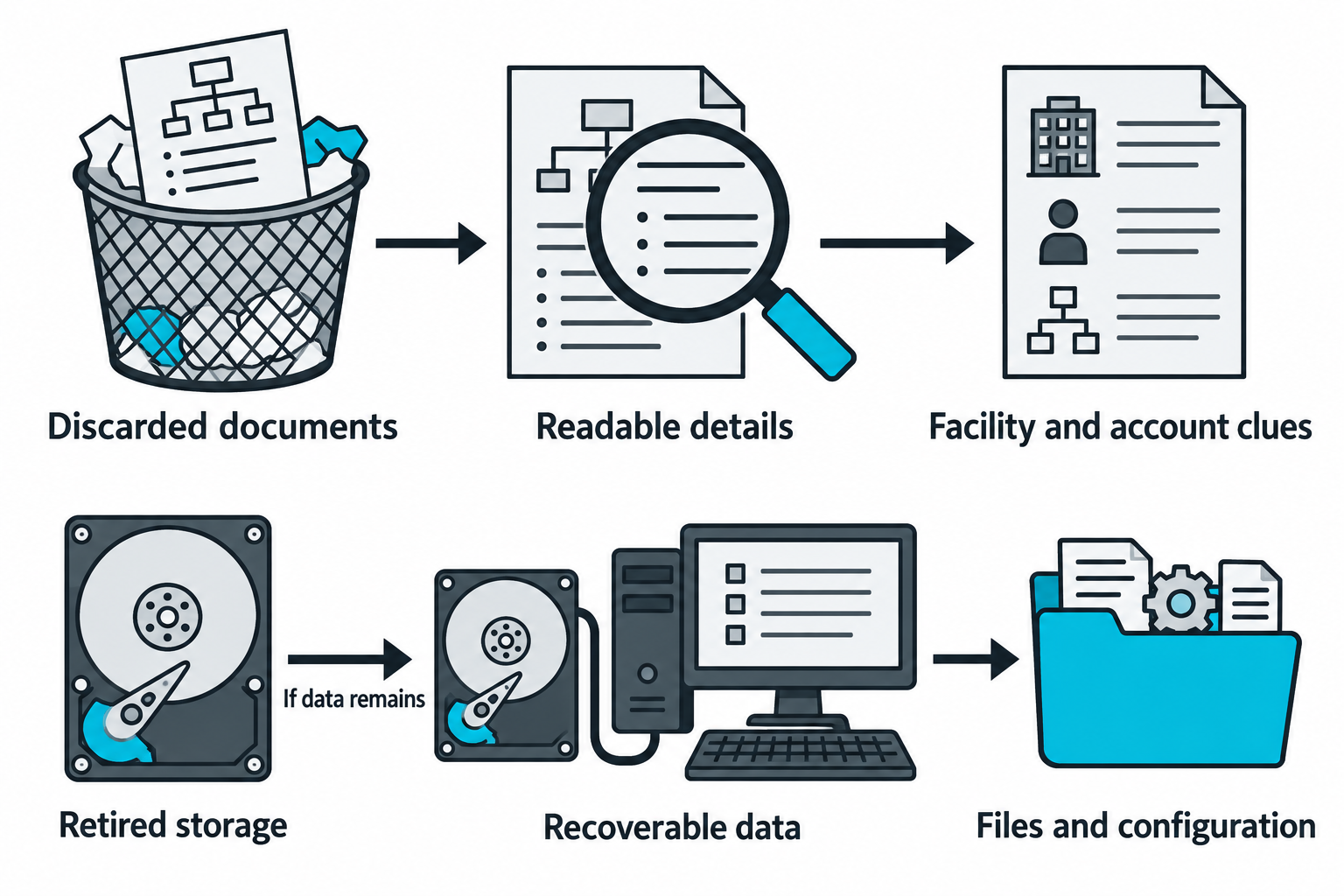
Figure 11.15: Readable documents and residual storage data can reveal operational information after disposal.
Open Figure 11.15 at full size (opens in a new tab)
Text description for Figure 11.15
The upper lane follows discarded documents to readable details and then to clues about facilities or accounts. The lower lane follows a retired storage device to examination and possible recovery of files and configuration. Recovery depends on what remains accessible, including whether sanitization, encryption, damage, or destruction prevents access. The symbols represent categories of information and contain no real account data.
11.5 Wireless Tools and Techniques
Wireless Scanning and Analysis Tools
Aircrack-ng suite is the foundational wireless auditing toolkit:
- airodump-ng: Passive wireless network and client discovery.
- aireplay-ng: Packet injection and attack execution (deauth, handshake capture, etc.).
- aircrack-ng: WEP and WPA/WPA2 password cracking.
- airdecap-ng: Decrypting captured wireless traffic if the password is known.
Kismet performs passive discovery and provides GPS logging and heatmapping. It is ideal for wardriving and understanding wireless coverage.
inSSIDer (Windows/Mac) provides a GUI for wireless network discovery and channel analysis.
WiFi-Pumpkin provides a full framework for rogue AP deployment, captive portal hosting, and credential harvesting.
WiGLE (Wireless Geographic Logging Engine) is a crowdsourced wireless network database. Searching WiGLE reveals what networks exist at a target location, their security, and historical changes.
Specialized Wireless Tools
Reaver and Bully perform WPS PIN attacks with Pixie Dust support.
Hashcat and John the Ripper perform GPU-accelerated and distributed password cracking on captured handshakes.
Scapy (Python library) allows custom wireless frame creation for protocol fuzzing and advanced attacks.
Physical Security Tools
Proxmark3 reads, analyzes, and clones RFID and NFC cards.
HackRF is a software-defined radio (SDR) for RF analysis and signal manipulation. Advanced attackers use SDRs for wireless protocol reverse engineering and signal analysis.
Lock pick sets range from basic practice locks to professional sets for complex locks.
11.6 Integrating Physical and Wireless Findings
Situational Awareness and Attack Planning
Wireless and physical findings together reveal the complete attack surface:
- Signal strength mapping combined with physical layout: Understanding where wireless signals are strong reveals the best position for a rogue AP. A strong signal from the parking lot indicates a poor facility design with wireless bleeding outside the perimeter.
- Access control points and camera coverage: Physical reconnaissance maps where badge readers and cameras are located. Combining this with wireless AP locations reveals blind spots where an attacker could position a rogue AP out of sight.
- Client device enumeration: Analyzing probe requests reveals which devices are in the facility and which SSIDs they trust. This informs evil twin setup and captive portal targeting.
Multi-Stage Physical-to-Wireless Attack Chains
A complete attack scenario:
- Wardriving reconnaissance: Map wireless networks and identify a target network with weak security (open, WPA2-PSK with weak password).
- Physical site survey: Walk the facility to understand access points, badge readers, and camera coverage. Identify tailgating opportunities.
- Evil twin deployment: Set up a rogue AP in a nearby parking lot with the same SSID as the target network, with stronger signal to attract clients.
- Deauthentication attack: Force clients off the legitimate AP onto the rogue AP.
- Credential harvesting: Display a fake login portal to capture credentials or MITM encrypted traffic.
- Physical access: Using harvested credentials or by tailgating, enter the facility. Plant a USB drop with a reverse shell payload in a common area.
- Employee activation: An employee plugs in the USB, executing the payload and establishing a reverse shell.
- Internal network access: From the reverse shell, scan the internal network, identify critical systems, and escalate.
Each step independently provides value; chained together, they move an external attacker to internal network access.
Figure 11.16 condenses the chapter's scenarios into two illustrative paths and marks conditions that can stop progression.
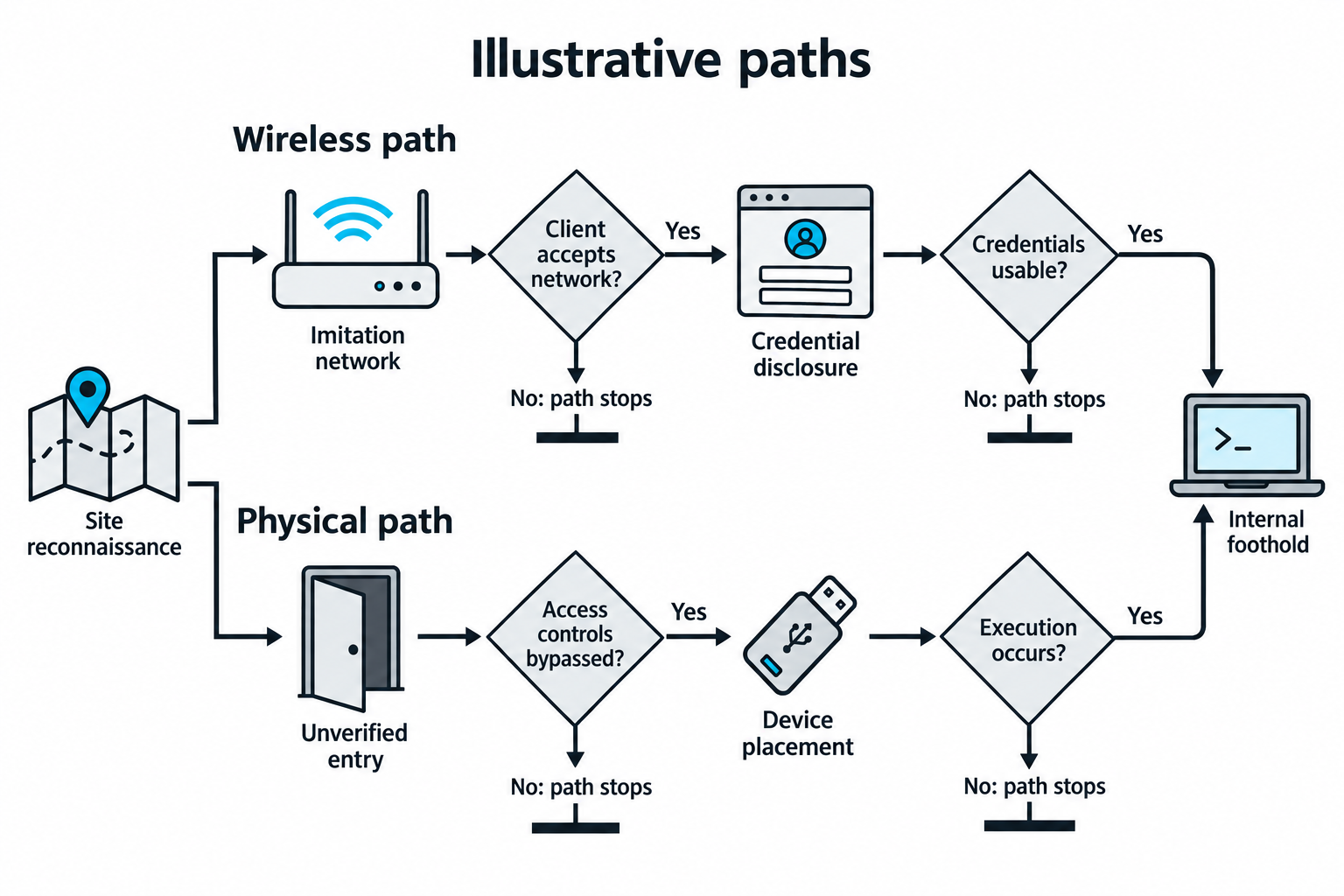
Figure 11.16: Wireless and physical paths can lead to an internal foothold only when their intermediate conditions succeed.
Open Figure 11.16 at full size (opens in a new tab)
Text description for Figure 11.16
Both paths begin with site reconnaissance. The wireless path proceeds from an imitation network through client acceptance and a separate credential-disclosure event. The next condition asks whether those credentials are usable for the intended access. The physical path proceeds through an entry-control failure and device placement, then asks whether execution occurs. Each decision includes a stopping branch. An internal foothold means an initial ability to operate inside the network. It does not establish administrative privileges, unrestricted movement, or persistence. The figure omits many intermediate checks, including whether phishing succeeds and whether additional authentication is required.
11.7 Scope and Authorization for Physical and Wireless Testing
Physical and wireless testing require explicit authorization that differs from standard penetration testing rules of engagement.
Rules of Engagement for Physical Testing
- Explicit written authorization: Physical testing must be explicitly approved in the statement of work (SoW). "Penetration testing" without explicit mention of physical testing does not authorize it.
- Insurance and liability: Confirm that the engagement is covered by appropriate insurance. Some activities (lock picking, tailgating) carry legal risk.
- Local law enforcement notification: Depending on jurisdiction and activity, law enforcement might need to be notified to avoid police response during the engagement.
- Scope boundaries: Define which facilities, buildings, floors, or areas are in scope. Specify whether restricted areas (executive offices, server rooms) are authorized.
- Time windows: Define when testing can occur (business hours, after hours, weekends). Specify whether employees will be informed or if the test is covert.
- Escalation procedures: Define what to do if a tester is confronted. Should they identify themselves, call a contact number, or attempt to leave? This prevents dangerous situations.
Figure 11.17 connects approved locations and networks to the written methods, times, and stop conditions for an assessment.
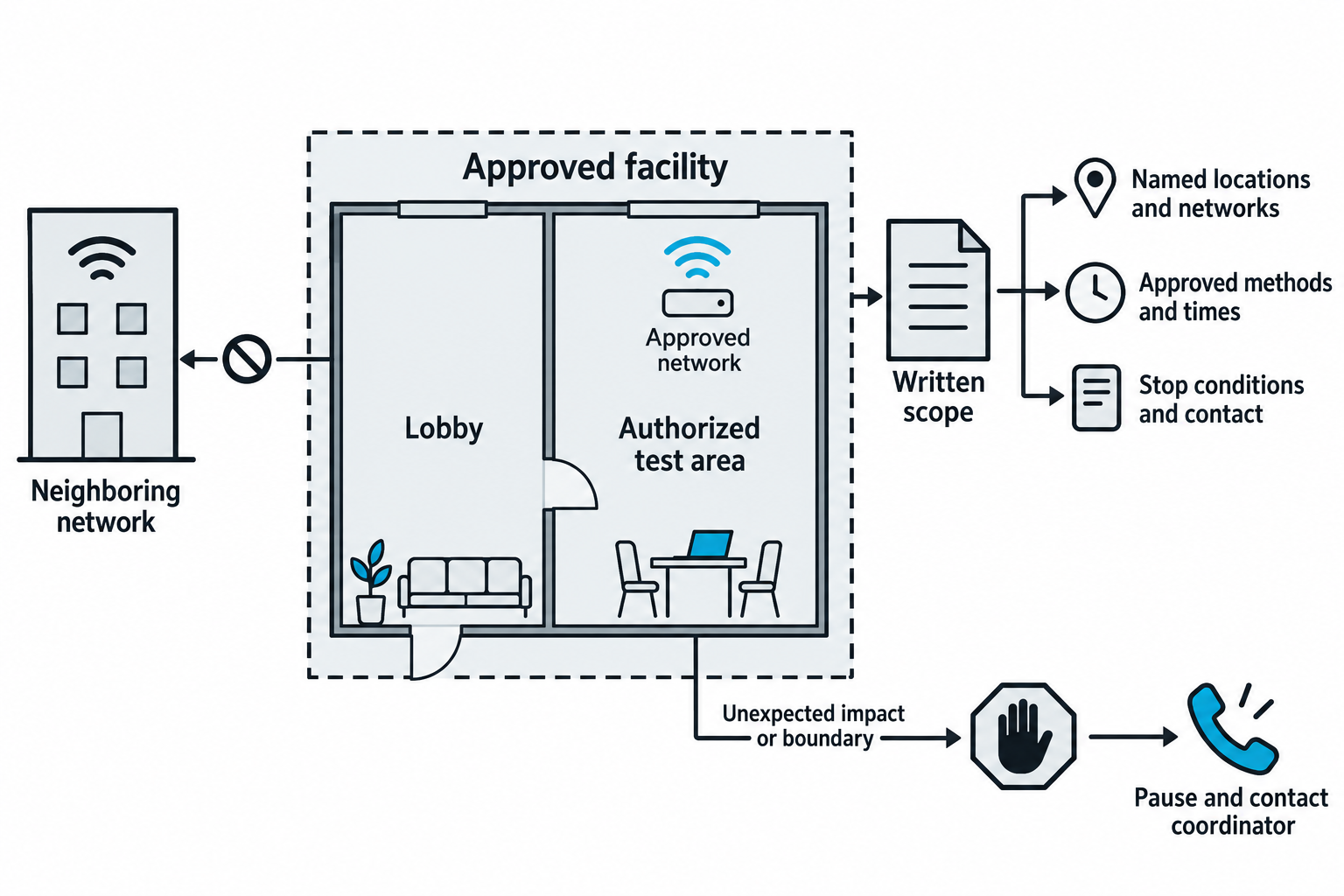
Figure 11.17: Physical proximity and radio reach must stay within the engagement's documented testing boundaries.
Open Figure 11.17 at full size (opens in a new tab)
Text description for Figure 11.17
The dashed boundary identifies the approved facility. Inside are a lobby, an authorized test area, and an approved network. The neighboring network sits outside the boundary and has a barred path. Written scope identifies named locations and networks, approved methods and times, and stop conditions with a contact. An unexpected effect or uncertain boundary leads to pausing and contacting the coordinator. Being able to reach a signal or enter a space does not add it to the approved scope.
Reporting Physical and Wireless Findings
Physical and wireless findings require clear contextualization in the final report:
- Risk chain analysis: Explain how physical findings enable wireless attacks and vice versa.
- Remediation guidance: Prioritize physical controls (stronger badges, better access control) vs. wireless controls (WPA3, enterprise authentication) vs. procedural controls (employee awareness training).
- Evidence and documentation: Physical testing can include photographs of vulnerabilities, but always with client permission.
- SoW and RoE alignment: Ensure all findings stay within the agreed scope and rules of engagement.
Warning
Physical penetration testing carries real legal risk. Trespassing, lock picking without permission, and badge cloning may violate local laws. Always operate under explicit client authorization with clear scope boundaries. If confronted by security or law enforcement, have a point of contact available who can confirm the engagement.
Analyst Perspective
Physical and wireless testing is most effective when combined with social engineering. An attacker who can convince an employee to hold a door (or tailgate) gains access far more easily than picking locks. Similarly, a wireless attack combined with a well-crafted phishing email about "network updates" tricks users into connecting to a rogue AP. The most dangerous attacks blend technical and human factors.
Chapter Summary
- Wireless reconnaissance (wardriving, site surveys) identifies networks, signal coverage, and security posture. Passive methods provide initial data; active surveys refine understanding.
- Evil twin attacks attract clients to rogue APs, enabling packet capture, credential harvesting, and man-in-the-middle attacks.
- Deauthentication attacks force handshake capture, enabling offline dictionary attacks on WPA/WPA2 networks.
- WPS attacks (PIN brute-force, Pixie Dust) bypass WPA2 when WPS is enabled.
- WPA2 Enterprise attacks target RADIUS servers with rogue APs and credential harvesting.
- Physical attacks include tailgating, badge cloning, lock picking, and USB drops, requiring on-site presence.
- Integration of wireless and physical findings enables multi-stage attack chains from external reconnaissance to internal persistence.
- Scope and authorization for physical testing require explicit approval, clear boundaries, and escalation procedures to manage legal and safety risks.