CH13: Automation, Orchestration, and AI in Security Operations
Introduction
Automation and orchestration have become foundational to modern security operations. The sheer volume of security events, the complexity of threat landscapes, and the scarcity of skilled security personnel mean that organizations cannot rely on manual response to threats. Large enterprises process hundreds of thousands of security alerts daily. Without automation, most of these alerts would remain unexamined. This chapter examines how security automation and orchestration platforms accelerate incident response, reduce human error, and extend the effectiveness of small security teams. We also explore the opportunities and risks associated with artificial intelligence and machine learning in security operations, and the critical balance between automated decision-making and human judgment.
Learning Objectives
After completing this chapter, you will be able to:
- Distinguish between security automation, orchestration, and integration.
- Evaluate SOAR platforms and design playbook logic for common incident types.
- Apply Infrastructure as Code security principles to automation pipelines.
- Assess AI and ML applications in security operations, including behavioral analytics and anomaly detection.
- Identify human-in-the-loop requirements and design decision frameworks for automated security actions.
13.1 Security Automation Concepts
Security automation refers to the use of software and scripts to perform security tasks without human intervention. Examples include automated vulnerability scanning, log aggregation, patch deployment, and policy enforcement. Automation is the foundation for scaling security operations beyond what human analysts alone can manage.
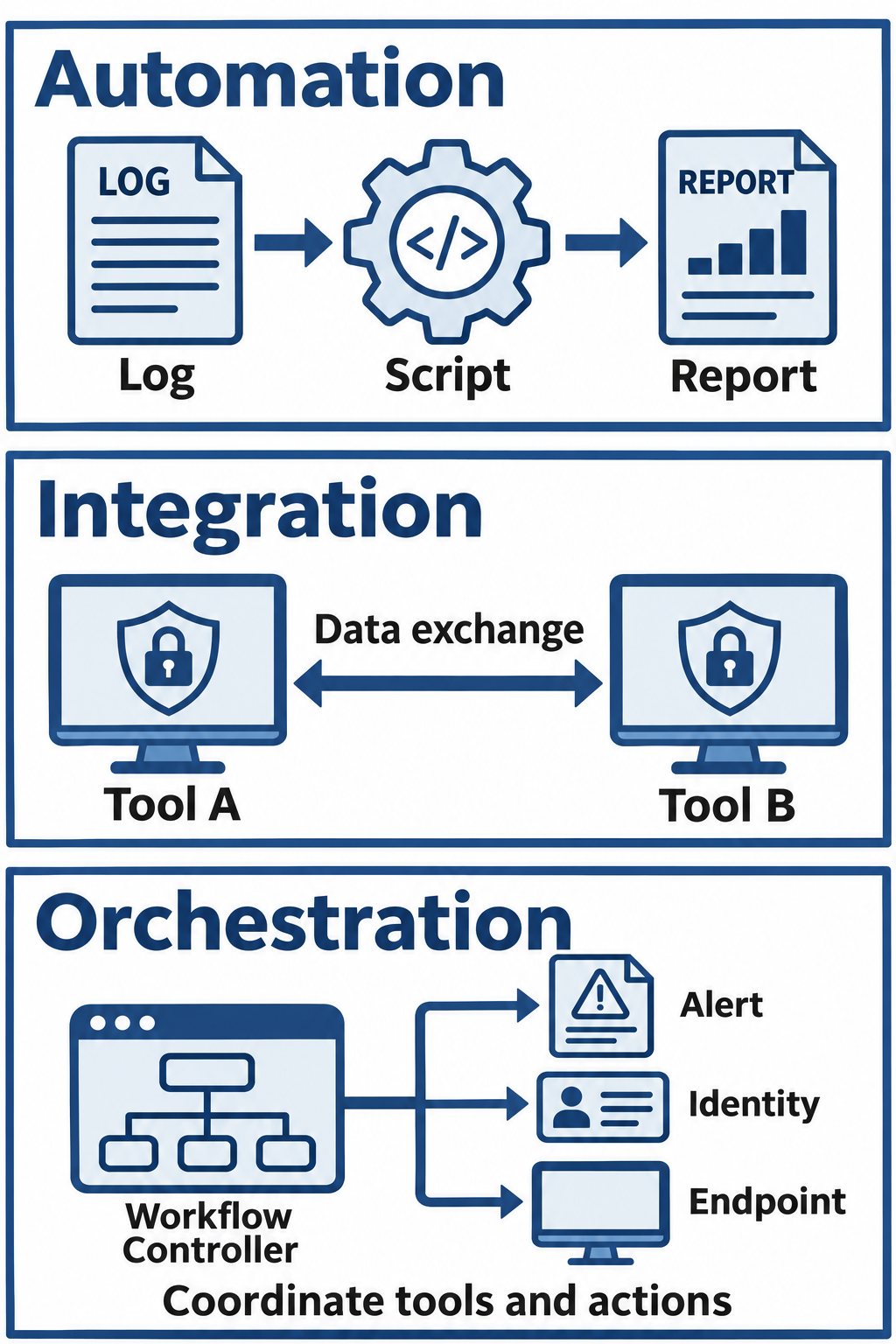
Figure 13.1: Automation, integration, and orchestration contribute different capabilities to a security workflow.
Text description for Figure 13.1
Automation executes a defined task, such as turning log data into a report. Integration connects tools so they can exchange data or commands. Orchestration coordinates those connected tools in a larger workflow. An orchestrated workflow can include both automated actions and human decisions.
Scripting for Security Tasks
Security teams commonly use scripting languages to automate repetitive tasks. A Python script might parse firewall logs to identify suspicious connection patterns by analyzing destination ports, protocol violations, or traffic volume anomalies. A PowerShell script running on Windows systems might enforce security baselines by configuring local policies, disabling unnecessary services, or configuring Windows Defender. Bash scripts on Linux systems accomplish similar tasks through command-line automation.
The value of scripting lies in consistency and speed. A script that takes 30 minutes to write might save 20 hours per month if it eliminates a manual task performed daily. Over time, security teams accumulate libraries of scripts that become operational assets.
Automated Response Mechanisms
Automated response mechanisms take actions based on detected conditions without waiting for human approval. An example is automatically blocking an IP address that has attempted 10 failed SSH login attempts in 5 minutes, triggering a defense against brute-force attacks. Another example is isolating a system from the network when endpoint detection and response (EDR) software detects ransomware behavior like bulk file encryption activity.
The benefits of automation are substantial and measurable:
- Speed: Responses occur in milliseconds rather than minutes or hours. An automated block of a malicious IP prevents further attack attempts during the time a human analyst would be reading an alert.
- Consistency: The same logic is applied every time. Automated policies eliminate the variability that occurs when different analysts interpret the same event differently.
- Scalability: The same automation handles 10 events or 10,000 events without additional human effort. This scalability is essential for organizations processing high alert volumes.
- Reduced analyst fatigue: Automating routine responses frees analysts to focus on complex investigations requiring human judgment.
Trade-offs and Considerations
Automation introduces complexity. Scripts require maintenance as systems change. Automated actions can have unintended consequences. A script that automatically disables user accounts after five failed logins might lock out legitimate users who forget their passwords. Effective security teams carefully consider the cost and impact of automation before implementing it.
13.2 SOAR Platforms: Orchestration and Automation
Security Orchestration, Automation, and Response (SOAR) platforms coordinate security tools and automate response workflows. A SOAR platform differs fundamentally from a Security Information and Event Management (SIEM) system. A SIEM collects, normalizes, and correlates security data from many sources, making it queryable and visual. A SOAR platform consumes that data and orchestrates automated responses across multiple tools.
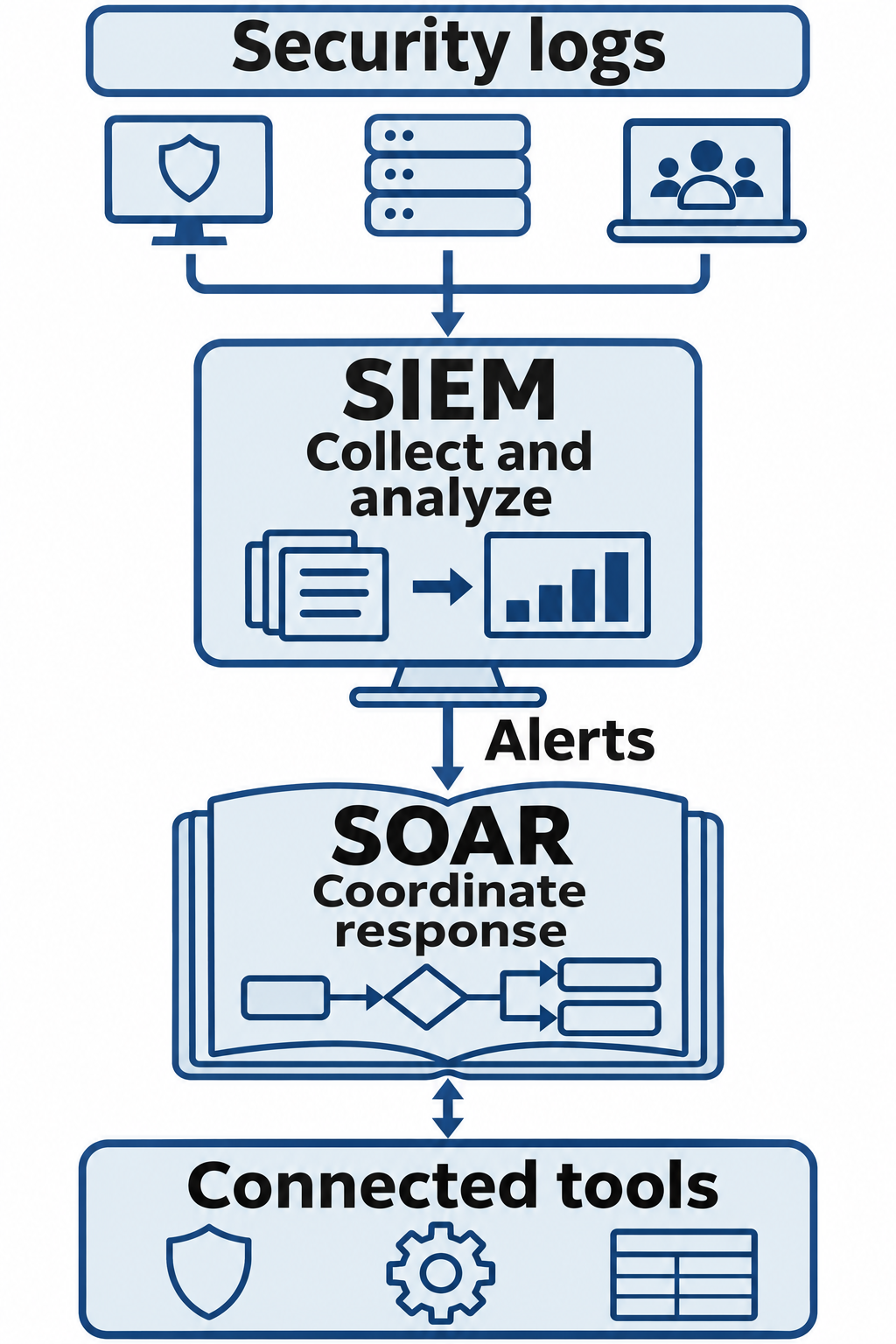
Figure 13.2: Security Information and Event Management (SIEM) organizes and analyzes event data. Security Orchestration, Automation, and Response (SOAR) coordinates response workflows.
Text description for Figure 13.2
Firewall, server, and user activity logs feed SIEM collection and analysis. Alerts can trigger a SOAR playbook, a defined response workflow. The playbook queries connected tools, gathers context, and coordinates approved actions. This diagram separates common functions for teaching; product capabilities can overlap.
Orchestration vs. Automation
Orchestration is the coordination of multiple tools and systems to accomplish a security objective. Rather than each tool acting independently, orchestration creates workflows that span multiple systems. An orchestration workflow might:
- Detect a suspicious login in the SIEM
- Query the endpoint detection and response (EDR) tool for additional process execution on that system
- Query the identity and access management (IAM) system to review the user's role and permissions
- Check the email gateway for suspicious messages sent from that user's account
- Present all enriched findings to a security analyst for decision-making
- If the analyst confirms malicious activity, automatically trigger containment actions across all systems
This coordination requires integration between tools, which is often the most complex part of a SOAR deployment. This is the work of security engineers.
Automation is the execution of actions without human intervention. Continuing the example above, the orchestration workflow could automatically:
- Disable the user's Active Directory account
- Revoke all active sessions across cloud and on-premises systems
- Isolate the user's systems from the network
The distinction matters: orchestration is about coordination, automation is about action.
Playbook Architecture and Logic
SOAR platforms use playbooks (also called workflows or runbooks) that define the sequence of actions to take in response to specific incidents. A playbook is event-driven logic that automates the incident response process. Playbooks are typically created using a visual workflow interface where analysts drag and drop actions and decision logic.
Example: A "Suspicious Login" playbook might implement the following logic:
Trigger: New login detected outside normal geographic location
Step 1: Query EDR for process execution on that system in the last 10 minutes
Step 2: Query SIEM for other login attempts from that IP address in the last 1 hour
Step 3: IF additional suspicious activity detected
        THEN disable user account
        THEN notify security team via Slack
        THEN create high-priority incident
Step 4: If no suspicious activity
        THEN send user a multi-factor authentication challenge
        THEN log the activity for later review
        THEN update the user's login baseline profile
This playbook demonstrates conditional logic. Playbooks can be simple (single action) or complex (dozens of steps with conditional branches). More complex playbooks require careful design to avoid unintended side effects.
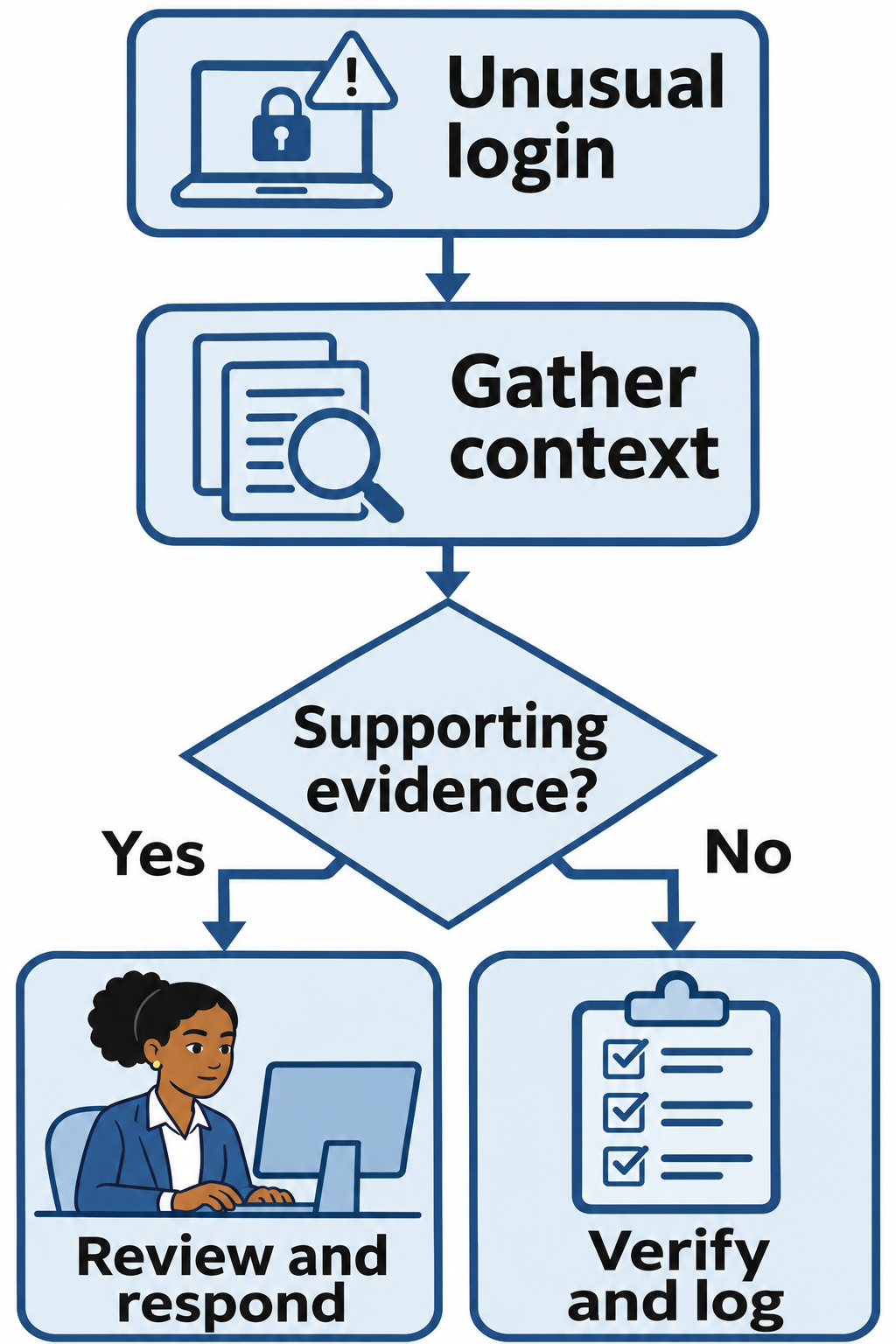
Figure 13.3: A suspicious-login playbook gathers evidence before selecting a response. The response branch applies the organization's approval policy.
Text description for Figure 13.3
The playbook begins with an unusual login and gathers endpoint and login context. Supporting suspicious activity leads to review and response under the organization's policy. If supporting evidence is absent, the workflow verifies the activity and records the result. This is a qualified teaching adaptation: a geographic anomaly alone does not establish compromise, and baseline changes follow validated activity.
SOAR Integration Patterns
SOAR platforms integrate with security tools through APIs or webhooks. Integration can be:
- Inbound: A SOAR platform receives data from external tools (alerts from EDR, events from SIEM)
- Outbound: A SOAR platform sends commands to external tools (disable user in AD, isolate system in EDR)
- Bidirectional: The SOAR platform exchanges data with external tools in both directions
Each integration requires configuration specific to the external tool's API. This is often done through API wrappers or pre-built connectors.
Benefits and Limitations
SOAR platforms reduce the time from detection to response, decreasing dwell time (the amount of time attackers remain undetected in the network). They also improve consistency and reduce alert fatigue by intelligently prioritizing incidents. Security teams can respond to more incidents with fewer analysts.
Limitations are significant. SOAR implementations require substantial expertise and budget. Integrating SOAR with existing tools is often custom development work. The platforms require high-quality, normalized alert data. Poor-quality alerts lead to poor automated responses. Additionally, SOAR doesn't solve the underlying detection problem. If an organization's SIEM has poor detection rules, SOAR will orchestrate responses to weak signals, wasting time on false positives.
13.3 Infrastructure as Code Security Implications
Infrastructure as Code (IaC) is the practice of managing infrastructure (servers, networks, storage, databases) through code and configuration files rather than manual provisioning. Tools like Terraform, CloudFormation (AWS), and Ansible codify infrastructure configuration. This approach enables version control, automation, and repeatability.
Example: A Small CloudFormation Template
Amazon Web Services (AWS) CloudFormation reads a template, a text file that describes resources and their settings. It creates and manages those resources together as a stack. The example below uses YAML, a configuration format that groups related settings through indentation. Lines beginning with # are comments for the reader.
This template defines four resources:
- An Amazon Elastic Compute Cloud (EC2) instance, a virtual server.
- A security group, a set of rules that controls network traffic for the instance.
- An Amazon CloudWatch alarm, a monitoring rule that tracks the server's processor use.
A virtual private cloud (VPC) is an isolated virtual network, and a subnet is an address range within it. An Amazon Machine Image (AMI) supplies the operating system image used to launch the instance. The template uses fixed, illustrative IDs for these resources. An actual deployment would require valid IDs, with the subnet inside the specified VPC and the AMI compatible with the instance type and AWS Region.
# This is CloudFormation's template format version.
AWSTemplateFormatVersion: '2010-09-09'
Description: A small server, security group, encrypted bucket, and alarm.

# Each entry below describes a resource that CloudFormation will create.
# Type selects the AWS resource; Properties contains its settings.
Resources:
  ServerSecurityGroup:
    Type: AWS::EC2::SecurityGroup
    Properties:
      GroupDescription: Security group for the example server
      VpcId: vpc-0123456789abcdef0  # Example ID for an existing network.
      # An empty list allows no new incoming connections.
      SecurityGroupIngress: []
      # With no outbound rules specified, AWS allows outbound traffic.

  ExampleServer:
    Type: AWS::EC2::Instance
    Properties:
      ImageId: ami-0123456789abcdef0  # Example operating system image ID.
      InstanceType: t3.micro  # Choose a small virtual server size.
      SubnetId: subnet-0abcdef1234567890  # Example subnet inside the VPC.
      # Attach this instance to the specific group created above.
      SecurityGroupIds:
        - !Ref ServerSecurityGroup
      # Tags are labels that help people identify resources.
      Tags:
        - Key: Name
          Value: Example-Server

  HighCpuAlarm:
    Type: AWS::CloudWatch::Alarm
    Properties:
      AlarmDescription: Average processor use exceeded 80 percent.
      Namespace: AWS/EC2  # Use measurements supplied by EC2.
      MetricName: CPUUtilization  # Central processing unit (CPU) use.
      # Limit this alarm to the instance created in this stack.
      Dimensions:
        - Name: InstanceId
          Value: !Ref ExampleServer
      Statistic: Average
      Period: 300  # Measure over a five-minute period, in seconds.
      EvaluationPeriods: 1  # One period above the threshold triggers it.
      Threshold: 80
      ComparisonOperator: GreaterThanThreshold
      # The alarm changes state; notification delivery needs extra setup.
This reading example shows how a file connects resource definitions and security settings. A real deployment requires suitable AWS permissions and can incur charges.
Attack Surface of IaC
IaC introduces new security attack surface. If an attacker compromises the configuration management system or the code repository, they can inject malicious infrastructure changes across the entire enterprise. An attacker who modifies a Terraform configuration could:
- Provision thousands of compromised instances in a cloud environment
- Disable security groups that limit network access
- Add backdoor users with administrative privileges to every instance
- Enable public access to sensitive databases
- Modify logging configurations to hide malicious activity
The blast radius of a compromised IaC pipeline is enormous. A single commit to a repository could compromise hundreds of systems.
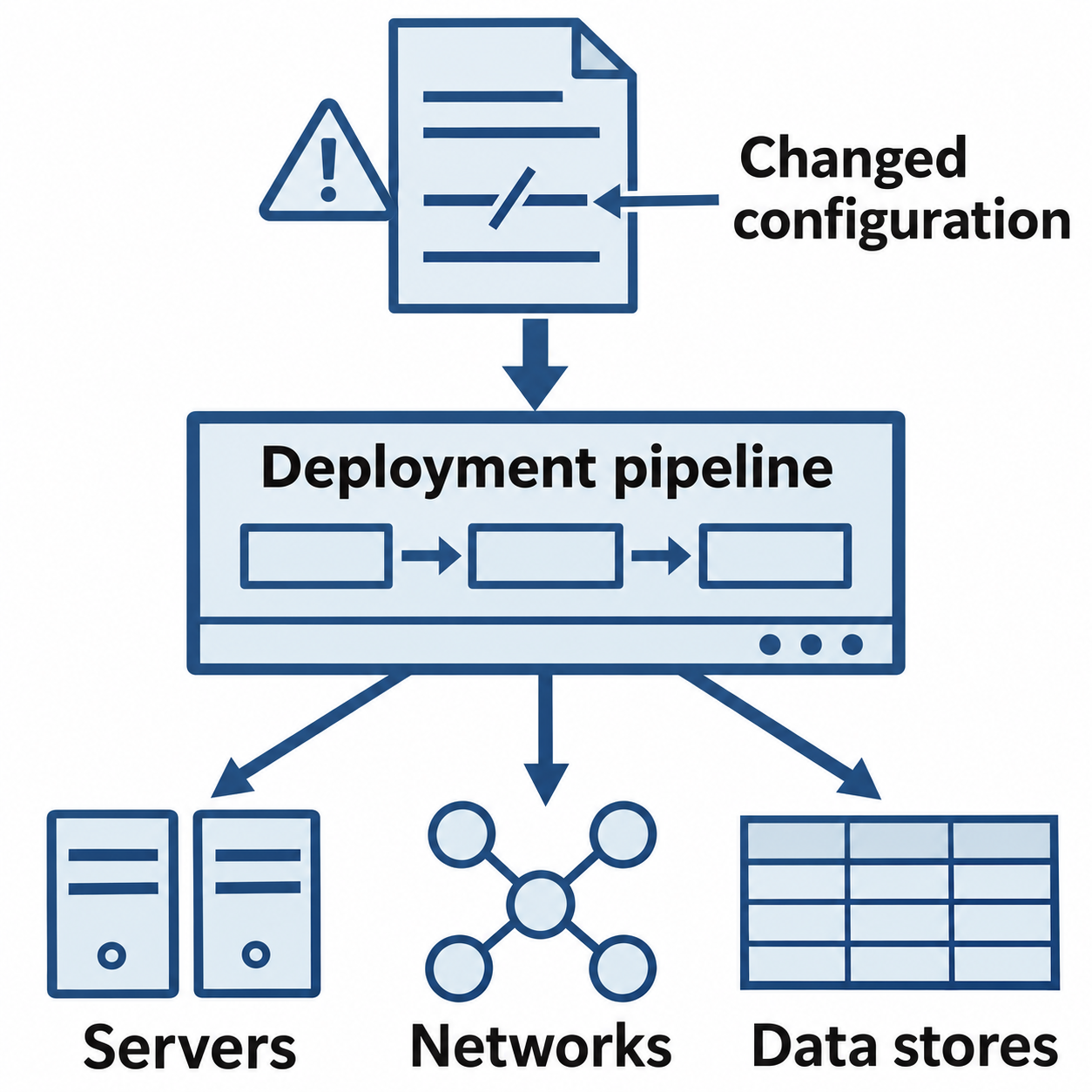
Figure 13.4: Infrastructure as Code (IaC) can distribute one configuration change across many managed resources.
Text description for Figure 13.4
Infrastructure as Code stores infrastructure settings in files that a deployment pipeline applies to managed resources. If a malicious change passes the pipeline's controls, it can affect every resource within the deployment's permissions and scope. This scope of potential impact is often called the blast radius. The illustration shows possible propagation, not a guarantee that every repository change reaches every system.
Security Controls for IaC Pipelines
Effective IaC security requires:
- Code repository access control: Restrict who can commit changes to IaC repositories. Use branch protection rules requiring code review before merging.
- Static analysis: Scan IaC code before deployment to detect insecure configurations (hardcoded passwords, overly permissive access controls, disabled logging).
- Code signing: Require commits to be cryptographically signed, ensuring changes come from authorized personnel.
- Audit logging: Log all changes to IaC repositories and all deployments triggered by IaC.
- Approval workflows: Require human approval before IaC changes are deployed to production.
Tools like Checkov, TFLint, and Snyk scan Terraform code for security misconfigurations before deployment.
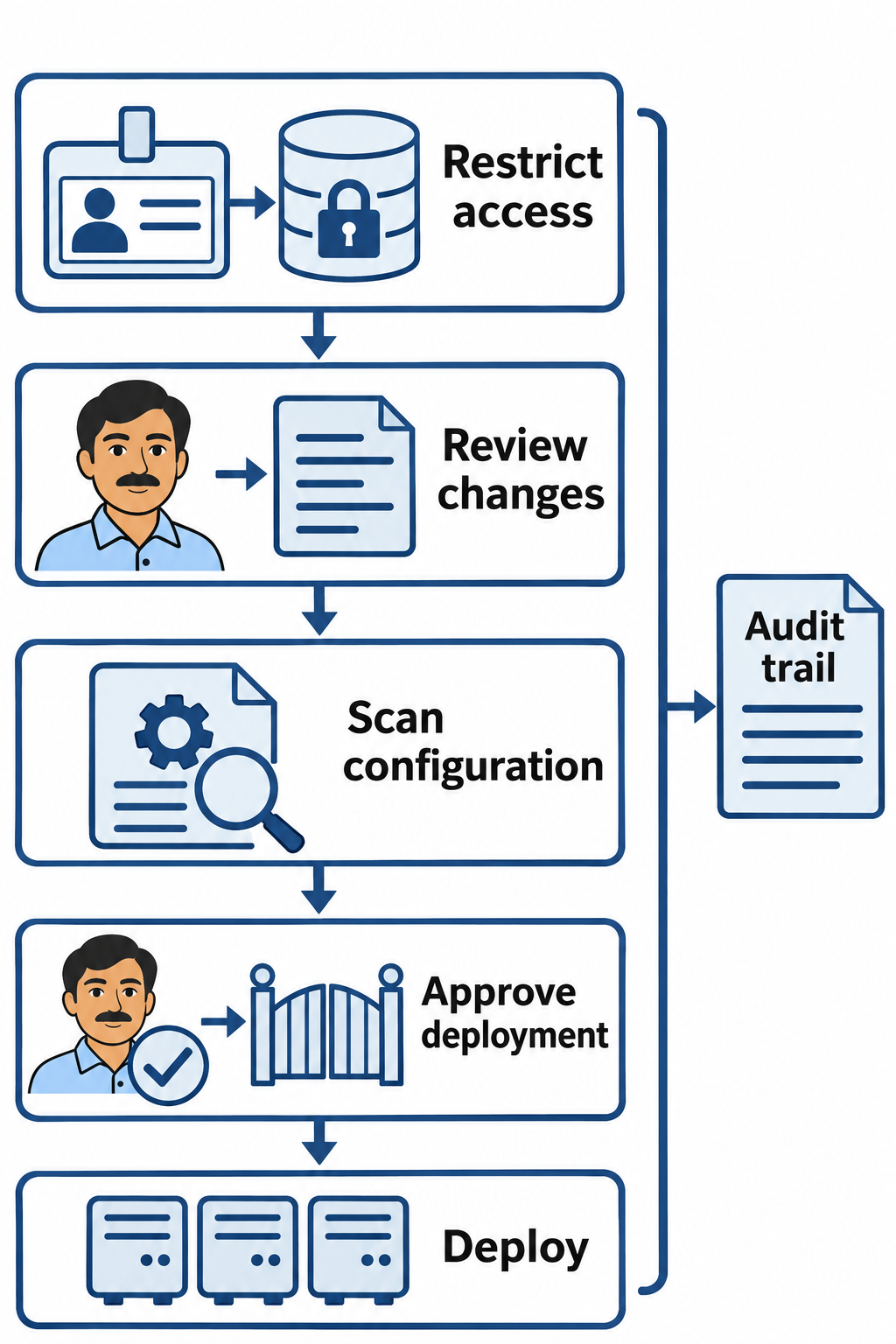
Figure 13.5: Layered controls check who can change infrastructure, what the change does, and whether it can reach production.
Text description for Figure 13.5
Repository access control restricts who can propose or merge changes. Code review and configuration scanning check the proposed change. A production approval gate controls deployment, and audit records track the change and its execution. A verified signature can support provenance, but review and access policy still determine whether a change is safe and authorized.
Automating Security Controls via IaC
IaC also enables security teams to automate security control deployment. A security policy can be encoded in infrastructure code and automatically applied consistently across all systems. Examples include:
- A Terraform module that ensures all S3 buckets include default encryption and prohibit public access
- A CloudFormation template that deploys a VPC with network segmentation, security groups, and network ACLs pre-configured
- An Ansible playbook that configures Windows security baselines on all servers, including firewall rules, local policies, and antivirus configuration
This approach ensures that security controls are applied consistently and can be version-controlled like any other code.
13.4 AI and ML in Security Operations
Artificial intelligence and machine learning are increasingly deployed in security operations for threat detection, behavioral analysis, and automated threat classification. Machine learning excels at identifying patterns in large datasets, work that would overwhelm human analysts.
Behavioral Analytics
Behavioral analytics uses machine learning to establish baselines of normal user and system behavior, then identifies deviations from those baselines. A user who normally logs in from New York at 9 AM ET and suddenly logs in from Tokyo at 11 PM UTC is a deviation from baseline and might indicate account compromise.
Behavioral analytics systems might track:
- User login patterns (time of day, geographic location, devices used)
- Application access patterns (which applications users access, when, and from where)
- Data access patterns (which files users access, volumes of data accessed)
- Network behavior (which systems communicate, ports used, data volumes)
When observed behavior deviates significantly from baseline, the system generates alerts. The sensitivity of behavioral systems can be tuned to reduce false positives (legitimate activity flagged as anomalous) or catch more actual attacks (increasing true positive rate at the cost of more false positives).
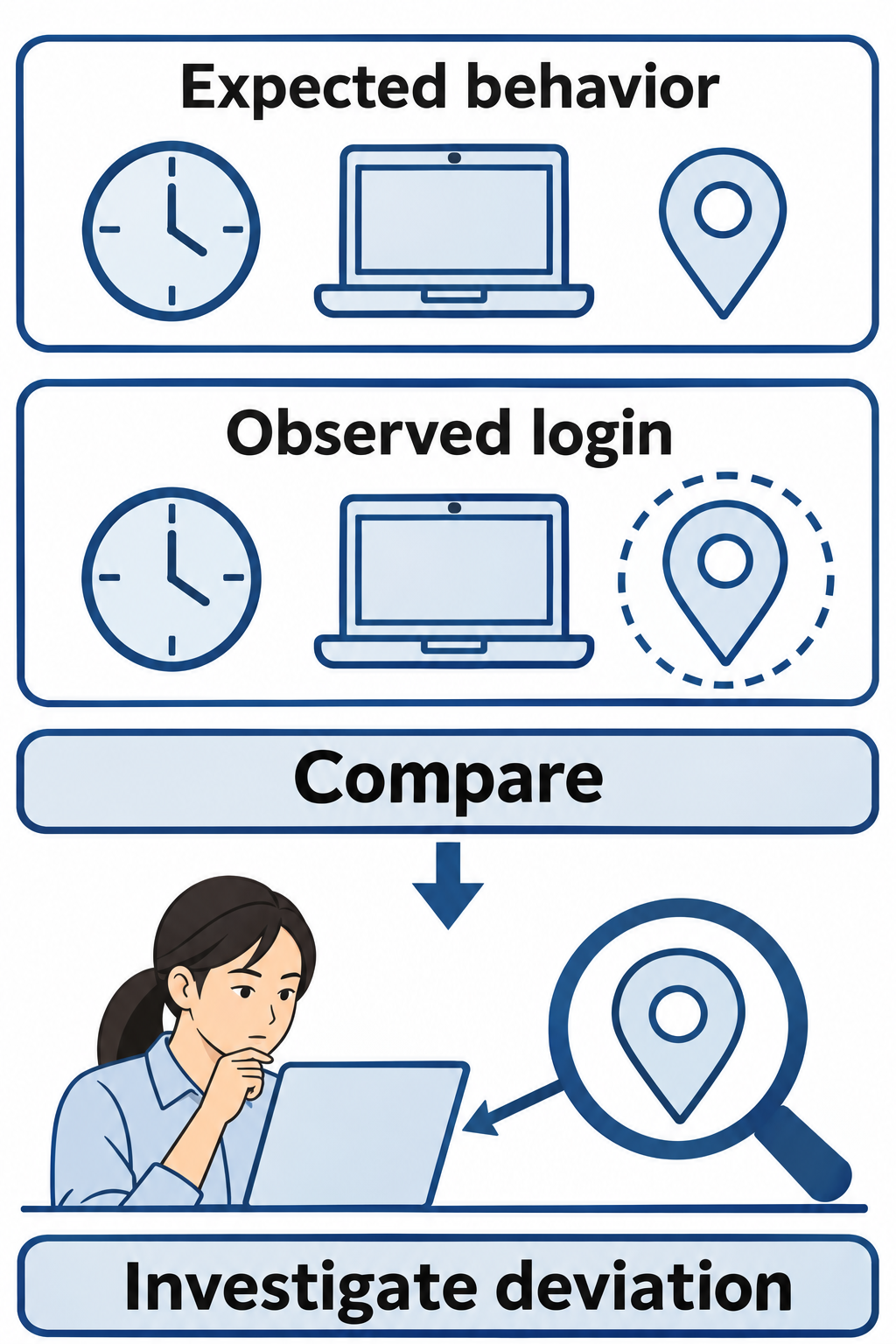
Figure 13.6: A behavioral baseline describes expected activity. A deviation provides a reason to investigate.
Text description for Figure 13.6
A baseline summarizes expected user or system behavior. The diagram compares an observed login with expected time, device, and location. A difference can reflect legitimate travel, a new device, a role change, or misuse. Investigation determines its meaning before an analyst changes the baseline or authorizes a disruptive response.
Anomaly Detection
Anomaly detection identifies events that deviate from expected statistical distributions or patterns. A machine learning model trained on normal network traffic can identify unusual data exfiltration patterns (large file transfers to external IP addresses) or suspicious port access (connection attempts to administrative ports from non-administrative systems).
Anomaly detection approaches include:
- Statistical models: Identify data points that fall outside normal distribution
- Clustering models: Identify points that don't cluster with normal data
- Neural networks: Deep learning models that learn complex patterns
The challenge with anomaly detection is setting appropriate thresholds. Too sensitive, and legitimate but unusual activity triggers false alarms. Too loose, and actual attacks are missed.
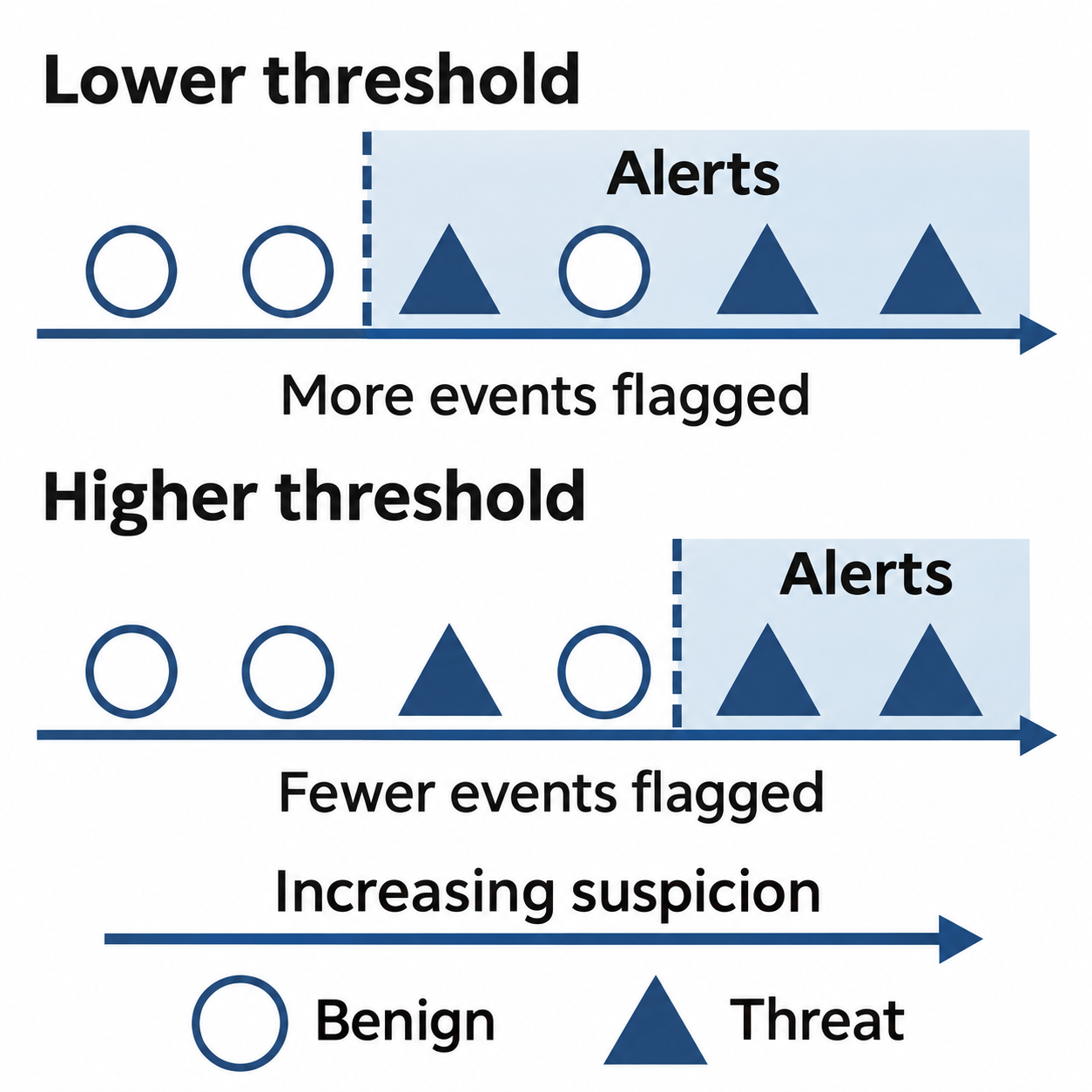
Figure 13.7: Changing a detection threshold changes which events become alerts. The trade-off depends on the events and their scores.
Text description for Figure 13.7
In this conceptual illustration, circles represent benign events and triangles represent threats. Increasing suspicion runs from left to right, and events to the right of a threshold produce alerts. A lower threshold includes more events, increasing both detected threats and false alarms. A higher threshold reduces the alert set and can miss threats with lower scores. The drawing uses no measured dataset or performance rates.
Automated Threat Classification and Risk Scoring
Machine learning can classify security alerts into categories (critical, high, medium, low) based on historical data and known threat patterns. Rather than a human analyst prioritizing alerts, a trained model assigns risk scores based on characteristics like:
- Alert type (EDR malware detection vs. failed login)
- User role (executive vs. standard user)
- System criticality (production database vs. test system)
- Time of day and day of week (alerts during business hours from regular user vs. off-hours from unusual location)
This automation helps security teams prioritize which alerts to investigate first.
Challenges with AI/ML in Security
Several challenges limit the effectiveness of AI and ML in security:
- Data quality and availability: Machine learning models require large amounts of quality training data. Labeled datasets of actual security incidents are scarce. Most security environments lack sufficient historical data to train robust models.
- Adversarial evasion: Attackers aware of ML detection logic can train against it. An attacker aware that behavioral analytics flags off-hours logins might gradually shift their activity to normal business hours, slowly changing the baseline.
- Interpretability: "Black box" ML models make predictions without explaining their reasoning. In security, understanding why a model generated an alert is critical for investigation and validation.
- Concept drift: Security environments change over time. Normal behavior changes as users change roles, systems are upgraded, or new applications are deployed. Models must be retrained regularly.
- False positive burden: Even models with 95% precision generate thousands of false positives when processing millions of events daily. Analysts still face alert fatigue.
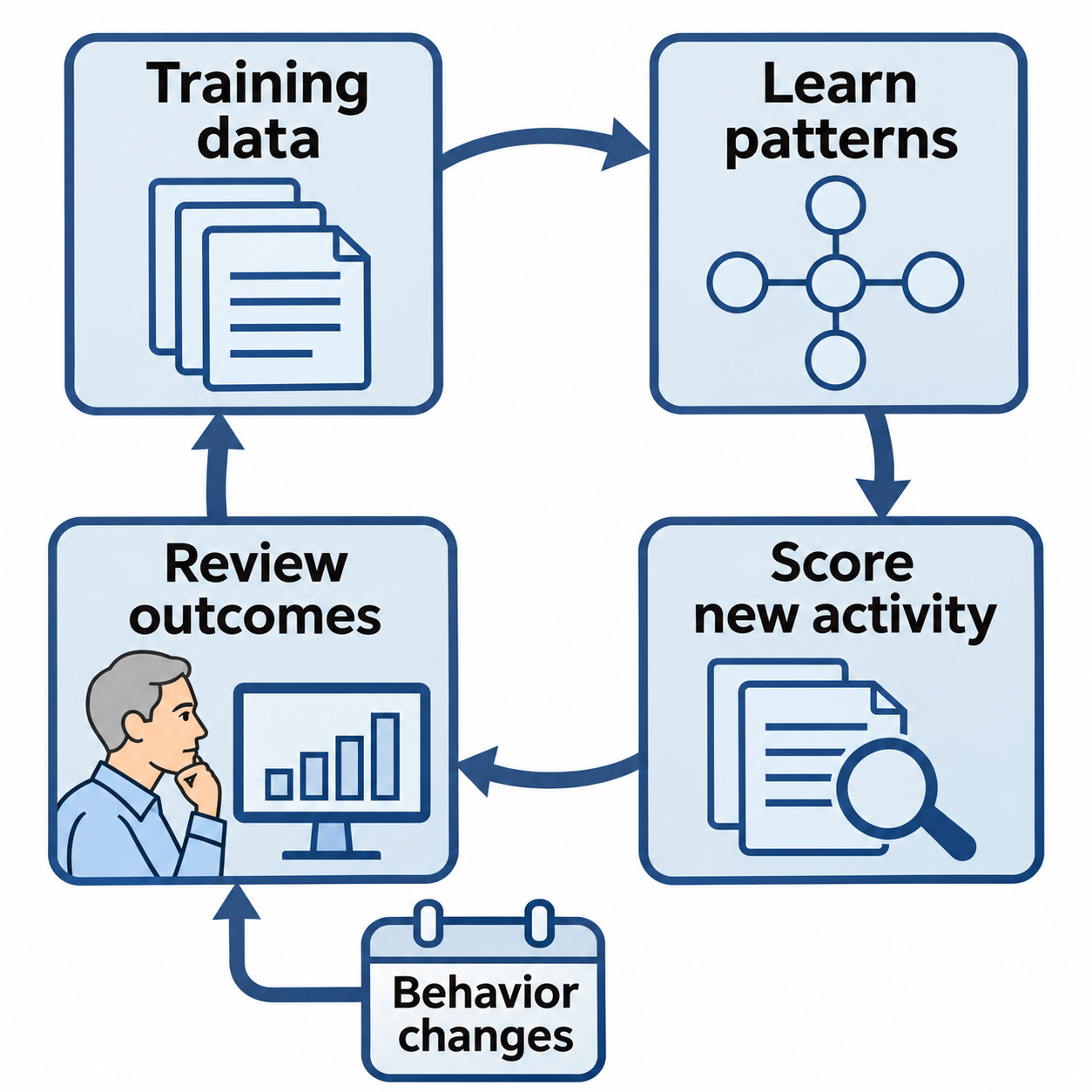
Figure 13.8: Machine learning (ML) models need review as behavior and operating conditions change.
Text description for Figure 13.8
Machine learning is a way to derive patterns from data. Training data informs a model, which scores new activity. Analysts review alert outcomes and changing behavior. When the relationship between learned patterns and current activity changes, model performance can degrade, a problem called concept drift. Validated updates and evaluation help teams decide whether to revise the model or its thresholds.
13.5 Benefits and Risks of Automation
Benefits
- Speed: Automated responses occur in milliseconds rather than hours, reducing dwell time and attack impact.
- Consistency: The same logic is applied every time, eliminating human inconsistency and bias.
- Scalability: The same automation handles high volumes. A 100-person security team with automation can monitor more assets than a 500-person team without it.
- Reduced alert fatigue: Intelligent filtering, deduplication, and prioritization mean analysts see fewer false positives and focus on higher-risk alerts.
- 24/7 response: Automation doesn't sleep. Automated responses occur at any time of day or night.
Risks
- Over-reliance: Teams may trust automation without validation, missing cases where automation fails. Analysts may not notice when automated systems begin malfunctioning.
- False positives causing business disruption: Automation can trigger on legitimate activity, causing business disruption. An automated policy that blocks all users attempting to access systems from new locations could lock out traveling executives.
- Adversary adaptation: Attackers learn detection signatures and develop evasion techniques. Automated controls that worked last year may be evaded this year.
- Complexity and liability: Overly complex automation becomes a liability if no one understands it. When automated decisions cause harm, accountability becomes unclear.
- Emergent behavior: When multiple automated systems interact, unintended consequences can emerge. System A triggering System B triggering System C can create cascading failures.
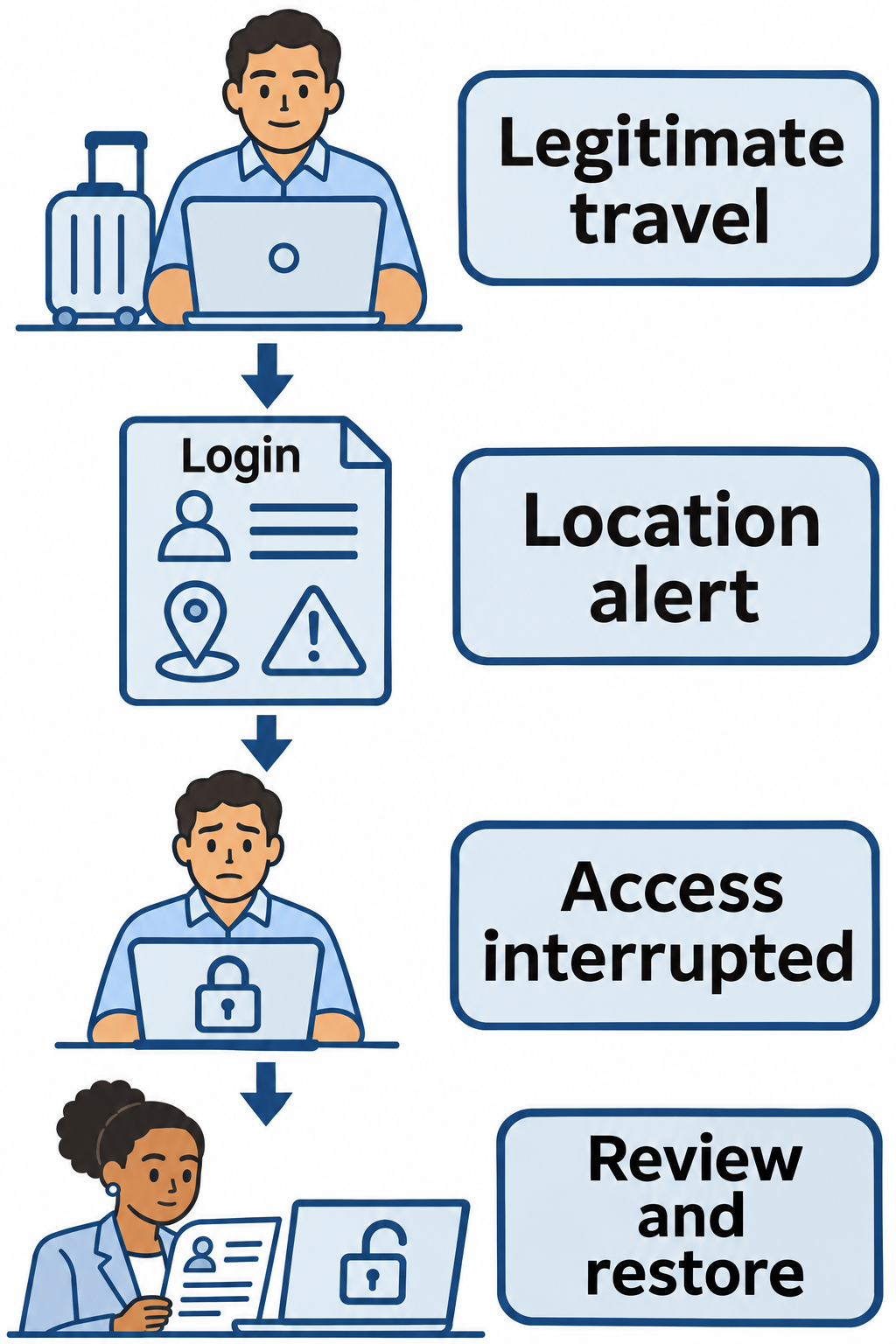
Figure 13.9: An automated response can interrupt legitimate work when a detection rule produces a false positive.
Text description for Figure 13.9
The illustrated user makes a legitimate login while traveling. A rule flags the new location and automatically blocks the account. The block interrupts the user's work, even though the account can later be re-enabled. An analyst checks the context and restores access after verification. A false positive is legitimate activity incorrectly flagged as suspicious.
13.6 Use Cases: Automated Incident Triage
A common SOAR use case is automated incident triage: intelligent prioritization of hundreds of daily security alerts based on risk and relevance.
Without automation, analysts might spend hours reviewing alerts manually, often starting with the oldest alerts rather than the highest-risk. A SOAR platform can:
- Deduplicate alerts: If the same event triggered 50 alerts from different sensors, the SOAR platform correlates them into a single incident.
- Enrich alerts: Add contextual information like user role, system criticality, data sensitivity, and historical breach information.
- Assign risk scores: Based on enriched information, calculate numeric risk scores (0-100) that reflect actual business impact.
- Route intelligently: High-risk alerts route to senior analysts. Medium-risk alerts route to junior analysts. Low-risk alerts may auto-close.
- Integrate with ticketing: Create tickets in the incident management system only for alerts requiring human investigation.
Example workflow:
- Alert: SQL injection attempt on web server from IP 192.168.1.50
- Enrichment: Attacker's IP is from internal marketing department. Attack was directed at non-critical test system. User has no prior security violations.
- Risk score: 15 (low risk)
- Action: Auto-close with documentation
Versus:
- Alert: SQL injection attempt on web server from IP 203.0.113.50 (external)
- Enrichment: Attack was directed at production database server. Server contains customer payment information. Attacker IP is from known botnet hosting provider. Attack was successful (HTTP 200 response).
- Risk score: 95 (critical)
- Action: Create high-priority incident, notify on-call analyst, trigger containment playbook
This triage approach allows a small team to handle large alert volumes effectively.
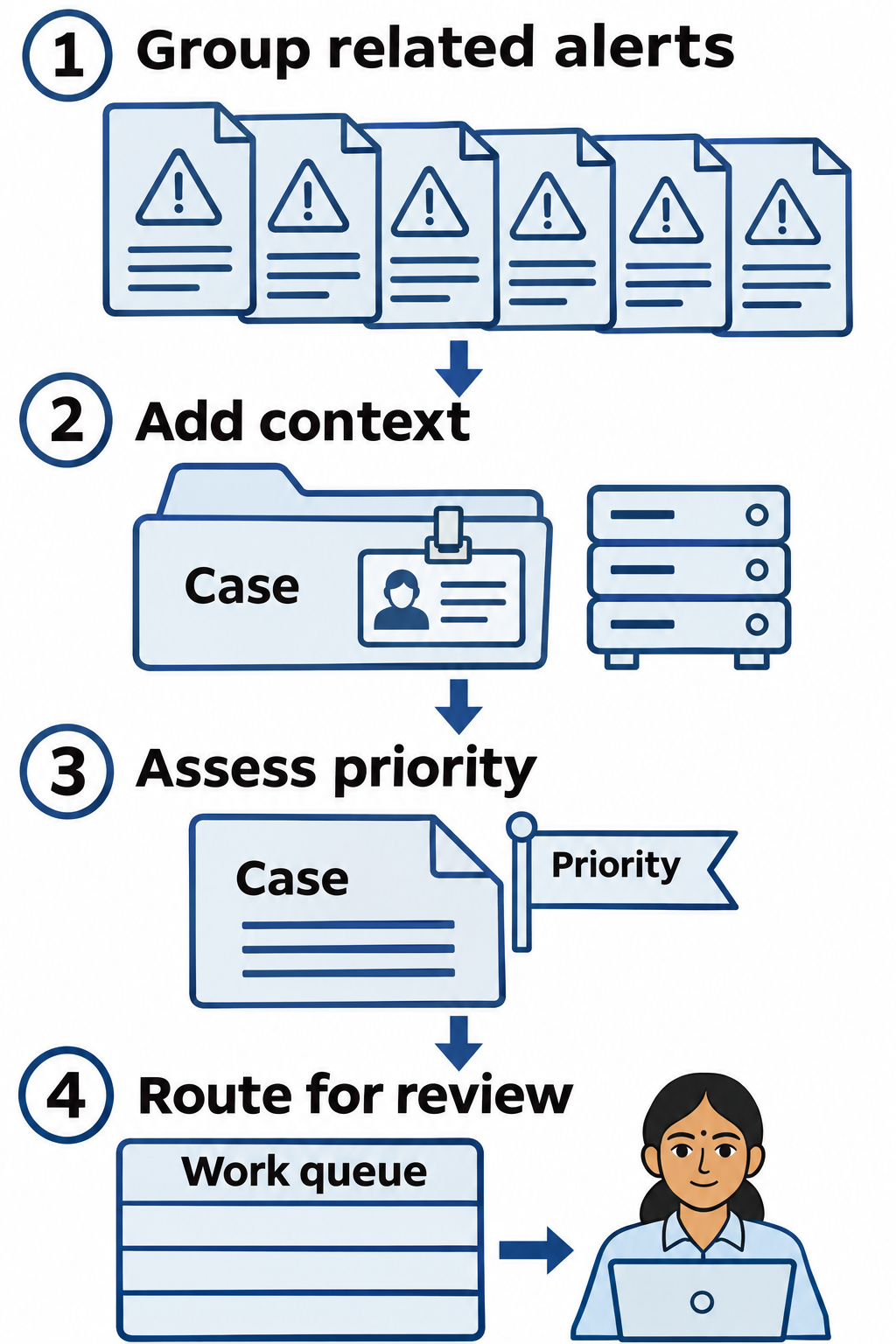
Figure 13.10: Automated triage groups related alerts, adds context, and routes cases for investigation.
Text description for Figure 13.10
Triage sorts work according to urgency and relevance. The workflow first groups duplicate or related alerts, then adds asset, identity, and activity context. It assesses priority and routes cases to the appropriate analyst queue. Scores support decisions but do not prove an attack succeeded. Automatic closure requires validated policy and evidence.
13.7 Use Cases: Automated Patch Deployment
Automated patch management is another common use case. A vulnerability management tool (like Qualys or Tenable) detects unpatched systems. That tool integrates with a SOAR platform that automates patch deployment:
- Verification: Confirms that the patch is available for the affected system's operating system and version.
- Scheduling: Checks if a maintenance window is available, avoiding production disruption during business hours.
- Pre-patch validation: Verifies system health and creates a rollback backup before patching.
- Deployment: Initiates the patch deployment through the patch management system.
- Verification: Waits for the patch installation to complete and verifies successful installation.
- Re-scan: Initiates a vulnerability re-scan to confirm the vulnerability is remediated.
- Reporting: Updates the vulnerability management tool with remediation status.
This workflow reduces the manual effort required for patch management and improves remediation speed. Vulnerabilities are often patched within hours of discovery rather than days or weeks.
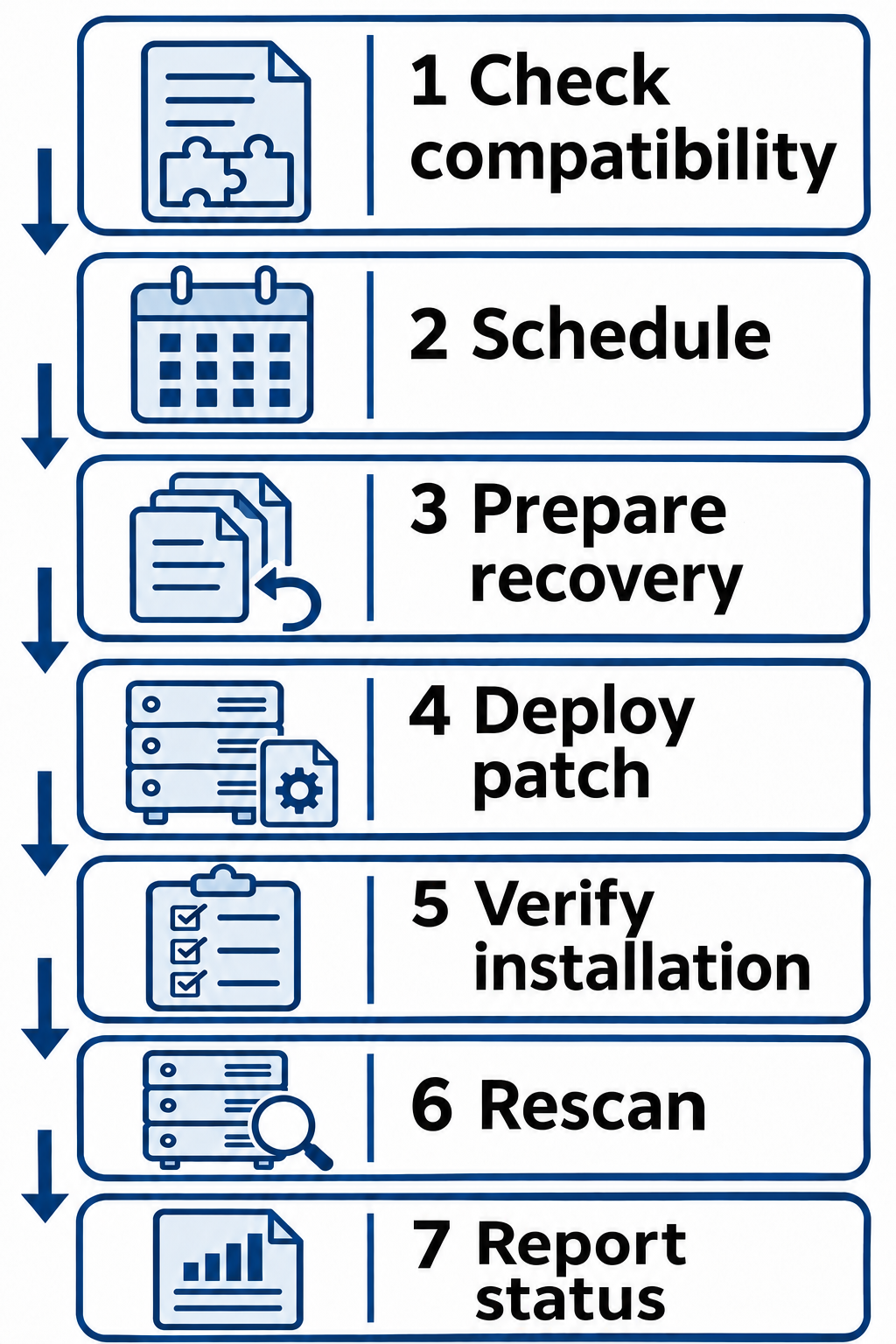
Figure 13.11: Automated patch deployment includes preparation, installation, verification, and an updated remediation record.
Text description for Figure 13.11
The workflow checks that a patch applies to the affected operating system and version. It schedules the work, checks system health, and prepares a recovery option. After deployment, it verifies installation and rescans the vulnerability. Reporting records the observed result, including failures that still need investigation. A completed installation alone does not establish that remediation succeeded.
13.8 Log Enrichment and Context
Log enrichment adds contextual information to security events, enabling more intelligent automated decisions. A raw firewall log might show:
Connection from 10.0.0.5 to 192.168.1.1:443
Enrichment adds context:
- Source system: Is 10.0.0.5 a known system? Yes, it's a workstation named DESKTOP-ALICE-1
- Destination: Is 192.168.1.1 a known resource? Yes, it's the corporate proxy server
- Baseline: Is this connection unusual? No, Alice's system makes this connection daily
- User context: What user is logged into 10.0.0.5? Alice Chen
- User role: What is Alice's role? Software developer
- Authorization: Is Alice authorized to access the proxy? Yes, all developers require proxy access
The enriched event becomes:
Connection from DESKTOP-ALICE-1 (Alice Chen, Software Developer) to corp-proxy
(known proxy) on port 443 (HTTPS). Connection matches daily pattern. Status:
NORMAL, NO ACTION REQUIRED.
Rather than:
Connection from 10.0.0.5 to 192.168.1.1:443 - UNKNOWN, ALERT
Enrichment dramatically reduces false positives by adding context that human analysts would otherwise need to research manually.
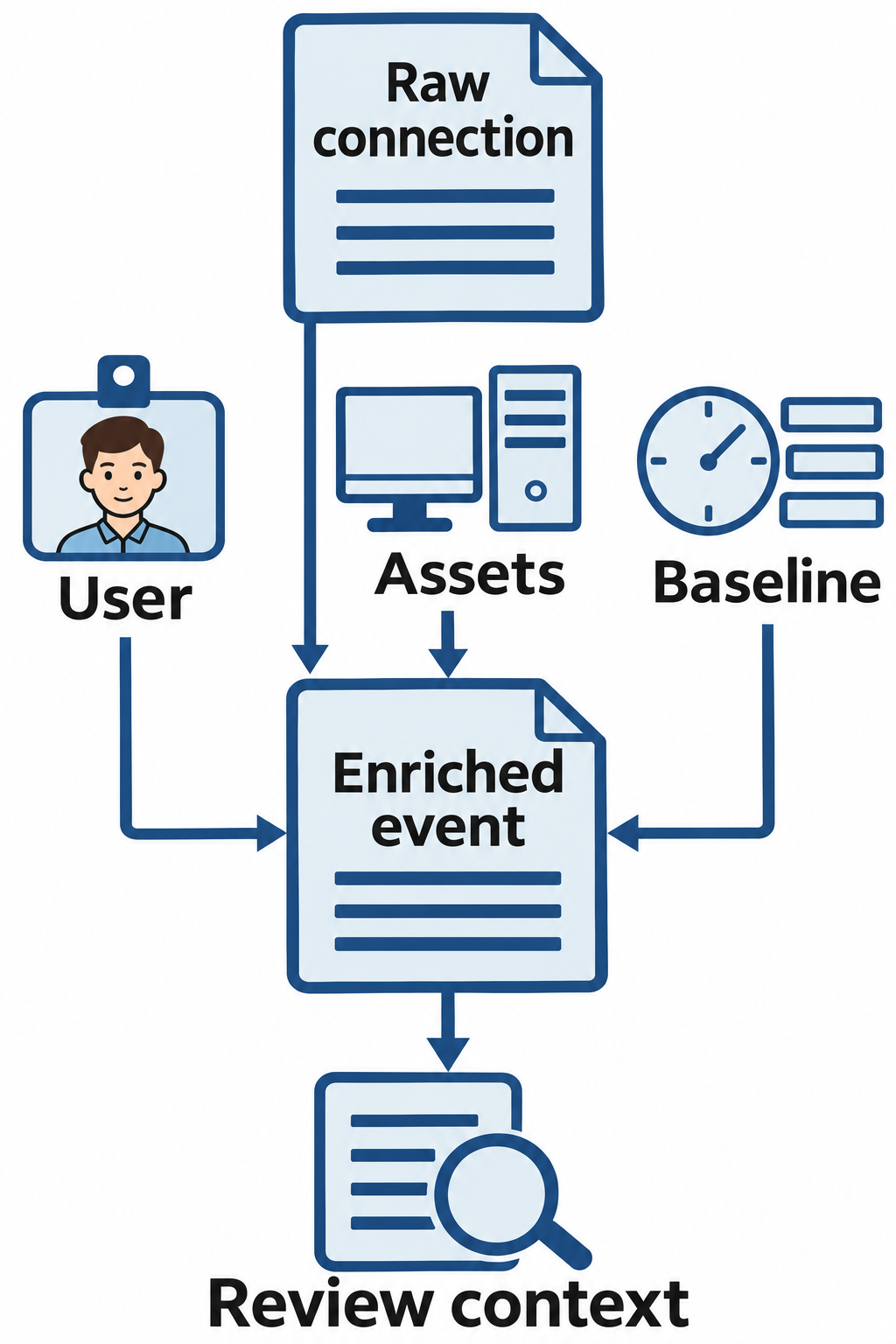
Figure 13.12: Log enrichment attaches identity, asset, and behavioral context to a raw connection event.
Text description for Figure 13.12
A raw connection record identifies source and destination addresses and a service port. Enrichment associates those fields with known assets, the logged-in user, authorization context, and previous activity. The resulting record gives an analyst more context for interpretation. Familiar assets and expected behavior can reduce uncertainty, but those facts alone do not prove that the event is harmless.
13.9 Human-in-the-Loop Considerations
Not all security decisions should be fully automated. Human-in-the-loop systems require human approval before taking certain actions, particularly irreversible actions that could harm business operations.
Decision Framework: When to Automate
Automation is appropriate for:
- Detection and alerting: Fast response to suspicious activity with minimal risk if the alert is false
- Enrichment and correlation: Adding context to alerts without changing system state
- Isolation of non-critical systems: Isolating a test system or development server has minimal business impact
- Logging and notifications: Logging and alerting are always appropriate to automate; they provide information without taking action
- Temporary access revocation: Disabling a compromised account is reversible (the account can be re-enabled)
When to Defer to Analysts
Manual review is appropriate for:
- Permanent actions: System deletion, database purge, or other irreversible actions
- Business-critical systems: Actions affecting systems critical to business operations
- Customer impact: Actions that could affect customer experience or data
- High-stakes decisions: Decisions affecting executives, board members, or customer relationships
- Policy-level decisions: Decisions that conflict with stated policies or procedures
Decision Matrix Example
| Action | Criticality | Reversibility | Automation Appropriate? |
|---|---|---|---|
| Block IP address | Medium | Reversible (whitelist) | Yes, with 1-hour auto-review |
| Disable user account | High | Reversible (re-enable) | Maybe, with senior analyst approval |
| Isolate test system | Low | Reversible | Yes |
| Isolate production system | High | Reversible but disruptive | No, requires analyst approval |
| Delete database | High | Not reversible | No, never automate |
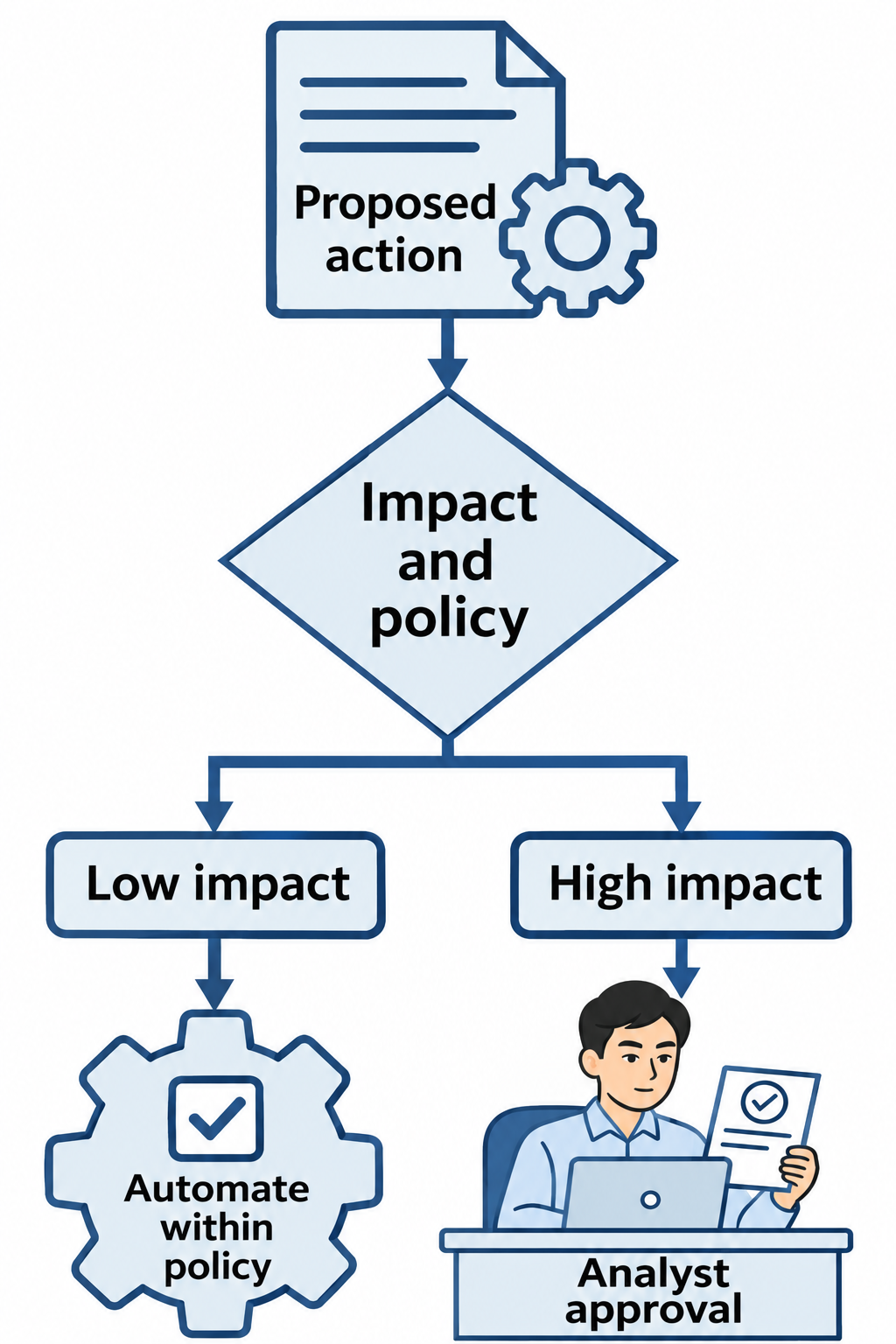
Figure 13.13: Human review considers business impact, reversibility, and policy before disruptive actions proceed.
Text description for Figure 13.13
The workflow evaluates a proposed action against policy and its likely effects. A bounded, low-impact action may proceed automatically when policy permits it. A disruptive, uncertain, or irreversible action goes to an analyst for a decision. The ability to reverse a configuration change does not erase an outage or lost work that occurred while the change was active.
13.10 Putting It Together: Automated Incident Response Scenario
A financial services organization deploys a SOAR platform with playbooks for common incident types.
Critical Consideration
Automated response is only as good as the underlying detection. Poor detection leads to poor automated response. Garbage in, garbage out. Invest in detection quality before investing in automation.
A user's credentials are compromised and used to access a financial application from an unusual location. The SOAR platform executes the "Suspicious Login" playbook:
- Detection (0:00:00): The application login is flagged as suspicious by EDR (new geographic location, off-hours access, impossible travel time)
- Enrichment (0:00:05): The system queries Active Directory and finds the user is a financial analyst with access to customer payment accounts. Historical data shows the user has never accessed systems from this location.
- Risk Assessment (0:00:10): Risk score is assessed as HIGH (95/100) based on user role, system accessed, and geographic anomaly.
- Automated Response (0:00:15): The system automatically:
- Revokes all active sessions for the compromised user
- Initiates a temporary account disable (with automatic re-enable in 4 hours if analyst doesn't confirm)
- Isolates the user's workstation from the network
- Creates a high-priority incident ticket in the ticketing system
- Sends an alert to the on-call senior analyst
- Human Review (0:04:30): A senior analyst reviews the incident and determines:
- The user was traveling to a conference and legitimately accessed the system
- The automated response was a false positive
- The analyst immediately reverses the account disablement and restores network access
- The analyst updates the user's login baseline profile to include the new geographic location
- Remediation (0:06:00): The analyst documents the false positive, verifies that no malicious activity occurred, and closes the incident.
This scenario illustrates the importance of human-in-the-loop systems: automation accelerates response, but human judgment is essential to avoid business disruption. The automated response prevented potential account abuse while the human analyst prevented a business disruption (analyst losing access to work during a business trip).
| Phase | Duration | Responsibility |
|---|---|---|
| Detection | 5 seconds | Automated (EDR + SIEM) |
| Enrichment | 10 seconds | Automated (playbook + integrations) |
| Initial Response | 15 seconds | Automated (playbook) |
| Human Review | 4 minutes 15 seconds | Human analyst |
| Resolution | 1 minute 30 seconds | Human analyst |
| Total | 6 minutes | Hybrid (Automated + Human) |
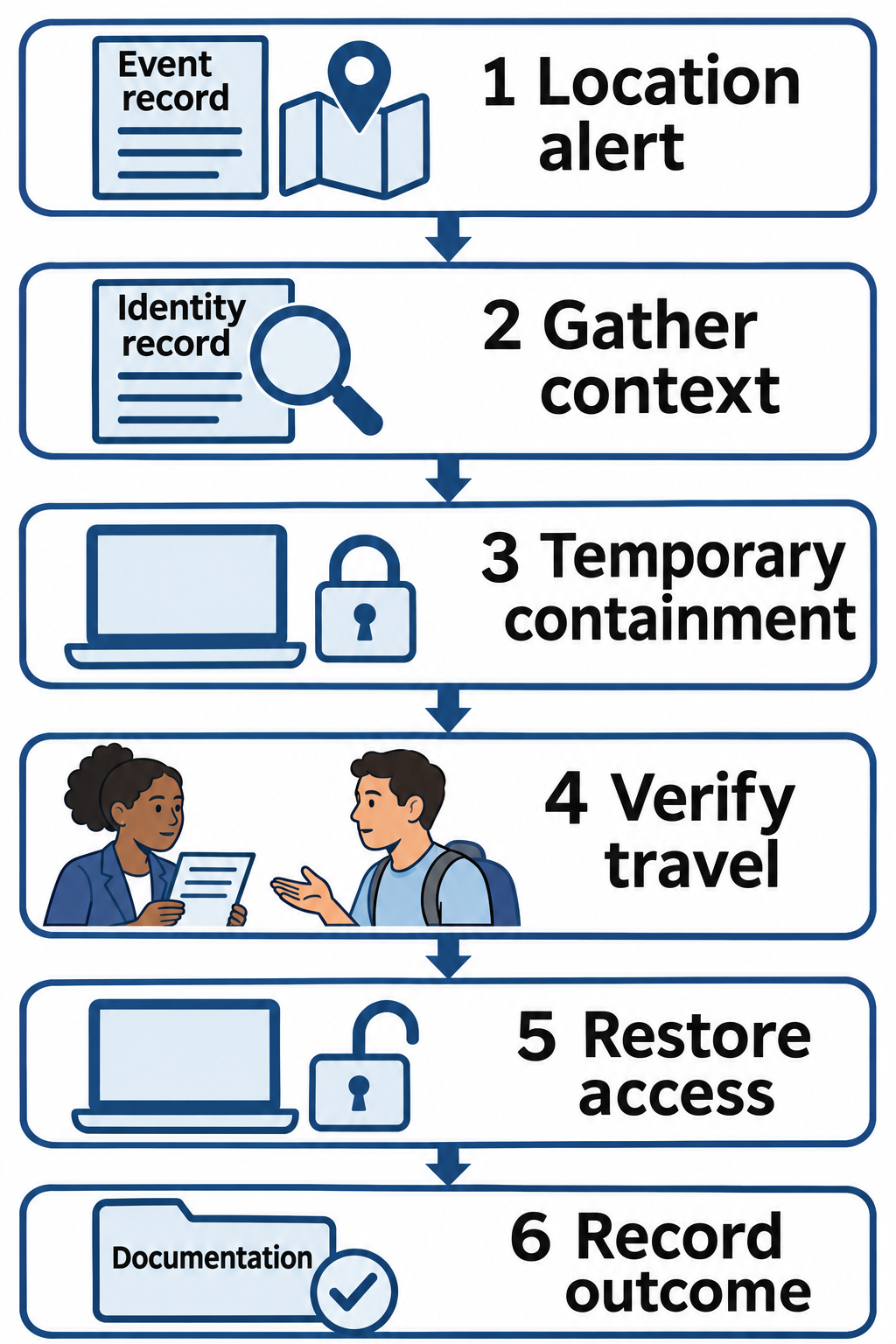
Figure 13.14: In the travel example, analyst verification resolves a suspicious-login alert and guides recovery from the response.
Text description for Figure 13.14
This figure follows the travel example after analysts determine the login was legitimate. A location alert prompts automated context gathering and a temporary response. The analyst verifies the travel explanation and checks for malicious activity, then restores access and documents the result. The temporary response had already interrupted work, so recovery and record keeping remain part of resolving the false positive.
Chapter Summary
- Security automation uses scripts and tools to perform security tasks without human intervention, enabling speed, consistency, and scalability.
- Orchestration coordinates multiple tools and systems; automation executes actions without human involvement.
- SOAR platforms use playbooks (event-driven workflows) to automate incident response. Playbooks include decision logic and conditional actions.
- Infrastructure as Code enables consistent, repeatable infrastructure deployment but introduces attack surface if code repositories or deployment pipelines are compromised.
- Artificial intelligence and machine learning enable behavioral analytics (baseline deviation detection), anomaly detection (statistical outlier identification), and automated threat classification (risk scoring).
- Challenges with AI/ML include scarcity of quality training data, adversarial evasion techniques, model interpretability, and concept drift as environments evolve.
- Benefits of automation include speed (millisecond response), consistency, scalability, and reduced analyst fatigue.
- Risks of automation include over-reliance, false positives causing business disruption, adversary adaptation, and emergent behavior from complex systems.
- Human-in-the-loop systems require human approval for high-risk actions (account disablement, system deletion, production system isolation) while automating low-risk detection and enrichment.
- Log enrichment adds contextual information to alerts, enabling more intelligent automated decisions and reducing false positives.
- Automated incident triage and patch deployment are proven use cases that significantly improve security operations efficiency.